A spreadsheet app has a "Download as" menu: CSV, PDF, Excel. The user picks a name from a list. Somewhere in the app, that name has to become a piece of code that writes that exact format. The code that serves the download should not care which format it was.
The same problem shows up wherever a value picks a class. A file's extension picks a parser. A payment method picked at checkout picks a payment client. A setting like cache=redis picks a cache. In each case, something has to turn the value into the right object. Code whose job is creating objects for other code is a factory.
In this article we build a sales report export with four formats. The first version uses a switch on the format name. The second uses a factory. Then we look at what the factory costs, when a plain new is enough, and how the three ideas called "factory" differ. The code is Java. Every snippet comes from code that compiles, except the ones labelled Sketch, and the finished project runs. The Open file button on a snippet shows the whole file.
The export we are building
A sales report has a title and a list of rows. Each row has a region, a product, the units sold and the revenue. The export must do six things:
- Download the report as CSV, JSON, HTML or Markdown. The user picks the format by name, from a menu or in a link like
/reports/q3?format=csv. - Follow each format's own rules. CSV puts quotes around a value that contains a comma. JSON puts a backslash before a quote. HTML replaces the less-than sign and the ampersand with
<and&. - Give the download a file name and a content type that match the format, such as
q3-sales.csvandtext/csv. - Treat format names without caring about case or spaces, so
" CSV "meanscsv. - Refuse an unknown name with a message that lists the formats we do support.
- Let us add a format without changing the code that serves downloads.
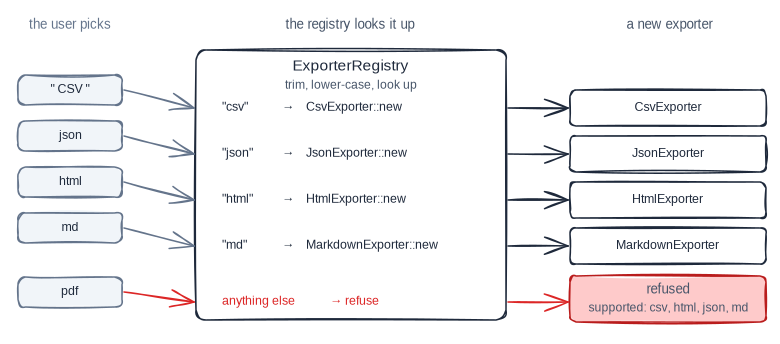
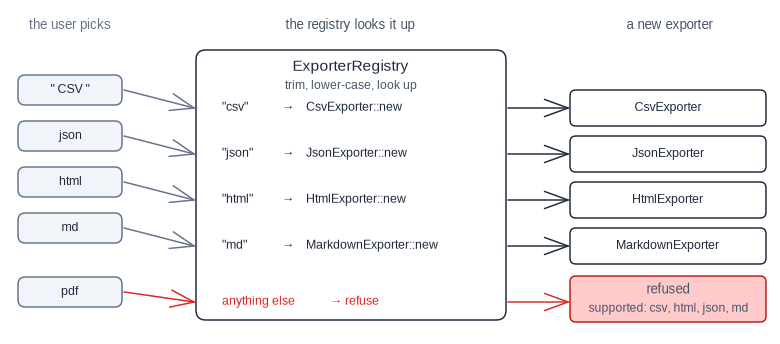
This table is the thing to draw first in an interview. It shows which names exist, which class each one becomes, and what happens to a name that is not there. Everything we write below is a way of keeping this table in one place.
The first version: a switch on the format
The obvious version puts everything in the service that serves downloads. One switch on the format name builds the file's contents:
public class ReportService { public Download export(SalesReport report, String format) { String name = format.trim().toLowerCase(Locale.ROOT); String body = switch (name) { case "csv" -> { StringBuilder out = new StringBuilder("region,product,units,revenue\n"); for (SaleRow row : report.rows()) { out.append(csvField(row.region())).append(',') .append(csvField(row.product())).append(',') .append(row.units()).append(',') .append(row.revenueDollars()).append('\n'); } yield out.toString(); }The JSON and HTML branches follow, each with its own loop. The file's extension and content type need two more switch statements further down:
private String extension(String format) { return switch (format) { case "csv" -> "csv"; case "json" -> "json"; default -> "html"; }; } private String contentType(String format) { return switch (format) { case "csv" -> "text/csv"; case "json" -> "application/json"; default -> "text/html"; }; }This code works. If the app has two formats and nobody plans a third, it is a fair answer. The trouble starts when formats are added.
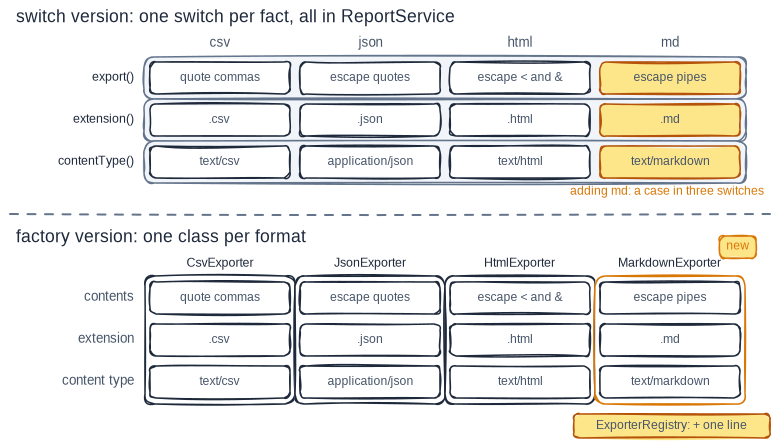
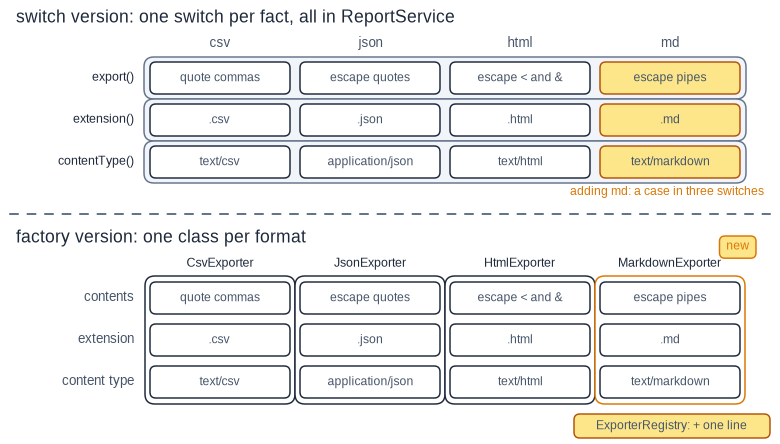
What one format means is spread over three switches. CSV's contents are in export, its extension is in extension, and its content type is in contentType. All three have to agree, and nothing in the code connects them.
A missing case fails quietly. Suppose we add "md" to the first switch and forget the other two. Their default branches answer "html" and "text/html", so a Markdown file downloads as q3-sales.html. Nothing throws. The user just gets the wrong file.
Every format's rules live in one class. CSV quoting sits next to JSON escaping and HTML escaping. A change to one format means editing the class that holds all of them, and testing one format means going through the whole service.
The idea
The factory version works like this:
- Each format becomes a class that implements one interface,
ReportExporter. The class holds every fact about its format: how to write the contents, the extension and the content type. - One object, the registry, turns a format name into a new exporter. It keeps a map from each name to a small function that creates the right object.
- The service asks the registry for an exporter by name, and from then on it talks only to the interface. It never names
CsvExporteror any other format class.
The registry is the factory. The objects it creates are its products, and ReportExporter is the product interface.
The word "factory" covers three related ideas. This page builds the simplest one, and we compare it with the other two in Simple factory, Factory Method or Abstract Factory?.
Building it, step by step
Step 1: one interface for every format
Each of the three facts about a format becomes a method:
public interface ReportExporter { String fileExtension(); String contentType(); String export(SalesReport report);}All three methods live in the same interface, so a class that implements it has to answer all three. The compiler now makes every new format answer all three questions, which the first version left to three separate switches. It cannot check that the answers make sense, such as an empty content type, so the registry checks them when the app starts (Step 4).
Step 2: one class per format
Here is the whole CSV exporter:
public class CsvExporter implements ReportExporter { @Override public String fileExtension() { return "csv"; } @Override public String contentType() { return "text/csv"; } @Override public String export(SalesReport report) { StringBuilder out = new StringBuilder("region,product,units,revenue\n"); for (SaleRow row : report.rows()) { out.append(field(row.region())).append(',') .append(field(row.product())).append(',') .append(row.units()).append(',') .append(row.revenueDollars()).append('\n'); } return out.toString(); } // A value with a comma, quote or line break is wrapped in quotes, and its own quotes are doubled. private String field(String value) { if (value.contains(",") || value.contains("\"") || value.contains("\n") || value.contains("\r")) { return "\"" + value.replace("\"", "\"\"") + "\""; } return value; }}Everything CSV needs is in this file: the header line, the extension, the content type, and the quoting rule in field. The other three exporters look the same, each with its own escaping. HtmlExporter replaces & before anything else, because the & inside every < it adds would otherwise be replaced again. Each exporter can be tested on its own by calling export on a small report. CsvExporter does not cover one rule: a spreadsheet treats a value that starts with =, +, - or @ as a formula, so an export meant to be opened in Excel would also guard against that.
Step 3: the registry turns a name into an exporter
This is the factory's main job:
public ReportExporter create(String format) { String name = format == null ? "" : format.trim().toLowerCase(Locale.ROOT); Supplier<ReportExporter> creator = creators.get(name); if (creator == null) { throw new UnsupportedFormatException(name, supportedFormats()); } ReportExporter exporter = creator.get(); String problem = problemWith(name, exporter); if (problem != null) { throw new IllegalStateException(problem); } return exporter; }create trims spaces and lower-cases the name (line 44), looks up the creator for it (line 45), and calls the creator to get a new exporter (line 49). An unknown name stops at line 47. Lines 50 to 52 check the new exporter the same way the registry checked every creator at startup (Step 4). If a creator has started returning null or the wrong kind of exporter, that download fails with an IllegalStateException, instead of a NullPointerException later or a wrong file sent to the user.
The map holds a Supplier<ReportExporter> for each name. A supplier is a function that takes nothing and returns a value. CsvExporter::new is a supplier written as a reference to the constructor: each call to its get() creates a new CsvExporter.
Where does the choice of class live?
A switch inside a factory method
A static create(format) method holds one switch: case "csv" -> new CsvExporter(), and a default that throws. The Strategy page warns that a factory with a switch inside brings back the edit-one-place-for-every-option problem. Here it is still an improvement, because it replaces three scattered switches with one, and an unknown name is refused instead of guessed. But a switch cannot list its own cases, so the menu and the refusal message need a second copy of the names. Code outside the method cannot add a format, not even a test.
An enum of formats
The formats become an enum: enum Format { CSV("csv", CsvExporter::new), JSON("json", JsonExporter::new), ... }. The table lists itself with Format.values(), and a new format is one more constant. But an enum is closed: a test or a separate module cannot add a format without editing it.
A map from each name to a creatorOur pick
A new standard format is one more line in withStandardFormats, the same size of edit as a new case or a new constant. Listing the table beats the switch: supportedFormats() returns it for the menu and the refusal message. Adding formats from outside beats the enum: code that builds a registry can add formats with plus without editing the registry class, which is how a test or a separate module adds its own format. The cost is one more step for a reader: to see which class "csv" becomes, you look at where the map is filled.
A new exporter for every download, or one shared exporter per format?
One shared object per format
The map holds finished exporters, and every download uses the same CsvExporter. This saves creating one small object per download. It is safe only while no exporter has fields that change while it writes. One exporter that keeps a row counter or a buffer would then be shared by every thread writing a download at the same moment.
A new object for every callOur pick
The map holds creators. The standard creators are constructor references, so each call to create makes a new exporter, and each download has its own object. A future exporter may then keep state while it writes. The registry cannot force this: a creator passed to plus could return the same object every time, and that object must then have no fields that change. The cost is one small object per download, which is very little next to building the file.
When the name is unknown, the registry throws this:
public class UnsupportedFormatException extends RuntimeException { private final String requested; private final List<String> supported; public UnsupportedFormatException(String requested, List<String> supported) { super("That format is not supported. Supported formats: " + String.join(", ", supported)); this.requested = requested; this.supported = List.copyOf(supported);What happens to a name we do not know?
Return null
The caller has to check, and a caller that forgets gets a NullPointerException later, far from the real cause.
Fall back to CSV
A user who asked for pdf gets a CSV file with no explanation. A misspelt jsno quietly gives CSV too, so a typo in a link is never noticed.
Throw an exception that lists the supported formatsOur pick
UnsupportedFormatException carries the requested name and the supported list. Its message lists only the supported formats and does not repeat what was typed, so it is safe to show the user even when the name is long or hostile. A web layer would turn it into a "400 Bad Request" response with that message, and keep the requested name for its logs. An empty or missing name gets the same answer.
The two kinds of error are kept apart. An unknown name comes from a person, so it is an UnsupportedFormatException with a message for them. A mistake in setting up the registry is a programmer's mistake: a blank name, the same name twice, a missing creator, or a creator that returns null or the wrong kind of exporter. The registry finds these while the app starts and throws IllegalArgumentException or NullPointerException. A creator whose constructor throws stops the start with its own exception. Only one kind of setup mistake can reach a user: a creator that behaves differently after startup. If it later throws, that download fails with its exception. If it later returns null or the wrong kind of exporter, create catches it and fails that download with IllegalStateException.
Step 4: building the registry once
The registry is built when the app starts:
public final class ExporterRegistry { private final Map<String, Supplier<ReportExporter>> creators; public ExporterRegistry(Map<String, Supplier<ReportExporter>> creators) { this(checkAll(creators)); } private ExporterRegistry(Checked checked) { this.creators = Map.copyOf(checked.creators()); } public static ExporterRegistry withStandardFormats() { return new ExporterRegistry(Map.of( "csv", CsvExporter::new, "json", JsonExporter::new, "html", HtmlExporter::new, "md", MarkdownExporter::new)); }The public constructor hands the map to checkAll (line 16). The private constructor stores the checked map with Map.copyOf (line 20), which returns a map that cannot be changed. checkAll does the work:
// Each creator is tried once at startup, so a broken one stops the app instead of a user's download. private static Checked checkAll(Map<String, Supplier<ReportExporter>> creators) { Objects.requireNonNull(creators, "creators"); Map<String, Supplier<ReportExporter>> byName = new HashMap<>(); for (Map.Entry<String, Supplier<ReportExporter>> entry : creators.entrySet()) { String name = normalize(entry.getKey()); Supplier<ReportExporter> creator = Objects.requireNonNull(entry.getValue(), "creator for " + name); if (byName.containsKey(name)) { throw new IllegalArgumentException("Format \"" + name + "\" is registered twice"); } checkCreator(name, creator); byName.put(name, creator); } if (byName.isEmpty()) { throw new IllegalArgumentException("A registry needs at least one format"); } return new Checked(byName); }It trims and lower-cases every name, so " CSV " and "csv" count as the same format, and it refuses that name twice (line 70). It tries each creator once (line 73) and refuses an empty registry (line 76). Trying a creator means calling it and looking at the exporter it returns:
// A format's name is its file extension, and every exporter needs a content type. private static String problemWith(String name, ReportExporter exporter) { if (exporter == null) { return "The creator for \"" + name + "\" returned null"; } if (!name.equals(exporter.fileExtension())) { return "Format \"" + name + "\" makes ." + exporter.fileExtension() + " files"; } if (exporter.contentType() == null || exporter.contentType().isBlank()) { return "Format \"" + name + "\" has no content type"; } return null; }The exporter must exist, it must have a content type, and its file extension must be the format's name (line 94). A creator whose constructor throws stops the app at this point too.
The name check is a deliberate rule: a format's name is its file extension. Without it, plus("txt", MarkdownExporter::new) would serve .md files to users who asked for txt. The rule has a cost. A menu cannot offer "markdown" for .md files or "excel" for .xlsx files, and two variants that share an extension, such as plain and indented JSON, cannot both be registered. A registry that needed those would keep the name and the extension apart and check only that the extension is not blank. Trying every creator also creates every exporter once at startup and throws it away.
withStandardFormats is a second, smaller kind of factory: a named static method that returns a ready-made object. A caller writes ExporterRegistry.withStandardFormats() and does not need to know the four creators inside.
Can formats be added after the registry is built?
A register method on the live registry
Code could call registry.register("txt", ...) at any time. It is flexible, but every download thread reads the map, so it would need a lock or a concurrent map. A list of formats that can change while the app runs is also harder to reason about: a format could be offered in the menu and then disappear before the download.
Build it once, and add formats by building a new registryOur pick
The registry never changes after the constructor returns, so many download threads can share it with no lock. To add a format while the app runs, code builds a new registry and a new ReportService around it, and sends new downloads to the new service. Whatever holds the service reference then needs a volatile field or an AtomicReference, so every download thread sees the new service. ReportService keeps its registry in a final field, so the registry never changes under a download that is already running.
plus adds a format by returning a new registry, and leaves the old one as it was:
public ExporterRegistry plus(String name, Supplier<ReportExporter> creator) { String key = normalize(name); Objects.requireNonNull(creator, "creator"); if (creators.containsKey(key)) { throw new IllegalArgumentException("Format \"" + key + "\" is registered twice"); } checkCreator(key, creator); Map<String, Supplier<ReportExporter>> more = new HashMap<>(creators); more.put(key, creator); return new ExporterRegistry(new Checked(more)); }plus tries only the new creator (line 37). The creators already in the registry were tried when it was built, so plus hands the larger map straight to the private constructor (line 40) instead of checking every creator again.
Step 5: the service only knows the interface
With the registry in place, the service is short:
public class ReportService { private final ExporterRegistry exporters; public ReportService(ExporterRegistry exporters) { this.exporters = Objects.requireNonNull(exporters, "exporters"); } public Download export(SalesReport report, String format) { Objects.requireNonNull(report, "report"); ReportExporter exporter = exporters.create(format); String body = exporter.export(report); return new Download(fileName(report.title(), exporter.fileExtension()), exporter.contentType(), body); } private String fileName(String title, String extension) { String base = title.toLowerCase(Locale.ROOT).replaceAll("[^a-z0-9]+", "-").replaceAll("^-|-$", ""); return (base.isEmpty() ? "report" : base) + "." + extension; }}export asks the registry for an exporter (line 19), lets it write the contents, and builds the download from the exporter's own extension and content type (line 21). The file name comes from the title: "Q3 sales: North & South" becomes q3-sales-north-south.csv. Nothing in this class names a format, and nothing in it changes when a format is added.
Step 6: adding a format
Markdown is the fourth format. Adding it took one new class, MarkdownExporter, and one line in the registry:
public static ExporterRegistry withStandardFormats() { return new ExporterRegistry(Map.of( "csv", CsvExporter::new, "json", JsonExporter::new, "html", HtmlExporter::new, "md", MarkdownExporter::new)); }ReportService did not change, and neither did the other three exporters. A format that only one part of the app needs does not even touch this method. That code calls ExporterRegistry.withStandardFormats().plus("txt", TextExporter::new) and passes the result to its own ReportService.
The finished design
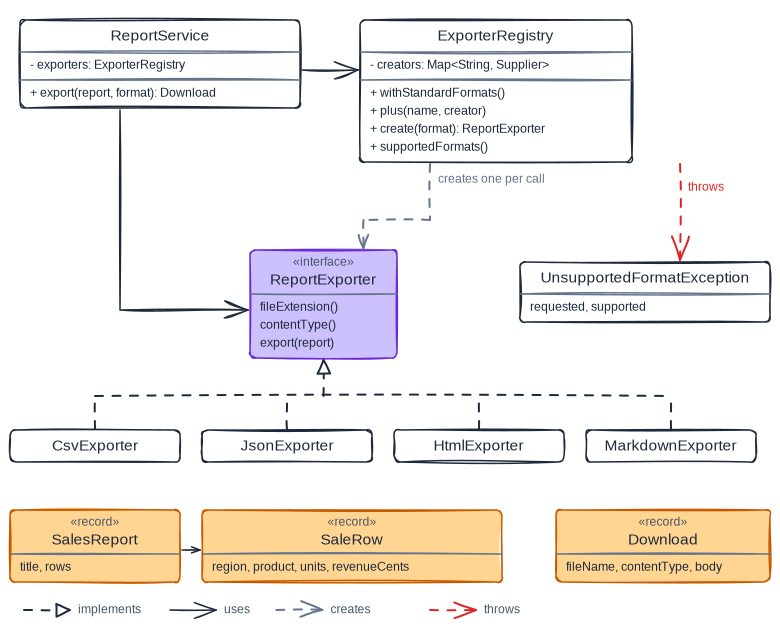
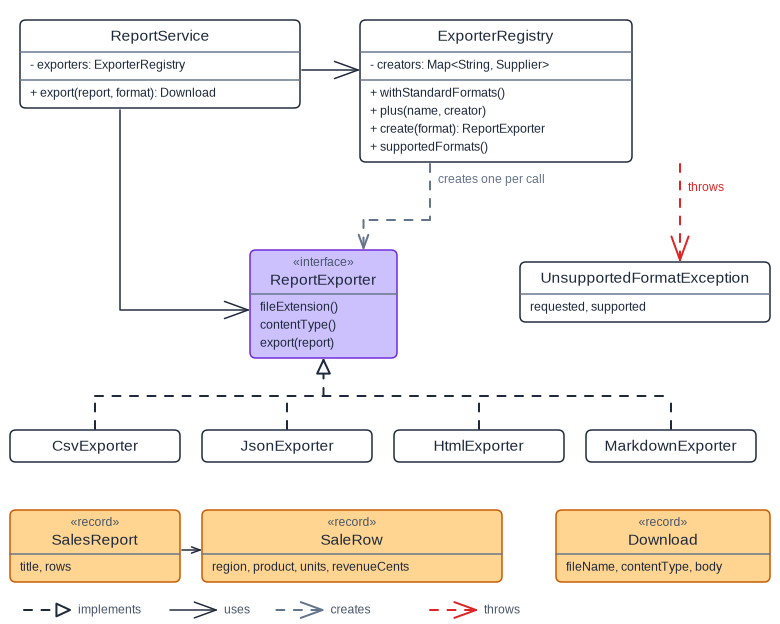
Here is one download, traced through the objects:
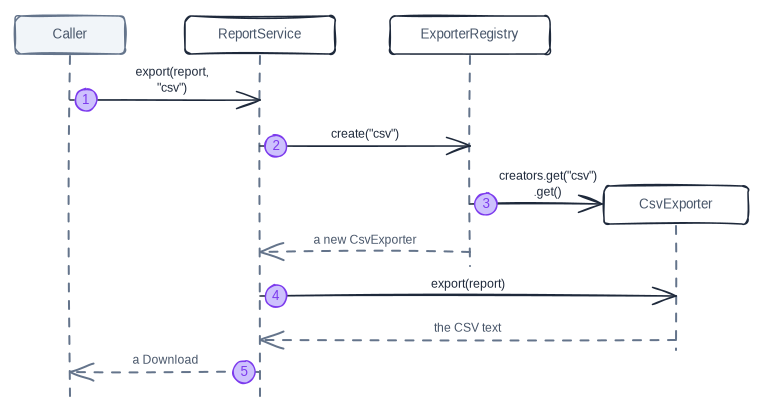
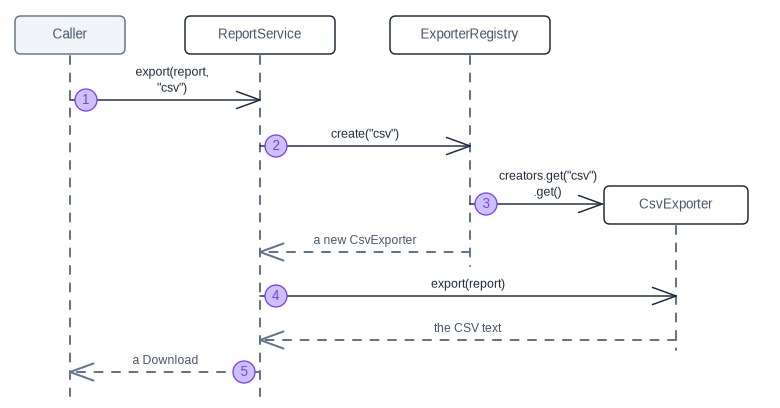
The whole project is below. Click any class name in the code to open that class.
package export; import java.util.ArrayList;import java.util.Collections;import java.util.HashMap;import java.util.List;import java.util.Locale;import java.util.Map;import java.util.Objects;import java.util.function.Supplier; public final class ExporterRegistry { private final Map<String, Supplier<ReportExporter>> creators; public ExporterRegistry(Map<String, Supplier<ReportExporter>> creators) { this(checkAll(creators)); } private ExporterRegistry(Checked checked) { this.creators = Map.copyOf(checked.creators()); } public static ExporterRegistry withStandardFormats() { return new ExporterRegistry(Map.of( "csv", CsvExporter::new, "json", JsonExporter::new, "html", HtmlExporter::new, "md", MarkdownExporter::new)); } public ExporterRegistry plus(String name, Supplier<ReportExporter> creator) { String key = normalize(name); Objects.requireNonNull(creator, "creator"); if (creators.containsKey(key)) { throw new IllegalArgumentException("Format \"" + key + "\" is registered twice"); } checkCreator(key, creator); Map<String, Supplier<ReportExporter>> more = new HashMap<>(creators); more.put(key, creator); return new ExporterRegistry(new Checked(more)); } public ReportExporter create(String format) { String name = format == null ? "" : format.trim().toLowerCase(Locale.ROOT); Supplier<ReportExporter> creator = creators.get(name); if (creator == null) { throw new UnsupportedFormatException(name, supportedFormats()); } ReportExporter exporter = creator.get(); String problem = problemWith(name, exporter); if (problem != null) { throw new IllegalStateException(problem); } return exporter; } public List<String> supportedFormats() { List<String> names = new ArrayList<>(creators.keySet()); Collections.sort(names); return List.copyOf(names); } // Each creator is tried once at startup, so a broken one stops the app instead of a user's download. private static Checked checkAll(Map<String, Supplier<ReportExporter>> creators) { Objects.requireNonNull(creators, "creators"); Map<String, Supplier<ReportExporter>> byName = new HashMap<>(); for (Map.Entry<String, Supplier<ReportExporter>> entry : creators.entrySet()) { String name = normalize(entry.getKey()); Supplier<ReportExporter> creator = Objects.requireNonNull(entry.getValue(), "creator for " + name); if (byName.containsKey(name)) { throw new IllegalArgumentException("Format \"" + name + "\" is registered twice"); } checkCreator(name, creator); byName.put(name, creator); } if (byName.isEmpty()) { throw new IllegalArgumentException("A registry needs at least one format"); } return new Checked(byName); } private static void checkCreator(String name, Supplier<ReportExporter> creator) { String problem = problemWith(name, creator.get()); if (problem != null) { throw new IllegalArgumentException(problem); } } // A format's name is its file extension, and every exporter needs a content type. private static String problemWith(String name, ReportExporter exporter) { if (exporter == null) { return "The creator for \"" + name + "\" returned null"; } if (!name.equals(exporter.fileExtension())) { return "Format \"" + name + "\" makes ." + exporter.fileExtension() + " files"; } if (exporter.contentType() == null || exporter.contentType().isBlank()) { return "Format \"" + name + "\" has no content type"; } return null; } private static String normalize(String name) { Objects.requireNonNull(name, "format name"); String normalized = name.trim().toLowerCase(Locale.ROOT); if (normalized.isEmpty()) { throw new IllegalArgumentException("A format name must not be blank"); } return normalized; } private record Checked(Map<String, Supplier<ReportExporter>> creators) { }}The demo in demo/Main.java exports one report in every format, asks for pdf, and then asks for " CSV ":
[csv]
q3-sales-north-south.csv (text/csv)
region,product,units,revenue
North,"Tea, Assam",120,9600.00
North,"27"" monitor",4,51996.00
South,Coffee <decaf>,85,7225.50
[json]
q3-sales-north-south.json (application/json)
{
"title": "Q3 sales: North & South",
"rows": [
{"region": "North", "product": "Tea, Assam", "units": 120, "revenue": 9600.00},
{"region": "North", "product": "27\" monitor", "units": 4, "revenue": 51996.00},
{"region": "South", "product": "Coffee <decaf>", "units": 85, "revenue": 7225.50}
],
"totalRevenue": 68821.50
}
[html]
q3-sales-north-south.html (text/html)
<h1>Q3 sales: North & South</h1>
<table>
<tr><th>Region</th><th>Product</th><th>Units</th><th>Revenue</th></tr>
<tr><td>North</td><td>Tea, Assam</td><td>120</td><td>9600.00</td></tr>
<tr><td>North</td><td>27" monitor</td><td>4</td><td>51996.00</td></tr>
<tr><td>South</td><td>Coffee <decaf></td><td>85</td><td>7225.50</td></tr>
<tr><th colspan="3">Total</th><th>68821.50</th></tr>
</table>
[md]
q3-sales-north-south.md (text/markdown)
# Q3 sales: North & South
| Region | Product | Units | Revenue |
|---|---|---:|---:|
| North | Tea, Assam | 120 | 9600.00 |
| North | 27" monitor | 4 | 51996.00 |
| South | Coffee \<decaf> | 85 | 7225.50 |
[pdf]
That format is not supported. Supported formats: csv, html, json, md
[" CSV "] q3-sales-north-south.csv (text/csv)Each format handled the awkward values its own way. CSV put quotes around Tea, Assam, and doubled the quote inside 27" monitor. JSON put a backslash before that quote. HTML replaced the ampersand in the title, the quote, and the angle brackets around decaf. Markdown put a backslash before <decaf>, so a viewer shows it as text instead of reading it as an HTML tag. The request for pdf was refused with the list of formats we support, without repeating what was typed, and " CSV " was read as csv.
What it costs
The factory makes one kind of change cheap and another kind expensive.
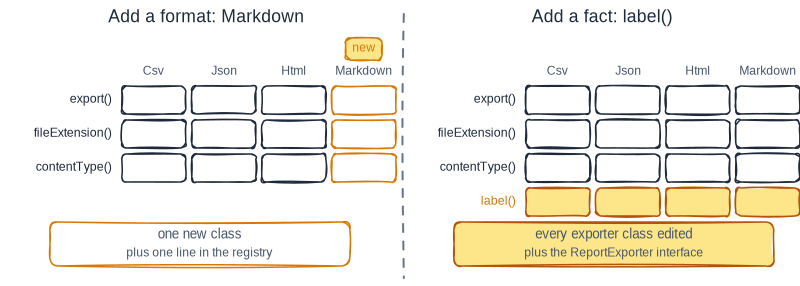
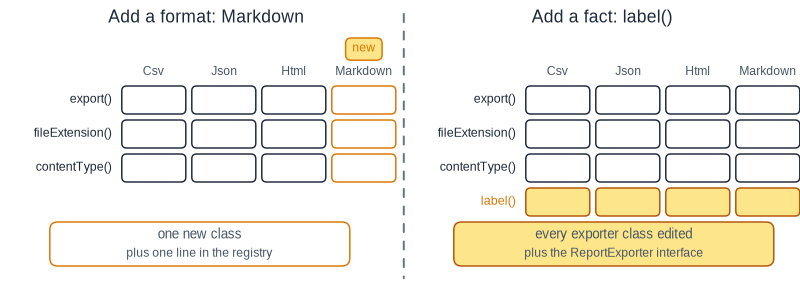
A new format is cheap. It is one new class and one line in withStandardFormats, or one call to plus. The service and the other formats do not change.
A new fact about every format is expensive. Suppose the menu needs a label such as "Comma-separated (CSV)" next to each format. That is a new label() method on ReportExporter, and every exporter class has to add it. A default method on the interface would avoid the edits, but no single default label is right for four different formats.
There is a smaller cost too. To find out which class "csv" becomes, a reader has to find where the registry is filled. With a plain new CsvExporter(), the answer is on the same line.
When a plain new is enough
A factory is worth having when the class is chosen from data at run time, or when the caller should not know which classes exist. When neither is true, it only adds a lookup and a string that can be misspelt.
- The caller already knows the class. A nightly job that only ever emails a CSV should write
new CsvExporter(). Going through a registry with the string"csv"gains nothing. - Two formats that will not change. A static method with one
switchand adefaultthat throws is enough:
static ReportExporter exporterFor(String format) { return switch (format.trim().toLowerCase(Locale.ROOT)) { case "csv" -> new CsvExporter(); case "json" -> new JsonExporter(); default -> throw new IllegalArgumentException("Unknown format: " + format); };}This is still a factory, and for two formats it is the right size. Unlike the first version, it keeps the knowledge in one place and refuses an unknown name.
Simple factory, Factory Method or Abstract Factory?
Three ideas share the word "factory", and they are easy to mix up.
A simple factory is what we built: one object or method that takes a value and returns the matching product. It is the one most code needs.
Factory Method is about a base class that runs a fixed sequence of steps and leaves one step, creating an object, to its subclasses. The subclass decides the class, and it decides when you write the subclass, not at run time:
abstract class ScheduledReport { void send(SalesReport report, Mailer mailer) { ReportExporter exporter = createExporter(); mailer.attach(exporter.export(report), exporter.fileExtension()); } protected abstract ReportExporter createExporter();} class WeeklyCsvReport extends ScheduledReport { @Override protected ReportExporter createExporter() { return new CsvExporter(); }}Abstract Factory is an interface that creates a whole set of objects that must match each other. Suppose reports gain charts. An HTML report needs SVG charts, while a CSV report needs none at all. One factory per format then creates both, so a caller cannot mix an HTML document with the wrong charts:
interface ExportKit { ReportExporter exporter(); ChartRenderer charts();}| Simple factory | Factory Method | Abstract Factory | |
|---|---|---|---|
| Who picks the class | The factory, from a value | A subclass | The kit you were given |
| When it is picked | At run time, per call | When the subclass is written | When the kit is chosen |
| What it creates | One object | One object | A set of objects that must match |
| Example here | create("csv") | WeeklyCsvReport | An HTML kit with SVG charts |
A short way to say it: a simple factory picks a class from a value, Factory Method lets a subclass pick, and Abstract Factory picks a whole matching set.
A Builder is different again. It does not choose a class. It assembles one complicated object step by step, for example a search request with many optional filters.
In an interview
A factory sits inside many low-level design questions: a notification sender that supports email, SMS and push, parsers chosen by file type, payment clients chosen by payment method, and pieces on a chess board created from a starting layout. It is also a place to argue against one. In the Parking Lot, there are no vehicle subclasses, so new Vehicle(plate, type) is the whole job and a VehicleFactory would have nothing to decide.
A good order for presenting it:
- Draw the name-to-class table, including what happens to an unknown name.
- Write the product interface, and make sure every fact about a product is a method on it.
- Write the factory: its map or switch, its normalising of the name, and its refusal.
- Say who builds the factory and who calls it. It is built once at startup and passed in.
Common mistakes:
- A factory with nothing to decide. If there is one product, or the caller always knows which one it wants,
newis clearer. - A factory that also does the products' work. The registry should only choose and create. The writing rules belong in each exporter, or the first version's problems come back inside the factory.
- Returning
nullor a default for an unknown name. Both hide mistakes. Refuse with a clear message. - Comparing names exactly as typed. Without trimming and lower-casing,
"CSV"and"csv "are refused even though the user meant a format we support. - A registry anyone can change at any time. A shared registry with a public
registermethod, changed by whichever class runs first, makes the list of formats depend on start-up order. - Sharing product objects that keep state. If the factory hands out one shared object, that object must have no fields that change while it works.
Summary
- A factory turns a value, such as a format name, into the right object, so the code that uses the object never names a concrete class.
- Put every fact about a product on its interface, so one class per product holds everything about it.
- Keep the name-to-class table in one place. A map from name to creator lets other code add products without editing the factory.
- Refuse unknown names with a message that lists what is supported. Never return
nullor guess. - Build the factory once at startup and pass it in. An unchangeable registry can be shared by many threads without a lock.
- When the caller already knows the class, write
new.