At a busy airport, no pilot talks to another pilot about who lands next. Every plane talks to the control tower, and the tower decides. If the planes coordinated among themselves, each pilot would need to know every other plane in the sky, and one confused pilot could stop everyone.
Software has the same problem. A smart home has a door lock, motion sensors, an alarm, lights and a thermostat, and they must react to each other. Locking the door turns the lights off. Motion while the house is empty sounds the alarm, and the alarm turns every light on. A chat room, an auction and a form whose fields enable each other look the same. In each one, many objects react to each other.
The Mediator pattern puts one object in the middle. Every object talks to it, and it decides what happens next. In this article we build a smart-home hub twice: first with devices that call each other directly, then with a hub. The code is Java. The finished project compiles and runs, and every snippet without a Sketch label comes from it or from the first version, which compiles. The Open file button on a snippet from the finished project opens the whole file.
The home we are building
The home has a front door lock, a motion sensor in each room, an alarm, the lights and a thermostat. It must do the following:
- Leaving. When the front door is locked from outside, every light goes off, the thermostat goes to away mode, and the alarm is armed.
- Arriving. When the front door is unlocked from outside, the alarm is disarmed, the thermostat goes back to home mode, and the hall light comes on.
- Motion. If the alarm is armed, motion in a room sounds the alarm. If it is not, motion turns on that room's light.
- Alarm. When the alarm sounds, every light comes on. A person can also sound it with the panic button.
- A device that fails a command does not stop the other devices, and someone hears about the failure.
- Devices report from their own threads, at any time.
- Adding a device does not mean editing the devices already there.
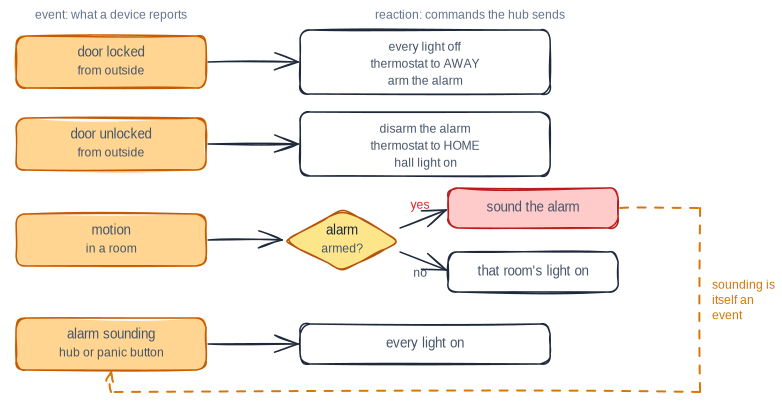
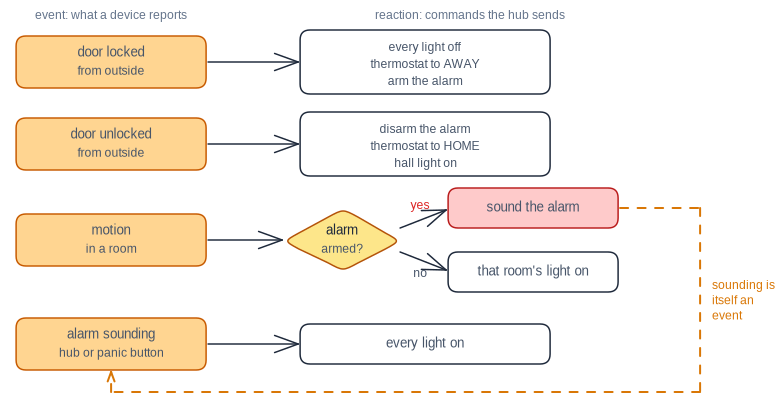
This table of events and reactions is the first thing to draw in an interview. It lists every rule before any class exists. The rest of the design is about one question: which class holds each arrow.
The first version: devices that call each other
The obvious design gives each device the other devices it needs, and puts each rule in the device that notices the event. The door lock holds the lights, the thermostat and the alarm:
public class DoorLock { private final Lights lights; private final Thermostat thermostat; private final Alarm alarm; private boolean locked; public DoorLock(Lights lights, Thermostat thermostat, Alarm alarm) { this.lights = lights; this.thermostat = thermostat; this.alarm = alarm; } public void lockFromOutside() { locked = true; lights.turnAllOff(); thermostat.setMode(ThermostatMode.AWAY); alarm.arm(); } public void unlockFromOutside() { locked = false; alarm.disarm(); thermostat.setMode(ThermostatMode.HOME); lights.turnOn(Room.HALL); }The motion sensor holds the alarm and the lights, and the alarm holds the lights:
public void detect() { if (alarm.isArmed()) { alarm.sound(room); } else { lights.turnOn(room); } } public void sound(Room room) { soundingIn = room; lights.turnAllOn(); }This code works, and with three rules and five devices it is easy to read. The trouble starts as the home grows.
The rules live in the wrong classes. What happens when you leave home lives in DoorLock. A lock now knows that the house has lights and a thermostat, and the rule for motion sits in the sensor. To learn everything the house does, you read every device.
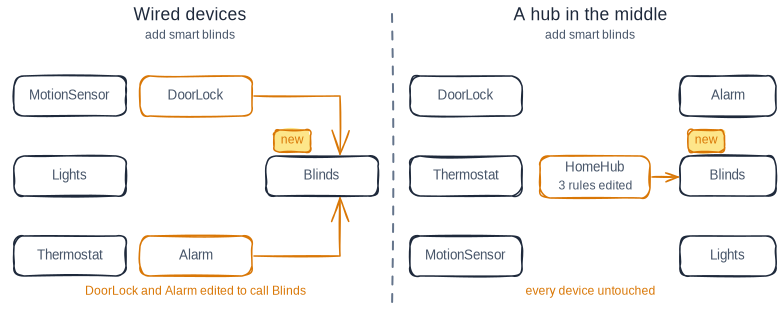
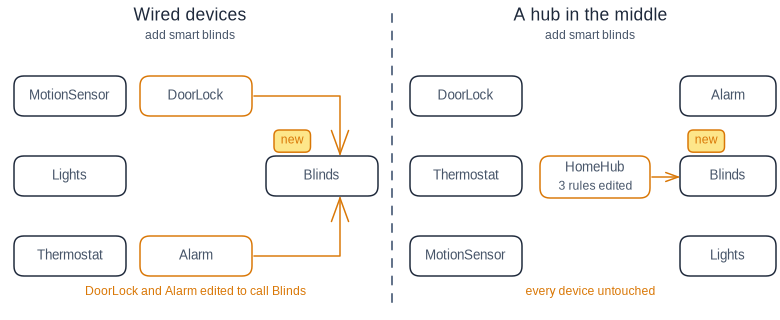
A new device means editing the devices that trigger it. Suppose we add smart blinds that close when we leave, open when we arrive, and close when the alarm sounds. That edits both methods of DoorLock and Alarm.sound. The blinds themselves are the easy part.
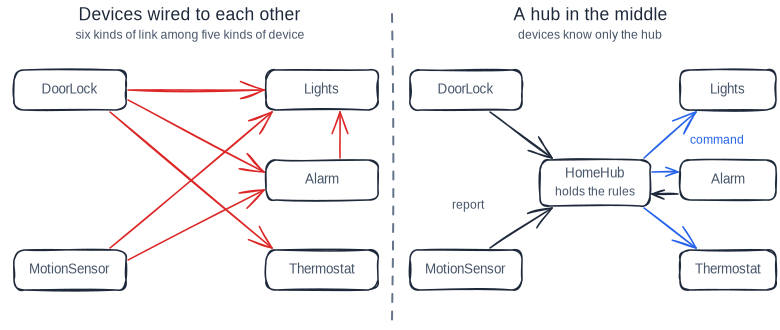
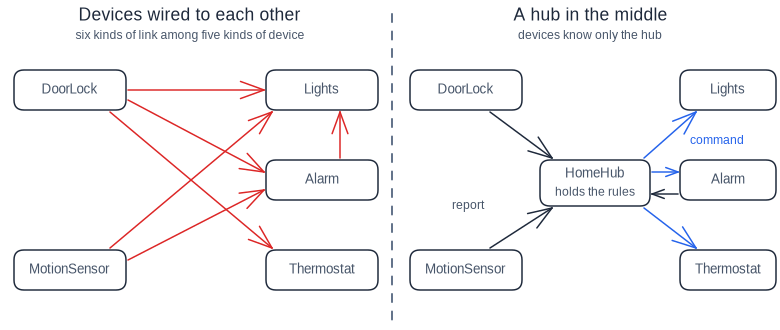
Everything knows everything. Three kinds of device already hold six kinds of reference to each other, and every extra sensor adds two more. Each new device adds references in both directions. The construction order is fixed too: the lights first, then the alarm, then the sensors and the lock. If the lights ever needed the alarm, the two constructors would need each other, and constructor injection would no longer work.
One failure stops the rest of the rule. If a bulb is offline and lights.turnAllOff() throws inside lockFromOutside, the next two lines never run. The family leaves home with the alarm unarmed.
The idea
The pattern works like this:
- One object, the hub, sits in the middle. Every device talks to it, and it is the only object that sends commands to devices.
- A device tells the hub what happened: "the door was locked from outside". It never says what should happen next.
- The hub holds every rule: for each event, which commands go to which devices.
- Devices know only a small
Hubinterface. They do not know the hub's class, and they do not know each other.
The object in the middle is called the mediator. The objects it coordinates are the colleagues. Here the mediator is HomeHub, and the colleagues are the door lock, the sensors, the alarm, the lights and the thermostat. As the Facade pattern page puts it, a mediator sits between objects that would otherwise talk to each other.
Building it, step by step
Step 1: what a device tells the hub
The interface a device knows has one method:
public interface Hub { void report(HomeEvent event);}An event is a record of what happened and where. There are four kinds, LOCKED_FROM_OUTSIDE, UNLOCKED_FROM_OUTSIDE, MOTION and ALARM_SOUNDED, in the EventType enum.
What does a device tell the hub?
What to do: "turn the lights off"
The lock would send commands for the hub to pass on. The rule is then back in the lock, which must know that lights exist and when to turn them off. The hub becomes a post office that changes nothing.
What happened: "locked from outside"Our pick
The device describes only itself, which it can do without knowing anything else in the house. The hub decides what the event means. A new reaction to leaving home is a change in one place, and the lock never changes.
Step 2: devices that only report
The door lock changes its own state and reports what happened. It takes the Hub interface, not HomeHub:
public class DoorLock { private final Hub hub; private boolean locked; public DoorLock(Hub hub) { this.hub = Objects.requireNonNull(hub, "hub"); } // Reports while holding its own lock, so the hub hears the door's changes in the order they happened. // That is safe only because the hub never sends the door a command. public synchronized void lockFromOutside() { locked = true; hub.report(new HomeEvent(EventType.LOCKED_FROM_OUTSIDE, Room.HALL)); } public synchronized void unlockFromOutside() { locked = false; hub.report(new HomeEvent(EventType.UNLOCKED_FROM_OUTSIDE, Room.HALL)); }Both methods are synchronized, and they report while holding the door's lock. If one thread locks the door while another unlocks it, the hub hears the two events in the order the door changed. Holding a lock while reporting is safe here only because the hub never sends the door a command. Step 5 explains why.
The lights and the thermostat only receive commands, so they do not know the hub at all. The alarm does both. The hub arms it, disarms it and sounds it, and the alarm reports whenever it sounds, whoever started it: the hub, or a person pressing the panic button.
sound changes its own field inside a short synchronized block and reports after the block ends. The reason is in step 5.
This leaves a loop: the hub needs the alarm to send it commands, and the alarm needs the hub to report. Something has to be built first.
How do the hub and the devices find each other?
The hub's constructor hands itself to each device
The hub takes the devices and calls device.connect(this) from its constructor. That passes this out before the constructor has finished, so a device could call report on a half-built hub. The Singleton pattern page explains why an object that leaks this loses Java's guarantee about its final fields.
Devices take the HomeHub class
This works, but every device is then tied to one hub class. A test cannot give a device a fake hub, and a second hub design means editing every device.
Build the hub, give devices the Hub interface, then connect onceOur pick
The hub is built first with only its error log. Devices that report get the Hub interface. Then one call to connect gives the hub the devices it commands. For a moment the hub exists without devices, so report before connect throws an IllegalStateException, and connect works only once.
public synchronized void connect(Lights lights, Thermostat thermostat, Alarm alarm) { Objects.requireNonNull(lights, "lights"); Objects.requireNonNull(thermostat, "thermostat"); Objects.requireNonNull(alarm, "alarm"); if (this.lights != null) { throw new IllegalStateException("The devices are already connected"); } if (!alarm.reportsTo(this)) { throw new IllegalArgumentException("The alarm reports to a different hub"); } this.lights = lights; this.thermostat = thermostat; this.alarm = alarm; }connect also checks, with alarm.reportsTo(this), that the alarm reports to this hub. An alarm built with a different hub would sound without this hub ever hearing it, so its lights would stay off.
Step 3: the hub holds the rules
Every rule is now in one class, and each is a few lines:
private void handle(HomeEvent event) { Runnable rule = switch (event.type()) { case LOCKED_FROM_OUTSIDE -> this::leaving; case UNLOCKED_FROM_OUTSIDE -> this::arriving; case MOTION -> () -> motion(event.room()); case ALARM_SOUNDED -> this::alarmSounded; }; rule.run(); } private void leaving() { attempt("lights.turnAllOff", lights::turnAllOff); attempt("thermostat.setMode(AWAY)", () -> thermostat.setMode(ThermostatMode.AWAY)); attempt("alarm.arm", alarm::arm); } private void arriving() { attempt("alarm.disarm", alarm::disarm); attempt("thermostat.setMode(HOME)", () -> thermostat.setMode(ThermostatMode.HOME)); attempt("lights.turnOn(HALL)", () -> lights.turnOn(Room.HALL)); } private void motion(Room room) { if (alarm.isArmed()) { attempt("alarm.sound(" + room + ")", () -> alarm.sound(room)); } else { attempt("lights.turnOn(" + room + ")", () -> lights.turnOn(room)); } } private void alarmSounded() { attempt("lights.turnAllOn", lights::turnAllOn); }handle uses a switch expression, not a switch statement. The compiler refuses a switch expression over an enum that leaves a value out, so a new event type cannot be added without a rule for it. The State pattern page shows how a switch statement lets a missing case through.
Each rule reads like requirement 1 to 4 above. Every command goes through attempt, which we look at in step 4.
Where do the rules live?
One method per rule, inside the hubOur pick
All four rules sit in one file and read top to bottom. The cost is that the hub grows with every rule, and it is the one class every new rule touches. With four rules that is fine.
One small Rule object per rule, held in a list
Each rule is a class that says which events it handles and what it does. The hub loops over the list. A new rule is a new class, and rules can be loaded from the owner's settings, such as "when the garage sensor sees motion after 10 pm, turn on the driveway light". This is worth the extra classes once the owner writes rules, or once the hub has more rules than fit on a screen.
interface Rule { boolean appliesTo(HomeEvent event); void run(HomeEvent event, Devices devices);}Step 4: one failing device must not stop the rest
Each command in a rule runs inside its own try:
private void attempt(String command, Runnable action) { try { action.run(); } catch (Exception e) { fail(command, e); } } private void fail(String what, Exception error) { try { errorLog.failed(what, error); } catch (Exception logFailure) { System.err.println("Could not log the failure of " + what + ": " + logFailure); System.err.println("The failure was: " + error); } }If a device throws any exception, checked or not, attempt hands it to the ErrorLog with the command's name, and the rule moves on to its next command. ErrorLog is an interface given to the hub's constructor, so the app can show the owner a warning and a test can collect failures in a list. If the error log itself throws, fail prints both failures to System.err, so a broken log cannot stop the rule either.
An Error, such as OutOfMemoryError, is let through. It means the program itself is in trouble. Events still waiting in the queue are then dropped, and the hub reports how many to the error log.
The hub has a second net. A rule can throw outside a command, for example if the alarm panel does not answer isArmed(). The loop in report, shown in step 5, catches that, reports it as "rule for MOTION", and moves on to the next event.
Two kinds of error stay separate. A device failing is a fact about the house, and it goes to the ErrorLog for the owner to see. A null event, a report before connect, or a second connect is a mistake in the code, so it throws at once.
What happens when a device fails a command?
Stop the rule and throw
The caller finds out at once. But the house is left half-switched. If the lights fail while you leave home, the thermostat stays on home mode and the alarm stays unarmed.
Try every command and report each failureOur pick
Every device that can do its part does it, and the failure still reaches someone. The cost is that a rule can finish partly done. If the alarm fails to disarm when you arrive, the hall light still comes on and the alarm stays armed. The error log is how the owner finds out.
Step 5: an event raised while the hub is busy
Here is the case that shapes the rest of the hub. Motion arrives while the alarm is armed. The motion rule calls alarm.sound(KITCHEN), and the alarm reports ALARM_SOUNDED, calling report again on the same thread while the hub is still inside the motion rule. Java's synchronized lock is reentrant, so that second call gets straight in.
@Override public synchronized void report(HomeEvent event) { Objects.requireNonNull(event, "event"); if (lights == null) { throw new IllegalStateException("Connect the devices before any of them reports"); } pending.addLast(event); if (handling) { // A command made a device report again. This event waits until the current rule has finished. return; } handling = true; try { int handled = 0; while (!pending.isEmpty()) { if (handled == MAX_EVENTS_PER_REPORT) { fail("event loop", new IllegalStateException( pending.size() + " events dropped after " + handled + " in one report")); pending.clear(); break; } HomeEvent next = pending.pollFirst(); try { handle(next); } catch (Exception e) { fail("rule for " + next.type(), e); } handled++; } } finally { // Only an Error gets here with events still queued. Reset first, so the hub is never stuck, // then report the dropped events. int dropped = pending.size(); pending.clear(); handling = false; if (dropped > 0) { fail("events dropped", new IllegalStateException(dropped + " queued events dropped after an Error")); } } }report puts every event in a queue. If the hub is already handling an event, the new one waits in the queue and report returns. Only the outermost call runs the loop, and it handles events one at a time. Events raised on the hub's own thread, like the alarm's, are handled in the order they were raised. So the motion rule finishes first, then the alarm rule turns every light on.
What happens to an event raised during a rule?
Handle it at once, inside the current rule
The alarm rule would run in the middle of the motion rule. Rules would interleave, so a rule could see the house half-changed by another rule. A chain of events would nest deeper and deeper, and a loop of events would overflow the stack.
Refuse it
The Observer pattern page refuses a listener that records a ball, because letting it in would send ball 2 to every listener before the rest had heard ball 1. Here the call is expected, not a mistake. The alarm reports whenever it sounds, and the hub is often the one that sounded it.
Queue it, and handle it after the current ruleOur pick
Every rule runs from start to end before the next one starts, and events raised on the hub's thread are handled in the order they were raised. The cost is that a device does not know when its event was handled, because report returns before that happens.
Two more guards sit in this method.
A limit on chains of events. Suppose a rule causes an event whose rule causes the first event again. With a queue, that loop would never end. After 100 events in one report, the hub reports an "event loop" to the error log and drops what is left.
A finally that clears the queue and resets handling. If an Error escapes from a device, the hub is not left stuck with handling set, and no stale event from before the Error runs later. The dropped events are reported, not lost silently.
Threads. report is synchronized, so events from different threads are handled one at a time, in the order they reach the hub. A device the hub commands must not hold its own lock while it reports. That is why Alarm.sound ends its synchronized block before calling report. Otherwise the hub's thread could hold the hub lock while waiting for the alarm lock to call arm, while the alarm's thread holds the alarm lock while waiting for the hub. Neither would ever move. The door lock can hold its lock while reporting, because the hub never waits for the door. For the same reason, a command must not wait for anything that reports to the hub, because the hub holds its lock while it waits. The cost of one lock is that a slow device command holds up every other report, so a device that talks to the network should not block inside a command.
The finished design
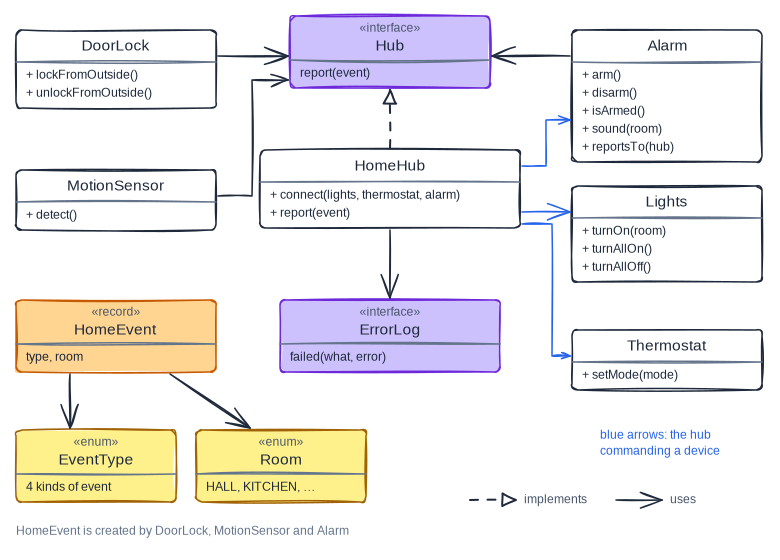
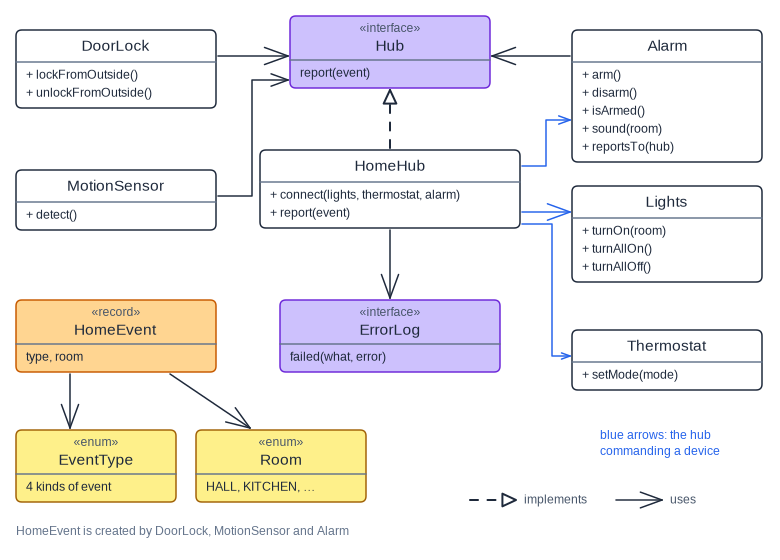
Here is one motion event while the house is empty, traced through the objects:
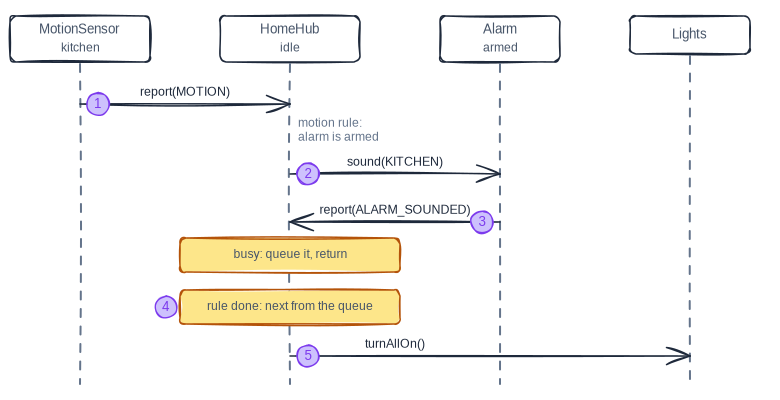
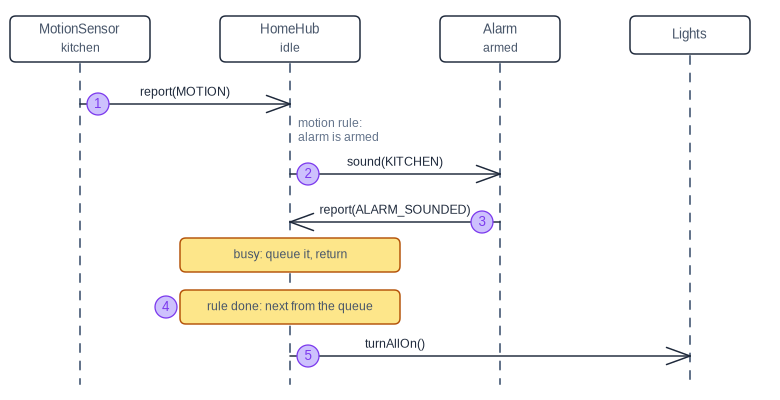
The whole project is below. Click any class name in the code to open that class.
package hub; import java.util.ArrayDeque;import java.util.Deque;import java.util.Objects; import devices.Alarm;import devices.Lights;import devices.Thermostat;import devices.ThermostatMode;import home.HomeEvent;import home.Hub;import home.Room; public class HomeHub implements Hub { static final int MAX_EVENTS_PER_REPORT = 100; private final ErrorLog errorLog; private final Deque<HomeEvent> pending = new ArrayDeque<>(); private boolean handling; private Lights lights; private Thermostat thermostat; private Alarm alarm; public HomeHub(ErrorLog errorLog) { this.errorLog = Objects.requireNonNull(errorLog, "errorLog"); } public synchronized void connect(Lights lights, Thermostat thermostat, Alarm alarm) { Objects.requireNonNull(lights, "lights"); Objects.requireNonNull(thermostat, "thermostat"); Objects.requireNonNull(alarm, "alarm"); if (this.lights != null) { throw new IllegalStateException("The devices are already connected"); } if (!alarm.reportsTo(this)) { throw new IllegalArgumentException("The alarm reports to a different hub"); } this.lights = lights; this.thermostat = thermostat; this.alarm = alarm; } @Override public synchronized void report(HomeEvent event) { Objects.requireNonNull(event, "event"); if (lights == null) { throw new IllegalStateException("Connect the devices before any of them reports"); } pending.addLast(event); if (handling) { // A command made a device report again. This event waits until the current rule has finished. return; } handling = true; try { int handled = 0; while (!pending.isEmpty()) { if (handled == MAX_EVENTS_PER_REPORT) { fail("event loop", new IllegalStateException( pending.size() + " events dropped after " + handled + " in one report")); pending.clear(); break; } HomeEvent next = pending.pollFirst(); try { handle(next); } catch (Exception e) { fail("rule for " + next.type(), e); } handled++; } } finally { // Only an Error gets here with events still queued. Reset first, so the hub is never stuck, // then report the dropped events. int dropped = pending.size(); pending.clear(); handling = false; if (dropped > 0) { fail("events dropped", new IllegalStateException(dropped + " queued events dropped after an Error")); } } } private void handle(HomeEvent event) { Runnable rule = switch (event.type()) { case LOCKED_FROM_OUTSIDE -> this::leaving; case UNLOCKED_FROM_OUTSIDE -> this::arriving; case MOTION -> () -> motion(event.room()); case ALARM_SOUNDED -> this::alarmSounded; }; rule.run(); } private void leaving() { attempt("lights.turnAllOff", lights::turnAllOff); attempt("thermostat.setMode(AWAY)", () -> thermostat.setMode(ThermostatMode.AWAY)); attempt("alarm.arm", alarm::arm); } private void arriving() { attempt("alarm.disarm", alarm::disarm); attempt("thermostat.setMode(HOME)", () -> thermostat.setMode(ThermostatMode.HOME)); attempt("lights.turnOn(HALL)", () -> lights.turnOn(Room.HALL)); } private void motion(Room room) { if (alarm.isArmed()) { attempt("alarm.sound(" + room + ")", () -> alarm.sound(room)); } else { attempt("lights.turnOn(" + room + ")", () -> lights.turnOn(room)); } } private void alarmSounded() { attempt("lights.turnAllOn", lights::turnAllOn); } private void attempt(String command, Runnable action) { try { action.run(); } catch (Exception e) { fail(command, e); } } private void fail(String what, Exception error) { try { errorLog.failed(what, error); } catch (Exception logFailure) { System.err.println("Could not log the failure of " + what + ": " + logFailure); System.err.println("The failure was: " + error); } }}The demo builds a home, connects the hub and plays through a day. After each step it prints the lights, the thermostat and the alarm:
start
    lights: all off | thermostat: HOME | alarm: off
motion in the kitchen while Asha is home
    lights: KITCHEN on | thermostat: HOME | alarm: off
Asha locks the front door from outside
    lights: all off | thermostat: AWAY | alarm: armed
motion in the kitchen while the house is empty
    lights: all on | thermostat: AWAY | alarm: armed, sounding in KITCHEN
Asha unlocks the front door
    lights: all on | thermostat: HOME | alarm: off
Asha switches every light off at the wall
    lights: all off | thermostat: HOME | alarm: off
Asha presses the panic button in the bedroom
    lights: all on | thermostat: HOME | alarm: off, sounding in BEDROOM
While Asha is home, motion in the kitchen only turns on the kitchen light. Locking the door from outside switches the house to away. The next motion in the kitchen sounds the alarm, and the alarm's own event turns every light on. Unlocking the door disarms and silences the alarm and sets the thermostat back to home mode. The hall light is already on, along with the others. Switching the lights off at the wall goes straight to the lights: a person can still use a device directly, and the hub is not involved. Finally, the panic button sounds the alarm while it is not armed, and every light comes on again.
demo/RaceCheck.java sends motion from eight threads at once, with the alarm off, so every event turns on a light:
8 threads reported 4000 motion events
handled: 4000, most handled at the same moment: 1
All 4,000 events were handled, and the counting Lights never saw two commands at the same moment.
What it costs
The pattern moves where changes land.
Adding a device leaves the other devices alone. Smart blinds become one new class and a few lines in the rules for leaving, arriving and the alarm. The lock, the sensors and the alarm do not change.
Every new rule changes the hub. The hub is the one class that grows. Watch for two signs that it is turning into a god class: rules that reach into a device's details, such as its brightness levels and bulb counts, and rule methods that keep gaining conditions for every device. At that point, split the rules into objects, as in the sketch in step 3.
There are quieter costs too.
- The flow is harder to trace.
lockFromOutsideno longer shows what happens when you leave. You read the hub instead. - The hub is a single point of failure. If it is stuck or broken, nothing in the house reacts to anything.
- A slow command holds up every report, because the hub handles one event at a time.
When the pattern is too much
If two objects talk to each other in one direction, a direct call is clearer. A door that only ever turns on the hall light does not need a hub:
public void unlockFromOutside() { locked = false; hallLight.turnOn();}The pattern pays off when several objects react to each other in several directions, and the set of objects keeps growing.
Mediator or Observer?
Both put something between the object that changes and the objects that react. The difference is in who knows whom and where the decisions are made.
| Mediator | Observer | |
|---|---|---|
| Who knows whom | The hub knows every device it commands. Devices know only the hub's interface | The subject knows only the listener interface. Listeners know only the event |
| Which way messages go | Both ways: devices report, the hub sends commands | One way: the subject tells its listeners |
| Where the rules live | In the hub | In each listener, which decides what an event means to it |
| What a new participant changes | A new class, and the hub's rules | A new class and a subscribe call. The subject does not change |
| Example | The smart-home hub and its devices | The score service and its scoreboard |
In short, with Observer, each listener decides what an event means for it. With a mediator, one object decides what an event means for everyone.
A facade is different again. A facade is one-way: callers talk to it, it talks to the subsystems, and the subsystems never talk back. Our hub receives events from the same devices it sends commands to.
In an interview
The Mediator pattern sits inside low-level design questions where many participants coordinate. Examples are a smart home, air traffic control with planes and a tower, and a chat server where users send to a room and the room delivers. An auction with bidders and an auctioneer is another, and so is a form whose fields enable each other.
We suggest presenting it in this order:
- List the participants and the events each one raises.
- Draw the table of events and reactions. These are the rules, and the hub will hold them.
- Write the
Hubinterface and one device, then the hub with one rule. Then say what happens when a device fails and when an event is raised while a rule is running.
Common mistakes:
- Devices that still call each other "just this once". One direct call brings back the web, and the hub no longer holds every rule.
- Events that are commands in disguise. "Turn off the lights" from the lock puts the rule back in the lock.
- A hub that reaches into device details. The hub sends commands such as
turnAllOff. It should not set bulb brightness and fan speeds field by field. - Handling a raised event in the middle of the current rule. Rules interleave, and a loop of events overflows the stack.
- A device the hub commands that holds its own lock while it reports. The hub may be waiting for that lock, and the two threads wait on each other forever.
- No limit on chains of events. One rule that triggers itself hangs the hub.
Summary
- Use a mediator when several objects must react to each other in several directions, and the set of objects keeps growing.
- Devices report what happened. The hub holds every rule and is the only object that sends commands.
- Devices know a small interface, not the hub's class and not each other.
- Run each command in its own
try, report failures, and let the rest of the rule continue. - Queue events raised during a rule, handle them in order, and limit how long a chain can run.
- Every new rule changes the hub. When the rules outgrow it, make each rule an object.