Every editor you use has an undo button. You type a sentence, delete a word by mistake, press undo, and the word comes back. If you press undo again, the sentence goes. If you press redo, it returns. The editor remembers what you did, in order, and can walk back through it and forward again.
The same need shows up far from editors. A drawing app undoes a moved shape. A spreadsheet undoes a pasted range. A job queue stores work to run later, on another machine. A database writes each change to a log so it can replay them after a crash. Each one turns an action into something the program can keep, pass around and reverse.
The Command pattern turns each action into an object. In this article we build a small text editor twice. The first version saves a full copy of the document before every edit. The second uses the Command pattern. Then we look at what the pattern costs, how it differs from the Memento pattern, which also gives undo, and how it shows up in interviews.
All the code is Java, and all of it compiles and runs. The snippets come from two complete projects, the first version and the finished one, apart from a few short sketches that are labelled. The Open file button on a snippet from the finished project shows the whole file in a code browser.
The editor we are building
The editor holds one piece of text. It supports:
- Type some text at a position.
- Delete a number of characters at a position.
- Replace a range with new text.
- Undo the last edit. Undo again to go further back.
- Redo an edit that was undone. A new edit after an undo throws away whatever could have been redone.
- Keep at most a fixed number of undo steps, so the history cannot grow forever.
Two more rules make it feel like a real editor. Typing several pieces in a row, such as one letter at a time, undoes as one step per word, not one step per letter. An edit that fails, such as deleting past the end, changes nothing at all.
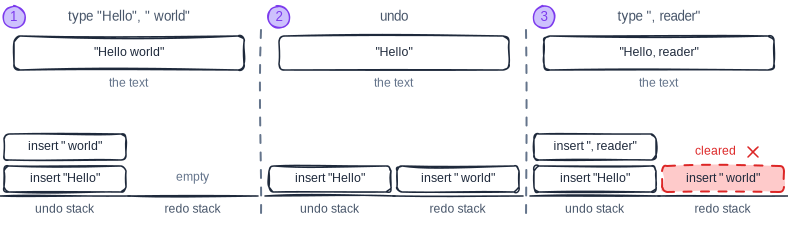
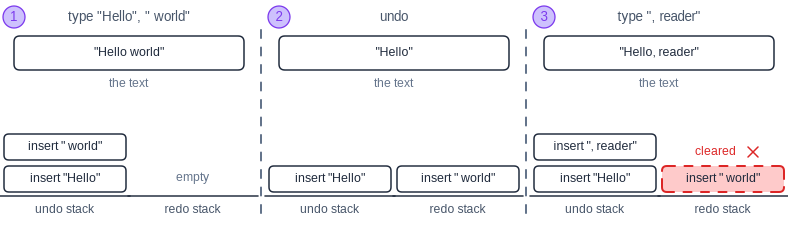
This picture is the whole of undo and redo. Each stack holds edits, newest on top. Undo takes the top edit off the undo stack, reverses it, and puts it on the redo stack. Redo does the opposite. A new edit goes on the undo stack and empties the redo stack. The rest of the article is about what an "edit" on those stacks actually is.
The first version: a copy of the document per edit
The simplest way to undo is to save the whole text before each change. To undo, the editor puts the saved text back:
public class Editor { private final StringBuilder text = new StringBuilder(); private final Deque<String> undoSnapshots = new ArrayDeque<>(); private final Deque<String> redoSnapshots = new ArrayDeque<>(); public void type(int position, String value) { saveSnapshot(); text.insert(position, value); } public void delete(int position, int count) { saveSnapshot(); text.delete(position, position + count); } public void replace(int position, int count, String value) { saveSnapshot(); text.replace(position, position + count, value); }Undo and redo swap whole copies between two stacks:
public boolean undo() { if (undoSnapshots.isEmpty()) { return false; } redoSnapshots.push(text.toString()); restore(undoSnapshots.pop()); return true; } public boolean redo() { if (redoSnapshots.isEmpty()) { return false; } undoSnapshots.push(text.toString()); restore(redoSnapshots.pop()); return true; } public String text() { return text.toString(); } private void saveSnapshot() { undoSnapshots.push(text.toString()); redoSnapshots.clear(); } private void restore(String snapshot) { text.setLength(0); text.append(snapshot); }}This code works, and for small state it is the right answer. A settings form with ten fields can save a copy of itself before each change, and the cost is ten small values per step. The trouble starts when the document is large, or when the program needs to know what each step did.
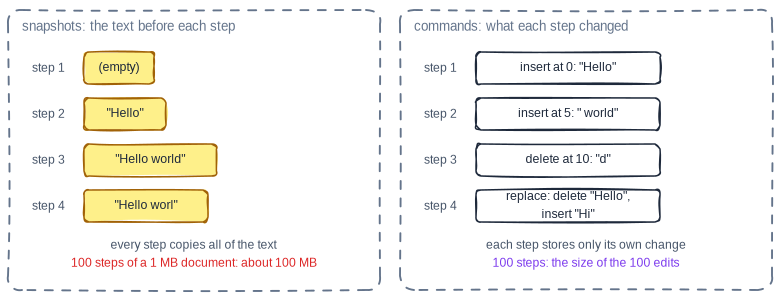
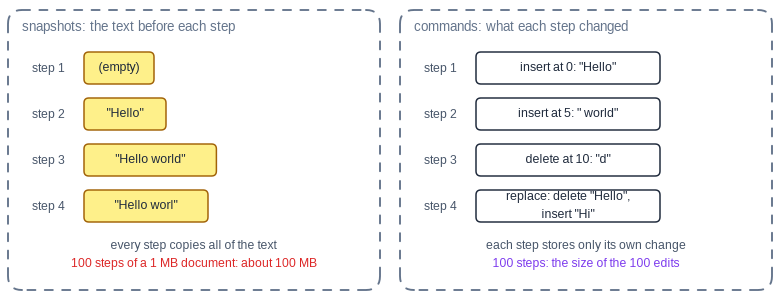
Every step costs a full copy. A 1 MB document with 100 undo steps holds 100 copies, about 100 MB, to remember a few hundred typed letters.
Every edit method must remember to save first. type, delete and replace all start with saveSnapshot(). A new indent method that forgets the call compiles fine and cannot be undone.
A failed edit still leaves a step behind. saveSnapshot() runs before the edit. If text.insert then throws because the position is past the end, a useless snapshot is already on the undo stack and the redo stack is already empty.
The history knows what the text was, not what happened. Each step is a separate copy of the text, so the history cannot say what the step was: it cannot show "Undo typing" in a menu. It also cannot send the edits to another copy of the document, which is how collaborative editors and macro recorders work.
The idea
The pattern works like this:
- Each kind of edit becomes a class:
InsertCommand,DeleteCommand. All of them implement one interface with two main methods,execute()andundo(). - An edit is no longer a method call that changes the text directly. It is an object that knows how to make its change, and how to reverse it.
- One class, the history, runs every command and keeps the ones that ran on a stack. Undo asks the top command to reverse itself.
- The text itself knows nothing about undo. It only knows how to insert and delete.
The pattern has names for these parts. The interface is the command. The object that the commands change, our Document, is the receiver. The object that runs commands and keeps them, our History, is the invoker. The code that creates commands, our Editor, is the client.
Building it, step by step
Step 1: the command interface
interface Command { void execute(); void undo(); // Lets typing that continues the last command join it as one undo step. default boolean mergeWith(Command next) { return false; }}Every command can run and can reverse itself. The third method, mergeWith, has a default that says no. It lets typing join the previous command, and we come back to it in step 4. The interface is package-private, so code outside the editor package never sees a command. Callers use Editor.
Step 2: insert and delete, each able to reverse itself
The document is a plain StringBuilder with two methods. Both are package-private, so only classes in the editor package can change the text, and both check their arguments before touching anything:
// Package-private: only classes in the editor package may change the document. void insert(int position, String value) { if (position < 0 || position > text.length()) { throw new IllegalArgumentException("Position " + position + " is outside 0.." + text.length()); } if (value.isEmpty()) { throw new IllegalArgumentException("Nothing to insert"); } text.insert(position, value); } String delete(int position, int count) { if (count <= 0 || position < 0 || count > text.length() - position) { throw new IllegalArgumentException("Cannot delete " + count + " characters at " + position); } String removed = text.substring(position, position + count); text.delete(position, position + count); return removed; }delete returns the text it removed. That return value is what makes undo possible. Here is the command that deletes:
class DeleteCommand implements Command { private final Document document; private final int position; private final int count; private String deleted = ""; DeleteCommand(Document document, int position, int count) { this.document = document; this.position = position; this.count = count; } @Override public void execute() { deleted = document.delete(position, count); } @Override public void undo() { document.insert(position, deleted); }}execute() removes the characters and keeps them in deleted. undo() inserts those same characters back at the same position. The command does not save the document. It saves only the characters it took away.
InsertCommand is the mirror image. Its undo deletes text.length() characters at its position:
class InsertCommand implements Command { private final Document document; private final int position; private final StringBuilder text; InsertCommand(Document document, int position, String text) { this.document = document; this.position = position; this.text = new StringBuilder(text); } @Override public void execute() { document.insert(position, text.toString()); } @Override public void undo() { document.delete(position, text.length()); }What does a command store so it can undo itself?
A copy of the document from before it ran
This always works, whatever the command did, and it is what the first version does. It also brings back the first version's memory cost, one full copy per step.
Just enough to reverse its own changeOur pick
An insert stores its position and text. A delete stores its position and the text it removed. The memory per step matches the size of the edit. The cost is that each command must get its own reverse exactly right. A delete that puts the text back one position off corrupts the document, and nothing warns you.
Does a command keep the document, or receive it on each call?
execute(document) and undo(document)
A command object could then be reused on any document, and it holds only plain values: a kind, a position and some text. That makes it easy to write to a log or send to another copy of the document as it is. But an undo must reverse the change on the same document it was made to, and passing the document on every call gives the caller a chance to pass the wrong one.
The document is given to the command when it is createdOur pick
new DeleteCommand(document, 5, 8) is a complete description of one edit: what to change, where and how much. It can go on a stack, sit there for an hour, and still undo correctly on the right document. The cost is that a command holds a live reference to a document, which cannot be written to a file. To log or replay edits, we store the kind, position and text instead, as the last part of this section shows.
Step 3: the history runs commands and keeps them
History is the invoker. It owns the two stacks:
class History { private final Deque<Command> undoStack = new ArrayDeque<>(); private final Deque<Command> redoStack = new ArrayDeque<>(); private final int limit; private boolean lastActionWasEdit; History(int limit) { if (limit <= 0) { throw new IllegalArgumentException("History limit must be positive, got " + limit); } this.limit = limit; } void execute(Command command) { command.execute(); redoStack.clear(); Command last = undoStack.peek(); if (lastActionWasEdit && last != null && last.mergeWith(command)) { return; } undoStack.push(command); if (undoStack.size() > limit) { undoStack.removeLast(); } lastActionWasEdit = true; } boolean undo() { Command command = undoStack.peek(); if (command == null) { return false; } // Move the command only after undo() succeeds, so one that throws stays where it was. command.undo(); undoStack.pop(); redoStack.push(command); lastActionWasEdit = false; return true; } boolean redo() { Command command = redoStack.peek(); if (command == null) { return false; } command.execute(); redoStack.pop(); undoStack.push(command); return true; } boolean canUndo() { return !undoStack.isEmpty(); } boolean canRedo() { return !redoStack.isEmpty(); }}execute() does three things in this order: run the command, clear the redo stack, and push the command on the undo stack. The order matters. If the command throws, for example because the position is past the end, nothing after line 20 runs. The failed edit leaves no step behind and the redo stack survives, which fixes the first version's third problem.
undo() looks at the top command, reverses it, and only then moves it to the redo stack. If the command's undo() throws, the command stays on the undo stack and the text is unchanged. Trying again runs the same undo(), so it fails again until whatever made it fail is fixed, but the step is never lost. redo() does the same in the other direction. Both return false when their stack is empty. canUndo() and canRedo() let the editor grey out the buttons before anyone presses them.
What happens to the redo stack when you make a new edit?
Keep it, as a branch of history
An editor can keep every branch as an undo tree, so nothing is ever lost. But the commands on the redo stack were recorded against text that no longer exists. A delete "at position 5" may now point at different characters. An undo tree must track which branch each command belongs to and when it is safe to apply.
Clear itOur pick
This is what most editors do (Vim keeps the branches, and Emacs records undos as edits), and it keeps the rule simple: a command only ever runs on the exact text it was created for. Line 21 is the whole implementation.
Step 4: one undo step per word, not per letter
An editor sends one insert per key press. Without help, typing "Hello" makes five undo steps, and undo removes one letter at a time. Grouping typing fixes that. Our rule: an insert joins the previous insert if it continues exactly where that one ended and does not start with a space.
@Override public boolean mergeWith(Command next) { if (!(next instanceof InsertCommand insert)) { return false; } boolean continuesTyping = insert.position == position + text.length(); boolean startsNewWord = Character.isWhitespace(insert.text.charAt(0)); if (!continuesTyping || startsNewWord) { return false; } text.append(insert.text); return true; }History.execute() asks the top command whether it will take the new one (line 23 of History). If mergeWith returns true, the top command has grown to cover both pieces of text, and nothing new goes on the stack. Undo then removes the whole word at once.
Merging only happens straight after another edit. After an undo or a redo, lastActionWasEdit is false, so the next piece of typing always starts a new step. Without that flag, typing after an undo could quietly join an older step, and one undo would then remove more than the user just typed.
How should typing be grouped into undo steps?
One step per key press
This is the simplest, and it is what you get with no merging at all. Removing a sentence then takes twenty presses of undo.
Group by a pause in typing
Another rule closes a group after a second or so without typing. That is a good rule, but it needs a clock passed into the history, and it makes every test depend on time.
Group until a word breakOur pick
A space starts a new step, so undo removes one word at a time. The rule lives inside InsertCommand.mergeWith, the one class that knows what an insert is. Grouping by time could be added later in the same method.
Step 5: replace is two commands run as one
Replacing "Hello" with "Hi" is a delete followed by an insert. Undo should reverse both in one press. A MacroCommand holds a list of commands, runs them in order, and undoes them in reverse order:
class MacroCommand implements Command { private final List<Command> steps; MacroCommand(List<Command> steps) { this.steps = List.copyOf(steps); } @Override public void execute() { int done = 0; try { for (Command step : steps) { step.execute(); done++; } } catch (RuntimeException failure) { // Reverse the steps that already ran, newest first, so a failed macro changes nothing. for (int i = done - 1; i >= 0; i--) { rollBack(steps.get(i)::undo, failure); } throw failure; } } @Override public void undo() { int undone = 0; try { for (int i = steps.size() - 1; i >= 0; i--) { steps.get(i).undo(); undone++; } } catch (RuntimeException failure) { // Run again the steps already undone, oldest first, so a failed undo changes nothing. for (int i = steps.size() - undone; i < steps.size(); i++) { rollBack(steps.get(i)::execute, failure); } throw failure; } } // A rollback that fails too is attached to the original failure, never thrown in its place. private static void rollBack(Runnable step, RuntimeException failure) { try { step.run(); } catch (RuntimeException rollbackFailure) { failure.addSuppressed(rollbackFailure); } }}The reverse order matters. Undo must first remove "Hi", then put "Hello" back. Done the other way round, "Hello" would be inserted next to "Hi", and then two characters of "Hello" would be deleted.
Both methods also handle a step that fails. execute() counts the steps that ran, and if a later one throws, it reverses those steps, newest first, before passing the same exception on. undo() does the mirror image: if a step's undo throws, it runs again the steps it had already undone. Either way a failed macro changes nothing, which keeps the rule from the requirements: an edit that fails changes nothing at all. If a rollback step fails too, rollBack attaches that second failure to the first with addSuppressed, so the original cause is never hidden.
Editor.replace builds the macro from the two smaller commands:
public void replace(int position, int count, String text) { Objects.requireNonNull(text, "text"); if (text.isEmpty()) { delete(position, count); return; } Command deleteOld = new DeleteCommand(document, position, count); Command insertNew = new InsertCommand(document, position, text); history.execute(new MacroCommand(List.of(deleteOld, insertNew))); }An empty replacement is just a delete, so replace hands it to delete instead of building a macro with an insert of nothing. A null replacement is rejected before any command is created. With those two checks, no replace in this editor can fail halfway: the delete either fails first or both steps succeed. The rollback in MacroCommand protects the macros added later, such as a "format document" made of fifty edits, where any step could fail.
Editor creates its own Document and History rather than taking them in its constructor. They are its parts, not collaborators that change: there is one kind of each, and everything outside the package works through Editor.
A macro is itself a Command, so History treats it like any other. The same idea gives you "record a macro and replay it", or a "format document" button made of fifty small edits that still undoes in one press.
Step 6: a limit on the history
The constructor takes a limit, and execute() drops the oldest command when the undo stack grows past it (lines 27 to 29). Each step holds only what its own edit changed, so a typing step is a few characters. Some steps are big, though: a merged insert grows with the typing, and deleting the whole document holds the whole document. The limit counts steps, not bytes. The first version needed it far more, because every one of its steps was a full copy.
Beyond undo
Once an edit is an object, undo is only one thing you can do with it. The editor could write every edit it runs to a file, as plain values: the kind, the position and the text. Replaying that file builds new commands against a fresh document and rebuilds the text, and the file doubles as a history of what changed. The editor could send the same values to a second copy of the document on another screen, where new commands are built against that copy. This is the starting point for collaborative editing. A job queue uses the same idea without undo at all: each job is a command object with an execute(), created in one place and run later somewhere else. None of these needs a change to Document.
The finished design
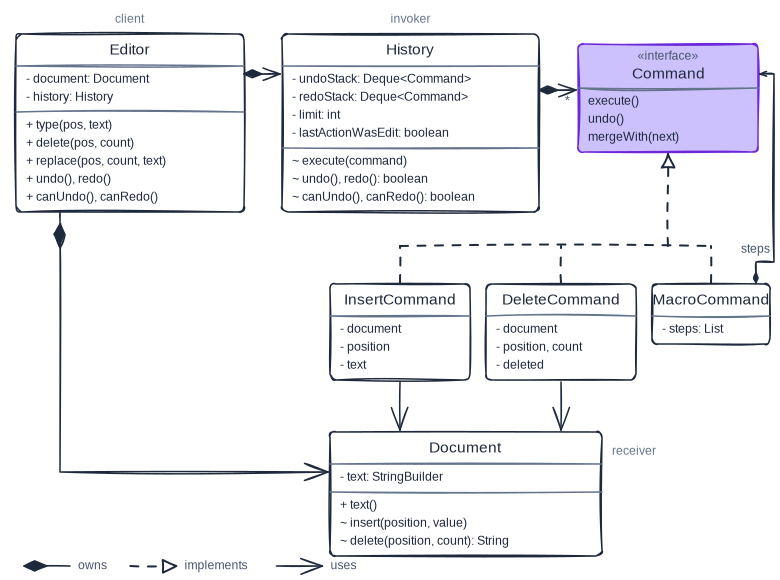
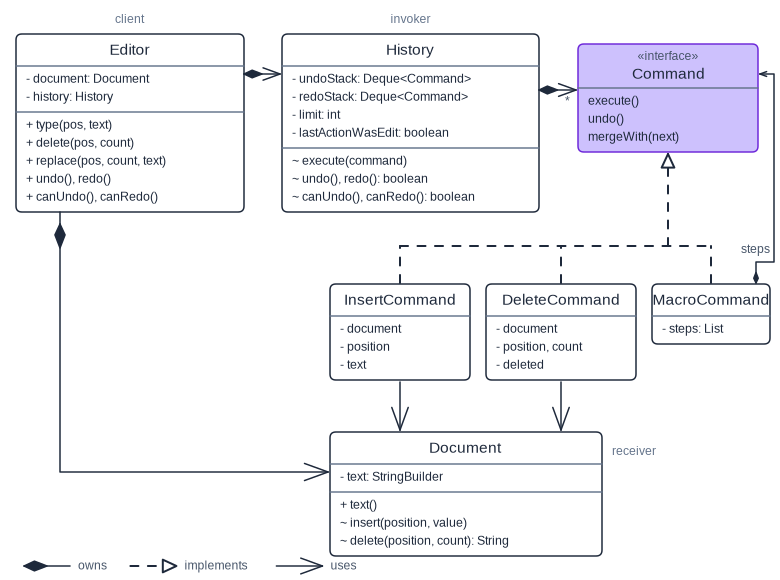
Here is one undo, traced through the objects:
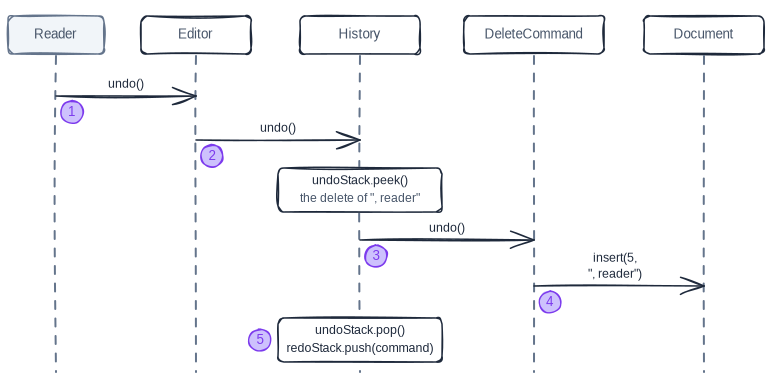
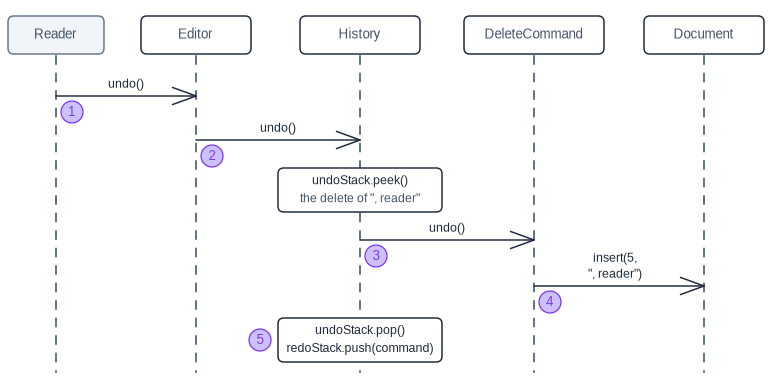
The whole project is below. Click any class name in the code to open that class.
package editor; import java.util.ArrayDeque;import java.util.Deque; class History { private final Deque<Command> undoStack = new ArrayDeque<>(); private final Deque<Command> redoStack = new ArrayDeque<>(); private final int limit; private boolean lastActionWasEdit; History(int limit) { if (limit <= 0) { throw new IllegalArgumentException("History limit must be positive, got " + limit); } this.limit = limit; } void execute(Command command) { command.execute(); redoStack.clear(); Command last = undoStack.peek(); if (lastActionWasEdit && last != null && last.mergeWith(command)) { return; } undoStack.push(command); if (undoStack.size() > limit) { undoStack.removeLast(); } lastActionWasEdit = true; } boolean undo() { Command command = undoStack.peek(); if (command == null) { return false; } // Move the command only after undo() succeeds, so one that throws stays where it was. command.undo(); undoStack.pop(); redoStack.push(command); lastActionWasEdit = false; return true; } boolean redo() { Command command = redoStack.peek(); if (command == null) { return false; } command.execute(); redoStack.pop(); undoStack.push(command); return true; } boolean canUndo() { return !undoStack.isEmpty(); } boolean canRedo() { return !redoStack.isEmpty(); }}The demo in demo/Main.java runs a short session. Each line shows the action and the text after it:
type "Hello"                   "Hello"
type " world"                  "Hello world"
type "!"                       "Hello world!"
replace "Hello" with "Hi"      "Hi world!"
undo                           "Hello world!"
undo                           "Hello"
redo                           "Hello world!"
undo                           "Hello"
type ", reader"                "Hello, reader"
redo (nothing to redo)         "Hello, reader"
delete ", reader"              "Hello"
undo                           "Hello, reader"
undo                           "Hello"
undo                           ""
undo (nothing to undo)         ""
Follow it down. The "!" joins the " world" step, because it continues the same typing with no space. So after undoing the replace, the next undo removes " world!" in one step. Redo brings it back, and undo removes it again. Then ", reader" is typed. That is a new edit, so the redo stack is cleared, and the following redo has nothing to do. Undo walks back through the delete, the ", reader" typing and finally "Hello", and the last undo finds an empty stack.
What it costs
The pattern makes one kind of change cheap and another kind expensive.
A new kind of edit is cheap. An UppercaseCommand is one new class with an execute and an undo. History and the other commands do not change, and the new edit can be undone, redone and grouped into macros straight away.
A new capability for every command is expensive. Suppose the menu should say "Undo Typing" or "Undo Delete". That is a new method on Command, say label(). A default method in the interface would avoid editing every class, but a default can only say something generic like "Undo". To get a real label, every command class needs its own version.
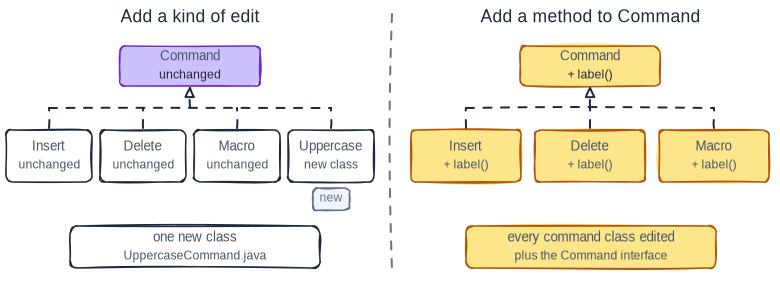
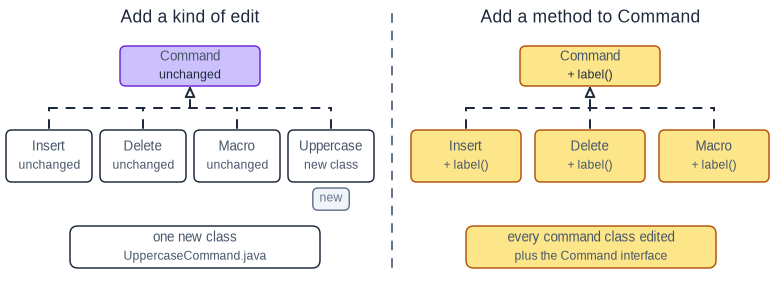
There are smaller costs too. Every edit is now a class, so a dozen editing features means a dozen command classes. Each class must get its own reverse exactly right, and a wrong reverse damages the document quietly. And a command depends on running against the same text it was made for, which is why a new edit has to clear the redo stack.
When a snapshot is better
If the state is small, saving a copy is simpler and cannot get a reverse wrong. A form with a handful of fields can keep its old values:
record FormState(String name, String email, boolean subscribed) {} private final Deque<FormState> undoStates = new ArrayDeque<>(); void change(FormState next) { undoStates.push(current); current = next;} void undo() { if (!undoStates.isEmpty()) { current = undoStates.pop(); }}Each step is three small fields, and there is no reverse to write. Use commands when copies get large, when the program needs to know what each step did, or when edits need to be queued, logged or sent somewhere.
Commands and copies also mix. A command whose change is hard to reverse, such as "apply a filter to this image", can save a copy of just the part it touches and restore that on undo.
Command or Memento?
The Memento pattern also gives undo, by saving state instead of changes. The object makes a memento of its own state, a sealed object that only it can read. The history keeps mementos and hands one back to restore, but it cannot look inside or change one, so the object's insides stay private. Our first version saved copies too, but it was plain snapshot undo, not a real Memento: the editor stacked raw strings that anything could read.
| Command | Memento | |
|---|---|---|
| What each step stores | The change: what was done and how to reverse it | The state: a copy of the object before the change |
| Size of a step | The size of the edit | The size of the object |
| Knows what happened | Yes, each step is "insert" or "delete" | No, only what the state was |
| Can be replayed on another copy | Yes, as the same change | No, it would overwrite that copy's own state |
| Risk | A wrong reverse corrupts the state | Memory, for large objects |
A short way to say it: a command remembers what you did, a memento remembers what it was.
In an interview
The Command pattern sits inside several low-level design questions:
- a text or drawing editor with undo;
- a remote control or smart home app, where each button is a command;
- a task scheduler or job queue;
- a bank transfer system that logs every operation;
- any menu or toolbar whose actions need undo.
It rarely appears as "implement the Command pattern". It appears as "add undo" or "let users queue these actions".
A good order for presenting it:
- Draw the two stacks first. Show an edit, an undo, and a new edit clearing the redo stack. It takes a minute and shows you understand the behaviour before any class appears.
- Name the parts. The command interface with
executeandundo, the receiver that changes, and the history that keeps commands. - Write one command in full, with its undo. A delete is the best choice, because it shows that a command must save what it removed.
- Then write the history, and explain the order of steps in
execute.
Common mistakes:
- A command that stores too little to undo. A delete that keeps only a position and a count cannot restore the text.
- Recording the command before running it. If the command then throws, a step that never happened sits on the undo stack.
- Keeping the redo stack after a new edit. Its commands now point at text that has moved.
- Undoing a macro in forward order. The steps of a group must be reversed newest first.
- One undo step per key press. It works, but removing a sentence takes one undo per letter. Say how you would group typing, even if you do not code it.
- No limit on the history. Every command stays in memory forever.
Summary
- Use the Command pattern when actions need to be undone, redone, queued, logged or replayed. It turns each action into an object with
executeandundo. - A command stores just enough to reverse its own change, such as the text a delete removed.
- The history runs a command first, then clears the redo stack, then records it, so a failed edit leaves nothing behind.
- A new edit clears the redo stack, because the old commands no longer match the text.
- A macro command groups several commands into one undo step and undoes them in reverse order.
- For small state, saving copies is simpler, and the Memento pattern keeps those copies private to the object.