Right-click a folder on your computer and open its properties. It tells you the size of everything inside it, including folders inside folders, ten levels down. Right-click a single file and you get the same box with the same question answered. You never had to say whether you were asking a file or a folder.
The same shape shows up in many places. A menu holds items and other menus. A company holds people and teams, and a team holds people and smaller teams. A screen holds buttons and panels, and a panel holds more buttons. On the Command pattern page, a macro holds commands and can hold other macros. Each is a tree where a group and a single item must answer the same question.
The Composite pattern makes a group and a single item look the same to whoever asks. In this article we build a small in-memory file system twice. The first version has two unrelated classes and a type check in every method. The second uses the Composite pattern. Then we look at what the pattern costs, how it differs from the Decorator pattern, and how it shows up in interviews.
All the project code is Java, and it compiles and runs. Snippets come from two projects, the first version and the finished one, apart from short sketches that are labelled. The Open file button on a snippet from the finished project shows the whole file in a code browser.
The file system we are building
The file system lives in memory. It holds three kinds of thing:
- A file has a name and a size in bytes.
- A folder has a name and holds files, shortcuts and other folders.
- A shortcut has a name and points at another file or folder, like a desktop shortcut.
It must answer these on any of them:
- Size: the total bytes inside, counted once each.
- File count: how many files are inside.
- Find: every node with a given name, anywhere below.
- Print: the tree, indented, in name order.
And it must let us change the tree:
- Add a node to a folder, move it to another folder, and delete it.
Two rules keep the tree a tree: a node sits in exactly one folder, and a folder can never end up inside itself. Two more keep it usable: two children of one folder cannot share a name, and the tree has a depth limit, which we come to in Step 6.
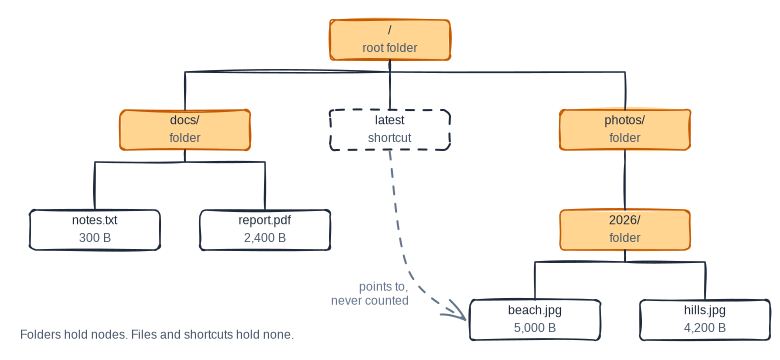
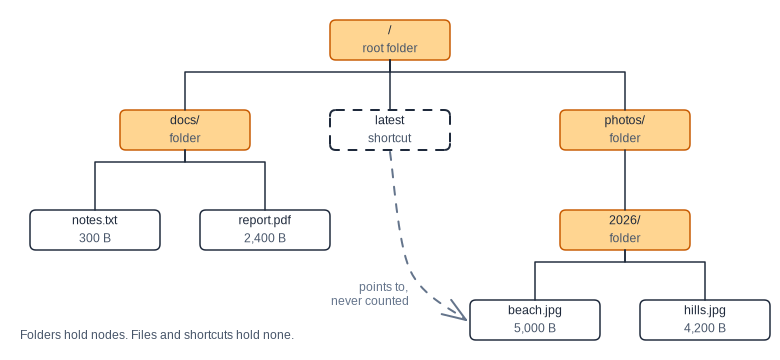
This drawing is the tree every example in the article uses. The questions in the list above are asked of any box in it. "How big is this?" makes as much sense for report.pdf as for the root.
The first version: a type check in every method
The obvious way to write this is two classes, FileEntry and FolderEntry, with a folder holding a List<Object>. A tools class walks the tree. Each method asks every entry what it is before it can do anything:
public static long totalSize(Object entry) { if (entry instanceof FileEntry file) { return file.size; } else if (entry instanceof FolderEntry folder) { long total = 0; for (Object child : folder.contents) { total += totalSize(child); } return total; } throw new IllegalArgumentException("Not a file or a folder: " + entry); } public static int countFiles(Object entry) { if (entry instanceof FileEntry) { return 1; } else if (entry instanceof FolderEntry folder) { int count = 0; for (Object child : folder.contents) { count += countFiles(child); } return count; } throw new IllegalArgumentException("Not a file or a folder: " + entry); }find and print follow the same shape: an instanceof test for a file, another for a folder, and a throw for anything else.
This code works. For two kinds of node and four questions, it is short and easy to follow, and if the tree never grows a third kind of node, it is a fine answer. The trouble starts when it changes.
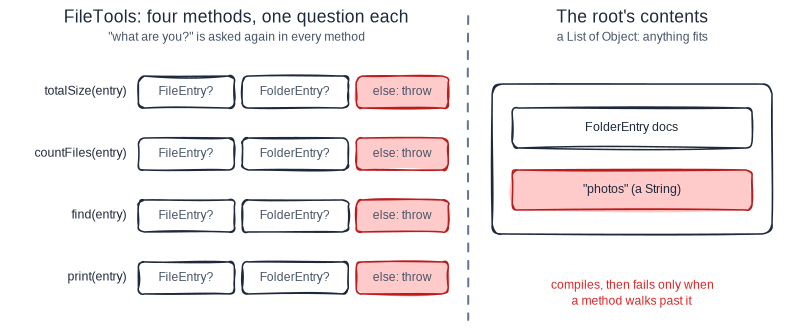
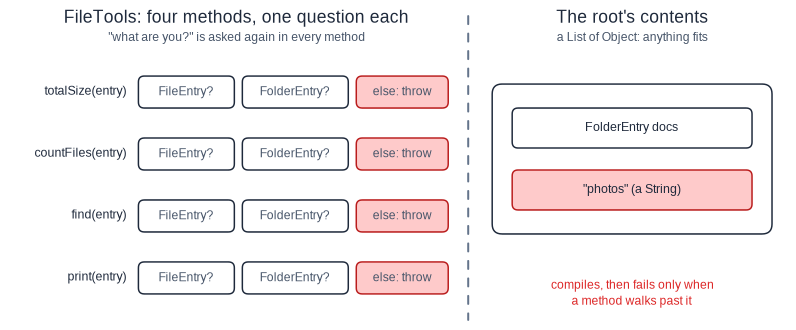
Every method asks "what are you?" again. The four methods hold four copies of the same test. The rules for a folder are spread across all of them.
A new kind of node means editing every method. A shortcut needs a third branch in totalSize, countFiles, find and print. If one is missed, the code still compiles. The missing case falls through to the throw, and the bug shows up only when someone walks a tree that holds a shortcut.
Nothing stops the wrong thing going into a folder. contents is a list of Object, so a stray String compiles fine. The demo adds one:
docs/
  notes.txt (300 B)
  report.pdf (2400 B)
docs: 2700 B, files: 2
found: 1
whole tree: Not a file or a folder: photos
The docs folder works. The whole tree fails, and only at the moment a method walks past the string.
The idea
The pattern works like this:
- One abstract type,
Node, stands for anything that can sit in the tree. It declares the questions: size, file count, find, print. - A leaf answers for itself. A file knows its own size.
- A composite holds nodes and answers by asking each child the same question and combining their answers. A folder's size is the sum of its children's sizes.
- Callers only ever talk to
Node. They never check what kind of node they have.
Because a folder holds Nodes, and a folder is itself a Node, a folder can hold other folders to any depth, and the question travels down the tree on its own.
The pattern has three names for its parts. The shared type, Node, is the component. File and Shortcut are leaves. Folder is the composite.
Building it, step by step
Step 1: one type for every node
Node is an abstract class. It holds what every node has, a name and the folder it sits in, and it declares the questions every node must answer:
public abstract class Node { public static final int MAX_DEPTH = 256; public static final int MAX_NAME_LENGTH = 255; private final String name; private Folder parent; public abstract long size(); public abstract int fileCount(); public final List<Node> find(String name) { Objects.requireNonNull(name, "name"); List<Node> found = new ArrayList<>(); collectMatches(name, found); return found; } public final String tree() { StringBuilder out = new StringBuilder(); appendTree(out, 0); return out.toString(); }size() and fileCount() are abstract, so every kind of node must answer them. find and tree are final. Each sets up a list or a buffer, then calls a package-private step, collectMatches or appendTree, which each kind of node fills in.
The first decision is what else belongs on Node.
Where does add live?
On Node, so every node looks the same
Every node gets add, and a file throws when asked to hold something. Callers can treat any node exactly alike, which is the point of the pattern. But a file now has a method that can never work, and a caller who adds to a file finds out only when the program runs.
On Folder only, and Node has only what makes sense for every nodeOur pick
Node declares the questions every node can answer, plus moveTo and delete, because every node can be moved or deleted. add lives on Folder, because only a folder can hold anything. Code that builds the tree has to hold a Folder, so adding to a file does not compile. Code that only asks questions still treats every node the same, and that is most of the code.
Step 2: the leaves
A file is the simplest node. It answers from its own fields:
public final class File extends Node { private final long sizeInBytes; public File(String name, long sizeInBytes) { super(name); if (sizeInBytes < 0) { throw new IllegalArgumentException("A size cannot be negative: " + sizeInBytes); } this.sizeInBytes = sizeInBytes; } @Override public long size() { return sizeInBytes; } @Override public int fileCount() { return 1; }A file holds nothing, so its count is always one, and a zero-byte file still counts. A negative size throws an IllegalArgumentException, because a negative size can only come from a bug in the calling code.
A shortcut is the second leaf. It points at a node, and that raises a question about counting:
public final class Shortcut extends Node { private final Node target; public Shortcut(String name, Node target) { super(name); this.target = Objects.requireNonNull(target, "target"); } public Node target() { return target; } public boolean isBroken() { return topOf(target) != topOf(this); } // A shortcut never follows its target, so the target is counted once, where it lives. @Override public long size() { return 0; } @Override public int fileCount() { return 0;Does a shortcut count its target?
Yes, it reports the target's size
It sounds helpful: a shortcut to a 5,000-byte photo reports 5,000 bytes. But the photo is already counted in its own folder, so the root's total would count it twice. A shortcut to its own parent folder would make size() call itself until the stack runs out and it throws a StackOverflowError.
No, a shortcut is zero bytes and zero filesOur pick
The target is counted once, where it lives. A shortcut can never send size() round in a circle, whatever it points at, because it never follows its target. The cost is that a shortcut's size says nothing about what it points at; code that wants that asks target() directly.
Step 3: the composite asks its children
This is where the pattern does its work. A folder answers each question by asking its children the same question:
@Override public long size() { long total = 0; for (Node child : children.values()) { total = Math.addExact(total, child.size()); } return total; } @Override public int fileCount() { int count = 0; for (Node child : children.values()) { count = Math.addExact(count, child.fileCount()); } return count; } @Override void collectMatches(String wanted, List<Node> found) { if (!root && name().equals(wanted)) { found.add(this); } for (Node child : children.values()) { child.collectMatches(wanted, found); } }size() does not check what kind of child it has. A file answers with its bytes, a shortcut with zero, and a folder by asking its own children. Each call goes down one level, so the root's answer is built from every level of the tree. Math.addExact throws an ArithmeticException if the total passes the largest long, instead of quietly going negative.
Children live in a TreeMap keyed by name. That gives two things at once: two children cannot share a name, and every walk visits children in name order, so find and tree always give the same order. The order compares character codes, so capital letters sort before small ones: Zeta comes before notes.txt. The root has no name, so find never returns it.
Compute folder sizes each time, or keep a running total?
Each folder keeps a running total
Asking a folder its size becomes instant. But every add, move and delete must update the total of every folder above it, all the way to the root. One missed update leaves a wrong number that nothing will ever correct, and it stays wrong until the folder is rebuilt.
Add up the children every timeOur pick
size() visits every node below, so it takes longer on a bigger tree. In return it is always right, and add, move and delete stay simple. For a tree held in memory this is the better trade. If size() were called constantly on a huge tree, a running total would be worth its upkeep, and the parent links from Step 4 are what would make it possible.
Step 4: adding a child safely
Folder.add is the only way a node joins a tree, and it checks everything before it changes anything:
public void add(Node child) { Objects.requireNonNull(child, "child"); Optional<Folder> current = child.parent(); if (current.isPresent()) { throw new IllegalStateException(child.path() + " is already in a folder. Call moveTo instead"); } checkCanHold(child); attach(child); } void checkCanHold(Node child) { if (child.isRoot()) { throw new IllegalArgumentException("A root folder cannot go inside another folder"); } for (Folder ancestor = this; ancestor != null; ancestor = ancestor.parentOrNull()) { if (ancestor == child) { throw new FileSystemException("Cannot put " + child.path() + " inside itself"); } } if (children.containsKey(child.name())) { throw new FileSystemException(path() + " already has something called " + child.name()); } if (depth() + 1 + child.height() > MAX_DEPTH) { throw new FileSystemException("The tree would be more than " + MAX_DEPTH + " levels deep"); } } void attach(Node child) { children.put(child.name(), child); child.setParent(this); } void detach(Node child) { children.remove(child.name()); child.setParent(null); }The method checks five things, in order:
- A node that is already in a folder is refused. A node sits in exactly one folder, and moving it is a different operation, with its own method.
- A root folder cannot go inside anything.
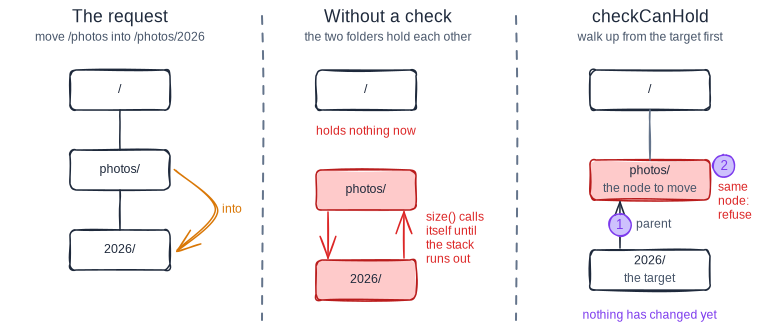
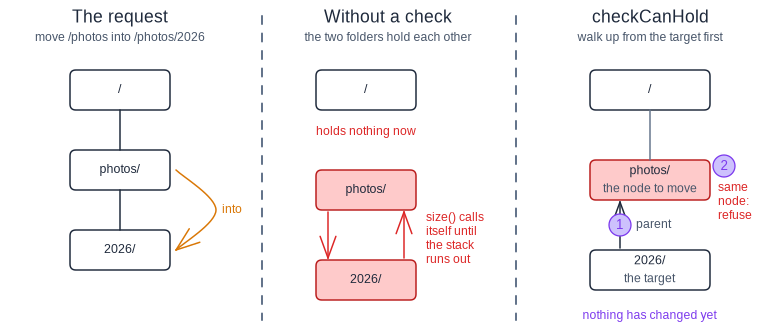
- The folder must not be the node itself or anything inside it. The loop walks up from this folder through its parents. If it meets the node being added, adding it would put the node inside itself.
- The name must be free in this folder.
- The tree must stay within the depth limit, counting the height of the subtree being added.
Only then does attach put the child in the map and set its parent. attach and detach are package-private, and they are the only code that changes a parent link, so the map and the parent link always change together.
Does a node know its parent?
No, only folders know their children
The tree has one kind of link and nothing can get out of step. But a node cannot tell you its path, and a move cannot find the folder to take the node out of without searching from the top. The check for a folder inside itself has to search everything below the moved folder for the target.
Yes, every node holds its parent, set only by FolderOur pick
path() walks up the parent links. moveTo and delete know where the node is. The cycle check walks up from the target, one step per level. The parent links save a search below the moved folder; the depth check's walk through height() remains. The cost is a second link to keep in step with the map, so only attach and detach may change it.
The file system reports two kinds of error. A FileSystemException means a person asked for something the rules refuse: a name already taken, a name with a / in it, a folder inside itself, a tree too deep, deleting the root. Its message is written to be shown to that person. Any other exception means the calling code has a bug. A NullPointerException means a null was passed. An IllegalArgumentException means a negative size or a root put inside a folder. An IllegalStateException means a node already in a folder was added again, or a node in no folder was moved or deleted. If the files in a tree add up to more than the largest long, size() throws an ArithmeticException until a file is removed.
Step 5: moving and deleting
A move takes a node out of one folder and puts it in another. The order of the steps matters:
public void moveTo(Folder target) { Objects.requireNonNull(target, "target"); Folder from = parent; if (from == null) { throw new IllegalStateException(path() + " is not in a folder, so it cannot be moved. Call add instead"); } if (from == target) { return; } // Every check runs before anything changes, so a refused move leaves the tree as it was. target.checkCanHold(this); from.detach(this); target.attach(this); } public void delete() { if (isRoot()) { throw new FileSystemException("The root folder cannot be deleted"); } if (parent == null) { throw new IllegalStateException(path() + " is not in a folder, so it cannot be deleted"); } parent.detach(this); }moveTo runs every check against the target first, with the same checkCanHold that add uses. Only after all of them pass does it detach the node from its old folder and attach it to the new one. If it detached first and a check then failed, the node would end up in neither folder. A move to the folder the node is already in does nothing.
delete detaches the node from its folder, and the whole subtree below a deleted folder leaves the tree with it. The root cannot be deleted. A deleted folder can be added to another folder later.
A shortcut holds the target object, not its path. If the target moves, the shortcut follows it. When the target is deleted, the shortcut stays. isBroken() in the Step 2 snippet walks up from the shortcut and from its target to the top of each one's tree. If the two tops differ, tree() prints the shortcut as broken. Adding the deleted folder back repairs it. A new node created at the old path does not. A symbolic link on a real disk stores a path, so a new file there repairs it. Our shortcut does not.
Step 6: how deep can a tree go?
Every question in this design is answered by recursion: a folder calls the same method on each child. Each level of the tree adds one call to the Java stack, and the stack is finite. A deep enough chain of folders would throw a StackOverflowError in the middle of size().
Limit the depth, or walk the tree without recursion?
Walk with an explicit stack instead of recursion
size(), find and tree each keep their own stack of nodes still to visit, so any depth works. The loop needs each node's children, so every node must expose them, with an empty list for a leaf. That brings back child access on every node, which Step 1 decided against, and it moves the questions out of the nodes into loops.
Refuse any change that makes the tree deeper than 256 levelsOur pick
The recursion stays, and so does the pattern. checkCanHold adds this folder's depth, one level for the child, and the height of the subtree being added, and refuses anything past MAX_DEPTH. Real file systems also limit how long a path can be. The number is a choice: high enough for any realistic folder tree, and low enough that the recursion is always safe.
height() is a small Composite question of its own: a leaf is height 0, and a folder is one more than its tallest child:
@Override int height() { int tallest = 0; for (Node child : children.values()) { tallest = Math.max(tallest, child.height() + 1); } return tallest; }The project includes a program that builds a chain exactly 256 folders deep, tries to add one more level, and then walks the tree:
folders 256 levels deep: allowed
a file one level deeper: refused. The tree would be more than 256 levels deep
size of the whole tree: 0 B
lines in the printed tree: 257
The finished design
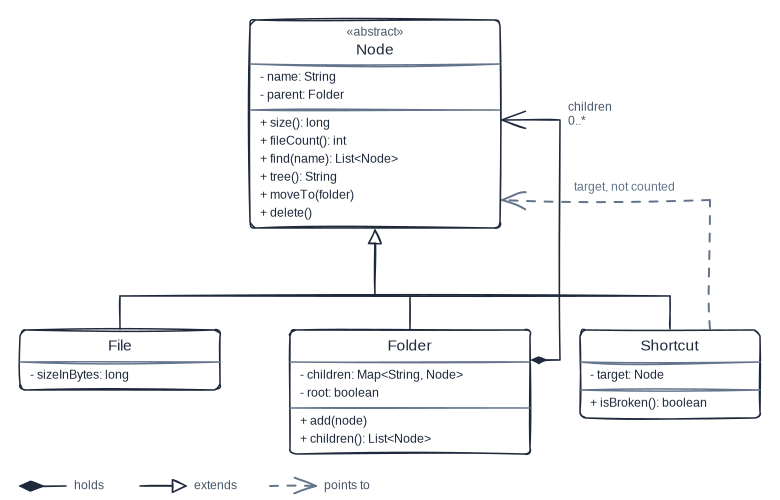
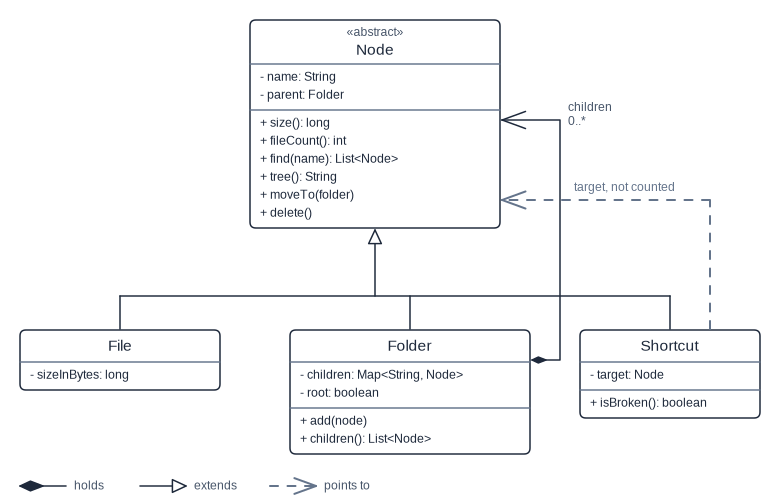
Here is one call to size() on the root, traced through the tree:
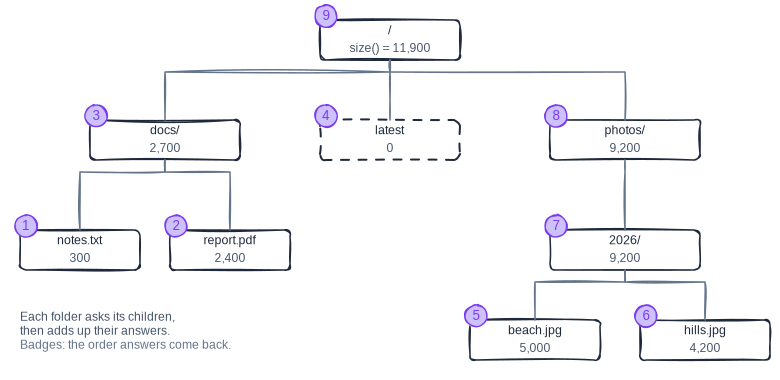
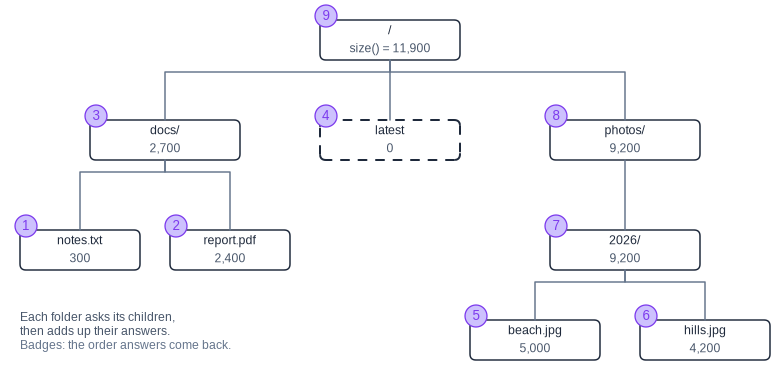
The tree is not thread-safe. It is built for one thread at a time. A tree shared between threads would need one lock for the whole tree, not one per folder, because moveTo changes two folders at once and isBroken walks two trees.
The whole project is below. Click any class name in the code to open that class.
package fs; import java.util.List;import java.util.Map;import java.util.Objects;import java.util.Optional;import java.util.TreeMap; public final class Folder extends Node { private final Map<String, Node> children = new TreeMap<>(); private final boolean root; public Folder(String name) { super(name); this.root = false; } private Folder() { super(); this.root = true; } public static Folder newRoot() { return new Folder(); } public List<Node> children() { return List.copyOf(children.values()); } public Optional<Node> child(String name) { return Optional.ofNullable(children.get(name)); } public void add(Node child) { Objects.requireNonNull(child, "child"); Optional<Folder> current = child.parent(); if (current.isPresent()) { throw new IllegalStateException(child.path() + " is already in a folder. Call moveTo instead"); } checkCanHold(child); attach(child); } @Override public long size() { long total = 0; for (Node child : children.values()) { total = Math.addExact(total, child.size()); } return total; } @Override public int fileCount() { int count = 0; for (Node child : children.values()) { count = Math.addExact(count, child.fileCount()); } return count; } @Override void collectMatches(String wanted, List<Node> found) { if (!root && name().equals(wanted)) { found.add(this); } for (Node child : children.values()) { child.collectMatches(wanted, found); } } @Override void appendTree(StringBuilder out, int depth) { indent(out, depth); out.append(root ? "/" : name() + "/").append('\n'); for (Node child : children.values()) { child.appendTree(out, depth + 1); } } @Override int height() { int tallest = 0; for (Node child : children.values()) { tallest = Math.max(tallest, child.height() + 1); } return tallest; } @Override boolean isRoot() { return root; } void checkCanHold(Node child) { if (child.isRoot()) { throw new IllegalArgumentException("A root folder cannot go inside another folder"); } for (Folder ancestor = this; ancestor != null; ancestor = ancestor.parentOrNull()) { if (ancestor == child) { throw new FileSystemException("Cannot put " + child.path() + " inside itself"); } } if (children.containsKey(child.name())) { throw new FileSystemException(path() + " already has something called " + child.name()); } if (depth() + 1 + child.height() > MAX_DEPTH) { throw new FileSystemException("The tree would be more than " + MAX_DEPTH + " levels deep"); } } void attach(Node child) { children.put(child.name(), child); child.setParent(this); } void detach(Node child) { children.remove(child.name()); child.setParent(null); }}The demo in demo/Main.java builds the sample tree, asks it questions, and then tries three changes:
/
  docs/
    notes.txt (300 B)
    report.pdf (2400 B)
  latest -> /photos/2026/beach.jpg
  photos/
    2026/
      beach.jpg (5000 B)
      hills.jpg (4200 B)

/: 11900 B, files: 4
/docs: 2700 B, files: 2
/docs/report.pdf: 2400 B, files: 1
found: /photos/2026/beach.jpg

add another notes.txt to /docs: refused. /docs already has something called notes.txt
move /photos into /photos/2026: refused. Cannot put /photos inside itself
move /docs/report.pdf into /photos/2026: done
/
  docs/
    notes.txt (300 B)
  latest -> /photos/2026/beach.jpg
  photos/
    2026/
      beach.jpg (5000 B)
      hills.jpg (4200 B)
      report.pdf (2400 B)

delete /photos: done
/
  docs/
    notes.txt (300 B)
  latest -> (broken)
/: 300 B, files: 1
The same describe call works on the root, a folder and a single file, with no type check. The second notes.txt is refused, and so is moving /photos into its own subfolder; both leave the tree as it was. Moving report.pdf works, and the next print shows it in its new place. Deleting /photos drops the totals to 300 bytes in one file, and the shortcut that pointed into /photos now prints as broken.
What it costs
The pattern makes one kind of change cheap and another expensive, the same trade the State pattern page describes.
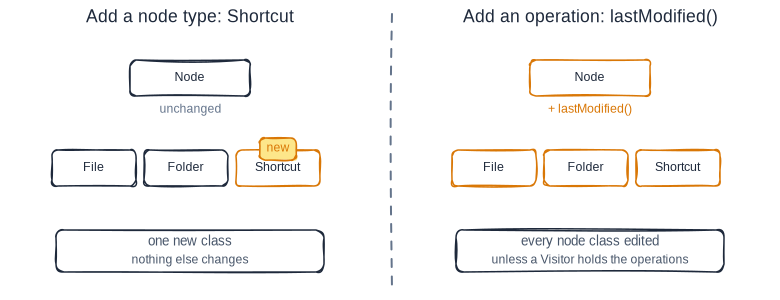
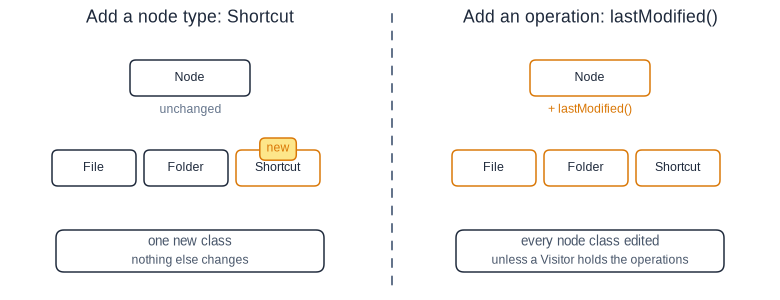
Adding a kind of node is cheap. Shortcut was one new class. Node, File and Folder did not change, and every question already worked on trees that hold shortcuts.
Adding a question is expensive. A lastModified() question means one new method on Node and an answer in File, Folder and Shortcut. In the first version, it would have been one new method in the tools class.
Two common additions
Renaming changes a node's name and its key in the parent's map, so the two must change together, inside Folder, after the same name checks as add. A case-insensitive file system, where Notes.txt and notes.txt are the same name, would key the map on a folded form of the name and keep the original for display.
Finding a node by path, such as /photos/2026/beach.jpg, splits the path on / and calls child() once per part, starting at the root. Each step is one map lookup, so the cost grows with the depth of the path, and a little with each folder's width, not with the size of the tree.
When the pattern is too much
If the tree has two kinds of node that will never change and only a few questions, the pattern adds classes for little gain. On Java 21 and later, a sealed interface lets one method handle every kind of node, and the compiler checks that no kind is missed:
sealed interface Entry permits FileEntry, FolderEntry {} record FileEntry(String name, long size) implements Entry {} record FolderEntry(String name, List<Entry> children) implements Entry {} static long totalSize(Entry entry) { return switch (entry) { case FileEntry file -> file.size(); case FolderEntry folder -> { long total = 0; for (Entry child : folder.children()) { total += totalSize(child); } yield total; } };}This fixes two of the first version's problems: a missing case no longer compiles, and a folder holds only entries. It keeps the questions in one place, which suits a small, fixed tree. Once the kinds of node start to grow, the Composite version is easier to extend.
A list with no nesting needs neither. If a folder can never hold another folder, a plain loop over its files is enough.
Composite or Decorator?
Both patterns have a class that implements an interface and holds objects of that same interface, so their class diagrams look alike. The difference is in how many it holds and what it does with them.
| Composite | Decorator | |
|---|---|---|
| How many it holds | Any number of children | Exactly one inner object |
| What a call does | Asks every child and combines the answers | Adds a job around one call to the inner object |
| Shape | A tree | A single line of layers |
| Example | A folder's size is the sum of its children's | A cache layer in front of a price lookup, on the Decorator pattern page |
A short way to remember it: a composite gathers answers from many; a decorator changes how one answer is reached.
In an interview
The Composite pattern sits inside low-level design questions about file systems, menus with submenus, an organisation chart, a screen built from panels and widgets, nested comments, a product made of parts, and macros made of commands. In each, the same operation must work on one item and on a group of items.
We suggest presenting it in this order:
- Draw the tree first, with one group, one leaf and a group inside a group. Then point out that the same question is asked of every box.
- Write the shared type with only the questions, and say where
addlives and why. - Write one leaf and the composite in full. The composite's loop that asks each child is the heart of the answer. Then say how you stop a folder going inside itself, and how deep the recursion can go.
Mistakes to avoid:
- A type check in the middle of a "Composite". If
Folder.size()checks whether each child is a file, the pattern has been written but not used. - No cycle check. Without one, moving a folder into its own subfolder builds a loop, and the next
size()calls itself until the stack runs out. - Changing a child list and a parent link in different places. One gets updated and the other does not, and paths start lying. Keep both changes in one method.
- Detaching before checking. A refused move then leaves the node in no folder at all.
- A shortcut or link that is followed while counting. It counts the target twice, and a link to an ancestor makes the count call itself until the stack runs out.
- Handing out the live child list. A caller can then add to it directly and skip every check. Return a copy that cannot be changed.
Summary
- Use the Composite pattern when a group and a single item must answer the same questions, and groups can hold groups.
- One shared type declares the questions. Leaves answer for themselves. A composite asks each child and combines their answers.
- Put
addonly on the composite, unless every caller needs to treat every node alike. Moving and deleting suit every node. - Check before you change: no name clash, no folder inside itself, no tree past the depth limit. Change the child list and the parent link together.
- Adding a kind of node is cheap. Adding a question touches every node class; the Visitor pattern trades that the other way.