A shop's GST (goods and services tax) register for a year is a spreadsheet with 5,000 invoices and 20 columns: 100,000 cells. Yet the sheet has only a handful of looks. The header row is bold on grey. The invoice numbers and names are plain text. The quantities have commas between digit groups. The amounts are dollars, right aligned. The last row is a bold total.
The same shape shows up wherever many small things repeat a few heavy ones: thousands of characters in two fonts, map markers with four icons, a stadium's seats in five seat types.
The Flyweight pattern keeps one copy of the repeated part and lets every small object point at it. In this article we build the register's formatting twice. The first version gives every cell its own format object. The second keeps each look once, in a pool, and every cell points at the look it needs. Then we look at what the pattern costs, how it differs from a cache, and where Java itself uses the same idea.
All the code is Java. Every snippet without a Sketch label is cut from a project that compiles: the first-version snippets from the format-per-cell version, the rest from the finished design. Both programs run, and the outputs shown are what they print.
The register we are building
The register must:
- Hold a value and a look for every cell of a 5,000 × 20 sheet, which is 100,000 cells.
- Keep each look once. Cells with the same look share one object. A file reader that builds a fresh style for every cell it reads must still end up with one object per look.
- Change one cell's look without touching any other cell.
- Show a cell's value in its look, in a column of a given width: amounts in dollars with digit groups, and a number too wide for its column as
###. - Refuse mistakes: a blank font, a size outside 6 to 72, a colour outside the range, a cell outside the sheet.
- Let several sheets be read at once on different threads, sharing one set of looks.
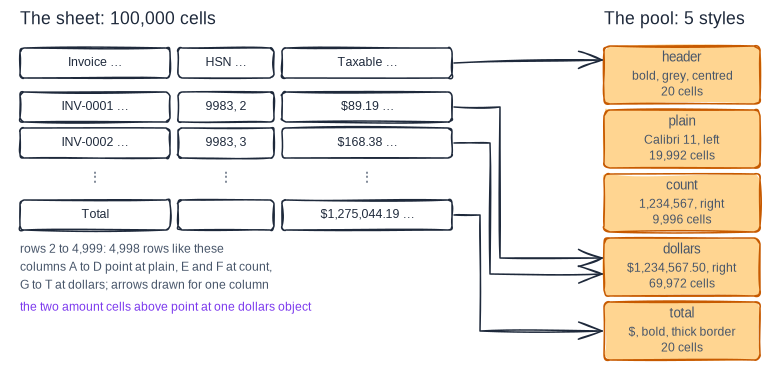
This is the figure to draw first in an interview. The left number counts objects and the right number counts looks. The gap between them is what the pattern saves, and when they are close, it saves nothing.
The first version: a format in every cell
The obvious design gives each cell a CellFormat object that it owns:
/** One cell: its value and its own format. */public class Cell { private Value value = Value.EMPTY; private CellFormat format = new CellFormat(); public Value value() { return value; } public void setValue(Value value) { this.value = value; } public CellFormat format() { return format; }Line 4 creates a new format with every cell. Formatting a cell means changing its format through setters, cell by cell:
for (int row = 0; row < ROWS; row++) { for (int column = 0; column < COLUMNS; column++) { Cell cell = sheet.cell(row, column); cell.setValue(Value.number(row * 100L + column)); if (row == 0) { cell.format().setBold(true); cell.format().setFill(GREY); cell.format().setBorder(Border.THIN); cell.format().setAlign(Align.CENTRE); } else if (column >= 6) { cell.format().setFormat(Format.DOLLARS); cell.format().setAlign(Align.RIGHT); } } }This code works, and for a sheet of a few hundred cells it is fine.
The sheet keeps 100,000 copies of three looks. It holds 100,000 CellFormat objects, and each of them holds one of three looks: the header, plain text or dollars. Both projects include a SizeModel class that estimates bytes from an object's fields. It counts a 12-byte header, 4 bytes per reference and each primitive field's own size, rounded up to a multiple of 8. That is how a 64-bit Java virtual machine (JVM) with compressed references usually lays objects out, but real layouts differ, so the estimate is for comparing two designs. The cells' values are left out, because both versions store them the same way.
Sharing a format that can change is a bug. The obvious fix for the memory is to let cells share a format. The first version's format painter does exactly that:
/** The format painter: copies one cell's look onto a range. To save memory, it shares the object. */ public void paintFormat(int fromRow, int fromColumn, int top, int left, int bottom, int right) { CellFormat source = cell(fromRow, fromColumn).format(); for (int row = top; row <= bottom; row++) { for (int column = left; column <= right; column++) { cell(row, column).shareFormat(source); } } }Line 28 points every painted cell at the source cell's format. The memory goes down, but a CellFormat can still be changed by anyone who holds it. The program paints the header row from A1 and then fills C1 red:
GST register: 100,000 cells
CellFormat objects: 100,000
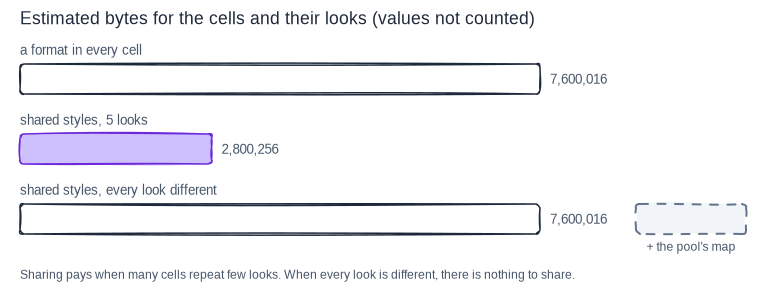
Estimated size of the cells and their formats: 7,600,016 bytes

Format painter: row 1 now shares A1's format. CellFormat objects: 99,981
C1 filled red. Fill of A1, B1, C1, D1: red, red, red, red
The last line is the bug. One setFill on C1 turned the whole header red, because all four cells hold the same object, and nothing in the code warns about it.
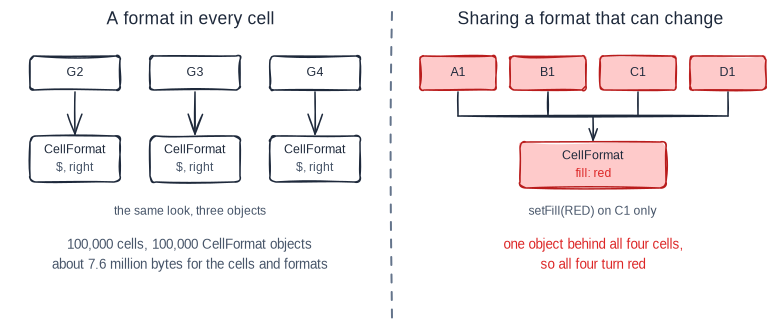
We need cells to share a look, and we need a shared look to be impossible to change.
The idea
The pattern works like this:
- Split what a cell knows into two parts. The look is the font, size, bold and italic, colours, border, number format and alignment, which many cells repeat. The cell's own data is its value and its place in the grid, which no other cell shares.
- Make the look an object that can never change, and let many cells point at one. That shared object is the flyweight.
- Keep one flyweight per look in a pool. Code that has a look in hand asks the pool for its copy, and the pool hands back the one it already has, or keeps the new one if the look is new.
- Pass the cell's own data in whenever the flyweight does work. The look renders a value it is given, in a width it is given.
The shared part is often called intrinsic state and the per-cell part extrinsic state. The pool is often called the flyweight factory, but it is not a factory in the Factory pattern page's sense. That page's simple factory picks which class to build from a value. The pool picks between an object it already holds and the one it was given.
Building it, step by step
Step 1: a look that cannot change
CellStyle is a record:
/** * How a cell looks. A record, so it never changes once it is made, and two * styles with the same values are equal. Both facts let many cells share one. */public record CellStyle(String font, int size, boolean bold, boolean italic, int textColour, int fillColour, Border border, Format format, Align align) { public static final int MIN_SIZE = 6; public static final int MAX_SIZE = 72; public static final int BLACK = 0x000000; public static final int WHITE = 0xFFFFFF; public CellStyle withBold(boolean bold) { return new CellStyle(font, size, bold, italic, textColour, fillColour, border, format, align); } public CellStyle withFill(int fillColour) { return new CellStyle(font, size, bold, italic, textColour, fillColour, border, format, align); }A record's fields are final, and every component here is itself unchangeable: a String, numbers, booleans and enums. So a CellStyle never changes after it is built. A record holding a list or an array could still change through it. A record also gets equals and hashCode from all its fields, so two styles with the same nine values are equal and hash the same. The pool needs both facts. A look that cannot change is safe to share, and a look that compares by value can be found in a map.
Changing a look means building a new one. withBold and withFill return a new CellStyle with one value changed, and leave the old one as it was.
Can a shared look change?
A format with setters, copied before every edit
This is the first version with discipline added: every caller copies the format before changing it, and shares it only when it is not going to change. It works as long as no caller forgets. The format painter's bug is one forgotten copy, and nothing points at it until a user sees the wrong colour.
A record that never changesOur pick
Sharing is always safe, because no one can change a shared style. The compiler enforces it, so no caller has to remember to copy. The cost is an object for every change: making a cell red builds a new style, even if only one cell ever uses it. The five with methods also repeat the nine-value constructor call, and a tenth value means editing all five.
Step 2: the value and the width come in from outside
The look has to turn a value into text. The value belongs to the cell, so render takes it as an argument, along with the column's width:
/** * The value as it appears in a column `width` characters wide. The value and * the width belong to the cell, not to the style, so they are passed in. */ public String render(Value value, int width) { Objects.requireNonNull(value, "value"); if (width < 1) { throw new IllegalArgumentException("width must be at least 1, got " + width); } String text = switch (value) { case Value.Text t -> t.text(); case Value.Number n -> format.write(n.value()); }; if (text.length() > width) { // A number cut short would be a wrong number, so it shows as ### instead. return value instanceof Value.Number ? "#".repeat(width) : text.substring(0, width); } int spare = width - text.length(); return switch (align) { case LEFT -> text + " ".repeat(spare); case RIGHT -> " ".repeat(spare) + text; case CENTRE -> " ".repeat(spare / 2) + text + " ".repeat(spare - spare / 2); }; }Line 63 is the pattern's other half. Nothing about one cell is stored in the style, so one style object can render any cell that has its look. The cell passes its own data in at the moment it is needed.
Line 74 decides what a value too wide for its column looks like. Text is cut short. A number becomes ###, because a number with its last digits cut off is a different, wrong number. Format.DOLLARS writes an amount in cents as dollars with digit groups, so 123456750 becomes $1,234,567.50.
What does a cell share, and what does it keep?
Share nothing
Each cell keeps its whole look, as in the first version. It is simple, and it costs a format object per cell.
Share the whole cell
Two cells could share one object only if they had the same value too. In a register almost every cell has a different value, so almost nothing would be shared.
Share the look, keep the value and the positionOur pick
The look is what repeats, so the look is shared. The cell keeps its value, and the sheet knows its position. The cost is that every render call passes the value and the width in. Each cell is still a small object of its own, 24 bytes in our estimate. A sheet that needs even less could drop the Cell objects and keep two arrays, one of values and one of styles.
Step 3: one pool, one object per look
StylePool keeps one style per look in a map whose keys and values are styles:
/** * Keeps one CellStyle for each look and hands out that one. Safe to share * between threads: computeIfAbsent looks and stores in one atomic step. */public final class StylePool { private final ConcurrentMap<CellStyle, CellStyle> styles; /** The pool's own style equal to `wanted`. The first time a look is asked for, `wanted` becomes that style. */ public CellStyle intern(CellStyle wanted) { Objects.requireNonNull(wanted, "style"); return styles.computeIfAbsent(wanted, first -> first); }The first time a look is asked for, line 27 stores the style it was given as both the key and the value, and returns it. Every later request with an equal style finds that entry and gets the first object back. The caller's own style is not kept, and the garbage collector can reclaim it.
computeIfAbsent on a ConcurrentHashMap checks and stores in one step, so the pool stays correct when threads share it. putIfAbsent(wanted, wanted), which returns the existing value or null, is just as correct, as long as intern returns wanted only when putIfAbsent returns null. The safety comes from the map keeping one winning value per key, not from the function running once.
How does the pool stay correct with many threads?
A HashMap inside synchronized methods
This is correct. Every intern waits for every other one, even when two threads want different looks. When sheets are read one at a time, this is enough.
get, then put if it was missing
Two threads can both call get for the same new look, both find nothing, and both put. The map ends up holding one of the two, but each thread keeps and uses its own object, so the sheets now hold two objects for one look. With this version, RaceCheck reports rounds where one look has two objects, while size() still reports 41. The pool's own count does not show the bug.
computeIfAbsent on a ConcurrentHashMapOur pick
The check and the store happen in one step for each key, so exactly one object wins for each look. There is no single lock, so threads asking for different looks rarely wait for each other. The one rule is that the function passed in must not change the map itself, and first -> first does not.
The rejected option, written out:
public CellStyle intern(CellStyle wanted) { CellStyle found = styles.get(wanted); if (found == null) { styles.put(wanted, wanted); // another thread may have put an equal style just now found = wanted; } return found;}Step 4: the sheet pools every style it is given
Sheet stores a Cell record for each cell it has been given a value or a style for: the cell's value and a reference to a style. It never stores a style the pool has not seen:
public Sheet(int rows, int columns, StylePool pool) { if (rows < 1 || columns < 1) { throw new IllegalArgumentException("a sheet needs at least one row and one column, got " + rows + " x " + columns); } this.rows = rows; this.columns = columns; this.cells = new Cell[Math.multiplyExact(rows, columns)]; this.pool = Objects.requireNonNull(pool, "pool"); this.defaultStyle = pool.intern(CellStyle.plain()); } public void setValue(int row, int column, Value value) { Objects.requireNonNull(value, "value"); int i = index(row, column); cells[i] = new Cell(value, styleOf(i)); } public void setStyle(int row, int column, CellStyle style) { int i = index(row, column); cells[i] = new Cell(valueOf(i), pool.intern(style)); }Line 46 runs every style through the pool before a cell gets it, and line 35 does the same for the plain style that untouched cells show. So every style in the sheet is the pool's own object, and two cells with the same look always hold the same object. That makes == a correct way to compare looks inside the sheet.
styleRange gives a block of cells one look, and asks the pool only once for the whole block:
/** Gives every cell from (top, left) to (bottom, right), both included, the same style. */ public void styleRange(int top, int left, int bottom, int right, CellStyle style) { checkCell(top, left); checkCell(bottom, right); if (bottom < top || right < left) { throw new IllegalArgumentException("the range ends before it starts"); } CellStyle shared = pool.intern(style); for (int row = top; row <= bottom; row++) { for (int column = left; column <= right; column++) { int i = index(row, column); cells[i] = new Cell(valueOf(i), shared); } } }replaceStyle relies on that ==:
/** Points every cell that looks like `from` at `to` instead, and says how many cells changed. */ public int replaceStyle(CellStyle from, CellStyle to) { Objects.requireNonNull(to, "style"); Optional<CellStyle> found = pool.find(from); if (found.isEmpty()) { return 0; // a look the pool has never seen is in no cell } CellStyle old = found.get(); CellStyle shared = pool.intern(to); if (shared == old) { return 0; } int changed = 0; for (int i = 0; i < cells.length; i++) { if (styleOf(i) == old) { cells[i] = new Cell(valueOf(i), shared); changed++; } } return changed; }Line 68 asks the pool for its own object for from with find, which never adds a look. A look the pool has never seen cannot be in any cell, so lines 69 to 71 return 0 without touching the pool. Line 74 returns 0 when the new look is the old one. Line 79 compares by identity. If a cell could hold a style the pool had never seen, line 79 would miss it while equals would not.
Who makes sure every style is pooled?
Every caller calls pool.intern
The sheet stores whatever it is given. One forgotten intern puts an unpooled copy in a cell. Memory grows a little, and replaceStyle silently skips that cell.
The sheet pools everything it storesOur pick
No cell can hold an unpooled style, whatever the caller does. The cost is a hash of nine values on every setStyle, even when the caller already holds the pooled object.
Only the pool can create a style
CellStyle becomes a class with a private constructor, and the pool is the only way to get one. This is the strongest guarantee. A record cannot do it, because a record's constructor must be at least as visible as the record itself. So we would write equals, hashCode and the accessors by hand.
Step 5: refusing what does not fit
CellStyle checks its values when it is built:
public CellStyle { Objects.requireNonNull(font, "font"); if (font.isBlank()) { throw new IllegalArgumentException("a font needs a name"); } if (size < MIN_SIZE || size > MAX_SIZE) { throw new IllegalArgumentException("size must be " + MIN_SIZE + " to " + MAX_SIZE + ", got " + size); } checkColour(textColour, "text colour"); checkColour(fillColour, "fill colour"); Objects.requireNonNull(border, "border"); Objects.requireNonNull(format, "format"); Objects.requireNonNull(align, "align"); }Sheet checks every row and column, and its constructor uses Math.multiplyExact, so a row count times a column count past the int range fails at once instead of wrapping round:
public Sheet(int rows, int columns, StylePool pool) { if (rows < 1 || columns < 1) { throw new IllegalArgumentException("a sheet needs at least one row and one column, got " + rows + " x " + columns); } this.rows = rows; this.columns = columns; this.cells = new Cell[Math.multiplyExact(rows, columns)]; private int index(int row, int column) { checkCell(row, column); return row * columns + column; } private void checkCell(int row, int column) { if (row < 0 || row >= rows || column < 0 || column >= columns) { throw new IndexOutOfBoundsException("no cell at row " + row + ", column " + column + " in a " + rows + " x " + columns + " sheet"); } }All of these are mistakes in code, so they throw: IllegalArgumentException, NullPointerException, IndexOutOfBoundsException or ArithmeticException. A file reader that finds a size of 90 in a file is a different case. It should turn that into a message for the person who made the file before it ever builds a style.
Step 6: several sheets read at once
A workbook with several sheets can read each one on its own thread, with one pool shared by all of them. Each Sheet is used by one thread only, so it has no lock. The pool is the only shared object, and Step 3 made it safe.
demo/RaceCheck.java reads eight one-row sheets at once, 300 times over. In every round, each thread builds its own fresh copies of the same 40 looks:
300 rounds of 8 sheets read at once, sharing one pool
Last round: 41 styles in the pool (40 looks and the plain one), 40 style objects used across all 8 sheets
Rounds where one look had two style objects: 0
In every round the eight sheets used exactly 40 style objects between them, one per look. The pool's 41st entry is the plain style that each new sheet asks for.
The finished design
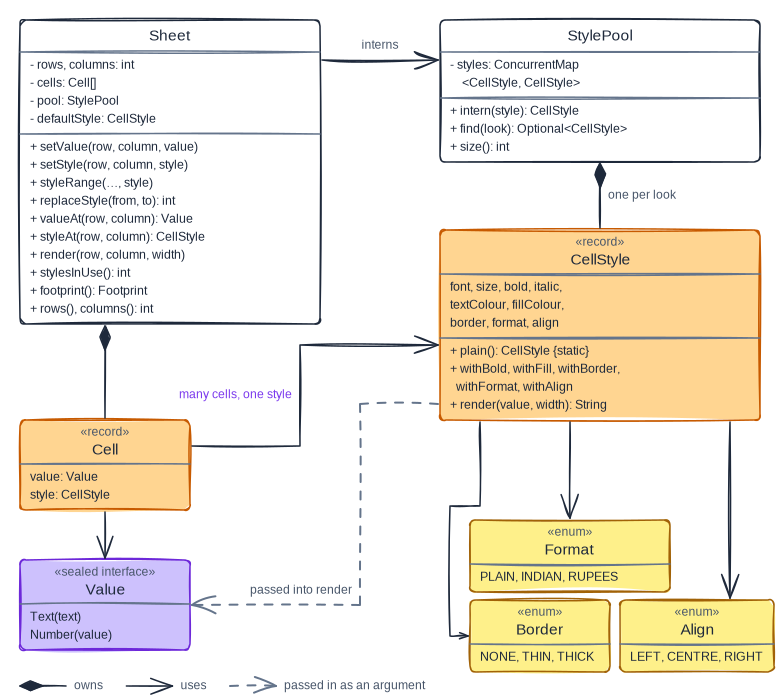
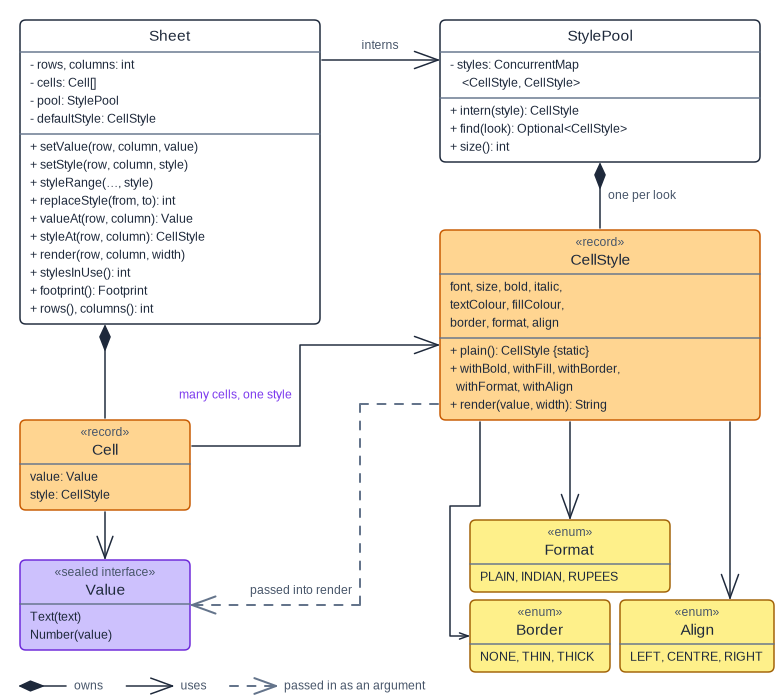
Here is one cell's style set and then rendered, traced through the objects:
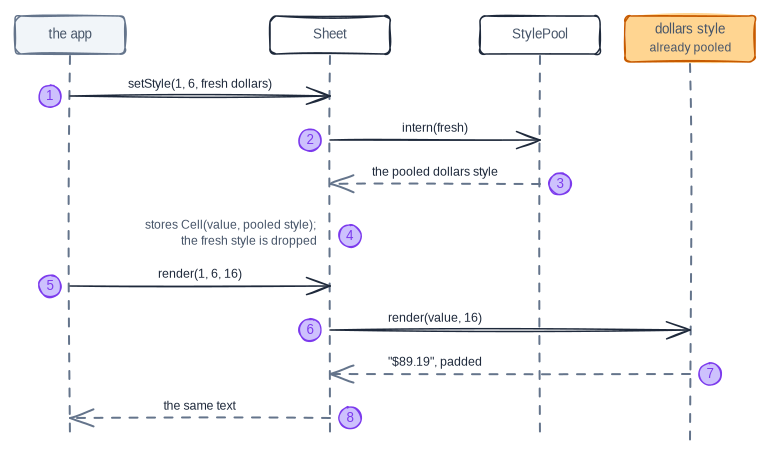
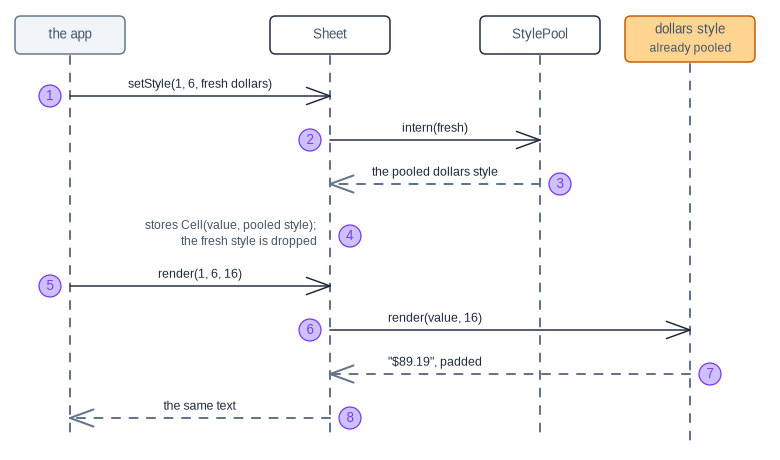
The whole project is below. Click any class name in the code to open that class.
package style; import java.util.Objects;import java.util.Optional;import java.util.concurrent.ConcurrentHashMap;import java.util.concurrent.ConcurrentMap; /** * Keeps one CellStyle for each look and hands out that one. Safe to share * between threads: computeIfAbsent looks and stores in one atomic step. */public final class StylePool { private final ConcurrentMap<CellStyle, CellStyle> styles; public StylePool() { this(new ConcurrentHashMap<>()); } /** Lets code in this package choose the map. */ StylePool(ConcurrentMap<CellStyle, CellStyle> styles) { this.styles = Objects.requireNonNull(styles, "styles"); } /** The pool's own style equal to `wanted`. The first time a look is asked for, `wanted` becomes that style. */ public CellStyle intern(CellStyle wanted) { Objects.requireNonNull(wanted, "style"); return styles.computeIfAbsent(wanted, first -> first); } /** The pool's own style for this look, if it has one. Never adds anything. */ public Optional<CellStyle> find(CellStyle look) { Objects.requireNonNull(look, "style"); return Optional.ofNullable(styles.get(look)); } /** How many different looks the pool holds. It only grows. */ public int size() { return styles.size(); }}The demo in demo/Main.java reads the register the way a file reader does, building a fresh style for every cell, and then edits it:
GST register: 5,000 rows x 20 columns = 100,000 cells
Fresh styles handed to the sheet while reading: 100,000, kept by the pool: 5
Style objects the cells point at: 5
Estimated size of the cells and their styles: 2,800,256 bytes
Taxable on row 2 and row 4,000 share one style object: true

|  Invoice  | Quantity |     Taxable      |      Total       |
| INV-0001  |        2 |           $89.19 |          $105.23 |
| INV-0002  |        3 |          $168.38 |          $198.68 |
|     Total |          |    $1,275,044.19 |    $1,504,502.65 |

C1 filled red. Fill of A1, B1, C1, D1: grey, grey, red, grey; pool: 6 styles
The grand total in a column 10 wide: [##########]
An invoice number in a column 5 wide: [INV-0]
Every amount filled yellow: 69,972 cells changed; pool: 7 styles, 6 in use

If every cell had its own fill colour: 100,000 styles, 7,600,016 bytes, before counting the pool's own map
Line 2 is requirement 2: the reader handed the sheet 100,000 fresh styles, and the pool kept 5. Line 4 is the saving. The estimate is 2,800,256 bytes for the cells and their styles, against 7,600,016 for the first version, which is about 63 percent less by our estimate. With the values counted too, by the same rules, the whole sheet comes to about half the size of the first version's. Both figures leave the pool's own map out. Line 5 shows row 2 and row 4,000 holding the same object. The table shows requirement 4: digit groups, dollars and right alignment from the shared styles. Filling C1 red changed only C1, which is requirement 3, and added a sixth look to the pool. The grand total in a column too narrow shows as # signs, and the invoice number is cut short. Filling every amount yellow changed 69,972 cells with one new look. The pool now holds 7 styles but the cells use 6, because the old dollars look stays in the pool after its last cell moves away. The last line is the case where the pattern stops paying, which the next section explains.
What it costs
The pattern makes some changes cheap and others more expensive.
Giving many cells one look is cheap. Styling 69,972 amount cells adds one style object, not 69,972. A new look is one more object in the pool, and comparing two looks is ==.
Changing a look everywhere it is used is a scan. A style cannot change, so making every amount yellow means pointing each of those cells at a new style. replaceStyle visits all 100,000 cells to do it. A sheet with named styles could add a level in between, with cells pointing at a named slot whose style can be swapped, but that slot is shared state again and needs its own rules.
The pool keeps every look it has ever seen. Nothing is ever removed, so a look that no cell uses any more still takes its place in the map, as the demo's 7 styles with 6 in use show. That is harmless for a file read once. A long-running editor would rebuild the pool when it saves the file, or keep each look as a weak key whose value is a WeakReference to itself, so that unused looks can be collected.
Every write pays for a lookup. Each setStyle hashes a nine-value record and, on a match, compares it with equals. The first version's setters did no such work.
When every look is different, nothing is saved. The demo's last line fills each of the 100,000 cells with its own colour. The cells then use 100,000 different styles, and the estimate is 7,600,016 bytes, the same as a format in every cell. The pool's map costs extra on top of that, and our estimate leaves it out.
When the pattern is too much
If the program makes its few looks itself, in code, a record and a few constants already share them, with no pool:
static final CellStyle HEADER = CellStyle.plain().withBold(true).withFill(GREY);static final CellStyle DOLLARS = CellStyle.plain().withFormat(Format.DOLLARS).withAlign(Align.RIGHT); sheet.setStyle(0, column, HEADER); // every header cell gets the same objectThe pool earns its place when looks arrive as data, such as from a file, a user's clicks or another system, and equal looks keep arriving as separate objects. It also needs many objects with few looks between them. A sheet of a few hundred cells, or one where most cells look different, gains nothing from it.
Java's own flyweights
Java uses the same idea in a few places. Integer.valueOf returns cached objects for every value from -128 to 127, so two calls with 100 return the same object, and a JVM option can raise the top of that range. Equal string literals in the source refer to one String object, and String.intern() returns that shared copy for any string. Boolean.valueOf returns one of two objects, and each enum constant exists once.
The same warning applies there as here. == works only on objects that all came from the pool. Two Integer objects for 1000 made by Integer.valueOf are usually two different objects, so comparing them with == usually gives false.
Flyweight, a cache, Singleton or Prototype?
All four keep objects around for reuse, so they are easy to confuse.
| Flyweight | Cache | Singleton | Prototype | |
|---|---|---|---|---|
| How many objects | One per look | One per key, for a while | One in the program | A new copy for every use |
| Shared or copied | Shared by many at once | Shared, and can be dropped and fetched again | Shared by everyone | Copied, and each copy goes its own way |
| Can it change | Never | An entry can expire or be refreshed | It may hold state that changes | Each copy changes on its own |
| It saves | Memory | Repeated slow work | Having two of something that must be one | Repeated costly setup |
| Example | The dollars style shared by 69,972 cells | A price lookup cached for 5 minutes | An order-number generator | A goblin copied from its template |
Throwing a price away is always safe in the Decorator pattern page's cache, because the price can be fetched again. A pool that dropped a look while cells still used it would not break those cells, which keep their reference. But the next cell given that look would get a second object, and == between the two would be false. The Prototype pattern page reaches the same idea from the other side: its goblins share one sprite that never changes, which is a flyweight inside a prototype. The Singleton pattern page's generator must exist once for correctness, and a flyweight exists once to save memory.
A short way to say it: a cache saves work and may forget, and a flyweight saves copies and must never change.
In an interview
The pattern appears inside low-level design questions about text editors, spreadsheets, maps with many markers, games with thousands of trees or bullets, and seat maps. In each, many small objects repeat a few heavy ones.
A good order for presenting it:
- Count the objects and the distinct looks. Say both numbers. The gap between them is the case for the pattern.
- Split the state. Say what is shared, the look, and what each object keeps, the value and the position, and why the shared part must never change.
- Then write the record and the pool, and say that the pool uses
computeIfAbsentso two threads cannot keep two copies.
Common mistakes:
- Sharing an object that can change. One edit then changes every cell that shares it, as the format painter did.
- Putting one object's data in the flyweight. A style that holds a cell's value cannot be shared with any other cell.
- Comparing with
==objects the pool never saw. Equal looks built separately are different objects until the pool swaps one for the other. - A pool that checks and then stores in two steps. Two threads keep two copies, and the pool's own count still looks right.
- Using the pattern where the looks are all different. It saves nothing and adds a map.
Summary
- Use Flyweight when many objects repeat a few heavy values and memory matters.
- Split the state: the shared part goes into an object that never changes, and each object keeps its own part and passes it in when needed.
- Keep one shared object per value in a pool, using
computeIfAbsenton aConcurrentHashMap. - Route every write through the pool, so
==is correct between objects from the same pool. - Changing a shared look means pointing objects at a new one. When most objects are different, the pattern saves nothing.