"Design a distributed cache" tends to turn into "design a database" by the fifteenth minute. The candidate shards the keys, gives every shard a replica, turns on persistence, and starts on quorums. All of that protects the data. But a cache holds copies. Every value in it also sits in a database, and the cache throws values away all day, every time its memory fills up.
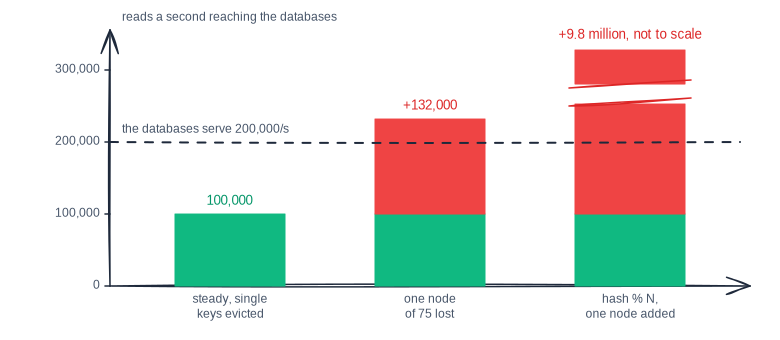
So losing a key is normal. Losing many keys at the same moment is not. The databases behind a cache are sized for its misses, not for the traffic. At a 99 percent hit rate they see 1 percent of the reads, and caching strategies and invalidation works out what happens when the whole cache disappears. A smaller version of that happens whenever the cache drops a large share of its keys together. A node dies, or a node joins and the keys reshuffle, or a deploy restarts the fleet.
A distributed cache may lose any key at any time, but it must never lose many keys at once.
That sentence settles most of this design. Any one key may go, so there is no disk and no quorum. Many keys may not go at once, so routing has to move as few keys as possible when a node joins or leaves. A dead node gets a plan that limits its misses, instead of a copy of every key it held. And a new node fills from the nodes that used to own its keys, not from the database.
Understanding the problem
The general method for this part of the interview is in The First Five Minutes: Requirements.
A distributed cache is a fleet of machines that hold key-value pairs in memory. The pairs are split across the fleet by key, and every application server shares the fleet. An application asks it for a key before going to the database, and puts the value there after a miss. Facebook's memcache, Twitter's Twemcache and Redis Cluster are three examples.
"Distributed cache" names at least five different things. Split them before you draw anything.
- An in-process cache. A map in the application's own memory, such as Caffeine. No network, one copy per process.
- A cache cluster. A shared fleet in front of the databases, like the three above. This is the question.
- A durable key-value store, where every value must survive. Each partition has a leader that copies its writes to other machines, and that's a different design: key-value store.
- A content delivery network (CDN). Whole responses cached near users, covered in CDNs and edge compute.
- How an application uses a cache. Cache-aside, invalidation and stampedes, covered in caching strategies and invalidation.
This page builds the second one, the service itself.
Functional requirements
Core:
- Get, set and delete one key, with a time to live (TTL) on every set: how long the value may stay before it expires.
- Get many keys in one call, because one page reads hundreds.
- Stay inside a fixed memory budget. When memory is full, the cache evicts something and keeps accepting sets.
Out of scope, deliberately:
- Persistence. Nothing is written to disk, and a crash empties the node.
- Data structures, such as lists, sorted sets and exact counters, and pub/sub. That's the rest of Redis.
- Deciding what to cache and when to invalidate it. That belongs to the application.
- The databases behind the cache.
Non-functional requirements
- Scale. 10 million key reads a second at peak, from 2,000 application hosts, plus 1 million sets and deletes. The working set, every item read at least once a day, is 10 billion items.
- Fast reads. A get answers in about half a millisecond at the median and under 2 ms at p99, the time 99 percent of gets beat, measured at the application.
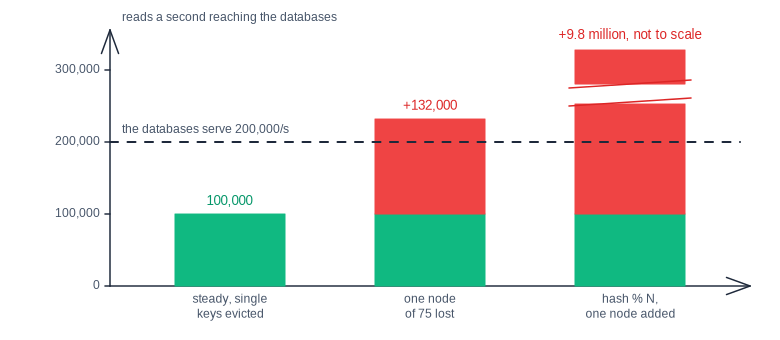
- A miss budget. The databases serve 200,000 reads a second, twice the steady miss rate. No single event in the cache tier may add more than 100,000 misses a second, sustained past its first minute. That covers a node dying, a node joining, a deploy and a hot key.
- Any key may be lost. The database holds every value, so the cache keeps nothing on disk.
- Quick deletes. After a write commits, the cached copies in each region are deleted within a second or two of the change reaching that region's replica. Every value has a TTL as the backstop.
Requirements 3 and 4 carry the design. Requirement 4 lets the cache drop any key, and requirement 3 limits how many it drops at once. Write both down in those words. If requirement 4 says "no data loss" instead, the cache turns into a database, with replicas and a disk, at twice the memory.
The question is how many nodes memory needs, and how
many extra misses the databases can absorb.

Working set
  items read at least once a day, assumed            10B
  per item stored
    key, mean                                       40 B
    value, mean, assumed                           450 B
    item header, memcached                          56 B
    rounding up to a slab chunk, ~10%               55 B
                                                 ≈ 600 B
  total                    10B × 600 B             = 6 TB

Nodes
  item memory per node, from deep dive 2           80 GB
  by memory                6 TB / 80 GB            = 75 nodes

Misses
  reads at peak                                   10M/s
  at a 99% hit rate        10M × 1%                = 100,000/s
  the databases serve                             200,000/s
  headroom                 200,000 − 100,000       = 100,000/s

One node lost
  hits at peak             10M × 99%               = 9.9M/s
  one node's share         9.9M / 75               = 132,000/s
  ─────────────────────────────────────────────────────────
Memory sets the fleet at 75 nodes. Losing any one of them
sends 132,000 extra reads a second at databases with
100,000 to spare.
The value size is an assumption between two published figures. Facebook measured a median response of 135 bytes and a mean of 954. A typical Twitter cluster's values average about 230 bytes, and most of Twitter's clusters have keys under 50 bytes.
So the first ordinary failure, one node of 75, already breaks requirement 3. Deep dive 2 deals with it.
The set up
Core entities
- Item. A key, a value, some flags and an expiry time.
- Node. One cache process with a fixed memory budget, 80 GB here. It knows nothing about the other nodes.
- Pool. A set of nodes that serves one family of keys, chosen by key prefix. Most keys share the main pool.
- Placement. The rule that turns a key into a node, for one pool. Placement is the entity that matters. Every way this system loses many keys at once is a change in placement, or a node that placement still points at.
System interface
The application speaks a memcached-style text protocol to the cache.
APP → CACHE

get user:42:profile
→ VALUE user:42:profile 0 312
  <312 bytes>
  END

get feed:42:p1 user:42:profile user:77:profile post:9001 ...
→ the keys that hit, each as a VALUE block, then END.
  A key that isn't returned is a miss.

set user:42:profile 0 3600 312        (flags, TTL in seconds, bytes)
<312 bytes>
→ STORED

delete user:42:profile
→ DELETED | NOT_FOUND
Three things to note.
A miss is an absence, not an error. A multi-get returns only the hits. A dead node, a timeout and a dropped reply all look the same to the application: a miss, and a read from the database. Requirement 4 makes that safe.
Every set carries a TTL. No value lives forever, so a delete that never arrives leaves a stale value for one TTL, not for good.
The cache never updates a value in place. A write deletes the key, and the next reader that misses fills it. Deletes are idempotent: repeating one is harmless, so a lost acknowledgement can be retried.
The design has two planes, and they share nothing on the request path. The data plane carries every get and set: the application, whatever routes its requests, and the nodes. The control plane holds the placement and the pool definitions in a small config service backed by etcd or ZooKeeper. It watches node health and pushes changes out. Nothing calls it while serving a request, so a control plane outage freezes placement and stops nothing.
High-level design
1. Get, set and delete one key
Which node holds a key?
There are 75 nodes, and 2,000 application hosts running 32 processes each, assumed, so 64,000 processes. Every one of them has to turn a key into the same node, and keep doing so while nodes join and leave. The rule they use decides how many keys move, and so how many miss, every time the node set changes.
Hash the key, modulo the node count, in every client
hash(key) % 75 is one line, needs no shared state, and spreads keys evenly. It's what most people write first.
It breaks the first time the count changes. Going from 75 nodes to 76, a key keeps its node only when hash % 75 and hash % 76 agree, which happens for 1 key in 76. So 98.7 percent of keys move, and each moved key is a miss on a node that has never seen it. That's 9.9 million hits a second times 0.987, about 9.8 million new misses a second, against a headroom of 100,000.
Losing a node does the same in the other direction. Consistent hashing works through this failure for a CDN.
Consistent hashing in a client library
Put the nodes on a hash ring with many positions each, as libraries built on Ketama do, and give every application a copy of the library. Adding a 76th node moves 1 key in 76, the minimum. That's 9.9 million / 76, about 130,000 misses a second. It's still above the headroom, and deep dive 4 is about that number.
This is the standard answer, and Facebook's clients placed keys this way. It has three costs, and all three come from the library living inside every application.
Every language the company writes needs its own library, and they must place every key identically. Two correct implementations of consistent hashing can disagree, as the warning in consistent hashing explains.
A new node list has to reach 64,000 processes, and they pick it up at different moments.
And every process holds a connection to every node: 64,000 connections on each node. Facebook found an open connection between every web thread and every cache server too expensive in memory.
A router on every host, reading a slot table
Placement doesn't have to be computed inside the application at all.
Run one small routing process on every application host. The applications talk to it over loopback, as if it were a cache node, and it forwards each request to the right node. Facebook's version is mcrouter, which runs on the same machine as each web server. In 2013 its gets went straight to the servers over the User Datagram Protocol (UDP), and only sets and deletes went through mcrouter.
Three things change.
Connections fall to one pool per host, about 2,000 per node instead of 64,000.
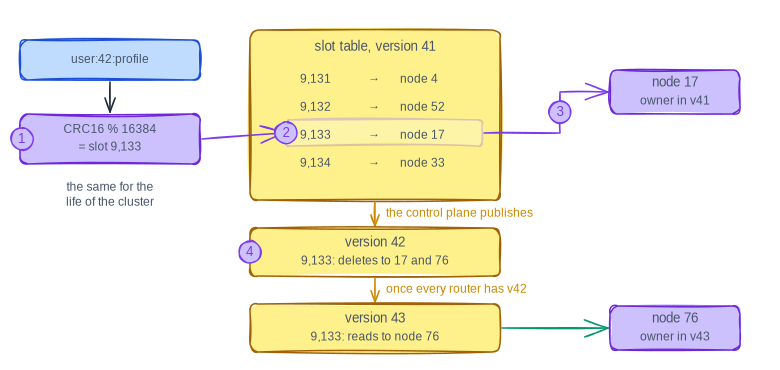
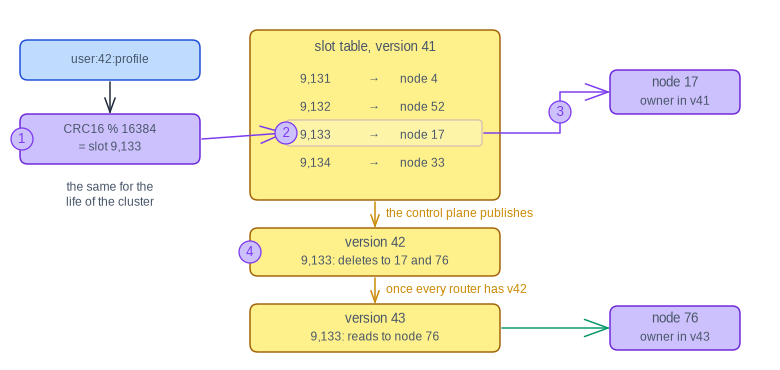
Placement becomes a table, not a function. The router hashes the key into one of 16,384 fixed slots, and a table says which node owns each slot. The control plane owns the table and gives each version a number. A table can move one chosen slot, and a ring can't. Partitioning and sharding makes the general case for a table wherever a control plane exists.
Policy moves out of the applications. The router's config says which pool each key prefix uses, where a failed read goes and how a new node fills. Changing any of them is one rollout instead of a change to every service.
The trade, sized. The router adds a loopback hop, about 40 µs per read. Against that, each node holds 62,000 fewer connections.
What you give up. A router runs on every host, and every cache read depends on it, so the application treats a router error as a miss. And its config is now code that ships to 2,000 hosts at once, so it rolls out in stages like any other deploy.
| placement | keys moved when the 76th node joins | connections per node | implementations to keep in step |
|---|---|---|---|
hash(key) % N in each client | 98.7% | 64,000 | one per language |
| ring in a client library | 1.3% | 64,000 | one per language |
| router per host, slot table | 1.3%, slots chosen on purpose | 2,000 | one |
Take the router. Its slot table is the placement entity from the set up, and the rest of the design changes placement by editing that table.
How the slot table works
A key's slot is hash(key) % 16384, and the hash never changes. Redis Cluster splits its keys the same way, with CRC16 as the hash, and this design uses the same function. The 16,384 slots spread over 75 nodes as 218 or 219 each. The counts are even because the table assigns them, not because a hash happened to.
The slot count is fixed for the life of the cluster, because changing it would move almost every key, like hash % N. So it's chosen large. 16,384 slots allow up to 16,384 nodes, and Redis Cluster's own design target is about 1,000.
A router loads the whole table when it starts and then watches for new versions. It picks each one up within a few seconds, so for a moment two routers can send the same key to two different nodes. For a cache that costs one extra fill. For a durable key-value store it would mean two values for one key, which is the cache-or-store question.
Deletes are the exception. Say slot 9,133 moves from node 17 to node 76. A router still on the old version deletes a changed key only on node 17, while a router on the new version may already have copied the old value into node 76. That copy stays stale for a full TTL. So a move takes two versions. The first sends every delete for the slot to both nodes. Only after every router has acknowledged it does the second move the reads.
2. Get many keys in one call
A web page doesn't read one key. Facebook measured an average of 521 distinct items fetched from memcache for one popular page, and its batches average 24 keys. The application sends a batch to the router. The router splits it by node, sends each node its share in parallel, and merges the replies.
The question is how much of the fleet each batch reaches,
and what that does to its latency.

  keys in a batch                                       24
  nodes                                                 75
  chance a given node gets none of them
                           (74/75)^24                ≈ 0.725
  nodes the batch touches  75 × (1 − 0.725)          ≈ 21

  each node slower than its own p99 1% of the time
  chance the batch waits on at least one slow node
                           1 − 0.99^21               ≈ 19%
  ─────────────────────────────────────────────────────────
A 24-key batch waits on about 21 nodes, so nearly one
batch in five sees some node's p99.
That's the fan-out arithmetic from latency numbers that matter. It turns one node's p99 into something a page meets often. Three more effects come with it.
Replies arrive together. About 21 nodes answer within the same fraction of a millisecond and overflow the switch port in front of the application host. This is called incast. So the router caps its requests in flight with a sliding window. The window grows while replies arrive and shrinks when one goes missing. Too small, and a page's batches go out one after another. Too large, and the incast comes back.
Misses come back as gaps. The router returns the hits and leaves the misses out, and it doesn't wait past its timeout for a slow node. The application reads all the misses from the database in one query, and sets them back in one batch.
A node's cost is per request, not per key. A 10-key multi-get served about four times as many items a second as single gets, in Facebook's measurements. So splitting a small, hot set of keys across more nodes doesn't relieve any of them. Every page still sends a request to every node that holds a piece.
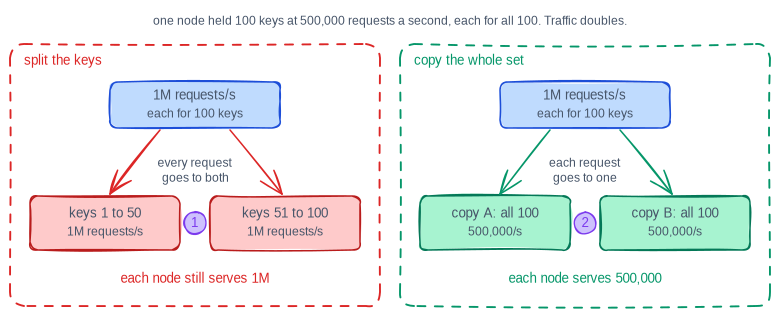
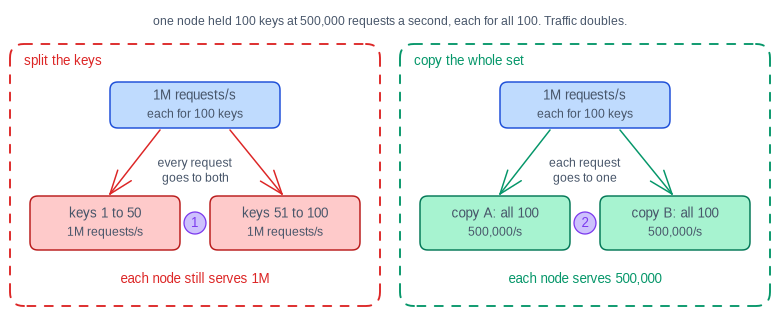
The memcache paper gives this example and its answer. The answer applies when a key family fits on one or two servers, is fetched many keys at a time, and is read faster than one server can serve. Give that family a pool where every node holds the whole set. Each router picks a copy by its own address, and every delete has to reach every copy.
3. Stay inside a fixed memory budget
How does one node lay out its memory?
Each node holds about 133 million items in 80 GB, sized from 50 bytes to tens of kilobytes. When memory is full, a set has to evict something. Two things decide whether a node can do that for years without degrading: where the free space comes from, and how much a read costs.
malloc each item, and keep one LRU list under one lock
Keep a hash table from key to item, and call malloc for each item. Thread every item onto a doubly linked list in least recently used (LRU) order. A read unlinks its item and puts it back at the head, and eviction frees whatever is at the tail. It's the textbook answer, and every operation is O(1).
It breaks on both counts. Items of every size are allocated and freed millions of times a minute, and the general-purpose allocator leaves holes between them. A 2020 study of Twitter's caches, by Twitter and Carnegie Mellon, found that allocators such as ptmalloc and jemalloc can fragment memory without bound for small items of mixed sizes. So the process grows past its memory limit while holding no more items.
And every read is now a write to the shared list, under one lock. Memcached's maintainer wrote that with its original LRU, which moved an item on reads, scaling past 8 worker threads was difficult.
A slab allocator, an LRU per size class, and reads that only mark
This is memcached. Memory is cut into 1 MB pages. Each page belongs to one slab class, a size class, and is cut into chunks of that class's size. Each class's chunks are 1.25 times the size of the class below, memcached's default. An item goes into the smallest chunk that fits it, and each class keeps its own LRU.
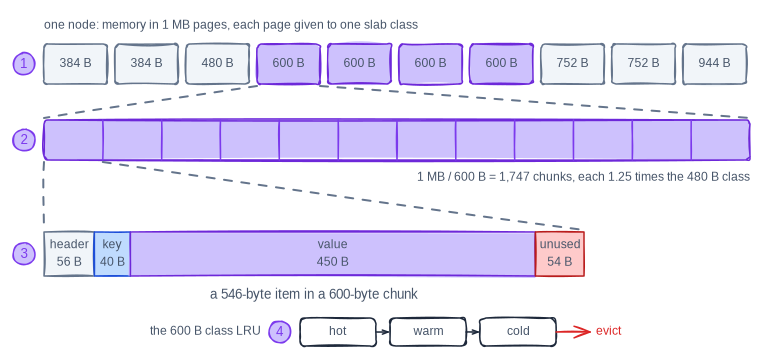
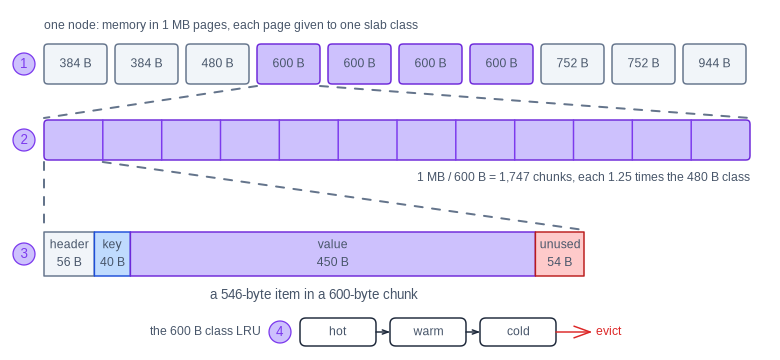
Fragmentation between items is gone, because every chunk in a page is the same size and gets reused. And reads no longer move anything. Memcached's newer LRU splits each class into hot, warm and cold sections. A read only marks the item active, and a background thread moves items between sections.
This is the standard answer, and it has two costs.
Some memory is wasted inside every chunk. A chunk can be up to 25 percent bigger than the item in it, so up to a fifth of it can sit empty.
And pages stay with their class. The Twitter study describes keys whose values grow over time. New writes need a bigger class, but every page already belongs to a smaller one. So the bigger class evicts items minutes old, while the smaller class keeps items untouched for days. That's called slab calcification.
Stop tuning which item to evict, and win back memory that holds nothing
Eviction order isn't where most of a node's memory goes.
The Twitter study found that for many workloads the choice of eviction algorithm made little difference to the miss ratio, and it asked for attention on per-item metadata and keys instead. Memory is lost in three places that no eviction policy looks at.
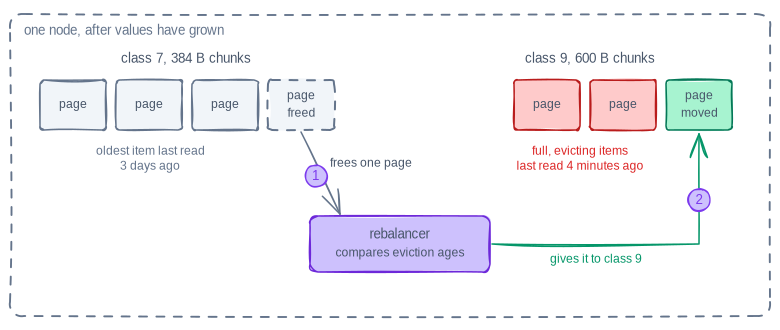
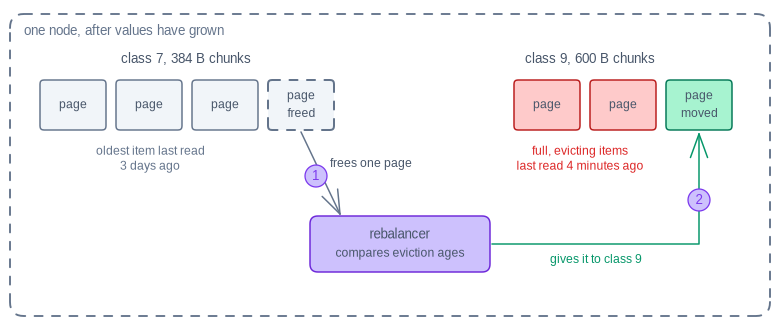
Pages in the wrong class. A background thread looks for a class that is evicting items much more recently used than the oldest items elsewhere. It frees the page that holds the least recently used item in the node and gives it to that class. The rule balances the age of the oldest item across classes rather than the eviction rates, and memcached later adopted it.
Bytes of header and key on every item. The worksheet's item is 546 bytes, and 96 of them are the 56-byte header and the 40-byte key. Twitter's newer cache uses a 38-byte header, and many keys repeat a long namespace such as service:table:id. Cutting the header to 38 bytes and the key to 16 saves 42 bytes on each of 10 billion items. That's 420 GB, or 5 of the 75 nodes.
Items that have already expired. An expired item still occupies memory until something finds it. Put items with short TTLs into buckets by expiry second, and free each bucket as its second arrives. At Facebook, giving one heavily used key family a short TTL this way cut its share of a pool from 6 percent to 0.3 percent, without changing the hit rate.
What you give up. Moving a page throws away the items on it, so a busy rebalancer costs hits. A shorter header leaves room for fewer features per item. And an index by expiry time costs a pointer on every short-lived item.
The item, as stored
item header, modelled on memcached's 56 bytes
  h_next      pointer   next item in the same hash bucket
  prev, next  pointers  neighbours in this class's LRU section
  last_read   uint32    seconds, the age a rebalancer compares
  expires     uint32    absolute time; 0 means no expiry
  flags       uint32    opaque to the cache, set by the client
  cas         uint64    version, bumped on every set
  key_len     uint8
  value_len   uint32
  class_id    uint8     which slab class owns the chunk
  bits        uint8     active, linked, fetched
then: key bytes, value bytes, and the unused end of the chunk

hash table: an array of bucket pointers, doubled in the
background when the table gets too full
Expiry is checked when an item is read. A get that finds an expired item frees it and reports a miss. A background crawler frees the expired items nobody reads, so nothing has to scan 133 million items on a timer.
Memcached or Redis?
The values here are opaque bytes, read 10 million times a second, with no need to survive a crash. Memcached fits that: many threads per process, the slab allocator above, and nothing else. Redis adds data structures, persistence and built-in replicas, and this design uses none of them.
The two would also be sized differently. Back-of-envelope estimation gives Redis about 100,000 simple operations a second per process. 10 million reads plus 1 million sets and deletes would need 110 processes, more than memory's 75 nodes, so a Redis fleet is sized by CPU. Pick Redis when the application needs a sorted set or a list. The routing above is the same for either.
Deep dives
Deep dives 2, 3 and 4 come up in most versions of this interview.
1. How many servers, and what binds?
Memory alone sets the fleet at 75 nodes of 80 GB, from the worksheet in the requirements. Throughput, network or connections could bind first, so check them too.
The question is which resource sets the node count.
Memory said 75.

Throughput
  reads 10M/s + sets and deletes 1M/s      = 11M ops/s
  per node                 11M / 75        ≈ 147,000 ops/s
  one 2013 server, single gets             ~450,000/s
  nodes throughput needs   11M / 450,000   ≈ 25

Network
  bytes out                10M × 450 B     = 4.5 GB/s
  per node                 4.5 GB / 75     = 60 MB/s
                                           ≈ 0.5 Gbps
  share of a 25 Gbps card                  ≈ 1.9%

Connections
  application processes    2,000 × 32      = 64,000
  per node, each process to each node        64,000
  per node, one router per host               2,000
  ─────────────────────────────────────────────────────────
Memory needs 75 nodes and throughput about 25, so each
node uses about a third of what a 2013 server served
in single gets, and 2 percent of its network. Buy
memory-heavy machines. The spare CPU and network go to
hot keys and failover.
The per-node rate comes from Facebook's 2013 measurements. One 12-core server served 1.8 million items a second from 10-key multi-gets, about 180,000 requests, and single gets ran at about a quarter of that item rate, around 450,000 a second. Even that older single-get rate clears the 147,000 each node needs.
The node size has one more consequence. Each node holds 1/75 of the keys, so each node's failure costs 1/75 of the hits. That's why the nodes are 80 GB rather than larger. Deep dive 2 shows that one node's hits have to stay under about 154,000 a second for the gutter to keep its failure inside the budget.
2. What happens when a node dies?
Node 17 stops answering. It held 218 slots and 132,000 hits a second, and the databases have 100,000 a second to spare. For the first few seconds every request to it times out, and the application reads the database instead. The question is what happens next.
Take it out of the table, and let the other nodes take its slots
The control plane sees a failed health check and hands node 17's slots to the survivors. It looks like self-healing.
It doesn't help the databases. The survivors don't have node 17's keys, so all 132,000 hits a second are still misses until the survivors fill.
It can also spread the failure. Facebook reports that a single key can carry 20 percent of a server's requests, so the survivor that receives that key can be pushed over too. Consistent hashing works through that cascade.
And most failures are short. Say node 17 comes back from a 5-second pause and gets its slots back. It still holds the values it had, and it missed every delete sent while it was out. It now serves those stale values, each for the rest of its TTL.
A replica for every node, promoted when the primary dies
Give each node a replica that copies every write, and promote the replica when the primary fails. The replica holds the same keys, so after the promotion nothing is cold.
This is the standard answer, Redis Cluster builds it in, and it costs three things.
Memory doubles: 75 more nodes and 6 TB more RAM, to protect 1/75 of the hits at any one time.
The promotion isn't instant. Redis Cluster declares a primary failed after its node timeout, 15 seconds by default, and the spec says the promotion itself usually takes 1 or 2 seconds more. Those 17 seconds at 132,000 misses a second are 2.2 million extra reads.
And replication is asynchronous. A delete that reached the primary just before it died may never reach the replica. In a database a lost write is lost data. In a cache a lost delete is a stale value, served for the rest of its TTL.
Let the keys go, and catch the misses in a gutter
A dead node's keys don't have to survive. Requirement 4 lets them go, and requirement 3 only limits the misses.
Keep a small gutter pool, two idle nodes here. When a request to node 17 times out, the router sends it to the gutter instead. A miss in the gutter sends the application to the database. The application then sets the value into the gutter, so the next read of that key is a hit.
Gutter entries get a TTL of 60 seconds, mcrouter's default for writes to a failover destination. The gutter receives no deletes, so that TTL is also how stale a gutter value can get. A shorter one would cut the staleness and the gutter's hit rate together.
Facebook runs a gutter with about 1 percent of a cluster's servers. Its hit rate generally passes 35 percent within 4 minutes of a server failing, and often comes close to 50 percent.
Each router makes this call for itself, without waiting for the control plane. Waiting out a timeout on every read to node 17 would add that timeout to one read in 75. So after a few timeouts in a row, the router marks node 17 down, sends its reads straight to the gutter, and tries node 17 again every second or so. mcrouter lists this as destination health monitoring with automatic failover.
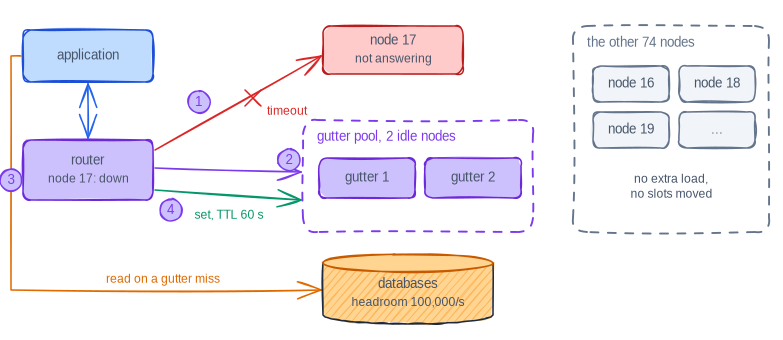
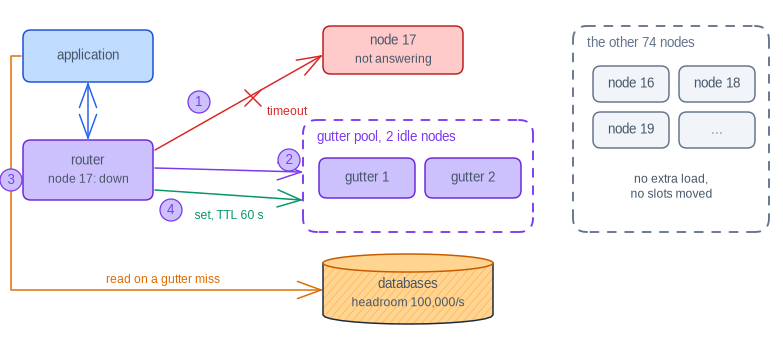
Node 17 stays in the slot table. A health check changes where requests are sent, never who owns a slot, which is the rule from consistent hashing. While node 17 is out, the routers that send deletes keep the ones meant for it, and replay them when it returns. So a node back from a short pause is warm and correct. After several minutes, the control plane declares it dead and hands its slots to a replacement, which fills the way deep dive 4 describes.
The trade, sized. At the low end of the gutter's range, a 35 percent hit rate, node 17's 132,000 hits a second become about 86,000 database reads. At 50 percent they become 66,000. Both fit the headroom of 100,000. The gutter costs 2 nodes. Replicas cost 75.
That arithmetic sets the node size. The gutter keeps a failure inside the budget only while one node's hits stay under 100,000 / 0.65, about 154,000 a second. With 60 nodes of 100 GB, one failure would cost 165,000 hits a second, and 107,000 would still reach the databases. With 75 nodes of 80 GB it's 132,000, and 86,000.
What you give up. For the first minutes, before the gutter fills, more than 86,000 reach the databases, and in the first seconds close to 132,000, above the 100,000 of headroom. Requirement 3 holds as a sustained rate, not for that first minute. Leases only stop many readers of one hot key missing at once. The cache hands one reader per key a token to refill it, at most once every 10 seconds, and tells the rest to wait briefly and retry, as caching strategies describes. Gutter values can be up to 60 seconds stale. And the budget covers one node. Two at once, such as a rack losing power, send about 172,000 through even with the gutter, so no rack holds more than one node of the main pool.
Replicas still have a place. A pool whose misses are expensive, such as aggregates that take seconds to compute, may not be able to send even 86,000 of them to the database. That pool gets replicas, and the cheap pools get the gutter.
3. Hot keys
A hot key is one key read far more often than the rest. Contention and hot keys covers the general moves. Two things are specific to a cache: what runs out first, and where the copy goes.
Take the trending list shown on every home page: one 20 KB value read on 200,000 page views a second. Its node also carries its own 147,000 operations a second.
The question is which limit the hot key hits first.

CPU
  normal load                           147,000 ops/s
  plus the hot key                    + 200,000 ops/s
  total                                 347,000 ops/s
  against ~450,000 single gets/s        tight, but under

Network
  hot key        200,000 × 20 KB      = 4 GB/s
                                      = 32 Gbps
  against a 25 Gbps card                over by 28%

With a 1 s copy in each router
  fetches        2,000 routers × 1/s  = 2,000/s
  bytes          2,000 × 20 KB        = 40 MB/s
  ─────────────────────────────────────────────────────
A large hot value fills the network card before it
fills the CPU. A one-second copy in each router cuts
it by a factor of 100.
So the router keeps a small in-memory cache, an L1, for keys it sees read often, with a TTL of 1 second. The node then serves each router once a second, however popular the key gets.
To find hot keys, each router counts the keys it forwards over a short window and promotes the top few. It counts with a Count-Min sketch, a small grid of counters that can overcount a key but never undercount it, and keeps a small heap of the top few. Bloom filters and probabilistic structures explains the sketch. The memory stays the same however many distinct keys pass through.
The cost is up to 1 second of staleness on those keys, because deletes don't reach the L1. That's acceptable for a trending list. A value that must reflect a write at once goes in the copied pool from section 2 instead, where every delete reaches every copy.
A hot key also makes a node failure worse. If node 23 died with the key still on it, its 200,000 reads a second would land on the gutter, and the gutter's misses on the databases. The L1 takes that key off the node before anything fails.
4. Adding and removing nodes
The working set grows, and node 76 joins. Its share is 16,384 / 76, about 216 slots, 2 or 3 from each old node, carrying 9.9 million / 76, about 130,000 hits a second. The same question comes up when the replacement for a dead node takes over its slots, and when the fleet shrinks. How do those slots change owner without their hits becoming misses?
Publish the new table, and let the new node fill from the database
One edit gives node 76 its 216 slots. It's empty, so all 130,000 hits a second on those slots become database reads, and the headroom is 100,000. An empty memcached server takes a few hours to reach 90 percent of its peak hit rate, so this isn't a short spike.
Moving the slots a few at a time keeps each step inside the budget. Each slot carries about 600 hits a second, so 100 slots at a time add 60,000 misses. But each batch still waits for its slots to warm up from the database before the next can go.
Move each slot's keys before switching it
Redis Cluster does this. A slot is marked as migrating on the old node and importing on the new one, and its keys are moved across a few at a time. During the move, a request for a key the old node no longer has is redirected to the new one. When the slot is empty on the old node, the table changes. Nothing is ever cold.
This is the standard answer for Redis Cluster, and it costs moving everything in those slots: 6 TB / 76, about 79 GB, into node 76. At a throttled 1 Gbps that's about 11 minutes at the least, competing with live traffic. Most of what it moves is the long tail of items nobody will read again before they expire. The spec also warns that moving slots that hold very large keys is unwise when latency matters.
Switch the slots at once, and fill the new node from the old owners
A slot can change owner without its data moving.
Publish the move as two table versions. Version 42 keeps the reads where they are and sends every delete for the 216 slots to both the old owner and node 76. Once every router has acknowledged it, version 43 moves the reads to node 76, with a warm-up route. For the next hour, a miss on node 76 asks the slot's old owner before the database. If the old owner has the key, the router writes it into node 76 with add, which stores it only if the key isn't already there. Only keys the old owner didn't have reach the database, and those were misses anyway.
mcrouter ships this as a cold cache warm-up route. Facebook warmed whole empty clusters the same way, reading from a warm cluster, and brought them to full capacity in a few hours instead of a few days.
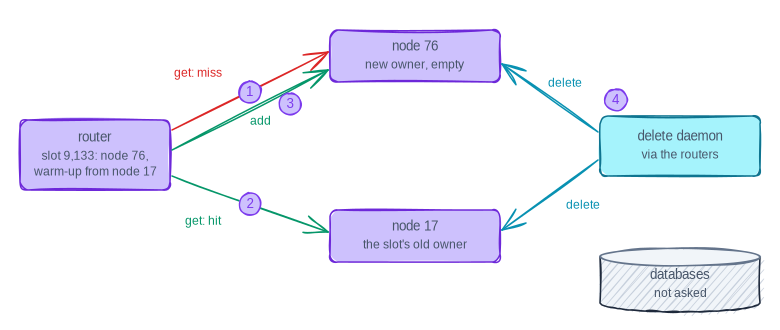
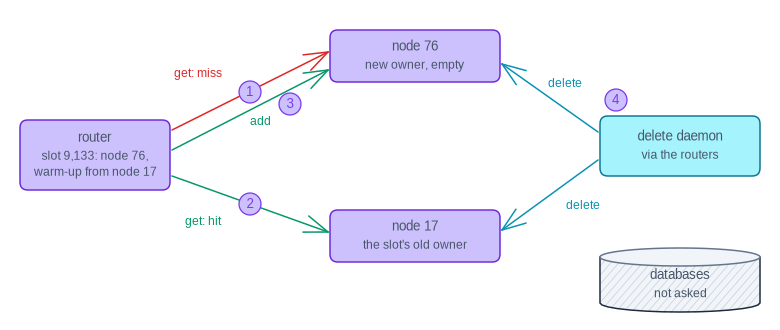
Version 42 is there for the deletes, as the slot table section explains. A last race remains: a delete can land on node 76 just before a slow warm-up copies the old value in. A hold-off closes it: a delete on the cold side refuses any add of that key for 2 seconds.
The trade, sized. Nothing is copied in bulk, and node 76's misses go to their old owners, not to the databases. A miss on node 76 costs two hops instead of one for an hour, and the old owners keep serving those reads until node 76 has them.
What you give up. The router config has a time-limited rule that someone has to set and remove. Each old owner keeps 2 or 3 slots it no longer owns until their items expire or get evicted. And the warm-up only works while the old owner is alive. A dead node's replacement has no old owner, so it takes the slots from the gutter a batch at a time, the naive way.
Removing a node is the same move in reverse. Its slots go to the others with a warm-up route pointing back at it, and it's switched off only after the hour.
5. Where does the half millisecond go?
Requirement 2 asks for about half a millisecond at the median. The router added a hop to every read, so check that the budget still sums.
The question is which part of a read sets its latency,
and whether the router's hop fits. The timings are
assumed, from the ranges in latency numbers that matter.

One get
  application to router, loopback                 ~20 µs
  router to node and back, same datacenter   250 to 500 µs
  the node: hash, look up, copy 450 B              ~5 µs
  router back to application, loopback            ~20 µs
  ─────────────────────────────────────────────────────────
  total                                   ≈ 0.3 to 0.55 ms

A 24-key batch
  waits for the slowest of about 21 nodes
  batches that see at least one node's p99          ≈ 19%
  ─────────────────────────────────────────────────────────
The round trip to the node is almost the whole median,
and the slowest node in a batch sets the tail. The
node's own work hardly shows.
The memcache paper's measurements land in the same place. It reports a median of 333 microseconds and a 95th percentile of 1.135 ms for a request from a web server, counting routing, the network and decoding. Three decisions follow.
The router's two loopback hops cost about a tenth of the median, a fair price for 62,000 fewer connections per node.
The pool sits in the same datacenter as the hosts that read it. A round trip between availability zones in one region takes 0.5 to 2 ms, which can spend the whole 2 ms p99 on distance alone. A region spread across zones either keeps a pool in each zone, paying for the working set again in every one, or reads across zones and gives up the half millisecond.
And a faster node buys nothing a user would see. A page's p99 comes from fan-out and queueing, so the levers are fewer nodes per batch and spare capacity on each node. Deep dive 1 already left about two thirds of each node's CPU spare.
6. Deploying a new version
A new memcached build restarts every process, and a kernel patch reboots every host. Each restart empties a node, so a rolling deploy done naively is a node failure 75 times over. Facebook described this problem: an empty server takes a few hours to warm, so upgrading a set of servers took over 12 hours while it managed the load on its databases.
A new memcached build: keep the items through the restart. Facebook changed memcached to keep its values and main data structures in System V shared memory, which outlives the process. Memcached now ships a version of this as warm restart. It keeps item memory in a file on a RAM disk, and on a clean restart it rebuilds the hash table from that file instead of starting empty. Its documentation says that takes a few seconds, and two or three minutes near a billion items. A node here holds 133 million.
While the node is away, its deletes wait in the routers, as for a short failure in deep dive 2. Its reads go to the gutter, which would start cold. So before a planned stop, the router points the node's reads at the gutter with a warm-up route back to the node. The gutter fills from the node, not from the databases, and only then does the node stop.
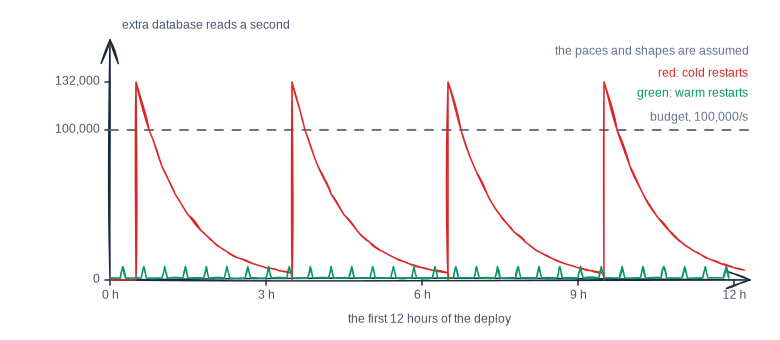
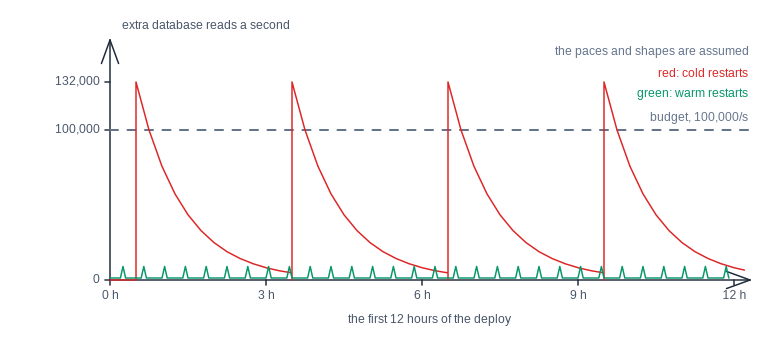
A kernel patch: move the slots off first. A reboot clears the RAM disk and the shared memory, so a warm restart can't help. Warm restart survives a reboot only when its file sits on a persistent memory mount. So the node's slots move to the other nodes with the warm-up route from deep dive 4, the host reboots, and the slots move back the same way. Each step reads from a node that still has the data, so the databases see none of it.
The same path covers a change to the memory limit or the slab sizes, which a warm restart also can't carry. Start new nodes with the new settings, and move the slots over.
7. Multi-region
Three regions, each serving its own users. The databases have a primary in one region and read replicas in the others, as the database design decides. A multi-region cache answers three questions: what each region holds, where writes land, and what it costs.
Each region has its own cache, and nothing is copied between caches. A region's cache fills from that region's database replica, on demand. Copying cache entries between regions would send every value across the long links, and it could land a value before the replica has the matching row. Writes never land in the cache at all: they go to the primary database, and the cache only sees deletes. Each region holds its own 6 TB on its own 75 nodes, so three regions run 225 nodes.
Deletes come from each region's own database log. A daemon beside each database reads its commit log and sends deletes to that region's routers, batched through a few dedicated routers that unpack them. In a replica region it reads the replica's log, so a delete arrives after the replica has the change. Change data capture works through the race this prevents. Inside Facebook's primary region, 99.99 percent of deletes landed within a second.
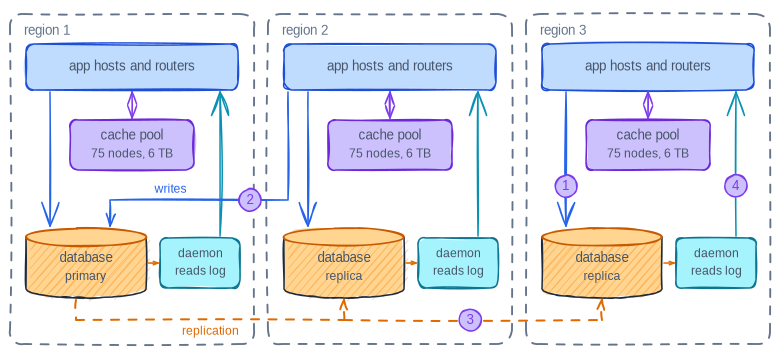
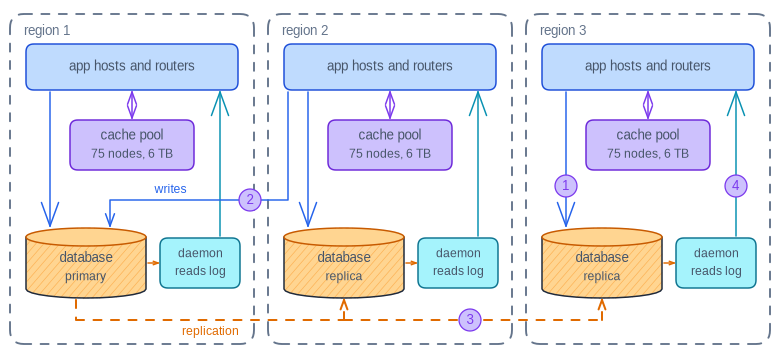
The writer reads its own write. The application that wrote also deletes the key in its own region straight away, so the next page that user loads misses and reads the database. In a replica region that read can still find the old row. So the writer first sets a marker key in a regional pool, and the write deletes the marker once the replica has the change. While the marker exists, any miss on that key reads the primary region.
A region failover is the one event that loses most keys at once. Users from the failed region arrive at a cache that has never seen their keys. No placement trick helps, because the keys were never there. Either the surviving region's databases are sized for the arriving misses, or the traffic moves over in steps and the rest is shed until the cache fills.
Cold cluster warm-up, reading from a warm cluster in the same region, works only where a warm copy exists. Keeping one ready for every region means paying for a second full cache that serves nothing on a normal day. That's the choice to put in front of whoever owns the outage budget.
8. How do you know it is working?
During an incident you need four answers quickly.
- Misses reaching the databases, against the budget of 100,000 a second. This number says whether the cache tier is doing its job.
- Hit rate per node and per pool. One node falling means a failure or a calcified class, and the next metric tells them apart.
- Age of the oldest item evicted, per slab class. A class evicting items minutes old while others hold items days old is calcification.
- Delete lag. Sample one delete in a million and check every cluster for the key afterwards. Anything still cached after a few seconds is a missing delete.
Count hot keys in the routers, not in the metrics system. A label per key would create one time series per key, and there are 10 billion of them.
Final design
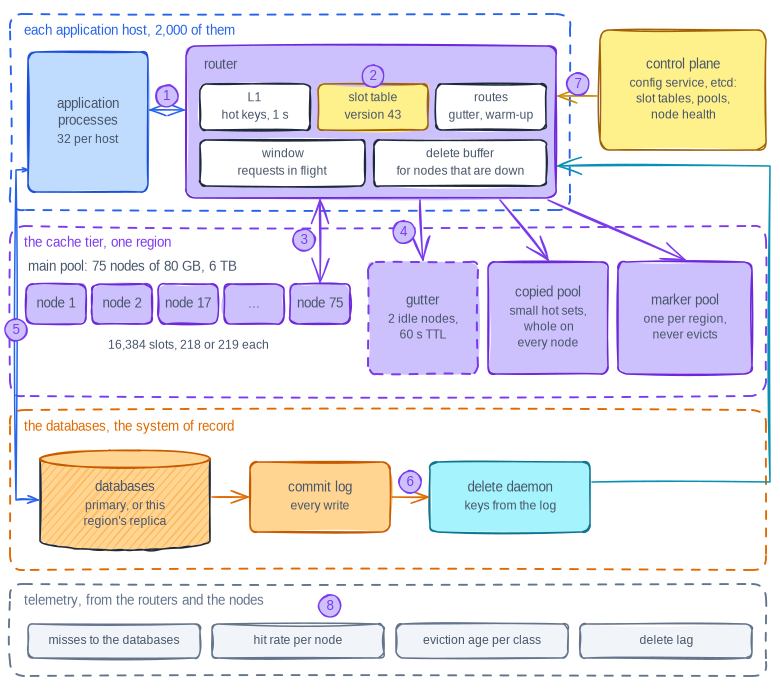
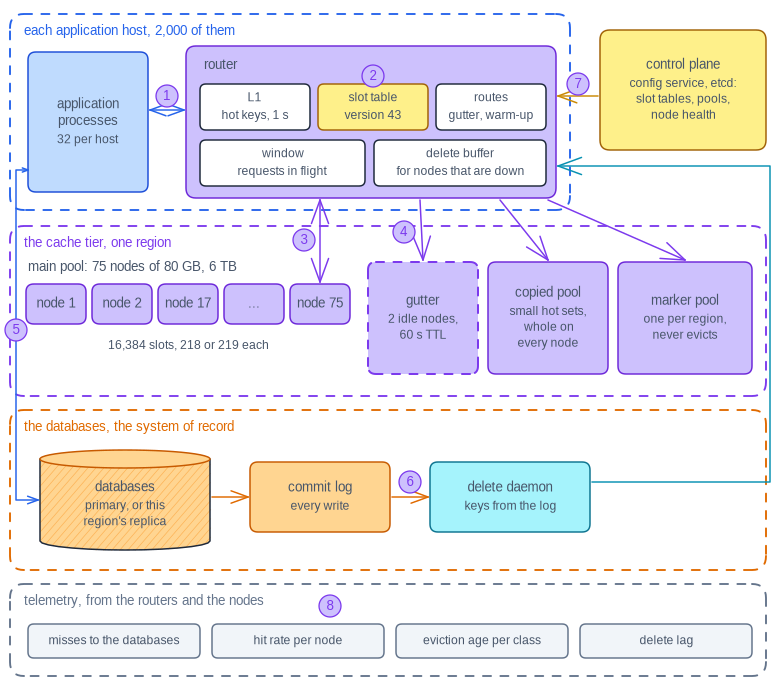
One read and one write, end to end:
- The application sends a batch of keys to the router on its own host, over loopback.
- The router answers hot keys from its L1. For the rest, it hashes each key to a slot and looks up the owner in its copy of the slot table.
- It splits the batch by node and sends each node its share in parallel, within its window of requests in flight.
- The nodes reply with their hits. If a node times out, the router retries its keys in the gutter pool. During a warm-up, a miss on a new owner is retried on the old one.
- The application reads the remaining misses from the database in one query, and sets them back through the router with a TTL.
- A write commits in the database. The daemon reading the commit log sends a delete for each affected key to that region's routers. They delete it on the owner, or on both owners during a move, and hold the deletes for a node that is down until it returns.
- The control plane publishes a new table version when a node joins, leaves or is declared dead. For a move, it switches reads only after every router has acknowledged the version that sends deletes to both owners.
- The routers report the misses they return and the delete lag, and the nodes report hit rates and eviction ages. Each region runs the same thing from its own database replica.
The numbers behind the shape: a 6 TB working set on 75 nodes of 80 GB, at about a third of a 2013 server's single-get rate. One node holds 132,000 hits a second, and the gutter keeps its failure to 66,000 to 86,000 database reads against a headroom of 100,000. A new node takes 130,000 hits a second from the old owners, not from the databases.
What is expected at each level
How interviewers turn what they see into these levels is in How a System Design Interview Is Scored.
Mid-level
Breadth matters more than depth at this level, and it's fine to be led.
You should split keys across nodes by hash, and know why hash % N moves almost every key when N changes. You should know what consistent hashing buys. You should be able to describe an LRU built from a hash table and a linked list, and say what a TTL is for.
You aren't expected to raise slab allocation, gutters or warm-up routes without being asked. You are expected to answer sensibly when asked "what happens when a node dies?" A good answer says its keys become misses, and asks whether the databases can take them.
Senior
You drive the structure, and three things should come up without prompting.
The miss budget. Turn the hit rate into misses a second, and say what the databases can take. Every later decision is measured against that number.
Placement that moves the minimum. Consistent hashing or a slot table, and the arithmetic for what one more node does. Say how many positions or slots, and why.
A node failure, priced. Say what happens to its keys, and what a returning node holds. Replicas are acceptable if you can name their cost: twice the memory, a failover gap, and lost deletes.
Two things are disqualifying: hash % N with no plan for a change in N, and a design that writes the cache to disk or runs quorums to keep data the database already has.
Staff+
A correct design is still the bar. A staff+ answer also decides what not to build.
State early that any key may go, and that many may not go at once. Use it to keep disks and quorums out, and to measure every event in misses a second.
Price the replica against a gutter, and size the nodes for the gutter. 75 nodes against 2, and a node small enough that the gutter's low end keeps its failure inside the budget.
Fill new owners from old owners. A move changes the owner, and the data follows the reads, so a resize costs the databases nothing. Send deletes to both owners before any reads move.
Treat a deploy as a failure of every node. Restart warm for a new build, move the slots off for a reboot, or the upgrade takes days of managed database load.
Look for memory outside the eviction policy. Pages stuck in the wrong class, header and key bytes, and expired items. At 10 billion items, 42 bytes each is five nodes.
Be able to say what you would not build. No persistence and no quorum replication for a cache. No replica for every node when a gutter meets the budget. No custom eviction algorithm before anyone has measured calcification and per-item overhead. No copying of cache entries between regions. No health check that changes slot ownership. No client library per language when one router per host will do. A team could spend a quarter on any one of these. Naming them as deliberate omissions counts for more than another box on the diagram.
Sources
The mechanisms and real-world figures below come from these sources, read for this article. The fleet, traffic and value sizes are assumptions, stated where they're used.
- Nishtala et al., Scaling Memcache at Facebook, NSDI 2013. Clients and the mcrouter proxy, gets over UDP with sets and deletes through mcrouter, consistent hashing, 521 items for a popular page in batches of 24, and the sliding window against incast. Copying a small multi-get set instead of splitting it, and the gutter at about 1 percent of servers with its 35 to 50 percent hit rate. The adaptive slab allocator and the short-lived key family cut from 6 to 0.3 percent. 1.8 million items a second from 10-key multi-gets, with single gets at about a quarter of that, hours to warm a server, and shared memory across upgrades. Deletes from the commit log, remote markers, leases, cold cluster warm-up with a 2 second hold-off, and delete latency.
- Facebook Engineering, Introducing mcrouter: A memcached protocol router for scaling memcached deployments, 2014, and the mcrouter wiki's list of route handles. Connection pooling, replicated pools, health monitoring with failover, cold cache warm-up, and the 60 second default TTL for writes to a failover destination.
- Redis, Redis Cluster specification. 16,384 hash slots with CRC16, about 1,000 nodes as the design target, slot migration with redirects, and asynchronous replication that can lose acknowledged writes. A primary is failed after the node timeout and replaced in 1 or 2 seconds. The default node timeout of 15 seconds is from redis.conf.
- Yang, Yue and Rashmi, A large scale analysis of hundreds of in-memory cache clusters at Twitter, Twitter and Carnegie Mellon, OSDI 2020. Key and value sizes, the 56-byte memcached header and Twitter's 38, and fragmentation from general allocators. Slab calcification, Zipf popularity, and the small effect of the eviction algorithm on many workloads.
- memcached: Replacing the cache replacement algorithm in memcached, 2018, for the segmented LRU, reads that only mark, and the original LRU's limit at 8 threads. Warm Restart, for keeping items through a clean restart, its timing, and the persistent memory needed across a reboot. The UserInternals wiki page and the source, for 1 MB pages, the default growth factor of 1.25 and expiry on read.