Why you are doing this at all
Your server can't send anything to an app that isn't running. When someone moves an iPhone app to the background, iOS suspends it, and the socket the app held goes with it. An Android phone left on a desk goes into Doze, a battery-saving state in which the system suspends network access for apps. Either way, nothing on the phone is listening for your server.
One connection stays up. The phone keeps a single connection to its operating system's push service, and every app on the phone shares it. Android's documentation gives the reason: one shared connection saves the battery that a separate connection per app would drain. RFC 8030, the Internet Engineering Task Force (IETF) standard behind push in web browsers, makes the same argument about the device's radio.
So there are three ways in, and you own none of them.
- APNs, the Apple Push Notification service, for Apple devices.
- FCM, Firebase Cloud Messaging, for Android. FCM can also pass messages on to APNs and to browsers, so many teams send everything through it.
- Web Push, the protocol in RFC 8030. Each browser vendor runs its own push service, and when a user allows notifications, the browser gives you a URL at that service.
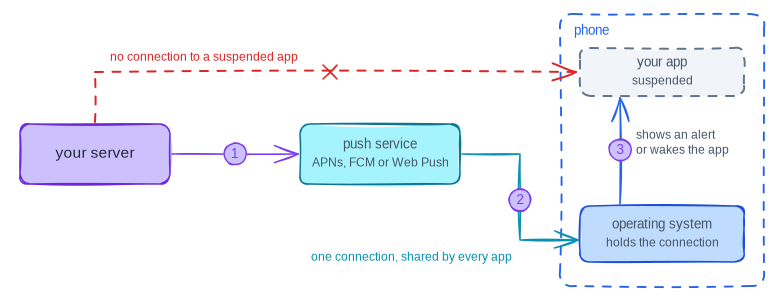
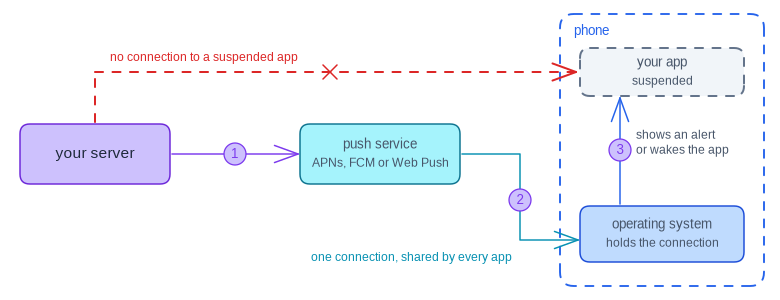
Your server sends an HTTP request to the right service and gets an answer within milliseconds. That answer says the service accepted the push. It doesn't say the phone got it. Apple describes APNs as "a best-effort service" that may reorder pushes, hold them, throttle them and, in some cases, not deliver them. Google says the same about FCM: a message ID in the response means FCM accepted the message for delivery, not that it reached the device.
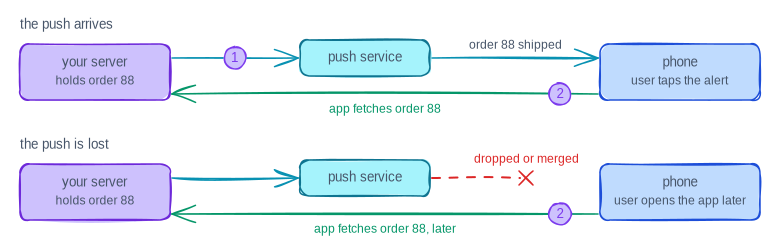
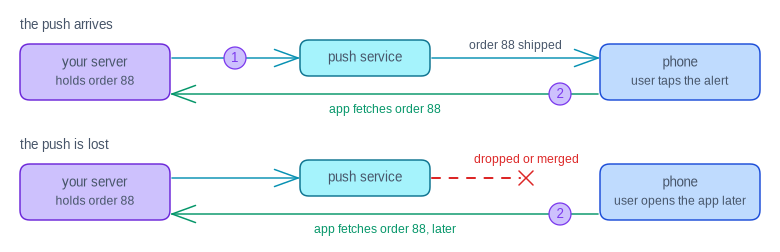
A push is a hint that something changed, delivered when Apple, Google or a browser vendor decides. Your server keeps the truth, and the push only gives the device a reason to come and ask.
Most of this page follows from that. The payload limit is 4 KB, too small for content and plenty for a pointer. A provider may merge or drop a push, which costs nothing when the app syncs from your server anyway. Retries create duplicates, and a duplicate hint does no harm if the phone can recognise it. And you can't see delivery from outside the phone, so you measure what the app fetches.
What a push is for
A push does one of two jobs, and Apple and Google both keep them apart.
Show the user something. That means an alert, a sound or a badge on the app icon. The operating system draws it, often without running any of your code.
Wake the app so it can sync. A background push shows nothing. It asks the system to start your app for a short time so it can fetch new data. iOS gives the app 30 seconds. Apple treats these pushes as low priority, doesn't guarantee to deliver them, and advises sending no more than two or three an hour.
APNs separates the two with the apns-push-type header, alert or background. Google is moving Android to the same split. Its new config, still in preview, replaces the priority setting with two message types: one for anything the user sees, and one for background sync.
Sometimes the right answer is no push at all. If the app is open, it already has a connection, and WebSockets, SSE and Polling covers that path. If the time is known in advance, as with a calendar reminder, the app can schedule a local alert on the device. Firebase's guide to sending at scale uses that exact example, and suggests using FCM only to sync the calendar.
The platform rules
Here is what each service accepts, as Apple's and Google's documentation and RFC 8030 read in November 2026. Push limits change, so check the current pages before you quote one in a design review.
| APNs | FCM | Web Push | |
|---|---|---|---|
| address | a device token, one per app per device | a registration token, being replaced by a Firebase installation ID | a subscription URL at the browser's push service |
| payload limit | 4 KB, or 5 KB for a Voice over IP call | 4,096 bytes, or 2,048 to a topic | at least 4,096 bytes, 3,993 of them your data after encryption |
| priority | apns-priority 10, 5 or 1 | high or normal | Urgency: very-low, low, normal or high |
| replace a waiting push | apns-collapse-id, up to 64 bytes | collapse_key, at most 4 per device | Topic, up to 32 characters |
| held while offline | 1 per app per device, up to 30 days | on Android, up to 100 data messages that don't collapse, up to 28 days | until the time to live (TTL) you must send |
| address is dead | 410 Unregistered | 404 UNREGISTERED | 404 or 410 |
| sending limits | 429 when one token gets too many | 600,000 a minute per project, 240 a minute to one Android device | 429 with Retry-After |
Device tokens, and why they churn
To push to a phone you need its address. On Apple platforms that address is a device token. The app asks the system for one at launch and sends it to your server. A token is unique to one app on one device, so a user with an iPhone and an iPad has two. FCM's address is a registration token. In a browser the address is a subscription: a URL at the push service, plus the keys you encrypt for.
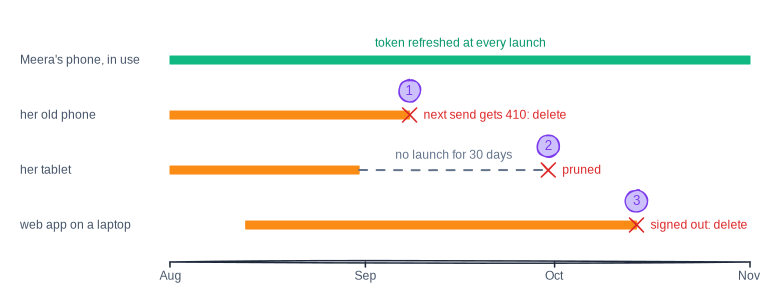
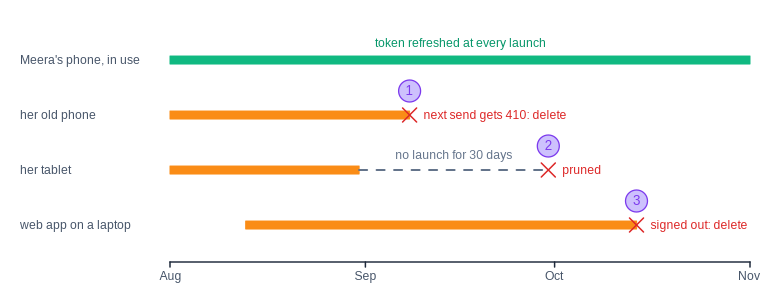
Tokens change, and your copy of them goes stale from the day you ship. Apple issues a new token when someone restores a phone from a backup, moves to a new phone, or reinstalls the operating system. So the app should never cache its token. It should ask the system at every launch and upload whatever it gets. An uninstall leaves the old token in your table with nothing behind it, and a phone in a drawer keeps its token for months.
So store one row per device, with the time it was last uploaded. The WhatsApp breakdown keeps the token as a column on its devices table, which is the same idea.
push_tokens (
  device_id    bigint primary key,
  user_id      bigint not null,
  platform     text not null,   -- apns, fcm or web
  token        text not null,
  updated_at   timestamptz      -- set on every upload, changed or not
)
  index (user_id)               -- one user's devices, for a personal push
  index (updated_at)            -- the pruning job
Three events remove a row.
The provider says the token is dead. APNs answers 410 Unregistered, FCM answers 404 UNREGISTERED, and a Web Push service answers 404 or 410. Delete the row, and don't send to that token again.
On APNs, compare two timestamps before you delete. The 410 body carries a timestamp, the moment Apple confirmed the token stopped working, and an app can get the same token back later. If your updated_at is newer than that timestamp, the app uploaded the token again after Apple marked it dead, so keep the row.
Nobody has heard from it in a month. FCM calls a token stale when its app hasn't connected for a month. Apple publishes no inactivity limit, so for APNs tokens the cleanup is all yours. Refresh updated_at on every launch, and prune rows older than your staleness window, a month by Google's default.
The user signs out. Delete the row, or the next person to sign in on a shared tablet gets the last person's alerts.
A broadcast goes to every Android token in the table. How
much of it is wasted if nobody prunes the table?

  tokens in the table                            10M
  sent to inactive devices, tokens unmanaged     ~15%
    (Firebase's estimate for apps that do not manage
     their tokens)
  wasted sends   10M × 0.15                      = 1.5M

FCM's default quota, which counts every message
  600,000 messages a minute per project
  quota spent on dead tokens   1.5M / 600,000    = 2.5 minutes

  ──────────────────────────────────────────────────────
Every broadcast spends 2.5 minutes of quota on phones that
will never show it, and the dead tokens drag the reported
delivery rate down. A daily pruning job shrinks both.The payload: a pointer, not the content
APNs and FCM both refuse a payload over 4 KB. Web Push leaves slightly less room for your data, because the encryption that RFC 8291 requires takes part of it.
4 KB holds an alert title, a body and a few ids. It doesn't hold a chat thread, an order with its line items, or a page of results, and you shouldn't want it to. Content in a push is a second copy of your data, sent through a service you don't control, which may arrive late or not at all. So the payload carries two things.
- What the user should see, if the push is an alert: a short title and body.
- A pointer: the id of the thing that changed, so the app can fetch it.
When the user taps, the app opens and fetches by id.
Two more rules shape the payload.
The payload leaves your control. Apple says not to put customer information or sensitive data in a payload, and to encrypt it if you must. A messaging app with end-to-end encryption can't put the message text in at all, because its server can't read it.
The iOS answer is a notification service extension, a small part of your app that the system runs before it shows an alert. If the push carries an alert and sets mutable-content to 1, the extension gets about 30 seconds to decrypt the payload or download the message, then rewrite the alert. If it runs out of time, the system shows the original text. So that text has to be safe to show, like "New message".
The system may show an alert without running your code. On Android, an FCM alert that reaches an app in the background goes straight to the tray, and the app only sees its data when the user taps. So anything that has to happen before the user sees the alert, like checking whether they wanted it, has to happen on your server.
Collapse keys
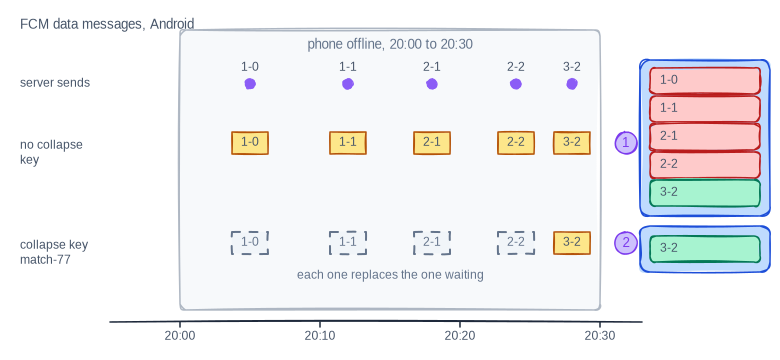
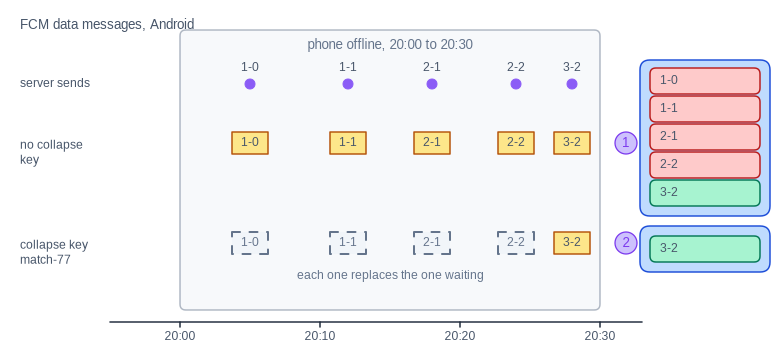
A phone that comes back after an hour offline can receive a stack of pushes that are already out of date. A collapse key marks pushes that are versions of the same thing, so a newer one replaces an older one still waiting for delivery.
- APNs takes an
apns-collapse-idheader of up to 64 bytes. Apple also uses it to merge alerts on the phone, so two pushes with the same id show as one entry rather than two. - FCM takes a
collapse_keyon Android. It keeps at most four different keys per device, and Google doesn't say which four survive when you use more. Notification messages, the alerts FCM draws for you, always collapse and ignore the key. Only data messages, which your app handles, can stay separate. - Web Push takes a
Topicheader of up to 32 characters. A new push with the same topic replaces any that is still waiting.
Collapse is right when the newest version makes the older ones useless: a score, an unread count, a "sync now" signal. It's wrong when each push stands alone, like separate chat messages.
If you don't collapse, the providers' storage rules decide what survives, and Apple and Google decided differently. While a device is offline, APNs stores one push per app per device, whatever you send. Most of the time it keeps the latest, but Apple doesn't promise that.
FCM on Android stores up to 100 data messages that don't collapse. When it reaches that limit, it discards all of them, and later tells the app to do a full sync.
A mail app sends Android a "sync now" data message when
mail arrives. A busy inbox gets 30 emails an hour, and
the phone is off for 8 hours overnight. What waits?

Each push stands alone
  sent overnight       30/hour × 8 hours         = 240
  FCM keeps for one device                       ≤ 100
  → at 100, FCM discards all of them, tells the app
    to do a full sync, and starts filling again

One collapse key, "mail-sync"
  waiting by morning                             = 1
  → the app wakes once and syncs

  ──────────────────────────────────────────────────────
Both versions end in one full sync. The collapsible one
gets there with 1 push instead of 240.
Priority, and what the phone does with it
Every service lets you say how urgent a push is. The device's power state decides what that buys you.
- APNs takes
apns-priority. 10, the default, sends immediately. 5 sends "based on power considerations". 1 puts battery first and won't wake the device. Apple says to use 10 only for alerts that need the user to act now, and a background push must use 5. - FCM takes
highornormal. Google's own pages disagree on the default, so set it on every send. A normal push arrives at once while the phone is awake, and waits while it is in Doze. A high push can wake a sleeping phone and lets the app do a little work. - Web Push takes an
Urgencyheader from very-low to high, normal by default.
In Doze, the phone wakes only for short maintenance windows, in which apps can sync and normal-priority pushes arrive. The longer the phone sits unused, the further apart Android schedules those windows.
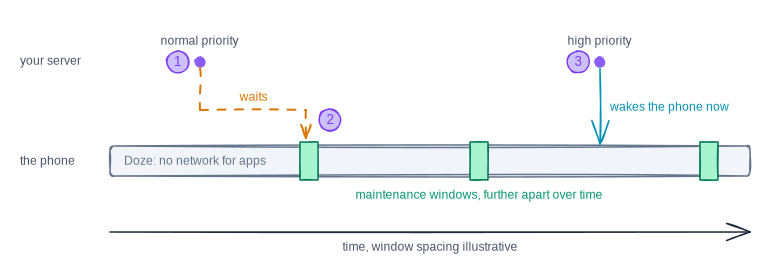
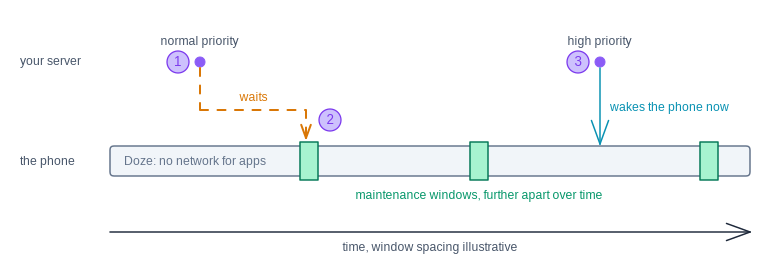
High priority isn't free. Google says high-priority Android pushes are for time-sensitive content the user sees. If FCM notices a pattern of high-priority pushes that don't produce a visible alert, it may lower them to normal, and its delivery data reports how often it did.
So match the priority to the job. An alert the user must act on now, like "your driver is here" or "a sign-in from a new device", is high. Everything else is normal, and a sync signal is always normal.
Rate limits, theirs and yours
The providers limit you to protect themselves and the user's battery. FCM publishes the most detail.
- Per project, 600,000 messages a minute by default. The quota counts messages, not requests. Past it, FCM answers 429
QUOTA_EXCEEDEDuntil the quota refills. For a planned event, FCM can raise the quota for a while, with weeks of notice. - Per Android device, 240 messages a minute, with a warning not to send near that rate as a habit.
- Per topic fanout. A topic is a named group that devices subscribe to. FCM copies a message sent to a topic out to every subscriber, and that copying is a fanout. Google says 10,000 sends a second is "not uncommon" for one project, without guaranteeing it, and all of a project's fanouts share that rate.
Apple publishes no quota per app. The 429 it documents is for too many pushes to one device token.
Your side needs limits too, and they protect the user. LinkedIn sends almost all its notifications through one gateway, Air Traffic Controller (ATC). Before anything is sent, ATC drops duplicates, expired content and excess volume, and it rate-limits the internal teams that ask for sends. LinkedIn reports it cut member complaints in half.
Then there is the clock. Firebase reports that FCM receives more than double its usual traffic in the first 30 seconds to 2 minutes of each hour, with smaller spikes at the quarter hours. It asks senders, "where possible", to avoid the 2 minutes around :00, :15, :30 and :45. Every job scheduled for 9:00 sharp lands in that spike.
Retries and duplicates
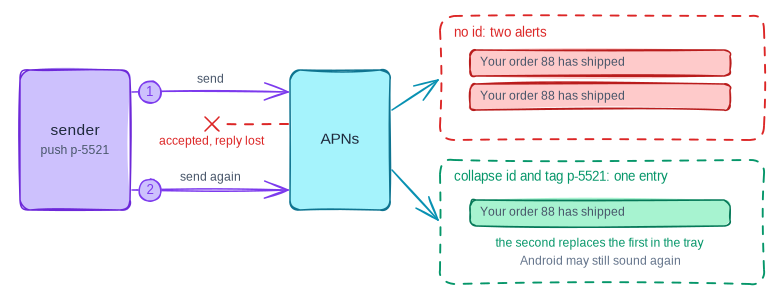
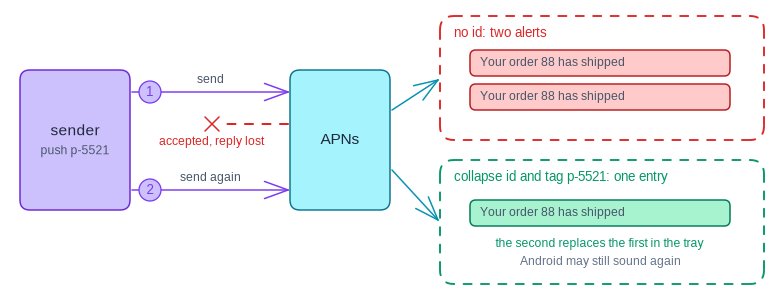
The sender will retry, and some retries will repeat a push that already worked. A request to APNs or FCM can time out after the provider accepted it, and the sender can't tell that from a request that never arrived. Idempotency and Exactly-Once Delivery explains why no protocol fixes that. A worker can also crash after sending a batch and before recording that it did. Every retry policy for push ends up sending at least once, and a duplicate alert is a failure the user sees directly.
The providers set the retry rules. FCM says never to retry a 400, 401, 403 or 404. On a 429, wait for the Retry-After header. On a 500, retry with exponential backoff, up to a maximum interval rather than forever. Apple lists the errors never to retry, among them Unregistered and PayloadTooLarge.
So when a push might be sent twice, how do you stop the user from seeing it twice?
Retry until the provider says yes
Most send loops start here, because the provider's API is one call and a retry is one more. It goes wrong in two places. A timeout after APNs accepted the push sends it again, and the user sees two identical alerts. A worker that crashes halfway through a batch of 500 resends the whole batch when it restarts, and up to 500 people see two.
A send record, checked before every send
Give every push an id when you create it, and keep a record of sends keyed on that id and the device. Before sending, insert the row. If the insert finds a row already there, skip the send. This is an idempotency key applied to pushes, and it stops the crashed worker from resending what it already sent.
It can't stop the lost response. If APNs accepted the push and the reply was lost, your row says "in flight", and you have to choose: resend and risk a duplicate, or don't and risk a lost push. It's the same choice the idempotency page makes for email, because the provider's state and yours can't share a transaction.
Let the phone recognise the duplicate
Question the premise that the server must catch duplicates before sending. It can't catch all of them, as the lost response shows. The phone can catch them, using fields every platform already has. Put the push's id in three places.
- APNs: the collapse id. Apple's guidance is exactly this: "When sending the same notification more than once, use the same value in this header to merge the requests."
- Android: the alert's
tag. An alert with the same tag replaces the one already in the tray. - Browsers: the alert's
tag, which works the same way.
A resend now replaces the alert in the tray instead of adding a second one. This is the idempotency page's "give the provider a key", applied to push: the provider's own field does the dedup. The app also fetches state by id when it opens, so a repeated hint fetches the same thing twice and changes nothing.
The server's record can now be coarse.
A broadcast to 10M devices, in batches of 500, the most
the Firebase Admin SDK takes in one multicast call. The
call sends to each token and reports each result, so a
retry resends only the tokens that failed. A worker
records each batch as done when its send returns. What
does a crash cost, and what would a finer record buy?

  batches   10M / 500                           = 20,000
  a worker dies after sending, before recording
    its retry resends the batch           ≤ 500 duplicates

  record per batch     20,000 writes per broadcast
  record per device    10M writes per broadcast
    and a lost response still leaves the device's
    row "in flight", so a resend is still possible
  ──────────────────────────────────────────────────────
500 times the writes makes duplicates rarer and still not
impossible. With the id as the collapse id and tag, each
duplicate replaces an alert instead of adding one.
What you give up: the id has to be unique per push and never reused, or one alert replaces a different one without any error. On Android the replacement sounds and vibrates again, unless the app draws the alert itself and sets setOnlyAlertOnce.
The replacement only happens while the first alert is still showing, so a duplicate that arrives after the user dismissed the first shows again. And a tag only covers alerts. A data push that starts work in the app needs the app to drop repeats by id itself.
Preferences, permission and quiet hours
Two layers decide whether a push reaches the user, and your server sees only one of them.
The first layer is the operating system's permission. On Android 13 and later, a newly installed app's alerts are off until the user allows them. On iOS, the app has to ask, and the system shows the prompt only once. Users can turn alerts off in Settings at any time.
iOS Focus modes also hold alerts back. An alert marked time-sensitive can break through Focus, unless the user turns that off.
Your server sees none of that. APNs accepts a push to a device whose user turned alerts off, and Apple's delivery metrics later count it as "Discarded - Disabled". So have the app report its permission state at every launch, and stop sending alerts to devices that can't show them.
The second layer is yours: the preferences the user set in your app, per type of push and per channel. They include quiet hours, a window in the user's own time zone when pushes that can wait do wait. These checks run on your server, before the send.
Measuring delivery when the provider says so little
Delivery happens between a provider's servers and a phone, and you see only your end of it. Here is what each step tells you, and who can see it.
- Accepted. The provider answers every request within milliseconds. The rejections in those answers are your best live signal: dead tokens, bad payloads, quota.
- Delivered to the device. Only the provider knows this, and it reports in aggregate. Apple's Push Notifications Console shows rounded counts of pushes delivered, stored and discarded, with reasons such as "Stored - Device Offline". Google's FCM Data API gives daily percentages for Android apps, such as delivered, collapsed and delayed by Doze, and they arrive up to 5 days late.
- Received by the app. Only your app can say, and only when it runs. On iOS the notification service extension runs for alerts that set
mutable-content, so it can report receipt. FCM's console reports "Received" for Android apps on recent versions of its library. - Opened. The app reports it when the user taps.
Slack built this funnel out of traces. Each notification gets its own trace, linked back to the request that triggered it. The trace has one span, a timed step, for each stage: notify, sent, received, opened and read in the app. Slack keeps every notification trace, while it samples the sender's requests at 1 percent. It says triage time for notification tickets fell by 30 percent.
Measuring has a price. Every "received" report is a request to your API.
Every device that runs your code can report receipt. Should
every push be reported?

Personal pushes, at an assumed 2,000 sends a second
  receipts at 100%                              ≤ 2,000/s

A broadcast to 10M devices at FCM's default quota
  send time        10M / 10,000/s                = 1,000 s
  receipts at 100% 10M / 1,000 s                 = 10,000/s
    on top of every app open the broadcast causes
  receipts at 1%   10,000 × 0.01                 = 100/s
  ──────────────────────────────────────────────────────
Report every receipt for personal pushes, where one missing
alert is a support ticket. Sample broadcasts at 1 percent:
100,000 devices measure the rate well, at 100 requests a
second instead of 10,000.The method
1. Say what the push is for. It's an alert the user sees, a signal for the app to sync, or neither. If the app is open, use its connection. If the time is known in advance, schedule a local alert.
2. Keep the truth on your server. Every push points at state the app can fetch. If the push never arrives, the user should still see the change the next time they open the app.
3. Store tokens per device, and clean them. Upload at every launch with a timestamp. Delete on the provider's "dead" answer. Prune past a staleness window, a month by default.
4. Set four things per type of push. A payload under 4 KB that carries a pointer. A collapse key if a newer push replaces an older one. A lifetime as long as the push stays true. High priority only for alerts the user must act on now.
5. Check preferences and quiet hours before the send. For each type, decide: send now, hold, or drop.
6. Send under both sets of limits. Send in batches, at a paced rate under the provider's quota, with a share kept for urgent pushes. Back off on 429, and, where possible, lower the rate in the minutes around each quarter hour.
7. Make a resend harmless, and measure what you can see. Use the push's id as the collapse id and tag, unless step 4 gave the type a shared collapse key. Track accepted, delivered and opened as three separate numbers.
Worked examples, start to finish
Here are four pushes. In each one, the obvious approach fails in a different way.
A chat message to a phone in someone's pocket
Alice sends Bob a message. Bob's phone is locked in his pocket, and his chat app is suspended, so its socket is gone. The obvious design puts the message in the push: the text in the alert body and the message id in the data. When APNs or FCM returns success, the server marks the message delivered.
That design has two flaws. First, the server marks as delivered a message Bob may never get. If Bob's phone loses signal for an hour while his group sends 150 messages, APNs keeps one push for the app. If the pushes are FCM data messages, FCM keeps up to 100, then discards all of them and starts again.
Second, if the chat is end-to-end encrypted, the server can't read the text it wants to put in the alert.
The WhatsApp breakdown keeps the truth on the server. The message waits in Bob's spool, a server-side queue of undelivered messages for his device. The push only wakes the phone. The app reconnects, asks for everything after the last position it acknowledged, and drains the spool. WebSockets, SSE and Polling describes that resume-from-position step. A message counts as delivered when Bob's device acknowledges it from the spool, not when Apple or Google accepts a push.
The alert has to work without the server reading the message. The push carries the ciphertext, if it fits in 4 KB, or just the conversation id. It sets mutable-content so the extension can decrypt or fetch, and its visible text is a safe fallback, "New message", in case the extension runs out of time.
The decision: the push wakes the phone and shows an alert, and the spool delivers. Each message gets its own push, and its own id as the collapse id, so only a resend of the same message collapses. A push the provider drops costs nothing, because the spool still has the message.
"Your driver is arriving"
A ride-hailing app sends Priya an alert when her driver is two minutes away. The obvious push carries the alert text, high priority, and the default settings for everything else.
The default lifetime is the bug. APNs can hold an undelivered push for up to 30 days, and FCM's default is 4 weeks. Priya's phone loses signal for 40 minutes. When it reconnects, she gets "Your driver is 2 minutes away" for a ride that ended half an hour ago. On Android, the trip's other alerts, "driver assigned" and "driver has arrived", stack up beside it.
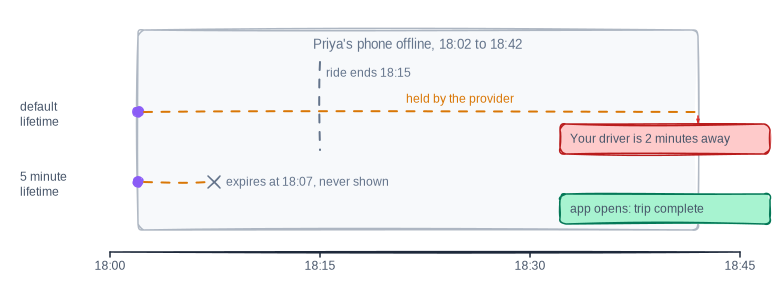
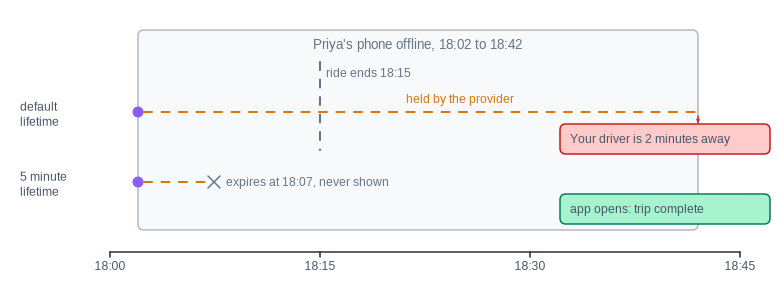
Four settings fix it.
- Lifetime: as long as the alert stays true. "Arriving" is worthless after a few minutes, so send
apns-expirationfive minutes ahead, an FCMttlof 300 seconds, and a Web PushTTLof 300. - Collapse key: the trip id. Each status replaces the one still waiting. Use the same id as the APNs collapse id and the Android tag, so the alert on screen updates in place instead of stacking.
- Priority: high. The user has to act now.
- On iOS, mark it
time-sensitive, so it can break through Focus.
Collapsing per trip has a cost, because neither provider promises order. If "driver assigned" is delayed and arrives after "driver has arrived", the older status replaces the newer one. A short lifetime shrinks that window. An app that draws its own alert from a data message can go further. It carries a version number in the data and drops anything older than what it already shows.
The decision: a lifetime of minutes, collapse per trip, and high priority. Compare this with the chat message. There, a late push is still useful, because the spool has the message. Here, a late push is wrong, so it should expire.
A broadcast to 10 million devices
A news app sends a breaking-news alert to every user who follows politics: 10 million devices. The arithmetic below treats all of them as Android phones on FCM, because FCM publishes its limits and APNs doesn't. The obvious design is one job that reads the audience and sends as fast as the API allows.
A breaking-news alert to 10M Android devices. Before
choosing how to send, work out how fast one FCM project
can go.

Sending to each device yourself, default quota
  600,000 messages/minute / 60 s              = 10,000/s
  10M / 10,000/s                              = 1,000 s ≈ 17 min

Sending to an FCM topic and letting FCM expand it
  rate Google calls "not uncommon"             ~10,000/s
  10M / 10,000/s                              = 1,000 s ≈ 17 min
  (not guaranteed, shared by every fanout the project
   has running, and a topic payload is 2,048 bytes at
   most, half the usual limit)

Duolingo's Super Bowl target, for scale
  4M learners / 5 s                           = 800,000/s
  ──────────────────────────────────────────────────────
Either way, the last push is sent about 17 minutes after
the first. Your fleet doesn't set that number. The
provider's quota does.
Duolingo shows what it takes to beat these numbers. For its 2024 Super Bowl ad, it wanted a push to reach 4 million learners within the ad's 5 seconds. Its largest push until then had gone to 500,000 learners over 60 seconds and "caused a few crashes". The team redesigned the whole sending system, and on the night it sent the push to 95 percent of eligible learners within 3.9 seconds. A broadcast that fast is a project, not a setting.
So the question isn't how to loop faster. It's how to get one alert to 10 million phones inside a window the product accepts, without starving every other push and without knocking over your own API when people tap.
One job, one loop, as fast as the provider allows
The Firebase Admin SDK takes one call per batch of 500, though underneath it sends one HTTP request per token, so a loop over the audience looks like the whole job. It fails in four places.
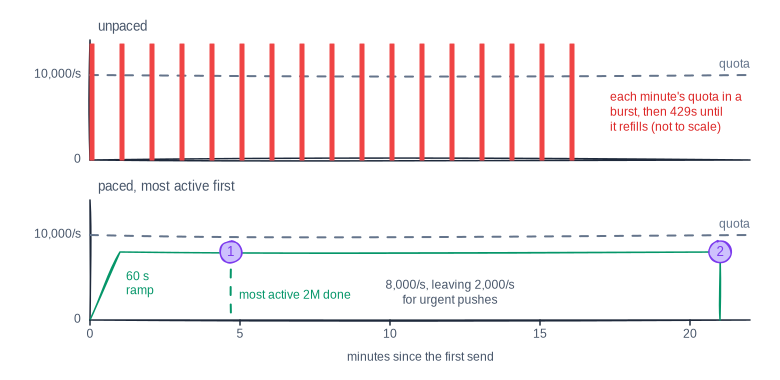
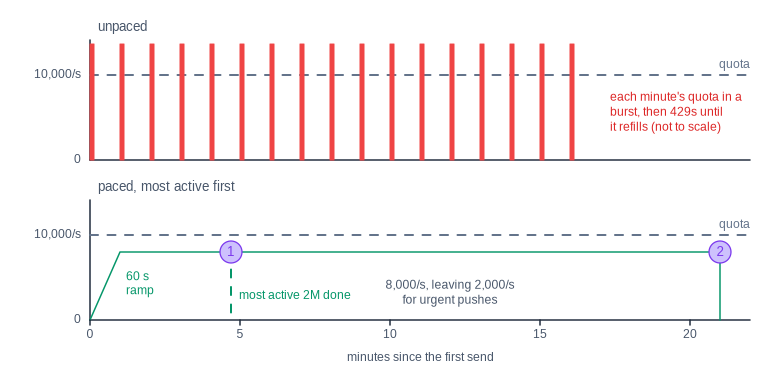
- After the first 600,000 sends in a minute, FCM answers 429. A loop that retries at once only adds more requests, which Firebase calls retry amplification.
- A crash at device 6 million either restarts from the top, sending 6 million duplicates, or loses its place.
- Every password-reset code in the same project waits behind the broadcast.
- When 10 million people tap, they all open the same article within minutes.
A paced fanout pipeline
Split the work into batches, and send them at a rate you choose.
- Expand the audience into batches of 500 device tokens, the most one multicast call accepts. Drop stale tokens, users who opted out, and users inside quiet hours on the way.
- Put the batches on a work queue. Each batch is a task to do once, which is the job a queue does well, as Message Queues vs Event Streams explains.
- Workers take batches and send through one shared rate limiter, set below the quota: say 8,000 a second, leaving 2,000 for urgent pushes. Ramp up over at least 60 seconds, as Google asks, and lower the rate near each quarter hour where you can.
- Retry only the tokens in each batch that failed. On a 429, wait for
Retry-After. On a 5xx, back off with jitter. When nothing in the batch is left to retry, record it as done. - Feed every
UNREGISTEREDback to the token table.
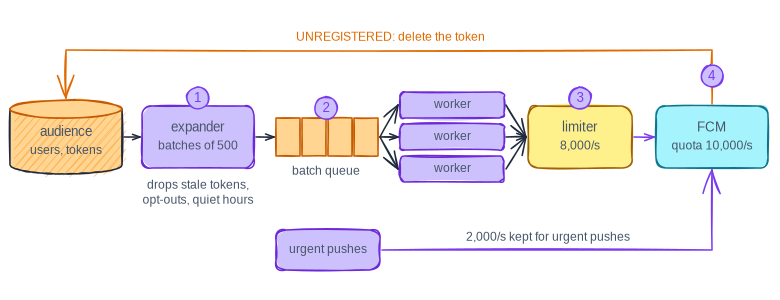
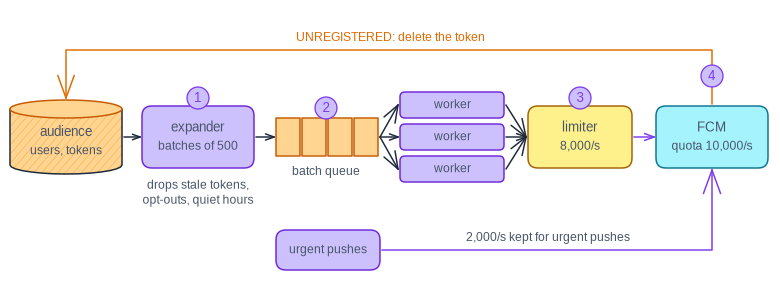
Most teams run something like this, and it works. The cost is time. At 8,000 a second the broadcast takes 10M / 8,000 = 1,250 seconds, so the last push goes out about 21 minutes after the first.
Make the window a product decision, and order the audience inside it
Question the premise that everyone should hear at the same moment. Firebase's own guide asks it: does everyone need the push within one minute, or would five do? Once the window is a number the product owns, three moves follow.
Order the audience. Send first to the people most likely to read it, such as everyone who opened the app in the last day. If they are 2 million of the 10, all of them are sent the alert in about 5 minutes: 2M / 8,000 = 250 seconds at full rate, plus half a minute lost to the ramp. The rest follow over the next 17.
Store the broadcast once. The push is one message per device, whether you or the provider makes the copies. The in-app record doesn't have to be. Write one row for the broadcast, and let each app read it when it opens, rather than writing 10 million rows into 10 million inboxes.
Get ready for the taps. Every push points at the same article, so cache it in your content delivery network (CDN) before the first send.
If the product insists on seconds, as Duolingo's did, treat it as an event you plan with Google. For the ordinary case, Firebase's FAQ is direct: notifying a large customer base within 2 minutes "cannot be supported. You must spread your traffic out over 5 minutes."
What you give up: people at the end of the list hear later than people at the start, on purpose. Ordering needs a recent-activity signal for every device. And the app has to merge shared broadcasts with personal alerts when it shows its inbox.
The decision: send through a paced pipeline at a rate below the quota, with a share kept for urgent pushes, the most likely readers first, and the target already cached. Agree the window with the product in minutes before you build any of it.
A push at 2 a.m.
Ravi set quiet hours from 22:00 to 07:00 in your app. At 02:10 his time his order ships, and a promotion for him is also in the queue. Both pushes are ready.
So what should happen to a push created during a user's quiet hours?
Send it, and let the phone's settings handle the night
It's tempting, because iOS has Focus and Android has Do Not Disturb. But plenty of people never set them, and for those people the push lights the screen at 2 a.m. Your app can't stop it either, because the system draws the alert without running your code. "No promotions at night" is a preference the user gave your app, so your server has to apply it.
Check quiet hours at send time, and hold until morning
Store each user's quiet hours in their own time zone. A push created inside the window goes into a table of held pushes, indexed by release time, and a job releases each one at 07:00 local time.
This is the standard answer, and Ravi sleeps through the night. Two costs remain. Some held pushes are worthless by morning, like a sale that ended at 3 a.m. And everything held in a time zone wants to go out at the same minute.
Decide per type: drop, merge, or break through
Question the premise that a held push should still be sent. Give each type a rule.
Pushes with a deadline expire. A sale that ends overnight or a driver who has arrived are worthless in the morning. Give them a lifetime, and drop them when it runs out.
Pushes that only inform get merged. Shipping updates, likes and comments become one summary per user at release time. LinkedIn's ATC queues alerts so it can group several into one, and it times delivery around the member's day.
Urgent pushes break through. A fraud alert or a sign-in from a new device goes now, marked time-sensitive on iOS.
What you give up: a table of push types that the product team has to own and keep current. A summary is less specific than separate alerts. And the break-through list costs trust if you stretch it. Apple says a rise in "Discarded - Disabled" means people find an app's alerts irrelevant or noisy.
Whatever rule each type gets, the pushes still held at 07:00 all leave at once unless you spread them out.
One time zone, 2M users with quiet hours ending at 07:00.
Assume 40% of them have pushes held overnight, 3 each on
average. How does the morning release land?

  held users      2M × 0.40                    = 800,000
  held pushes     800,000 × 3                  = 2.4M
  merged, one per user (the staff tier)        = 800,000

Everything released at 07:00:00, at 600,000 a minute
  3 per user      2.4M / 600,000               = 4 minutes
  merged          800,000 / 600,000            ≈ 1.3 minutes
  of the whole project's quota, starting exactly when
  FCM already sees more than double its usual traffic

Merged, each user at a random moment, 07:02 to 07:32
  800,000 / 1,800 s                            ≈ 440/s
  share of the 10,000/s quota                  ≈ 4%
  ──────────────────────────────────────────────────────
Merging and spreading turn 4 minutes of saturated quota
into 4% of it for half an hour. A shipping update that
waited all night can wait 30 more minutes.
The decision: check quiet hours on the server before every send. Drop what expires overnight, merge what only informs, let a short list break through, and spread the morning release over half an hour from 07:02.
Where it goes wrong
These are ordered by how often they turn up.
1. Treating an accepted push as a delivered one
The provider's success response means accepted, so record delivery when the app fetches or acknowledges.
2. Putting the content in the push
A push that carries the content is a second copy of your data with no delivery guarantee, so send a short alert and a pointer.
3. High priority for everything
High priority wakes a sleeping phone, and the providers notice when it's abused. If FCM sees high-priority pushes that never produce a visible alert, it lowers them to normal. Apple treats a background push sent at priority 10 as an error. Keep high priority for alerts the user must act on now.
4. The default lifetime on a push that goes stale
"Your driver is arriving" held for 40 minutes by default is worse than no alert, so set the lifetime to how long the push stays true.
5. Never cleaning tokens, or cleaning on the wrong error
Firebase estimates that apps which don't manage their tokens lose about 15 percent of their messages to inactive devices. The opposite mistake is deleting on every 400. FCM's INVALID_ARGUMENT also means "bad payload", so one broken template can wipe live tokens.
6. Sending on the hour, as fast as possible
Scheduled jobs at :00 add to the spike FCM already sees at the top of every hour. A loop with no limiter hits the quota in its first minute, then turns the 429s into retry amplification. Pace below the quota, ramp up over at least a minute, and avoid the quarter hours where you can.
7. Background pushes as a sync engine
On iOS, a background push is low priority and not guaranteed. While the phone holds background pushes, it keeps only the newest, and it discards a held push if something force-quits or kills the app. A design that depends on a silent push for every change will miss changes, and nothing will report an error. Sync when the app opens, and use a visible alert for anything the user needs to know.
If you memorise nothing else
| fact | why it matters |
|---|---|
| A 200 from APNs or FCM means accepted, not delivered | record delivery when the app fetches or acknowledges |
| A push is a hint; your server keeps the truth | a dropped or merged push then costs a delay, not data |
| The payload limit is 4 KB, and 2,048 bytes to an FCM topic | carry a short alert and a pointer, never the content |
| Offline, APNs keeps 1 push per app; FCM keeps up to 100 data messages, then drops them all | the app has to sync from your server either way |
| Set a lifetime as long as the push stays true | APNs holds up to 30 days, and FCM defaults to 4 weeks |
| FCM's default quota is 600,000 messages a minute per project | 10 million devices take about 17 minutes, and urgent pushes share it |
| Delete tokens on 410 or 404, and prune what has been quiet for a month | unmanaged tokens waste about 15 percent of sends |
| Use the push's id as the collapse id and tag | a resend replaces the alert in the tray, though Android may still buzz |
What is expected at each level
Mid-level
Know that a closed app can only be reached through APNs, FCM or a browser's push service, and that your server sends to the provider, not to the phone. Know that a device has a token, that tokens change, and that the server stores one per device. Know there is a payload limit of about 4 KB.
You aren't expected to raise collapse keys, quotas or quiet-hour release spikes without being asked. You are expected to answer sensibly when asked. If the interviewer asks "what if the push never arrives?", a good answer is "the app shows the change when the user next opens it, because the data is on our server."
Don't describe the push as the way data reaches the phone. It's how the phone finds out there is data to fetch.
Senior
You lead this part of the discussion, and three things should come up without prompting.
That the provider's success means accepted, not delivered. It shapes everything after it: where delivery is recorded, what retries mean, and what you can measure. A design that marks delivery on the provider's 200 loses messages without an error.
The per-type settings: lifetime, collapse and priority. Say them for each kind of push in the design. A driver-arrival alert and a weekly summary need different answers for all three, and a single default is wrong for at least one.
Token cleanup. Delete on the provider's "dead" answer, prune by last upload, and know that FCM's INVALID_ARGUMENT doesn't always mean the token.
Two things are disqualifying: a design where losing a push loses data, and a broadcast with no plan for the provider's rate limit.
Staff+
Producing a correct design is still the bar. On top of it, a staff answer makes four moves.
Make the delivery window a product number. Divide the audience by the provider's quota, show the product team the 17 minutes, and let them choose the window. Then order the audience inside it.
Push the dedup to the phone. The server can't catch a lost response. The collapse id and tag can, in the tray. Say why the server's record can then be one row per batch.
Decide per type what happens in quiet hours. Drop, merge or break through, written down, with a short and defended break-through list.
Measure what you can see. Name the steps you can't see, sample broadcast receipts, and alert on rejections, which is the one number you get within seconds.
Sources
Every APNs, FCM and Web Push limit here comes from the provider's documentation or the standard, read in November 2026, and each company figure from that company's own write-up.
- Apple Developer Documentation: Sending notification requests to APNs, Handling notification responses, Registering your app and Pushing background updates. Also Generating a remote notification, Modifying content in newly delivered notifications and Metrics and APNs. Payload, priority, collapse, storage, token and metrics rules for APNs.
- Firebase documentation: collapsible messages, message options, message priority, throttling and quotas, sending at scale and topic messaging. Also managing tokens, understanding delivery, error codes, the FAQ, the REST reference and AndroidConfigV2. FCM's limits, quotas, retry rules and delivery data.
- Neil Gu and Andrea Wu, Understanding FCM Message Delivery on Android, Firebase blog, July 2024. The 15 percent of messages lost to inactive devices when tokens go unmanaged.
- IETF, RFC 8030 and RFC 8291, with Matt Gaunt's The Web Push Protocol. Web Push's TTL, urgency, topic and size rules.
- Android Developers, Optimize for Doze and App Standby, Notification runtime permission and Create a notification. Doze, the shared FCM connection, alerts off by default, and
setOnlyAlertOnce. - Duolingo, How we turned Duo's butt into a viral Super Bowl commercial, February 2024. Its earlier and Super Bowl send times.
- Changji Shi, Air Traffic Controller: Member-First Notifications at LinkedIn, March 2018. One notification gateway that filters, groups and times sends.
- Suman Karumuri and George Luong, Tracing Notifications, Slack Engineering, April 2023. Notification traces, their sampling and the triage gain.