Why you are doing this at all
At 10:00 an admin removes a contractor's access. At 9:58 the contractor's app was given an access token valid for an hour. It's a JSON Web Token (JWT), a signed set of claims that any server can check without asking anyone. Every API that trusts it checks the signature and the expiry, and both stay valid until 10:58. None of those APIs has anywhere to look up that the contractor was removed. So the contractor keeps access for 58 minutes after the admin clicked the button.
With a server-side session, the same click takes effect on the next request, because every request looks the session up. That lookup is the price: one read of a shared data store on every request, by every server that needs to know who is calling.
A signed token is a cached answer to "who is calling, and what may they do?". Its expiry is how long that answer can stay wrong, so choosing a token's lifetime is choosing how long a revoked user keeps access.
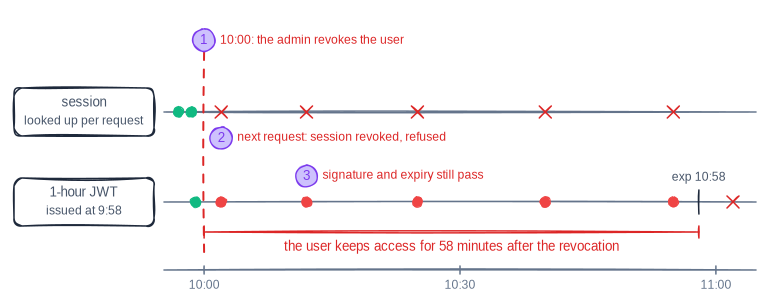
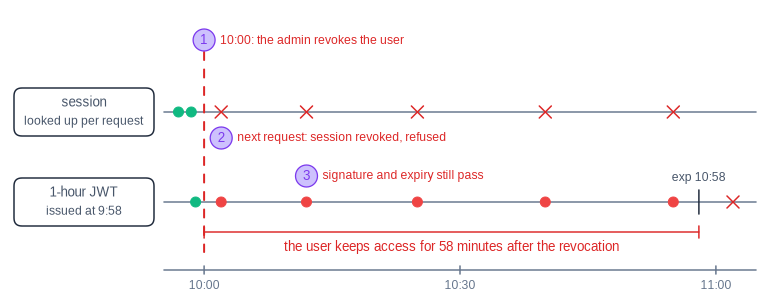
Seen this way, auth design is a caching problem, and caching strategies and invalidation already has the questions: what to cache, for how long, and how to invalidate it early when you must. A session is the uncached version. A JWT is the cached one. A short access token with a refresh token is a cache entry with a short time to live, renewed against the source. A denylist is the early invalidation.
Who the caller is, and what they may do
Authentication answers who is calling. A user proves it once, at login, and gets back something that stands for that proof: a session ID or a token.
Authorization answers whether this caller may do this action to this object, such as editing document 42. It's asked on every request.
The two change at different speeds. A user's identity stays the same for the life of a login. Their permissions change whenever someone shares a folder, removes a member or changes a role, and many of them belong to one object. So identity fits in a token well, and permissions often don't.
When one clause is enough
Most system design breakdowns don't need auth at all. The first five minutes treats authentication as a different layer, covered by one clause: someone upstream has already worked out who the caller is. The rate limiter and the URL shortener both do exactly that.
Bring this page in when the interviewer asks how a request proves who it is, when a third-party app acts for a user, or when sharing is the product, as in Dropbox and Google Drive.
Sessions, tokens and what each one costs
Six credentials turn up in almost every design. Each is held by one party, checked by another, and lives for its own length of time.
| credential | held by | checked by | lifetime | revoked by |
|---|---|---|---|---|
| session ID | the browser, in a cookie | the server, by a lookup | idle timeout of 15 to 30 minutes for low-risk apps, 2 to 5 for high-value ones (OWASP) | marking the session revoked |
| access token, signed (JWT) | the client | each API, by its signature | one hour or less (RFC 6750); usually minutes | expiry, or a denylist |
| access token, opaque | the client | each API, by asking the authorization server | as above | deleting its record |
| refresh token | the client; never sent to APIs | the authorization server only | until unused for too long, or revoked | marking it revoked, or a cut-off for the user |
| ID token | the client app | the client app, once, at login | used once | not needed after login |
| authorization code | the browser, in passing | the authorization server, once | 10 minutes at most (RFC 6749) | used once |
The worksheets on this page use one example app: 20 million daily users and 200,000 requests a second at peak.
Server-side sessions
At login the server makes a random session ID, stores a record under it, and sends the ID to the browser in a cookie. The ID means nothing by itself. On every request the browser sends the cookie back, and the server reads the record to find the user.
The record lives in a shared key-value data store, such as Redis or DynamoDB, under a key like session:{id}. It holds the user ID, when the session started, when it was last used and which device it belongs to. Any server can read it, so a deploy signs nobody out, unlike the sticky sessions in load balancing.
Three rules from the session guidance of OWASP, the Open Worldwide Application Security Project.
- The ID is random and long: at least 64 bits of randomness, from a cryptographic random generator.
- The cookie is
Secure,HttpOnlyandSameSite.Securesends it only over encrypted connections,HttpOnlyhides it from scripts in the page, andSameSite=StrictorLaxkeeps it off most requests started by other sites. - The server controls the session's life. Login issues a new ID, so an ID an attacker planted in the browser beforehand is useless; that attack is session fixation. The server enforces an idle timeout and an absolute one, which OWASP puts at 4 to 8 hours for an app used through a working day.
Revocation takes effect on the next request. Logging out marks the session revoked, and the next request with that ID is refused. A password change or an admin removing a user revokes all of that user's sessions, which the server finds through a user_sessions item per session, stored under the user's key. One item per session means two regions adding sessions at once can't overwrite each other.
The session store is read on every request, so its size is set by the request rate, not by the data. The first worked example sizes one at 2 GB and 4 Redis processes.
It isn't a cache. Evicting a cached value costs a miss, and evicting a session logs a user out. Distributed cache says the same about session tokens: give them a pool that never evicts, or a different data store.
Across regions, multi-region and disaster recovery lists sessions as data where every region can accept writes and the later write wins. That's safe for the record's contents. It isn't safe for a logout, because a delete is a write too. A last-seen update from another region with a later timestamp wins, and the session comes back.
So write the logout as its own record that no later write replaces, revoked:{session_id}. Keep it under the same partition key as the session, so one request reads both and the read rate doesn't change.
Signed tokens
A JWT carries the user's identity and claims inside the token, instead of a pointer to a record on a server. It's three strings joined by dots: a header naming the algorithm and the key, a payload of claims, and a signature over the first two.
Each part is base64url, an encoding that makes bytes safe for URLs. It isn't encryption, so anyone holding the token can read the claims. OWASP's JWT guidance lists where they turn up: logs, browser storage, Referer headers and any proxy that decrypts the traffic. Leave out anything you wouldn't show the user.
header     {"alg":"Ed25519","kid":"2026-11","typ":"at+jwt"}
payload    {"iss":"https://auth.example.com","sub":"user_8812",
            "aud":"api.example.com","iat":1794218400,
            "exp":1794218700,"jti":"f3a9c1d2","client_id":"app_42",
            "scope":"docs.read"}
signature  Ed25519 over base64url(header) + "." + base64url(payload)
iss names the issuer and sub the user. aud names the API the token is for, and exp is when it stops working, here 5 minutes after iat. jti is a unique ID for this one token, and client_id names the app it was issued to. Ed25519 names the signature, replacing the older EdDSA, and at+jwt marks the token as an access token.
A server checks a JWT without asking anyone. The issuer publishes its public keys at a URL as a JSON Web Key Set (JWKS), and each server fetches and caches them. On each request the server picks the key named by kid and checks the signature. Then it checks that exp hasn't passed, and that iss and aud name the issuer and API it expects.
The check costs CPU, not a network call. The Ed25519 signature scheme's authors measured one verification at 273,364 cycles on a 2010-era Intel core, about 0.1 ms at 2.4 GHz. This page uses 0.1 ms per check for sizing.
A session lookup costs a round trip inside the datacentre, 250 to 500 µs by latency numbers that matter. Neither cost is large enough to decide between them. Two other things decide it: what each check depends on, and how a revocation reaches it.
Who can sign matters as much as who can check. With HS256, a hash-based message authentication code (HMAC) keyed with a shared secret, the key that checks a token is the key that makes one. With RS256, ES256 or Ed25519, the issuer signs with a private key and every API checks with the public key, which can't make tokens.
OWASP's JWT guidance suggests HMAC mainly where the issuer is also the only audience. Inside one company's network, where mutual authentication limits who can call whom, its lower cost can win, as the service graph section works out.
What a signed token costs
A signed token has three costs.
Revocation. Nothing in the check asks whether the token was revoked, and that's why it needs no lookup. It's a cache entry with an expiry and no way to delete it early. A logout deletes the client's copy, and a stolen copy works until exp. OWASP's JWT guidance says a JWT used as a session needs a denylist to be revocable, and with one it's no longer stateless.
Stale claims. Every claim is a copy taken at issue time. Microsoft's guidance for its identity service, Entra ID, says group information in a token is current only when you receive the token. A role removed at 10:00 stays in a token issued at 9:58.
Size. The token travels on every request, so every claim is paid for on every hop. Entra ID puts at most 200 groups in a JWT. Past that it drops the claim, and the app has to ask Microsoft's Graph API instead.
The question is what carrying a user's groups in the
token costs, and whether the token still fits in a
cookie. Take a user at Entra's cap of 200 groups.

A minimal access token
  header and claims, as JSON                    ~300 B
  base64url adds a third       300 × 4/3      =  400 B
  Ed25519 signature, 64 B, encoded               ~86 B
  total                                         ~490 B

The same token with 200 group IDs
  one group ID, quoted, with its comma            39 B
  200 × 39 B                                  = 7,800 B
  base64url                    7,800 × 4/3    = 10,400 B
  total, with the minimal token               ~10.9 KB

On the wire, at the example's 200,000 requests a second
  minimal          200,000 × 0.49 KB          ≈   98 MB/s
  with groups      200,000 × 10.9 KB          ≈  2.2 GB/s
  ─────────────────────────────────────────────────────
  Browsers are only expected to store 4,096 bytes per
  cookie, so the token with groups doesn't fit in one.
  Every internal hop that forwards it pays again.
Keep groups and per-object permissions out of the token. The token should carry who the user is and the few roles that rarely change.
Short access tokens, refresh tokens and a denylist
A signed token's costs leave one question: how does a revoked user lose access, and how fast? The answer has to cover a stolen token as well as a logout, and it shouldn't bring back a lookup on every request.
One long-lived token, and logout deletes it on the client
It's tempting because there's no state at all and no refresh logic. The client logs in once and sends the same token for a day.
It breaks on the first stolen token. A copy works anywhere for the rest of its life, and the logout on the user's own device does nothing to it. The internet standard for bearer tokens, RFC 6750, asks for them to live an hour or less. A bearer token works for whoever holds it. If you fix revocation by checking a database on every request, you've rebuilt a session and added a signature to it.
Short access tokens and rotated refresh tokens
The access token lives a few minutes, say 5. A refresh token, long-lived and opaque, gets a new access token when the old one expires. The authorization server keeps a record of each refresh token, and RFC 6749 says refresh tokens go only to it, never to APIs.
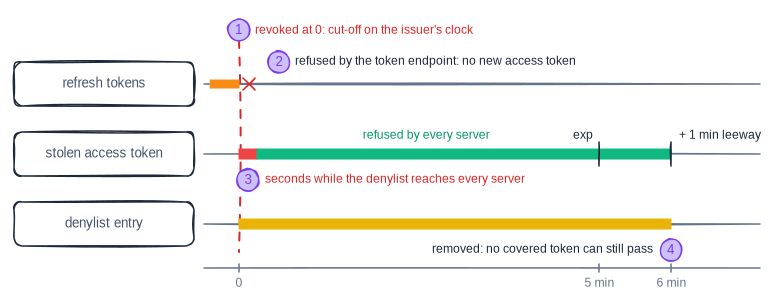
To revoke a user, record a cut-off time for them. In the same transaction that swaps one refresh token for the next, the token endpoint refuses any refresh token from a login before the cut-off. Deleting the refresh tokens isn't enough on its own: a refresh that read the old token just before the delete can write its replacement just after. The user loses access when the current access token expires.
RFC 9700, OAuth's security best practice, adds a step for clients that can't keep a secret, such as mobile and browser apps. Their refresh tokens must be rotated, unless each one is bound to a key the client holds. Each refresh returns a new refresh token and retires the old one, and the server remembers that both belong to one family. If a retired token comes back, two parties hold copies. The server can't tell the thief from the owner, so it also revokes the family's current token, and the owner has to log in again.
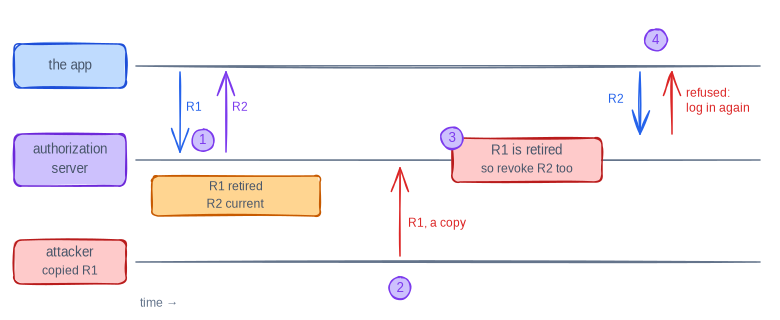
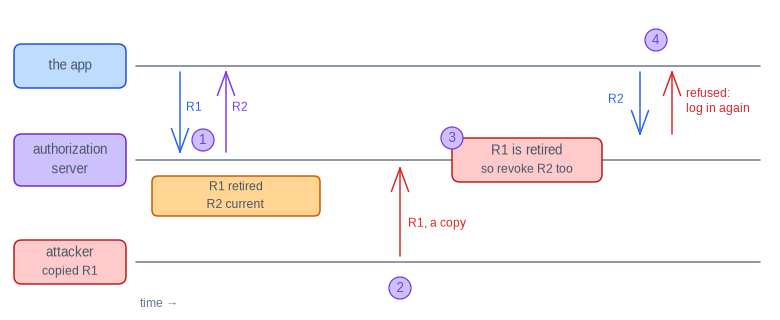
A lost response looks like reuse too. If R2 never reaches the app, the app sends R1 again, and the whole family dies. So some servers keep the old token valid for a short grace period after it's replaced. Okta's default is 30 seconds, settable from 0 to 60.
The cost is the window and the refresh load. A revoked user keeps access for one lifetime, and every active session refreshes once per lifetime.
The question is what each lifetime costs in refreshes,
against how long a revoked user keeps access. Each
active session refreshes once per lifetime.

  200,000 requests/s at peak, one per active
  session every ~10 s, assumed
  active sessions     200,000 × 10            = 2M

  lifetime   refreshes a second        revoked user keeps access
  60 min     2M / 3,600   ≈    556/s   up to 60 min
  15 min     2M /   900   ≈  2,222/s   up to 15 min
   5 min     2M /   300   ≈  6,667/s   up to  5 min
   1 min     2M /    60   ≈ 33,333/s   up to  1 min

Each refresh reads the old refresh token and writes the
new one, so each rate is also the reads and the writes
a second to the authorization server's token database.
  ─────────────────────────────────────────────────────
  Halving the window doubles the refresh load, and no
  lifetime gets the window to zero.
A window of 5 minutes is fine for a logout. It isn't fine for a stolen account or a fired employee, and making it shorter only buys more load.
Revoke only what can't wait, and push it
Question the idea that every revocation needs the same speed. A logout can wait 5 minutes: the device dropped its token, and its refresh token is refused. A few events can't wait: a password reset after an account takeover, an employee who has been fired, and "sign out all devices".
Put each of those on a denylist, keyed by user ID with the same cut-off time. Any access token for that user with an iat before the cut-off is refused. Take the cut-off on the issuer's clock, the clock that writes iat, or a few seconds ahead of it.
An entry is needed until the last token it covers can no longer pass: one access token lifetime plus the leeway. To revoke a single token instead, key the entry by iss and jti. OWASP warns against keying it on a hash of the raw token, because an attacker can re-encode a revoked JWT so its hash changes while its signature still checks.
The question is whether the list fits in each server's
memory, so the check is a lookup rather than a call.
Only urgent revocations go on it.

  daily users in the example app                 20M
  urgent revocations: 1 per 1,000 daily users
  a day, assumed      20M / 1,000             = 20,000/day
  an entry lives one lifetime plus leeway
                      5 min + 1 min           = 6 min
  live entries        20,000 × 6 / 1,440      ≈ 83

  even at 100 times that rate                 ≈ 8,300
  per entry: user ID, cut-off, overhead       ~ 64 B
  memory              8,300 × 64 B            ≈ 531 KB
  ─────────────────────────────────────────────────────
  About half a megabyte, small enough to push to every
  server that checks tokens and look up in memory.
The publisher pushes each new version of the list to every server, and each server reports the version it holds. So a server that missed an update shows up as behind, and the bound is the push time, seconds.
A second fix covers the stolen-token case only. RFC 9700 recommends binding the access token to a key the client holds, through mutual Transport Layer Security (mTLS) or DPoP (Demonstrating Proof of Possession), so a copy without the key is useless. In mTLS, both ends of a connection present a certificate. That doesn't help with a fired employee, whose own device holds the key.
What you give up: a small system of its own, with a publisher, a push, a periodic fetch in case a push is lost, and an alarm on the oldest version held. The 5-minute window stays for every other revocation.
OAuth 2.0 and OpenID Connect
OAuth lets an app act for a user at an API without the user giving the app their password. RFC 6749 names four roles: the user who grants access, the app that wants it (the client), the authorization server that issues tokens, and the API that accepts them.
The old shortcut was for the app to collect the user's password and trade it for a token. RFC 9700, published in January 2025, says that grant must not be used. The flow to use is the authorization code flow with Proof Key for Code Exchange (PKCE).
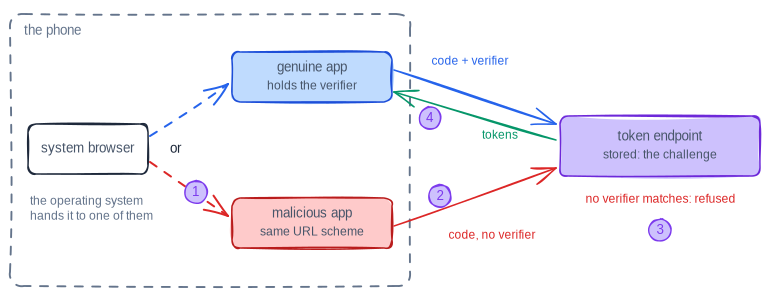
- The client makes a random code verifier and keeps it. It sends the browser to the authorization server with the code challenge, the verifier's SHA-256 hash, a method RFC 7636 calls S256. Its other method,
plain, sends the verifier itself, and RFC 9700 asks clients to use one that doesn't. - The user logs in and consents at the authorization server. The password never reaches the client.
- The authorization server redirects back with an authorization code. It works once, only for this client and redirect address, and RFC 6749 recommends it expire within 10 minutes.
- The client sends the code and the verifier to the token endpoint, directly.
- The authorization server hashes the verifier and compares it with the challenge. If they match, it returns an access token and a refresh token.
- The client calls the API with the access token.
The verifier exists because the code passes through the browser or the phone's operating system, where other code can see it. RFC 7636 describes a malicious app that registers the same custom URL scheme as the genuine app, so the redirect can go to either of them. It says this attack has been seen in the wild.
RFC 9700 requires PKCE for public clients, apps that can't keep a secret, such as mobile and single-page apps. It recommends PKCE for every other client too.
The implicit flow skipped the code and returned the access token in the redirect address itself. A token in a URL can leak through browser history and the Referer header, and it can't be bound to the client that asked for it. RFC 9700 says clients should not use it, and the OAuth 2.1 draft, still a draft in October 2026, removes it.
OAuth on its own gives an app access, and doesn't say who the user is. OpenID Connect adds that with the ID token, a JWT about the login: who signed in, when, and a nonce that ties it to this login request. Its aud is the client's own ID. So the ID token is for the client and the access token is for the API. An API that accepts ID tokens is accepting tokens addressed to another party.
For a browser app, RFC 10017, published in August 2026, ranks a backend for frontend (BFF) as the most secure pattern. A small server-side component runs the OAuth flow, holds the tokens, and forwards the browser's calls with the access token added. The browser holds only an HttpOnly session cookie. So the browser gets a session, and the tokens stay on servers.
Where checks happen in a service graph
A request enters through the API gateway and fans out to many services. Each one needs to know who the user is, and some need to decide what the user may do to one object. So where does each check run, and what does an internal call carry to prove it?
- At the gateway: authenticate the user once. Check the session or token, its audience and scope, and reject failures before they cost anything.
- In the service that owns the object: authorize. Only the documents service knows who may edit document 42.
- Between services: authenticate the calling workload, so each service knows which service is calling.
Only a signed token can be checked further out, on a content delivery network's servers near the user, because it needs only a public key, as CDNs and edge compute shows. A session cookie needs the session store.
The gateway checks the user and forwards a user ID header
It's tempting because there's one check, the headers are plain, and nothing inside the network does any cryptography.
It breaks because nothing proves the header. Any caller inside the network can send X-User-Id: 1: a compromised service, a misrouted request, or a server tricked into making requests for an attacker. Netflix described its own earlier state: identity passed between systems in request headers and URL parameters, with "no checks in place to ensure the integrity of the tokens or the data contained therein".
Forward the user's token, and check it in every service
Each service checks the signature and expiry, and checks that aud names it. The audience check stops a token sent to one API being replayed at another, which RFC 8725 and RFC 9700 both warn about. Most teams start here.
The cost is the check multiplied by the fan-out, and any design that looks the session up at every hop multiplies the lookups the same way.
The question is what checking the user costs once the
request fans out. The gateway takes the example's
200,000 requests a second, and each makes 10 internal
calls, assumed.

  internal calls      200,000 × 10            = 2M/s

Every service looks up the session
  session reads       200,000 + 2M            = 2.2M/s
  a Redis process does ~100,000 simple
  operations a second, by back-of-envelope estimation
  Redis processes     2.2M / 100,000          = 22, before headroom

Every service checks the user's signature
  0.1 ms × 2.2M/s                             = 220 s of CPU/s
  a core gives 1 s of CPU per second, so      = 220 cores

The gateway checks once, and calls carry an HMAC
  gateway             0.1 ms × 200,000/s      = 20 cores
  each hop, HMAC over ~1 KB, ~2 µs × 2M/s     = 4 cores
  ─────────────────────────────────────────────────────
  One signature check at the gateway and a hash at each
  hop cost 24 cores instead of 220, and keep the session
  store off every internal call.
The Redis figure is from back-of-envelope estimation, and the HMAC figure from the SHA-256 row in latency numbers that matter: 1 to 2 µs for 1 KB, plus one short hash.
End the user's token at the gateway, and give each request an internal identity
Question the idea that the client's token should travel inside at all. The gateway checks the external credential once, a session cookie or an OAuth token, and creates a short internal identity for this one request. It names the user, the device and how strongly they signed in, and it's signed or HMAC'd.
Netflix built this. Its gateway creates a Passport, an identity record protected by HMAC-SHA-256 and scoped to one request. In 2021, Netflix served over 2.5 million requests a second. Moving token handling to the gateway cut its main API service's CPU per request by 30 percent.
The calling workload proves itself separately, with mTLS on every internal connection. SPIFFE, the Secure Production Identity Framework for Everyone, gives each workload an ID such as spiffe://example.com/orders and a short-lived certificate for it. Its keys are rotated often and automatically. So every internal call carries two identities: the workload's in the connection, and the user's in the Passport.
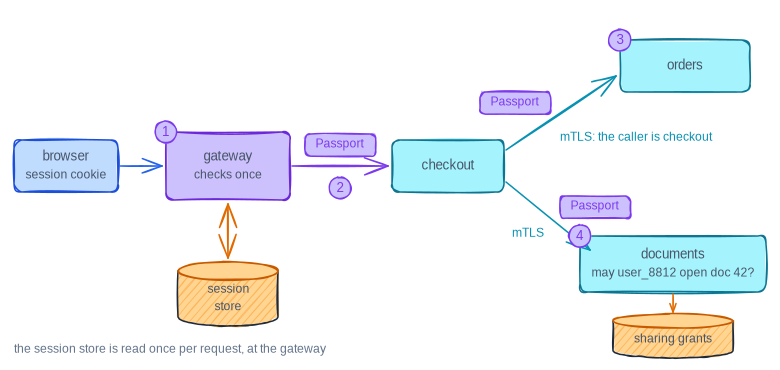
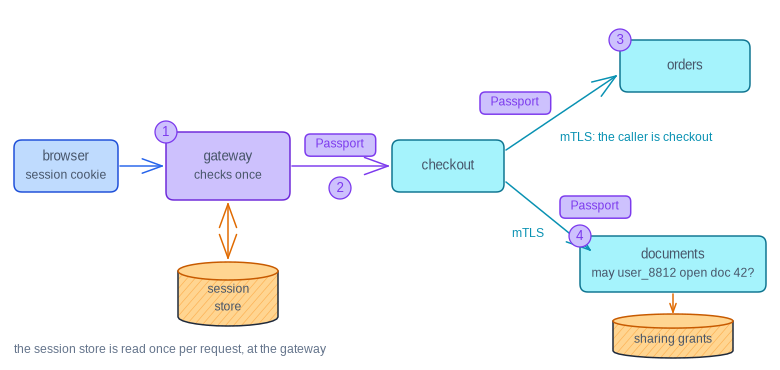
What you give up: an internal token format and a library every service has to use. The gateway becomes a dependency of every request. With an HMAC, every service that checks a Passport holds the key that makes one, so the mTLS rule on who may call whom matters as much as the token.
Authorization models: roles, scopes and relationships
Three models, from the simplest.
- Roles. A user has roles, and each role grants a set of actions. There are few of them, they change slowly, and they fit in a token.
- Scopes. An OAuth scope limits what a client may do for the user, such as
calendar.read. It narrows the user's rights and never adds to them. - Relationships. A permission follows from links between users and objects. Bob can view a document because he's in a group that can view its folder.
Roles fit admin consoles and internal tools. Microsoft's Entra guidance recommends app roles over group claims partly because roles avoid the 200-group limit.
A scope check is needed and isn't enough. The client may hold docs.write, and the user may still not be allowed to write this document. RFC 9700 asks for access tokens limited to the minimum privileges, by audience and by action.
Sharing products need relationships. Google's Zanzibar stores permissions as relation tuples such as doc:readme#viewer@group:eng#member, meaning members of group eng can view doc readme. It answers a check by following tuples from a document to its folder, and from a group to its members.
Its 2019 paper reports over 10 million client queries a second. It also names a failure it calls the new enemy problem. Alice removes Bob from a document, then Charlie adds new content. If the check that decides whether Bob sees the new content reads a copy of the permissions from before Bob's removal, Bob sees content added after he lost access.
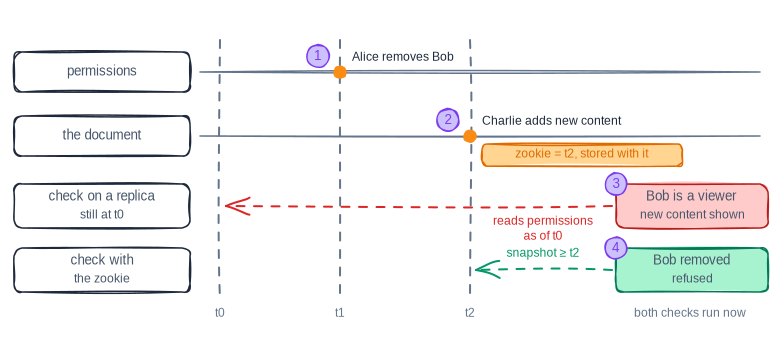
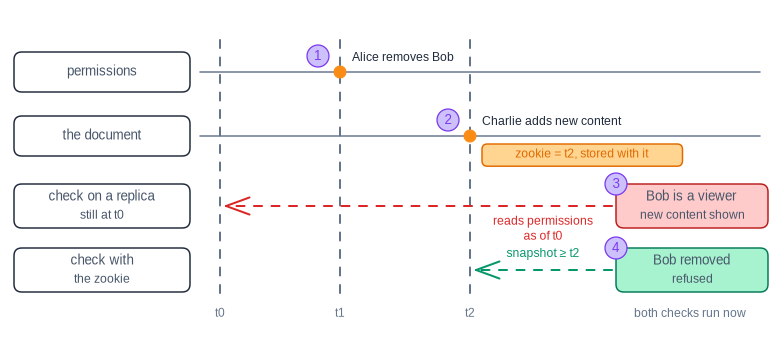
Zanzibar's fix is the zookie. When content is saved, the app asks Zanzibar for one: an opaque token holding a timestamp later than every permission change made before it. The app stores the zookie with the content.
A later check on that content passes the zookie, and Zanzibar answers from a snapshot at least that new. Checks without a fresh zookie can use any recent replica, so most of them stay local.
Keys and clocks
Signing keys have to change, and every API has to keep up. The issuer's metadata names its JWKS address, jwks_uri, and each token's header names its key in kid. OpenID Connect describes the rotation. The issuer adds the new key to the set, starts signing with it when it chooses, and keeps recently retired keys published for a while.
A server that meets an unknown kid fetches the set again. Limit that to about once a minute, so a stream of forged kid values can't flood the JWKS endpoint. The order of the steps matters, and the third worked example shows what the wrong order costs.
Servers' clocks disagree, so a check on exp allows some leeway. RFC 7519 says leeway is usually no more than a few minutes. It adds to the revocation window: a 5-minute token checked with 2 minutes of leeway works for 7 minutes, 40 percent longer. With short tokens, keep leeway to a minute or less and keep the clocks synchronised.
The method
1. Separate who from what. Decide what proves identity at login, and which permissions are checked on each request against current data.
2. Give each client the right credential. A browser gets an HttpOnly session cookie, directly or through a BFF, with a CSRF defence beside it. A mobile app or third-party client runs the code flow with PKCE and holds an access token and a refresh token.
3. Write a revocation bound for each event. Logout, password reset, a fired employee, each in seconds or minutes. The bounds set the token lifetime, or rule tokens out.
4. Price the checks. Count session reads a second, refreshes a second, and signature checks times the fan-out.
5. Place each check. Authenticate the user at the gateway, the workload with mTLS on every hop, and authorize in the service that owns the object.
6. Choose the model. Put rarely changing roles in the token. Check per-object permissions at request time.
7. Plan keys, clocks and outages. Rotate keys with an overlap, keep leeway small, and decide what the gateway does when the authorization server is down.
Worked examples, start to finish
Each example breaks a different obvious answer.
A web app, where a token in local storage is the obvious answer
A team builds a single-page app and its API, at the size of the page's example app. The obvious answer is a JWT kept in the browser's localStorage and sent in an Authorization header, because it needs no session store.
OWASP's session guidance says not to keep tokens in localStorage, because any script running in the page can read it. A cross-site scripting (XSS) bug lets an attacker run script in the page. With the token in localStorage, that script sends it to the attacker, who uses it from anywhere until it expires.
An HttpOnly cookie can't be read by script. The same bug can still make requests from the victim's open tab, and anything it does in that time sticks, such as changing the account's email. But it can't take the credential away. The cookie brings its own risk, CSRF, and the defence is the one in the sessions section: a CSRF token or a Sec-Fetch-Site check.
Is a session store expensive at this size?
The question is whether a session store costs much at
this size, and which resource sets its size. The app
uses a 30-minute idle timeout, the top of OWASP's range
for low-risk apps.

Memory
  sessions alive: used within the last 30 minutes,
  about twice the 2M active in the peak minute,
  assumed                                       4M
  per session, with Redis overhead, assumed   ~500 B
  4M × 500 B                                 = 2 GB

Reads
  every request reads its session            200,000/s
  one Redis process                          100,000/s
  200,000 / 100,000                         = 2 processes
  with headroom                               4 processes

Last-seen writes, for the idle timeout
  on every request                           200,000/s
  at most once a minute per session,
  2M active sessions / 60                   ≈ 33,333/s
  ─────────────────────────────────────────────────────
  The memory fits on one machine. Reads set the size at
  4 processes of about 500 MB each. Writing last-seen
  once a minute cuts the write load to a sixth.
The 33,333 last-seen writes a second match what one-minute access tokens cost in refreshes, because both are 2 million active sessions divided by 60 seconds. At that lifetime, the token design writes as often as the session store and saves only the reads: 33,333 a second against 200,000, 6 times fewer. And a revoked user still keeps access for up to a minute.
The decision is an HttpOnly, Secure, SameSite=Lax session cookie with a CSRF token, and Redis with 4 primaries, a replica each, and eviction turned off. Last-seen is written at most once a minute, and logout marks the session revoked.
Shared documents, where permissions in the token are the obvious answer
A document product lets users share folders with people and groups, and documents inherit their folder's sharing. Search shows 50 documents a page. The obvious answer is to put the user's groups and roles in the token, and have each service check them.
The size worksheet already rules this out at 200 groups: about 10.9 KB on every request. Two more things fail. A group removal takes effect only when the token is refreshed. And groups aren't the whole answer, because a document's access also depends on its folder, which the token can't know.
So the token carries the user and nothing per object, and the documents service checks each document against current data. At Zanzibar's scale that's a central relationship service. In one product it can be a table of sharing grants in the documents service's own database. Either way, a search page now needs 50 checks.
The question is what checking every result costs.
Use Zanzibar's published Check latency for requests
served from a nearby replica.

  results per page                               50
  check, 50th percentile                       3 ms
  check, 99th percentile                      15 ms

One check after another
  50 × 3 ms                                = 150 ms

All 50 at once, so the page waits for the slowest
  chance none takes over 15 ms  0.99^50    ≈ 0.61
  chance at least one does     1 − 0.61   ≈ 0.39
  ─────────────────────────────────────────────────────
  In sequence the checks cost 150 ms. In parallel,
  about 2 page loads in 5 wait 15 ms or more for one
  slow check.
Zanzibar's paper says search clients send tens to hundreds of checks for one page of results.
The decision is to send all 50 checks at once, as one batch, each with the zookie stored beside its document. The token stays small, and a removal takes effect within seconds instead of at the next refresh.
A signing key rotation, where swapping the key is the obvious answer
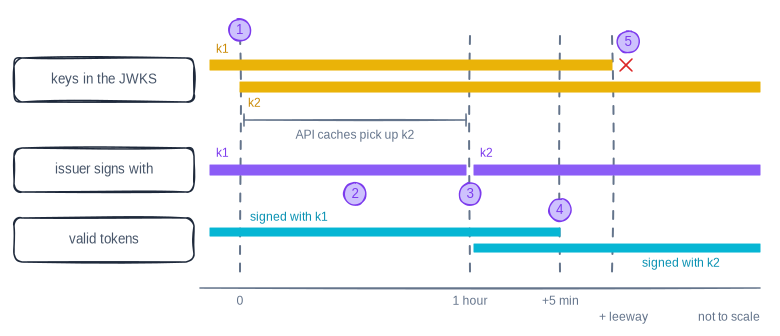
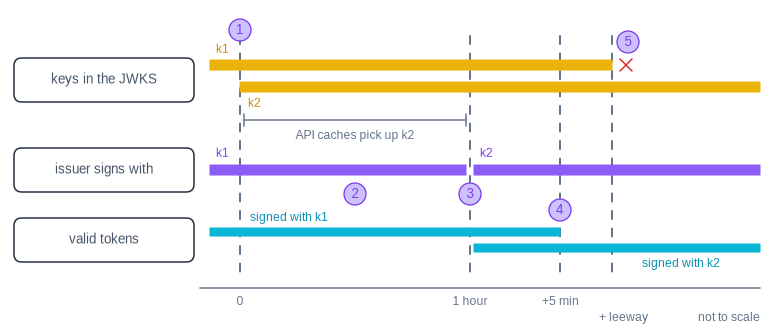
Security asks for the token signing key to change every 90 days. The obvious answer is to generate a new key, k2, switch the issuer to it, and replace the old key, k1, in the JWKS.
APIs fetch the key set again when they meet an unknown kid, as the keys section recommends. So the first k2 token an API sees makes it fetch the new set, which no longer holds k1. New tokens are issued thousands of times a second, so within seconds every API has dropped k1, and every live token signed with it fails at once. APIs that refresh the set only on a timer fail the other way: they reject k2 tokens until their next refresh.
The question is what the token endpoint sees when every
live k1 token fails at once.

  active sessions, each sending a request
  every ~10 s, from the refresh table              2M
  each session's next request fails, within       10 s
  refreshes           2M / 10 s            = 200,000/s
  normal refresh rate, 5-minute tokens         6,667/s
  ─────────────────────────────────────────────────────
  The token endpoint gets 30 times its usual load, from
  sessions that did nothing wrong.
The decision is an overlap, in five steps. Publish k2 beside k1. Wait one JWKS cache lifetime, say an hour, so even an API that refreshes only on a timer holds k2 before it meets a k2 token. Start signing with k2. Keep k1 published until the last token signed with it has expired, 5 minutes plus leeway. Then remove it.
Where it goes wrong
These are ordered by how often they come up.
1. A JWT session with no revocation plan
Deleting the client's copy at logout leaves a stolen copy working until exp. Have the token endpoint check a cut-off, and push a denylist for what can't wait.
2. Checking the signature and nothing else
A valid signature only says some key signed it. Check exp, iss and aud, and check that the key belongs to the issuer. In 2023, an attacker Microsoft calls Storm-0558 used a consumer-account signing key to forge tokens for enterprise mail, because "a validation issue allowed this key to be trusted for signing Azure AD tokens". Fix the algorithm for each key too. RFC 8725 records libraries that accepted alg: none, and libraries that checked an RS256 token as HS256 with the public key as the secret.
3. Trusting an identity header inside the network
A user ID header that nothing checks can be sent by any caller inside the network.
4. Permissions in the token
Claims are copies from issue time, and the token carries them on every hop.
5. An ID token sent to an API, or a token in a URL
An API that accepts ID tokens accepts tokens addressed to another app. A token in a URL ends up in logs and browser history.
6. Treating the session store as a cache
A lost session store signs out every active user at once, and they all log in again together. Give it replicas and no eviction.
7. Rotating keys without an overlap
A one-step swap fails every live token at once. Publish first, and remove last.
If you memorise nothing else
| fact | why it matters |
|---|---|
| A signed token is a cached answer; its expiry is the revocation window | the lifetime is a security decision, not a tuning knob |
| A session is looked up on every request, so revocation is immediate | the price is one data store read per request |
| Authentication happens once per login; authorization on every request | identity fits in a token, per-object permissions don't |
| A session lookup is 250 to 500 µs; a signature check about 0.1 ms of CPU | speed doesn't decide between them |
| Halving the access token's lifetime doubles the refreshes | 2M sessions: 6,667 a second at 5 minutes, 33,333 at 1 |
| Short access token, a cut-off at the token endpoint, a denylist for urgent cases | the denylist stays around half a megabyte |
| A denylist entry lives one lifetime plus the leeway | a covered token can pass until then |
| A retired refresh token coming back ends the whole family | the server can't tell the thief from the owner |
| Code flow with PKCE for every client; implicit and password grants are out | RFC 9700 |
| The ID token is for the app, the access token for the API | aud tells them apart |
Browsers hold an HttpOnly cookie and send a CSRF token | XSS can't take the credential away, and other sites can't forge requests |
| Authenticate once at the gateway, the workload with mTLS, authorize at the owner | 24 cores instead of 220 at 2M internal calls a second |
| With HMAC every checker can mint; with a public key only the issuer can | choose by who checks |
| A permission check must not be older than the content | the zookie carries the version |
| Rotate keys by publishing first and removing last | a one-step swap is a refresh storm |
What is expected at each level
Mid-level
Know authentication from authorization. Explain a session cookie against a JWT, and why a JWT can't be revoked early without something extra. Know that refresh tokens get new short access tokens, and describe the OAuth code flow at the level of who redirects where.
You aren't expected to raise refresh rotation, denylist sizing, workload identity or key rotation without being asked. If the interviewer asks "how does logout work?", a good mid-level answer says what is revoked and how long a stolen token still works.
Senior
You lead this part of the discussion, and three things must come up without prompting.
A revocation bound, and what meets it. Minutes for logout through token expiry, seconds for urgent cases through a pushed denylist. A design with no bound can't be checked.
Which credential each client holds, and why. A cookie session with a CSRF defence for the browser, the code flow with PKCE for apps, and the ID token kept apart from the access token.
Where each check runs. The user authenticated at the gateway, the object authorized at its owner, and something that proves the caller on internal hops.
Two things are disqualifying: a long-lived JWT with no way to revoke it, and services that trust a user ID header nobody can check.
Staff+
Producing a correct design is still the bar. A staff answer stands out by matching the cost of each check to what it protects.
Revoke by urgency. Let ordinary logouts wait one token lifetime, and push a small denylist for the few events that can't.
End external tokens at the gateway. Create one internal identity per request, and prove workloads separately with mTLS.
Keep permissions out of tokens. Carry identity and slow roles, check objects at request time, and name the ordering problem when objects are shared.
Plan keys and outages. Rotate with an overlap, keep leeway small, and decide in advance what may degrade when the authorization server is down.
And say what you would not build. Each of these can cost a team a quarter.
One is a denylist checked over the network on every request. Another is one-minute access tokens to avoid building a denylist. A third is a Zanzibar-style relationship service for an app with five roles and no sharing.
Another is encrypted JWTs to hide claims that shouldn't be in the token at all. Another is your own authorization server when an existing one meets the requirements. And the last is a home-made token format with its own cryptography, when JWT libraries already exist.
Sources
Every protocol rule and published figure on this page comes from the documents below; the worksheets derive the rest from the inputs they state.
- IETF RFCs. OAuth: 6749, PKCE 7636, security practice 9700, browser apps 10017 and the OAuth 2.1 draft. Tokens: JWT 7519 and 8725, Ed25519 8037 and 9864,
at+jwt9068, bearer tokens 6750. The web: cookies 6265 and WebSockets 6455. - OpenID Foundation, OpenID Connect Core 1.0. The ID token and the key rotation procedure.
- OWASP Cheat Sheet Series: Session Management, JSON Web Token and CSRF Prevention. The session rules, where claims leak, HMAC, denylist keys and CSRF defences.
- Pang et al., Zanzibar: Google's Consistent, Global Authorization System, USENIX ATC 2019. The new enemy problem, zookies, the query rate and the check latencies.
- Netflix Technology Blog, Edge Authentication and Token-Agnostic Identity Propagation, 2021. The Passport, the 2.5 million requests a second and the CPU saving.
- Microsoft, Configure group claims and app roles in tokens and Analysis of Storm-0558 techniques. The 200-group limit, stale claims and the trusted consumer key.
- Okta's refresh token rotation guide for the grace period, SPIFFE concepts for workload IDs, and the Ed25519 page for the cost of one signature check.