Why you are doing this at all
Postgres will store a 1 MB file in a row without complaint, and so will MySQL. Nothing fails on the first day or the hundredth, so keeping files in the same database as everything else looks fine for a long time.
Do the arithmetic for one ordinary product. A support desk stores ticket attachments, 200,000 a day at about 1 MB each, with a short row for each file: its name, its owner, its size and a hash.
A support desk keeps ticket attachments in Postgres. The
question is what those bytes do to the database around
them, so size the files and the rows separately.

  attachments a day                              200,000
  average file                                      1 MB
  row per file: name, owner, size, hash           ~500 B

One year
  file bytes   200,000 x 1 MB x 365        =       73 TB
  row bytes    200,000 x 500 B x 365       =     36.5 GB
  ──────────────────────────────────────────────────────
  file bytes for every byte of rows        ≈       2,000

A full restore, at an assumed 500 MB/s
  files inside   73 TB / 500 MB/s    = 146,000 s ≈ 41 h
  rows only    36.5 GB / 500 MB/s    =              73 s

The write rate never mattered: 200,000 a day is about 2 a
second. The size did. Every copy of this database, each
replica, backup and restore, now moves 73 TB to carry the
36.5 GB that queries read.
A database copies its own contents all the time: to every replica, into every backup, out of every restore and through every major-version upgrade. With the attachments inside, each copy carries 2,000 bytes of files for every byte of rows.
Object storage is the other place for those bytes. Amazon S3, Google Cloud Storage and Azure Blob Storage are the managed products, and MinIO is one you run yourself. Each keeps bytes under a name, called the key, and charges per gigabyte stored instead of per disk you provision.
At S3 Standard's US East list prices, $0.023 per GB for the first 50 TB and $0.022 for the next 450 TB, the 73 TB above costs about $1,660 a month. That price includes copies in at least three availability zones, the separate data centres inside one region.
The bytes these products hold are often called blobs, short for binary large objects. Facebook's f4 paper gives the definition that matters for design: a blob is created once, read many times, never modified and sometimes deleted. Photos, videos, documents and backups all fit it.
An object store is a key-value store for bytes that never change. Keep the bytes there, and keep every question you will ask about them in a database beside it.
Each half of that sentence settles a design question. "Bytes that never change" means you never edit an object. You replace it whole, and that makes caching, deduplication and safe retries easy. "A database beside it" means the object store answers one question: which bytes sit under this key? Who owns the file, which version is current and whether it has finished uploading all live in rows you can index.
What you give up
An object store is cheap and durable because it does less than a database. It gives up four things.
Edits in place. In S3 general-purpose buckets and Cloud Storage regional buckets, an object is replaced whole, so changing one byte of a 1 GB object means writing 1 GB again. A few narrower products accept appends or in-place writes: S3 Express One Zone, Cloud Storage zonal buckets, and Azure's append and page blobs.
Queries. The object store lists keys in sorted order, 1,000 at a time. It cannot find every file owned by user 42 or every file over 10 MB.
Transactions across keys. Updates are per key, and S3 has no way to make an update to one key depend on another.
Cheap small requests. Every request has a price, and a read waits tens to hundreds of milliseconds for its first byte. Choosing a database puts a typical read at 20 to 100 ms, and AWS quotes roughly 100 to 200 ms for small objects.
When not to use one
Three kinds of data belong somewhere else.
- Small records. They cost more to write than to keep, as the toolkit below works out. WhatsApp rejects object storage for its spool, the queue of messages waiting for offline devices, because the spool takes 25 billion writes of about 1 KB a day.
- Data you edit in place. It belongs in a database or a file system.
- Data that two writers must not change at the same time. It needs a lock or a compare-and-swap. S3 offers compare-and-swap on one key, and nothing across keys.
The toolkit
The object model
An object is a key, its bytes and a small amount of metadata, held in a bucket. The bucket is the container that owns the objects and their settings, such as the region, versioning, and lifecycle rules that move or delete objects by age.
| part | what it is | the limit to know, in S3 |
|---|---|---|
| key | the object's name, unique in its bucket | 1,024 bytes of UTF-8 |
| bytes | the content, replaced whole on every write | 5 GB in one PUT, 50 TB when sent in parts as a multipart upload |
| user metadata | name and value pairs set at upload, such as a content type or an owner id | 2 KB, and changing it means copying the object |
| ETag | an entity tag, a fingerprint that changes when the content changes | the MD5 of the bytes only for single-part uploads that are unencrypted or use S3-managed keys |
| version id | with versioning on, each write keeps the old bytes under a new id | every version is billed until it is deleted |
| storage class | the price tier the bytes sit in | set per object, and moved by lifecycle rules |
The namespace is flat. The key photos/2026/puppy.jpg is one string, and the slashes are characters in it rather than folders. Consoles and SDKs draw folders by splitting keys on /. A prefix is any leading part of a key, such as photos/2026/, and a listing can be limited to one prefix.
What it costs
These are S3's US East list prices. They change, and other regions differ, so check before quoting them.
| line | price |
|---|---|
| S3 Standard storage, first 50 TB | $0.023 per GB-month |
| writes: PUT, COPY, POST, LIST | $0.005 per 1,000 requests |
| reads: GET | $0.0004 per 1,000 requests |
| egress to the internet | $0.09 per GB for the first 10 TB a month, falling to $0.05 per GB above 150 TB |
| S3 to CloudFront | free |
| to most other AWS regions | $0.02 per GB |
Egress is data sent out of the provider's network. At $0.09 against $0.023, sending a gigabyte out once costs about four months of storing it. Back-of-envelope estimation builds a whole worked example on that ratio.
A content delivery network (CDN) in front of the bucket replaces S3's egress price with the CDN's own. CDNs and edge compute works out the break-even hit rate for a CDN that pays origin egress on every miss. Moving data from S3 into CloudFront, Amazon's CDN, costs nothing, so with CloudFront the comparison is CloudFront's price against S3's. Cloudflare R2 charges no egress at all, and $0.015 per GB-month to store.
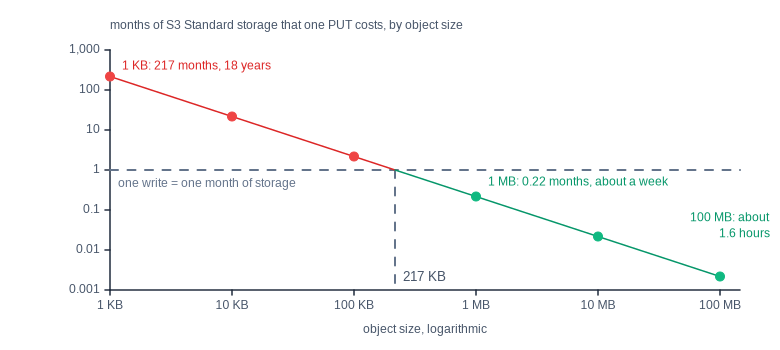
The request prices turn object size into a cost.
S3 Standard charges per request as well as per byte. The
question is the object size below which the request price
stops being noise. Price a million writes against a month
of keeping what they wrote, at US East list prices.

  a million PUT requests   1,000 x $0.005      =      $5
  storage                                $0.023 per GB-month
  ─────────────────────────────────────────────────────
  break-even   $5 / $0.023 per GB  = 217 GB per million
                                   = 217 KB per object
  1 KB objects   $5 / (1 GB x $0.023)  = 217 months

Below about 200 KB, writing an object costs more than a
month of keeping it. At 1 KB, the write alone costs as much
as storing the object for 18 years.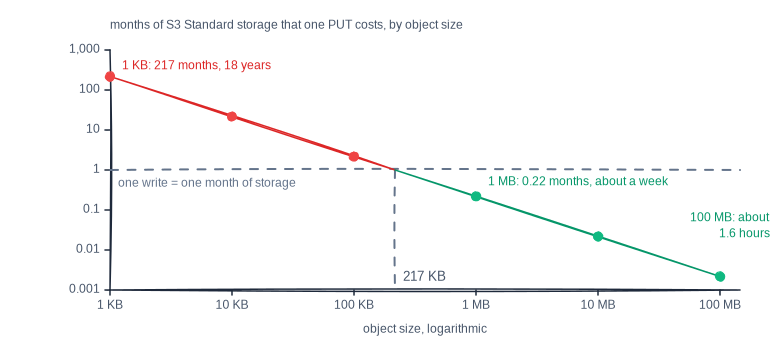
Durability is not availability
Durability is the chance the bytes still exist. Availability is the chance you can read or write them right now. S3 publishes a design target for each, and the two are far apart.
| S3 class | availability design target | copies kept in | minimum billed time | minimum billed size |
|---|---|---|---|---|
| Standard | 99.99% | at least 3 zones | none | none |
| Standard-IA, for infrequent access | 99.9% | at least 3 zones | 30 days | 128 KB |
| One Zone-IA | 99.5% | 1 zone, and lost if that zone is destroyed | 30 days | 128 KB |
| Glacier Flexible Retrieval | 99.99%, once restored | at least 3 zones | 90 days | 40 KB of overhead added to each object |
These are design targets. The service level agreement (SLA) promises less: AWS pays credits only when a month's uptime falls below 99.9 percent for Standard.
AWS designs S3 for 99.999999999 percent durability, eleven nines, over a year. It gets there by storing redundant copies, checking every upload end to end, checking data at rest with checksums, and repairing any copy that disagrees.
S3 Standard is designed for 99.999999999% durability and
99.99% availability over a year. They measure different
things, so turn each one into a count.

Durability: the chance an object is lost in a year
  1 - 0.99999999999              = 1 in 100 billion
  10 million objects             = 0.0001 a year
                                 = 1 object per 10,000 years
  146 billion objects            ≈ 1.5 objects a year
    (Instagram's 4 sizes x 100M posts a day, for one year)

Availability design target: minutes a year unavailable
  a year                                     525,600 min
  Standard     99.99%    x 0.0001        =      52.6 min
  Standard-IA  99.9%     x 0.001         =       526 min
  One Zone-IA  99.5%     x 0.005         =     2,628 min
  ─────────────────────────────────────────────────────
  US East, 28 February 2017: S3 could not take new
  objects from 9:37 to 13:54 PST         =       257 min

Eleven nines says the bytes almost certainly still exist.
It says nothing about reaching them this afternoon. That
one afternoon in 2017 used about five years of Standard's
availability design target.
The 2017 outage started with a mistyped command meant to remove a few servers. It took too much capacity away from the index subsystem, which maps every key in the region to where its bytes live, and the subsystem needed a full restart.
The 146 billion row has a design consequence. At the size of the Instagram breakdown, eleven nines predicts one or two lost derivatives a year. A derivative is a resized copy made from the uploaded original. The Instagram breakdown keeps each original in a cold tier so it can re-encode later, and that also means a lost derivative can be rebuilt.
Availability is bought in a different way. A product that must accept uploads while one region is down needs a second region, at $0.02 per GB to replicate, plus a second storage bill.
Consistency, since December 2020
Before December 2020, S3 could return old data for a short window after a write. On 1 December 2020 it became strongly consistent for every GET, PUT and LIST, in every region, at no extra charge and with no performance cost.
Strong consistency covers reads and lists after a write. It does not make two writes atomic, and it does not reach copies outside the object store.
Two keys. A manifest and the segments it lists are separate writes, and a reader can see one without the other. So write the segments first and the manifest last: a reader who finds the manifest then finds every segment it names.
Two writers on one key. If two plain PUTs to the same key overlap, the one with the later timestamp wins, and the other is lost without an error. Since August 2024, S3 refuses a write sent with If-None-Match: * if the key already exists. Since November 2024, it also accepts If-Match with an ETag, and refuses the write if the object has changed since you read it. That is a compare-and-swap on one key.
Copies outside the object store. A CDN, a browser or a proxy that cached the old bytes keeps serving them until its own expiry. Cloud Storage spells this out: publicly readable objects with no Cache-Control header can be cached for up to 60 minutes.
Request rates and key names
S3 supports at least 3,500 writes and 5,500 reads a second per prefix, and a bucket can have any number of prefixes. When load rises, S3 scales up gradually. Until it finishes, it returns 503 Slow Down to some requests, and the client must retry them with backoff.
Key names used to matter more. In 2018, AWS raised S3 to these rates and withdrew its earlier advice to randomize key prefixes. The Instagram breakdown says skew mostly does not matter now, because its keys are content hashes and spread evenly. Two cases still need checking: a new bucket that takes a sudden flood, which meets 503s while S3 scales, and a write rate above 3,500 a second under one prefix.
Getting bytes in: pre-signed URLs
A pre-signed URL is a link to one object that carries a signature made with your credentials. The object store checks the signature and the expiry, then accepts or serves the bytes without asking your servers.
Instagram works out why that matters: passing 3 MB photos through your own API at 100 million a day needs 17 machines and holds 40,000 slow connections open. Signing a URL takes microseconds. WhatsApp uses the same mechanism to keep a 40 MB video off its chat servers.
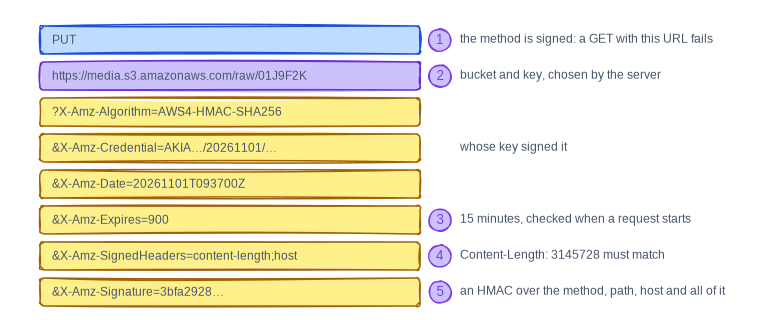
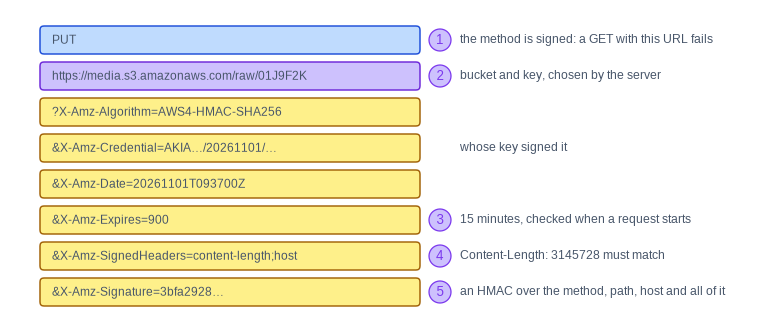
The URL carries the credential, the expiry and the list of signed headers as query parameters. Its signature is an HMAC, a keyed hash, over those, plus the HTTP method, the path and the host. So a URL signed to PUT the key raw/01J9F2K cannot read that key or write any other.
Four details decide whether one of these URLs is safe.
The server chooses the key. A client that picks its own key can pick someone else's. The API should generate an unguessable key, store it in the pending row and sign exactly that.
A URL works more than once. A pre-signed URL can be used any number of times until it expires, and each write replaces the object already there. To make the first write the only one, have the client send If-None-Match: *, and require that header on the raw/ prefix in the bucket policy. The object store then refuses a second write to the same key. The policy has to exempt multipart uploads, because their calls cannot carry the header. Scoping it to raw/ keeps it away from the workers, which write derivatives under other keys.
The expiry is short, and it is checked when a request starts. The maximum is seven days, and a URL signed with temporary credentials expires when they do. S3 checks the expiry when a request arrives, so a transfer that has started finishes even if the URL expires partway through.
The size cap comes from the signature. A PUT URL fixes the size only if the server signs the Content-Length header, and then the upload must be exactly that many bytes. Instagram's upload request sends byte_size first, which gives the server the number to sign. For a range of sizes, S3 uses a POST policy instead: a signed form that sets the smallest and largest upload it accepts.
The database row is the commit point
An upload touches two systems, the object store and your database, and no transaction covers both. So one of them has to decide when the file exists. Make it the row.
The order that works has three steps.
- Your API inserts a row in state
pending, chooses a key underraw/, and returns a pre-signed URL for it that expires in minutes. - The client uploads the bytes straight to the object store.
- The object store's event, not a call from the client, reaches a handler. The handler checks the bytes, copies or processes them to their permanent keys, and moves the row to
ready.
S3 delivers those events at least once, usually within seconds and sometimes a minute or more later. So the handler must be safe to run twice. It moves the row with UPDATE media SET state = 'ready' WHERE id = ? AND state = 'pending'. If no row matched, the event is a repeat or arrived after a sweep, so the handler deletes the raw object and creates nothing. A late or repeated event can never bring a row back.
Every failure in this order leaves something harmless.
- The client dies before uploading. That leaves a pending row with no bytes. A sweeper deletes rows still pending after 24 hours. The URL expired long before that, so no upload can land after its row is gone.
- The handler fails, or the bytes fail validation. That leaves a pending row and an object under
raw/. The sweeper removes the row, and a lifecycle rule that expires everything underraw/after a few days removes the bytes, with no listing.
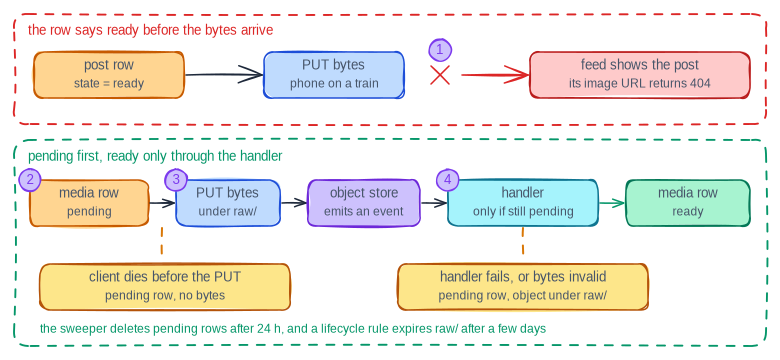
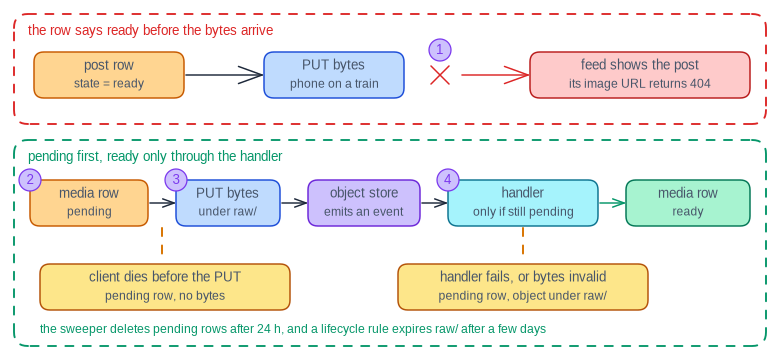
Instagram splits the same job differently. Its client claims the uploaded media with a second call, POST /v1/posts, which creates the post row in a processing state. The bucket event starts the processing, and a worker marks the post ready. Its 24-hour sweeper removes media that no post ever claimed. Both designs keep one rule: no row says ready until the bytes are there and processed.
Deletion runs the same rule backwards. Change the row first, then remove the bytes. A row marked deleted stops serving at once, and bytes that a failed cleanup leaves behind are only an orphan for the sweeper.
Storage classes and lifecycle rules
Lower storage classes cost less per gigabyte to keep and more to read, and some bill a minimum number of days. A lifecycle rule moves objects down a class, or deletes them, by age, and tiered storage covers when a move pays for itself. Two S3 rules belong here, because both are about object size, not age.
Lifecycle rules, by default, do not move objects smaller than 128 KB. Each move is a billed request, and the fee can exceed the saving.
Every object moved to Glacier Flexible Retrieval or Deep Archive carries 40 KB of billed overhead, for its name, metadata and index. A 1 KB object archived that way is billed as 41 KB. AWS advises combining small objects into larger ones before archiving them.
The method
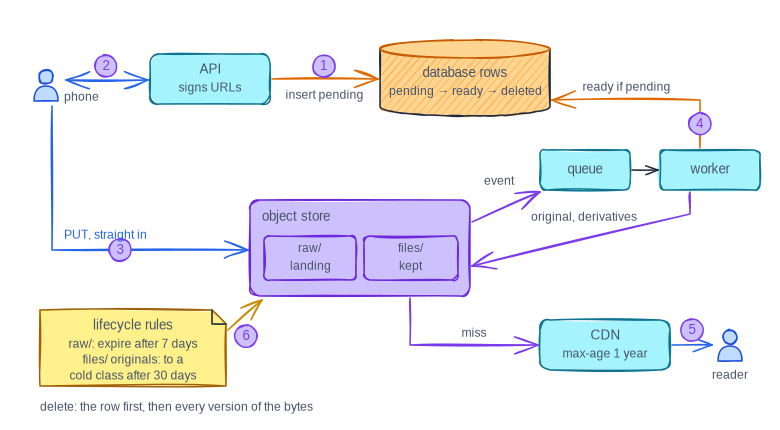
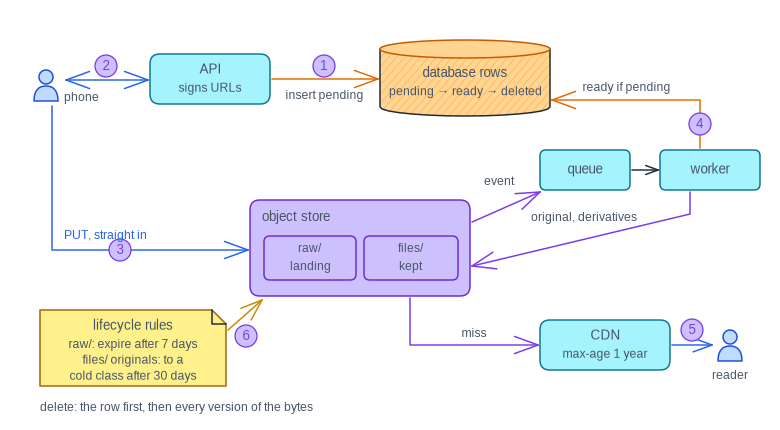
1. Separate the bytes from the questions. List every question the product asks about a file: who owns it, when it was made, whether it is ready, how big it is. Each of those is a column. The bytes go to the object store, and the row holds the key.
2. Choose keys that never change meaning. The server picks them. Make them unguessable, and never reuse a key for different bytes. Where the bytes define the identity, as with derivatives or file blocks, use a hash of the content as the key.
3. Get the bytes in without your servers. Sign a URL for one key, one method, one size and a few minutes. Above about 100 MB, which is where S3 recommends it, use a multipart upload.
4. Make the row the commit point. Insert the row as pending, take the bytes under raw/, and let a handler for the object store's event mark the row ready only if it is still pending. Sweep stale pending rows, expire raw/ with a lifecycle rule, and abort multipart uploads nobody finished.
5. Serve through a CDN. Because keys never change meaning, the response can carry a one-year max-age with immutable, and the object store only answers misses.
6. Write the lifecycle down. Say when each kind of object changes class, when it expires, and what deleting it does to the row, the bytes, old versions, replicas and caches.
Worked examples, start to finish
Here are three systems. In each, the obvious approach fails in a different way.
A 200 GB upload over a home connection
A backup client uploads disk images, and some of them are 200 GB. The obvious design sends each file in one request, and S3 rules that out before anything else does: one PUT carries at most 5 GB. Even below that limit, one request means a dropped connection at 90 percent restarts from zero.
A multipart upload splits the object into parts. The client starts an upload and gets an upload id. It then sends each part on its own request, numbered 1 to 10,000, in any order and in parallel if the link allows. A failed part is resent on its own. Finally the client sends the list of part numbers with each part's ETag, and S3 joins the parts into one object. Cloud Storage's resumable uploads do the same job with a session that lasts a week, and Azure does it with block blobs.
Parts run from 5 MiB to 5 GiB, where a MiB is 1,048,576 bytes, and only the last part may be smaller. The 10,000-part ceiling sets the smallest part size you can use.
A backup client uploads a 200 GB disk image over a home
connection. The question is what part size to use, and
what the multipart upload costs when people give up.

The upload
  uplink                                       50 Mbps
  200 GB x 8,000 Mb / 50 Mbps     = 32,000 s  ≈  8.9 h
  largest single PUT                              5 GB
  → one request cannot carry it at all

Parts, at most 10,000 of them
  8 MiB parts    10,000 x 8 MiB    =  83.9 GB ceiling
                 reached after 83.9 GB, at   ≈  3.7 h
  smallest part that fits   200 GB / 10,000 =   20 MB
  → 32 MiB parts                    =  5,961 parts
  resending one dropped part        ≈  5.4 s

Abandoned uploads, assuming 1,000 a day and 5% abandoned
halfway through
  parts left behind    50 x 100 GB        = 5 TB a day
  no cleanup, after one year                1,825 TB
    first 50 TB at $0.023, next 450 TB at $0.022,
    the other 1,325 TB at $0.021      ≈ $38,900 a month
  abort after 7 days    35 TB x $0.023 =    $805 a month

A part size fixed in the client fails on big files. And
without an abort rule, abandoned parts become a bill that
rises every day and that no listing shows.
A client with a fixed 8 MiB part size uploads for 3.7 hours, then has part 10,001 refused. The part size has to come from the file size: at least the size divided by 10,000, rounded up to something convenient.
Three more details matter for uploads that take hours.
The client keeps the session. S3 advises keeping your own list of part numbers and ETags rather than rebuilding it from a listing. A client that restarts reads its saved upload id and list, asks which parts landed, and carries on. YouTube does the same with 8 MB chunks and a GET that reports which byte ranges arrived.
The server signs parts in batches. Each part is its own request, so its URL must still be valid when that part starts, and a 9-hour upload outlives a 15-minute URL. So the client asks the API for part URLs a hundred or so at a time, since 15 minutes covers about 166 parts of 5.4 seconds each.
Abandoned parts are invisible and billed. Parts of an unfinished upload are stored and charged until the upload is completed or aborted, and a normal listing of the bucket does not show them. A lifecycle rule that aborts incomplete uploads after 7 days holds the worksheet's bill after a year at $805 a month instead of about $38,900.
The decision: multipart above 100 MB, part size from the file size, and the session saved on the client and tracked in a row on the server. Every bucket that takes uploads gets an abort rule.
A sync service that keeps every version
A file sync service, in the shape of Dropbox or Google Drive, keeps 30 days of versions so users can roll back. The obvious design keys each object by user and path, and writes the whole file on every save, with versioning to keep the old copies.
A sync service keeps 30 days of versions. One user has a
100 MB file, saved 20 times a day, and each save changes a
few kilobytes in place, as a database file does. Compare
whole versions with 4 MB blocks.

Whole file per version
  per save                                      100 MB
  per day      20 x 100 MB                  =     2 GB
  30 days      30 x 2 GB                    =    60 GB

4 MB blocks, keyed by their SHA-256 hash
  blocks in the file     100 MB / 4 MB      =       25
  per save: one changed block               =     4 MB
  per day      20 x 4 MB                    =    80 MB
  30 days      30 x 80 MB                   =   2.4 GB
  hash lists   600 versions x 25 x 32 B     =   480 KB
  ─────────────────────────────────────────────────────
  60 GB against 2.4 GB: 25 times less to keep, and 25
  times less to upload on every save.

Now insert one line at the top of a 100 MB text file.
Every byte after it moves, so all 25 fixed blocks change
and all 25 hash differently.
  per save                                      100 MB
  → back to whole-file cost, for the most ordinary edit.
Dropbox published its design for this. Every file is split into 4 MB blocks, and each block is hashed with SHA-256. The ordered list of hashes, which Dropbox calls the blocklist, identifies the file's contents. To save a file, the client sends the blocklist to the metadata server. The server answers with the hashes it does not have yet, the client uploads only those blocks, and then it commits again. Dropbox's block store, Magic Pocket, mostly names blocks by their hash, and a block never changes once written.
This is content addressing: the key is computed from the bytes. It needs immutable objects to work, because a key that names its own contents can never hold anything else. Two files that share a block, or two users that share a file, store it once.
So which unit should a version be stored in?
One object per path, rewritten on every save
It is the obvious mapping from a file system to keys, and versioning keeps history with one bucket setting. Every save stores and uploads the whole file, so the 100 MB file above costs 60 GB of versions over 30 days. Users on slow uplinks wait 100 MB per save for a change of a few kilobytes.
Fixed-size blocks, keyed by their hash, with a blocklist per version
This is Dropbox's documented design, and it cuts the example to 2.4 GB. The database holds one blocklist per version, and the object store holds each block once.
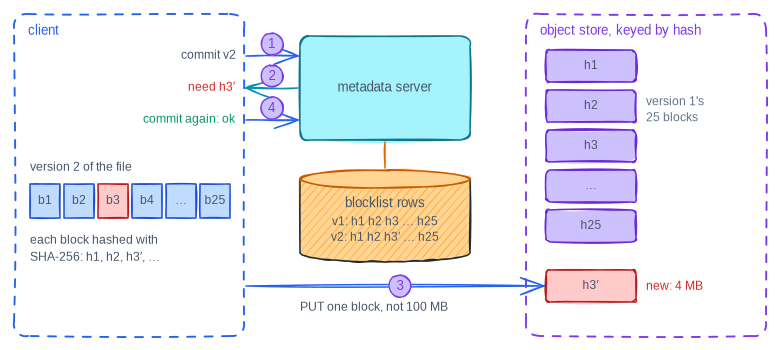
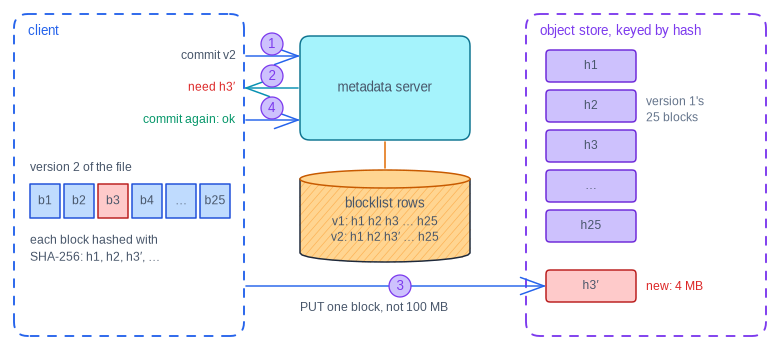
It costs you three things.
Deletion becomes reference counting. A block can go only when no blocklist, in any version of any file, still names it, and that check is a database job. The count also races with saves. After the server says it already has a block, the last other file using that block can be deleted before the new blocklist commits. The new version then points at missing bytes.
So delete a block only after its count has been zero for longer than any commit takes, or check at commit time that every hash still exists. A save can still find the block during that wait, before its increment has landed, and that save has to restart the clock. Record when each hash was last claimed as well. Delete a block only if its count is zero, and both the moment it reached zero and its last claim are older than the wait. Check all three in one conditional statement.
Cross-user deduplication leaks information. Harnik, Pinkas and Shulman-Peleg showed in 2010 that if the client skips the upload of a file the server already has, anyone can ask whether some user stored that file. Dropbox was one of three services they found doing this.
Fixed boundaries break on insertion. As the worksheet showed, one line added at the top of a text file uploads all 100 MB again.
Cut blocks where the content says, not where the offset says
The premise to question is that a block is a fixed range of bytes. The Low-bandwidth Network File System (LBFS) paper, from 2001, set chunk boundaries from the content instead. It slides a 48-byte window across the file and computes a Rabin fingerprint of each window, a hash that is cheap to update as the window moves. A chunk ends wherever the low 13 bits of the fingerprint equal a chosen value. That happens about once every 8 KB of random data. An insertion changes only the chunks around it, because every boundary after it moves with the bytes that define it.
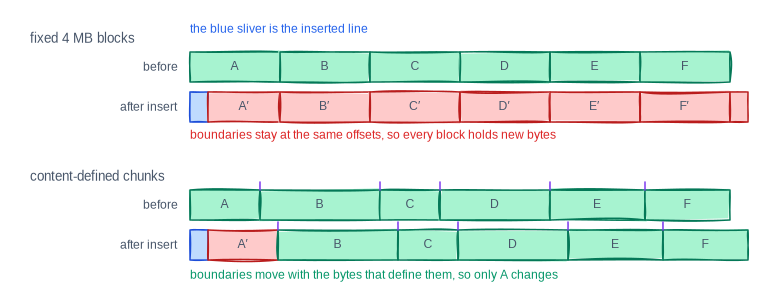
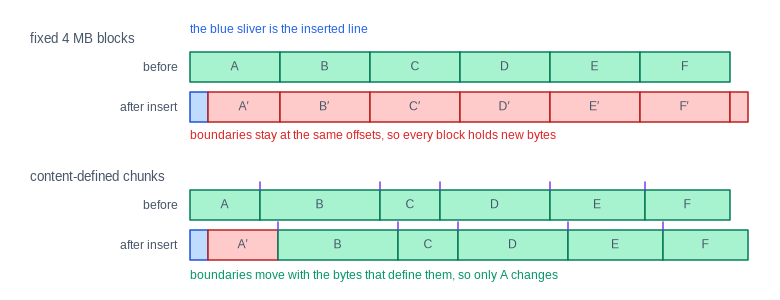
The chunk size has to suit the object store. At LBFS's 8 KB average, a 100 MB file is about 12,500 objects, and each write costs about 27 months of storing its chunk, by the request-price worksheet in the toolkit. Matching 22 low bits instead of 13 gives an expected 4 MiB chunk, which keeps each write cheap. Bound the size as LBFS did, with a minimum and a maximum, so no chunk is tiny and none is huge.
What you give up: chunking costs CPU on every save, and chunks vary in size. The client and server must also agree on the exact algorithm, and changing it later moves every boundary, which costs one full re-upload per file.
The existence leak has its own fix, which Harnik and his co-authors describe. Deduplicate across users on the server, after the upload. Let a client skip only the blocks its own account uploaded before or can already read, such as the blocks of a file shared with it. Other accounts then reveal nothing, and the storage saving stays. You lose only the bandwidth saving across accounts.
The decision: for a sync product, store content-addressed chunks with a blocklist row per version, and cut them with content-defined boundaries at a large average size. Count references in the database, with a grace period before a block is deleted, and deduplicate across accounts only on the server.
A billion small readings a day
A device fleet sends 50,000 readings a second, each about 1 KB. They are kept for a year, and only scheduled jobs read them, each scanning a time range. The obvious design writes each reading as its own object, keyed by device and timestamp.
A device fleet sends 50,000 readings a second, about 1 KB
each, kept for a year and read only by jobs that scan a
time range. Price one object per reading, then one object
per minute of each shard.

One object per reading
  objects a day    50,000 x 86,400          =     4.32B
  PUT requests     50,000/s x $0.000005     =  $0.25 /s
                   x 86,400                 = $21,600 a day
                   x 365                    ≈ $7.9M a year
  prefixes at 3,500 writes/s  50,000 / 3,500 = 15 at least
  bytes a day      4.32B x 1 KB             =   4.32 TB
  storing one day's bytes  4,320 GB x $0.023 =  $99 a month

Batched into 64 MB objects
  objects a day    4.32 TB / 64 MB          =    67,500
  PUT requests     67,500 x $0.000005       = $0.34 a day
  ─────────────────────────────────────────────────────
  The same bytes, in 64,000 times fewer requests. Each
  day's writes cost 217 months of storing that day's
  bytes, which is the 1 KB row of the toolkit worksheet.
The bytes are cheap and the requests are not, and archiving the small objects makes it worse. Lifecycle rules skip objects under 128 KB by default, and a forced move to Glacier Flexible Retrieval costs $0.03 per 1,000 transitions. That is $129,600 for each day of readings.
Facebook's Haystack, described in 2010, fixed the same per-item overhead on disk by packing millions of photos into 100 GB files, each photo found through a 10-byte index entry in memory.
So what should one object hold?
One object per reading
It is easy to write and easy to read back one reading at a time. It costs $21,600 a day in PUT requests, needs at least 15 prefixes to absorb the write rate, and makes archiving cost more than storing. It also puts every reading's durability on one request that a device or a gateway must retry correctly.
A durable log in front, and large batches behind it
Readings go first to a partitioned log such as Kafka, which makes each one durable in milliseconds. A sink process reads each partition and writes a 64 MB object from it whenever it has 64 MB. Then it records the object in a catalogue table in the database, with its key, its partition, its first and last timestamps and its row count. The URL shortener archives its click events the same way, with a Kafka Connect job writing to S3.
This takes the request bill from $21,600 a day to $0.34. The cost is the catalogue: one row per object, 67,500 a day, which every read must query first, and a log to run. Single-reading lookups now mean reading a batch.
Make the key the index, and let the file carry the rest
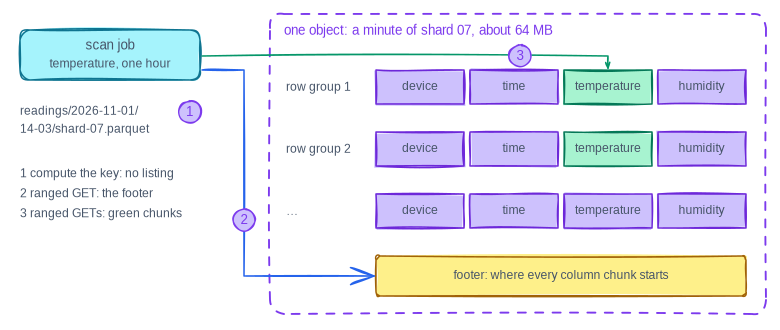
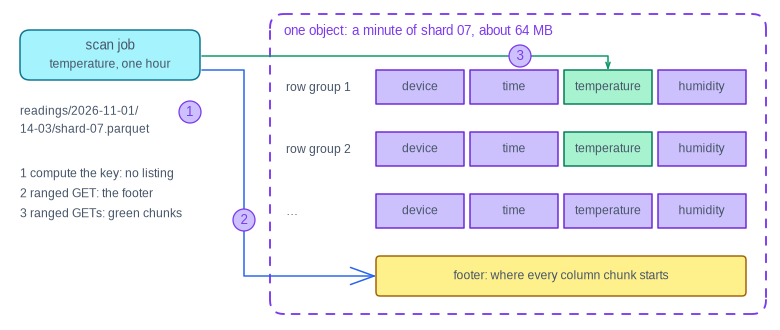
Question whether any reader needs a reading by itself. None does: every job scans a time range. So the batch boundaries can be fixed in time, one object per shard per minute, and the key becomes computable: readings/2026-11-01/14-03/shard-07.parquet. With 47 shards, each object holds about 64,000 readings in 64 MB, the size the senior tier chose. A job that needs an hour of data builds 60 times 47 keys and reads them, with no catalogue and no listing. YouTube does the same with video segments, whose names follow from the video, the rendition and the segment number.
Inside the object, use a columnar format such as Apache Parquet. Parquet splits a file into row groups and stores each column of a row group as a separate chunk. After the data it writes a footer, file metadata that gives the location of every column chunk. A reader fetches the footer first with a byte-range GET, then fetches only the column chunks it needs. S3 serves one byte range per request.
What you give up: late readings need a compaction job that rewrites a minute's object, because objects in an S3 general-purpose bucket cannot be appended to. The shard count is fixed into every key, so changing it means a new key scheme from some date forward. And finding one device's reading means scanning a minute of data rather than reading one object.
The decision: one object per shard per minute behind a durable log, computable keys instead of a catalogue, and a columnar file whose footer replaces a per-reading index.
Where it goes wrong
These are ordered by how often they come up in interviews and in production.
1. Sending the bytes through your own servers
Every upload passes through the API tier, so the tier is sized for bandwidth and slow connections instead of requests. The pre-signed URL section above gives Instagram's numbers for this, and WhatsApp works out 41 GB per send for one video to a group of 1,024. The fix is a pre-signed URL in both cases.
2. Asking the bucket questions
Finding files by listing a prefix, or keeping their status only in object metadata, runs into the limits in the toolkit's listing warning, and those answers belong in rows.
3. A pre-signed URL scoped too loosely
A URL for a key the client chose, valid for days and with no size cap, lets its holder write whatever it likes there. The four details under pre-signed URLs above are the fix: a server-chosen key, minutes, a signed size, and create-only writes on raw/.
4. Overwriting a key that something has cached
If you overwrite avatars/42.jpg, caches keep serving the old bytes until they expire, as the consistency section above shows. New bytes need a new key, the content addressing that caching strategies and invalidation uses for static assets.
5. Deleting by key in a versioned, replicated bucket
With versioning on, a DELETE without a version id removes no bytes. S3 adds a delete marker as the current version, returns 404 on reads, and keeps billing the old bytes as a noncurrent version. Under a replication rule that uses a filter, delete markers are not replicated by default, so the replica keeps the object as its current version. A delete that names a version is never replicated, on purpose, to protect against malicious deletes. And copies in CDNs and browsers stay until their own expiry, as Instagram's deletion deep dive works through.
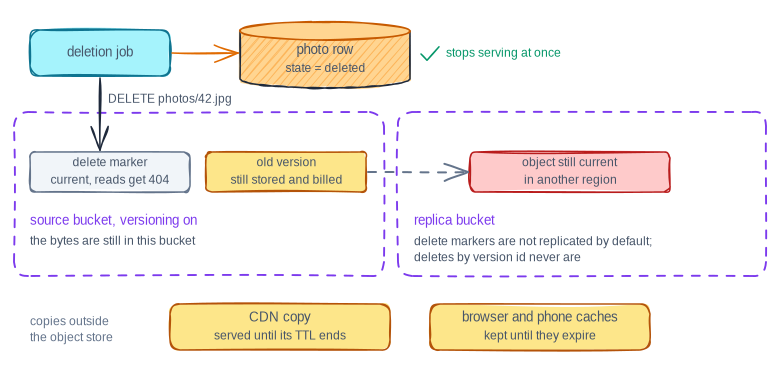
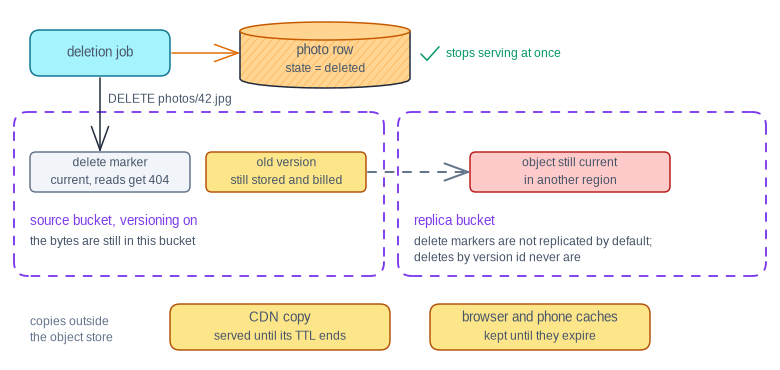
The fix is a deletion job that starts from the row. It marks the row deleted, then pushes the key onto the CDN's denylist, so every serving node refuses it within a time you can state. Then it deletes each version by id, in every bucket, and purges the CDN. Both halves are needed: the denylist is fast and bounded, and the deletes and the purge make the removal permanent. Turn on delete-marker replication too, so the replica's copy stops being current. As the backstop, give every bucket a lifecycle rule that expires old versions.
If you memorise nothing else
| fact | why it matters |
|---|---|
| An object store is a key-value store for bytes that never change | keep the bytes there and every question about them in a database |
| A blob in a database is copied by every replica, backup and restore | 73 TB of attachments turned a 73-second restore into 41 hours |
| S3 Standard: $0.023 per GB-month, $0.005 per 1,000 PUTs | below about 200 KB, a write costs more than a month of storage |
| Egress at $0.09 per GB is about four months of storage | serve through a CDN, and S3 to CloudFront is free |
| Eleven nines is durability, 99.99 percent is the availability target | 10 million objects lose about one per 10,000 years, while Standard's target allows 52.6 minutes down a year |
| Durability does not cover your own deletes | versioning, replication and Object Lock are off until you turn them on |
| S3 has been strongly consistent since December 2020 | reads and lists see a write at once, but two writes are never atomic |
If-None-Match: * makes a write create-only, and If-Match makes it a compare-and-swap | August and November 2024, and only on one key |
| 3,500 writes and 5,500 reads a second per prefix | S3 scales gradually and returns 503 while it does |
| A pre-signed URL works until it expires, more than once | the server picks the key, the size and minutes of validity |
| The database row is the commit point | pending, bytes under raw/, then a handler marks it ready only if it is still pending |
| Multipart: at most 10,000 parts of 5 MiB to 5 GiB | part size has to be at least the file size divided by 10,000 |
| Unfinished multipart parts are billed and not listed | add an abort rule to every bucket that takes uploads |
| Content addressing needs immutable objects | it gives deduplication and caching forever, and makes deletes a reference count with a grace period |
| Pack small items into large objects | Haystack: millions of photos per 100 GB file, with 10 bytes of index each |
What is expected at each level
Mid-level
Put files in object storage and their details in a database, and say why: the bytes are large, never change and are never queried. Know that a client can upload straight to the object store with a pre-signed URL, and that a CDN serves the reads. Know that large files go up in parts.
You aren't expected to raise consistency, request rates or lifecycle rules unprompted. You are expected to answer sensibly when asked. If the interviewer asks what happens when an upload starts and never finishes, a good answer is a pending row, a short URL expiry and a cleanup job.
Senior
You drive this part. The method above is the baseline, and two more things should come up without prompting.
The cost shape. Price storage, requests and egress separately, and say which one dominates for this product. For media it is egress, for small items it is requests, and for backups and archives it is storage.
What consistency covers. Reads and lists see a write at once, and two writes are never atomic. So a manifest goes last, and anything that needs two keys to change together needs a row in a database.
Two things are disqualifying: streaming uploads through the API tier at scale, and a design whose only index of its files is a bucket listing.
Staff+
Producing a correct design is still the bar. On top of it, the difference is choosing what the object store is and is not responsible for.
Separate durability from availability, and price each. Say which requirement asks for a second copy and which asks for a second region.
Choose the unit of storage on purpose. A whole file, a content-addressed chunk, or a minute of readings in one columnar object. The unit decides the request bill, what deduplicates, what a delete has to touch and whether a key can be computed instead of looked up.
Design deletion before launch. Row first, then the denylist, then every version in every bucket and a purge, with a deadline you can state.
Keep the bytes immutable everywhere. New bytes get a new key. That keeps CDN caching, retries and deduplication safe.
And say what you would not build. A custom blob store, when the problem is per-object overhead that packing would fix. A metadata service that lists buckets to answer queries. Cross-region replication for data whose requirement was durability, not availability. Your own resumable upload protocol, when multipart and resumable sessions already exist. And a cold-storage migration for objects under 128 KB that will cost more to move than they save.
Sources
The prices, limits and dates below come from the providers' own documentation and the published papers listed. Every sizing worksheet on this page is derived from them, with its assumptions stated in the block.
- Amazon S3 documentation on the consistency model, performance, multipart upload and its limits, pre-signed URLs, signed query parameters and POST policies. Also its pages on conditional writes and enforcing them, deleting versions, replication, lifecycle transitions and aborting incomplete uploads. And on object keys, metadata, listing, ranged reads, event notifications, data protection and storage classes. Prices and targets come from the FAQ, pricing, the SLA and the storage classes page. Dates come from the announcements of the 2018 request rates, If-None-Match in August 2024, If-Match and Express One Zone appends in November 2024.
- Jeff Barr, Amazon S3 Update: Strong Read-After-Write Consistency, 1 December 2020. The change, its date, and that it came at no extra charge.
- AWS, Summary of the Amazon S3 Service Disruption in the Northern Virginia Region, 28 February 2017. The mistyped command, the index and placement subsystems, and the recovery times.
- Google Cloud Storage documentation on consistency, resumable uploads, objects and zonal buckets, and Microsoft's block, append and page blobs. The 60-minute cache default, week-long upload sessions, appendable zonal objects, and Azure's in-place page writes.
- Cloudflare R2 durability and pricing. The 10-million-objects reading of eleven nines, durability as distinct from availability, and zero egress.
- Beaver et al., Finding a needle in Haystack: Facebook's photo storage, OSDI 2010, and Muralidhar et al., f4: Facebook's Warm BLOB Storage System, OSDI 2014. Photos packed into 100 GB files with a 10-byte index entry each, and the definition of a blob.
- Dropbox, Inside the Magic Pocket by James Cowling, 2016, and Streaming File Synchronization by Nipunn Koorapati, 2014. 4 MB blocks keyed by SHA-256, the blocklist, and the commit that asks only for missing blocks.
- Muthitacharoen, Chen and Mazières, A Low-bandwidth Network File System, SOSP 2001, and Harnik, Pinkas and Shulman-Peleg, Side channels in cloud services: deduplication in cloud storage, IEEE Security and Privacy 2010. Content-defined chunk boundaries, what cross-user deduplication reveals, and deduplicating on the server instead. Apache Parquet's file format page supplies the footer that a reader fetches first.