Most candidates answer this question by designing Instagram with bigger files. They upload the bytes, store them and put a content delivery network (CDN) in front. That design works, but it describes a video host, not YouTube. The interview is about the difference between the two.
Two published numbers drive the rest of the design.
About 500 hours of video are uploaded every minute. YouTube gave this figure at its own press events in 2019. That is 720,000 hours of new video every day.
About 1 billion hours of video are watched every day. YouTube announced this on its blog in February 2017, and the figure has not gone down since.
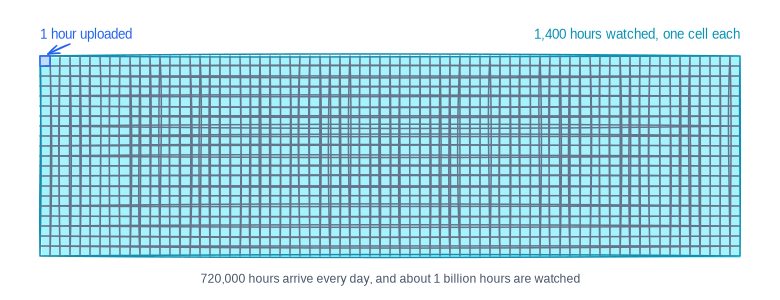
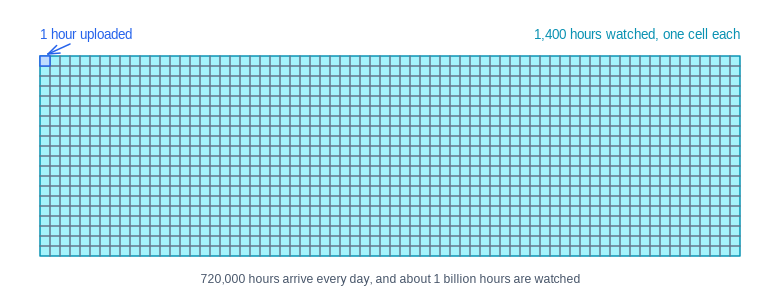
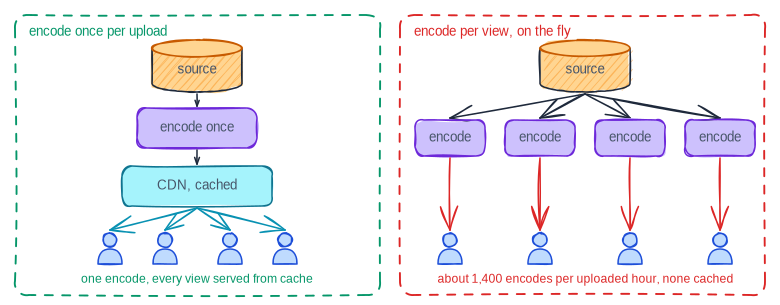
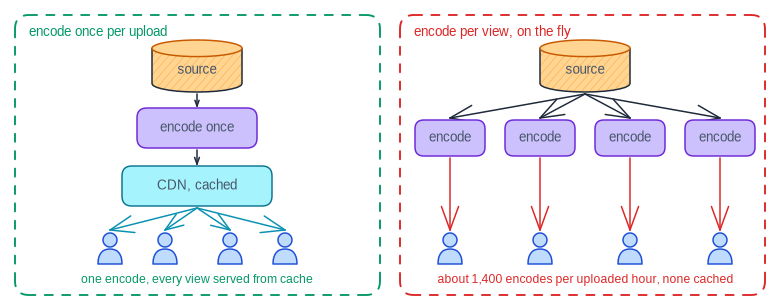
Divide one by the other. Every hour of video that arrives is watched for roughly 1,400 hours.
That ratio is the thesis. The work you do once per upload is spread across 1,400 hours of serving. So effort spent making the file smaller is worth almost any amount of CPU. If you spend twice the compute to make a file 20 percent smaller, that is not a small optimisation. It is one of the biggest wins the company has, and it is why Google designed and deployed a custom chip to do it.
The ratio also means you never serve the file that was uploaded. A watch session is not one file transfer. It is a sequence of short chunks of video. Every chunk comes from a set of encoded versions of the video, called renditions, that were produced long before anyone pressed play. The player picks the bitrate again every few seconds.
Understanding the problem
The general method for this part of the interview is in The First Five Minutes: Requirements.
YouTube is a site where anyone can upload a video and anyone else can watch it, on any device and any connection. Playback starts within a second or two of the click.
That description covers at least six separate systems.
What people mean by "YouTube"
- Upload and transcode. Getting a file of several gigabytes in, and turning it into the dozens of files that can be served. Transcoding means decoding the video and encoding it again at a different size, bitrate or format. This is what we build, and it is the part most candidates skip.
- Watch, meaning adaptive playback. Manifests, segments, bitrate switching and seeking. We build this too. Once the transcode is right, it is smaller than people expect.
- Live streaming. There is no complete file to work from, the delay budget is a few seconds, and segments must be published while the encoder is still producing them. It is a different system. Deep dive 6 covers what changes, but we do not design it here.
- Recommendations and the home page. This is a problem of finding and ranking items among billions, and it has almost nothing in common with playback. It is out of scope. The reasoning is close to News Feed, except that there is no follow graph to start from.
- Search over video. This is an inverted index over titles, descriptions, captions and transcripts, and it is a different system.
- Comments, subscriptions, community, monetisation. These are ordinary product features that happen to sit next to a video player.
Say which two you are building. A good way to put it: "upload with transcode, and adaptive playback, because that is where both the money and the hard engineering are." That one sentence sets the scope for the rest of the interview.
Functional requirements
- A creator can upload a video file, resumably, and is told when it is watchable.
- The system transcodes each upload into a set of renditions and formats.
- A viewer can watch any video, starting quickly, on any device and connection.
- Playback adapts to changing bandwidth without stopping.
- A viewer can seek to any point without downloading what came before.
- Views are counted, approximately, and in a way that is hard to fake.
Out of scope, on purpose:
- Recommendations, the home feed, search, trending
- Live streaming, premieres, Shorts as a distinct product
- Comments, subscriptions, notifications, playlists
- Monetisation, ads, Content ID and rights matching
- Digital rights management and paid content
Non-functional requirements
Two of these figures are published, and the rest are my assumptions.
- Scale, published. 500 hours uploaded per minute, so 720,000 hours a day. About 1 billion hours watched a day. That figure was announced in 2017, so treat it as a floor, not as a current number.
- The ratio, derived. Roughly 1,400 watch-hours per uploaded hour. Every later decision in the design follows from this requirement.
- Time to first frame under 1 second at p95, meaning 95 of every 100 starts are faster than that. This is for a warm video, one whose files are already in the CDN's cache. After the start, playback continues without a stall for almost every session.
- Upload durability is absolute. A creator's only copy of a video cannot be lost. The transcoded renditions are derived from the source and can be rebuilt. The source cannot.
- Watchable within minutes, not instantly. A creator accepts a wait between upload and publish. Because of that wait, the whole transcode pipeline can run asynchronously, in the background. Without the wait, the design does not work.
- Views may be approximate and late. They must not be easy to inflate. That is a different requirement from accuracy, and a harder one.
Requirement 2 is the one to write down. It says you pay for encoding once and collect the benefit 1,400 times. That justifies decisions that look wasteful on their own.
The set up
Core entities
- Video. What a URL points at: the title, owner, description and state. It is small, it changes, and it is the only entity a viewer names directly.
- Source file. The bytes the creator uploaded. It is large and never changes, and after its first hour it is almost never read.
- Rendition. One encoding of one video at one resolution, bitrate and codec. A codec is the compression format, such as H.264 or AV1. The full set in this article is six resolutions, from 144p to 1080p, each in two codecs, H.264 and AV1, so a video has 12 renditions. All of them are derived from the source and can be rebuilt.
- Segment. A few seconds of one rendition, stored as its own object. This is the unit that is served, and most designs never introduce it.
- Manifest. A small text file that lists which renditions exist and where their segments are. The player reads it first, and every later request follows from it.
- View event. One record that someone watched a video. Rules decide which watches count.
Segment and manifest are the two to focus on. A naive design does not have them, and they are the reason the serving path is simple. Everything else is a database row or a stored file, and you already know how to handle those.
Why the player decides what to send, not the server
Settle this before you design the interface. Interviewers probe it first, and the answer is not obvious until you work out what the alternatives cost.
Start with the obvious design: serve the file. The browser sends GET /video.mp4 and plays the video as it arrives. This is called progressive download, and it works. It needs no new infrastructure, any static file server can do it, and for a small site it is the right answer.
Then check what it costs against requirements 3, 4 and 5.
A 10 minute video at a single 1080p encoding, 4.5 Mbps.
File size = 4.5 Mbps x 600 s / 8 = 337 MB

Problem 1: the viewer on 1.5 Mbps mobile
  they need 4.5 Mbps to keep up
  ⇒ they buffer forever, or you serve them nothing

Problem 2: the viewer on 100 Mbps fibre and a 4K screen
  they get 1080p because that is what exists
  ⇒ you left the quality on the table

Problem 3: seeking to minute 9
  HTTP range requests can fetch the right byte range,
  but only if the container is laid out for it, and
  the player must first fetch the index at the end
  ⇒ one extra round trip before any seek works

Problem 4: bandwidth changes mid-session
  the file has ONE bitrate. There is no adaptation
  available, at all. The session either survives
  or it stalls.

Now the fix everyone reaches for: encode several files.
  /video_1080p.mp4  /video_720p.mp4  /video_480p.mp4

Better, and it does not fix problem 4. Switching files
mid-playback means a new request, a new buffer, and a
visible interruption, because each file is one object
and the player committed to it when it started.
So take one more step. This step defines the product: cut every rendition into short segments, and let the player choose a rendition for each segment.
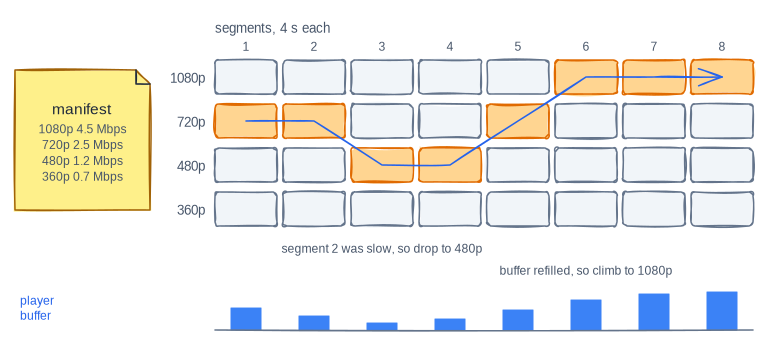
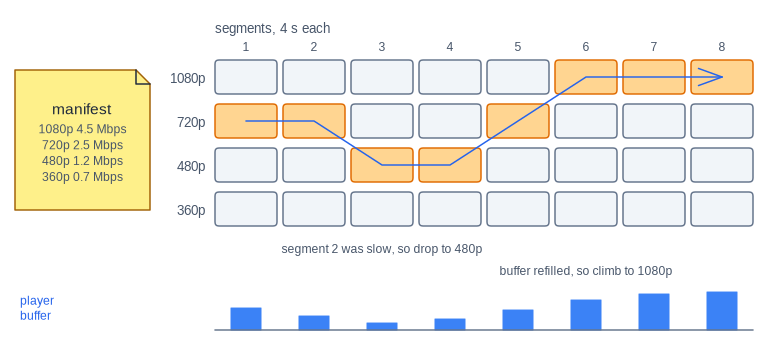
The video becomes a set of small objects: 1080p/00001.ts, 1080p/00002.ts, 720p/00001.ts, and so on. Each one is two to six seconds long, and each can be decoded on its own. A small manifest lists what exists. The player fetches the manifest, picks a rendition and fetches segments. Before every segment, it picks the rendition again. It bases the choice on how fast the last segment arrived and how full its buffer is.
This is adaptive bitrate streaming. HLS, Apple's HTTP Live Streaming, and DASH, the MPEG standard, are the two standard formats for it. It gives you three things, and together they are why it wins.
Adaptation becomes free. To switch quality, the player requests the next segment from a different folder. There is no new connection, no reset and no visible break, because every segment starts at a point where decoding can begin.
Seeking becomes free. To jump to minute nine, the player requests the segment that contains minute nine. It fetches no index, works out no byte ranges, and downloads nothing that came before.
The server becomes simple. Segments are immutable files with content-addressed names: a name always refers to the same bytes, and different bytes get a different name. The serving tier does not transcode, does not decide anything and keeps no session state. It is a static file server, and that is exactly what a CDN is. All the decisions have moved to the player, because the player is the only part of the system that knows the network conditions.
System interface
Upload takes three calls. The middle one is different from Instagram's, because the files are enormous.
POST /v1/videos
Authorization: Bearer <token>
{ "title": "...", "visibility": "private", "byte_size": 8589934592, "content_type": "video/mp4" }

201 Created
{ "video_id": "dQw4w9WgXcQ",
  "upload_url": "https://ingest.example.com/u/01J9F...",
  "chunk_size": 8388608,
  "expires_in": 86400 }
PUT <upload_url>
Content-Range: bytes 0-8388607/8589934592
<8 MB chunk, direct to storage, never touching our API>

# ... repeated, resumable, in any order

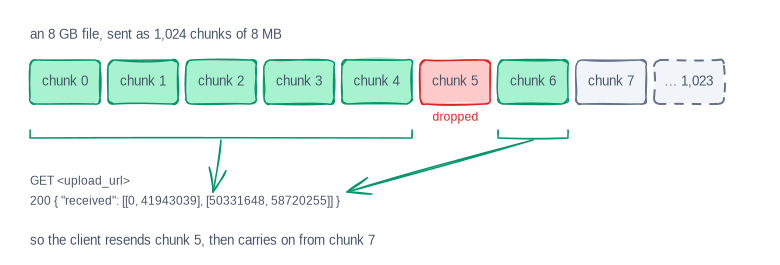
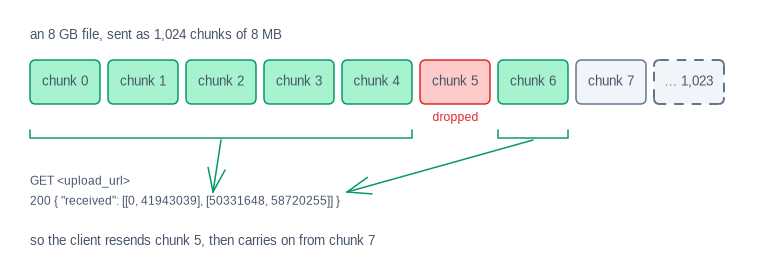
GET <upload_url>            # which chunks landed?
200 { "received": [[0, 41943039], [50331648, 58720255]] }
POST /v1/videos/dQw4w9WgXcQ/publish
Idempotency-Key: 7c9e6679-...
{ "visibility": "public" }

202 Accepted
{ "state": "processing", "renditions_ready": [] }
Four details to note.
The upload is chunked and resumable, and Instagram's is not. A 3 MB photo can be retried whole. An 8 GB file over a home connection takes hours. If a failure at 90 percent restarts the upload from zero, creators give up on the product. So the file goes up in chunks of a few megabytes, and each chunk is acknowledged on its own. A GET reports which chunks have landed, so a client that resumes after a crash asks instead of guessing.
The bytes still never pass through our application servers, for the reasons worked out in Instagram, and those reasons are stronger here. At 720,000 hours a day and a few gigabytes per hour of source video, petabytes arrive every day.
Publish is a separate call from upload. A creator may upload today and schedule the video for Friday. Because the two calls are separate, the transcode can start at once while the video stays private.
The response is 202 with a state, and the state has more than two values. A video does not go straight from "processing" to "ready". Low renditions finish first, so the video becomes watchable at 360p while 1080p is still encoding. The API should say which renditions exist, because the player needs to know that.
Reads are simple by comparison, and that is a sign the design is working.
GET /v1/videos/dQw4w9WgXcQ/watch

200 OK
{ "video_id": "dQw4w9WgXcQ",
  "title": "...", "channel": {...}, "duration_s": 213,
  "manifest_url": "https://cdn.example.com/v/dQw4.../master.m3u8",
  "thumbnail_url": "https://cdn.example.com/t/dQw4.../maxres.webp",
  "storyboard_url": "https://cdn.example.com/sb/dQw4.../sb0.webp",
  "view_count": 1584930211 }
The response has no video bytes, and not even a segment URL. It returns a manifest URL and nothing more. The player fetches the manifest from the CDN. Every byte after that goes between the player and the edge, the CDN's servers close to the viewer. Your API takes no further part in the session. That is why one metadata service can serve a billion watch hours a day.
High-level design
1. Getting petabytes in, resumably
The upload path is the Instagram design with two changes, both caused by file size.
It is chunked and resumable, as above. The client splits the file, sends each chunk with a PUT to a signed session URL, and can ask which chunks have landed. Object stores such as S3 support this directly, as multipart upload. You track the upload session, not the object.
It keeps a pending session row, with a sweeper, as Instagram does. The sweeper is a background job that deletes uploads nobody finished. It matters more here. An abandoned 8 GB upload is expensive to keep, and at this volume uploads are abandoned all the time, not now and then.
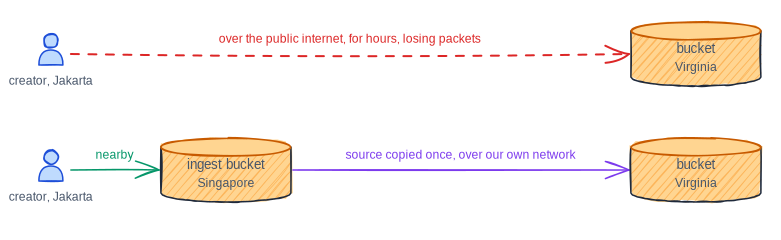
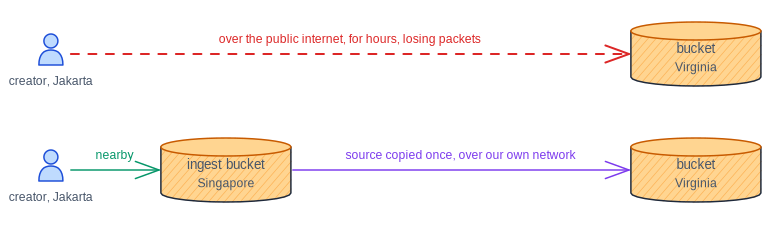
The one new question is where the upload lands geographically. A creator in Jakarta who uploads 8 GB to a bucket in Virginia sends it, for hours, over a long path that loses packets. Instead, take the upload in a nearby region. Then move the source once, over your own network, at your own pace. This decision changes upload success rates more than anything else in this section.
2. Turning one upload into a ladder
This is the core of the system.
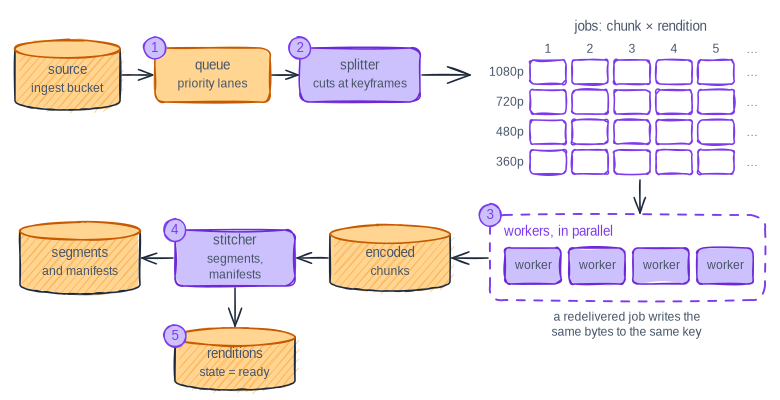
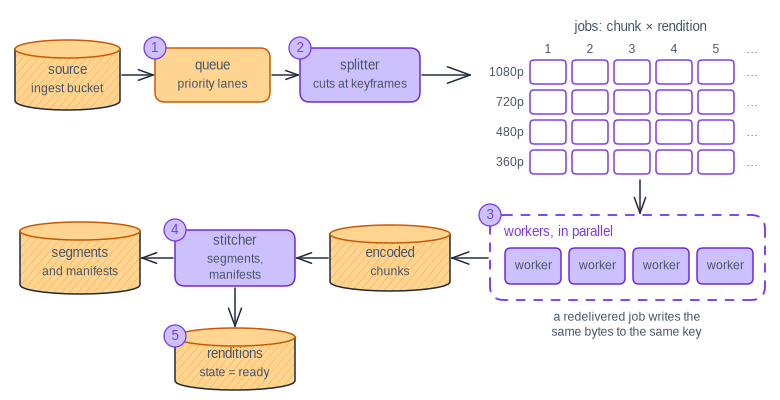
A finished upload starts a pipeline. The pipeline produces every rendition, cut into segments. It also produces the manifests, the thumbnails and the storyboards, which are the small preview images shown as you drag along the progress bar. Then it marks the video as watchable.
Four decisions make this pipeline work.
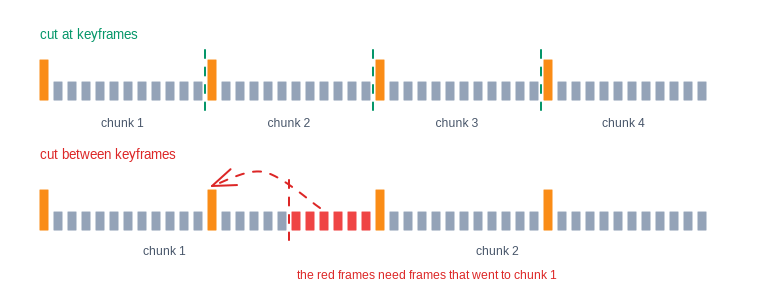
Split at keyframes, and transcode the chunks independently. A keyframe is a frame stored whole. The frames after it are stored only as changes from nearby frames, so decoding has to start at a keyframe. The splitter cuts the video into chunks of roughly 30 seconds, and it makes every cut at a keyframe. Each chunk can then be decoded and encoded without its neighbours. A two-hour video becomes 240 independent jobs instead of one long one, and on a big enough fleet the encode finishes in minutes. The rest of the pipeline depends on this split, and the split only works because of where you cut.
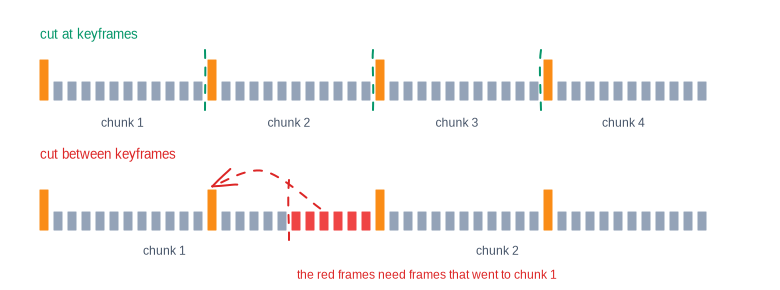
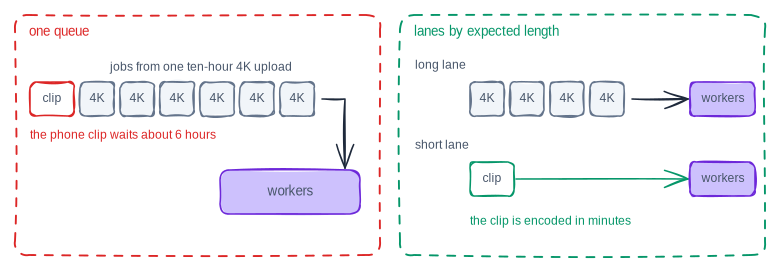
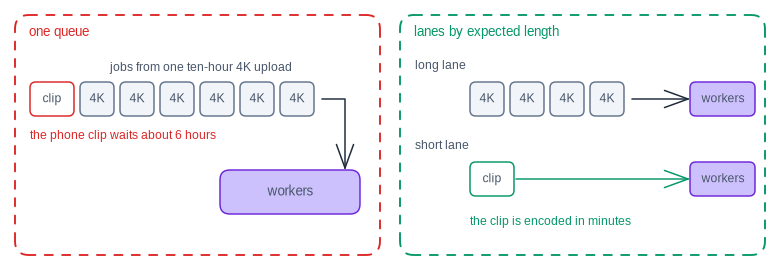
The work is chunks times renditions. One source chunk becomes one encoded chunk per rendition. A two-hour video at 12 renditions is 2,880 jobs. The queue holds jobs, not videos, so one enormous upload does not hold up a thousand small ones.
Workers are idempotent, and outputs are content-addressed. Idempotent means that running a job twice has the same effect as running it once. Queues do redeliver jobs. If a worker encodes the same chunk twice with the same settings, it writes byte-identical output to the same key. The duplicate overwrites the first copy with the same bytes and does no harm, so you never need a distributed transaction.
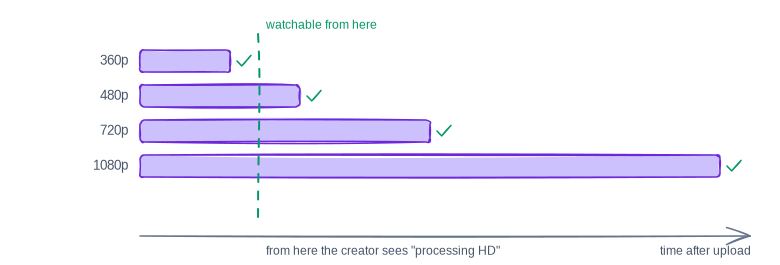
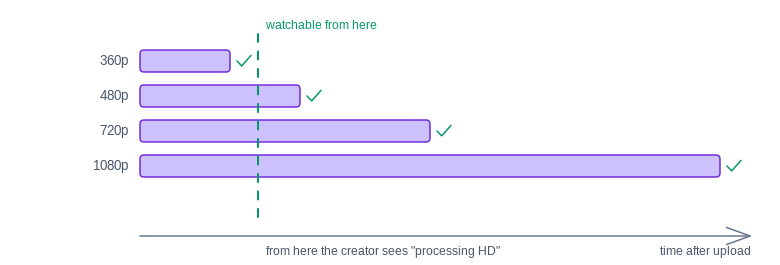
Prioritise low renditions. 360p is fast to encode and is enough for most viewers. The pipeline finishes the ladder from the bottom up, and it publishes each rendition as soon as that rendition is done. The video is then watchable in a fraction of the time the full encode takes. The creator sees "processing HD" instead of "processing". That is a product decision, and it comes straight from the shape of the pipeline.
3. Serving a watch session
The decisions above make the watch path short.
- The client asks your API for the watch metadata, a response of a few kilobytes.
- The client fetches the master manifest from the CDN. It lists the renditions and their bandwidths.
- The client picks a starting rendition and fetches that rendition's media manifest, which lists its segments.
- The client fetches segments and measures how long each one takes. Before each segment, it picks the rendition again.
- On a seek, the client works out which segment holds that timestamp and requests it.
Your own servers appear in step 1 and nowhere else. Steps 2 to 5 are static file requests to an edge cache. Segments are immutable and content-addressed, so they carry a one-year max-age. That cache header tells every cache it may keep the file for a year, and the file never needs invalidating. Instagram's images are cheap to serve for the same reason. It matters far more here, because a video is thousands of times larger than a photo.
4. Storing the metadata
Each kind of data gets its own storage decision, and the decisions land on different data stores.
Which store, and what actually forces it
One relational database for everything
Videos, channels, renditions, segments and views all go in one Postgres database. This is the right starting point, and it handles the video table easily. At 720,000 hours a day and an average video of, say, 10 minutes, that is about 4.3 million new videos a day, or 50 rows a second. Any database can take that.
It fails on the other two tables. Few candidates expect segments to be a problem. Everyone expects view events to be one, and they still underestimate it.
Relational for videos, and stop putting segments in a database
Videos, channels and rendition summaries stay in a relational database such as Postgres. The rows are small, a channel page needs an ordered scan, and a relational schema suits queries you have not thought of yet.
Segments do not belong in a database at all. You can work out a segment's name from the video id, the rendition and the segment number, so a row per segment stores something you can compute. The manifest is the index, and it is a file stored next to the segments.
Three data stores, plus the observation that one table should not exist
Video and channel metadata go in a relational database. View events go in a wide-column store such as Cassandra or Bigtable, which spreads heavy writes across many machines. Their write rate is orders of magnitude above everything else, and no query needs a join. The source, renditions, segments and manifests go in object storage.
There is also a decision not to build something, and you should say it out loud: there is no segments table. Here, seeing which entity needs no row counts for more than any argument about sharding.
Per day:
  hours uploaded                          720,000
  average segment length                        4 s
  ⇒ segments per source hour           900
  ⇒ renditions in the ladder                   12

  segments/day  = 720,000 x 900 x 12 =        7.8B

At ~120 bytes a row plus index overhead:
  ~930 GB/day of rows, 340 TB/year
  ⇒ 7.8 billion inserts/day = 90,000/s sustained,
    purely as bookkeeping

And what those rows would buy you: nothing. The name
of segment 41 of the 720p rendition of video X is a
function of X, "720p" and 41. You can compute it.

⇒ the manifest IS the index, and it is one small
  file that ships next to the data it describes

The cheapest table is the one you do not create.| store | what goes in it | the requirement that forces it |
|---|---|---|
| relational, sharded by channel | videos, channels, rendition summaries | ordered scans for a channel page, and data that must be correct |
| wide-column, append-only | view events | a write rate three orders of magnitude above uploads, no joins, TTL-based retention |
| in-memory | view counters, watch-page cache | a 200 ms budget on a page served a billion times a day |
| object storage plus CDN | source, renditions, segments, manifests, thumbnails | exabytes, immutable, and served by machines you do not own |
| nothing | segments | their names are computable and the manifest is the index |
The tables
-- Sharded by channel_id. A channel's videos live together,
-- because the channel page is the only ordered scan.
videos (
  video_id      text primary key,      -- 11-char public id, unguessable
  channel_id    bigint not null,
  title         text,
  description   text,
  duration_s    int,
  visibility    smallint,              -- private | unlisted | public
  state         smallint,              -- uploading | processing | ready | blocked
  published_at  timestamptz,
  created_at    timestamptz
)
  index (channel_id, published_at desc) where visibility = 'public' and state = 'ready'

channels (
  channel_id    bigint primary key,
  handle        text unique,
  name          text,
  sub_count     bigint                 -- denormalised, eventually consistent
)

-- One row per rendition, NOT per segment. Tens of rows per
-- video, not thousands. This is what the manifest is built from.
renditions (
  video_id      text,
  rendition     text,                  -- '1080p_av1'
  codec         text,
  width         int,
  height        int,
  bitrate_bps   int,
  segment_count int,
  state         smallint,              -- encoding | ready
  primary key (video_id, rendition)
)

-- Different store. Append-only, TTL'd, never read by key.
view_events (
  video_id      text,                  -- partition key
  bucket        date,                  -- partition key, keeps partitions bounded
  event_id      timeuuid,              -- clustering
  viewer_hash   bytea,                 -- salted, for dedup not identity
  watched_ms    int,
  primary key ((video_id, bucket), event_id)
) WITH default_time_to_live = 7776000;  -- 90 days, then rollups carry it
Four things to note.
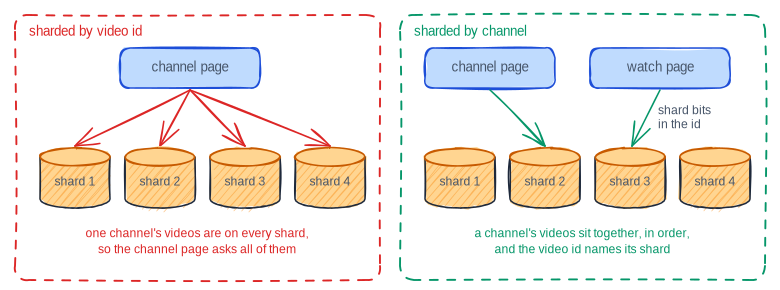
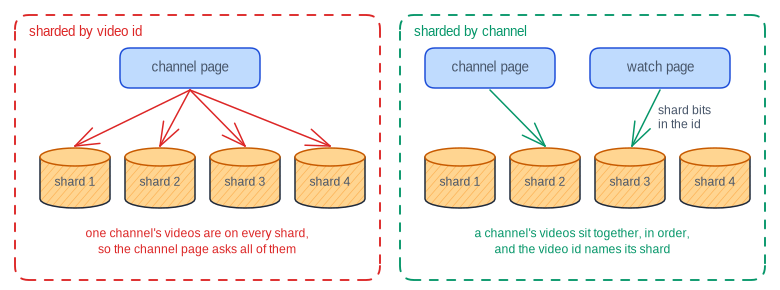
videos is sharded by channel, not by video. The only ordered scan in the product is a channel's videos, newest first. A watch page is a single-key lookup. It only needs a way to find the shard from the video id, such as a few shard bits inside the id. So the shard key is free to serve the scan.
The partial index filters on visibility and state. A partial index holds only the rows that match its where clause. A channel page shows public, ready videos. With both conditions in the index, private and half-transcoded videos never enter the scan, so they are not fetched and then thrown away. A large channel has thousands of each.
renditions has one row per rendition, not per segment, for the reason the worksheet gives. That is tens of rows per video instead of thousands, and they hold everything a manifest needs.
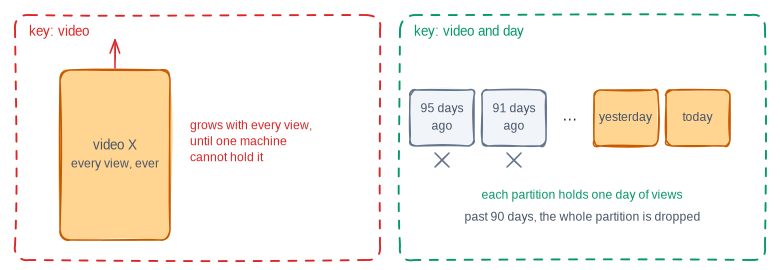
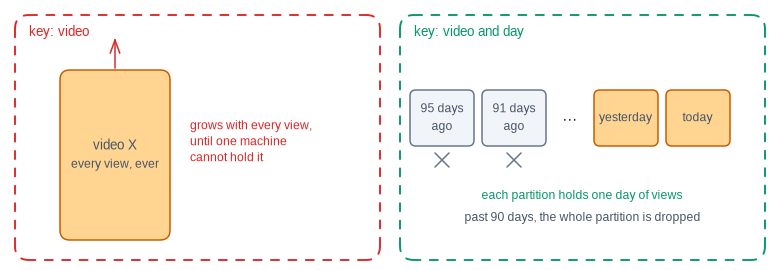
view_events is partitioned by video and date. If you partition by video alone, a video with a billion views gets one partition that grows without limit. That is the classic failure in a wide-column store. Adding the date caps each partition at one day of views, and deleting old data becomes dropping old partitions.
The queries that carry the product
-- 1. The watch page. Runs a billion times a day.
--    Single key, and in practice served from cache.
SELECT video_id, channel_id, title, duration_s, state
FROM videos WHERE video_id = $1;

-- 2. Build the manifest. Tens of rows, one video.
SELECT rendition, codec, width, height, bitrate_bps, segment_count
FROM renditions WHERE video_id = $1 AND state = 'ready';

-- 3. The channel page. One shard, one index, cursor paginated.
SELECT video_id, title, duration_s, published_at
FROM videos
WHERE channel_id = $1 AND visibility = 'public' AND state = 'ready'
  AND published_at < $2
ORDER BY published_at DESC
LIMIT 30;

-- 4. Record a view. Append only, no read, no lock.
INSERT INTO view_events (video_id, bucket, event_id, viewer_hash, watched_ms)
VALUES ($1, current_date, now(), $2, $3);
Query 1 runs on every watch, and it is a point lookup, a read of one row by its key. That is why the metadata tier is small. Query 2 is the one to notice. It exists only to build a manifest, and the manifest does not change once a video is fully processed. So generate the manifest once, at publish time, and put it on the CDN. Query 2 then runs on publish instead of on every watch, and it leaves the hot path, the work done on every request, completely.
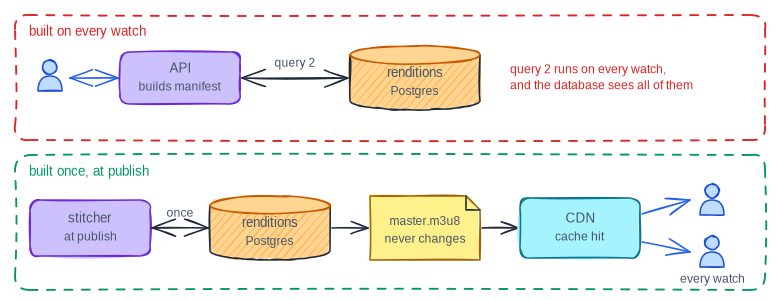
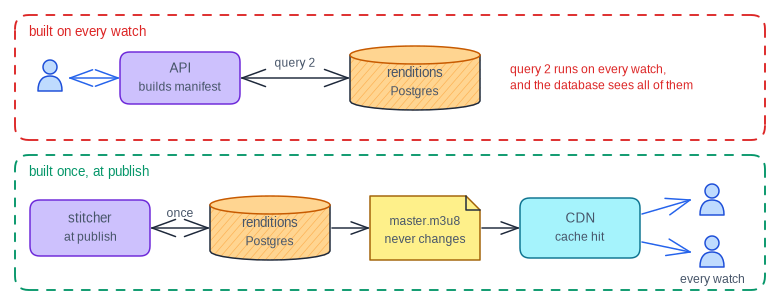
That is the general rule in this design. Anything that can be computed at publish time should be, because publish happens once and watch happens 1,400 times.
5. Counting views without lying
Views are worth money, so people try to fake them. That makes this harder than counting.
The write rate is the easy part. A billion hours a day, at an average watch of, say, 5 minutes, is around 12 billion view events a day, or roughly 140,000 a second. Each event is appended and never changed, and no query needs a join. The hard parts are three product rules.
A view is not a request. A view usually needs some minimum watch time, so the client reports progress and the server decides whether it counts. The event therefore arrives seconds after playback starts, and some sessions never report at all.
Duplicates must be dropped. If the same viewer refreshes the page again and again, that counts as one view within some time window. This needs a dedup key per viewer and per video, with a TTL, a time to live after which the key expires. Each check asks whether a key is in a set, and the set holds an enormous number of distinct keys.
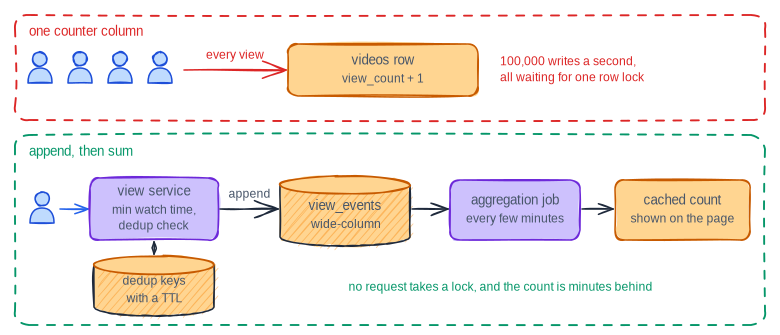
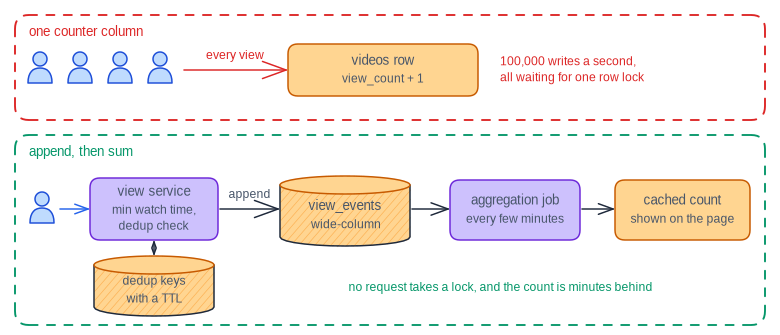
The counter is a hot key, a single key that takes a large share of all writes. A viral video takes over 100,000 writes a second on one row. Sharding cannot fix that, because sharding spreads different keys across machines, and this is one key.
Here is the design. Raw events are appended to the wide-column store. An aggregation job rolls them up into counts. The number on the page is a cached total, not a column that every view updates. The count runs a few minutes behind, which no viewer can notice, and no request ever takes a lock.
Deep dives
1. What the ladder actually costs to store
Assumptions marked; the upload rate is published.

  hours uploaded/day                      720,000   (published)
  average source bitrate                   8 Mbps   (assumption)
  ⇒ source bytes/hour                       3.6 GB

The ladder, per hour of video, one codec family:
   1080p  @ 4.5 Mbps                        2.03 GB
    720p  @ 2.5                             1.13
    480p  @ 1.2                             0.54
    360p  @ 0.7                             0.32
    240p  @ 0.4                             0.18
    144p  @ 0.15                            0.07
  ────────────────────────────────────────────────
  one codec                                 4.27 GB
  x2 for a second codec (H.264 + AV1)       8.54 GB

Per day:
  renditions   720,000 x 8.54 GB    =        6.1 PB / day
  sources      720,000 x 3.6 GB     =        2.6 PB / day
  ─────────────────────────────────────────────────
  total                                      8.7 PB / day
                                           3.2 EB / year

Two observations that change decisions:

1. The ladder is 2.4x the source. Storing what you
   serve costs more than storing what arrived.

2. Sources are 30% of the bill and are read almost
   never after the first hour.
Point 2 is a tiering decision, a choice of which class of storage each file lives in. Instagram makes the same decision for photo originals, and YouTube makes it at 100 times the volume. Sources are needed for exactly one thing: re-encoding the whole library when a better codec arrives. The industry does that roughly once a decade, and when it happens it pays for itself many times over.
2. Egress, and why this is one of the most expensive products on the internet
  hours watched/day               1,000,000,000   (published, 2017 floor)
  ⇒ seconds                       3.6 x 10^12

  average served bitrate                1.5 Mbps  (assumption: a mix
                                                   heavy on mobile 360p
                                                   and 480p)

  bits/day     3.6e12 x 1.5e6      = 5.4 x 10^18
  bytes/day                        = 675 PB / day

  average rate = 5.4e18 / 86,400   = 62.5 Tbps
  peak at 2x                       = 125 Tbps

Now the sensitivity that justifies everything:

  a 10% reduction in average bitrate
    saves 6.25 Tbps, continuously, forever

  the cost to obtain it: more CPU per upload, ONCE

Given 1,400 watch-hours per uploaded hour, spending
2x the encoding compute to get 10% smaller files is
not close. It is one of the best trades
available to the company.

Which is exactly why Google built a chip for it.
This worksheet is the argument for the ASIC, an application-specific integrated circuit: a chip built for one job. Google published the details, which is rare. Its ASPLOS 2021 paper describes the video coding unit (VCU), called Argos internally, which runs as PCIe cards in Google's servers. Google reports 20 to 33 times better compute efficiency than optimised software on ordinary servers. For H.264, a single VCU matches the throughput of the baseline system at roughly one tenth of the power, measured for the whole system. For VP9, one machine with 20 VCUs replaces several racks of servers that have only CPUs. Each chip has ten encoder cores. Each core can encode 2160p at 60 frames per second in real time, using three reference frames.
Very few companies should build their own chips. Here the arithmetic says Google should.
3. Sizing the transcode fleet
Steady state, in wall-clock terms:

  hours of video arriving per hour        30,000
  renditions per video                        12
  ⇒ encode-hours needed per wall-clock hour
                             30,000 x 12 = 360,000

If one CPU core encodes at roughly 1x real time
for a mid-ladder rendition:

  ⇒ 360,000 cores running continuously
  ÷ 64 cores/machine        =  5,625 machines
                               doing nothing but encoding

At Google's reported 20-33x efficiency for the VCU:

  ⇒ roughly 11,000 to 18,000 chip-equivalents
    instead of 360,000 CPU cores

Two things this table settles:

1. The transcode fleet is the largest compute tier
   in the system by a wide margin. Serving is a CDN
   and metadata is a few hundred machines.

2. It is sized by ARRIVAL rate, not by library size
   or by viewership, which makes it the one tier that
   does not grow as the product succeeds with viewers.
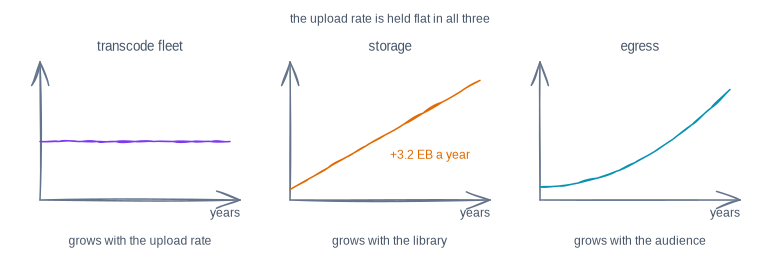
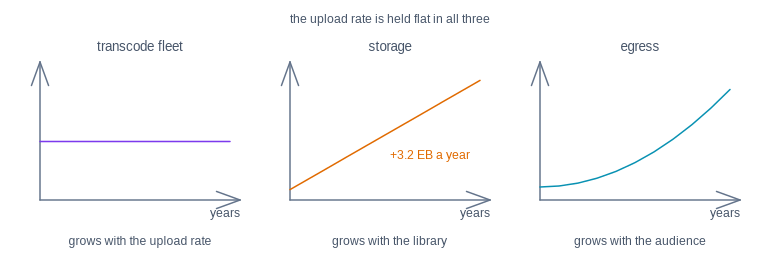
The second point is the one to plan around. Storage grows with the library, egress grows with the audience, and transcode grows only with the upload rate. Each of the three tiers grows for a different reason, and capacity plans go wrong when they mix them up.
4. Lazy transcoding, which is where the real saving is
Everything above assumes every video gets the full ladder. It should not.
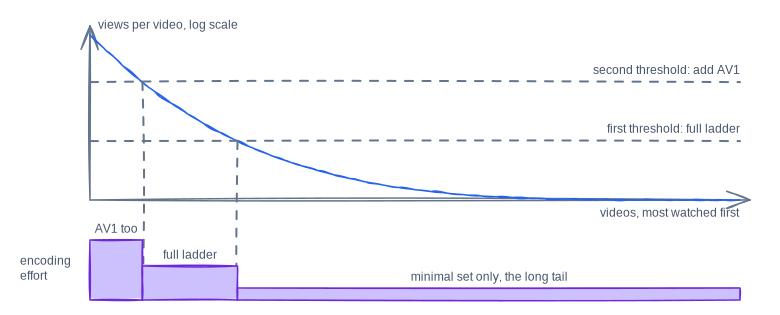
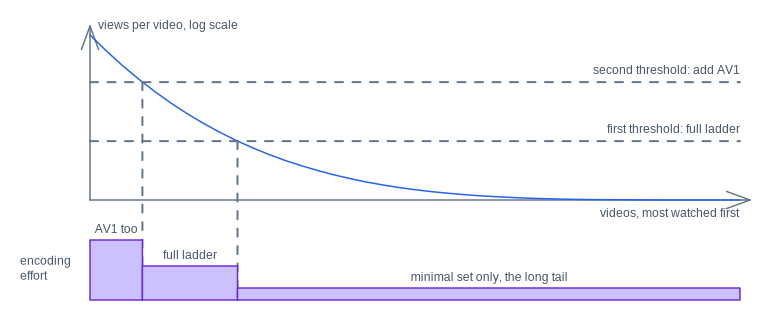
Video popularity is extremely skewed. Most uploads are watched a handful of times, and many are never watched at all. Encoding all 12 renditions for a video that gets four views is almost all waste. That waste repeats across most of the 4.3 million uploads a day.
The policy has three steps.
At publish, encode a small set that anyone can watch. That is one or two middle renditions in a codec every device supports. It is enough for anybody to watch the video, and cheap enough to do for every upload.
Above a view threshold, encode the full ladder. The video has shown it has an audience, so the higher renditions will be served.
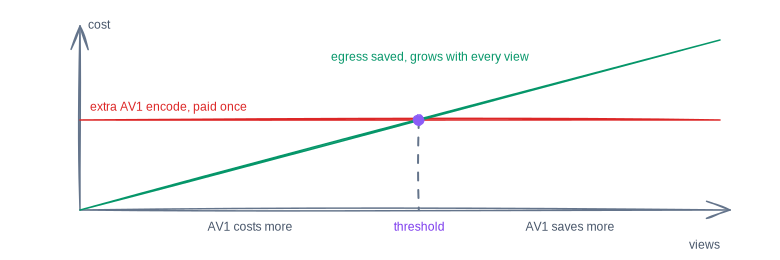
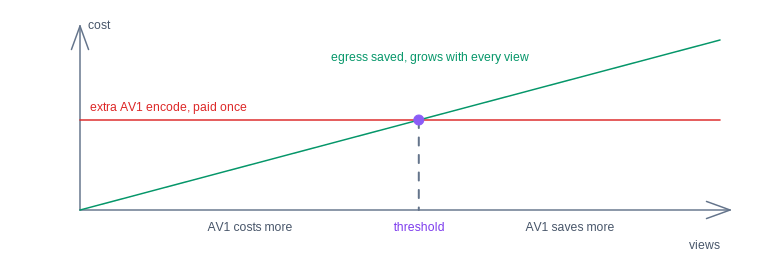
Above a much higher threshold, add the expensive codec. AV1 takes much more CPU to encode than H.264, and its files are noticeably smaller. That trade is bad for a video watched 10 times and very good for one watched ten million times, because the saving comes on every view and the cost is paid once.
The threshold is where the encoding cost equals the egress saving. You can calculate it, so it is not a matter of taste. It is also a reason to keep the sources, because moving a video up a tier means re-encoding it from the original.
5. Where the first second goes
Requirement 3 set a budget of one second to the first frame. Here is how that second is spent on a cache hit.
  0 ms   click
 30 ms   TLS resumed to nearest PoP
 90 ms   watch metadata request reaches the region
120 ms   metadata read, mostly from cache
170 ms   response back at the client
200 ms   master manifest requested from CDN
230 ms   master manifest returned (a few hundred bytes, cached)
260 ms   media manifest for the chosen rendition returned
300 ms   first segment requested
         ── the player must now choose a starting bitrate ──
520 ms   first segment arrives (4 s of 720p, ~1.2 MB, cache hit)
560 ms   decoded, first frame painted
Two things decide this budget, and neither of them is your backend.
The starting bitrate is a guess, and the first segment's download time depends on it. The player has no bandwidth measurement yet. If it starts too high, the first segment takes seconds to arrive and the video looks broken. If it starts too low, the video looks poor at first and then improves. Most players start low and climb, which is why videos often begin slightly blurry.
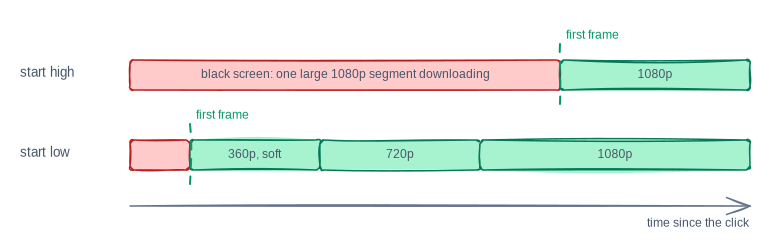
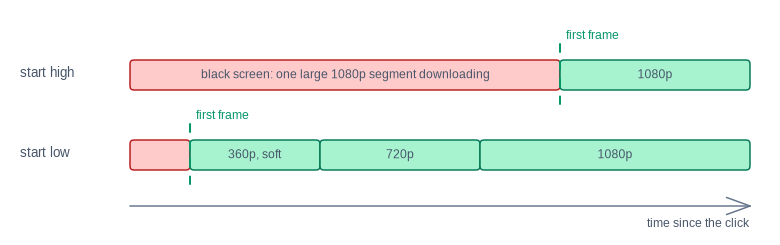
A shorter first segment helps more than its size suggests. Some designs cut the first segment shorter than the rest, so there is less to download before playback starts. It costs a little compression efficiency and makes the start feel much faster. Instagram's blurhash, the blurred placeholder shown while a photo loads, makes the same trade.
On a cache hit, your servers appear only in the metadata call.
6. Live, and what changes
Live streaming uses the same interface, but it is a different system. In the interview, explaining why counts for more than designing it.
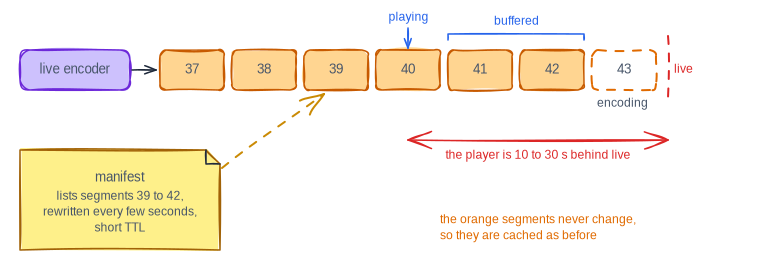
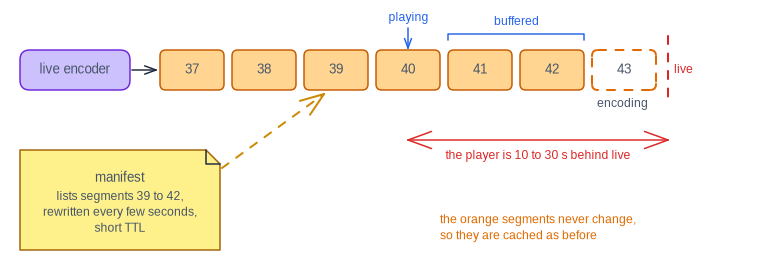
There is no complete file. You cannot transcode chunks of the whole video in parallel, because the whole video does not exist yet. You transcode in real time, so the fleet must keep up with the clock or fall behind for good.
Segments are published as they are produced. The manifest is rewritten every few seconds, so it is no longer immutable. The whole video on demand (VOD) design relies on files that never change, so a changing manifest breaks its caching. Manifests get short TTLs, and segments stay immutable.
Latency becomes a requirement. Standard segmented streaming always runs several segments behind the live event, typically 10 to 30 seconds, because you cannot serve a segment before it exists. Getting below that needs partial segments, which the low-latency versions of HLS and DASH define. Partial segments cut the delay, and caching works less well with them.
The failure mode reverses. In VOD, falling behind delays a publish. In live, falling behind is permanent, because the source does not wait. Under load, you must drop renditions instead of queueing work.
7. Deletion, copyright and blocking
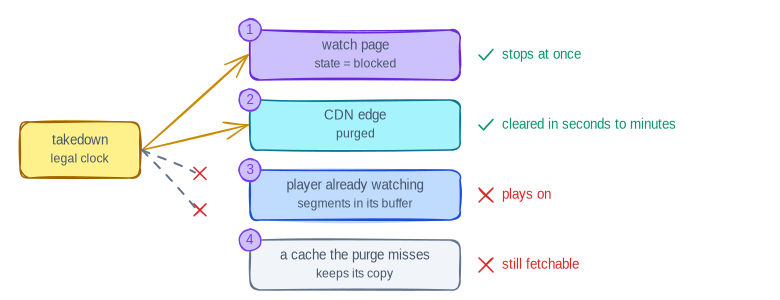
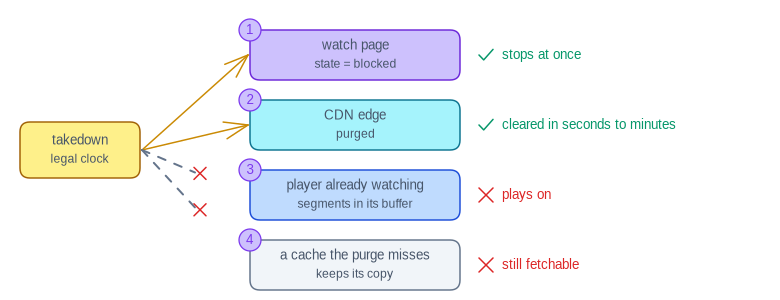
A takedown must be fast, and that conflicts with the caching design.
The metadata is easy. You set state to blocked, and the watch page stops serving the video. The bytes are harder, for the same reasons as in Instagram. It is worse here, because segments carry year-long cache lifetimes at every layer.
A CDN purge is a request to delete the cached copies. It reaches the edge in seconds to minutes, and it does not reach a player that already has the segments. After a takedown, a session that is already playing can keep playing from its buffer, and any cached segment can still be fetched for as long as a cache holds it. Say that plainly.
Deletion does not cover one case: a video blocked in one country and allowed in another. That is not a purge. It is a policy decision made on each request, at the edge. It is one of the few things that must run as code in edge compute, instead of being served as a static file.
8. What breaks, and what you watch
Uploads can look healthy while they fail. A resumable upload that keeps restarting reports no errors. It just never completes. Watch the completion rate, and the number of attempts each successful upload needed.
The pipeline can fall behind without showing it in queue depth. Queue depth alone hides stuck workers. The useful signal is the time from publish to the first ready rendition, at p99, for each priority lane. The p99 is the time that 99 of every 100 videos beat.
A storm of cache misses lands on your origin. The origin is your own storage behind the CDN. Watch origin egress, not the hit ratio. A drop in hit ratio that matters shows up as bandwidth leaving the origin.
Rebuffer ratio is the product metric. It is the fraction of watch time spent stalled, broken down by region and by connection type. It tells you whether the ladder and the player's logic are right. You can only measure it on the client, because the CDN serves most requests and they never reach your logs.
Final design
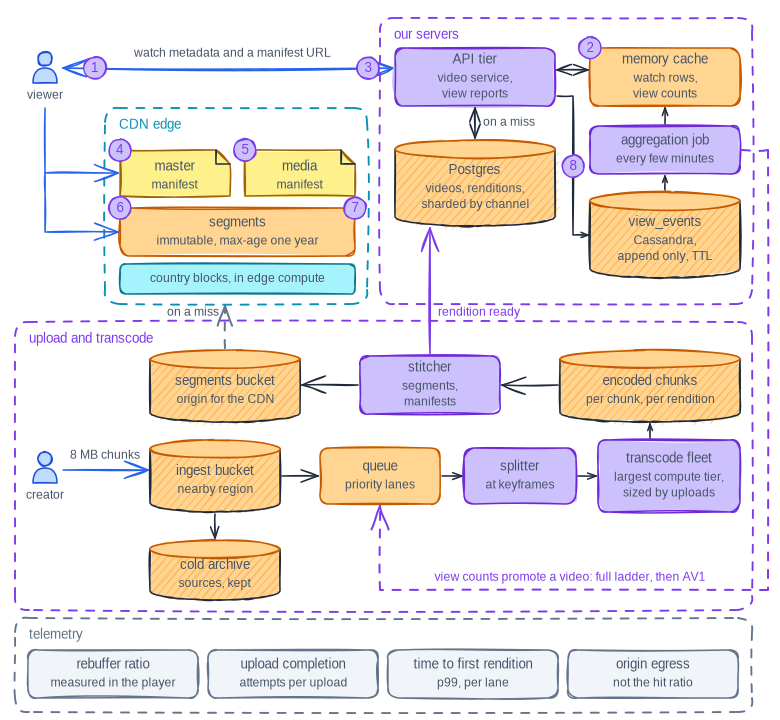
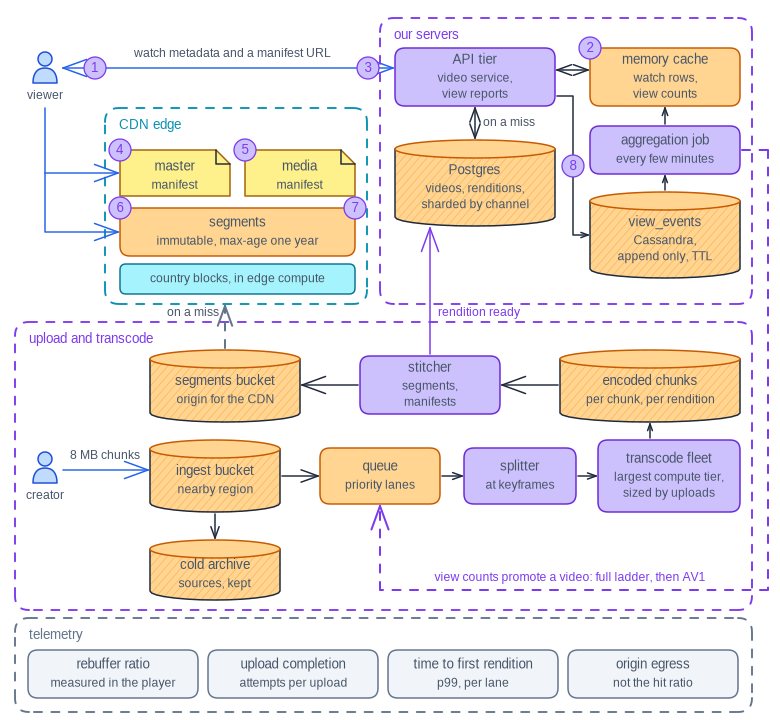
A single watch, end to end:
- The viewer requests a watch page. One call to the API tier, a few kilobytes.
- The video service reads the row by
video_id, almost always from the memory cache. - It returns metadata plus a manifest URL on the CDN. No segment URLs, no bytes.
- The player fetches the master manifest from the edge. It was written once at publish and is immutable, so it is a cache hit.
- The player picks a starting rendition, fetches that media manifest, and requests the first segment.
- Segments stream from the edge. The player times each one and re-decides the rendition before the next.
- A seek is a request for a different segment index. Nothing else changes.
- After a watch-time threshold, the client reports a view, which appends to the view store and is rolled up later.
Steps 4 to 7 never touch infrastructure you operate. That is what lets one metadata tier serve a billion watch hours a day. It follows from two decisions: the player picks the rendition, and everything else is computed at publish time.
Four numbers justify this shape. There are 1,400 watch-hours for every uploaded hour. Egress averages 62.5 Tbps, against a few kilobytes per metadata call. Storage grows by 8.7 PB a day. The size of the transcode fleet depends on none of these, only on the 500 hours a minute coming in.
What is expected at each level
How interviewers turn what they see into these levels is in How a System Design Interview Is Scored.
Mid-level
You get the entities right, put video in object storage with a CDN in front, and know that transcoding happens asynchronously, behind a queue. You usually propose a small set of fixed resolutions and serve one whole file per resolution, which leaves adaptation and seeking unsolved. You size storage but not egress, and you do not point out that the segment is the unit that is served.
Senior
You derive adaptive bitrate from the failure of progressive download. You can say that segments make switching and seeking free, and turn the serving tier into a static file server. You split the source at keyframes so transcoding runs in parallel, and you prioritise low renditions so a video becomes watchable early. You size storage and egress, keep segments out of the database, and identify the view counter as a hot key.
Staff+
You open with the watch-to-upload ratio and use it to price every later decision, including why transcoding on the fly reverses the costs by roughly the same factor. You propose lazy, tiered transcoding driven by observed views, and you can say that the threshold is where the encoding cost meets the egress saving. You separate the three growth drivers, so capacity planning does not mix up library size, audience size and upload rate. You state the takedown limit plainly, including that buffered and cached segments outlive a purge. You know that the metadata query that builds a manifest does not belong on the hot path at all, because publish happens once and watch happens 1,400 times.
Sources
Every real-world figure here comes from a published source, named below. Figures marked as assumptions are mine, and they are stated as assumptions where they are used.
- Google's ASPLOS 2021 paper, Warehouse-scale video acceleration: co-design and deployment in the wild, describes the video coding unit called Argos internally. It says YouTube receives "multiple hundreds of hours" of video a minute, and it is the source for 20 to 33 times better compute efficiency than optimised software. It is also the source for a single VCU matching baseline H.264 throughput at roughly one tenth of the system-level power, and for one 20-VCU machine replacing several racks of CPU-only servers on VP9. And it is the source for ten encoder cores per chip, each handling 2160p at 60 frames per second in real time with three reference frames.
- The YouTube blog post You know what's cool? A billion hours, 27 February 2017, for one billion hours watched per day, a milestone they say was reached in late 2016. It is used here as a floor, not a current figure, and the derived ratio is conservative for the same reason.
- Tubefilter, More Than 500 Hours Of Content Are Now Being Uploaded To YouTube Every Minute, 7 May 2019, reporting YouTube's own figure, for the 500 hours uploaded per minute.
- HLS and DASH are the two standards that define segmented adaptive streaming. The properties used here are common to both: segments that decode on their own, a manifest that lists renditions, and rendition choice on the client.
Derived figures and their assumptions, so any of them can be rebuilt:
- The 1,400 to 1 ratio divides one billion watch-hours by 720,000 uploaded hours. Both inputs are published, on different dates, so treat it as an order of magnitude.
- Storage uses an 8 Mbps average source and a ladder of six resolutions in two codec families, 12 renditions, all listed in the worksheet. If you change the ladder, the total moves in proportion. The finding that renditions cost more than sources does not change.
- Egress uses an average served bitrate of 1.5 Mbps, which assumes a mix weighted toward mobile. This is the least certain number here, and the one most worth challenging. At 3 Mbps the totals double, and the argument for encoding effort gets stronger, not weaker.
- The transcode fleet assumes one core encodes a mid-ladder rendition at roughly real time. That varies by an order of magnitude with codec and preset, and the Argos work exists to remove exactly that variation.