Interviewers ask for Instagram because it looks like a feed problem. It is mostly a media problem. The feed is real, and most candidates spend forty minutes on it. The media is the part that separates good answers from weak ones. Each post carries a few megabytes of image bytes, and those bytes are written once, read about 1,000 times on average, and never change again.
Those bytes behave nothing like the rest of your data. They are three to four orders of magnitude larger, they do not fit in a memory cache, they are never updated, and machines you do not own serve them. If you treat them like rows in a database, every later part of the design pays for it, and candidates usually make that mistake in the first 5 minutes.
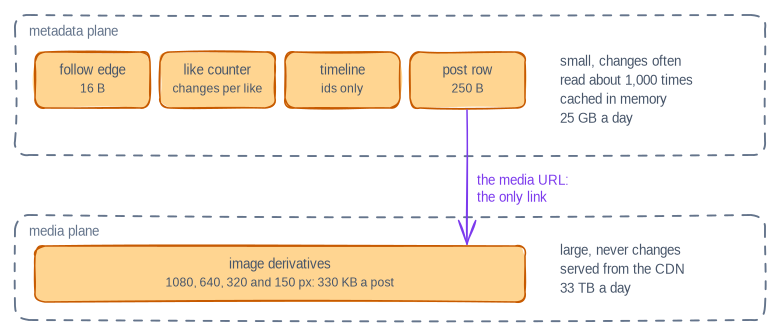
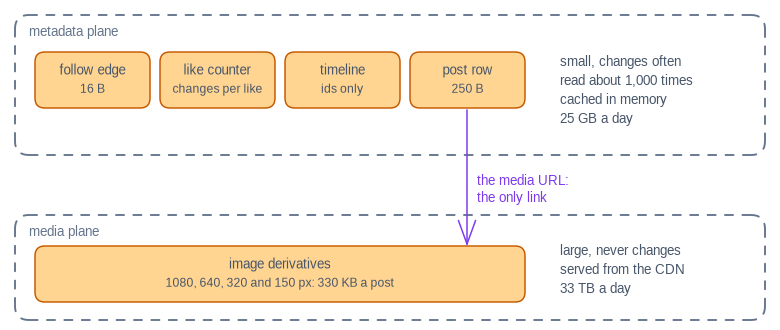
Keep one idea in mind: a post is a row and a URL. If you design the row and the URL separately and connect them at exactly one point, most of the hard questions get easy answers. If you design them together, you spend the interview explaining why your API servers are overloaded.
Understanding the problem
The general method for this part of the interview is in The First Five Minutes: Requirements.
Instagram is an app where people post photos, follow other people, and see a feed of recent photos from the people they follow. They can like and comment. Each user has a profile grid of everything they have posted.
That description covers maybe a fifth of the real product. So the first thing to do is say out loud what you are not building.
What people mean by "Instagram"
The name covers at least six different systems, and their architectures have almost nothing in common. Each one changes the answer, so name them.
- Photo posting and the following feed. Posts are kept for good, users follow each other, and the feed is newest first or lightly ranked. This is what we build.
- Stories. These are posts that expire after 24 hours, which is the opposite of a permanent post. The app shows them as a tray of unseen items rather than a scrolling list. The storage can be far cheaper too, because nothing needs to survive a week.
- Reels and video. Video changes the media pipeline completely. Each video is transcoded into several bitrates, called an adaptive bitrate ladder, so the player can switch as the connection changes, and it is cut into short segments. Each view costs roughly a hundred times the bytes of a photo. Video also changes ranking, because watch time is a signal a photo does not have.
- Direct messages. This is a chat system, with delivery receipts, presence and ordering guarantees that have nothing to do with feeds. WhatsApp and chat works through it.
- Explore, search and recommendations. These serve content from people you do not follow. The follow graph no longer decides what to show. The problem becomes picking candidates from the corpus, the full collection of billions of posts, and ranking them.
- Live video. This is a streaming problem, usually built by a different team.
Say which one you are solving and why. One sentence sets up the rest of the interview: "I am building durable photo posts and the following feed, because that is where the media pipeline and the feed interact. Stories and Reels are variations on the same storage once that is right."
Functional requirements
- A user can upload a photo with a caption.
- A user can follow and unfollow another user.
- A user can view a feed of recent posts from people they follow.
- A user can view any user's profile grid, newest first.
- A user can like and comment on a post.
Out of scope, deliberately:
- Stories, Reels, live video, direct messages
- Explore, hashtag search, and any recommendation of content from people you do not follow
- Client-side filters and editing, which happen on the phone before anything reaches us
- Ads, and the entire ranking and auction system behind them
- Account creation, login and authentication
Non-functional requirements
Start with the working assumptions. Every number below depends on them, and an interviewer will want to see which ones are published and which ones are yours.
Mark Zuckerberg confirmed in September 2025 that Instagram had passed 3 billion monthly active users. Meta does not publish Instagram's daily active users or its posts per day. The other figures are my own assumptions, and I say so each time.
- Scale. Take 500 million daily active users, a deliberately low working figure, and 100 million posts per day. Third-party trackers put daily photo and video uploads near 100 million. That is not an official number, so treat it as an order of magnitude rather than a fact.
- Very read heavy. Assume each active user opens the feed 20 times a day and sees 10 posts each time. That is 100 billion post views per day against 100 million posts created, a 1000 to 1 read to write ratio on metadata. In bytes, the media side is far heavier still.
- Latency. Feed metadata arrives in under 200 ms at p99, which means 99 of every 100 requests are faster than that. The first image is visible in under 1 second on a normal mobile connection. These are two separate budgets, and two different systems serve them.
- Media durability is non-negotiable. A lost row can often be recomputed. A lost photo is gone, and it may be the only copy of something that mattered. Target the eleven nines of durability, 99.999999999 percent, that object stores advertise, and never keep the only copy on machines you run yourself.
- Availability over consistency, everywhere except the follow edge. A like count that is three seconds stale is fine. A feed missing the last 30 seconds of posts is fine. A follow that silently fails is not fine, because the user can see that it did not take.
The second half of number 2 is the requirement the design rests on. The metadata for a post is about 250 bytes. The media for that post is a few hundred kilobytes at least. That ratio, roughly 1,300 to 1 on stored derivatives and larger once you count the original, is why the two halves of this system cannot share a design. We call them the two planes: the metadata plane holds the small rows, and the media plane holds the bytes. We do the arithmetic properly in the deep dives, but the shape of the answer is fixed as soon as you notice the ratio.
The set up
Core entities
- User. Profile fields, plus follower and following counts. The follower count matters later, because it decides whether an account's posts are fanned out to followers.
- Post. The row: who posted, when, the caption, and a reference to the media. It is small, and it can change.
- Follow. A one-way edge from one user to another. There are a huge number of them, each one is tiny, and we need to look them up in both directions.
- Media. The image bytes, plus the smaller sizes we generate from them, called derivatives.
- Interaction. Likes and comments. These differ from the rest because they are written far more often than posts.
Media is the only entity that needs new thinking, because it is the only one here that is not a row. It is a large object that never changes, and it has its own lifecycle. It is uploaded, checked, processed into several sizes, copied out to caches near users, and eventually deleted, sometimes under a legal deadline. Everything else on the list is a database record, and you already know how to shard those. Media is a different kind of thing, so it needs a different kind of storage.
Why the photo bytes must not pass through your API servers
Everybody writes the obvious design first. The client POSTs the image to your API as multipart form data. Your server receives it, checks it, writes it to storage and returns a post id. It is one call, and it is easy to reason about.
Work out what it costs before you accept it.
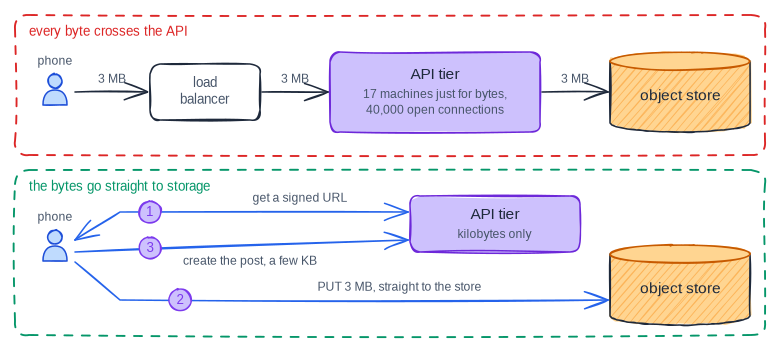
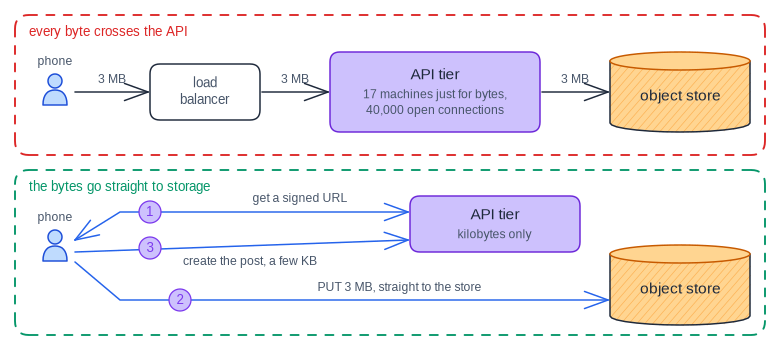
A modern phone camera produces an original of about 3 MB. At 100 million posts per day, that is 300 TB of image bytes arriving per day. Spread evenly, that is 3.5 GB per second, or 28 Gbps. Traffic is not spread evenly. If the busiest hour runs at 3 times the daily average, you need to absorb 84 Gbps in that hour.
Every one of those bits would cross your application tier. Say each machine has a 10 Gbps network card, and you run it at no more than 50 percent so the machine has room for its other work. Then you need 17 machines that do nothing but copy bytes from one socket to another. They run no business logic. They only pass bytes through.
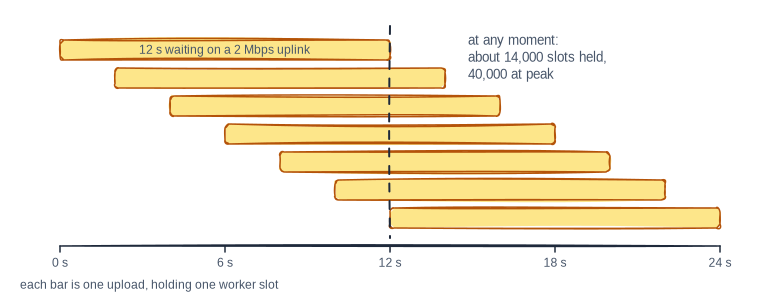
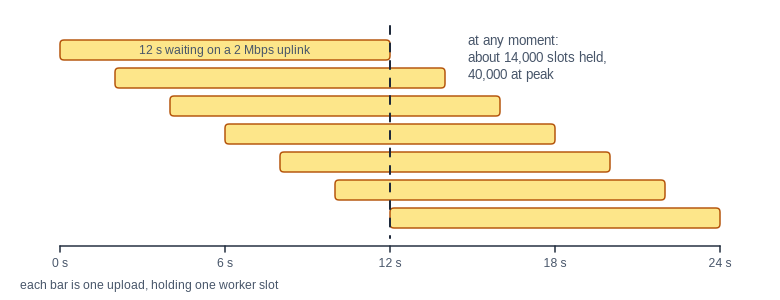
The bandwidth is not the worst part. The time each connection stays open is worse. A 3 MB upload over a typical mobile uplink of 2 Mbps takes about 12 seconds. For those 12 seconds, one worker slot on your application server does nothing but wait on a slow phone connection. At 100 million uploads a day and 12 seconds each, that is 1.2 billion connection-seconds per day. At the daily average, about 14,000 uploads are in flight at any moment, and at peak there are three times as many. You would be sizing a Python or Java application tier to hold 40,000 slow connections at once, and none of them need your code.
So take the bytes off that path. The client writes the bytes straight to object storage, and your API only ever handles the small requests.
The mechanism is a pre-signed URL. This is a link to the object store that carries a signature, so the store accepts the upload without asking your servers. The client asks your API for permission to upload. Your API signs a URL that works for one object key, one HTTP method and the exact size the client declared, and that expires after a short time, 15 minutes in the example below. It hands the URL back. The client PUTs the bytes directly to that URL, and your servers never see them.
This has three costs.
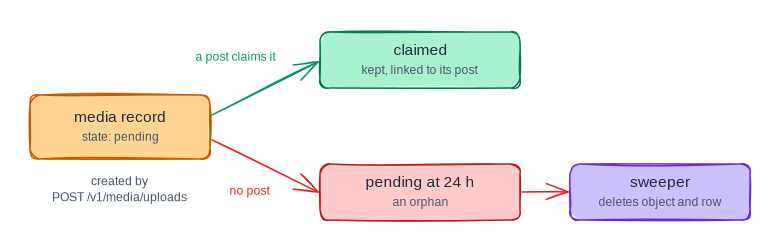
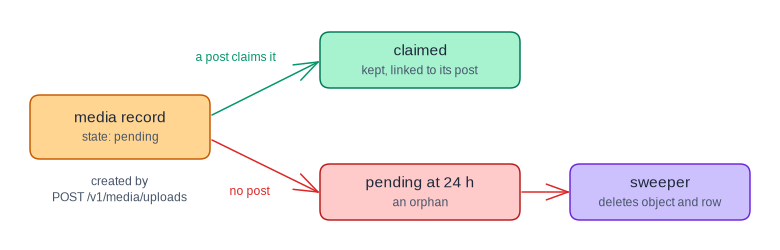
- The upload and the post creation are no longer one transaction. There are now two calls that can fail independently. If the second call never arrives, the uploaded object is left orphaned, with no post pointing at it. We handle this below.
- You cannot inspect the bytes before they land. Validation, format checks and safety scanning all happen after the upload instead of before it, so your storage briefly holds objects you have not approved. The only checks up front are the size cap and the content type in the signature.
- You are trusting an expiring signature instead of checking your own auth on every byte. If you get the expiry or the scope wrong, you have built an upload endpoint that anyone can use.
These costs are worth paying, by a wide margin. The 17 machines and 40,000 open connections would give you nothing that the object store does not already do better.
System interface
The upload takes three calls, and that split is what keeps the bytes away from our API.
POST /v1/media/uploads
Authorization: Bearer <token>

{
  "content_type": "image/jpeg",
  "byte_size": 3145728
}

201 Created
{
  "media_id": "01J9F2K3M4N5P6Q7R8S9T0",
  "upload_url": "https://media-ingest.example.com/raw/01J9F2K...?X-Sig=...",
  "expires_in": 900
}
PUT <upload_url>
Content-Type: image/jpeg
Content-Length: 3145728

<bytes, straight to object storage, never touching our API>
POST /v1/posts
Authorization: Bearer <token>
Idempotency-Key: 01J9F2K3M4N5P6Q7R8S9T0

{
  "media_id": "01J9F2K3M4N5P6Q7R8S9T0",
  "caption": "morning, finally"
}

202 Accepted
{
  "post_id": "2947103847162094592",
  "state": "processing"
}
Three things to note in these calls.
The upload is a resource, not a side effect. POST /v1/media/uploads creates a media record in pending state before any bytes exist. This record makes the orphan problem easy to handle. Every uploaded object has a row that knows when it was created and whether a post ever claimed it. A sweeper job deletes pending media older than 24 hours. Without the record, you would have to compare the object store against the database by listing buckets, and at this scale that job never finishes.
POST /v1/posts returns 202, not 201. The post exists as a row, but its media is not ready to serve, because the derivatives have not been generated yet. A 202 with a state tells the client exactly that. The client can then show the user their own post at once, from the copy it still has in memory, while the pipeline catches up. A 201 would claim the post is ready, and the client would find out half a second later that it is not, when the image URL returns a 404.
The idempotency key is on post creation and nowhere else. An idempotency key is a unique value the client sends with a request, so the server can recognise a retry and not do the work twice. A retried upload PUT is harmless, because writing the same bytes to the same key twice is the same as writing them once. A retried post creation is not harmless. Without a key, one tap on a train with a weak signal can create two posts. The key belongs exactly where repeating the operation stops being safe. Here the key is the media_id the client already holds. It is a natural key: one upload becomes at most one post, so a unique constraint on it lets the database reject the second post, and the retry gets back the post it already made. Idempotency and exactly-once delivery explains in full why a natural key beats a generated one.
Reads are simple by comparison, and that is a sign the split is working.
GET /v1/feed?cursor=eyJ0IjoxNzU0NzE2ODAwLCJpZCI6IjI5NDcxMDM4NDcxNjIwOTQ1OTIifQ&limit=10

200 OK
{
  "items": [
    {
      "post_id": "2947103847162094592",
      "author": { "id": "31341", "handle": "rahul", "avatar_url": "https://cdn.example.com/a/31341/64.webp" },
      "media": {
        "url": "https://cdn.example.com/p/01J9F2K.../1080.webp",
        "thumb_url": "https://cdn.example.com/p/01J9F2K.../320.webp",
        "blurhash": "L6PZfSjE.AyE_3t7t7R**0o#DgR4",
        "width": 1080,
        "height": 1350
      },
      "caption": "morning, finally",
      "like_count": 1284,
      "liked_by_me": false,
      "created_at": "2026-08-09T06:31:12Z"
    }
  ],
  "next_cursor": "eyJ0IjoxNzU0NzE2MjAwLCJpZCI6IjI5NDcxMDM4NDcxNjIwOTQ1MDAifQ"
}
The feed response contains no image bytes and no image server. It contains URLs on the hostname of a CDN, a content delivery network: a set of caching servers spread around the world, close to users. Your feed service returns a few kilobytes of JSON and is done. The client makes a separate request for the megabytes, to a CDN machine near the user, and our servers play no part in it. This is what it means in practice for the two planes to touch at one string, the URL.
The blurhash field is a string of twenty-odd bytes that decodes to a blurred version of the image. It ships inside the feed JSON, so the client can paint something in the right colours as soon as the metadata arrives, without waiting for the CDN. It costs almost nothing. It moves the moment the user first sees something from "when the photo arrives" to "when the JSON arrives", and on a bad connection those are 800 ms apart.
High-level design
1. Where the bytes live, and who serves them
A photo has to survive forever and load fast from anywhere. That needs two separate decisions: where the bytes are stored, and what serves them.
Store images as blobs in the database
This keeps everything in one place, with one backup. It also puts hundreds of terabytes a day into a system whose buffer pool, replication stream and backup window were all designed for rows of a few hundred bytes. Replication lag starts to depend on how many people uploaded photos. Backups no longer fit in a night. A single row read can pull three megabytes through a connection pool sized for kilobytes. The one real advantage is that the post and its image are written in one transaction. That is worth less than it sounds, because the image never changes and can be written first.
Object storage, served through your own image servers
The bytes go to S3 or something like it. It offers eleven nines of durability, it has no practical size limit, and you pay per gigabyte stored rather than per disk you provision. A tier of your own servers reads from the object store and serves clients. That gives you one place for access control, resizing on the fly and request logging. This works, and it is the right answer at a hundredth of this scale. At this scale, that tier brings back the original problem. Every byte served crosses machines you run, and deep dive 2 works out how many bytes that is.
Object storage as origin, CDN as the serving tier, immutable content-hashed keys
The object store keeps the bytes safe, and the CDN delivers them. The object store is the origin: the place the CDN fetches from when it does not have a copy. A processed image never changes, so its URL can include a hash of its content. The response can be marked immutable with a one-year max-age, the HTTP header that tells a cache how long it may keep a copy. Every cache between the origin and the user's disk can then keep the image forever. The origin serves only cache misses. The hit ratio, the share of requests a cache answers itself, then decides your bandwidth bill and the size of your origin fleet. Public posts need no access control. Private accounts need signed URLs that expire, and those give up part of the hit ratio. Many candidates skip over that cost.
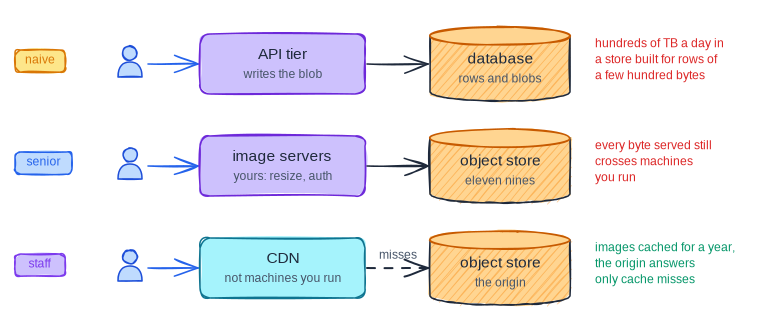
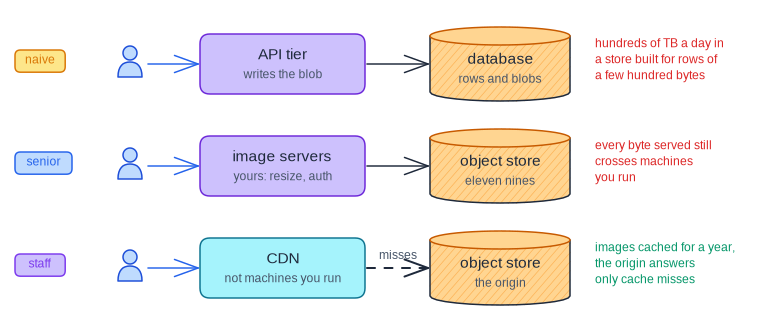
Take the third. Be precise about why immutability matters, because it does more of the work than the CDN does.
A processed image is written once and never modified. Not "rarely modified", but never. If someone edits a caption, the bytes do not change. If they crop the photo, that is a new object with a new key. So there is no invalidation problem at all. No cache ever holds an out-of-date copy, so there is no purge to send out, no version header and no cache-busting query string. Every cache in the world can hold the image forever and never be wrong.
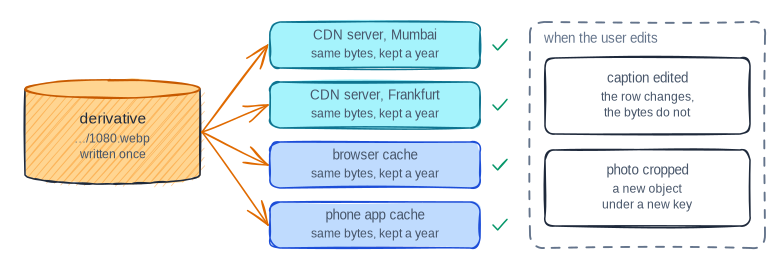
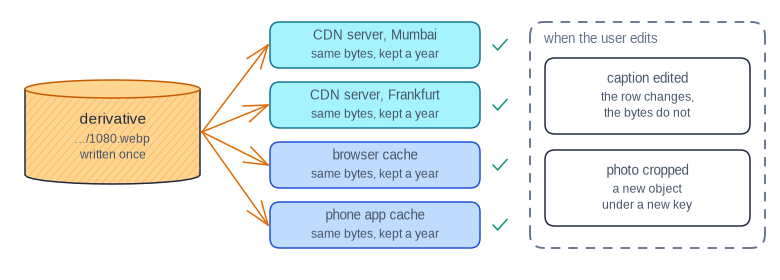
This one property makes the costs work, and deep dive 2 puts a number on it. It is also why "make the URL immutable" is a design decision rather than a detail of the build. If a design lets images be updated in place, it throws away the whole benefit. It then needs a purge system, a version counter, and an answer for the fifteen minutes when different users see different pictures.
2. Getting a post created without waiting for the work
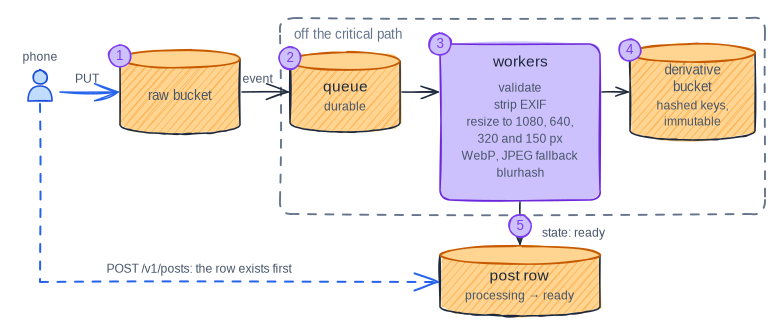
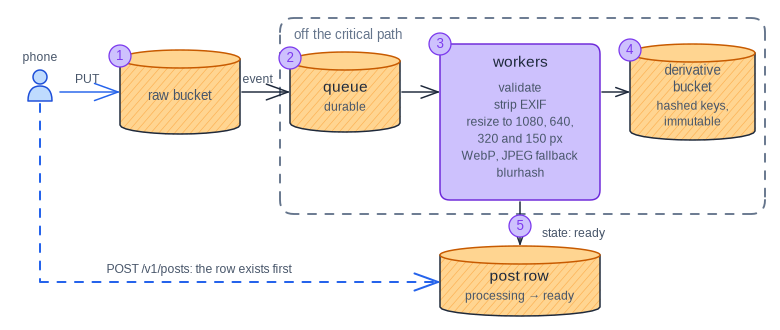
The bytes are now in the raw bucket. Several things must happen before anyone can see the photo. A worker checks that the file is a JPEG, and not a 3 MB zip bomb with a JPEG header. It strips the EXIF data, the camera metadata that can include a GPS location, so the post does not publish the user's home address. It resizes the photo into the few sizes clients request and re-encodes them into modern formats. It computes the blurhash. And it runs whatever safety classification the product requires.
That is somewhere between 200 ms and several seconds of CPU per photo. The question is whether the user waits for it.
They must not, and the reason is more about failure than latency. If post creation waits for processing, every one of those steps is on the critical path of a user action. Then a slow safety classifier or a stuck encoder does more than slow the product down. It stops people posting. If a user-facing write depends on a CPU pipeline with unpredictable cost, the system's availability becomes the product of eight other systems' availability.
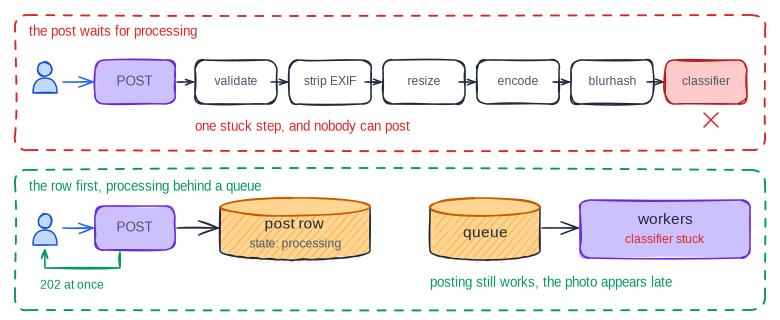
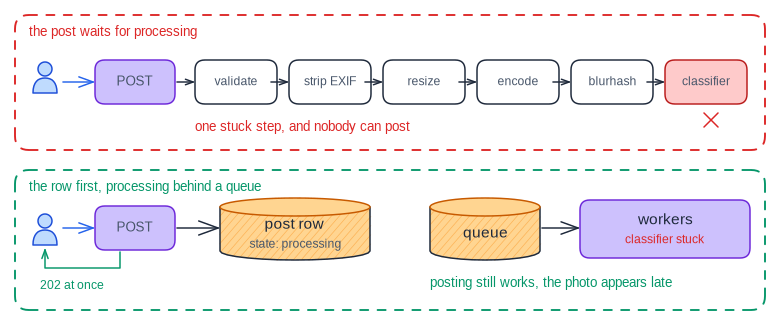
So the post row is written immediately, and the processing runs behind a queue.
client PUT ──▶ raw bucket ──▶ event ──▶ queue ──▶ workers ──▶ derivative bucket
                                                     │
POST /v1/posts ──▶ post row (state=processing) ◀─────┘  state=ready
The post exists as soon as the row is written. It just cannot be served yet, and the state column says so. Feed queries filter on state = 'ready', so a post that is still being processed is invisible rather than broken.
Three details to note, because this flow goes wrong at each of them.
The trigger is an event from the object store, not a call from the client. If the client told us the upload had finished, we would be trusting a phone on a train to make one more network call after it already has what it wanted. Object stores send a notification when a write succeeds. That notification is the only signal we can trust that all the bytes are there.
Workers are idempotent and derivatives are content-addressed. Idempotent means that running the same job twice has the same effect as running it once. Content-addressed means that each file's key is derived from its bytes. A queue can deliver the same message more than once. If the same photo is processed twice, both runs produce identical bytes at identical keys, so the second run is a harmless overwrite. That makes at-least-once delivery acceptable, and we do not need distributed transactions at all.
The queue must be able to absorb a backlog without losing anything. Processing capacity is sized for the average, and uploads spike. A durable queue is built for exactly this, and message queues against event streams works through it.
3. Storing metadata so a feed and a profile grid are both cheap
There are two access patterns, and they pull in different directions.
The profile grid wants all posts by one user, newest first. The feed wants recent posts by a set of a few hundred users. If you shard posts by post id, the grid becomes a scatter-gather: the query goes to every shard, and the answers are merged. If you shard by user id, the grid is a range scan on one shard, and the feed is a scatter-gather across a few hundred shards.
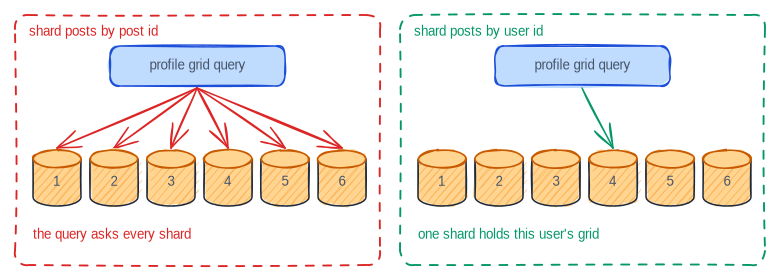
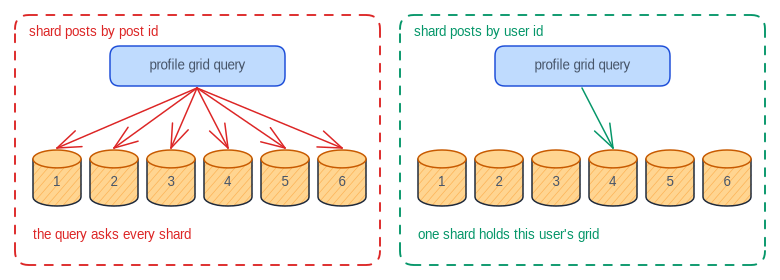
Neither is free, and they do not cost the same. The deciding point is that in a well-built design the feed does not read the posts table at all. It reads a precomputed timeline, as News Feed and Timeline works through. That timeline is filled by fanout: when a user posts, the post id is copied into the timeline of every follower. Once fanout exists, the posts table serves the profile grid and single-post lookups, and both of those are naturally keyed by user.
Which store, and what actually forces the split
Before sharding anything, decide what you are sharding. Start where everybody starts, and work out what it costs.
One relational database for everything
Users, posts, follows and likes all go in one Postgres or MySQL database. Joins work, transactions work, and you can answer a question you did not plan for without a migration. That is worth a great deal, and it is why this is the right starting point and not a strawman.
Check the write rate first, because most people assume that is what breaks it. 100 million posts a day is 1,157 writes per second on average and about 3,500 at peak. One well-provisioned Postgres handles that comfortably. The write rate does not force a split.
Storage does. The follow graph is the problem, and the arithmetic below gives a number that surprises people.
One relational engine, sharded by user id
Keep the relational model and split it across machines. Instagram published that it did this: PostgreSQL, sharded by user id into 2,000 logical shards.
It fits because the metadata access patterns are relational ones. The profile grid is an ordered range scan. Hydration, which turns a list of post ids into full posts, is a batch of single-key lookups. The follow graph is an index scan. None of that needs a document store, and all of it uses the ordered index that a B-tree gives you for free.
The cost is that any query without a user id becomes a scatter-gather, and you lose transactions across shards. Both are acceptable here, because no product feature needs them.
Three data stores, because three workloads have nothing in common
Sharded relational storage holds user, post and follow metadata. A wide-column store built for appends holds likes and comments. Their write rate is 40 times higher, and no query on them needs a join. In-memory lists hold timelines, and those are a cache, not a database.
Instagram published this shape too. It used PostgreSQL for structured data and Cassandra for workloads with heavy writes, with Memcached in front of both. Later it built its own Cassandra storage engine to cut latency on that tier.
Say "three data stores" out loud, because it makes you name what each one gives you, and that is the real question.
Write rate, the thing people assume is the constraint:
  posts/day                          100,000,000
  ⇒ mean                                 1,157 /s
  ⇒ peak at 3x                           3,500 /s
  one Postgres primary                 ~10,000 /s
  ⇒ survives, with room                    FINE

Storage, the thing that actually forces it:
  post rows    100M/day x 250 B  =    9.1 TB / year

  follow edges
    users                          3,000,000,000
    average follows each                     200
    ⇒ edges                      600,000,000,000
    stored BOTH directions     1,200,000,000,000 rows
    at 16 B + index overhead          ~40 TB

Against the comfort ceilings from the sharding article:
  per machine                              10 TB
  per table                               500 GB

  ⇒ the follow graph alone is 80x the per-table
    ceiling and 4x the per-machine ceiling

Likes, on the same box:
  4B/day         ⇒ 46,000/s mean, 150,000/s peak
  ⇒ 40x the write rate of everything else combined

So: writes do not force the split. Storage forces it,
maintenance forces it sooner, and the like rate says
that one workload does not belong here at all.
Maintenance forces the split, and it does so before storage runs out. Vacuum, Postgres's routine cleanup of old row versions, cannot finish on a 40 TB table inside a day. Its indexes cannot be rebuilt in any maintenance window you will be given, and restoring it from backup takes days. The same problem forced Figma to split its database, as partitioning and sharding covers.
| store | what goes in it | the requirement that forces it |
|---|---|---|
| sharded relational | users, posts, follows | ordered range scans for the profile grid, and 40 TB that one machine cannot maintain |
| wide-column, append-optimised | likes, comments | 150,000 writes/s at peak, no joins, no ordering beyond recency |
| in-memory lists | timelines | a 35 ms read budget, and the data is rebuildable so durability is not required |
| object storage plus CDN | media | decided in section 1, for reasons that have nothing to do with any of these |
So shard posts by user id. Instagram published exactly how it did this, and the scheme solves three problems with one 64-bit integer.
Their scheme, from Instagram Engineering's "Sharding and IDs at Instagram", packs an id like this:
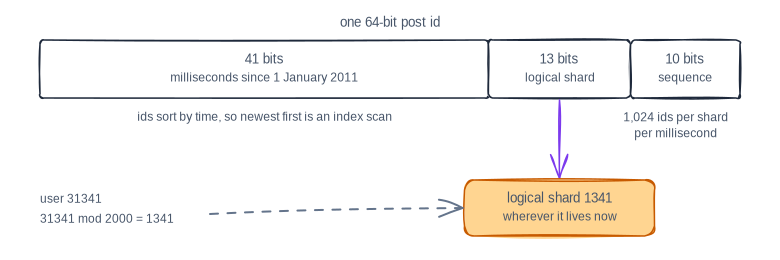
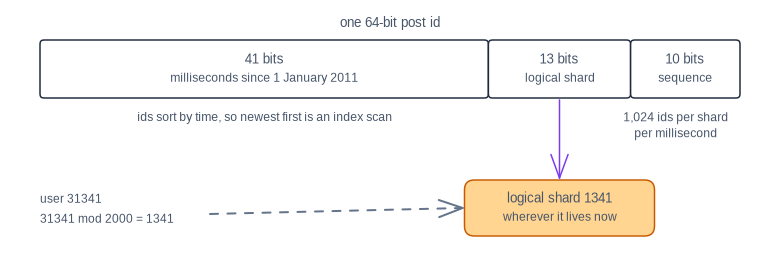
- 41 bits of milliseconds since a custom epoch, a start date of 1 January 2011. Ids sort by time, so "newest first" is an index scan rather than a sort, and a range of time is a range of ids.
- 13 bits of logical shard id, giving 8192 possible shards, of which they used 2000. The id names the shard that holds the row, so any service holding an id can route to the right database without a lookup table.
- 10 bits of sequence, modulo 1024. That allows 1024 ids per shard per millisecond, which is a ceiling of about one million ids per second per shard.
The published post says that 41 bits gives 41 years of ids. Check that yourself: 241 milliseconds is about 69.7 years, so the published figure is cautious rather than exact. In an interview, do this arithmetic instead of repeating a number, because the interviewer may ask you to.
Most candidates miss the logical shard. A logical shard is a slice of the data, not a database server. For example, 2,000 logical shards might live on 10 physical machines, 200 each. When you need to grow, you move logical shards between machines. No id changes, no row keys are migrated, and nothing downstream needs to know. The alternative is sharding by user_id % number_of_physical_machines, and then adding a machine moves almost every user to a different machine. Partitioning and sharding makes the same argument, and Instagram's ids are the clearest published example of it.
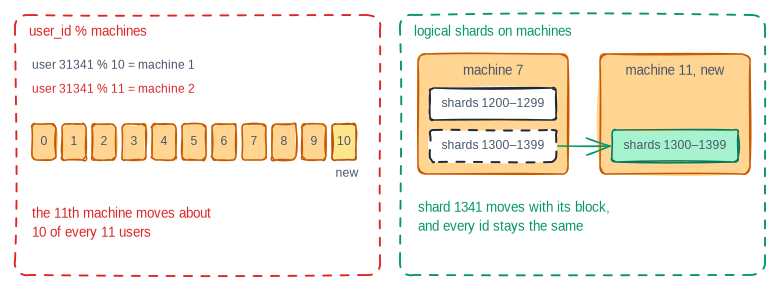
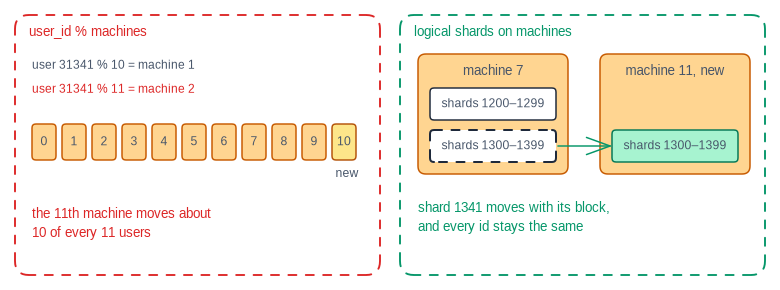
Generating these ids needs no coordination service. Each shard's database generates its own sequence locally, in a stored procedure. So there is no central id server whose failure would stop every post, and no network round trip per post.
The tables
Only five tables matter, and in each one the key is the column to look at.
-- Sharded by user_id. Everything below lives on the shard
-- named by the id itself, so no routing table is needed.

users (
  user_id      bigint  primary key,
  handle       text    unique,
  avatar_key   text,               -- points at the CDN, not at bytes
  follower_ct  bigint,             -- denormalised, eventually consistent
  post_ct      bigint
)

posts (
  post_id      bigint  primary key,   -- time-sortable, shard-bearing
  user_id      bigint  not null,
  media_id     text    not null,      -- the only link to the media plane
  caption      text,
  state        smallint not null,     -- processing | ready | deleted
  created_at   timestamptz
)
  index (user_id, post_id desc) where state = 'ready'
  unique (user_id, media_id)           -- one upload, at most one post

-- Each follow edge is written twice, once on each user's shard.
followers (                          -- on the followee's shard
  followee_id  bigint,
  follower_id  bigint,
  created_at   timestamptz,
  primary key (followee_id, follower_id)
)

following (                          -- on the follower's shard
  follower_id  bigint,
  followee_id  bigint,
  created_at   timestamptz,
  primary key (follower_id, followee_id)
)

-- Different store. Append-only, no joins, 150k writes/s at peak.
likes (
  post_id      bigint,               -- partition key
  user_id      bigint,               -- clustering key
  created_at   timestamptz,
  primary key ((post_id), user_id)
)
Four things to note. Each one is a decision, not a default.
posts needs no index on created_at. The primary key already sorts by time, because the top 41 bits of the id are milliseconds. "Newest first" is a backwards scan of an index that has to exist anyway. This is the second thing the id scheme gives us for free, and it is why the partial index above is on (user_id, post_id desc) rather than (user_id, created_at desc).
The follow edge is stored twice, deliberately. Fanout needs "who follows X", and the profile page needs "who does X follow". One primary key cannot serve both. A secondary index cannot either, because on a sharded store it sits on the same shard as its rows, and the other user's edges are spread across every shard. So the edge is written in two places: into followers on the followee's shard, and into following on the follower's shard. That doubles the writes. It is not a normalisation failure. It is the price of two access patterns on one relationship.
state is on the row and the index is partial. A post exists before its derivatives do, and until they exist the feed must not show it. A partial index only includes the rows that match its condition. Filtering on state = 'ready' inside the index keeps posts that are still processing, and deleted posts, out of the scan entirely, instead of fetching them and throwing them away.
likes is keyed the other way round. It is partitioned by post_id and clustered by user_id inside each partition. So "did I like this" is a point read in one partition, and "who liked this" is a scan of one partition. The cost is that "everything I have liked" becomes a scatter-gather. That is the right trade. The first two run every time a post is shown in a feed, and the third is a profile tab people rarely open.
The four queries that carry the product
Everything a user does while reading comes down to one of these queries.
-- 1. Profile grid. One shard, one index, no sort.
--    post_id < cursor is the pagination, and it works because
--    ids sort by time. Cursor rather than OFFSET, so posts
--    arriving mid-scroll cannot shift the window.
SELECT post_id, media_id, caption
FROM posts
WHERE user_id = $1 AND state = 'ready' AND post_id < $2
ORDER BY post_id DESC
LIMIT 12;

-- 2. Feed hydration. The 10 ids came from the timeline list.
--    Each id names its own shard, so this fans out to a few
--    shards at most and every one is a primary-key lookup.
SELECT post_id, user_id, media_id, caption
FROM posts
WHERE post_id = ANY($1) AND state = 'ready';

-- 3. Fanout. Read the follower side of the edge, in batches,
--    resumable from the last follower_id so a worker that dies
--    does not restart the whole thing.
SELECT follower_id
FROM followers
WHERE followee_id = $1 AND follower_id > $2
ORDER BY follower_id
LIMIT 5000;

-- 4. Did I like this. Runs once per post per impression, so
--    100 billion times a day. Single partition, point read.
SELECT 1 FROM likes WHERE post_id = $1 AND user_id = $2;
Query 4 is the one to notice. It looks trivial, and it runs 100 billion times a day. That is ten times the number of feed requests, and more often than any other query in the system. In practice you do not run it once per post. You fetch the viewer's likes for all 10 posts in one multi-key read, or you keep a small set of each user's recent likes in the cache and answer from memory. Interviewers notice when a candidate spots that the most trivial query is also the most frequent one.
Query 1 is the one interviewers push on. The follow-up is usually "what if a user has 50,000 posts?" It makes no difference. The index is on (user_id, post_id desc), and the scan starts at the cursor and stops after 12 rows. So a user's thousandth page costs the same as their first.
4. Assembling the feed
The News Feed article covers this part in full, so here we only say what Instagram changes about it.
The mechanism is fanout on write. When a user posts, the post id is pushed into an in-memory timeline list for each follower. Reading a feed is then a single range read of one list, rather than a query across everyone you follow. Celebrities break this, because one post from an account with 100 million followers means 100 million list writes. The usual answer is a hybrid. Posts from ordinary accounts are fanned out on write. A small set of very large accounts is skipped, and their recent posts are merged in when the feed is read.
Two things are specific to Instagram.
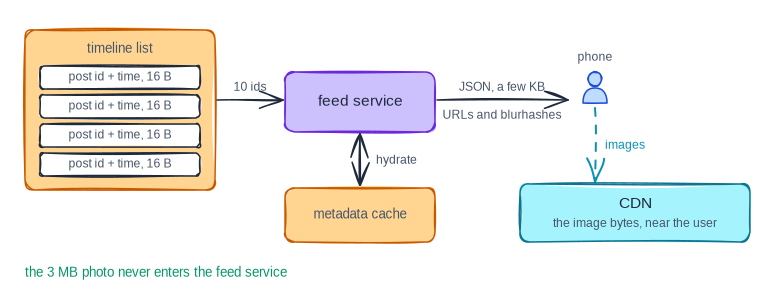
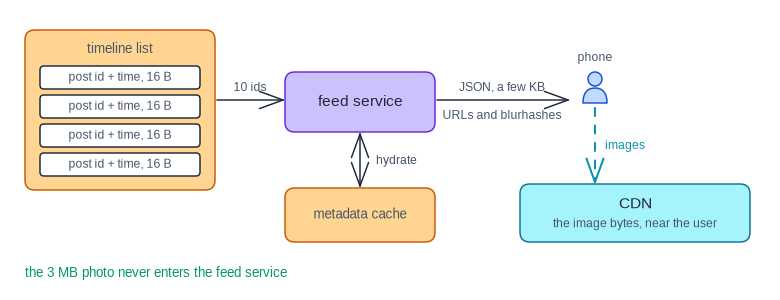
The timeline stores ids, not posts, and this matters more here than in a text feed. A timeline entry is a post id and a timestamp, 16 bytes. It is not the post, and it is nowhere near the image. When the feed is read, the ids are hydrated from a cache into the metadata you saw in the API response. The feed service does not fetch the images at all. The client fetches them from the CDN afterwards. So the id size sets the memory cost of a timeline, and the JSON size sets the bandwidth cost of a feed read. Neither changes because this is a photo product. The 3 MB photo never enters your serving path.
Ordering is chronological here, and I would keep it that way in the interview. Real Instagram ranks its feed. Ranking changes the costs of fanout, as the News Feed article works through, and it turns a range read into a scoring pass over a set of candidate posts. Say you know that. Say you would build chronological first, because it keeps the storage and the invalidation simple, and offer ranking as the extension. Offering that order of work yourself counts for more than claiming the more complex version.
5. Likes and comments, where the write rate stops being polite
Posts arrive at about 1,200 per second at our assumed volume. Likes arrive much faster.
Assume 4 percent of those 100 billion daily post views end in a like. That is 4 billion likes per day, 46,000 per second on average and perhaps 150,000 per second at peak. Likes come in at 40 times the post rate, the highest write rate that any database in this design takes. They are also the only thing here that gets worse when the product succeeds.
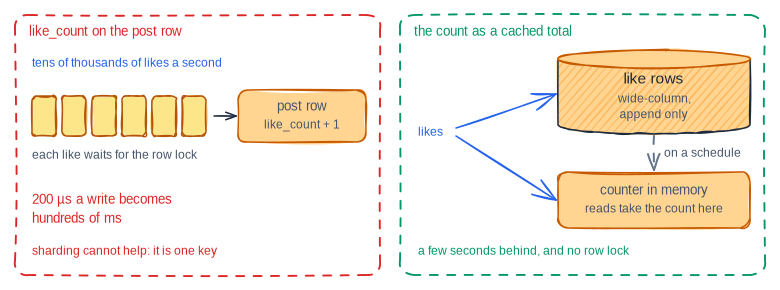
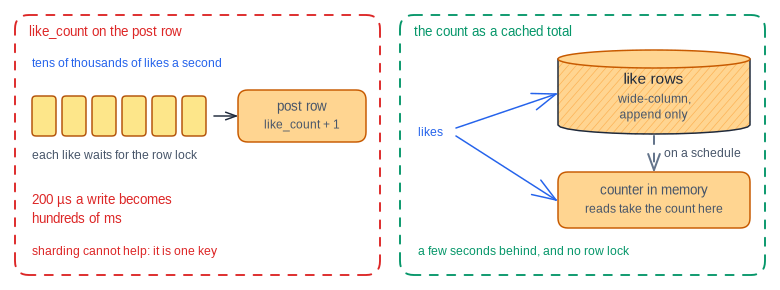
The naive implementation is a row per like plus UPDATE posts SET like_count = like_count + 1. The row per like is fine and necessary, because you need to answer "did I like this" and to let people unlike. The counter update is what breaks, and it breaks on one row, not on average.
When a popular account posts, that single row gets tens of thousands of increments per second. Each one takes a row lock, so they run one at a time. The lock queue grows, and a write that normally takes 200 microseconds starts taking hundreds of milliseconds. Sharding does not help, because every one of those transactions waits on the same physical row. Sharding spreads keys across machines, and this is one key.
This is the hot key problem in its simplest form: one key gets more writes than one row can take. It has three standard answers. You can split the counter into N sub-counters and add them up on read. You can buffer increments in memory and write them out every so often. Or you can move counters out of the transactional store entirely.
For this system, keep the like rows in a store built for writes, and treat the count as a cached total rather than a column. Each like increments a counter in memory, and reads take the count from there. On a schedule, the counter is corrected against the like rows, which are the source of truth. Users cannot see a like count that is a few seconds behind. Everyone notices when a like waits on a row lock.
Deep dives
These are ordered roughly by how often they come up. The first two come up almost every time, because most of the arithmetic in this problem is in them.
1. How much storage, and what does keeping the original cost?
Assumptions, all mine unless marked published:
  posts per day                      100,000,000   (third-party estimate)
  original from a modern phone              3 MB
  derivative sizes generated       1080, 640, 320, 150 px

Bytes per post, after processing:
  1080 px WebP, quality 80                200 KB
   640 px WebP                             90 KB
   320 px WebP                             30 KB
   150 px WebP (grid thumbnail)            10 KB
  ───────────────────────────────────────────────
  derivatives, total                      330 KB

Per day:
  derivatives   100M x 330 KB      =        33 TB / day
  originals     100M x   3 MB      =       300 TB / day

Per year:
  derivatives   33 TB x 365        =      12.0 PB / year
  originals    300 TB x 365        =     109.5 PB / year

The original is 9x the cost of everything you serve.
The last line of that worksheet raises a product question. Do you keep the original?
There are three reasons to keep it. You can regenerate derivatives when you adopt a better codec, and the industry has done this many times, saving a lot of bandwidth each time. You can offer full-resolution download. And you do not destroy the only copy of somebody's photo.
The reason against is cost. The original is 90 percent of your storage bill, for something no user ever requests.
The good answer is neither yes nor no. It is tiering: keep the original, but in a cheaper class of storage. Hot object storage costs roughly five times as much per gigabyte as cold archival storage, and after the first few minutes the original is almost never read. So write originals to a cold tier, where a read takes minutes to start. That delay is fine for a re-encoding job and unacceptable for serving. Keep only the derivatives hot. You keep the ability to re-encode, and you pay a fifth of the price for it.
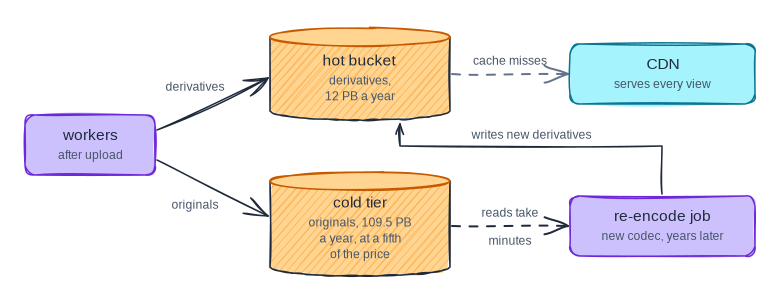
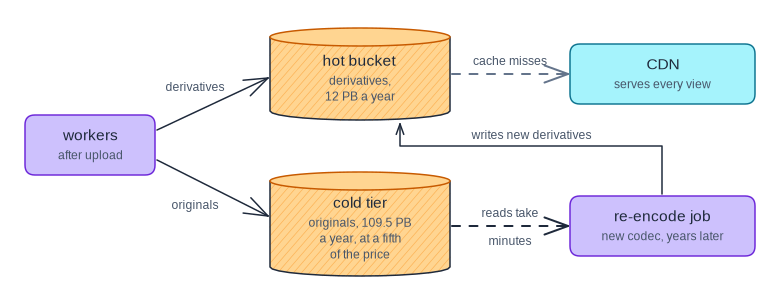
Say the number out loud, because the number makes the argument. At 109.5 PB of originals a year, the choice between hot and cold storage changes the largest line on the storage bill by five times.
Keeping the originals is what makes a codec change possible, and that is a pattern of its own. Adopting a better codec means re-encoding every stored photo from its original. That is a batch job over 109.5 PB of archive for every year of uploads, and it has to run without disturbing serving traffic.
2. How much bandwidth, and why the cache hit ratio is the whole design
Storage is the simpler half. Serving is where this system is unusual. The number to work out is egress: the bytes sent out to users.
  daily active users                500,000,000   (assumption)
  feed sessions per user per day             20   (assumption)
  posts viewed per session                   10
  ───────────────────────────────────────────────
  post views per day            100,000,000,000

Not every view transfers bytes. Assume:
  client cache hit rate                     40%   (recently seen posts)
  ⇒ views that reach the network  60,000,000,000

  average bytes served per view          150 KB   (mix of 1080 and 640)
  ───────────────────────────────────────────────
  bytes per day                  9,000,000 GB  =  9 PB / day
  average rate                       104 GB/s  =  833 Gbps
  peak at 3x                                     2.5 Tbps

What the ORIGIN sees, by CDN hit ratio:
  hit ratio 99%          8.3 Gbps      trivial
  hit ratio 95%           42 Gbps      manageable
  hit ratio 90%           83 Gbps      expensive
  hit ratio 80%          167 Gbps      a second CDN
  hit ratio  0%          833 Gbps      you are the CDN

A 15-point swing in hit ratio is a 4x swing in origin fleet.
Nearly a terabit per second on average, and 2.5 terabits at peak, is not something you serve from your own machines. So the CDN is not an optimisation here. It is part of the structure. The accurate way to say it is "the CDN serves the product, and my origin serves the CDN."
The table at the bottom of the worksheet matters more. It shows how the load on the origin changes with the hit ratio. Your cache miss rate sets the size of your origin fleet, and your URL scheme sets the miss rate. This is where the earlier decision to make images immutable pays off.
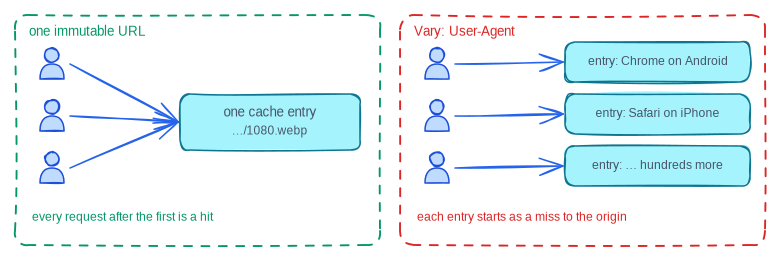
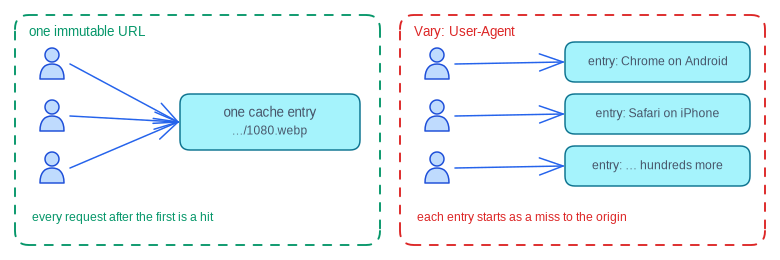
- Immutable, content-hashed URLs with a one-year max-age can be cached at every layer forever, with no revalidation and no purge.
- A URL with a varying query string, a short max-age, or a
Varyheader on a request header with many distinct values lowers the ratio, and no error shows it. AVary: User-Agenton an image response can split one cache entry into hundreds.
Raising the hit ratio from 80 to 95 percent cuts origin cost to a quarter, and you get there entirely by choosing headers correctly.
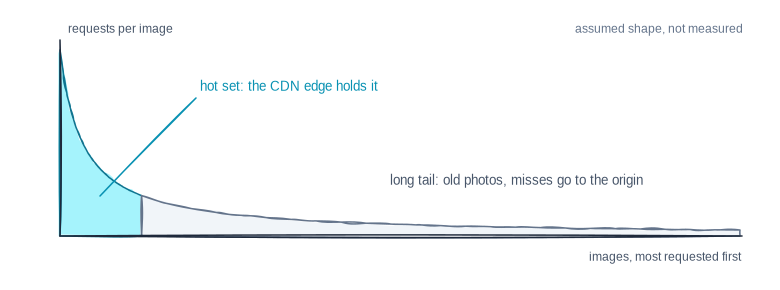
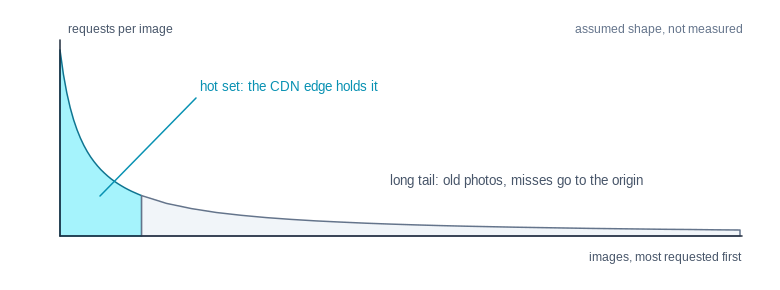
Most of the remaining misses are in the long tail: old photos nobody has requested recently. Those are real origin reads, and no trick removes them. You only decide how long the CDN keeps objects that are rarely requested.
The ratio is reachable at all because the set of images being requested right now is tiny next to the set that exists. This hot set is what the CDN's edge, its servers near users, holds. Sizing the edge cache means sizing that hot set.
3. Where does the first second go?
The requirement was the first image visible in under one second. Break that second down step by step, because "we use a CDN" is not a latency budget. In the timeline, a PoP is a point of presence, one of the CDN's sites near the user.
  0 ms   user opens app, request leaves phone
 40 ms   TLS resumed to nearest PoP (0-RTT on repeat visits)
 90 ms   feed request reaches origin region
125 ms   timeline read from memory cache        (35 ms)
165 ms   hydrate 10 post ids from metadata cache (40 ms)
185 ms   JSON assembled and compressed
230 ms   feed response back at the phone
235 ms   blurhash painted, layout settled, no reflow
         ── the screen is no longer blank at 235 ms ──
250 ms   client opens image requests to CDN
310 ms   CDN hit, first bytes of 1080 px WebP
710 ms   200 KB transferred over a 4 Mbps link
710 ms   first real image visible
Two things to note, and both matter more than the total.
The screen stops being blank at 235 ms, not 710 ms. The blurhash in the feed JSON does that, and it costs 20 bytes per post. The time until the user sees something and the time until the image has loaded are different here, and the design uses that gap on purpose.
The last 400 ms is transfer time, not compute. Nothing in your architecture makes it faster. Only fewer bytes do: a better codec, a smaller default size, or a smaller size picked for the client's screen and connection. That is why the image format matters so much, and why the industry keeps re-encoding everything it stores.
The origin is not in this budget. On a cache hit, which is nearly every request, your servers play no part in the image path.
4. How many servers, and which tier actually grows?
The fleet arithmetic is short, and the result is not what most people expect.
Feed reads:
  100B post views/day ÷ 10 per request  =  10B feed requests/day
  ÷ 86,400                              =  116,000 req/s mean
  x 3 peak                              =  347,000 req/s peak

  per server, feed assembly              =    2,000 req/s
  ⇒ servers                              =      174
  + 50% headroom and spare capacity      =      260 servers

Uploads:
  100M/day ÷ 86,400 = 1,157/s mean, 3,500/s peak
  but these are SMALL requests now (pre-signed URL mint)
  per server                             =    5,000 req/s
  ⇒ servers                              =        1  (run 6 for redundancy)

Processing workers:
  1,157 photos/s mean, 3,500/s peak
  CPU per photo (4 resizes + encode)     =      400 ms
  ⇒ core-seconds/s at peak               =    1,400 cores
  ÷ 32 cores per machine                 =       44 machines
  + backlog burn-down capacity           =       60 machines

Image serving:
  0 servers. That is the CDN's job.
The upload tier is one machine. That number is the payoff of the pre-signed URL decision. Signing a URL takes a few microseconds of HMAC, a keyed hash. A tier that would have needed 17 machines just to pass bytes through now needs one, and we run six only because nobody deploys a single machine.
The read tier, at 260 machines, is far bigger than everything else. This is a read-heavy system, and the fleet shows it. The write path took most of the design work, yet its machine count is a rounding error.
The processing tier is sized by CPU rather than by requests, and it is the only tier where a backlog can build up. So it is the only tier where autoscaling on queue depth makes sense. The others autoscale on request rate, as usual.
5. What happens when the pipeline falls behind?
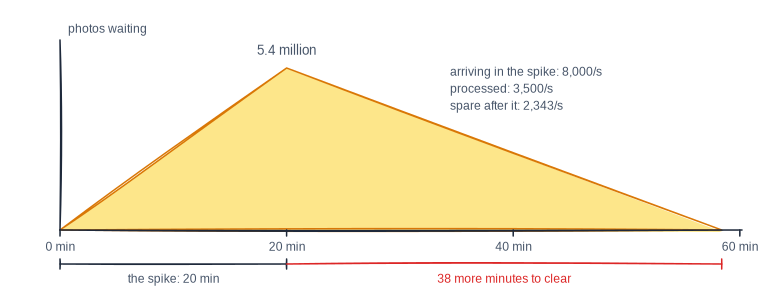
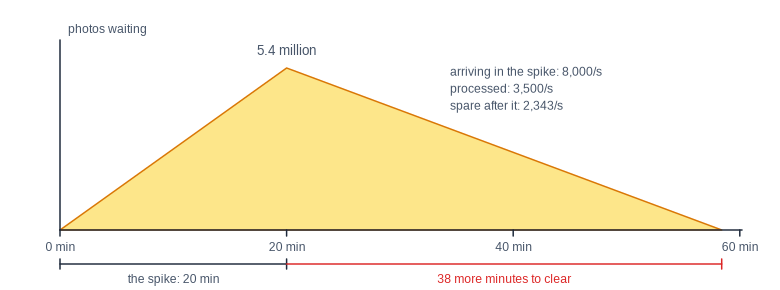
Processing capacity is 3,500 photos per second at peak. Suppose a regional event, a product launch, or the recovery from a partial outage pushes uploads to 8,000 per second for 20 minutes.
The queue absorbs it, which is what the queue is for. Posts stay in processing state for longer, and users see the result: they post, and their photo does not appear for several minutes.
The time to drain the backlog works like replication lag, and it surprises people in the same way.
backlog accumulated = (8,000 - 3,500) x 1,200 s = 5.4M photos
drain rate          = 3,500 - (normal rate 1,157) = 2,343 photos/s
time to drain       = 5.4M ÷ 2,343 = 2,300 s = 38 minutes
The spike lasted 20 minutes. The backlog takes 38 minutes to clear after it ends, and that assumes traffic drops back to the average at once. Adding workers during the incident is the right response, but it is slow. New machines take minutes to start, and by then the backlog is already there.
Two fixes to note, and one thing that is not a fix.
Prioritise by size, not arrival. Workers generate the 320 px thumbnail first for every photo in the queue, then come back for the 1080 px version. A user who sees a slightly blurry image at once is far better off than one who sees a placeholder for six minutes, and the thumbnail takes a tenth of the CPU. The failure becomes a drop in image quality instead of missing photos.
Shed the optional work. When the queue backs up, workers can skip the blurhash and any classification that is not essential, and fill them in later.
Adding workers is not a fix, it is a control. It is better to size spare capacity for the peaks you see than to react to them. That is why the fleet table above includes capacity to burn down a backlog, rather than being sized for the average.
6. Deletion, and why immutability makes it hard
Everything above treats images as permanent and cacheable forever. Then a user deletes a post, or a court orders it deleted.
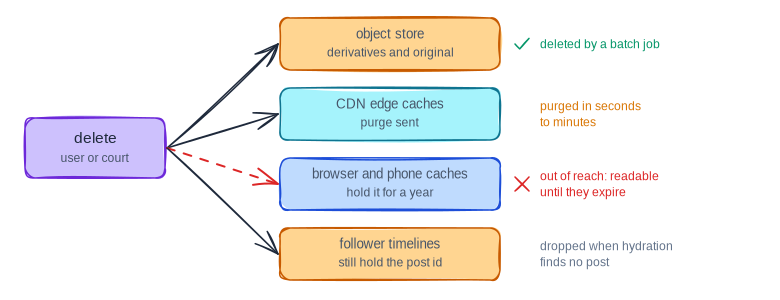
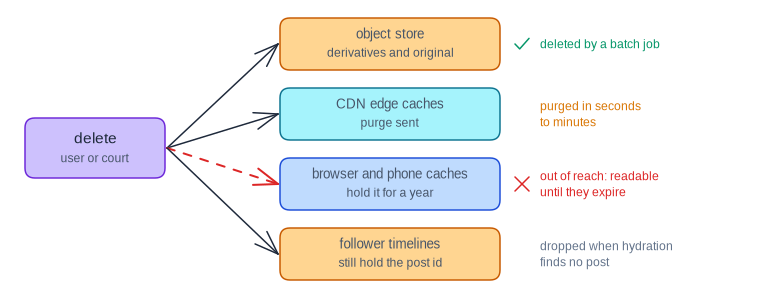
The row is easy. You delete it or mark it deleted, and the post disappears from feeds and grids within one cache TTL, the time a cache keeps an entry. The bytes are harder, and they raise three separate problems.
The object store. This part is simple: delete the derivative keys and the original. It is a batch job, and it is reliable.
The CDN. The images were served with a one-year immutable max-age, on purpose. Now you need them gone, and nothing can reach into a browser cache that already holds the file. You can purge the CDN's own edge caches, which every CDN supports. But a purge takes seconds to minutes to reach every site in a global network, and it does not touch clients.
So the accurate statement is this: after a delete, the bytes stay retrievable by anyone who already has the URL, for as long as their cache holds them. An immutable-URL design cannot promise anything stronger.
If the requirement is "the bytes must become unreachable", the design has to change earlier. Private content needs signed URLs that expire quickly, and that gives up the cache hit ratio, which deep dive 2 showed is worth a 4x difference in origin cost. This is why private and public content often take different paths through the same system.
The timelines. The deleted post id sits in the timeline of every follower it was fanned out to. You can remove it, which is a fanout as large as the original one. Or you can leave it, and let hydration drop ids that no longer lead to a post. The second is far cheaper and is the usual choice: the feed service asks for 10 posts, gets 9 back, and asks for one more. The cost is that timeline lists slowly collect dead ids and need to be compacted now and then.
7. Skew, and where it actually is
Traffic is never uniform. So be specific about which parts of this system are skewed, meaning a few keys get most of the traffic, and which parts are not.
Badly skewed: like counters on popular posts. Section 5 of the high-level design covered this: one row can take tens of thousands of writes per second.
Badly skewed: the follow graph. Accounts with 100 million followers make fanout far too expensive. This is the celebrity problem, and the hybrid design exists to handle it.
Skewed, and helpfully so: image popularity. A tiny fraction of images gets most of the requests. This skew works in your favour. It is what makes a 95 percent CDN hit ratio reachable, because the hot set is small enough to stay at the edge. If requests were spread evenly across every stored image, the hit ratio would collapse. The bandwidth arithmetic in deep dive 2 would then put you in the "you are the CDN" row.
Not skewed: the media storage path. Keys are content hashes, so they are effectively random, and writes spread evenly across the object store's partitions. No partition gets more than its share. Object stores did once have a problem where keys with a shared prefix landed on the same partition, so key naming was a real design concern. Providers now mostly handle that themselves. It is still good to be able to explain why keys used to need random prefixes.
If you name a place where there is no hot key problem and say why, the interviewer can see that you checked each part instead of matching a pattern.
8. What do you watch during an incident?
Four questions.
Are posts being created? Compare the post creation rate with the same hour last week. This is the top of the funnel, and it catches upload failures that no error rate shows. If the API cannot sign upload URLs, that looks like lower traffic, not like errors.
Are posts becoming visible? Watch the p99 of the time from POST /v1/posts to state = 'ready'. This is the pipeline's real SLI, its service level indicator: the measure that tells you whether users get what they were promised. Queue depth alone will not show a problem, because a short queue with stuck workers looks healthy.
Is the CDN hitting? Watch the hit ratio by region, and the origin egress rate. Alert on origin egress, not on hit ratio. A drop in hit ratio that matters shows up as bandwidth, and a drop that does not show up as bandwidth is noise.
Are feeds being served? Watch the feed p99 and the empty-feed rate. The empty-feed rate catches partial failures. A feed that returns 200 with zero items is a successful response and a broken product, and no error metric you have will show it.
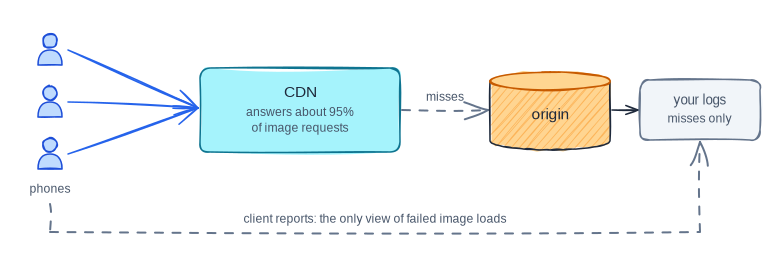
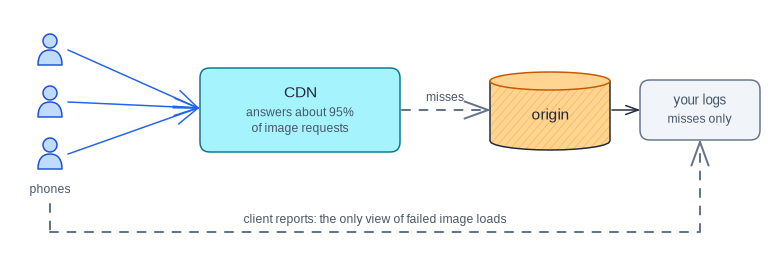
The CDN makes the product work, and it also hides most of the product from your monitoring. The CDN serves most traffic, so most user-visible requests never touch your infrastructure and never reach your logs. Reports from the client are not optional in this design. They are the only place image failures show up at all.
Final design
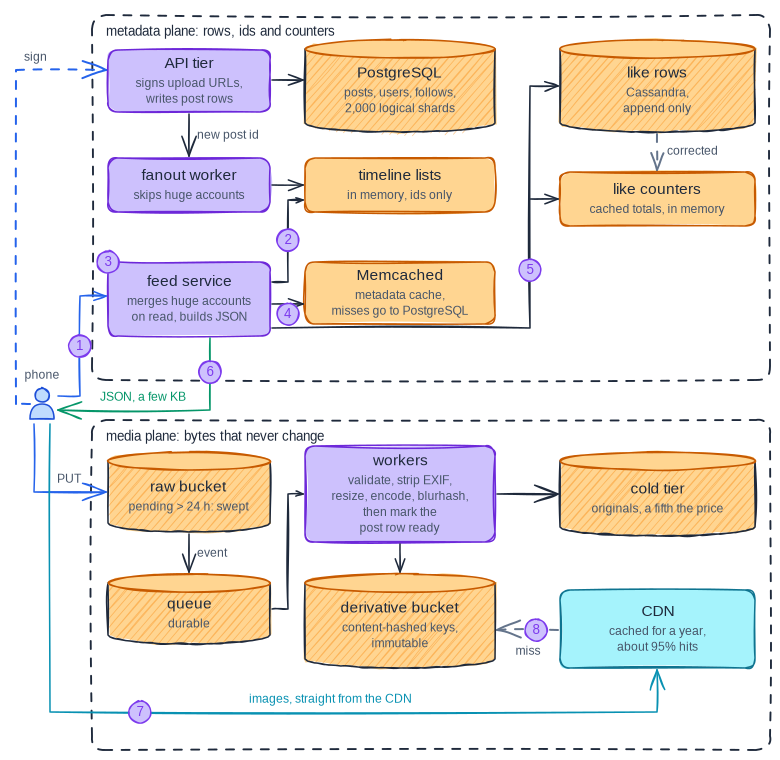
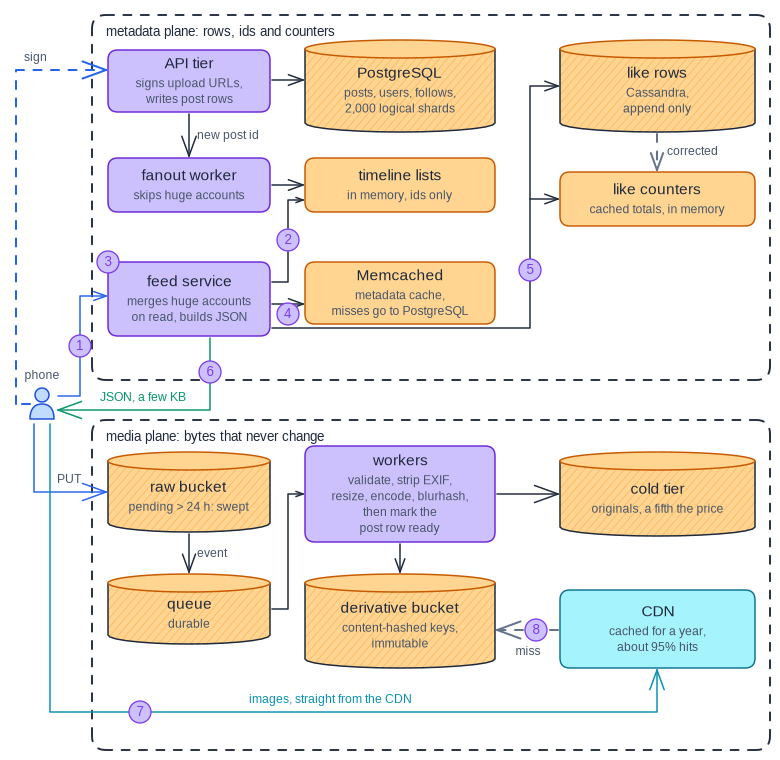
A single feed open, end to end:
- The client sends
GET /v1/feedwith a cursor. The request carries a session token and a few hundred bytes. - The feed service reads the user's timeline list from the in-memory store: a range read of 10 post ids by score, roughly 35 ms.
- Any very large accounts the user follows are merged in at read time, since their posts were never fanned out.
- The 10 ids are hydrated from the metadata cache into author, caption, counts and media keys. Cache misses fall through to the user-sharded PostgreSQL, routed by the shard id embedded in the post id itself.
- Like counts come from the counter store as cached aggregates, and
liked_by_mefrom the viewer's own like rows. - The service assembles JSON containing CDN URLs and blurhashes, and returns it. Total payload a few kilobytes. No image bytes have moved.
- The client paints the blurhashes immediately, then requests each image from the CDN. Those requests do not reach us.
- On the rare cache miss, the CDN fetches the immutable object from the derivative bucket, caches it for a year, and serves it.
Three numbers justify this shape: 833 Gbps of average image egress against a few kilobytes per feed response, 33 TB per day of derivatives against 25 GB per day of metadata, and one upload server against 260 read servers. Each ratio says the same thing in a different unit. The two halves of this product share nothing except a string. A design that keeps them apart stays cheap, and no amount of tuning makes a design that mixes them as cheap.
What is expected at each level
How interviewers turn what they see into these levels is in How a System Design Interview Is Scored.
Mid-level
Gets the entities right and proposes object storage for images rather than blobs in the database. Knows a CDN belongs in the picture and can say what it does. Designs a working upload, usually through the API server, and can describe fanout at a high level. Typically sizes storage but not bandwidth, and treats the image path and the metadata path as one system with one latency budget. Usually misses that the time an upload holds a connection open is a capacity problem at all.
Senior
Separates the media plane from the metadata plane on purpose and can say why. Reaches for pre-signed uploads and justifies them with the bandwidth arithmetic rather than by convention. Puts processing behind a queue and explains that the post row exists before the derivatives do. Shards metadata by user id with a reason that holds up, sizes both storage and egress, and identifies the like counter as a hot key with a named fix. Knows the feed response should carry URLs rather than bytes.
Staff+
Treats the CDN hit ratio as a main design variable. Can show that a 15-point swing changes the origin fleet by 4x, then connects that back to the decision to make URLs immutable and content-hashed. Prices keeping originals separately from derivatives and proposes storage tiering, with the ratio to justify it. States the deletion problem accurately, including that immutable caching means bytes stay reachable after a delete, and identifies where the design would have to change if that were unacceptable. Generates thumbnails first when the queue backs up, so an outage becomes a drop in image quality. Notices that most user-visible traffic never touches their infrastructure, so client-side reporting is the only monitoring that covers the image path.
Sources
Every real-world figure in this article comes from a published source, named below. Where a number is my own assumption for the sake of the arithmetic, it is marked as an assumption at the point of use rather than presented as fact.
- Instagram Engineering, Sharding and IDs at Instagram. The 64-bit id layout used in the metadata section. 41 bits of milliseconds against a custom epoch of 1 January 2011, 13 bits of logical shard id, and 10 bits of sequence modulo 1024, giving 1024 ids per shard per millisecond. Also the 2000 logical shards and the worked example of user 31341 mapping to shard 1341, and the use of PostgreSQL with per-shard sequence generation rather than a central id service.
- Mark Zuckerberg's September 2025 statement that Instagram passed 3 billion monthly active users. This is the only user-count figure here that is official; Meta does not publish Instagram daily actives.
- Lisa Guo, Scaling Instagram Infrastructure, QCon London 2017, and the earlier version at QCon San Francisco 2016. Source for the shape of the stack. Django and Python at the web tier, PostgreSQL for structured data, Cassandra for high-write workloads, and Memcached in front of both. Also the migration from AWS into Meta's own data centres.
- Third-party trackers put daily photo and video uploads near 100 million, which is where the posts-per-day figure comes from. This is an estimate rather than a Meta disclosure and is treated as an order of magnitude throughout.