"Design search autocomplete" usually becomes a lesson on tries. The candidate draws a tree of letters, puts a count on each leaf, and spends twenty minutes walking it. The trie is a sound answer, and it's the easy part. A 2013 paper found the ten best completions of a prefix in about 5 microseconds on average, over more than 400 million queries from a commercial search engine.
The hard part is how often the question arrives, and from how far away. A search box sends a request on every keystroke. At an ordinary typing speed the keys arrive about 300 ms apart, and each list of suggestions should be on screen within about 100 ms of its key. Most of that time goes on the network, not on the lookup.
Then look at what the requests ask. Every search starts with one of 36 letters and digits, and there are only about 50,000 prefixes of up to three characters. At 1 billion searches a day, each of those prefixes is asked about 2,500 times an hour on average, counted across every language and region (worksheet below). Everyone who asks one in the same language and region gets the same ten suggestions. Longer prefixes repeat less often, and the popular ones still repeat.
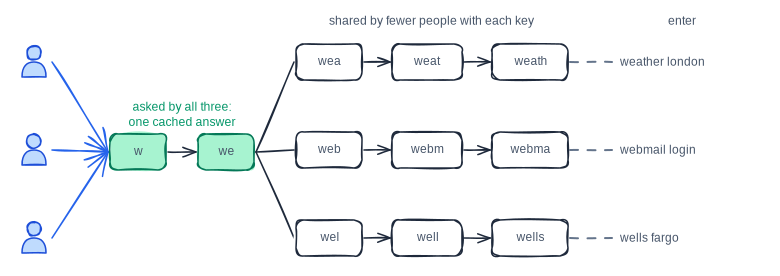
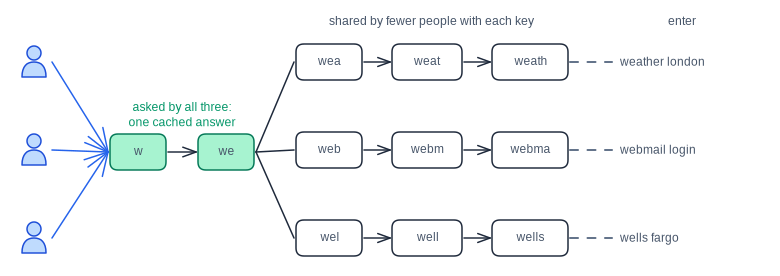
Almost every keystroke asks a question that many other people asked within the hour, so the answer should be computed once, ahead of time, and served from the cache nearest the user. The design work is keeping that answer the same for everyone, and adding the personal and the per-minute parts without breaking that.
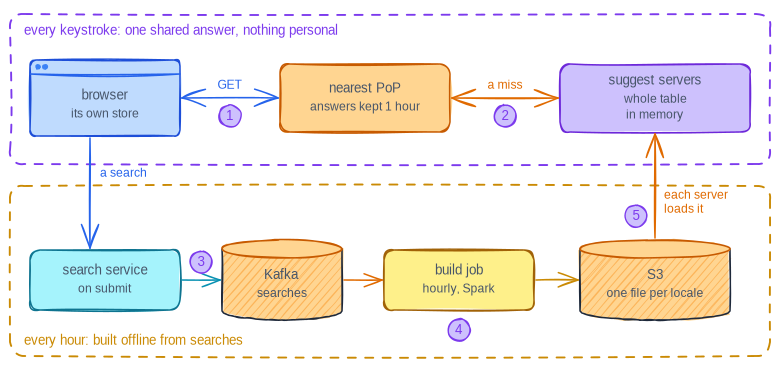
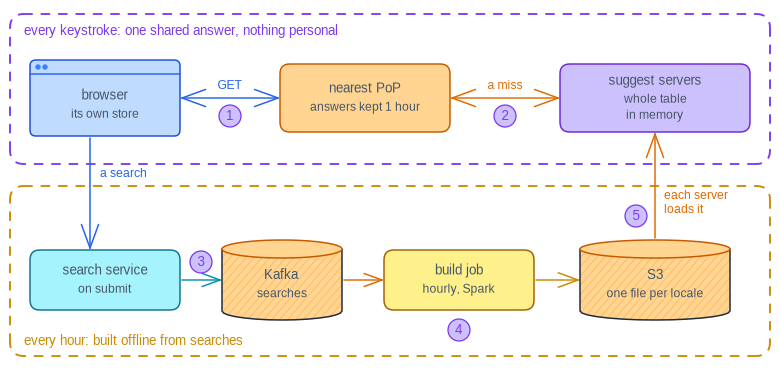
Most of the design follows from that. The ranking is built offline, once an hour, from logs of past searches. The answer for each prefix is a small response that a content delivery network (CDN) can cache. The user's own history and the queries trending this minute are fetched separately and merged on the device, so they never make the shared answer personal.
Understanding the problem
The general method for this part of the interview is in The First Five Minutes: Requirements.
A user types into a search box, and a list of completed searches appears under it and changes with every key. The user picks one, or keeps typing and presses enter. Google typically shows up to 10 predictions on desktop and up to five on mobile, and says autocomplete cuts typing by about 25 percent on average.
"Autocomplete" covers five different systems, and each needs a different design. Split them before you draw anything.
- Query autocomplete. Completing a search from what other people have searched. The candidates come from the search logs, and the ranking is popularity. This is the question.
- Entity typeahead. Finding one person, product or page by name. The candidates are records, not past searches, and the ranking depends on who is asking.
- Instant results. Running the whole search on each keystroke and showing results rather than suggestions. That puts a search engine's load on every key.
- Spelling correction. Suggesting
weatherforwether, which needs a search for near matches, not only exact prefixes. - Predictive text. Completing words on a phone keyboard or code in an editor, usually from a model on the device.
This design covers the first, and says where entity typeahead differs.
Functional requirements
Core:
- Suggest up to 10 completions of what has been typed, updated on every keystroke, in the user's language and region.
- Rank them by how many people search for them, with the past fading slowly and sudden spikes shown within minutes.
- Put the user's own recent searches first, when they're signed in.
- Never suggest offensive or harmful completions, and make a removed one disappear within minutes.
Out of scope, deliberately:
- The search results. Finding the documents that contain the words is covered in inverted indexes.
- Crawling and indexing documents, which web crawler covers.
- Spelling correction, and matching words in the middle of a query.
- Entity typeahead, and sponsored suggestions.
Non-functional requirements
- Scale. 1 billion searches a day, our working figure, and about 15 suggestion requests for each (the worksheet below).
- Latency. The list is on screen within 100 ms of the keystroke, measured on the device. 100 ms is the limit for a response to feel instant, as latency numbers that matter sets out, and Facebook's typeahead team wrote that taking longer makes typeahead "stutter".
- Freshness. A search shows up in the table's answers everywhere within an hour or two, two and a half at worst. A sudden spike shows within about five minutes, and a removed suggestion disappears within five minutes.
- Optional. If suggestions fail, the search box still works, and nothing about a search waits on them.
- Approximate counts. Ranking needs the order of the counts, not exact counts.
Requirement 2 carries the design. The 100 ms includes the network, and on a phone the first radio hop alone can take 30 to 70 ms, by the same page's figures. An answer from a datacenter on another continent rarely arrives in time, however fast the lookup. So most answers have to come from somewhere close to the user, and that only works if one cached answer can serve everyone who types the prefix.
The question is how many suggestion requests the search
box sends, and how many of them repeat.

Searches
  searches a day, our working figure                    1B
  average search, assumed                    20 characters
  typed, after the 25% that suggestions save
                        20 × 0.75               = 15 keys

Suggestion requests, one per keystroke
  a day                 1B × 15                 = 15B
  average               15B / 86,400 s          ≈ 174,000/s
  peak, assumed 2×, lower than a one-country
  product's because a global day spreads across
  time zones                                    ≈ 350,000/s

Searches submitted, the only writes
  average               1B / 86,400 s           ≈ 11,600/s
  peak                                          ≈ 23,000/s

How many questions the first keys ask
  first characters, a to z and 0 to 9                  36
  prefixes of up to 3 characters: a space may
  follow the first, but never two in a row
            36 + 36 × 37 + 36 × (36 × 37 + 36)  ≈ 50,600
  share of requests     3 of every 15           = 20%
  an hour, all locales  15B × 20% / 24          = 125M
  each, on average      125M / 50,000           = 2,500
  ─────────────────────────────────────────────────────────
Suggestion requests outnumber searches 15 to 1. A fifth
of them, 70,000 short-prefix requests a second at peak,
ask one of about 50,000 questions.
The set up
Core entities
- Search. One query submitted by one user, with its language, region and time. It's the only thing the system counts.
- Candidate. A normalised query, with its popularity score. Normalised means lowercased, with spaces trimmed from both ends and runs of spaces collapsed to one. There are up to a few hundred million of them.
- Suggestion list. The best 10 candidates for one prefix in one locale, where a locale is a language and region such as
en-GB. The suggestion list is the only interesting entity: it's the same for everyone who types that prefix, so it can be computed before anyone asks and cached anywhere. - Build. An immutable snapshot of every candidate and its score, one file per locale, made once an hour.
- Blocked query. A candidate that policy removed, with its close variations.
Why a plain GET for every keystroke?
A request on every keystroke looks like a stream, so a socket is tempting. Hold a WebSocket open while the box has focus, send each prefix up it, and get each list back. It saves sending the headers every time.
The socket ends at a server. So every keystroke travels to a datacenter, 350,000 a second at peak, and each one pays the round trip there. Nothing in between can answer, because a CDN can't cache a message on a socket.
A GET with the prefix in the URL can be answered by the CDN's nearest point of presence (PoP), when someone nearby typed the same prefix. Over HTTP/2 the browser keeps one connection to the PoP open anyway, so each request costs a few hundred bytes and no new handshake.
System interface
CLIENT → CDN, on every keystroke, over HTTPS
GET /v1/suggest?q=wea&loc=en-GB&k=10

← 200
Cache-Control: public, max-age=0, s-maxage=3600
{ "q": "wea", "loc": "en-GB", "build": 41812,
  "complete": false,
  "suggestions": [
    { "text": "weather",              "score": 412000 },
    { "text": "weather london",       "score": 98100 },
    { "text": "weather tomorrow",     "score": 61700 },
    ... ] }

SEARCH SERVICE → KAFKA, once per submitted search
{ "user_key": "9f3c51e2...", "signed_in": true,
  "loc": "en-GB", "query": "weather leeds",
  "from_suggestion": true, "ts": 1793612040000 }
Four things to note.
Everything the answer depends on is in the URL, and nothing about the user is. The prefix, the locale and k, the number of suggestions, form the cache key, and no cookie travels on this path. The client normalises the prefix before sending it, so Wea and wea share one entry. A prefix keeps one trailing space, because new has finished a word and asks a different question from new. CDNs and edge compute shows what one per-user dimension in a cache key does to the hit rate: it goes to zero.
Two lifetimes. s-maxage lets a shared cache such as a PoP keep the answer for an hour, and a copy at a PoP can be purged (section 4). max-age=0 keeps the browser's own HTTP cache out of it. That cache counts an answer's age from when the origin built it, including its time at the PoP, under the HTTP caching standard, RFC 9111. So an answer that sat at the PoP for a while would arrive already too old to reuse. Instead, the client keeps answers in its own in-page store, by prefix, and drops each one 5 minutes after it arrived. Backspaces are served from that store, and a copy on a device, which can never be recalled, lasts at most 5 minutes.
complete says the list holds every match. The server sets it when its search finds no more than k candidates below the prefix. Every longer prefix that extends this one can only match a subset of them. So the client answers the next keystrokes from the list it has, with no request. Twitter's typeahead.js library works the same way: it searches what it already holds and goes to the network only when that gives too few results.
user_key is a keyed hash. The suggest call writes nothing, and the search event never carries the user's ID. For a signed-out user, user_key hashes a browser cookie, and signed_in says which kind it is.
High-level design
1. Suggest completions on every keystroke
Where does the top 10 for a prefix come from?
A suggest server holds the candidates and their scores. For a prefix, it has to return the 10 highest-scoring candidates that start with it.
Find the matches when asked, and sort them
Keep the candidates sorted, in a database with a B-tree on the query text, or in a trie in memory. A trie is a tree where each edge is a character, so the path from the root to a node spells a prefix, and everything below the node starts with it. For a prefix, read every candidate below its node and keep the 10 best. In Postgres that's WHERE query LIKE 'wea%' ORDER BY score DESC LIMIT 10, and the B-tree finds the range of matches.
It's tempting because it's correct with no build step, and for a long prefix it's fast. weather lon matches a few hundred candidates.
Short prefixes break it. The 36 one-character prefixes split every candidate between them, so each matches about 11 million on average (worksheet below). Reading 11 million to keep 10 takes about a second. With no cache in front, one-character requests arrive 23,000 times a second at peak, and that's 25,000 cores. The edge cache in the next section takes most of those requests away. But each one-letter miss still takes over a second, ten times the latency budget, and a cold start or a purge after a rollback makes every short prefix miss at once.
Store the top 10 at every node of a trie
Build the trie offline, and at every node store a list of the 10 best candidates below it. A lookup walks the prefix one character at a time and reads the stored list. That's a few memory reads, however many candidates match.
This is the standard answer, and it works. It costs memory and flexibility. Each list is 10 references to candidates, about 40 bytes, and a trie over 400 million candidates has fewer than 400 million nodes where it branches. The 10 is fixed when the trie is built, so a client that wants 20 can't have them. And when one candidate's score changes, the list at every node above it may change, up to one node per character. So the trie gets rebuilt, not updated.
Store one score per node, and search best-first
Question the premise that the answers have to be stored for the lookup to be fast.
Store at each node only the highest score anywhere below it. To find the top 10, walk to the prefix's node and search best-first. A priority queue holds two kinds of entry: a candidate, with its own score, and a branch, with the best score below it. Take the entry at the front. If it's a candidate, it's the next answer. If it's a branch, open it. Nothing below a branch beats the branch's best score, so nothing left in the queue can beat what has already come out. The search stops when 10 candidates have come out.
Keeping each node's children sorted by their best score makes opening a branch cheap. Hsu and Ottaviano, at Microsoft Research and the University of Pisa, point out that the queue then needs only the branch's first child. When that child comes out, its next sibling goes in, so the queue never holds every child at once. They call the structure a completion trie.
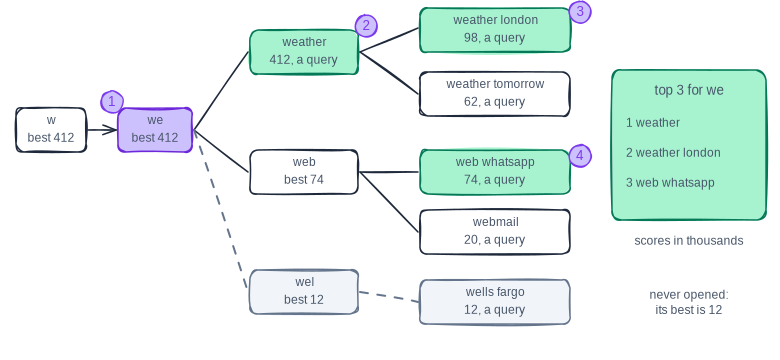
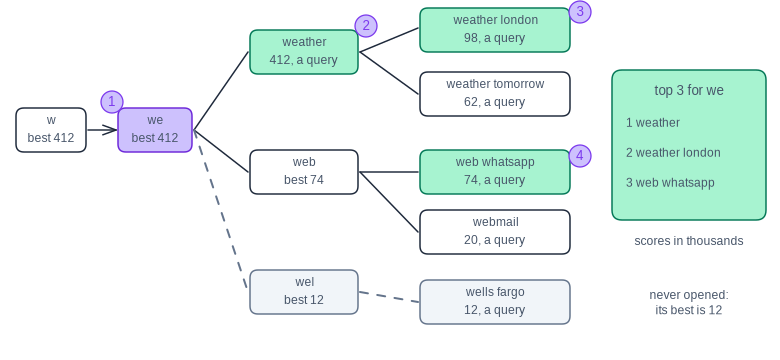
The trade, sized. On over 400 million queries from a commercial search engine, their completion trie took 112 bits a query, 5.6 GB for 400 million. It found a prefix's top 10 in 5.3 µs on average.
That's a few microseconds slower than reading a stored list, against a network round trip of tens of milliseconds. In return, the stored lists that it drops could weigh up to three times as much as the whole completion trie, and k becomes a parameter of each request.
What you give up. Each lookup does more work, and the structure is custom code.
The question is what each server should hold. 400M
candidates is a generous ceiling, the size of the
commercial search engine's set that Hsu and Ottaviano
measured (section 2 says why it's a ceiling).

Find the matches when asked
  one-character prefixes                              36
  matches each, on average  400M / 36          ≈ 11M
  read and rank, ~100 ns each in memory
                            11M × 100 ns       ≈ 1.1 s
  one-character requests at peak                23,000/s
  cores busy, with no cache in front
                            23,000 × 1.1 s     ≈ 25,000

Store the top 10 at every branching node
  branching nodes, fewer than candidates        < 400M
  one list, 10 references   10 × 4 B           = 40 B
  all the lists             400M × 40 B        ≤ 16 GB

Store one score per node (completion trie, measured)
  whole structure           400M × 112 bits    ≈ 5.6 GB
  top 10 for a prefix, on average              ≈ 5.3 µs
  ─────────────────────────────────────────────────────────
The stored lists alone weigh up to three times the whole
completion trie, and they save a few microseconds a
lookup. Finding the matches when asked costs over a
second for every one-letter miss, even behind a cache.Caching the answer near the user
The answer for wea in en-GB doesn't depend on who asks. So the first person to type it near a PoP fills that PoP's cache, and everyone after them for the next hour is answered there. A shield tier, as CDNs and edge compute describes, lets the PoPs fill from one upper cache. The suggest servers then see about one fill per prefix per hour, rather than one per PoP.
The edge ends up holding the answers people ask for: every short prefix, and the long ones that are popular near each PoP. In effect it's the stored top 10 per prefix, built on demand, for the prefixes people type. Deep dive 1 works out how often it answers.
Which data store, and what actually forces it
Every answer the edge doesn't have comes from a suggest server, and the server needs the table. The table is rebuilt every hour by the job in section 2, and read at whatever rate the edge misses.
One Postgres table of prefixes and their lists
Store one row per prefix, suggestions(locale, prefix, top10), with read replicas. A lookup is a read by primary key, and one Postgres serves tens of thousands of those a second. The reads are fine.
The rebuild is the problem. The table has at least one row per candidate, since every candidate is a prefix of itself, and every build may change any of them. The cheapest way to replace it is a bulk COPY into a new table and a rename. That still writes about 100 GB every hour, builds a 400 million row index, and ships all of it to every replica (worksheet below).
A key-value store, sharded by prefix
Put the lists in a key-value store such as Redis Cluster or DynamoDB, keyed by locale and prefix. Bulk-load each build under a new version number, and switch readers to it when the load finishes. The cluster takes the hourly load, and it grows by adding nodes.
Hashing the prefix spreads the keys evenly, where ranges by first letter would not, and a one-letter prefix stays one hot key on one shard. At about 640 requests a second each at peak, 23,000 / 36, before the edge absorbs nearly all of them, one Redis node handles that easily.
This is a common answer, and it works. It costs a network hop on every lookup, 0.25 to 0.5 ms inside one datacenter, and a cluster to run. Each load also needs room for two versions at once, and all of it is for a table that fits on one machine.
No database on the read path: copy the build to every server
Question the premise that the table belongs in a database. It's written once an hour, whole, by one job, and never changed in place. That's a file.
The build job writes one completion-trie file per locale to object storage such as S3, 5.6 GB for all of them, and a manifest naming the new build. Every suggest server reads the manifest each minute. When it changes, the server downloads the files, maps them into memory beside the build it's serving, and switches one pointer. Requests already running finish on the old build, and new ones use the new one. The build before stays loaded, so a rollback is the same pointer switch, back.
The trade, sized. Each server copies 5.6 GB an hour. It always holds two builds, the live one and the one before, 11.2 GB, and briefly three while a new one loads, 16.8 GB. A lookup is 5 µs in the server's own memory, not a network hop. And because every server holds the whole table, there's no shard key, no hot shard and nothing to rebalance. The table is replicated, not sharded.
What you give up. A table that outgrows one machine's memory needs splitting, first by locale and then by prefix range, and at 5.6 GB that's a long way off. And every server switches to each build, so a bad build reaches all of them. Deep dive 4 covers the checks.
The question is what one new build an hour costs in each
place the table could live.

Postgres, one row per prefix, replaced by COPY and a rename
  rows, at least one per candidate             ≥ 400M
  a row: a prefix and 10 suggestions, assumed   ~250 B
  table                   400M × 250 B         = 100 GB
  written every hour      100 GB / 3,600 s     ≈ 28 MB/s
  plus a 400M-row index built every hour, and the
  same 100 GB copied to every read replica

A file on every server
  one build, every locale                      5.6 GB
  copy and load, at ~1 GB/s                    ≈ 6 s a server
  memory, two builds and briefly three
                          3 × 5.6 GB           = 16.8 GB at most
  ─────────────────────────────────────────────────────────
The reads never decided it. Postgres would write and
replicate about 100 GB an hour to serve lookups that a
5.6 GB file answers from memory.
2. Rank by popularity, and keep the ranking fresh
Every hour, a job turns the searches so far into a new build. Three decisions shape it: what counts, how the past fades, and how a spike gets in faster than an hour.
What counts as popular?
Only submitted searches count. When a user presses enter or picks a suggestion, the search service writes an event to Kafka, a partitioned log. The event holds the hashed user key, whether the user is signed in, the locale, the normalised query, and whether it came from a suggestion.
Count distinct signed-in users a day, not searches. One account that searches a phrase 1,000 times adds 1 to that day's count. A signed-out user's key is a hashed cookie, which a script can mint as often as it likes, so signed-out searches count toward nothing: not the score, not the floor, not trending. The cost is a ranking that reflects signed-in users only. A query enters the build only once 20 different signed-in users have searched it on one day. Planting a phrase then takes 20 accounts for a long prefix, and thousands to outrank the popular queries under a short one. The floor also keeps out queries only one person makes, such as their own address.
The floor also limits the table. It admits at most 50 million queries on any one day, 1 billion searches divided by 20, and most of them are the same queries every day. The decay below drops the ones people stop searching for. So the 400 million that section 1 sized the table for is a generous ceiling, not a count.
The hourly build
An archiver copies the Kafka topic into object storage as hourly files. On the hour, a batch job in Spark runs five steps.
- Count today's distinct signed-in users for each locale and query, from today's files so far.
- Add each candidate's decayed total from the days before.
- Drop candidates whose score has fallen below a floor, and admit new ones with 20 signed-in users in a day.
- Drop everything the filters and the blocked list catch (section 4).
- Build one completion-trie file per locale, and write the files to S3 with a manifest.
Each day's scores are a new snapshot. After midnight, the job reads yesterday's snapshot, adds yesterday's full count to each carried total, multiplies the sum by 0.906, and writes today's snapshot. A rerun reads the same inputs and overwrites the same snapshot, so the job is safe to retry. A day's count is multiplied once at every midnight after it, so after n days it carries 0.906 to the power n, and its weight halves after 7 days. That's the same as weighting every past day by its age, and the job never rescans weeks of events.
The question is whether the hourly table can bring a new
query up quickly, or whether that needs another path.
Scores count distinct users a day, with a 7-day half-life.

  weight kept per day       0.5^(1/7)              ≈ 0.906
  a query steady at r users a day settles at
                            r / (1 − 0.906)        ≈ 10.6 × r

  "weather london", steady at 1,000 a day          ≈ 10,600
  a new query at 3,000 a day, after n days
                            3,000 × 10.6 × (1 − 0.906^n)
  it passes when 0.906^n falls to 2/3              n ≈ 4 days
  ─────────────────────────────────────────────────────────
A query three times as popular takes four days to outrank
a steady one. A one-day half-life cuts that to about a
day, and lets one busy weekend reorder every list.
So the table keeps its 7-day half-life for a stable ranking, and queries that rise in minutes reach users by a separate path.
A search made just after the hour waits up to an hour for the next build. The build run and the canary take about 20 minutes, which is assumed, and the PoPs then keep the old answers for up to an hour plus 6 minutes of jitter (deep dive 3). That's about two and a half hours at worst before a search shows up everywhere.
Trending queries
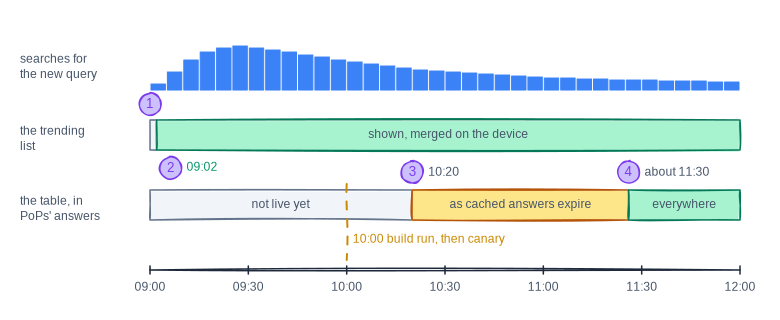
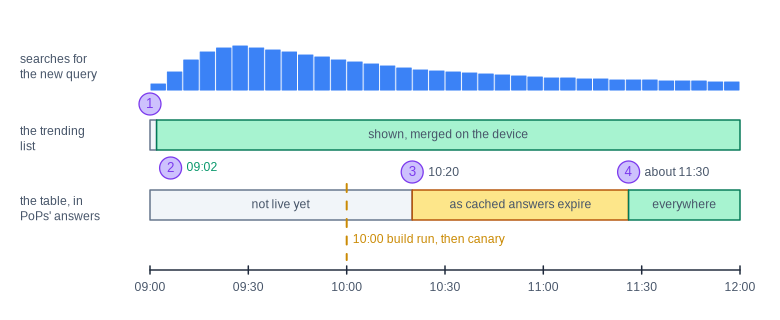
The hourly table can't show a spike in time. A news event at 09:00 sends thousands of people to a new query within minutes, and the table shows it everywhere about two and a half hours later. Google says that when its systems detect rising interest in a topic, they can show a trending prediction even though it isn't the most common. So how does a query that took off five minutes ago reach the lists, without giving up the hour-long cache?
Rebuild every five minutes
Run the build every five minutes, and cut the PoPs' cache lifetime to five minutes to match. It's the same pipeline, run more often.
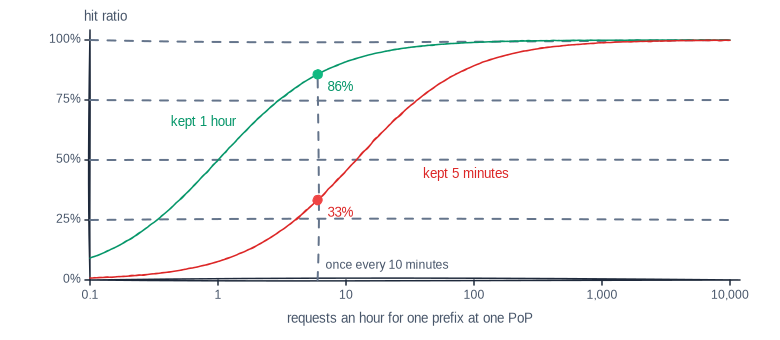
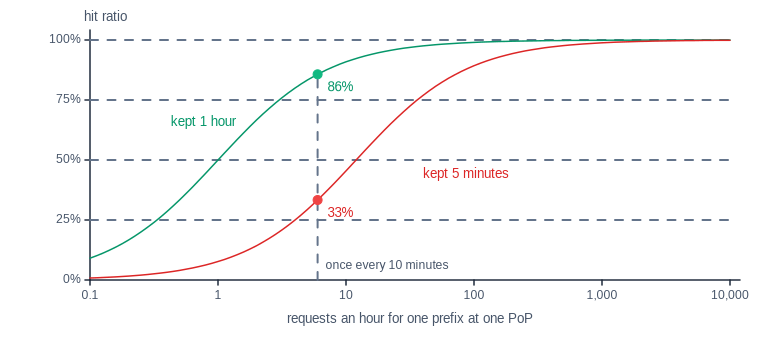
It costs the edge most of its hits. By the hit-ratio formula in deep dive 1, a prefix asked once every 10 minutes at a PoP falls from 86 percent hits to 33. Every prefix asked less than a few times an hour mostly misses, and those misses go to the suggest servers. The build itself, a whole new trie, also runs 12 times an hour.
Find trending queries in a stream, and merge them at the server
A stream processor such as Flink reads the same Kafka topic. For each locale, it counts distinct signed-in users per query over the last 10 minutes. It compares that with the query's usual rate, which the score gives: the score divided by 10.6 is about a day's users. A query is trending when it has at least 5 times its usual users for 10 minutes, and at least 50. Each minute, the job publishes the top 200 trending queries per locale, after the same filters as the build. The suggest servers merge the matching ones into each answer.
The counts can be exact. At 23,000 searches a second at peak, a 10 minute window holds under 14 million user and query pairs, a few hundred megabytes, so no sketch is needed.
The cost is again in the cache. The merge happens before the answer is cached, so a trending query shows only once the cached answer expires. Showing it within five minutes means a five minute lifetime at the PoPs, and the hit ratio falls as in the naive tier.
Send the trending list to the client, beside the answers
Question the premise that a trending query has to be inside each prefix's cached answer.
The trending list is small, and one list serves a whole locale. Serve it as its own response, GET /v1/suggest/trending?loc=en-GB, which the PoPs cache for 60 seconds. The client fetches it when the box gets focus, and once a minute while it keeps focus. On each keystroke, it picks the trending queries that start with the prefix and merges them into the shared answer. The job gives each trending query a score on the same scale as the build's, from its current rate, so the merge is a sort.
The trade, sized. The answers keep their hour-long lifetime and their hit ratio. A trending query reaches users within about two minutes: one for the job to publish it, one for the PoPs' copy of the list to expire. The list is about 200 queries, a few kilobytes, and each PoP asks the origin for it once a minute per locale.
What you give up. The client now merges, so ranking rules live in two places, and an old version of the app shows no trending queries. And a removed query has to leave the trending list too, which happens when the job next publishes, within a minute.
The tables
-- Search events: Kafka, then hourly Parquet files in S3,
-- partitioned by day and hour.
search_events (
  user_key         bytes,      -- keyed hash, never the user ID
  signed_in        boolean,    -- only signed-in users are counted
  locale           text,       -- 'en-GB'
  query            text,       -- normalised
  from_suggestion  boolean,
  ts               timestamp
)

-- Running scores: one snapshot per day, rewritten each hour.
candidate_scores (
  day              date,
  locale           text,
  query            text,
  carried          double,     -- decayed total of the days before
  today_users      bigint,     -- distinct signed-in users today, so far
  primary key (day, locale, query)
)

-- Builds, in a small Postgres config store.
builds (
  build_id         bigint,
  locale           text,
  file             text,       -- s3://suggest-builds/41812/en-GB.trie
  candidates       bigint,
  checksum         text,
  state            text,       -- BUILT, CANARY, LIVE, ROLLED_BACK
  primary key (build_id, locale)
)
Three things to note.
The user is a hash. The job only needs to tell users apart, so the event carries a keyed hash, and nothing the counts hold names anyone.
A day is a snapshot, not an update. Today's rows are made from yesterday's rows and the events, and never from today's own earlier rows. So a job that fails halfway and runs again writes the same answer, instead of decaying the scores twice.
A row in builds is the switch. The manifest the servers read is made from this table, so going live and rolling back are both a change to state.
The queries that carry the product
-- 1. Each hour: today's distinct signed-in users per query, so far.
SELECT locale, query, COUNT(DISTINCT user_key) AS today_users
FROM search_events
WHERE day = current_date AND signed_in
GROUP BY locale, query;

-- 2. Each hour: the score the build ranks by.
--    score = carried (today's snapshot) + today_users
--    kept if score >= floor, admitted if today_users >= 20

-- 3. Every lookup, in the suggest server's memory:
--    walk trie[locale] to the prefix's node,
--    search best-first until k + 5 candidates are found,
--    drop any on the blocked list, return the first k.

-- 4. Every minute, in the trending job, per locale:
--    signed-in users over the last 10 minutes, per query;
--    trending if users >= 50 and users >= 5 × score / 10.6 / 144
Lookup 3 runs most often, at the edge's miss rate, and it's the cheapest. Query 1 costs the most: by late evening it reads most of a day's billion events, once an hour. The interviewer usually pushes on query 2, because the decay is how the table forgets. In query 4, score / 10.6 is a day's usual users, and dividing by 144 gives 10 minutes' worth.
| data store | what goes in it | the requirement that forces it |
|---|---|---|
| suggest servers' memory | the live build and the one before, briefly a third | lookups in microseconds, at the edge's miss rate |
| object storage, S3 | search events as hourly files, and every build | weeks of events kept for rescoring; builds written once and copied everywhere |
| Kafka | search events, as they happen | 23,000 a second at peak, read by the archiver and the trending job |
| Postgres, small | builds, and the blocked list with its version | small, rarely changed, and every change versioned |
| Cassandra or DynamoDB | each signed-in user's recent searches (section 3) | one write per search and one read per session, by user |
3. Put the user's own searches first
A signed-in user who searched weather leeds yesterday expects to see it near the top when they type wea today, and Google shows signed-in users their past searches. The history belongs to one user, and the answer for wea is shared, so where are the two combined?
Rank for each user on the server
Send the user's ID with each keystroke, and let the suggest server raise the candidates this user searched before. It's one request and one answer, with all the ranking in one place.
It makes every answer personal. The cache key now includes the user, so no PoP can reuse an answer for anyone else, and the hit ratio falls to near zero. All 350,000 requests a second at peak reach the suggest servers, each pays the round trip to them, and each reads the user's history.
Merge on the server, from the shared answer and the history
Keep the shared answer as it is, and add a personal layer on the server. The suggest service reads the shared top 10 from its build, reads the user's recent searches from a history store, keeps the ones that match the prefix, and merges them. Facebook's 2010 typeahead had this shape. Stateless aggregators asked several services at once and merged what they returned. One service held global results, whose results were cached in memcached because they were the same for every user. Another searched the user's own part of the social graph.
It keeps the table shared and the ranking in one place, and it gives up the edge. A response with a user's history in it can't be cached for anyone else. So every keystroke from a signed-in user crosses the network to a datacenter, and on a phone that alone can use most of the 100 ms.
Fetch the history once a session, and merge on the device
Question the premise that the history has to travel with every keystroke. It's small, a user's last 50 or so searches, and it changes only when they search.
When the box gets focus, the client fetches the history once, from GET /v1/suggest/history, marked private, no-store so that no shared cache keeps it. On each keystroke, it fetches the shared answer as before. It puts up to three history entries that start with the prefix first. Then come the shared suggestions, with the matching trending queries sorted in by score, and duplicates are dropped until there are k. Facebook's typeahead did the first half of this. As soon as the box got focus, it fetched the user's friends and pages into the browser's cache, and asked the server only when those gave too few results.
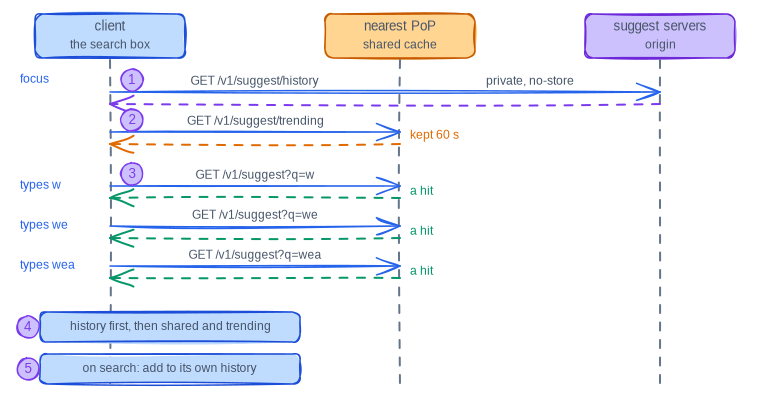
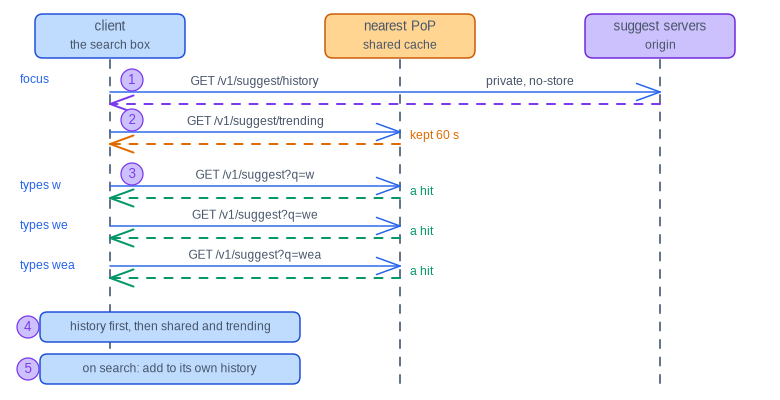
The trade, sized. History reads fall from one per keystroke to one per session, and every keystroke stays cacheable. When the user searches, the client adds the query to its own copy, so it shows on the next keystroke without waiting for any data store.
What you give up. The device ranks history only by prefix and recency, so a personal entry can't be weighed against everything the server knows. A search made on another device shows up at the next focus. And the history sits in the page's memory while the box is open.
-- Cassandra: one partition per user, newest first.
user_history (
  user_id      bigint,
  searched_at  timestamp,
  query        text,
  primary key ((user_id), searched_at)
) WITH CLUSTERING ORDER BY (searched_at DESC)
  AND default_time_to_live = 7776000;   -- 90 days
The search service writes one row per search, 23,000 a second at peak, and each session reads the newest 50 rows once.
Entity typeahead is where this stops working. When the whole answer depends on who is asking, as when you search for a friend by name, the personal part is the answer. The server then has to search each user's own data on every keystroke, and little of it can be cached.
4. Keep offensive suggestions out
A suggestion appears to everyone who types its prefix, whether or not they were looking for it. Google's policies list what it removes: dangerous, harassing, hateful, sexually explicit, terrorist, violent and vulgar predictions, with extra rules for named people, elections and health. Its automated systems try to block these first, and enforcement teams remove what gets through, along with closely related variations.
The design has two jobs: keep bad candidates out of each build, and remove one that got in from every copy, quickly.
At build time, three filters run. The 20-user floor keeps out what only a few people search, including attempts to plant a phrase. A list of terms and a classifier drop candidates in the policy categories, with a stricter threshold when a candidate contains a person's name. Google describes the same caution with names. And the blocked list drops everything reviewers have removed.
After a removal, the candidate is still everywhere. It's in the current build on every server, maybe in the trending list, in the PoPs' cached answers, and on devices. Each copy needs its own step, and the order matters.
- A reviewer adds the query and its variations to
blocked_queries, which raises the list's version, say to 913. - The config store pushes version 913 to every suggest server and to the trending job. Each server drops blocked candidates from every answer it builds, and reports the version it holds.
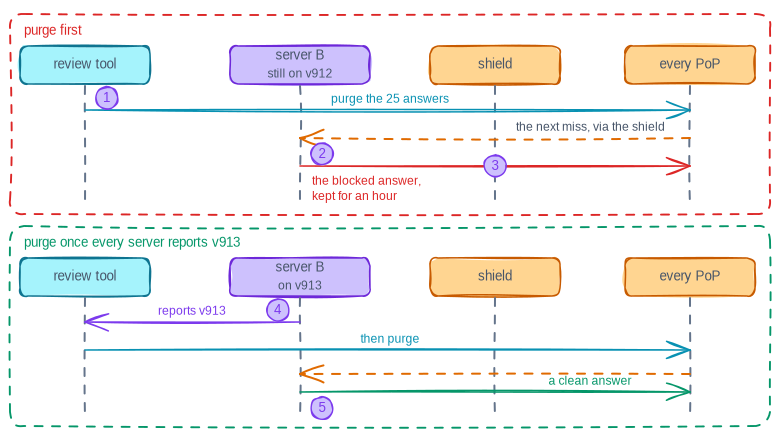
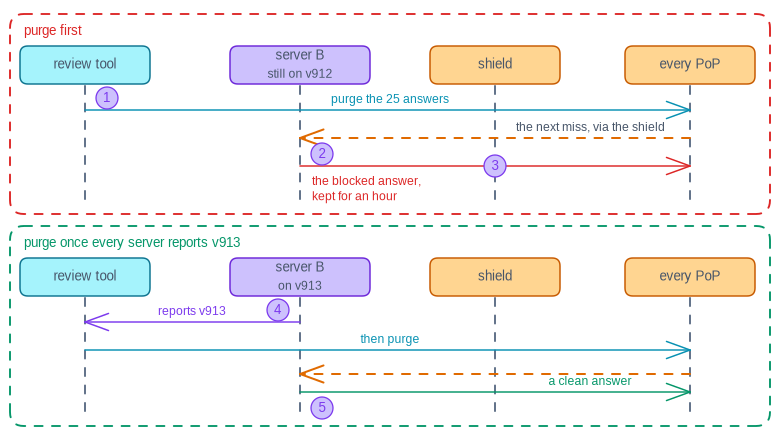
- When every server in the load balancer reports 913, which takes seconds, the review tool purges the cached answers that can contain the query. A suggestion can only appear in the answers for its own prefixes, so a 25-character query is in at most 25 cached answers per locale and value of
k. The purge is a short, exact list of URLs. - On devices, the client drops every stored answer 5 minutes after it arrived, so a copy there lasts at most 5 minutes.
- The next build leaves the query out for good.
Step 3 has to wait for step 2. Purge first, and a PoP's next miss can reach a server still on version 912, which hands back the blocked answer. The shield caches it, and every PoP that misses after that fills from the shield, so the answer is back everywhere for another hour.
-- In the small Postgres config store.
blocked_queries (
  locale      text,
  query       text,       -- normalised; one row per variation
  reason      text,
  version     bigint,     -- the list version that added it
  primary key (locale, query)
)
A purge reports that it was accepted, not that every PoP has finished, while each server's list version can be checked against the latest. So the version report is what gates the purge, and what an alarm watches.
Deep dives
Deep dives 1, 2 and 3 come up in most versions of this interview.
1. How many keystrokes reach a server, and how fast?
Requirement 2 gives 100 ms from the keystroke to the list
on screen. The question is which paths fit. The first hop
and the trips between regions are from latency numbers
that matter. The hops to the PoP and to the shield, and the
client's own work, are assumed.

                                        Wi-Fi         4G
  handle the key, build the request         5           5
  first hop, there and back           1 to 10    30 to 70
  on to the nearest PoP and back      5 to 20     5 to 20
  look up the PoP's cache                   1           1
  parse and draw                           10          10
  ─────────────────────────────────────────────────────────
  a hit at the PoP                   22 to 46   51 to 106

Each miss adds to the line above it
  PoP to the shield and back, 5 to 20, + 1 to look up
  a hit at the shield                28 to 67   57 to 127
  shield to the suggest servers and back, + 1 on the server
    same continent, 10 to 70        39 to 138  68 to 198
    another continent, 60 to 200    89 to 268  118 to 328
  ─────────────────────────────────────────────────────────
On Wi-Fi, a hit at the PoP or the shield fits. A miss to
servers on the same continent fits for users near their
region, and not for users far across a wide continent.
On 4G, a hit at the PoP usually fits, and anything past
it fits only at best. A miss to another continent fits
only at best on Wi-Fi, and never on 4G.
So the suggest servers run in a region on each continent, and on phones the PoP carries the budget. A continent as wide as North America may need a second region for the users far from the first.
How often does the edge answer?
How often a PoP answers depends on how often each prefix is asked there. Take one prefix asked r times an hour at one PoP, cached for T hours. The first request misses and fills the cache. On average, the next r × T requests find it there. Then it expires, and the cycle starts again. So the share of requests for that prefix that hit is rT / (1 + rT), as long as the PoP keeps the entry for its whole lifetime.
Short prefixes, asked many times a second at a busy PoP, hit almost every time at any lifetime. The lifetime matters for the prefixes in the middle, the ones asked a few times an hour, and that's why the answers keep an hour at the edge.
Should the client debounce?
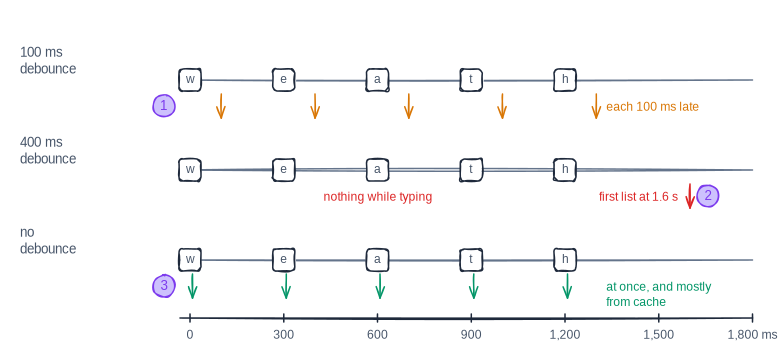
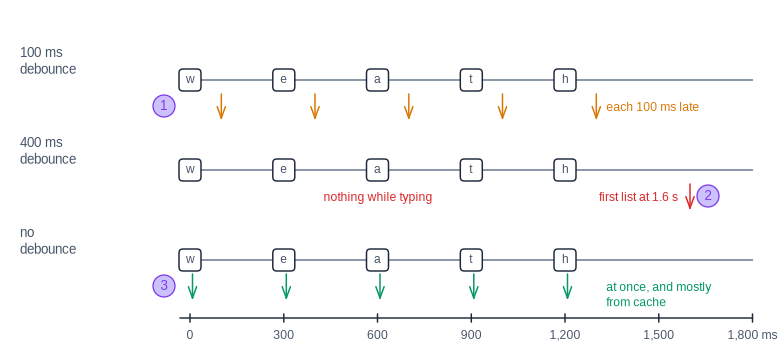
The usual first move to cut the request count is a debounce: send a request only after the user has stopped typing for a set time. Twitter's typeahead.js library does this by default, with a 300 ms wait.
A debounce trades latency for requests. At 40 words a minute, the speed the 2013 paper used for its tests, keys arrive about 300 ms apart. A debounce shorter than that gap saves only the keys typed in a quick burst, and it still delays every list by its own length. A debounce longer than the gap drops most requests, but the user sees nothing while typing, and the first list arrives 300 ms or more after they pause.
So send every keystroke, and make each one cheap. The client keeps every answer it has received in its own store, by prefix, so a backspace costs nothing. When a new key arrives, it cancels the request for the old prefix, and it drops any answer for a prefix that's no longer in the box. An answer marked complete serves every longer prefix with no request at all. What still reaches the network goes to the nearest PoP.
2. How many servers, and what sizes them?
The question is how many suggest servers the origin needs.
One region serves one continent, whose day doesn't spread
across time zones, so size each at its own busiest hour:
2.5 times its daily average, from back-of-envelope
estimation. Plan for the CDN to answer 80% of requests,
then check 50%. Headroom by the same page's rule: 50 to
70% busy at peak, plus a spare that can be lost.

  keystroke requests, daily average             174,000/s
  regions, one per continent served                     4
  one region, daily average  174,000 / 4        = 43,500/s
  one region, busiest hour   43,500 × 2.5       ≈ 108,750/s
  reach the origin, at 80%   108,750 × 0.2      ≈ 21,750/s
  one server, flat out, assumed                 20,000/s
  run at 60% at peak         20,000 × 0.6       = 12,000/s
  servers a region     21,750 / 12,000 → 2, + 1 spare = 3
  fleet                      4 × 3              = 12

  if the CDN answers only 50%
  reach the origin, a region 108,750 × 0.5      ≈ 54,400/s
  servers a region     54,400 / 12,000 → 5, + 1 spare = 6
  fleet                      4 × 6              = 24

  lookups on one server     20,000 × 5.3 µs
                            = 0.106 s of CPU a second
  one core gives 1 s of CPU a second, so        ≈ 0.1 cores
  memory, two builds and briefly three          ≤ 16.8 GB
  ─────────────────────────────────────────────────────────
The fleet is 12 servers at the planned hit ratio, and 24
if the CDN answers only half. The lookups use a tenth of
a core, so the servers are sized by HTTP handling.
The part that grows with traffic is the CDN, and the hit ratio is the number to watch. Each 10 points of hit ratio lost at peak is another 35,000 requests a second at the origin.
Every region holds the whole table. The build is copied to each region's object storage, 5.6 GB an hour, and every server there loads it. Search events are written to Kafka in the region where they happen, then copied to the one region that runs the build. At about 200 bytes an event, that's about 200 GB a day. The build region decides freshness, not availability: if it stops, every region keeps serving its last build.
3. Hot prefixes, and refills that line up
Short prefixes are the hottest keys in the system, and they cause the least trouble. There are about 50,000 of up to three characters, each a few hundred bytes, and a busy PoP is asked each of the common ones many times a second. By the hit-ratio formula, a prefix asked 100 times a second with an hour's lifetime misses once in 360,000 requests. Through a shield, the suggest servers see each one about once an hour.
When a hot entry expires, a PoP receives many requests for it before the fill returns. CDNs collapse these into one fill, which is usually called request coalescing. So a prefix asked 100 times a second still costs the origin one request per expiry.
A spike in one topic is the same case. Even if 1 million people type earthq in the minutes after an earthquake, they ask for one cached answer, which each PoP fills once. Their searches reach the trending job, which publishes one small list per locale.
The harder case is many different answers refilling at the same moment. It's tempting to put the build number in the URL, /v1/suggest?q=wea&build=41812, so that every answer switches to a new build at once and is never more than one build old. Caching strategies and invalidation explains why changing the key is often the cleanest way to invalidate.
Here it moves the hour's refills to its first few minutes. With coalescing and the shield, the origin still fills each distinct answer once, so the burst is sized in answers, not in requests.
The question is what the origin sees when every cached
answer changes key at once. Assume the CDN holds 10M
answers that are asked more than once an hour; the real
count comes from the logs.

Lifetimes counted from each fill
  those 10M refill once an hour, spread out
                     10M / 3,600 s          ≈ 2,800/s
  part of the 70,000/s that reach the origin at peak

A build number in the URL
  the same 10M refill, at worst, in the first ~5 minutes
                     10M / 300 s            ≈ 33,300/s
  peak at the origin 70,000 − 2,800 + 33,300 ≈ 100,500/s
  then none of them for the rest of the hour
                                            ≈ 2,800/s less

Jitter after a cold start, by the caching page's rule:
window ≥ entries / spare refill capacity
  spare at peak   12 × 12,000 − 70,000      = 74,000/s
  window needed   10M / 74,000/s            ≈ 135 s
  0 to 10% of an hour                       = 360 s
  ─────────────────────────────────────────────────────────
The build number doesn't overload the fleet. It moves the
same refills to the top of the hour, and 10 percent of
jitter is wide enough to spread a cold start.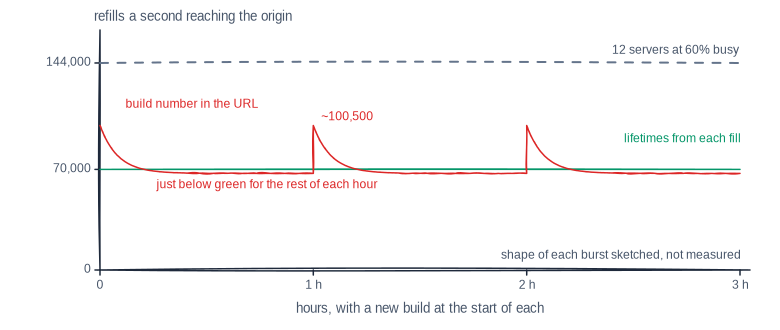
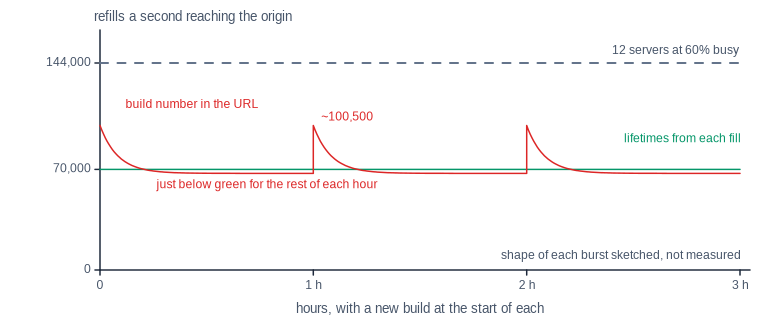
So the build number costs a burst every hour, and it needs one more thing: every client has to learn the current number. That's one more request, or a field in the session fetch that's up to a minute stale. Servers also need a rule for a client that asks for a build they haven't loaded yet. Lifetimes counted from each fill need none of it. Their cost is that some answers are up to an hour behind the newest build, which requirement 3 allows.
With a lifetime from each fill, entries expire at whatever time they were filled, which is spread through the hour. A cold start or a purge of everything lines them up: all the fills happen at once, and so do the expiries an hour later. So the servers add a random 0 to 10 percent to each s-maxage, a 360 second window, against the 135 seconds the worksheet needs.
4. How does a new build reach every server safely?
A bad build reaches every server, and from them every PoP, within the hour. A failed upstream job can produce an empty file for one locale, so that locale gets no suggestions. A change to the normaliser can garble every candidate. A filter bug can put a harmful phrase in the list for a one-letter prefix, the list every user sees.
So a build is checked in three stages before it's live everywhere.
- Before publishing, the job compares each locale's file with the last build. The number of candidates must be within 10 percent of the last build. The top 10 for the 1,000 most-asked prefixes must mostly match the last build's, and a large change stops the build. No blocked query may appear in any list.
- On canary servers. The manifest marks the build
CANARY, and one server per region loads it. For 10 minutes, those servers also look up each request in the old build, and log how often the two answers differ. - Everywhere. The manifest marks it
LIVE, and the other servers switch at their next check, within a minute.
Rolling back is the same manifest change, back to the previous build, which every server still holds in memory. The bad answers already cached at the PoPs are the harder part. Purging them one URL at a time would run into the CDN's limits on purge requests. So every answer carries its build number as a cache tag, which Fastly calls a surrogate key and Cloudflare a cache tag. Rolling back purges one tag, and the refills that follow are the burst sized in deep dive 3.
5. What fails, and what does the user see?
Suggestions are optional, by requirement 4. Each failure below leaves the search box working.
A suggest server. The load balancer stops sending to it, and the PoP's fill goes to another server in the region.
A whole region. With one region per continent, its PoPs fill from a region on another continent. Answers already cached keep hitting, and misses make a 60 to 200 ms trip instead of 10 to 70, so lists that miss arrive late until the region is back.
The build pipeline. Every server keeps serving its last build. Nothing changes for users except freshness, and the trending list still shows what's new. An alarm fires when the live build is more than two hours old.
The trending job. The list carries the minute it was made, and the client ignores a list more than 5 minutes old. A stale list would keep showing yesterday's news, which is worse than showing nothing.
The history store. The history call returns an empty list, and the user sees only the shared suggestions.
The blocked-list push. A server that can't reach the config store keeps its last version and keeps serving, and an alarm fires when any server's version is more than a minute behind. A removal can't wait on it, so the alarm takes that server out of the load balancer, and the purge goes ahead without it. Each build also filters on its own, so the risk is limited to removals made since the last build.
6. How do you know it is working?
During an incident you need four answers quickly: whether lists arrive in time, how much reaches the origin, how fresh each part is, and whether people still use the suggestions.
- Time from keystroke to list, measured on the device, at the median and p95 (the time 95 percent of lists beat), by connection type and region. This is requirement 2, and only the client can see it.
- CDN hit ratio and origin requests per region. A falling hit ratio means a change to the cache key or a purge, and the origin rate shows what it costs.
- Build age and blocked-list version, per server. These are the two freshness bounds the design promises.
- How many searches come from a suggestion, from
from_suggestionin the events. A drop right after a build points at the build.
Final design
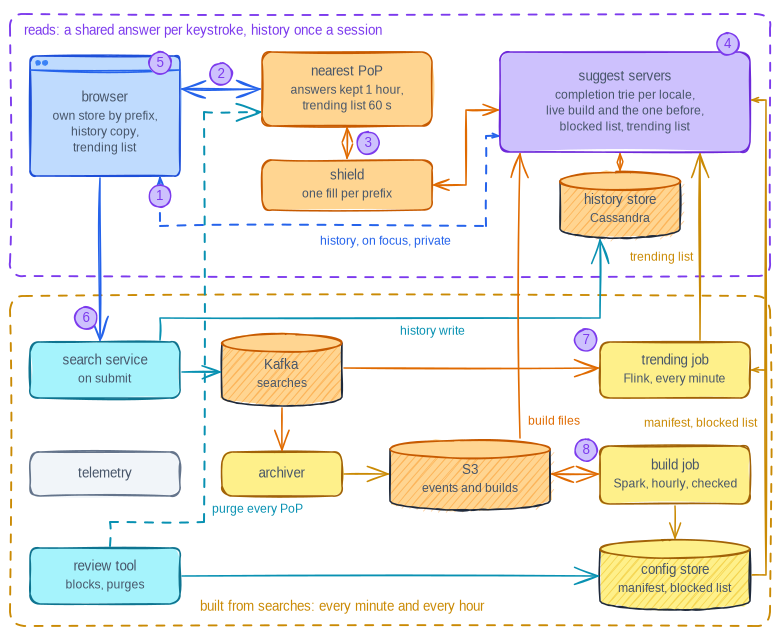
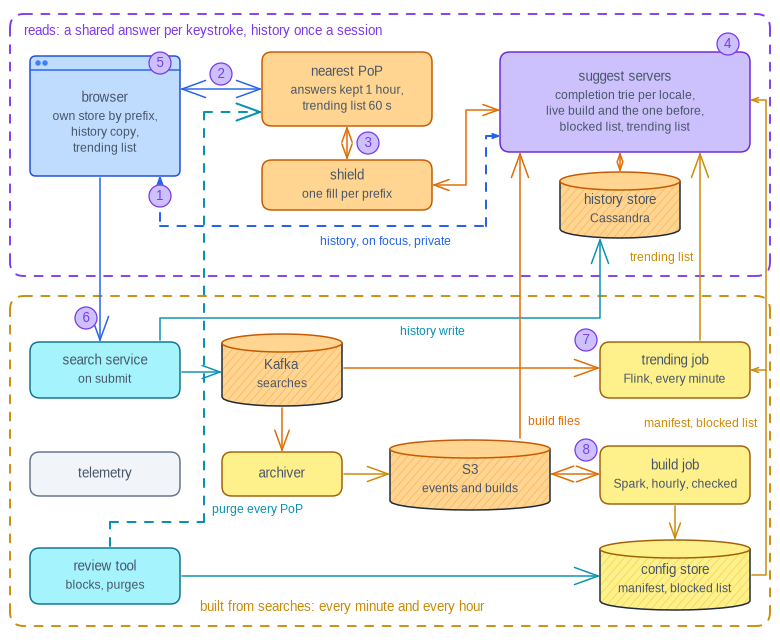
One search, end to end:
- The search box gets focus. The client fetches the user's history from the origin, kept private, and the locale's trending list from the nearest PoP.
- The user types. For each key, the client normalises the prefix, checks its own store and any
completeanswer, cancels the request for the previous prefix, and sendsGET /v1/suggest. - The nearest PoP answers from its cache, kept for an hour. On a miss it fills through the shield from the suggest servers in the nearest region.
- A suggest server walks the completion trie for the locale, searches best-first for
kplus a margin, drops anything on the blocked list, and returnsksuggestions. - The client puts matching history entries first, sorts trending queries into the shared answer by score, and draws the list within 100 ms.
- The user submits. The search service writes a search event to Kafka and a row to the history store, and the client adds the query to its own copy of the history.
- The trending job reads the event within seconds, and every minute it publishes a new trending list per locale, through the filters and the blocked list.
- On the hour, the build job adds today's distinct signed-in users to the decayed scores, filters, writes a completion-trie file per locale to S3, and checks it. The manifest moves it to canary servers, then to every server, and each server switches with one pointer.
The numbers behind the shape: 350,000 keystroke requests a second at peak against 23,000 searches. A 5.6 GB table on every server, answering a prefix in about 5 µs. A hit at the PoP on screen in 22 to 46 ms on Wi-Fi, and a suggest fleet of 12 servers.
What is expected at each level
How interviewers turn what they see into these levels is in How a System Design Interview Is Scored.
Mid-level
Breadth matters more than depth at this level, and it's fine to be led.
You should build the suggestions from logs of past searches, offline, and serve them from a trie that holds the top completions per prefix. You should explain why LIKE 'w%' on the search table fails for short prefixes. And you should cache answers, and say what the cache key is.
You aren't expected to raise edge lifetimes, trending or the client merge without being asked. You are expected to answer sensibly when asked "what if the table doesn't fit on one machine?" A good answer says how to split it, and what the short prefixes do to that split.
Senior
You drive the structure, and three things should come up without prompting.
The request rate per keystroke. About 15 requests per search, 350,000 a second at peak, and what the client and the edge take off it before the origin sees any.
The offline build. Count distinct users rather than repeats, and say how a signed-out user is counted. Say how often the table is rebuilt and how a new build goes live.
The short prefixes. They're the expensive case for computing an answer and the cheap case for caching one. Say both.
Two things are disqualifying: counting suggest requests as searches, and updating the serving trie in place on every search while it's being read.
Staff+
A correct design is still the bar. A staff+ answer also decides what not to build.
State that the answer is shared, and use it. No cookie on the suggest path, an hour at the edge, and the personal and trending parts merged on the device.
Price the lookup against the network. 5 µs against tens of milliseconds means the structure is chosen for its memory, and the latency is decided by where the answer comes from.
Replicate the table, don't shard it. 5.6 GB fits on every server, so there's no shard key, no hot shard and no rebalancing.
Give each kind of freshness its own path. An hour or two for the table, a minute or two for trending, seconds for a removal on the servers and minutes on devices. The purge waits until every server has the new list.
Be able to say what you would not build. No WebSocket for keystrokes, and no debounce that spends the latency budget. No sharded key-value cluster for a 5.6 GB table, and no trie updated in place. No per-user answer in a shared cache, and no build number in the URL. No sketch for counts that one streaming job can hold exactly. A team could spend a quarter on any one of these. Naming them as deliberate omissions is worth more than another box on the diagram.
Sources
The sizes and timings of the core structure come from one measured paper, and the product behaviour from what Google and Facebook have published. The traffic, the thresholds and the timings marked as assumed are this design's own.
- Bo-June (Paul) Hsu and Giuseppe Ottaviano, Space-Efficient Data Structures for Top-k Completion, WWW 2013. The completion trie, with the best score below each node, and sorted children so the queue takes only a first child and a next sibling. 112 bits a query, and 5.3 µs on average per top-10 lookup, on over 400 million queries from a commercial search engine. Also the point that storing the top k at each node fixes k and costs space, and a test model with keys 300 ms apart, at 40 words a minute.
- Google, Danny Sullivan, How Google autocomplete works in Search, 2018, and How Google autocomplete predictions are generated, 2020. Typing cut by about 25 percent, and up to 10 predictions on desktop and five on mobile. Trending predictions for rising interest, a cautious approach to names, and closely related predictions removed along with a reported one.
- Google Search Help, How Google autocomplete predictions work. The policy categories, the extra rules for elections, health and named people, history for signed-in users, and automated systems that try to block predictions before enforcement teams step in.
- Keith Adams, Facebook Engineering, The Life of a Typeahead Query, 2010. More than 100 ms makes typeahead stutter. The user's own connections fetched into the browser on focus, stateless aggregators merging global and personal services, and memcached for the global results because they're the same for everyone.
- Twitter's typeahead.js Bloodhound documentation, for a 300 ms debounce by default and a request to the network only when local results run short. RFC 9111, section 4.2.3, for a browser counting an answer's age from when the origin built it, Age header included.