"Design a web crawler" usually gets a queue of URLs, a pool of fetchers and a Bloom filter. Each fetcher takes the next URL, downloads the page and puts the page's links on the back of the queue. It looks finished on the whiteboard. In practice, within a minute it sends dozens of requests at once to one website.
The links on a page mostly point back to the same site, so they reach the queue together. 100 fetchers take the next 100 URLs, and most of them are on one host. Site owners block crawlers that do this.
The convention is one request at a time to a host, a few seconds apart. Common Crawl's crawler waits a few seconds between requests to the same site. IRLbot, a research crawler from Texas A&M, waited 40 seconds on hosts in low-ranked domains. This design starts at 5 seconds.
At 4,000 pages a second, that means at least 20,000 different hosts with a URL queued at every moment. No single host can give you more than one page every 5 seconds, whatever hardware you buy. More machines raise the total rate, as long as the frontier holds enough hosts, and they never raise one host's rate.
Politeness caps each host's rate, so a crawler's throughput comes from the breadth of hosts it keeps busy, and the frontier is a timetable of hosts, not a queue of URLs.
The fetching itself is cheap. IRLbot downloaded 6.4 billion pages in 41 days on one server in 2007. The work is in choosing which host goes next, and keeping thousands of hosts busy without touching any one too often. Meanwhile, the list of URLs to fetch grows about six times faster than the crawl can empty it.
Understanding the problem
The general method for this part of the interview is in The First Five Minutes: Requirements.
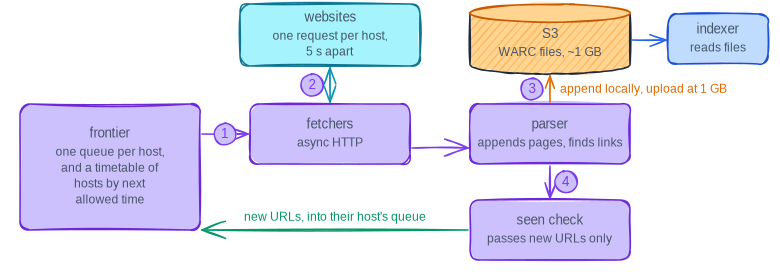
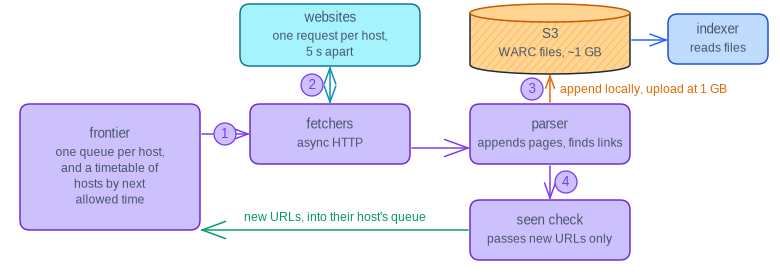
A crawler starts from a list of seed URLs. It downloads each page, finds the links in it, and adds the ones it hasn't seen before to the list of URLs still to fetch. That list is the frontier. The pages go to whoever needs them: a search index, an archive or a dataset.
People mean at least five different systems when they say "web crawler". Ask which one before you draw anything.
- A broad crawler for a search engine. It finds as much of the useful web as it can and keeps its copy fresh. This is the usual interview question.
- An archive. Common Crawl publishes a new crawl about once a month, 2.14 billion pages in August 2026. An archive keeps every capture, and it cares more about completeness than about freshness.
- A site crawler. One site, or a few, for site search or an audit. With one host, the crawl goes at whatever rate that host allows, and scale doesn't come into it.
- A monitor. A fixed list of URLs checked on a schedule, for prices or uptime. Nothing is discovered.
- Indexing and ranking. What happens to the pages after they're stored. Inverted indexes covers it, and search autocomplete covers the query box.
This design is the first one, a broad crawler. It stores what it fetches the way an archive does, as raw pages, so the index can be rebuilt without fetching the web again.
Functional requirements
Core:
- Discover and fetch pages. Start from seed URLs, download each page, extract its links, and queue the ones never seen.
- Be polite. Obey each site's robots.txt, and keep the load on every site low.
- Store every page fetched, raw and with its metadata, and store each distinct content once.
- Keep the copy fresh. Revisit pages, and spend the revisits where changes matter.
Out of scope, deliberately:
- Indexing, ranking and serving queries.
- Rendering JavaScript. A page that builds its content in the browser needs a headless browser for each fetch, which is a different cost model.
- Forms, logins and anything behind them.
- Judging page quality, beyond the budgets that stop spam from taking over the crawl (deep dive 3).
Non-functional requirements
- Throughput. 10 billion pages a month, about 4,000 a second.
- Politeness. At most one request in flight to a host. Requests to one host start 5 seconds apart by default, measured from one start to the next. The gap adapts to the site: longer if it's slow or its robots.txt asks for more, shorter for a large site that answers fast. A server that hosts many sites gets a limit of its own. A change to robots.txt takes effect within 24 hours.
- Freshness. Popular pages are revisited within a day. The rest are revisited as the budget allows.
- No silent loss. A page counts as fetched only once it's stored durably. Losing a machine costs some repeated fetches, never a gap.
- Memory that doesn't grow with the crawl. The frontier and the set of seen URLs grow every day, so neither may need to fit in memory.
Why 10 billion? Common Crawl's August 2026 crawl fetched 2.14 billion pages between August 7 and 20, about 1,770 a second. IRLbot averaged 1,789. A search engine keeps a larger copy and revisits it, so twice either rate, all month long, is a fair target. It's also large enough that no part of the crawl fits on one machine.
Requirement 2 carries the design. It decides how the frontier is built, how the crawl is split across machines and how traps are stopped. Write it down with its numbers, because "be polite" without a number gives the frontier nothing to enforce.
The question is what limits the crawl: our machines or
other people's servers. Size the fetch rate, then apply
the politeness rule to it.

Fetch rate
  pages a month                                   10B
  a month in seconds       30 × 86,400            = 2.59M s
  average                  10B / 2.59M s          ≈ 3,860/s
  design rate, rounded up                         4,000/s

Politeness: requests to one host start 5 s apart
  hosts with a URL queued, at the least
                           4,000/s × 5 s          = 20,000
  the most one host can give in a month
                           2.59M s / 5 s          ≈ 518,000 pages

For scale
  IRLbot on one server, 2007, average             1,789/s
  ─────────────────────────────────────────────────────────
A few servers can fetch 4,000 pages a second, and none of
them can make a host go faster. The crawl needs at least
20,000 hosts with work queued, and a site with a million
pages can't be finished in a month at this rate.
The set up
Core entities
- URL. A normalised address and its state: queued, fetched, or due for a revisit.
- Host. A scheme, a host name and a port, such as
https://www.example.com:443. This is the unit robots.txt applies to. A host also has an IP address, its robots rules, the gap between requests and the earliest time of its next request. The host is the entity the design turns on. Politeness, the split across machines, DNS and robots.txt are all per host. - Capture. One fetch of one URL: the status, the headers, the body and the time. It's stored as a WARC record. WARC, the Web ARChive format, is a file of many captures one after another, and it's the format Common Crawl publishes.
- Fingerprint. Two hashes of a page's content. One finds exact copies, and one finds near copies.
- Registered domain. The part of a host name someone paid a registrar for, such as
example.co.uk. Budgets apply to it (deep dive 3).
System interface
A crawler has no users sending it requests. Its interfaces are the request it sends to every site, the event it hands to the systems downstream, and a small API for operators.
CRAWLER → SITE, one fetch
GET /products/42 HTTP/1.1
Host: www.example.com
User-Agent: Mozilla/5.0 (compatible; ExampleBot/1.0; +https://example.org/bot)
Accept-Encoding: gzip, br
If-None-Match: "a1b2c3"
If-Modified-Since: Tue, 14 Oct 2026 08:12:00 GMT

CRAWLER → INDEXER, one event per capture, on Kafka
{ "url": "https://www.example.com/products/42",
  "fetched_at": "2026-11-02T09:14:03Z", "status": 200,
  "content_hash": "c9f04e1a77d2b310", "simhash": "5a1e09c3f2b47d18",
  "capture": { "file": "s3://crawl/2026/11/02/part-08812.warc.gz",
               "offset": 48213377, "length": 41208 } }

OPERATOR → CONTROL PLANE
POST /v1/seeds                        { "urls": [ ... ], "priority": "high" }
PUT  /v1/hosts/www.example.com/policy { "min_gap_s": 20, "blocked": false }
Three things to note.
The User-Agent names the crawler and links a page about it. RFC 9309, the Robots Exclusion Protocol standard, says the name a crawler looks for in robots.txt should appear in its User-Agent header. Here that's ExampleBot. A site owner who sees the traffic can then find out who you are and how to slow you down.
A revisit is a conditional request. If-None-Match and If-Modified-Since carry what the last fetch returned. If the page hasn't changed, the site answers 304 Not Modified with no body, so checking an unchanged page costs a few hundred bytes instead of the whole page. Google's crawl budget guide asks sites to support 304 for this reason.
The event carries a pointer, not the page. Readers fetch the bytes from S3 using the file, offset and length. That keeps each event to a few hundred bytes, and Kafka never holds a page body.
The control plane holds seeds, per-host overrides and blocks. It shares no state with the crawl loop except two columns on each host row, min_gap_s and blocked, which only the control plane writes and the crawl only reads. When a site owner complains, an operator changes that row, and the crawl obeys it at the host's next request.
High-level design
1. Discover and fetch pages
The Mercator paper, from Compaq's research lab in 1999, describes the loop every crawler runs. The crawler takes a URL from the frontier and resolves its host to an IP address. It downloads the page, extracts the links and makes each one absolute. Each link it hasn't seen before goes into the frontier.
A link is normalised before it's checked, because the same page has many spellings. The crawler lowercases the scheme and the host, drops the default port and the #fragment, and resolves ../ against the page it came from. It also strips query parameters known to carry session IDs. Without this step, HTTP://Example.com:80/a/../b and http://example.com/b count as two pages.
Two parts of that loop grow with the crawl: the frontier, and the check for links already seen.
The question is whether the frontier and the set of seen
URLs can live in memory. Size the stream of links, using
the ratios IRLbot measured over 6.4 billion pages.

Links
  links per page, after dropping invalid ones     ~59
  links to check           4,000 × 59             = 236,000/s
  share that is new, once the crawl settles      ~11%
  new URLs                 236,000 × 0.11         ≈ 26,000/s
  new URLs per fetch       26,000 / 4,000         ≈ 6.5

A month, if every fetch is a new page, as in IRLbot's crawl
  URLs discovered          26,000 × 2.59M s       ≈ 67B
  as 8-byte hashes         67B × 8 B              ≈ 540 GB
  not yet fetched          67B − 10B              ≈ 57B
  at ~110 B a queued URL   57B × 110 B            ≈ 6.3 TB
  ─────────────────────────────────────────────────────────
The frontier grows six times faster than the crawl empties
it, and a month of it is terabytes. It lives on disk, and
most of it is never fetched. The frontier is a choice of
what not to crawl.
So the frontier and the seen set live on disk, split across machines by domain (deep dive 4). Checking 236,000 links a second against 67 billion URLs is a problem of its own (deep dive 2).
Where does DNS go?
Every fetch needs the host's IP address, and DNS lookups were where Mercator stalled. Its resolver ran one uncached lookup at a time, and DNS took 87 percent of each fetch thread's time. A resolver of their own that ran lookups in parallel cut that to 25 percent.
The volume is small: IRLbot made 260 million DNS lookups over 41 days, about 73 a second. The problem is waiting. Nearly all of Mercator's DNS time went on waiting for remote name servers.
So keep DNS off the fetch path entirely. Each crawler machine runs a caching resolver of its own. A host is resolved when it first gets a queue in the frontier, long before its first fetch. The address is stored on the host's row with the record's expiry time, and a fetch reads the IP from that row.
When the record expires, the host is resolved again in the background and held out of the timetable until the answer comes back. The per-server limit in section 2 needs the IP anyway, so a host is never scheduled without a current one.
2. Be polite
Politeness has two parts. robots.txt says which URLs you may fetch. The gap between requests says how often.
What robots.txt says, and when it can't be read
A site's rules live at /robots.txt on each host, and they apply only to that scheme, host and port. A subdomain needs its own file. RFC 9309, published in 2022, standardised what had been a convention since the 1990s. Five of its rules matter here.
- Keep it for at most 24 hours. After that, fetch it again, unless the site is unreachable. The crawler fetches it before any page on a new host, which Mercator's paper describes as what the protocol requires.
- The longest matching rule wins. If an
allowrule and adisallowrule are the same length,allowwins. - A 4xx status means there are no rules. The crawler may fetch anything on the host. Google makes an exception for 429, Too Many Requests, and this design treats a 429 like a 5xx.
- A 5xx status or a network error means everything is disallowed. If that lasts a long time, 30 days in the standard's example, the crawler may treat the file as missing or keep using its last good copy.
- Parse at least the first 500 KiB. Google enforces exactly 500 KiB and ignores the rest.
The 5xx rule looks harsh, but it protects a server in trouble. A server that is failing returns 500 for everything, including robots.txt. If the crawler read that as "no rules", it would crawl at full rate exactly when the server could least take it.
Google adds a schedule to the 5xx rule. For the first 12 hours it stops crawling the site and keeps retrying robots.txt. Then, for 30 days, it uses the last good copy. After 30 days, it crawls as if there were no file, if the rest of the site is reachable.
This design stores the parsed rules on the host row with the time they expire, robots_until. Each URL is checked against them when the fetcher takes it from the queue, because the rules may have changed since the URL was queued.
Which URL goes next?
The rules say which URLs are allowed. The frontier decides the order, and requirement 2 says no host may get a request less than 5 seconds after its last one. So the question is what structure keeps the 20,000 hosts from the first worksheet busy and never breaks the gap.
One first-in, first-out queue of URLs
A single queue is the textbook crawl. Fetchers take URLs from the front, and new links go on the back. The crawl goes outwards from the seeds, one level of links at a time, which is called breadth-first search. Mercator notes that most crawlers worked this way.
It breaks on where links point. Many links on a page go to other pages on the same host, so they arrive in the queue together, dozens at a time. 100 fetchers taking the next 100 URLs send dozens of requests to that host at the same moment.
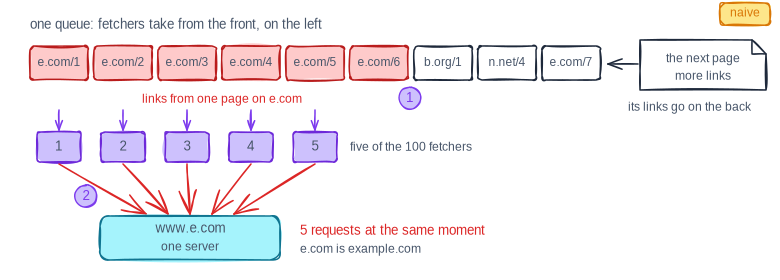
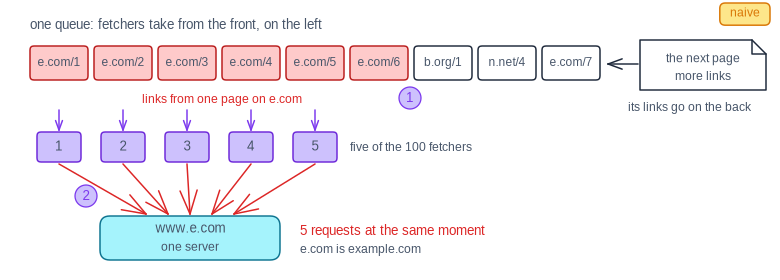
Making a fetcher skip URLs whose host is busy doesn't fix it. The front of the queue is thousands of URLs from a few hosts, and every fetcher scans past all of them to find one it may take.
One queue per host, and a heap ordered by each host's next allowed time
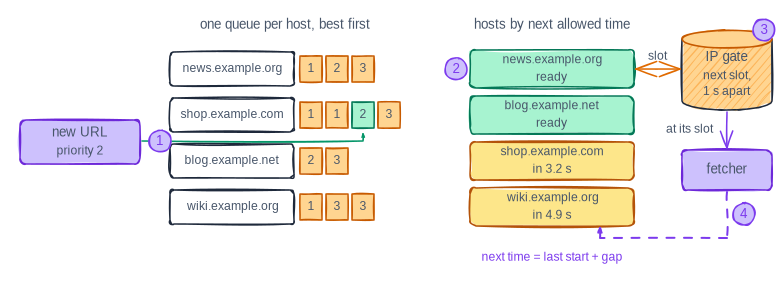
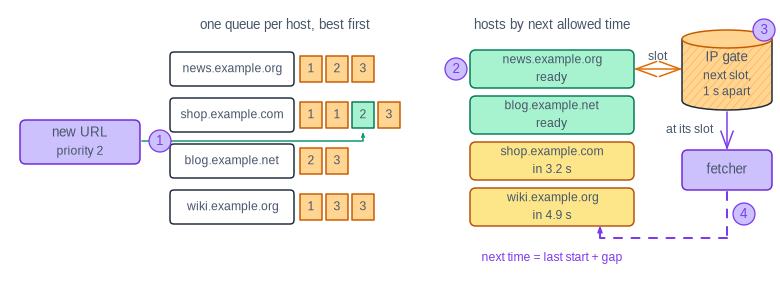
Each host gets its own queue, and the hosts sit in a heap ordered by the earliest time each may be contacted, next_fetch_at. A fetcher pops the host at the top of the heap, if its time has passed, and takes the URL at the front of that host's queue. The host's next time is set to the request's start plus its gap. It goes back into the heap when the response arrives, so a host never has two requests in flight.
Marc Najork and Allan Heydon described this frontier in 2001, in their later paper on Mercator. A prioritizer puts each new URL in one of several front queues, one per priority level. A router moves URLs from the front queues into back queues, each holding one host, and a heap orders the back queues by when their host may be contacted again. A back queue is refilled only when it empties, by drawing from a front queue chosen at random with a bias towards high priority.
This design keeps it simpler: each host's queue on local disk is sorted by priority, then by arrival, so the URL at its head is always the host's most important one. The heap decides only when the host is next.
The gap is 5 seconds by default, or 10 times the time the last response took if that's longer, or the robots.txt Crawl-delay if that's longer still. Najork and Heydon waited 10 times the last download's time before contacting a host again. A host that answers in 500 ms gets a request every 5 seconds. One that takes 2 seconds gets one every 20.
This is the standard design, and it keeps requirement 2 for every host. Its cost is that it takes the host to be the thing that gets overloaded.
Limit each server as well as each host, and let the server set the rate
Question the premise that the host is what needs protecting. The machine at the other end of the connection is what gets overloaded, and many hosts can share one machine.
IRLbot found that hosting services often put thousands of virtual hosts on one server, and many of those servers couldn't serve all their sites at once. With a gap per host only, 5,000 hosts on one IP address get one request each every 5 seconds: 1,000 requests a second to one machine.
IRLbot added a second gap per IP address, 1 second by default, kept in a second heap. Here the IP gate hands out slots rather than answering yes or no. When a host's turn comes, the frontier asks the gate for the IP's next free slot, at least 1 second after the last one it gave out. If that slot is later than now, the host is rescheduled for it. Each host holds a slot of its own, so the hosts on one IP never come back at once. A yes-or-no gate shared by 5,000 hosts would refuse 999 checks in every 1,000, and each refused host would ask again.
The second change is that the gap stops being a constant. 5 seconds is too slow for a large site that answers in 50 ms, and too fast for one that is already struggling. Start every host at the default. Lower the gap slowly while responses stay fast and error-free, down to a floor. Raise it at once on a 429, a 5xx or a slowdown.
The IP gap adapts the same way. An IP that turns out to be a content delivery network (CDN) in front of thousands of sites speeds up while it answers fast. Google's crawl budget guide describes the same loop for each site. Its crawl capacity limit, which Google also calls hostload, goes up while response times stay stable and down when the server slows or returns 5xx errors.
The trade, sized. A site with 50 million pages takes about 8 years at one request every 5 seconds, and about 4 months at one every 0.2 seconds. Only an adaptive gap lets the crawl finish large sites at all. In return, the hosts on a crowded IP share one request a second between them.
What you give up. Hosts on a shared server are crawled more slowly, though they did nothing wrong. A host can't be scheduled until DNS has resolved it, because the IP decides its second gap. And the gap becomes a control loop, so it needs a slow increase and a fast decrease, or it swings.
3. Store every page, and each content once
Each capture is written once, never changed, and read later by the indexer and by jobs that rerun old crawls. The question is where those bytes go, and in what units.
Which data store, and what actually forces it
The question is how to store 10 billion pages a month.
Size the bytes, then price the writes at the S3 list
prices on the object storage page.

Bytes, from Common Crawl's August 2026 crawl
  pages                                           2.14B
  uncompressed             360 TiB / 2.14B        ≈ 185 KB a page
  as compressed WARC       84.78 TiB / 2.14B      ≈ 44 KB a page
  our month                10B × 44 KB            = 440 TB
  storing it, 50 TB at $0.023 a GB and the rest at $0.022
                           $1,150 + $8,580        ≈ $9,730 a month

One object per page
  PUT requests             10B × $0.005 / 1,000   = $50,000 a month

Pages packed into files of about 1 GB
  files                    440 TB / 1 GB          = 440,000
  PUT requests             440,000 × $0.005/1,000 ≈ $2.20 a month
  ─────────────────────────────────────────────────────────
Writing each page as its own object costs five times as
much as storing a month of pages. Packed into 1 GB files,
the writes cost almost nothing.One Postgres table, with the page in a column
Put each capture in a row: the URL, the status, the headers and the body. Every question about a page is then one query, and it's the right first sketch.
It fails on size. A month of pages is 440 TB, and each month adds another. No single database holds that, and splitting one across machines just to store bytes that are never queried by their contents means paying database prices for archive storage.
Each page as an object in S3, and its metadata in a database
Put the body in an object store such as S3, keyed by a hash of the URL and the fetch time. Keep a small row per URL with the status, the time and the object key. This is how most systems store large blobs, and object and blob storage explains why.
The cost is the requests. S3 charges $0.005 per 1,000 writes, so 10 billion objects cost $50,000 a month to write, five times the $9,730 to store them. The object storage page puts the break-even at about 217 KB an object, and a compressed page is 44 KB. The indexer then needs 10 billion reads to get the month back, one per page.
Pack pages into large archive files, and point into them
Question the premise that a page is the unit of storage. Almost nothing reads one page at a time. The indexer and the reprocessing jobs read whole crawls.
Each crawler machine appends every capture to an open WARC file. Each record is compressed on its own as it's appended, so any record can be read alone. When the file reaches about 1 GB, it's closed and uploaded to S3 as one object. The URL's row stores the file name, the offset and the length of its record. Common Crawl stores its crawls the same way: the August 2026 crawl is 100,000 WARC files.
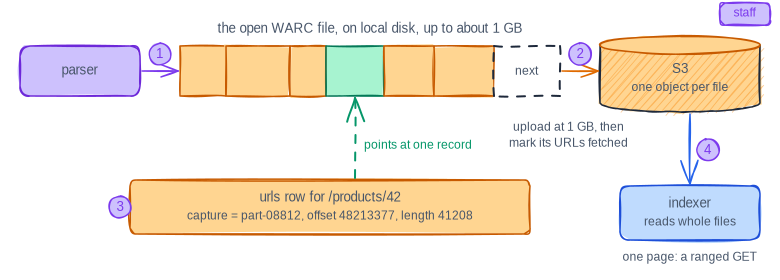
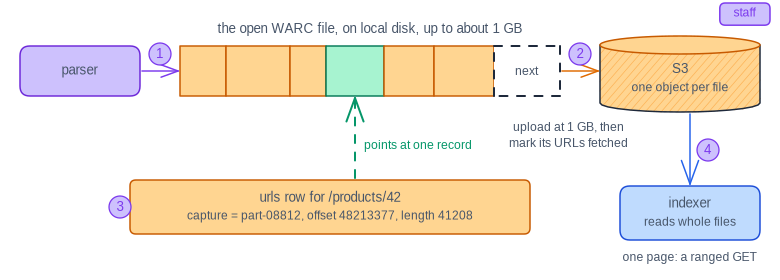
The trade, sized. The writes drop from $50,000 a month to about $2. A reader that wants one page makes a ranged GET using the offset and length, so single-page reads still work.
What you give up. A file can't be edited, so deleting one page, for a takedown, means a tombstone in the metadata or rewriting the file. The open file lives on one machine until it's uploaded, so a crash loses the captures in it, and deep dive 6 covers how they're fetched again.
The metadata needs a home too. It holds a row for every fetched URL, at least 10 billion of them, and more every month. It's written 4,000 times a second, always by the machine that owns the URL's host. It's read by URL, for the last fetch's headers and for the indexer. There are no transactions across hosts.
The write rate doesn't force anything, because one Postgres primary takes 4,000 writes a second. The row count does. Tens of billions of rows need splitting across machines, and the natural split key is the host. A wide-column store such as Cassandra or Bigtable splits by key, so it's the same design with less work. Choosing a database has the general comparison.
| data store | what goes in it | the requirement that forces it |
|---|---|---|
| S3, in WARC files of about 1 GB | every capture: status, headers, body | 440 TB a month, and $50,000 a month of writes as separate objects |
| Cassandra, keyed by host | hosts, URL state, content hashes | tens of billions of rows, one writer per host |
| local disk on each crawler machine | per-host queues, the revisit schedule, the seen-URL hashes | 236,000 checks a second, and a frontier that grows by terabytes a month |
| Kafka | links on their way to another partition, and a capture event for each page | readers that may lag, and replay after a machine fails |
The tables
-- Cassandra. Every table but one is keyed by host, so the crawler
-- machine that owns a host is the only writer of its rows.
hosts (
  host          text primary key,    -- 'https://www.example.com:443'
  domain        text,                -- registered domain, for budgets
  epoch         int,                 -- lease epoch of the owner, deep dive 6
  ip            inet,
  ip_expires    timestamp,           -- the DNS record's expiry
  robots        blob,                -- parsed rules for our product token
  robots_until  timestamp,           -- fetch robots.txt again after this
  gap_ms        int,                 -- current gap between requests
  min_gap_s     int,                 -- operator's floor, control plane only
  blocked       boolean              -- operator's block, control plane only
)

urls (
  host          text,
  bucket        smallint,            -- url_hash mod 256
  url_hash      bigint,
  url           text,
  fetched_at    timestamp,
  status        smallint,
  etag          text,                -- for the next conditional request
  last_modified text,
  content_hash  bigint,              -- exact copies
  simhash       bigint,              -- near copies, deep dive 5
  checks        int,                 -- revisits so far
  changes       int,                 -- revisits that found a change
  capture       text,                -- WARC file, offset, length
  primary key ((host, bucket), url_hash)
)

contents (
  content_hash  bigint primary key,  -- keyed by the bytes, not the host
  capture       text                 -- where the stored copy is
)

-- Local disk on each crawler machine, per partition, in RocksDB:
--   queue/{host}/{priority}/{seq} → url    each host's queue, best first
--   due/{host}/{due_at}/{url_hash}         the revisit schedule
--   seen runs                              sorted 8-byte URL hashes
Three things to note.
Rows are keyed by host, and a large host is split into buckets. Only one crawler machine writes a host's rows, so there are no write conflicts and no cross-machine transactions. Without the bucket, a 50-million-page host at about 200 bytes a row would be one 10 GB Cassandra partition. With 256 buckets, each holds about 40 MB.
The revisit schedule isn't in Cassandra. It's a queue: each row is read once and deleted. In Cassandra a delete leaves a tombstone, a marker that later reads have to step over, so a queue there slows down as it's used. The schedule lives in the partition's local store instead, in time order per host, and it's checkpointed with the queues (deep dive 6).
The content table is keyed by the bytes. Copies of a page sit on different hosts, on mirrors, so contents is keyed by the content hash and points at the stored copy. It's one of three checks on the fetch path that leave the partition, with the IP gate and the SimHash tables.
The queries that carry the product
-- 1. Before a revisit: the headers for the conditional request.
SELECT url, etag, last_modified, content_hash, checks, changes
FROM urls WHERE host = ? AND bucket = ? AND url_hash = ?;

-- 2. Before appending a capture: is this body already stored?
SELECT capture FROM contents WHERE content_hash = ?;

-- 3. Once the WARC file is in S3: each new body, then each URL.
INSERT INTO contents (content_hash, capture) VALUES (?, ?);
UPDATE urls SET fetched_at = ?, status = ?, etag = ?, last_modified = ?,
  content_hash = ?, simhash = ?, checks = ?, changes = ?, capture = ?
WHERE host = ? AND bucket = ? AND url_hash = ?;

-- 4. Fill a host's queue with revisits that are due: a local range
--    scan from due/{host}/ to due/{host}/{now}, at most 100 entries.

-- 5. The indexer reads one page: the row, then a ranged GET.
SELECT capture FROM urls WHERE host = ? AND bucket = ? AND url_hash = ?;
--   GET s3://crawl/2026/11/02/part-08812.warc.gz
--   Range: bytes=48213377-48254584
Queries 2 and 3 run for every capture, about 4,000 times a second. Query 4 is the one an interviewer pushes on, because it's where revisits meet discovery: a host's due revisits and its new URLs go into the same queue.
Query 2 has a gap. A body's contents row appears only once its file reaches S3, and one machine fills a 1 GB file in about 90 seconds, at 176 MB/s split over 16 machines. So for a minute or two, a new body is invisible to query 2. Each machine also keeps the hashes in its own open file in memory and checks them first, which catches repeats from one host, such as session-ID copies.
Two machines can still store the same body from two mirrors inside that window. That costs one extra copy of one page, so the design accepts it rather than adding a transaction.
Exact copies
Many pages are the same bytes under different URLs, on mirrors or behind session IDs that normalisation didn't catch. In Mercator's 8-day crawl, 8.5 percent of successful fetches were copies of pages already fetched. A Google study reported by the IRLbot paper found 25 to 30 percent of its downloaded pages were identical to another.
So each body is hashed before it's appended, and query 2 looks up the hash. If the bytes are already stored, the crawler appends a WARC revisit record instead: a short record that names the stored copy rather than repeating the body. It doesn't extract the links again either. Mercator made the same choice, because the links on a copy mostly lead to more copies.
The contents row is written only once its file is in S3, by query 3. So it never points at bytes that a crash could still lose.
4. Keep the copy fresh
A page you fetched last month may have changed. A revisit is the conditional request from the interface, so an unchanged page costs little to check. But each revisit is a fetch that could have gone to a new page, so the question is how to spend revisits.
Junghoo Cho and Hector Garcia-Molina studied this at Stanford, in a paper published in 2000. They fetched about 720,000 pages from 270 sites every day for four months. About 23 percent of the pages changed more than once a day.
Revisit each page in proportion to how often it changes
It sounds right: a page that changes ten times as often gets ten times the visits. It's the obvious first answer.
Cho and Garcia-Molina showed it's the worst of the policies they tested. They modelled 100 million pages, each revisited once a month on average, with change rates from their data. Revisiting in proportion to change gave an average freshness of 0.12: at any moment, 12 percent of the copies matched the live pages. Revisiting every page equally often gave 0.57.
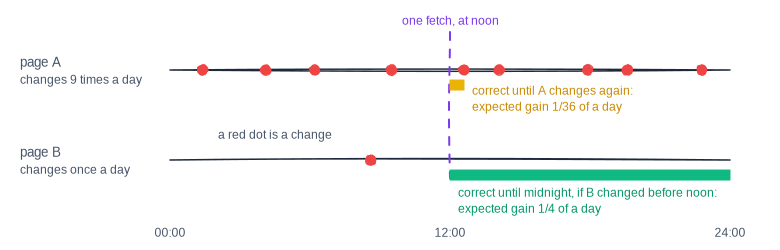
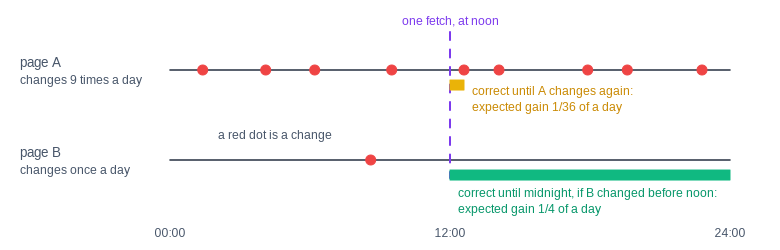
The reason is that a page that changes every hour is out of date again within an hour of any visit. Visits spent on it buy almost nothing, and they come out of the budget of slow pages, where one visit stays correct for weeks.
Estimate each page's change rate, and choose the interval that buys the most freshness
Every revisit tells you whether the page changed: a 304, or the same content hash, means it didn't. Count both on the URL's row, checks and changes, and estimate each page's rate of change from them. Then pick each page's revisit interval to get the most freshness per fetch. Cho and Garcia-Molina's best policy landed between equal and proportional revisits, and gave up on pages that change faster than the budget can follow. It reached 0.62, against 0.57 for equal revisits.
This is the standard answer. Its cost is in the objective. Average freshness counts a page nobody reads the same as a news site's front page.
Weight each revisit by what a stale copy costs
Question the premise that every stale page costs the same. A stale copy costs something when someone reads it: a search result that shows yesterday's price or a dead link. So multiply each page's expected freshness gain by its importance, and revisit in that order. Importance comes from downstream: how often the page appears in results, and how many sites link to it. Google's crawl budget guide says the same: URLs that are more popular on the internet are crawled more often.
The trade, sized. Revisiting the 100 million most important pages every day costs 100 million fetches a day, about 1,160 a second, 29 percent of the 4,000. The rest of the budget goes to discovery and to the long tail.
The revisit and the new URL compete inside each host, not across the crawl. A host gets one request every 5 seconds, about 17,000 a day. A news site's front page revisited every hour takes 24 of them. Query 4 puts due revisits into the same host queue as new URLs, and the queue's priority order decides between them.
What you give up. The crawler now needs an importance score fed back from the index, which is a dependency in the other direction. Pages nobody reads may be months stale. And a new page on a busy host waits behind that host's revisits.
Deep dives
Deep dives 2 and 3 come up in most versions of this interview. Deep dives 4 and 6 come up at senior level and above.
1. How many servers, and what actually needs scaling?
The question is how many machines, and which resource
sets the number. Size each one separately.

Fetching
  pages                                           4,000/s
  open connections, ~1 s a fetch, assumed
                           4,000 × 1 s            ≈ 4,000
  network in, if nothing came compressed
                           4,000 × 185 KB         ≈ 740 MB/s ≈ 5.9 Gb/s

Parsing
  HTML to parse, at most                          740 MB/s
  at ~50 MB/s a core, assumed
                           740 / 50               ≈ 15 cores

Writing
  to S3                    4,000 × 44 KB          = 176 MB/s
  one 1 GB file about every                       6 s

Frontier and seen set, after a month
  queued URLs on disk                             ≈ 6.3 TB
  seen-URL hashes                                 ≈ 540 GB

Checkpoints to S3, every hour (deep dive 6)
  a full snapshot          6.3 TB + 540 GB        ≈ 6.8 TB/h
                           6.8 TB / 3,600 s       ≈ 1.9 GB/s
  only what changed: new URLs, queued and hashed
                           26,000/s × 3,600 s     ≈ 93.6M/h
                           93.6M × (110 B + 8 B)  ≈ 11 GB/h

On 16 machines
  pages per machine        4,000 / 16             = 250/s
  frontier per machine     6.3 TB / 16            ≈ 390 GB
  ─────────────────────────────────────────────────────────
No resource needs more than a few machines. IRLbot ran at
1,789 pages a second on one server. Sixteen is set by how
much one failure may take away, a sixteenth of the crawl,
and by a frontier that fits on each machine's local disk.
A full hourly snapshot would be 11 times the WARC writes,
so checkpoints upload only what changed.
The fleet is small because the work per page is small: one HTTP request, one parse, one append. A few thousand open connections fit in one process that uses asynchronous I/O. Only the frontier grows, and it grows on disk.
More machines do raise the crawl's rate, as long as the frontier holds enough hosts. Doubling to 8,000 pages a second needs at least 40,000 hosts with a URL queued, and about twice the fetch and parse capacity. Breadth isn't short: Common Crawl's August 2026 crawl reached 40.2 million hosts. No number of machines raises one host's rate.
2. Have we seen this URL?
Every link goes through the seen check, 236,000 a second, against a set that grows by 26,000 URLs a second. A wrong "seen" means a page is never fetched, and nothing reports it. Bloom filters and probabilistic structures works through why a filter alone loses pages for good, and puts an exact check behind it.
Look up every link in one shared set
Keep every URL seen in a Redis set, or in a table with a unique index, and look each link up before queueing it. It's exact and simple.
It fails on size and on round trips. 67 billion URLs a month at IRLbot's average of 70.6 bytes is 4.7 TB of text, before any per-key overhead, and it grows every month. Every one of the 236,000 links a second makes a network round trip to ask.
A Bloom filter in front of an exact set of hashes
Store each URL as an 8-byte hash instead of its text, so a month is 540 GB. Put a Bloom filter in front, at 1 percent false positives, about 9.6 bits a URL. When the filter says "definitely not", the URL is new, and no lookup is needed. When it says "probably yes", the exact set confirms it. This is the decision the Bloom filter page reaches, and it never loses a page to the filter.
Its cost comes from the mix of links. IRLbot measured that, once the crawl settled, only 11 percent of links were new. The other 89 percent point at URLs already seen, and for each of those the filter says "probably yes". So 210,000 links a second still read the exact set.
Answer the common case from a cache, and check the rest in batches
Question two premises: that the cheap answer should be "new", and that each link needs its answer at once.
The cheap answer should be "seen", because most links are. Links to home pages, navigation and popular articles repeat across millions of pages, so an in-memory cache of popular URL hashes answers them. A cache hit is exact, since everything in the cache was seen.
The cache's size is set by the links parsed between two visits to the same host, because that's where repeat links come from. IRLbot measured it. At billions of pages, a cache of 256K entries hit only 16 to 19 percent, and a cache 10 times that interval's link count hit 73 percent. Here the interval holds 5 s × 59 links × 4,000 pages a second, about 1.2 million links. So the cache needs about 12 million entries across the fleet, about 25,000 per partition, a few hundred MB in all.
The rest can wait. A new URL won't be fetched for hours, because the frontier holds far more than the crawl can fetch. So each partition buffers its misses, sorts them by hash every 10 minutes or so, and merges them with its sorted file of seen hashes in one sequential pass.
The pass reads the file once, finds which buffered hashes are new, and writes the file back with them added. IRLbot's DRUM structure works this way. It kept up with up to 184,000 links a second on one server, reading and writing its disks only in sequence.
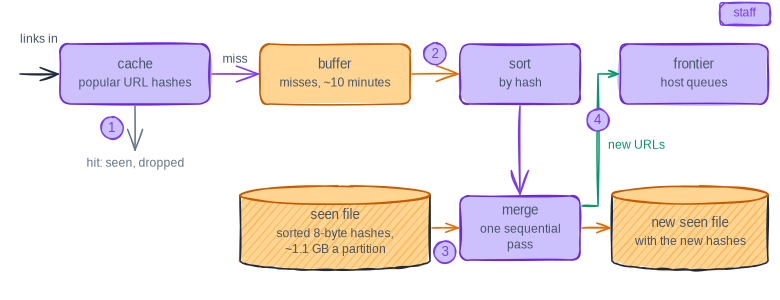
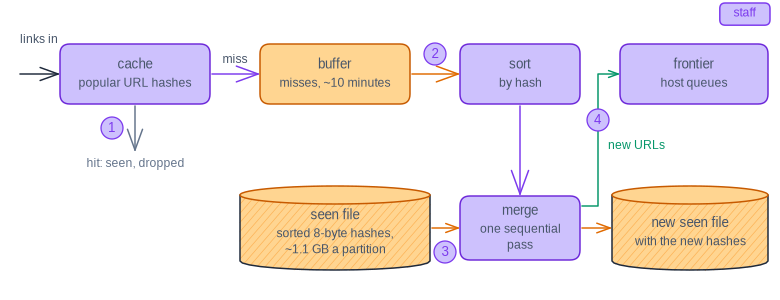
The split by domain in deep dive 4 makes most of this local. A link is checked by the partition that owns its host, and most links point back to the domain they were found on.
The question is how much work reaches the seen file, with
the cache sized from IRLbot's measurements.

Cache
  links parsed between two visits to a host
                           5 s × 59 × 4,000/s     ≈ 1.2M
  ten times that, across the fleet                ≈ 12M entries
  per partition, 480 of them (deep dive 4)
                           12M / 480              ≈ 25,000

Checks
  links to check                                  236,000/s
  answered by the cache    × 73%                  ≈ 172,000/s
  left for the batch       × 27%                  ≈ 64,000/s
  per partition            64,000 / 480           ≈ 133/s

Each partition's seen file after a month
  per partition            540 GB / 480           ≈ 1.1 GB
  one merge every 10 min reads 1.1 GB and writes 1.1 GB
  ─────────────────────────────────────────────────────────
A partition merges about 80,000 buffered hashes with a
1.1 GB file every 10 minutes, all of it sequential, and
the file can grow for years without needing more memory.
The trade, sized. A new URL reaches the frontier up to 10 minutes late, and it was going to wait hours anyway. The file is rewritten on every pass, which is 2.2 GB of disk traffic per partition every 10 minutes.
What you give up. Hashes collide. With 8-byte hashes, the expected number of URLs lost to a collision is about N² / 2^65. For 67 billion URLs that's about 120 a month, against 670 million a month for a 1 percent filter with nothing behind it. So "exact" here means about one URL in 500 million is lost, and that's a number you can say in the interview.
3. Crawler traps
A crawler trap is a set of URLs that never ends. Some are accidents: a calendar with a "next month" link forever, a file-system link that loops, or a shop whose filters and sort orders combine into millions of URLs for the same products. Some are deliberate, built to catch crawlers or to inflate links to a spam site.
IRLbot found that a breadth-first crawl eventually meets a site whose pages branch so fast that, three or four levels in, its URLs fill most of the queue.
Five defences, cheapest first.
- URL rules. Normalise, cap URL length and path depth, and strip session parameters.
- A budget per host. Each host may have a set number of pages fetched each day, and its queue is cut off there.
- A budget per registered domain, set by reputation. All hosts under
example.co.ukshare one budget, and the budget grows with the number of other domains that link in. - Copies as a signal. A host whose new pages are mostly near copies of each other loses priority (deep dive 5).
- A person. An operator blocks a host through the control plane.
Mercator's authors knew of no automatic way to avoid traps. They spotted each trap by its huge number of URLs, then excluded the site by hand. An operator's block through the control plane does the same job here.
The politeness gap already limits the damage in one way. A trap on one host gets one request every 5 seconds, however many URLs it generates, so it can't take over the fetchers. It takes over the frontier instead: millions of queued URLs that are never worth fetching. A budget per host stops that.
A trap that generates host names gets around the per-host budget. Every new host name is a new host, with its own budget and its own slot in the timetable. IRLbot met domains that created new host names faster than its DNS resolver could keep up.
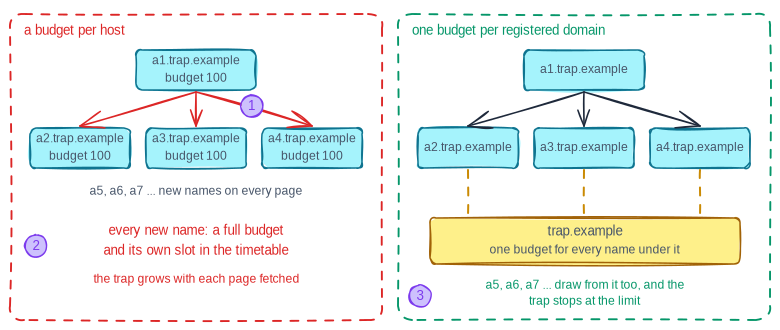
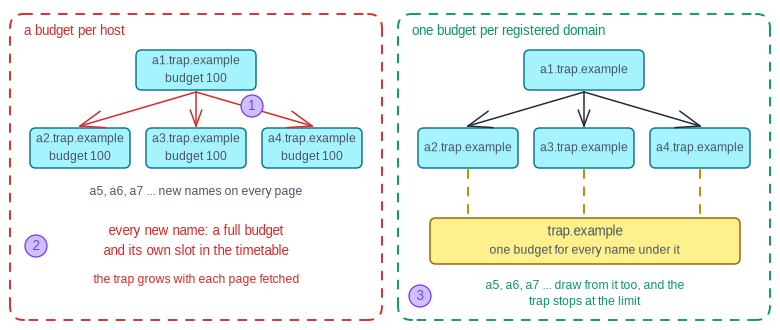
So the budget belongs to the registered domain. The size of the budget is the hard part, because a cap on pages or hosts per domain also stops legitimate giants. IRLbot's paper notes that Yahoo reported 1.2 billion objects in its own domain, and blogspot over 50 million users, each with a host name of their own.
IRLbot's answer, called STAR, ranked each domain by the number of other registered domains linking to it. A spammer can create unlimited pages and host names for free. Each linking domain, though, has to be bought from a registrar.
The top 10,000 domains got budgets between 10 and 10,000 pages, interpolated by rank, and every other domain got 10. The same budget also scaled down the domain's gap, so a domain with many incoming links was crawled faster as well as further.
Two more limits stop a slow trap. A fetch times out, after 1 minute in Mercator, and a body is cut off at a fixed size: 1 MB in Mercator, 5 MiB in Common Crawl.
IRLbot also met sites that deliberately delay every HTTP and DNS response to a crawler's IP address. The timeout limits what each one costs.
4. Splitting the crawl across machines
Split the crawl by registered domain. Hash each URL's domain to one of 480 partitions, and map partitions to machines with a table, 30 per machine on 16 machines. A partition owns every host under its domains: their queues, their place in the timetable, their seen hashes, their budgets and their rows in Cassandra. No two machines ever decide when to fetch from the same host, so the host gap needs no coordination at all.
The domain is the key, not the host, because the trap budget in deep dive 3 belongs to the domain, so all its hosts must be counted in one place. IRLbot ran on one server, but its authors note that a distributed version would have to assign URLs to servers by domain for this reason.
The registered domain comes from the Public Suffix List, the list of suffixes under which anyone can register a name. Its private section includes blogspot.com and github.io, so each blog and each GitHub Pages site counts as a domain of its own, with its own budget and partition.
A fixed count with a table follows partitioning and sharding. 480 divides evenly by many machine counts, and moving a partition moves its files without changing which hosts it holds.
Hashing each URL instead spreads the work just as evenly, and it breaks politeness. Every machine would fetch from every host, so each fetch would need to ask a shared counter whether the host's gap had passed. That's 4,000 coordination calls a second, and two machines can still both pass the check in the same instant.
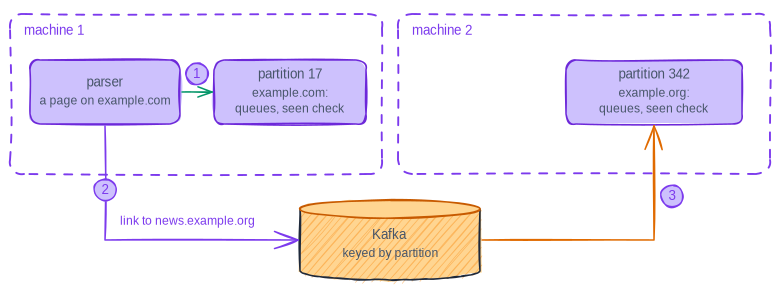
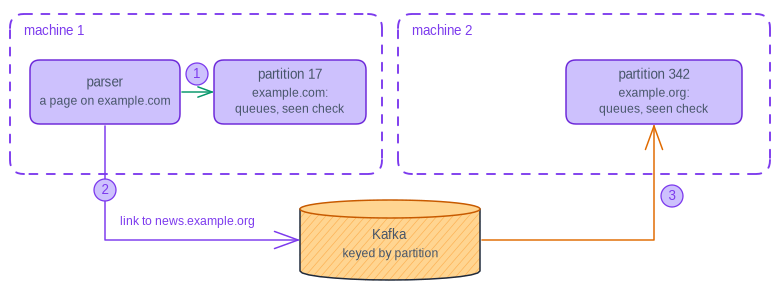
Most links stay where they were found. IRLbot estimated that with URLs assigned to servers by domain, over 80 percent of parsed links stay on the server that found them. Those go straight to the partition's own seen check. The rest, under 20 percent, about 47,000 a second, go onto Kafka keyed by partition. Kafka also gives a failed partition a log to replay (deep dive 6).
The IP gate is the one politeness check that crosses partitions. Unrelated domains share servers, so the hosts behind one IP land in many partitions. So the gate from section 2 lives in Redis, shared by every partition, like the counters in the distributed rate limiter. Each host's turn is one atomic call that takes the IP's next free slot. That's at most 4,000 calls a second.
There's no hot host, but there can be a hot domain. The gap caps every host at one request every few seconds, however popular it is. The skew shows up in queue length instead. Common Crawl's August 2026 crawl spread 2.14 billion pages over 40.2 million hosts, about 53 pages each, while a large site has millions of URLs. So a partition that holds a giant site holds a large queue on disk, and its fetch rate stays normal.
A domain with millions of hosts is different, if it isn't on the suffix list. All its hosts sit in one partition, each allowed a request every 5 seconds, so only the domain budget and the IP gate cap that partition's rate.
5. Near copies
Exact hashing misses copies that differ by a few bytes. Two copies of an article differ in an ad, a timestamp or a visitor counter, and their hashes have nothing in common. The Google study that IRLbot cites found a further 1.7 to 2.2 percent of pages were near copies. Gurmeet Manku, Arvind Jain and Anish Das Sarma described Google's method for finding them in 2007.
SimHash turns a page into a 64-bit fingerprint where similar pages get similar fingerprints. Each word or phrase on the page gets a weight and a 64-bit hash. Each of the 64 bit positions keeps a running total. A phrase adds its weight to the total where its hash has a 1, and subtracts it where its hash has a 0. The sign of each total becomes that bit of the fingerprint. Changing a few words moves a few totals, so it flips only a few bits.
They tested it on 8 billion pages and declared two pages near copies when their fingerprints differ in at most 3 of the 64 bits. At that setting, about 75 percent of the pairs it flagged were near copies when checked by hand, and it found about 75 percent of the near copies in the sample.
Finding fingerprints within 3 bits of a new one, among billions, is the hard part. Trying every fingerprint within 3 bits of the new one means 43,745 lookups. The paper's answer splits the 64 bits into blocks. If two fingerprints differ in at most 3 bits and there are 4 blocks, at least one block is identical. So keep 4 copies of the fingerprint table, each sorted by a different block. A lookup finds the fingerprints that match exactly on each copy's block, then compares all 64 bits of each one.
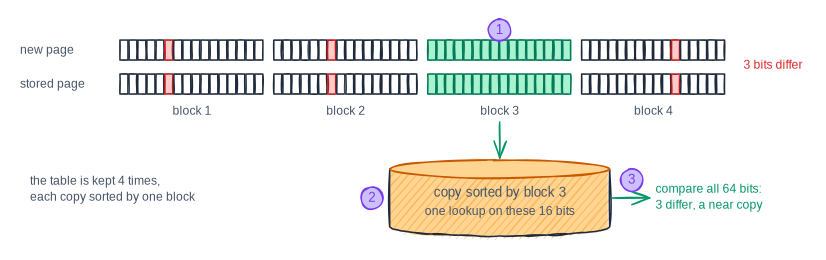
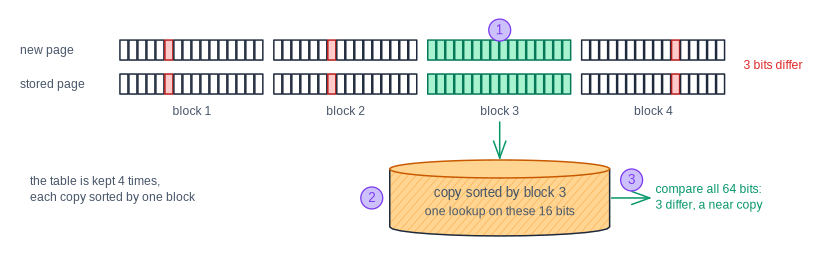
With 8 billion fingerprints, though, a 16-bit block matches about 122,000 of them, too many to compare on every lookup. So the paper splits the bits more finely and keeps more copies. With 6 blocks, 3 differences leave at least 3 blocks identical, and one copy for each choice of 3 blocks makes 20 copies. A lookup then matches on 31 to 33 bits and compares 1 to 4 candidates.
One copy of 8 billion fingerprints is 64 GB, compression halves it, and 20 copies come to about 640 GB across machines. New fingerprints go into a small table in memory, which every lookup also checks, and that table is merged into the sorted copies now and then.
Precision and recall are both near 75 percent, and near copies are only about 2 percent of pages beyond the exact ones. So a near copy can't be grounds for deleting anything. The paper says the same: near-copy detection may be one of a few scores that set a URL's crawl priority. Here, a near copy is still stored, its links drop to a lower priority band, and the index decides whether to show it.
6. What fails, and what a restart costs
Take the failures in order of how often they happen.
A site is slow or down. Its gap grows with each error or timeout, and its queue waits. A 5xx on robots.txt stops the host entirely, as section 2 describes. No other host notices.
DNS is slow. Hosts with an unexpired address on their row carry on. New hosts, and hosts whose record expired, wait to be resolved, which delays them and nothing else.
S3 is slow. Each machine keeps its open and finished WARC files on local disk until they upload. If the backlog grows past a limit, the machine stops taking hosts from the timetable. That slows the crawl and loses nothing.
A crawler machine dies. Its 30 partitions move to other machines. Each partition writes a checkpoint to S3 every hour, right after a seen-check merge, so the buffer of unchecked links is empty. The checkpoint records the Kafka offset as of that merge. A URL a fetcher has taken stays in the checkpointed queue, marked in flight, until its WARC file is in S3. Mercator checkpointed too, about once a day.
The checkpoint uploads only what changed since the last one: new queue and schedule entries, the newly seen hashes as a sorted run, and each queue's head position. A full snapshot would be about 6.8 TB an hour after a month, 11 times the WARC writes (deep dive 1).
The new owner loads the checkpoint and replays Kafka from the saved offset, which brings back every link other partitions sent since. Pages fetched after the checkpoint are back in the restored queues, so they're fetched again, and their own links are found again. A crash can repeat a page but never skip one.
An hour of one partition is about 30,000 pages, at 4,000 a second spread over 480 partitions. A repeated fetch costs the site one more request, and the content table turns the copy into a revisit record.
Politeness can break during the handover. If the old owner was only paused, by a long garbage collection or a network split, it can wake up still fetching from its hosts while the new owner starts on them too. Then a host gets two requests inside its gap.
So ownership is a lease with an epoch number, held in a coordination service such as etcd or ZooKeeper. The owner checks its lease before each request, and it stops when its own clock says the lease has expired, slightly before the coordinator's deadline. The new owner waits one gap before its first fetch from any host.
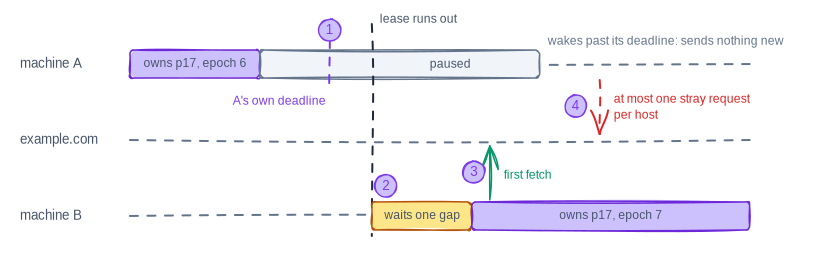
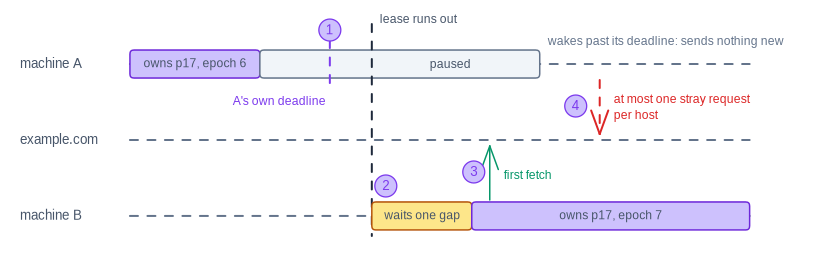
A request to a website can't be fenced, so at most one stray request per host is possible: one the old owner had already decided to send when it paused.
The data can be fenced. Before its first fetch from a host, the new owner stamps its epoch on the host's row. Every write the owner makes to a host row is conditional on its epoch, UPDATE hosts ... IF epoch = 7 for B, so a late write from A, conditional on epoch 6, fails. The control plane's writes are plain writes to min_gap_s and blocked, columns no owner ever writes, so they need no epoch. Cassandra runs each conditional write as a lightweight transaction, one Paxos round, and host rows change far less often than URL rows. A late write to a URL's row isn't fenced, and it does no harm, because the capture it records did happen.
7. How do you know it is working?
During an incident, you need four answers quickly: is the crawl at its rate, is it polite, is the frontier healthy, and is any stage of the loop failing.
- Pages a second against 4,000, and hosts with a URL queued against 20,000. Also track hosts past their next allowed time that no fetcher has taken yet. A few are normal. If that backlog grows while the rate is short, the fetchers are the problem. If hosts with a URL queued fall towards 20,000, the frontier is.
- Requests to one host inside its gap. This must be zero. One request inside the gap means two machines think they own the same partition.
- Queue growth per host and per domain. The fastest-growing queues are where traps show up first.
- Robots.txt failures, the copy rate, and upload lag. A jump in 5xx answers to robots.txt, in the share of copies, or in WARC files waiting to upload each points at one part of the loop.
Final design
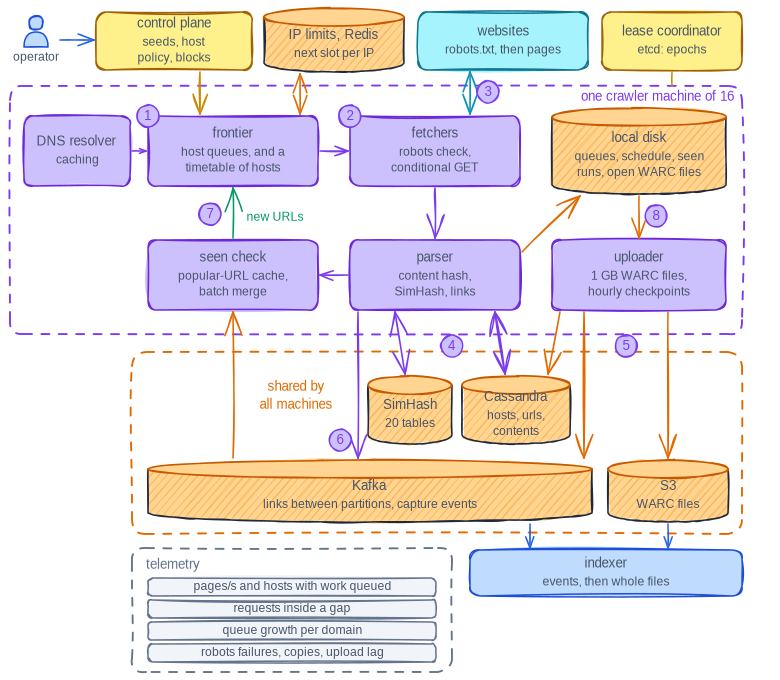
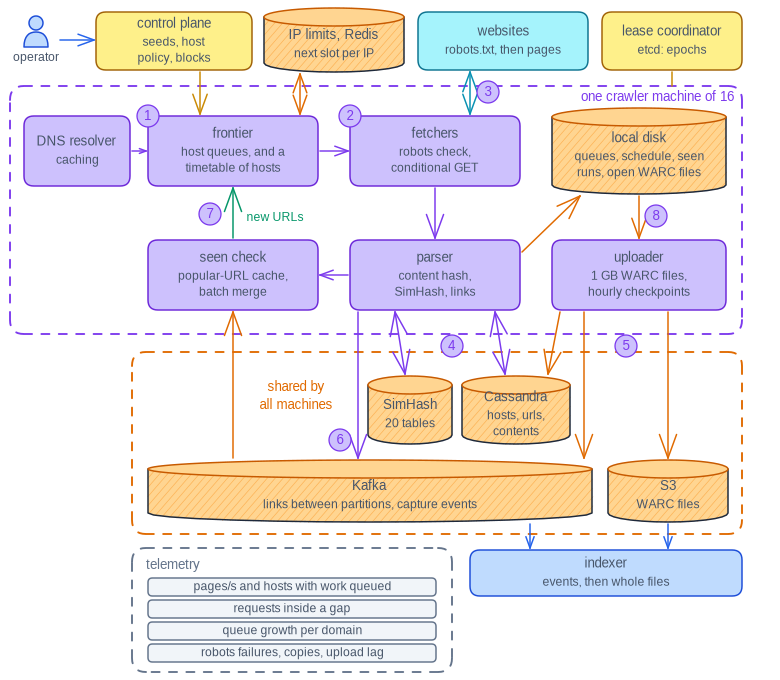
One URL, end to end:
- The frontier pops the host at the top of its timetable whose next time has passed, a time set from a slot the IP gate in Redis handed out. The URL at the head of the host's queue is next.
- The fetcher checks the URL against the host's robots rules, refreshed within 24 hours, and reads the host's current IP from its row.
- The fetcher sends the request, conditional if it's a revisit. The host goes back into the timetable at the request's start plus its gap, which adapts to how the site responded.
- The parser hashes the body and checks it against its open file's hashes and the content table. A copy becomes a short revisit record. Anything else is appended to the open WARC file, and its SimHash is checked against the near-copy tables, which can lower its links' priority.
- At about 1 GB, the uploader sends the file to S3. Only then do its URLs count as fetched, their rows and new content hashes go to Cassandra, and a capture event for each goes to Kafka for the indexer.
- The parser extracts and normalises the links. A link whose domain belongs to the same partition goes straight to its seen check. Any other goes to Kafka, keyed by its domain's partition.
- The partition that owns the link's domain checks it against the cache of popular URLs, then in the next batch merge. A new URL joins its host's queue in priority order, within the domain's budget.
- The URL's next revisit time goes into the partition's local schedule. Every hour, right after a merge, each partition uploads what changed in its queues, schedule and seen hashes to S3.
The numbers behind the shape: 4,000 pages a second at one request per host every 5 seconds needs at least 20,000 hosts with a URL queued. The 236,000 links a second they produce are mostly seen already, and 440 TB a month of pages go to S3 in 1 GB files. Sixteen machines carry it, sized by failure and disk rather than by fetching.
What is expected at each level
How interviewers turn what they see into these levels is in How a System Design Interview Is Scored.
Mid-level
Breadth matters more than depth at this level, and it's fine to be led.
You should draw the loop: frontier, fetch, store, parse, seen check, back to the frontier. You should know that robots.txt exists and must be obeyed, and that two URLs can point at the same page. You should store pages outside the database.
You aren't expected to size the frontier or to know the robots.txt status rules. You are expected to answer sensibly when asked "what stops you hitting one site too hard?" A good answer is one queue per host with a wait between requests.
Senior
You drive the structure, and three things should come up without prompting.
The frontier is organised by host. One queue per host and a timetable of next allowed times, with the number of hosts that must have work queued worked out from the rate and the gap.
The seen check, sized. 236,000 links a second, mostly already seen, against a set that doesn't fit in memory. Say where the exact answer comes from, and what a Bloom filter alone would lose.
Traps. Say how the crawl stops on an endless site, and why a limit per host isn't enough.
Two things are disqualifying: one shared queue with no per-host limit, and a Bloom filter as the only seen check with no answer for the pages it drops.
Staff+
A correct design is still the bar. A staff+ answer also decides what not to build.
Say early that politeness caps each host, so throughput comes from breadth, and use it. It shapes the frontier, the split by domain, the trap budgets and the revisit budget.
Protect the server, not only the host. A gap per IP as well as per host, handed out as slots, and a gap that follows the site's own response times.
Make the common seen check cheap. Notice that most links are already seen, size a cache for them, and batch the rest.
Spend revisits on what a stale copy costs. Know why proportional revisiting loses, and say that revisits and discovery share each host's slots.
Be able to say what you would not build. No global lock or counter per host, since partitioning by domain makes the host gap local. No Bloom filter as the only seen check. No one object per page in S3. No automatic trap detector beyond budgets, URL rules and an operator's block. No JavaScript rendering for every page. A team could spend a quarter on any one of these. Naming them as deliberate omissions is worth more than another box on the diagram.
Sources
The real-world figures above come from the papers, standards and crawl reports below. The 4,000-page rate, the 5 second gap, the fleet and the partition counts are this design's own assumptions, stated where they're used.
- Allan Heydon and Marc Najork, Mercator: A Scalable, Extensible Web Crawler, World Wide Web, 1999. The crawl loop, robots.txt fetched before a host's pages, and DNS lookups that took 87 percent of thread time. The 8.5 percent of copies, the 1 minute timeout and 1 MB cap, traps found by hand, and daily checkpoints.
- Marc Najork and Allan Heydon, High-Performance Web Crawling, Compaq SRC Research Report 173, 2001. The front and back queues, the heap of next contact times, and the wait of 10 times the last download.
- Hsin-Tsang Lee, Derek Leonard, Xiaoming Wang and Dmitri Loguinov, IRLbot: Scaling to 6 Billion Pages and Beyond, ACM Transactions on the Web, 2009. 6.4 billion pages in 41 days on one server, with 59 links per page and 11 percent of them new. Cache hit rates against cache size, DRUM's batched seen check, the 40 second host gap and the 1 second IP gap, and domain budgets set by rank. The 80 percent of links that would stay on one server, the Google study of copies, and the 8-byte hash collision estimate.
- IETF, RFC 9309: Robots Exclusion Protocol, 2022, and Google, How Google interprets the robots.txt specification. The 24 hour cache, the longest-match rule, 4xx as no rules and 5xx as full disallow, the 500 KiB limit, and Google's 429 exception and 12 hour and 30 day schedule. Google's crawl budget guide adds the per-site crawl capacity limit that follows server health, popularity as a reason to revisit, and 304 support.
- Common Crawl, August 2026 crawl archive and FAQ. 2.14 billion pages from 40.2 million hosts, 360 TiB uncompressed and 84.78 TiB of WARC files, and the 5 MiB body limit. A crawler that waits a few seconds per site and obeys Crawl-delay.
- Gurmeet Singh Manku, Arvind Jain and Anish Das Sarma, Detecting Near-Duplicates for Web Crawling, WWW 2007. SimHash, 64 bits with a 3 bit threshold over 8 billion pages, precision and recall near 75 percent, and the sorted tables that find close fingerprints.
- Junghoo Cho and Hector Garcia-Molina, Synchronizing a Database to Improve Freshness, SIGMOD 2000. 270 sites over four months, and the result that proportional revisiting gives 0.12 freshness against 0.57 for equal revisits and 0.62 for their best policy.