Most candidates draw the whole system at once. Every service they can name gets a box, the arrows point both ways, and nothing is written on them. By minute 25 the board holds a dozen boxes. When the candidate says "and then it checks the cache", the interviewer has to guess which arrow that was.
The companies that describe the round treat the board as part of the answer. Meta's guide to its 45-minute design interview lists "Familiarize yourself with Excalidraw" among its design resources. Amazon's prep page for senior engineers suggests you "split your system into five to seven high-level blocks to clarify what you're building."
In Amazon's video on the high-level design round, an interviewer says what the round should produce: "an architecture diagram of overall system and sequence diagrams explaining the important use cases." A sequence diagram shows one request moving through the system, step by step.
Interviewers write their notes from what you say and what you draw, as How a System Design Interview Is Scored explains. The board helps those notes when each sentence you say has one place on it to point at.
Draw the path of one request first, and attach everything else to a step on that path.
Draw the path first
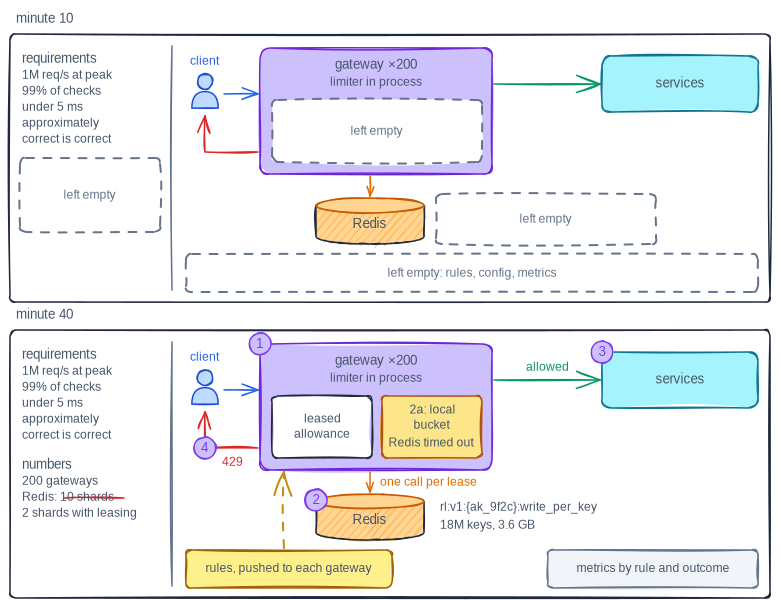
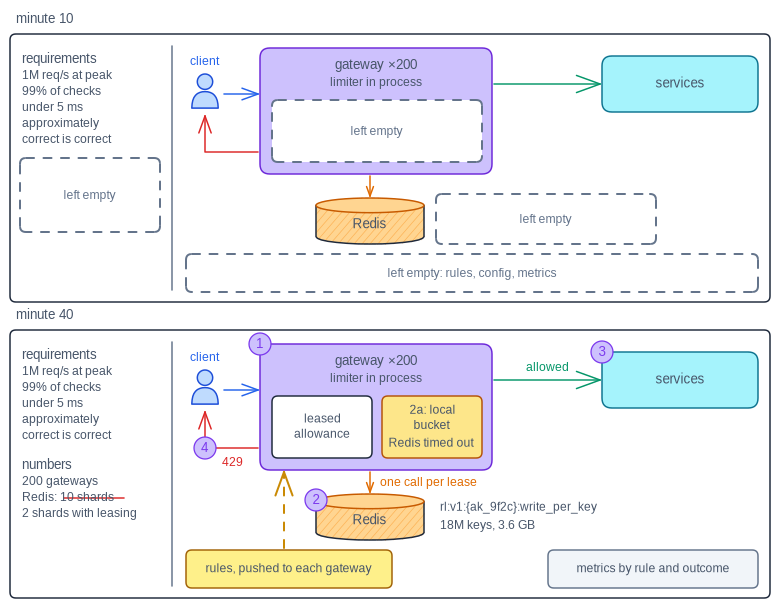
At about minute 10, once the requirements and the API are written down, draw one request from the caller to the data and back. Use four or five boxes. In the rate limiter, that is a client, a gateway with the limiter inside it, Redis holding the counters, and the services behind the gateway.
The functional requirements describe this path: a request arrives, and something happens to it. Each requirement should land on a step. A requirement that lands on no step shows up as a gap at minute 10, while it is cheap to fix.
Then set the board out so it can grow without moving anything.
- The path goes across the top, with room left between the boxes and inside the main one.
- The data stores go in a row underneath, each below the step that reads it.
- Rules, config and metrics go along the bottom.
- The requirements and numbers go in a column down one side.
The rate limiter's final design uses the same areas, with the gateways across the top and Redis, the rules and the metrics sharing one row beneath them.
Write on the board
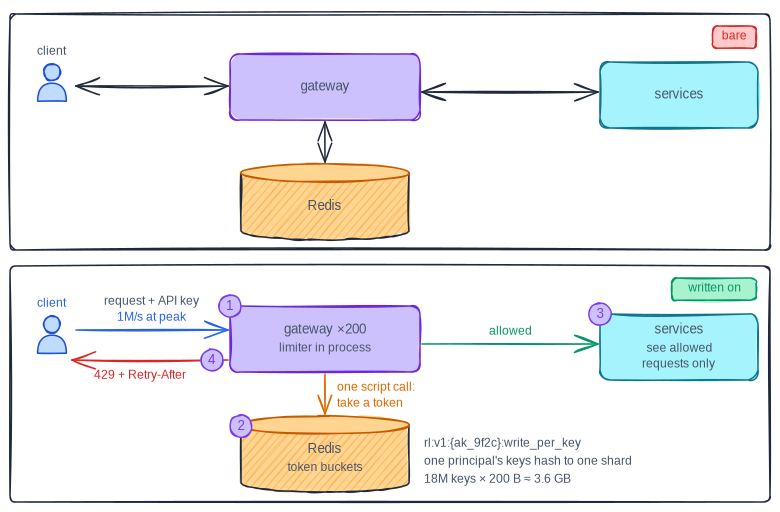
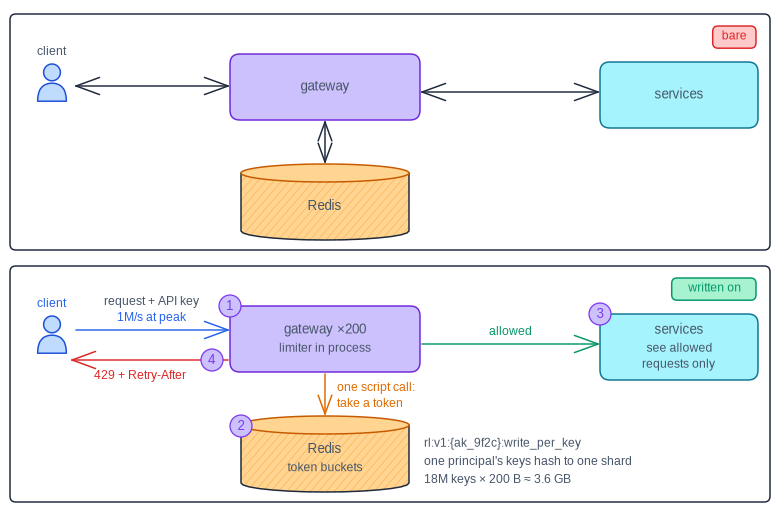
Four kinds of writing let someone read the board without you: step numbers, arrow labels, keys, and rates and sizes.
Number the steps, then walk them
When the path works end to end, at about minute 20 to 25, put a number on each step. Then walk one request through it out loud. The rate limiter's overview figure is its board at minute 25, and its walk goes: "1, the request reaches a gateway. 2, the limiter takes a token from that caller's bucket in Redis, in one call." Amazon's video on its low-level design round suggests "a dry run of your design by taking the important use cases", and this walk is one.
The numbers also give each step a short name. "What happens at 2 if Redis is slow?" needs no pointing. Every breakdown in this course ends this way, with a badge on each step of the final design and a numbered list under it.
Two rules keep the numbers stable. A second path gets a prefix: the URL shortener numbers a redirect 1 to 9 and a link creation W1 to W4. A branch added later takes a letter, so "2a, Redis timed out, decide locally" changes no other number.
Label every arrow with what travels on it
An arrow with nothing on it says only that two boxes talk. Write the call or the payload on it: GET /aB3xY9z, 302 + Location, "one script call". Point each arrow the way the request goes. A head at both ends hides which side starts the call, and that side has to handle a failure.
Draw a reply as its own arrow only when it takes a different route, or when the reply is what the caller came for, like the 302. The rate limiter's 429 takes a different route: it leaves from the gateway and never reaches the services.
Write the key on every data store
A cylinder labelled "DB" invites a question at minute 25: what is in it? Write three things on it: the product, what it holds, and the key it is read by. The key decides how the data is split across machines and what one read costs, so a deep dive on that data store starts there.
In the rate limiter, the three are Redis, token buckets, and rl:v1:{ak_9f2c}:write_per_key, where the braces put one principal's keys on one shard. In WhatsApp, the spool is Cassandra, holding undelivered messages under the key (device_id, deliv_seq).
Put each number where it applies
A rate goes on the arrow it measures, and a size goes on the data store that holds it. The URL shortener serves redirects from the edge, servers in about 300 locations close to visitors. So 350,000 redirects a second at peak go on the arrow into the edge. The edge answers 95 percent, so 17,500 go on the arrow out of the edge, into the region. Side by side on the path, the two numbers show which tier carries the load.
Use the numbers to choose the deep dive
At about minute 25, the board shows you where to go deep. Look for the step that is shared or holds state, because you cannot scale it by adding identical copies. In the rate limiter, step 1 needs 200 gateways at about 5,000 requests a second each, but they keep no counters, so adding more is routine. Step 2 sends all 1 million requests a second to one shared Redis. At about 100,000 calls a second per shard, that needs 10 shards before any headroom.
So point at step 2, give the reason, and ask whether that suits the interviewer. "Step 2 takes 1 million Redis calls a second, and every request waits on it. It sets both the size of the cluster and the risk. I'd like to go deep there. Does that work for you?" If the interviewer picks another step, follow, and its number is already on the board.
Amazon's low-level design video gives the same order: "start with a high level solution and ask which areas the interviewer would want you to go deeper into." The Ten Most Common Ways Candidates Fail covers what waiting to be asked costs.
During the deep dive, circle its step. When it ends, the circle shows where you were, and the numbers show what is left.
Annotate a step, redraw only when the steps change
The design keeps changing through the deep dives. If the numbered steps stay the same, annotate. If a step is added, removed or moved, redraw only the part of the path that changed.
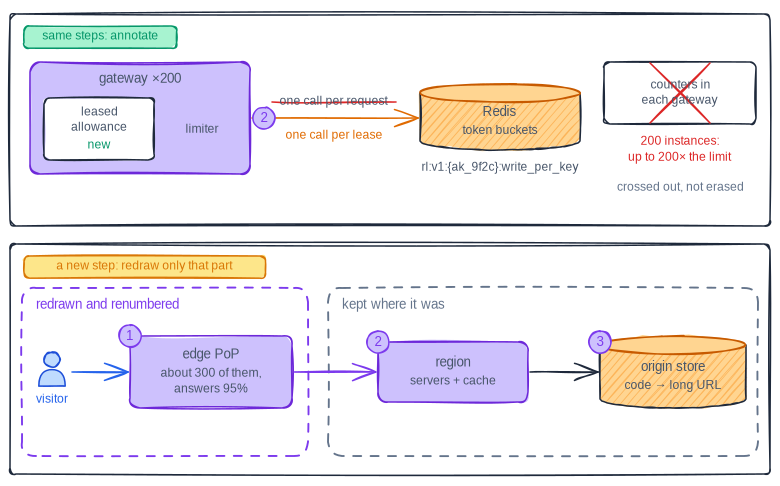
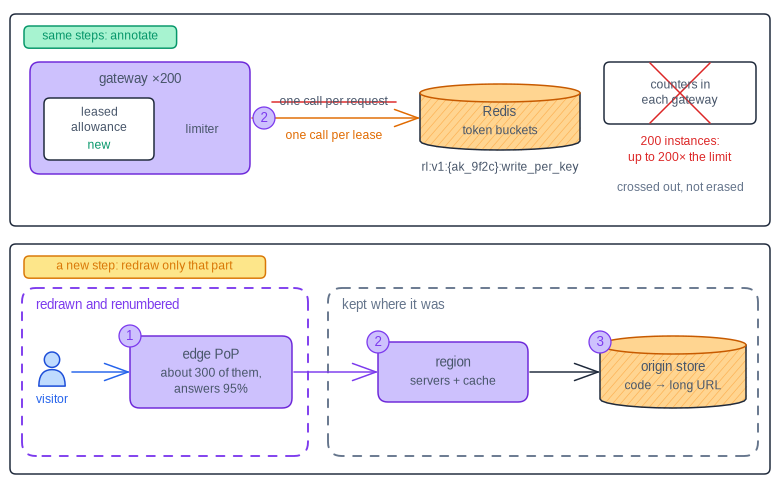
Leasing in the rate limiter keeps the steps. Step 2 still goes to Redis, but now for a block of tokens, and the gateway decides most requests from that block in its own memory. Put a box for the leased allowance in the room you left inside the gateway, and relabel the Redis arrow "one call per lease".
When you reject an option, cross it out instead of erasing it, and write the number that rejected it: "counters in each gateway: 200 instances, up to 200 times the limit". The crossed-out box keeps the reason where the interviewer can copy it into the notes.
Moving the URL shortener's redirects to the edge adds a step. The first box a visitor reaches is now a point of presence (PoP), one of those edge locations, and it answers 95 percent of redirects on its own. Redraw the front of the read path, renumber it, and say that you renumbered. The origin key-value store, its key and the write path stay where they are.
The URL shortener board, three ways
Three candidates reach minute 25 with the same facts about the URL shortener. There are 10 billion redirects and 100 million new links a day. Creation may be down for minutes, and redirects may not. What should the board show?
Draw the standard stack
Client, load balancer, app servers, cache and database, with a queue and a content delivery network (CDN) added in case they are needed. Every box can be defended, and the board goes up in two minutes.
But no arrow says what it carries or how much, and nothing says what the cache is keyed by. Redirects and creation run through the same boxes, so if the interviewer asks what happens when creation is down, the board suggests that redirects go down with it.
Number the redirect, and write on it
The redirect is numbered from the visitor through the edge and the region to the origin key-value store, DynamoDB or Cassandra. Its arrows carry GET /aB3xY9z and 302 + Location, the data store says code → long URL, and the rates sit on the arrows: 350,000 a second into the edge, 17,500 out of the edge into the region. Creation is a box at the side, with an arrow into the same data store.
This is the standard answer. The cost is that it draws creation and redirects as one system, and nothing on it says how differently the two must behave.
Draw two paths that meet at one data store
This tier questions the premise that the board shows one system. The requirements gave the two paths different promises. Redirects can never be down, because the links are already printed. Creation can be down for minutes. And there are 100 redirects for every link created.
So draw them as two rows. The redirect runs along the top, and creation runs underneath with W numbers. The rows meet at one box, the origin store. Write "100 redirects for every link created" between them, and "may be down for minutes" on the bottom row.
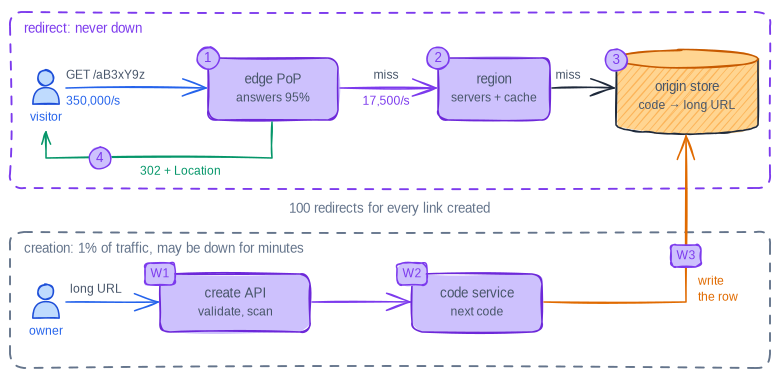
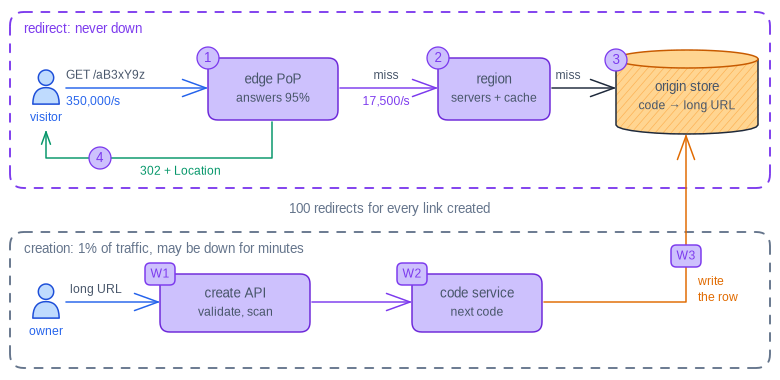
Now the answer to "what if creation is down?" is on the board, because nothing on the top row waits for the bottom row. The cost is board space, and a minute spent drawing a row that carries 1 percent of the traffic.
Where it goes wrong
1. A box you never say a sentence about
Each box on the board is a question the interviewer can ask. A box that no step of the path uses is a question you have not prepared for. A CDN in front of an API whose responses cannot be cached is one. A queue with no load to smooth is another. If you will not say a sentence about a box, leave it off.
Amazon's page calls load balancers and message queues "meaningful abstractions", and they are, once a number on the board calls for one. More boxes do not raise the level either, as What Separates Mid, Senior and Staff shows.
The exception is a box you decided not to build, when the decision shapes the design. WhatsApp's overview draws its message archive in grey, because leaving it out turns 18 PB a year into a spool of about 4 TB.
2. Drawing every instance
Four shards with three copies each is twelve cylinders, and they say nothing that "4 shards × 3 copies" does not. Draw one, write the count next to it, and keep the space for the next step. The rate limiter's final design opens up one gateway instance and draws the rest as "gateway 2", "gateway 3" and "… 200".
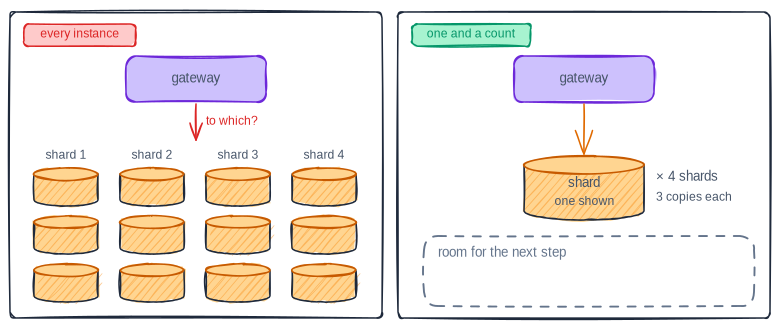
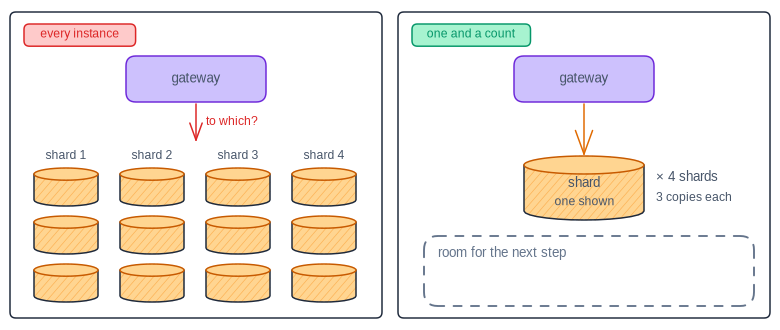
3. A board and a conversation that drift apart
Ten minutes into a deep dive on WhatsApp's spool, the board still shows a box labelled "storage", while the interviewer's notes say "spool, per device, kept 30 days". Write each new thing on the board as you say it, even as one word in a box, so the notes and the board use the same names.
If you remember nothing else
| Do this | Because |
|---|---|
| Draw one request's path first | every later choice lands on a step of it |
| Leave room for data stores, rules, metrics and numbers | the board grows without moving |
| Number the steps and walk them out loud | the numbers become names you both use |
| Label each arrow with what it carries, in one direction | a head at both ends hides who handles a failure |
| Write the product, the contents and the key on each data store | a deep dive on it starts at the key |
| Put each rate on its arrow and each size on its data store | the load shows where it sits |
| Annotate while the steps stay the same | redraw only the part that changed |
| Cross out a rejected option, and keep its number | the reason stays where the notes can use it |
| Propose the deep dive by pointing at a step | its number is your reason |
What is expected at each level
Mid-level
A path from end to end, with arrows that say what they carry, is the bar. The interviewer may suggest the structure and pick the deep dive. You are not expected to lay the board out for growth, or to propose the deep dive from a number.
Senior
You lay the board out and drive it, and three things appear without prompting.
A numbered path, walked out loud. The walk checks the design, and the numbers give every step a name.
A key and a size on every data store. They are the first questions about any data store.
A deep dive proposed from a number on the board. Pointing at a step and its rate shows you leading the interview.
Staff+
A correct, readable board is still the bar. A staff board also shows the decisions behind it.
Draw paths apart when the requirements treat them differently, as the URL shortener's two rows do, and size the difference: 100 to 1 in volume, minutes of downtime against none.
Keep rejected options on the board, crossed out, each with the number that rejected it.
Be able to say what you would not build, and leave it on the board as a grey box. In this course that means the 18 PB a year archive behind WhatsApp, and coordination between regions on every rate limiter check. It also means a click write that the URL shortener's redirect waits for.
Sources
What Meta and Amazon expect comes from the guides they publish for candidates, and every system and number in the examples comes from the course's own breakdowns.
- Meta, Software Engineer Full Loop Interview Guide, linked from Meta's onsite prep page. The 45-minute design round, the big picture and moving to the details, and Excalidraw.
- Amazon, SDE III Interview Prep. Five to seven high-level blocks, and meaningful abstractions.
- Two videos on the same Amazon page, High-Level Design Interview Tips and Low-Level Design Interview Tips. The architecture and sequence diagrams, the dry run, and asking where to go deeper.