Asked to design a notification service, most candidates draw the same picture. There is an API, a queue for each channel, a pool of workers behind each queue, and arrows out to Apple, Google, an email provider and an SMS provider. The picture is correct. It is also the part of the system that does the least work. Each worker makes one HTTP call, and a company you don't control does the delivery.
The hard part comes before the workers. Something has to decide whether this person wants this kind of message at all, on which channel, and at what hour in their time zone. It also has to check whether they got three like it in the last hour, whether the same request is already in flight, and whether the thing it describes is still true. LinkedIn sends almost all its notifications through one service built for that decision, Air Traffic Controller (ATC). Its write-up says that ATC "is not the service that sends the email or push notification."
A notification service is mostly a decision about whether to send. The send itself is a hand-off to a provider you don't control.
Most of the design follows from those two sentences. Product teams send the service a description of what happened, not a finished message, because only one central place can merge, delay or drop messages across teams. The decision runs at send time, against the user's current settings, because a decision made when the request arrived can be hours old when a held message goes out. The send rate is set by the providers' limits, not by how many workers you run. And because every send crosses into someone else's system, every channel delivers at least once, and repeats are caught with keys rather than prevented.
A request is one ask from a product team: "order 88 shipped, tell user 42." A message is one thing that reaches a user on one channel. One request can become no message, one, or several.
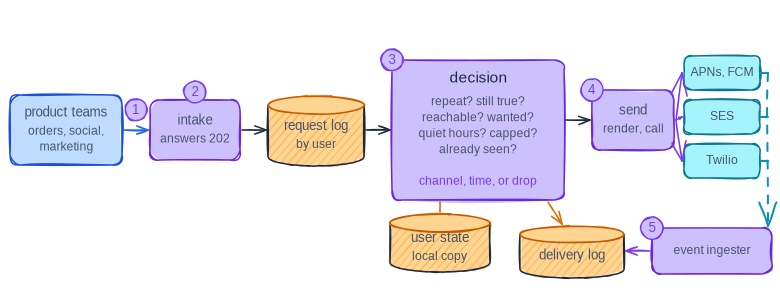
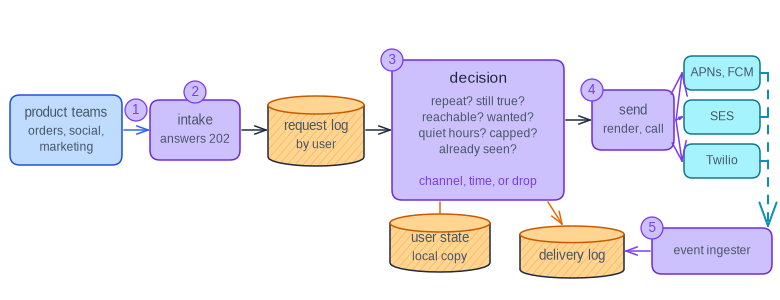
Understanding the problem
The general method for this part of the interview is in The First Five Minutes: Requirements.
A notification service is an internal platform. Other teams (orders, payments, social, security, marketing) call it when something happened that a user should hear about. It reaches the user by a push to a phone or browser, an email, an SMS, or an inbox inside the app, usually shown as a bell icon with a count.
Before you design anything, split "notifications" into the jobs people mean by it. They differ in volume, in urgency, and in what a mistake costs.
- Messages the user is waiting for. A sign-in code, a password reset, a receipt, "your driver is here." Each one goes to one user, is caused by their own action, and is often needed within seconds. The volume is modest, and a lost one becomes a support ticket.
- Activity from other people. Likes, comments, mentions, follows. The volume is huge, each one is worth little, and five of them in ten minutes are better sent as one.
- Campaigns. A promotion or a breaking-news alert to millions of people, planned in advance. The questions are how fast it can go out, and how to stop it slowing down everything else.
- Getting a push onto a phone. Device tokens, payload limits, collapse keys, priority, and phones that sleep. This is its own subject, covered in Push Notification Delivery, and this design uses it as a building block.
- Choosing what is worth a message. Ranking which posts to tell someone about, as LinkedIn's Concourse does, or scheduling each user's pushes over a 7-day horizon to maximise orders, as Uber's Consumer Communication Gateway (CCG) does. These are ranking and timing systems, and they feed requests into this one.
This design covers the first three, uses the fourth, and treats the fifth as one more team that sends requests.
Functional requirements
Core:
- Accept a request from any internal service to tell one user, or an audience, about an event, and deliver it by push, email, SMS or the in-app inbox.
- Apply the user's settings before every send: opt-outs per type and channel, quiet hours in their time zone, and limits on how many messages they get.
- Render each message from a template per channel and language. Product teams own the templates and change them without a deploy.
- Schedule and prioritise. Send now, at a set time, or in the user's morning, and never let urgent messages wait behind bulk ones.
- Record what happened to every request, sent or not, and why, so support can answer "why didn't I get it?"
Out of scope, deliberately:
- Ranking content and choosing send times with machine learning.
- Push internals: tokens, payload size, collapse keys and priority.
- Running our own mail servers or our own connections to mobile carriers. Amazon SES, SendGrid and Twilio do that.
- Building campaign audiences. The campaign tool hands us an audience id.
- Two-way messaging, such as replies to an SMS, apart from the opt-out keywords.
Non-functional requirements
- Scale. 1 billion requests a day for about 100 million daily active users (DAU). That is about 11,600 requests a second on average and 35,000 at peak, assuming peak is three times the average. Campaigns go to up to 10 million users each. For comparison, LinkedIn's ATC handled over a billion requests a day in 2018.
- Urgent messages leave in seconds. A sign-in code or a security alert reaches the provider within 2 seconds at p99, meaning 99 of every 100 do, even while the largest campaign is sending. After the provider accepts it, delivery is outside our control.
- Nothing accepted is lost. Once the service answers HTTP 202 Accepted, the request is either sent or recorded as dropped, with a reason. A repeated message is better than a missing sign-in code. Across regions this holds only up to the copy lag in deep dive 6.
- Every send is decided at send time, against the user's current state. That state is their settings, their quiet hours, how much they've received lately, and whether they've already seen the thing. An opt-out takes effect within seconds.
- Teams can't hurt each other. One team's campaign, bug or complaint spike must not delay or block another team's messages.
Requirement 4 is the one the design rests on. If deciding is most of the job, the decision has to use current data, so it runs as late as possible and reads the user's state every time.
The set up
Core entities
- Type. A registered kind of message, like
order_shipped,post_likedorsign_in_code. It carries the rules: a priority class, the allowed channels, the default settings, how long the message stays true, whether it can be merged, and which team owns it. - Request. One ask from a producer: a type, a recipient (a user or an audience), data for the template, an idempotency key, and an optional send time.
- Settings. One user's choices: on or off per category and channel, quiet hours, and time zone. They are stored as differences from the type's defaults.
- Message. What one channel carries to one address: a device token, an email address, a phone number, or the inbox. It gets a provider id when it is handed off, and a status when the provider reports one.
- Template. The text for one type, channel and language, with a version number.
System interface
The data plane takes requests and serves the inbox. The control plane edits types, templates and campaigns a few times a day. The two share nothing except config, which is pushed out to the workers, so a slow template editor can't delay a sign-in code.
POST /v1/requests
Idempotency-Key: order-88:shipped
{
  "type":      "order_shipped",
  "recipient": { "user_id": "u_42" },
  "data":      { "order_id": "88", "carrier": "UPS", "eta": "2026-11-03" },
  "send_at":   null
}

202 Accepted
{ "request_id": "r_7f3c", "state": "accepted" }

POST /v1/campaigns
{ "type": "news_alert", "audience_id": "aud_19",
  "data": { "story_id": "s_551" }, "window_minutes": 20 }

GET  /v1/inbox?after=4410            → items after position 4410, unread count
POST /v1/inbox/read { "through": 4412 }
Three things to note.
The request names a type and data, not a channel or text. The service picks the channel and renders the words when it sends. If producers sent finished text, the service couldn't merge two requests, move one to the morning, or switch a push to email.
The idempotency key comes from the producer's own data. order-88:shipped is the order id plus the event. Two separate business events can't produce that value, so it passes the test for a natural key in Idempotency and Exactly-Once Delivery. A producer that retries after a timeout sends the same key, and the decision step drops the repeat.
The inbox is read by position. Each item in a user's inbox has a number that only goes up. The app asks for everything after the last number it saw, which is the resume step from WebSockets, SSE and Polling. An item that arrives while the app is closed is still there when it opens.
High-level design
1. Where does the decision happen?
Every team that wants to tell a user something has to reach a provider. The question is how much of the deciding happens in each team's code, and how much happens in one place.
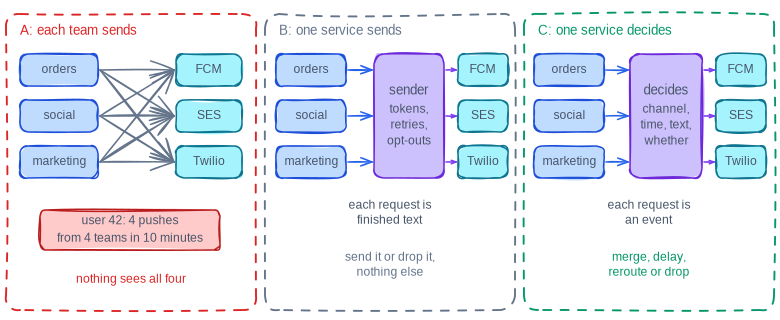
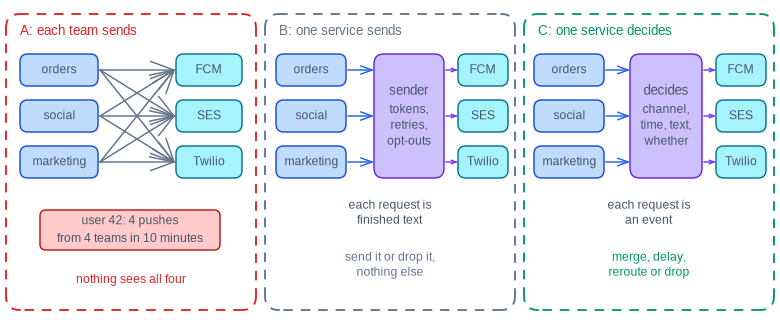
Each team calls the providers itself
Each producing service adds client libraries for Apple's push service (APNs), Firebase Cloud Messaging (FCM), Amazon SES and Twilio, checks the user's settings, and sends. It's tempting because each send is one HTTP call, and the team ships without waiting for anyone.
It breaks as soon as there are several teams. A user who gets a like, a comment, a follow and a promotion in ten minutes gets four pushes from four teams, and no code anywhere can see that they are four. Every team writes its own opt-out check, and one of them gets it wrong. All the teams share one FCM project, whose default quota is 600,000 messages a minute. One team's campaign can use the whole quota while another team's sign-in alerts get 429s, the HTTP code for too many requests.
A central service that sends finished messages
One service owns the provider credentials, the device tokens, retries, the rate limits for each provider, and the opt-out check. Producers call it with a finished message: the channel, the text and the user. Most companies build this first, and it fixes the copied code and the fight over the shared quota.
The cost is that each request arrives already decided. The service can send it or drop it, and nothing else. It can't merge the like and the comment, because they are two finished texts from two teams. It can't move a promotion to the morning, because a finished message doesn't say whether it can wait. It can't switch a push to email when the user has no phone registered.
Producers send events, and the service decides
Question the premise that the producer knows what to send. Producers send a request that describes what happened, a type plus data. The service decides the channel, the time, the text and whether to send at all.
This is LinkedIn's ATC. Before anything goes out, ATC groups related messages into one, drops duplicates and expired content, reads the member's settings and picks the channel. It also picks a send time from the member's locale and from when they are most likely to engage. LinkedIn reports that it cut member complaints in half.
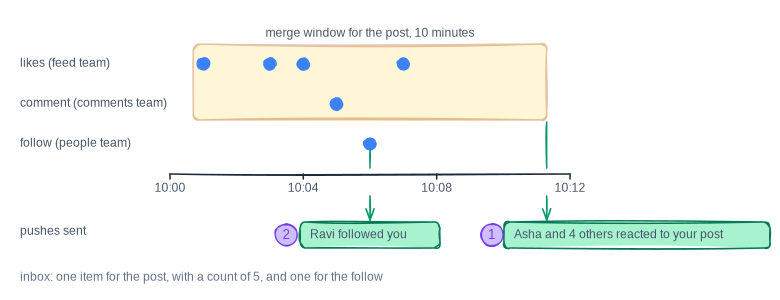
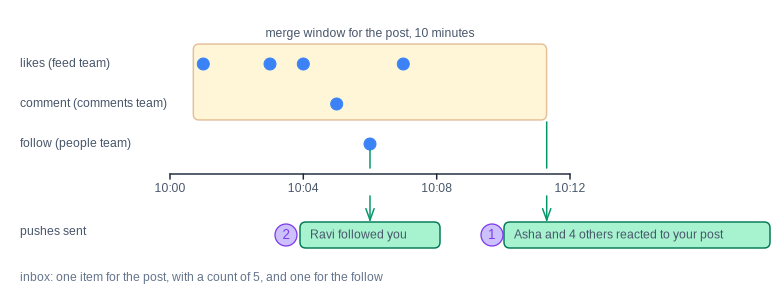
What you give up: a central team now owns the list of types, and every new kind of message is a change someone has to review. The service sits on every team's critical path, so it has to stay up when they do. And a bad rule in one place now affects every team at once. Deep dive 7 covers how rule changes ship.
A request passes through three stages, and each one is separate for its own reason.
Intake checks the request and a rate limit per producer, so one team's bug can't flood users. Then it writes the request to a Kafka topic, partitioned by the recipient's user id, and answers 202.
A partitioned log fits here better than a queue, for two reasons from Message Queues vs Event Streams. Several readers want the same requests: the decision step, the delivery log and analytics. And partitioning by user puts all of one user's requests on one consumer, in order, so merging, caps and the repeat check need no locks across machines. ATC partitions its input the same way, by member id.
Decision workers each own a set of partitions. For each request they read the user's state, decide, and write down the outcome. A message to send becomes a task on the send queue for its channel.
Send workers take tasks, render the template, and call the provider. Sending is work that must happen once and is then done, so a queue fits. The worker acknowledges each task, the queue retries a task that fails, and after a few failures it moves the task to a dead-letter queue, a side queue for tasks that keep failing.
The producer side needs one more piece. If the orders service commits "order 88 shipped" and then crashes before it calls us, the user never hears about it. The fix is to write the request into an outbox table in the same transaction as the order, and let a relay send it to us, retrying until we answer 202. The idempotency key makes the relay's retries harmless.
2. Apply the user's settings
The decision step runs a short list of checks for every request, cheapest first. It stops at the first check that drops or holds the request.
- Is it a repeat? Drop the request if its idempotency key is already in the worker's local state, and insert the key if not. A request coming back from a timer carries the key it already inserted, so it is checked by its request id and timer id instead.
- Is it still true? Each type has a lifetime. A driver-arrival alert that has waited 20 minutes is dropped.
- Can we reach this user at all? The account may be deleted, the email address may have bounced, the phone may have replied STOP, the standard SMS opt-out keyword, or there may be no device tokens.
- Does the user want this type on this channel? Read their settings, and fall back to the type's defaults.
- Is it quiet hours for them? Hold the message until the window ends, unless the type may break through.
- Have they had enough today? A cap per category, such as three social pushes a day. Over the cap, the message joins the next summary or is dropped.
- Have they already seen it? If the user has already opened the post, a push about it adds nothing.
Every outcome is written down with its reason, such as dropped: quiet_hours or merged: into r_9d01. That record is what requirement 5 asks for.
Sign-in codes and security alerts skip checks 4 to 6. A user can't opt out of a password reset, and it shouldn't wait for morning. The type registry marks these types, so the rule lives in one place instead of in every team's code. US law draws a similar line: the Federal Trade Commission's (FTC) CAN-SPAM guide requires an opt-out only in commercial email.
Where do the settings live?
The decision step's checks run 35,000 times a second at peak. If the settings and the repeat keys sit in a remote data store, that is 70,000 network calls a second on the decision path.
Every request reads one user's settings, and every new request
inserts a repeat key. Can that state sit on the decision
workers' own disks, or does it need a remote data store?

Settings, stored as differences from each type's defaults
  accounts                                            300M
  one row: overrides, quiet hours, time zone
                                          ~150 B (assumed)
  total               300M × 150 B                 = 45 GB
  per partition       45 GB / 256                 ≈ 176 MB
  (256 request partitions, from deep dive 1)

Repeat keys, kept 48 hours (assumed)
  keys                1B a day × 2 days               = 2B
  per partition       2B / 256                      ≈ 7.8M
  size                7.8M × ~40 B (assumed)      ≈ 300 MB

  per partition       176 MB + 300 MB             ≈ 0.5 GB
  per worker          8 partitions × 0.5 GB         ≈ 4 GB
  ────────────────────────────────────────────────────────
Each worker holds its partitions' state on local disk, with
the busy part in memory. The checks are local reads, not
70,000 network calls a second.
Settings are stored as differences because a changed default then needs no backfill: every user without an override reads the new default.
The settings service keeps the source of truth in its own database, and writes every change to a Kafka topic keyed by user id and partitioned the same way as the requests. Each decision worker reads that topic for its partitions and keeps a local copy. When a user turns a type off, the change reaches their worker within seconds, which meets requirement 4.
ATC does the same with RocksDB, an embedded key-value store, inside each stream processor. LinkedIn reports local reads at a couple of milliseconds against 10 to 100 ms for a remote call.
Contact data stays where it is owned. Device tokens live in the token table the push page describes, and email addresses and phone numbers in the account service's database. A decision worker keeps only which channels can reach the user, from the same change stream. The send worker looks up the actual token, address or number just before it calls the provider.
Which channel, and when to use more than one?
Settings say which channels the user allows. They don't say which ones to use. Someone who allows push, email and in-app for mentions doesn't want all three for every mention. So the question is how many channels a message should use, and in what order, given that a push has no fee and an SMS costs over a cent.
Send on every channel the user allows
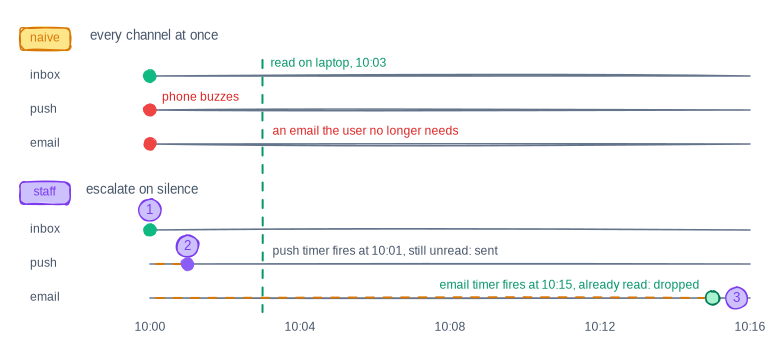
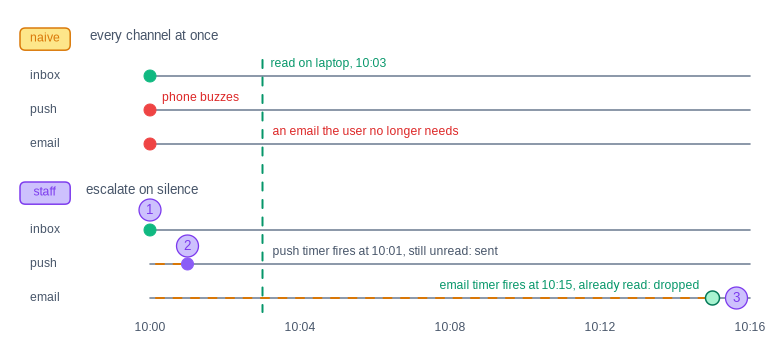
It's tempting because it gives the message the best chance of being seen. In practice, a mention that the user reads on their laptop still buzzes their phone, and an email about it arrives a minute later. The same mention reaches the user three times.
It also spends money for nothing, because the channels are priced very differently.
What does one message to each of 10M US users cost on each
channel, at list prices?

  push, FCM           no fee                            $0
  email, Amazon SES   $0.16 per 1,000               $1,600
                      (Essentials, the default plan)
                      $0.10 per 1,000 (à la carte)  $1,000
  SMS, Twilio         $0.0083 a segment            $83,000
  SMS carrier fee     $0.0035 to $0.005
                      a message       + $35,000 to $50,000

  SMS against email   $118,000 / $1,600              ≈ 74x
                      $133,000 / $1,000             ≈ 133x
  ────────────────────────────────────────────────────────
An SMS costs about 75 to 130 times as much as an email. A
design that sends on every allowed channel pays that on
every message.A fixed channel order for each type
The type registry lists channels in order for each type. A sign-in code goes by SMS, a receipt by email, and a mention by push plus the in-app inbox. The decision step filters that list by the user's settings and by what it can reach: no device token means no push, so it falls back to the next channel. This is what most services run, and SMS stays reserved for the few types that need it.
The cost is that the order is fixed when the message is created. It doesn't change if the user reads the mention on their laptop ten seconds later.
Start with the cheapest channel and escalate on silence
Question the premise that a message is sent once, on its channels, at the start. Send it first on the channel that costs nothing and interrupts least, which is the inbox, and only move to the next channel if the user hasn't seen it after a delay.
Slack works this way. By default it sends a mobile push one minute after you lock your desktop screen. Email for mentions and direct messages goes only when you're not active, bundled once every 15 minutes or once an hour.
ATC has both rules. It blocks a message when the member has already interacted with the content, and it can send a reminder later if they haven't clicked.
The size of the saving depends on how fast people read. If 70 percent of mentions are read within 15 minutes (an assumed figure), 70 percent of the emails are never sent. The rest go out as one bundle per user, not one email per mention.
What you give up: a deliberate delay on every channel after the first. The "seen" signal has to flow back from the apps into the decision step. And every escalation is a timer that has to fire later, which adds load to the scheduler in section 4.
3. Render each message from a template
The send worker renders the template just before it calls the provider, from the request's data plus the user's name and language.
Rendering happens that late for three reasons. A merged message only exists at send time: "Asha and 4 others reacted to your post" can't be written when the first like arrives. The user may have changed language since the request came in. And the template may have been fixed in the meantime.
Templates are config, and they ship like config. Each version is rendered against sample data in every language before it is published, so a missing variable fails the publish, not the send. Send workers keep templates in memory and get new versions pushed to them, with polling as a backup. The distributed rate limiter gets its rules to every gateway the same way. If a template still fails at send time, that one message is recorded as failed instead of going out as "Hi ."
Each channel puts its own limits on the text, and the publish check enforces them.
- Push. At most 4 KB. The message carries a short alert and an id that the app uses to fetch the rest, as the push page describes.
- SMS. A single SMS holds 160 characters of the standard GSM-7 character set. One character outside it, such as an emoji, switches the whole message to a 2-byte encoding, and a single SMS then holds 70. A longer message goes as several segments, and Twilio bills each one. So a 100-character code that gains one emoji goes as two segments and costs twice as much.
- Email. Marketing email carries the one-click unsubscribe headers from deep dive 4.
4. Schedule and prioritise
A message can be ready now, at a fixed time, or at a time that depends on the user. That can be the end of their quiet hours, 9:00 in their time zone, the close of a merge window, or the moment an escalation is due. All of these become one thing, a timer that says "decide this request again at time T." The scheduler stores timers and, when one is due, puts the request back on the request log with the timer's id. The decision step then runs its checks again with current state, which is requirement 4.
Why not let the provider schedule it? A message scheduled inside a provider can't be decided again if the user opts out in the meantime. SendGrid's send_at also accepts at most 72 hours ahead.
The scheduler keeps timers in a table keyed by the minute they are due, split into 64 buckets by user. Each scheduler worker holds a lease on some buckets, a claim that expires unless the worker renews it. Every minute, it reads its buckets for that minute and publishes what is due. Uber's CCG needed a scheduler like this for "upwards of tens of thousands triggers/second."
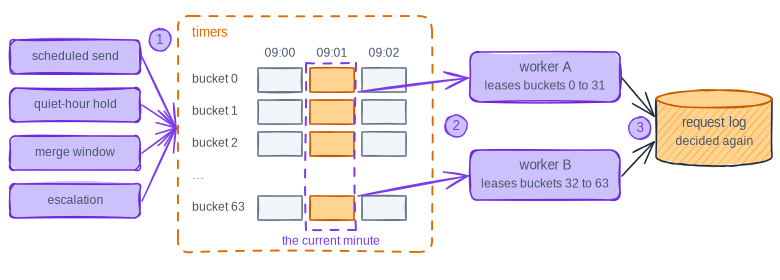
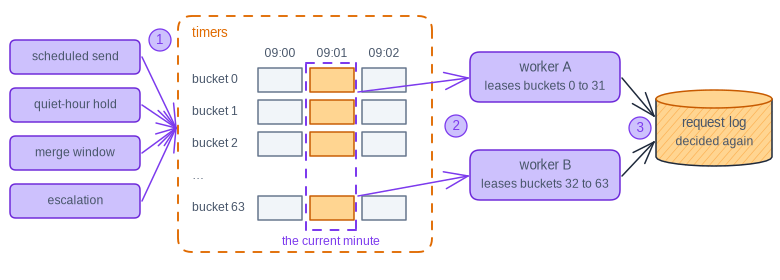
Many timers fall due together: everyone whose quiet hours end at 07:00, every campaign set for 9:00. The push page releases them from 07:02, spread over half an hour, and merges what can be merged. It also avoids the minutes around :00, :15, :30 and :45, when FCM sees its own spikes. The scheduler does the same by adding a random offset to each user's timer.
A campaign takes one extra step. An expander reads the audience and writes one request per user into the request log, at the pace the campaign can be sent. Each user's settings and quiet hours are then checked on their own partition, like any other request. The push page's paced pipeline covers the batching and the pace.
Timing decides when a message becomes ready. Priority decides what happens when many are ready at once. The case that matters is a campaign sending while one user waits for a sign-in alert.
One queue per channel, in arrival order
Every push goes on the push queue, and the send workers take them in order. It's simple, and on a quiet day nobody notices a problem.
A campaign puts 10M pushes on the push queue at 09:00:00.
A sign-in alert joins the same queue 5 seconds later.
How long does the alert wait?

  send rate           FCM's whole quota           10,000/s
  ahead of the alert  10M − 5 s × 10,000           ≈ 9.95M
  wait                9.95M / 10,000/s             ≈ 995 s
                                                  ≈ 17 min
  ────────────────────────────────────────────────────────
The alert about a new sign-in arrives 17 minutes after the
sign-in. Requirement 2 allows 2 seconds.A queue per class, and a reserved share of each provider
Each channel gets one queue per priority class: critical (sign-in codes, security alerts), high (receipts, direct messages), normal (activity), and bulk (campaigns and summaries). Send workers take from the higher classes first, with a weighted share for the lower ones so bulk work still moves.
The queues fix the order, but the provider's limit is shared. So each provider account gets one rate limiter, set below its quota, with part of it held back for critical and high messages. The push page splits FCM's default 10,000 a second into 8,000 for campaigns and 2,000 held back. Every send worker draws from this limiter, so it is a shared counter on the send path, built the way the distributed rate limiter builds one.
Our own traffic changes the numbers. At peak, ordinary Android pushes already take about 7,000 of the 10,000 a second, as deep dive 1 works out, so a campaign at peak hour gets about 1,000 a second. So campaigns run off-peak until the quota grows.
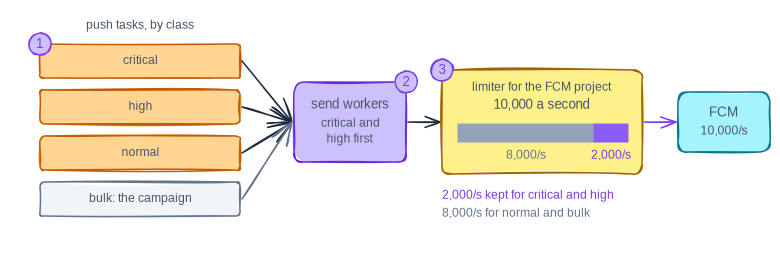
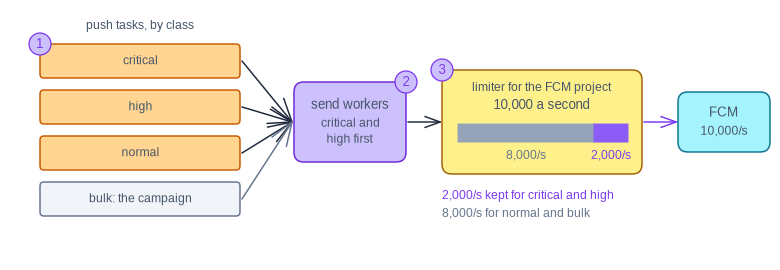
Most teams stop here, and it meets requirement 2 for push. The cost is that the provider account is still shared, and some providers judge the account as a whole, not one queue at a time.
Separate what the providers judge, not only what you queue
Question the premise that queues and quota are the only things the classes share. Email providers also judge the sender. SES keeps a reputation for each account: at a complaint rate of 0.1 percent it places the account under review, and at 0.5 percent it may pause sending. You can keep sending during a review, but a pause stops everything the account sends.
SES can also split one account into tenants. A tenant is a container inside the account with its own reputation metrics.
Transactional mail and a newsletter go through one SES
account. What complaint rate does SES see?

  transactional       2M at 0.01% (assumed)            200
  newsletter          5M at 0.2% (assumed)          10,000
  account rate        (200 + 10,000) / 7M          ≈ 0.15%

Separate tenants, each with its own metrics
  transactional       200 / 2M                     = 0.01%
  newsletter          10,000 / 5M                   = 0.2%
  ────────────────────────────────────────────────────────
On a shared account, the newsletter's complaints put the
whole account under review. Sending continues during a
review, but if the rate isn't fixed, a pause stops the
password resets too.
So separate the sending identities by class, not only the queues. For email, each class gets three things of its own.
- An SES tenant. SES can pause one tenant without stopping the others.
- A dedicated IP pool. AWS's own example is one pool for marketing and one for transactional mail, because "if a marketing campaign generates a large number of complaints, the delivery of your transactional emails is not impacted."
- A From address on its own subdomain. Gmail judges the sender by domain and by IP address, and Google asks for one From address per category of message.
SMS needs a split too, for a different reason: Twilio's queue is shared across the whole account, as deep dive 5 explains.
What you give up: more tenants, IP pools and subdomains to set up, warm up and watch. A new dedicated IP has to be warmed up, with volume raised slowly, before it can carry full volume.
5. Record what happened
Requirement 5 is about one question: why didn't this user get that message? To answer it, the service needs one record per request and channel, with what the decision step chose, why, and what the provider said afterwards.
The providers report back in different ways. SES publishes an event at each step of an email, such as a delivery, a bounce, a complaint or a click. Twilio calls a status callback URL as a message becomes sent, delivered, undelivered or failed. A push provider only says whether it accepted the push, and the push page explains why delivery to the phone is visible only in aggregate. An event ingester takes these reports and updates the record.
Which data store, and what actually forces it
By now there are several kinds of state: types and templates, settings, timers, the inbox, and the delivery log. The first three are small or already placed. The inbox and the log are the large ones.
What does the log hold, how fast does it grow, and how much
of it expires each day?

  requests a day                                        1B
  rows, one per request and channel considered,
  1.5 channels on average (assumed)
  rows a day          1B × 1.5                      = 1.5B
  provider updates to those rows (assumed)            ≈ 1B
  writes              2.5B / 86,400             ≈ 29,000/s
  at peak             × 3                       ≈ 87,000/s
  row: ids, decision, reason, status      ~200 B (assumed)
  storage             1.5B × 200 B          = 300 GB a day
  kept 30 days        300 GB × 30                   = 9 TB
                                           before replicas
  rows expiring every day                             1.5B
  ────────────────────────────────────────────────────────
The write rate is high but steady. The size, and the 1.5
billion rows that expire every day, are what decide the
data store.One Postgres for everything
Start with one relational database. Requests, settings, timers, the inbox and the log go in one Postgres, with indexes on user id and time. It's easy to query, and support can join the log against users.
The worksheet prices it. With 9 TB on one primary, every backup, restore and replica rebuild is slow. Deleting 1.5 billion expired rows a day leaves the database cleaning up dead rows all day. Partitioning the log table by day and dropping old partitions fixes the deletes. But the size and the 87,000 writes a second at peak still land on one primary, and nothing in the workload needs a join.
One data store per access pattern
Split by how each kind of state is read.
- The delivery log and the inbox go in a wide-column store such as Cassandra, or a key-value store such as DynamoDB. Rows are keyed by user and sorted by time. Each row is written with a time to live (TTL), 30 days for the log and 90 for the inbox, so expired rows disappear without a delete job. Both stores spread writes over many nodes by key.
- Settings and repeat keys live in each decision worker's local state, rebuilt from Kafka, as section 2 describes.
- Types, templates and campaigns stay in Postgres. They are small, change a few times a day, and need versions and an audit trail.
- Analytics reads the same events from Kafka into a columnar store such as ClickHouse, which answers "delivery rate by type yesterday" without touching the support store.
This is the standard answer, and it works. The cost shows up on campaigns: a campaign to 10 million users writes 10 million inbox rows and 10 million log rows that all say the same thing.
Store a campaign once, and record only the exceptions
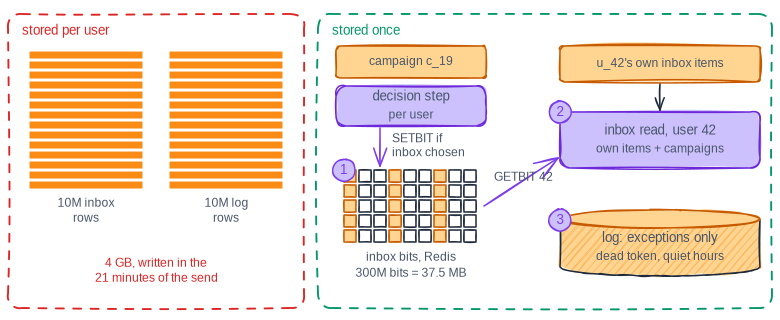
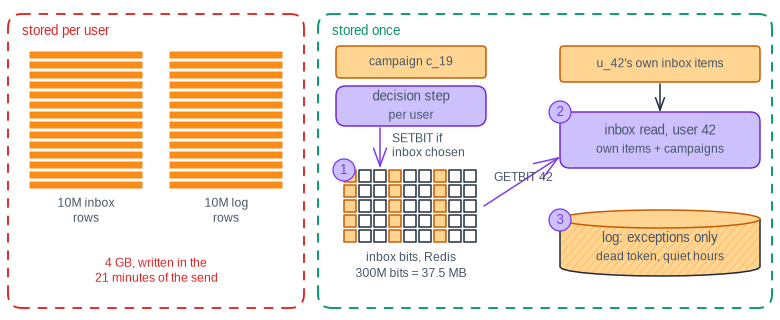
Question the premise that every recipient needs a row. A campaign is one message to many people, so store its content once. Only the outcome has to be stored per user: whether the decision step chose the inbox for this user, after their settings and quiet hours. That outcome fits in one bit. The push page stores its breaking-news alert once for the same reason.
When the decision step puts a campaign in a user's inbox, it runs SETBIT on the campaign's Redis bitmap at the user's id. The inbox read merges the user's own items with each campaign from the last 30 days whose bit is set for them, checked with GETBIT.
The bitmaps are small. One covers 300 million account ids, which is 300 million bits or 37.5 MB, so 90 campaigns in 30 days (three a day, assumed) take about 3.4 GB. The log keeps a row only for users whose outcome wasn't "sent", such as a dead token or quiet hours.
The storage saving is modest. At 200 bytes a row, a campaign written per user is 4 GB, or 12 GB a day for three, against 300 GB a day of log. The burst matters more. Written per user, a campaign adds 20 million rows in the 21 minutes it takes to send, about 16,000 extra writes a second on the stores. A bit is one operation in memory.
What you give up: the inbox read checks one bit per recent campaign. Read state for a campaign needs its own small record, written only when the user reads it. Support needs a tool that combines the campaign row, the bit and the exceptions to answer for one user.
The tables
-- Control plane: small, relational, pushed to every worker.
notification_types (
  type_id         text primary key,    -- 'order_shipped'
  category        text not null,       -- what the settings page shows
  class           smallint not null,   -- critical | high | normal | bulk
  channels        text[] not null,     -- in escalation order
  delays_s        int[] not null,      -- wait before each channel, 0 = at once
  lifetime_s      int not null,        -- dropped once this old
  merge_window_s  int,                 -- null means never merged
  owner_team      text not null,
  version         bigint not null
)

-- One row per account; each decision worker keeps a local copy.
user_settings (
  user_id      bigint primary key,
  overrides    bytea,                  -- only what differs from defaults
  quiet_start  time,
  quiet_end    time,
  time_zone    text,
  suppressed   bytea,                  -- addresses and numbers never to use, with why
  updated_at   timestamptz
)

-- Wide-column. One partition per user per day, 30 day TTL.
deliveries (
  user_id, day, request_id, channel,
  type_id, decision, reason,           -- sent | held | merged | dropped, and why
  provider_msg_id, status, updated_at,
  primary key ((user_id, day), request_id, channel)
)

-- Wide-column. Personal items only, newest first, 90 day TTL.
inbox (
  user_id, position,                   -- position only goes up, per user
  request_id, type_id, body, read,
  merged_count,                        -- one item per post, with a running count
  primary key (user_id, position)
)

-- Every kind of timer, one table.
timers (
  due_minute, bucket,                  -- bucket = hash(user_id) % 64
  request_id, timer_id, user_id, kind, -- scheduled | quiet | merge | escalate
  primary key ((due_minute, bucket), request_id, timer_id)
)

-- Campaigns are stored once.
campaigns (
  campaign_id  text primary key,
  type_id      text not null,
  data         jsonb,
  inbox_bits   text not null,          -- Redis key; the decision step sets bits
  window_s     int,
  started_at   timestamptz
)
Three things to note.
deliveries is keyed by user and day. Support always asks about one user. The day in the partition key stops one busy user's partition from growing without limit, and a week's history is seven partition reads.
The provider's message id is a column, not a key. A provider's report has to find its row. Rather than keep a second index from provider id to request, we attach our own ids to every send. SES copies the tags we attach into every event it publishes. Twilio calls the status callback URL we set for each message, and that URL can carry the request id. The ingester reads our ids and updates the row directly.
Timers are split by minute and bucket. At 09:00, a campaign and every user whose quiet hours end then fall due in the same minute. With the minute alone as the key, that whole minute is one partition. The 64 buckets spread it over 64 keys and 64 readers.
The queries that carry the product
-- 1. Every app open: the inbox after the last position seen.
SELECT position, type_id, body, read FROM inbox
WHERE user_id = ? AND position > ?
ORDER BY position DESC LIMIT 50;
-- then GETBIT each recent campaign's bitmap at this user's id

-- 2. Every request: settings, from the decision worker's local copy.
GET user_settings[user_id]

-- 3. Every provider report: one row updated.
UPDATE deliveries SET status = ?, updated_at = ?
WHERE user_id = ? AND day = ? AND request_id = ? AND channel = ?;

-- 4. Every minute, per bucket: what is due.
SELECT request_id, timer_id, user_id, kind FROM timers
WHERE due_minute = ? AND bucket = ?;

-- 5. Support: one user's last week.
SELECT * FROM deliveries WHERE user_id = ? AND day IN (?, ?, ?, ?, ?, ?, ?);
The inbox read runs most often, because every app open runs it, and it is the one interviewers push on. The unread count is one counter per user, kept beside the inbox. A new item, or a merged item that becomes unread again, adds one, and a read resets it.
Deep dives
Interviewers ask about the first three most often. The others depend on the company and the level.
1. How many servers, and what actually needs scaling?
Two tiers of this service do the work, the decision tier and the send tier, and they grow for different reasons.
How many machines does each tier need at peak, and what
decides that number?

Intake and decision
  peak requests                                   35,000/s
  partitions          by user id                       256
  per partition       35,000 / 256                 ≈ 137/s
  a decision worker with local state handles
                                        ~5,000/s (assumed)
  workers needed      35,000 / 5,000                   = 7
  run 32 workers, 8 partitions each
  capacity            32 × 5,000               = 160,000/s
                                              over 4x peak

Send, push through FCM
  Android pushes, one request in five (assumed)
                      35,000 / 5                 = 7,000/s
  project quota       600,000 / 60 s            = 10,000/s
  left at peak        10,000 − 7,000             = 3,000/s
  one HTTP request per token
  time per request                        ~0.1 s (assumed)
  in flight           10,000 × 0.1                 = 1,000

Send, email through SES, one call per recipient
  account send rate                      2,000/s (assumed)
  time per call                           ~50 ms (assumed)
  in flight           2,000 × 0.05                   = 100

Send, SMS from one Twilio short code
  throughput                                         100/s
  ────────────────────────────────────────────────────────
The decision tier is sized by our traffic. The send tier is
sized by the providers' limits, and a few machines reach them.
Our own Android pushes use 70% of FCM's default quota.
The send numbers use one rule: requests in flight equal the rate times the time per request. FCM's Admin SDK makes one HTTP request per token, even when it sends to a list, so 10,000 pushes a second are 10,000 requests. About 1,100 requests in flight in all fit on a handful of machines, so the send tier never needs to be large.
That is why autoscaling send workers on queue length is a mistake. The send workers have spare capacity, so a growing send queue means a provider is throttling us or is down. More workers then make more calls into the same limit, get more 429s, and retry them, which the push page calls retry amplification. Scale send workers on CPU, and treat a growing queue as a signal to page someone.
The FCM line has a second consequence. Every team's Android pushes go through one FCM project, and at peak they already use 7,000 of its 10,000 a second before any campaign. Moving traffic to a second project needs an app release, because a token works only for the senders the app registered with. So the one project has to grow into a larger quota. FCM raises a quota a step at a time, and only for a project already close to its limit. Until then, campaigns run off-peak.
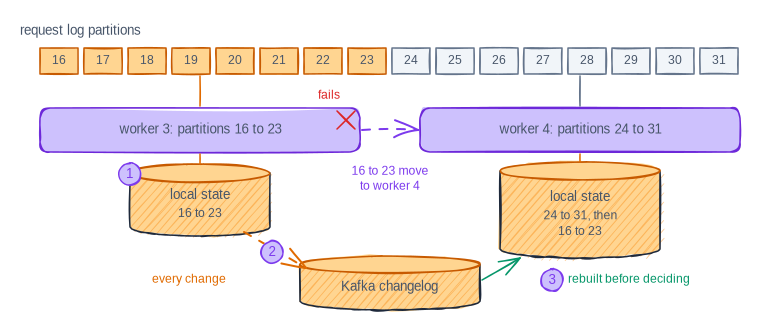
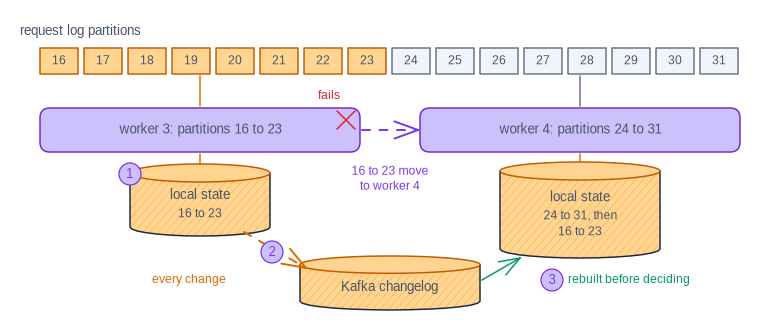
The 256 partitions are a ceiling. Kafka gives each partition to one consumer, so the decision tier can grow to 256 workers and no further without changing the partition count. Changing it moves users between partitions, and their local state has to move with them.
A failed worker's partitions move the same way. ATC writes all local state to Kafka, so a job that moves to another machine rebuilds its state from there. The cost is time. A new worker can't decide anything for its partitions until it has read their state, about 0.5 GB each. So add workers before a known peak, not during it.
The intake API and the event ingester are ordinary stateless services behind a load balancer. A few instances handle 35,000 requests a second, and they scale on CPU like any other web tier.
2. Duplicates: where is a repeat caught?
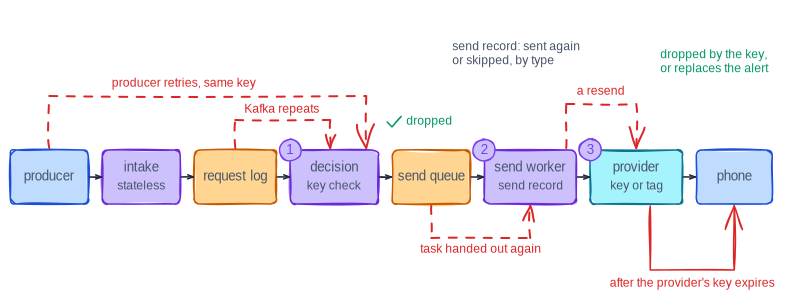
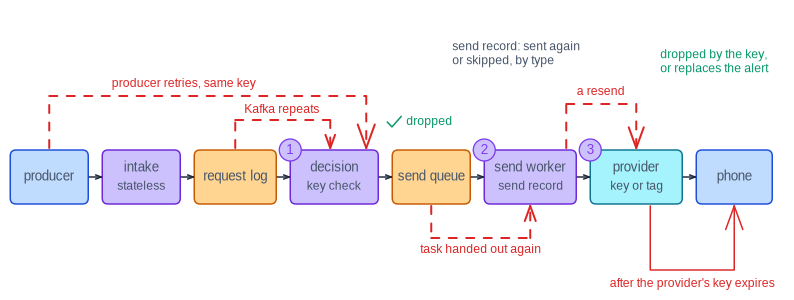
Every hop in this design can repeat. A producer retries after a timeout. Kafka can deliver a request to the decision step twice after a worker restarts. A send task is handed out again when a worker crashes after calling the provider but before it acknowledged the task. Idempotency and Exactly-Once Delivery explains why no protocol removes the last case: the provider's state and ours can't share a transaction. So the design catches repeats at three points instead.
- At the decision step, by the producer's key. Intake is stateless and passes every request to the log. The decision step keeps each key for 48 hours (assumed) and drops a request whose key it has already seen, whether the repeat came from the producer or from Kafka. ATC does the same after a restart, "dropping any request it has already processed."
- At the send, by a send record. Before calling the provider, the send worker writes
(request_id, channel): in_flight. A task that comes back finds the record, and the type decides what happens next, as the idempotency page describes for email. Types the user is waiting for, like a sign-in code, are sent again: a repeat is annoying and a missing one is a support ticket. Types they aren't waiting for, like a promotion, are skipped. - At the provider or the phone. Some email providers take a key and drop a repeat. Resend, for one, keeps each key for 24 hours. For push, the request id goes in the APNs collapse id and the Android tag, so a repeat replaces the first alert instead of adding a second. On Android the replacement can still sound and vibrate again. SMS has no such field, but sign-in codes go through Twilio Verify, Twilio's managed service for one-time codes, which sends the same code again to a user who asks within 10 minutes. Deep dive 5 explains why.
3. Hot keys: one user, thousands of events a minute
Traffic to users is never even. When a post goes viral, its author's user id receives a flood of requests, and all of them land on one partition, because the log is partitioned by recipient.
A post gets 1M likes in its first hour (assumed). What breaks
first: the author's partition, the phone, or the stores?

  likes a minute      1,000,000 / 60              ≈ 16,700
  partition load      16,700 / 60                  ≈ 280/s
  a decision worker handles ~5,000/s                → fine

  FCM's limit for one Android device          240 a minute
  rejected, one push per like
                      1 − 240 / 16,700             ≈ 98.6%

  one inbox row per like, one inbox partition
                                           1M rows an hour
  one log row per like
                      1M × 200 B                  ≈ 200 MB
                                    an hour, one partition

  merged per user and post, 10-minute windows
  pushes              60 / 10                          = 6
  inbox items         one, with a count                = 1
  log rows            one per window                   = 6
  ────────────────────────────────────────────────────────
The decision partition copes. The phone, and the user's
inbox and log partitions, need the merge.
So the hot key here is the person, not the decision partition. A partition at 280 a second is well inside a worker's capacity. Splitting the user's key across partitions would break what the design needs: all of one user's requests in one place, where they can be counted and merged.
The fix is the merge from section 1, applied to every output. The decision step keeps one counter per user and post while a merge window is open, and sends one push when it closes: "Asha and about 167,000 others liked your post." The inbox gets one item per post, updated in place with a running count, and the log gets one row per merge window, not one per like.
The reverse case is a single producer that reaches millions, which is a campaign, and section 5 stores it once. LinkedIn's Concourse names both sides: it partitions its scoring by recipient, and for its largest accounts it notes that "each of their activity will generate millions of candidate notifications."
4. Email: bounces, complaints and the suppression list
Google asks every sender to keep the spam rate shown in its Postmaster Tools below 0.3 percent, and recommends below 0.1. Senders of more than 5,000 messages a day to personal Gmail accounts must also do two things.
- Authenticate. Sender Policy Framework (SPF) lists the servers allowed to send for your domain. DomainKeys Identified Mail (DKIM) is a signature that proves the mail came from your domain. A Domain-based Message Authentication, Reporting and Conformance (DMARC) record tells receivers what to do when those checks fail.
- Offer one-click unsubscribe on marketing and subscribed messages. RFC 8058 defines it as two headers,
List-Unsubscribewith an HTTPS address andList-Unsubscribe-Post.
SES also counts hard bounces, mail sent to an address that doesn't exist. Beside the complaint lines in section 4, it reviews an account at 5 percent hard bounces and may pause it at 10.
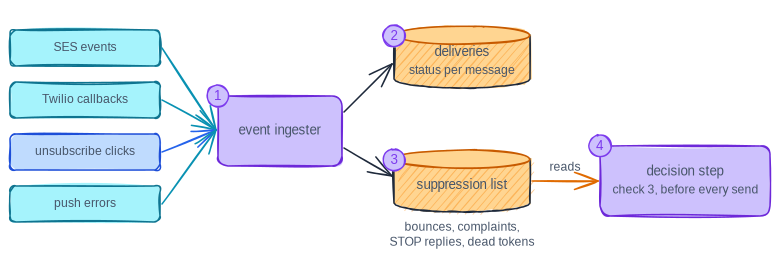
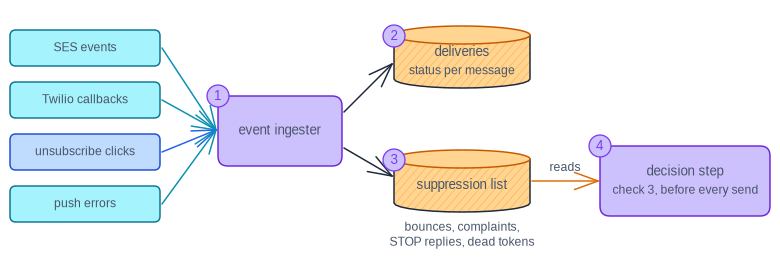
The defence is a suppression list: addresses and numbers the service must never send to. SES keeps one per account and adds hard bounces and complaints to it automatically. It isn't enough on its own. It covers one account in one AWS Region, knows nothing about a second provider, and never sees some signals.
So the service keeps its own suppression list as the source of truth, and every signal feeds it. A hard bounce, a complaint, a one-click unsubscribe, a STOP reply to an SMS, and a dead push token all become events that update it. The decision step reads it in check 3.
Twilio blocks sends to a number that replied STOP until it replies START. If the STOP doesn't reach our list, from the reply or from Twilio's error, the decision step keeps choosing SMS for a user who can't receive it.
5. SMS: throughput, queues and abuse
Because of the cost gap in section 2, SMS carries sign-in codes, alerts for users who have no other channel, and the occasional campaign to users who opted in to texts.
A Twilio short code sends 100 messages a second. When you submit faster, Twilio queues the rest, up to 10 hours of segments. That queue belongs to the whole account, subaccounts included, and every sender of the same type shares it. So a campaign and a sign-in code sent from your own short codes wait in the same line.
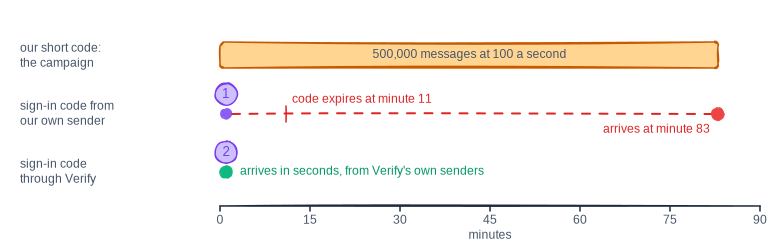
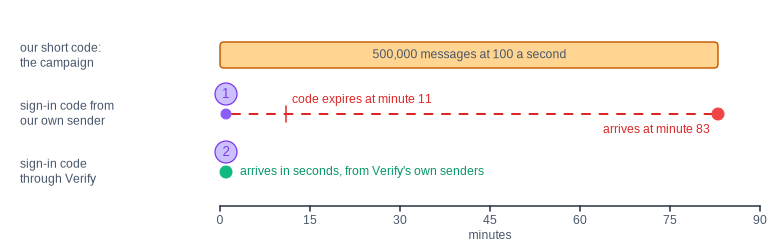
US rules add a setup step. Twilio blocks texts to US numbers from a 10-digit long code (10DLC), an ordinary local number, unless it is attached to an approved application-to-person (A2P) 10DLC campaign. Here a campaign is a registration of your brand and what you send, not a batch of messages. Verify's senders are exempt. Every other sender has to be registered before the day you need it.
The sign-in form is also a target. In SMS pumping, an attacker submits phone numbers on a form that sends texts, often numbers on a carrier that shares the revenue from those messages. Twilio's advice is to turn off every country you don't send to, check that a number is a mobile number before texting it, and use its fraud filters. Limits per user, per IP address and per destination prefix cover the rest. The distributed rate limiter names "anything that sends an email or an SMS" as the endpoints that need them most.
6. What happens when a provider fails?
Providers fail in two ways. They throttle, answering 429 when you go over a quota. Or they have an outage, and calls time out or return 5xx. Throttling is normal, and the limiter in section 4 plus the provider's Retry-After handle it. An outage needs a decision, and a sign-in code with a 10-minute life can't wait for it to end.
One provider per channel, and retry until it recovers
It's the obvious place to start, because a provider outage is rare and retries are already built. Messages wait in their queues and are retried with backoff.
It fails the messages that matter most. Sign-in codes expire before the provider recovers, and the user can't log in for the length of the outage. When the provider comes back, every queue drains at once, into a provider that is still recovering.
A second provider per channel, behind a circuit breaker
Integrate a second email provider and a second SMS provider. A circuit breaker per provider watches errors and timeouts, and when it opens, new sends for the critical and high classes go to the other provider. Bulk waits, because a campaign can go out an hour late.
This is the standard answer. The cost is the assumption under it: that the standby can take the traffic the moment you switch.
Keep both providers live, every day
Question the premise that a standby is ready. A provider you only use in an outage isn't.
If you send from dedicated IP addresses, the standby's addresses have no history. SES's own guide says mailbox providers "are less likely to accept mail from new IP addresses," and that building a reputation takes two to six weeks. It also warns that a large, sudden increase in volume may get the address blocked or throttled. A failover is exactly that sudden increase. For SMS, the standby's US numbers need their own approved 10DLC campaigns, or their messages are blocked.
So run both providers all the time, and split traffic by weight, say 90 percent and 10 percent of transactional email. SES suggests that a warmed-up address keep sending about 1,000 emails a day to each mailbox provider you want a reputation with. With the 2 million transactional emails a day assumed in section 4, a 10 percent share is 200,000 a day, far above that.
A failover then raises the second provider's share tenfold, from addresses with a sending history, instead of starting from zero. A tenfold jump is still the kind of sudden increase SES warns can be throttled, so move the critical and high classes first and let bulk wait.
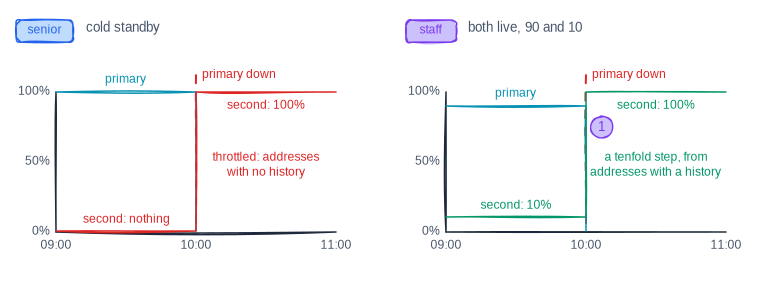
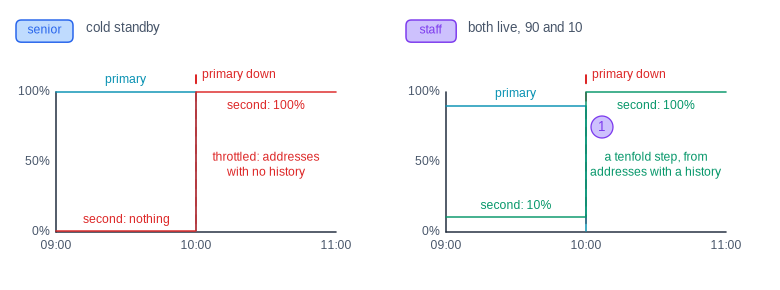
What you give up: two integrations, two event formats and two suppression lists to merge into ours, and DNS records for both, the SPF entries and the DKIM keys. Features drop to what both providers support, so an idempotency key that only one provider accepts can't be relied on.
When a provider is slow or the push quota is spent, the type registry says how each class degrades. Bulk waits or drops, normal waits, and critical uses the reserved share or the other provider. A partition whose state is rebuilding holds every request on it, sign-in codes included, which is why deep dive 1 adds workers before a known peak.
Each user is decided in one home region, and the request log, the timers and the state changelogs are copied to a second region with a tool such as Kafka's MirrorMaker. That costs cross-region traffic on every write and leaves the copy seconds behind, so a region failure can lose the last few seconds of accepted requests, as requirement 3 says.
7. How do you know it is working?
Some failures here raise no error at all. A rule that drops a whole type looks like normal work, because dropping is a normal outcome of the decision step.
Four questions to answer quickly.
- Are urgent messages on time? The age of the oldest message in each critical queue, against the 2-second target.
- What are the providers refusing? Rejections by provider and error code. They arrive within seconds of the send, before anything else.
- Is any type being dropped that wasn't yesterday? Outcomes by type and reason. Alert on a change in the share dropped, not on a fixed threshold.
- Are we hurting our reputation? Bounce and complaint rates per tenant, and Gmail's spam rate, against the lines in section 4 and deep dive 4.
The opt-out rate per type belongs on the same page. If a type makes people turn off notifications for the whole app, every other type loses that user too, so the type's owner should see the number.
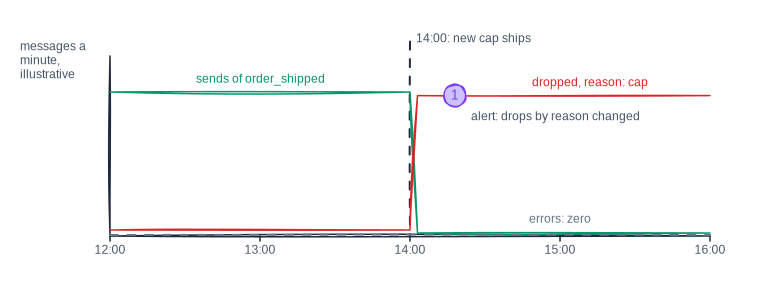
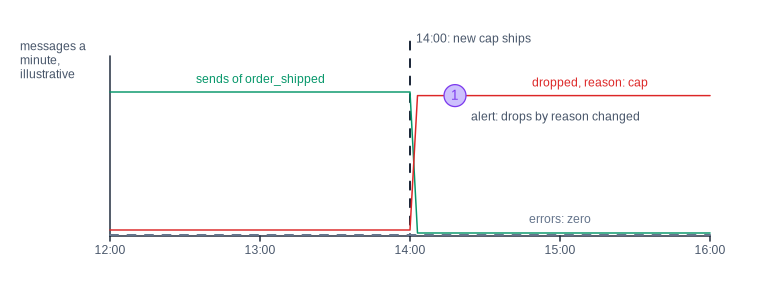
Rule changes ship like code. A new cap, merge window or channel order runs first in shadow mode. The decision step works out what the new rule would do, logs it, and still acts on the old rule. The distributed rate limiter uses the same shadow flag for its rules. Then the change goes to 1 percent of partitions, then 10, then all.
Label metrics by type, channel, class and outcome, never by user, or the metrics backend gets one time series per user. Per-user detail belongs in the delivery log. Slack went further for its own notifications. It traces every one at 100 percent while sampling the rest of its backend at 1 percent, and it reports that its customer experience team now triages notification tickets 30 percent faster.
Final design
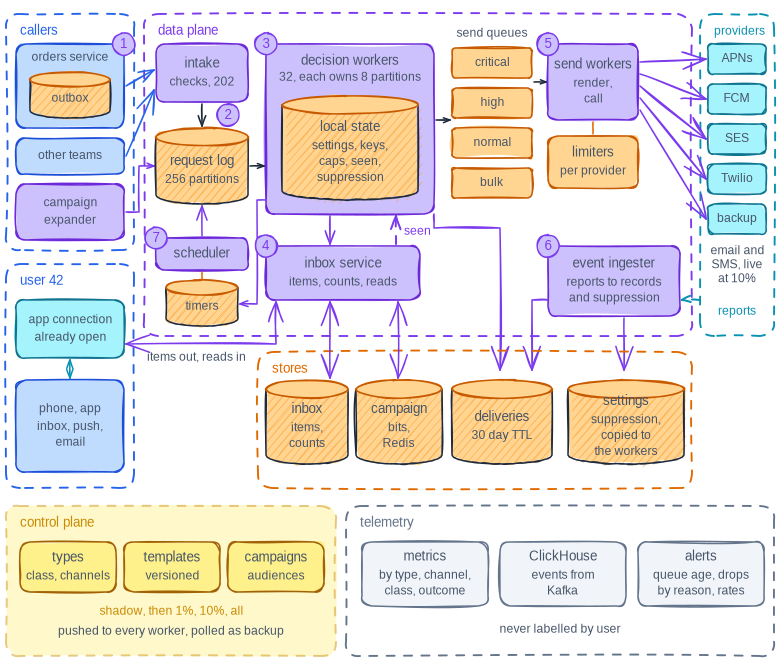
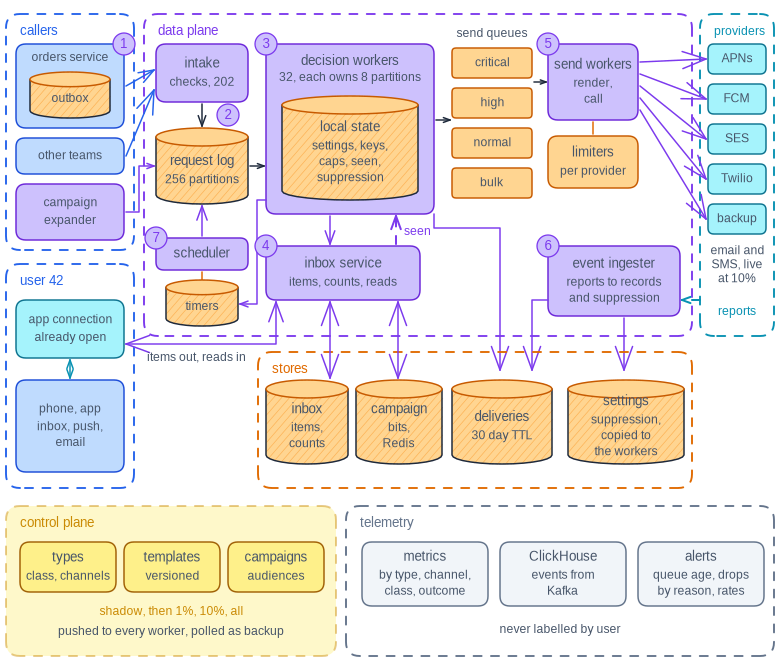
The path of one request, an order that shipped:
- The orders service commits "order 88 shipped" and an outbox row in one transaction. Its relay calls
POST /v1/requestswith the keyorder-88:shipped. - Intake checks that the type exists and that the producer is within its limit, writes the request to the request log on user 42's partition, and answers 202.
- The decision worker that owns the partition inserts the key and reads user 42's settings, suppression entries, caps and seen state from its local copy. It chooses the inbox and a push now, because the type's channel order starts with both. It writes an email timer for 15 minutes, in case the message is still unread, and writes each outcome to
deliveries. - The decision worker hands the inbox item to the inbox service, which writes it at the user's next position and adds one to the unread count. If the app is open, the app's existing real-time connection tells it there is a new position, and the app fetches it from the inbox service.
- The push task goes on the high-class push queue. A send worker gets a slot from the FCM limiter, looks up user 42's Android device tokens, renders the template, and sends with the request id as the Android tag.
- The push provider's answer, including any error such as
UNREGISTERED, reaches the event ingester. It updatesdeliveriesand feeds the suppression list and the metrics. - User 42 opens the order from the push at 10:04. The app reports the read with
POST /v1/inbox/read, and the inbox service writes a seen event to user 42's partition, so the decision worker records it. At 10:15 the email timer fires, the decision step finds the order already seen, and recordsdropped: seen.
The service takes 1 billion requests a day, 35,000 a second at peak, decided on 256 partitions that hold about 0.5 GB of state each, and its own Android pushes use 7,000 of FCM's default 10,000 a second. Almost all of the machinery sits before the send: the decision, its state, the timers and the record. The send itself is a few machines making HTTP calls to providers we don't control.
What is expected at each level
How interviewers turn what they see into these levels is in How a System Design Interview Is Scored.
Mid-level
Breadth matters more than depth here, and it is fine if the interviewer leads.
You should get to an API that takes requests, a queue per channel, workers that call APNs, FCM, an email provider and an SMS provider, and retries with backoff. You should check the user's settings before sending, render from templates, and know that push needs a device token per device.
You aren't expected to raise reputation, escalation or campaign storage on your own. You are expected to answer sensibly when asked, and to know that the API answers "accepted", not "sent".
Senior
You lead the design, and three things should come up without prompting.
The decision runs at send time. Held, scheduled and merged messages are checked again when they go out, with the user's current settings. A design that checks settings once, when the request arrives, sends to people who opted out an hour ago.
Urgent messages can't wait behind bulk. A queue per class and a reserved share of each provider's quota, with the number that shows why: a sign-in alert behind a 10-million-push campaign waits 17 minutes.
Repeats are caught, not prevented. The producer's key, checked by the decision step, a send record per channel, and a choice per type between sending again and skipping. Claiming exactly-once delivery to a provider is disqualifying.
Also disqualifying: an API that returns "sent", and one queue in arrival order for everything.
Staff+
A correct design is still the bar. A staff+ answer also decides what not to build.
Move the decision into the service. Producers send events, the service decides, and you name the cost: a type registry one team owns and reviews.
Spend channels in order. The inbox first, then escalate on silence, and SMS only where nothing else works, at about 75 to 130 times the cost of an email.
Separate what the providers judge. Queues and quota are not the only shared resources. A campaign's complaints can get a shared SES account paused, so each class gets its own tenant, IP pool and sending address.
Size the send tier by the providers. A few machines reach the provider limits, so you don't autoscale senders on queue length. Our own pushes nearly fill FCM's default quota, so campaigns run off-peak while the quota grows.
Be able to say what you would not build: your own mail servers, IP addresses or carrier connections, exactly-once delivery, a row per recipient per campaign, machine-learned send times on day one, and a general workflow engine. A team could spend a quarter on any one of them, and none is needed to meet the five requirements.
Sources
The company figures below come from each company's own engineering write-up, and every provider limit from the provider's documentation, read in November 2026.
- Changji Shi, Air Traffic Controller: Member-First Notifications at LinkedIn, 2018, and Vivek Nelamangala and PJ Xiao, Concourse: Generating Personalized Content Notifications in Near-Real-Time, 2018. One deciding gateway, partitioned by member with local state, its scale and the halved complaints, and scoring partitioned by recipient.
- Uber Engineering, How Uber Optimizes the Timing of Push Notifications using ML and Linear Programming. The CCG gateway, its 7-day schedule per user, and its scheduler's trigger rate.
- Slack: Tracing Notifications, and the Help Center's Guide to Slack notifications and notification settings. Trace sampling and the triage gain, and the email bundling and mobile delays.
- Amazon SES documentation: reputation metrics, the account-level suppression list, dedicated IP pools, warming up dedicated IPs, sending quotas, event publishing, event contents, the sending review FAQ, tenants and pricing. Review and pause thresholds, sending during a review, tenant pauses, suppression, IP pools and warming, the events, and the Essentials price.
- Google, Email sender guidelines, and IETF, RFC 8058. The bulk sender rules, the spam rate limits and one-click unsubscribe.
- FTC, CAN-SPAM Act: A Compliance Guide for Business. Commercial against transactional email.
- Twilio documentation: Account based throughput, error 21611, status callbacks, SMS character limits, US SMS pricing, error 21610, error 30034, SMS pumping fraud and Verify rate limits and timeouts, with Twilio's Migrate from Programmable Messaging to Verify. Queues and their 10 hours, callbacks, segments, prices, opt-outs, 10DLC, pumping, and Verify's sender pool and reused code.
- Firebase: pricing, throttling and quotas, error codes and the Admin SDK messaging reference. FCM's cost, its quota and how increases are granted, tokens tied to their senders, and one request per token.
- Resend, idempotency keys; SendGrid, Mail Send; Redis, SETBIT. The email provider's key, the 72-hour limit on
send_at, and bitmaps up to 2^32 bits.