When someone designs Dropbox, most of the answer goes on the bytes. How do you split a 10 GB file, resume an upload that died at 90 percent, or avoid storing the same video twice? Those questions matter, and they're also the solved part. Content-addressed blocks answer nearly all of them: each block is named by the hash of its bytes and kept in an object store such as S3. Object and Blob Storage works through each one using Dropbox's own design.
The hard part starts once the bytes have landed. Priya has a laptop and a desktop. She shares a folder with Tom, who spent the day on a plane with his laptop open. Both of them edited the same spreadsheet. When Tom's laptop reconnects, every computer involved has to end up with the same folder, and neither edit may disappear without anyone being told.
File sync is a journal that every device replays from its own position. The bytes are only what the journal points at.
Dropbox described this split in 2014. Its metadata servers keep the Server File Journal, an append-only table with one row per version of a file. Each row carries a journal ID that only goes up within a namespace. A namespace is Dropbox's word for the root of a folder tree. A device catches up by sending the last journal ID it has for each namespace, and the server returns only the rows after it.
The bytes live in a separate block store, keyed by the SHA-256 hash of each block. The block store has "No knowledge of users/files/how those blocks fit together."
So the system splits in two before any boxes are drawn. The block plane holds bytes: large blocks that never change, have no order and are never queried. The metadata plane holds journal rows: small, ordered within a namespace, and read on every sync. A block doesn't know which file it belongs to, and a row holds only hashes, so each plane can be stored, sized and replicated by its own rules.
The rest of the design follows. Saving a file writes blocks, then one row. Syncing reads the rows after a position, so the signal that something changed only has to carry a position. Sharing a folder gives it a journal of its own. A conflict is two rows that both claim to follow the same one. And a version history is the journal read backwards.
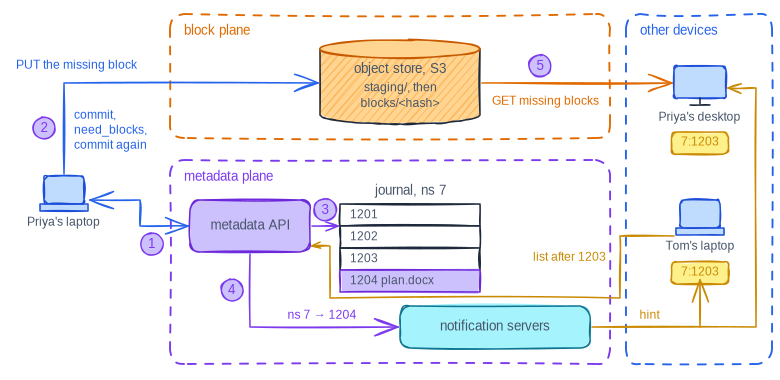
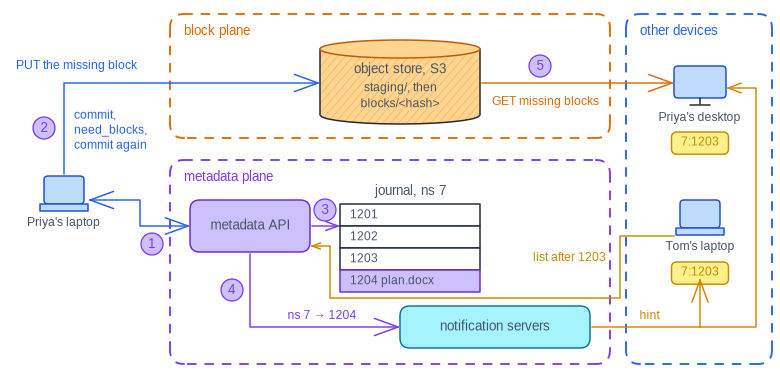
Understanding the problem
The general method for this part of the interview is in The First Five Minutes: Requirements.
Someone saves a file in a folder on their laptop, and a few seconds later it's on their desktop. They share the folder, and it appears on a colleague's machine. They edit on a plane, and everything catches up when they land. On their phone they browse the same folder and open one file.
Two products hide under the name. A sync engine keeps a folder the same on every computer, and each computer holds a full copy it can edit offline. A cloud drive lets a phone or a browser browse and download. This design covers both, plus shared folders. Live co-editing and one-way backup stay out.
Functional requirements
- Save a file on one device and have the server keep it, whatever its size, over a connection that drops.
- See every change on the user's other devices, within seconds when they're online, and in full when they come back after days away.
- Share a folder with other people, who then sync it as if it were their own.
- Never lose an edit when two devices change the same file or folder before either has seen the other's change.
- Restore an earlier version of a file, or a deleted file.
Out of scope, deliberately:
- Live co-editing inside one document. Two people typing in the same file at once is Google Docs.
- Search, previews and thumbnails. They read a file after it's committed and change nothing in the sync path.
- Public links and their permissions. Folders shared between accounts stay in.
- Syncing straight between computers on the same local network, and the operating-system work that shows online-only files as placeholders.
- Malware scanning, abuse handling and legal takedowns.
Non-functional requirements
- Scale: 500 million accounts. 100 million desktop clients connected at peak, and 200 million phones with the app. 1 billion commits a day, where a commit is one new file, edit, rename, move or delete. Peak is 3x the average.
- Sync latency: a file under 4 MB saved on one desktop appears on the owner's other connected desktops within 10 seconds at p99, in the same region. Bigger files move at the speed of the slower of the two connections.
- Durability: a committed version is never lost. Blocks are kept at eleven nines, and a commit is acknowledged only after a majority of its copies, in at least two regions, have the row.
- Convergence without loss: every device that comes online reaches the same tree as the server, and no save the server acknowledged is ever replaced without a trace.
- History: 30 days of versions and deleted files on the free plan, and up to 365 days on paid plans.
Requirement 4 carries the design, so read what it leaves out. It doesn't say the server merges two edits, or that every device sees a change at the same moment. It says an acknowledged save is never replaced without a trace, and every device ends at the same tree. An append-only journal gives you the first, because a row is never rewritten. A position per device gives you the second, because every device reads the same rows in the same order.
Requirement 2 matters as much for what it allows. Chat needs a message on screen within half a second, which is why WhatsApp holds a socket per device and delivers over it. Sync has ten seconds. That much slack lets the signal that something changed be small, and lets it get lost.
The set up
Core entities
- Account. A person, with one or more devices.
- Device. A desktop client keeps a full copy of its folders on disk and edits them offline. A phone or a browser keeps nothing by default and reads on demand.
- Namespace. A folder tree with its own journal. Every account starts with one, its root. Section 3 decides what a shared folder is.
- Journal row. One change to one file or folder in one namespace, numbered by
rev, the namespace's next journal position. This is the entity the design is about. The current tree, every device's progress and every old version are all read from it. - Block. A piece of a file, about 4 MiB on average and between a minimum and a maximum size, named by its SHA-256 hash. A MiB is 1,048,576 bytes. A block never changes.
System interface
Nearly every call is a request the device makes when it wants something: commit a change, upload a block, read rows, download a block. The one exception is learning that something changed while the device sits idle, and section 2 works out that call.
// Commit a version. The device sends hashes, never bytes.
POST /v1/commit
{ "ns": 7,
  "node_id": 5501,                       // null for a new file
  "parent_id": 4410, "name": "plan.docx",
  "base_rev": 1190,                      // the version this edit started from
  "blocklist": ["9f2c…", "e41a…", "77b0…"],  // SHA-256 of each block, in order
  "size": 9437184,
  "commit_id": "c_2b1e…" }               // idempotency key, made when the user saved

← { "status": "need_blocks",
    "upload": { "e41a…": "https://blocks…/staging/a_88/e41a…?X-Amz-Signature=…" } }
← { "status": "committed", "rev": 1204 }
← { "status": "conflict", "current_rev": 1201 }

// Wait until a followed namespace moves, or the timeout passes.
GET /v1/notify?cursor=1:880,7:1203&timeout=60
← { "changed": [ { "ns": 7, "rev": 1204 } ] }       // [] on a timeout

// Read the rows after a position.
GET /v1/list?cursor=1:880,7:1203&min_rev=7:1204
← { "entries": [ { "ns": 7, "rev": 1204, "node_id": 5501, "op": "edit",
                   "blocklist": ["9f2c…", "e41a…", "77b0…"], "size": 9437184 } ],
    "cursor": "1:880,7:1204", "has_more": false }

// Signed download URLs, only for hashes a row in a mounted namespace names.
POST /v1/fetch  { "ns": 7, "rev": 1204, "hashes": ["e41a…"] }
Three things to note.
The commit carries hashes, never bytes, so a 9 MiB file whose second block changed costs one 4 MiB upload.
base_rev makes the commit a compare-and-swap. If the file has moved on, the commit fails with conflict.
The cursor holds one position per namespace the device follows, such as 7:1203, ns 7 at rev 1203. WebSockets, SSE and Polling prefers one stream per client. Here a shared folder's rows live in one journal that many accounts read, and section 3 shows what copying them into a stream per device costs.
High-level design
1. What does saving a file write?
A save writes the blocks first and one journal row last. The row is the moment the file exists.
The device splits the file into blocks and hashes each one with SHA-256. The ordered list of hashes is the file's blocklist, and it's all the metadata plane ever learns about the contents.
Object and Blob Storage derives this unit. Blocks are keyed by their hash, so a save uploads only what changed. They're cut at content-defined boundaries: the bytes themselves decide where a block ends. So one inserted line changes one block instead of all of them. Dropbox's published design cuts at fixed 4 MB offsets instead.
In this design, a 10 GB file is about 2,400 separate uploads of one block each, so a dropped connection costs one block, not the file. A block the account already has never travels again.
A save takes three calls.
- Commit, with hashes only. The device sends the blocklist with
base_revandcommit_id. The server works out which hashes this account must upload: every hash except those it uploaded before and those it can already read. Every hash in thebase_revversion's blocklist counts as readable, so editing a file in a shared folder never re-uploads blocks somebody else put there. The server answersneed_blockswith a pre-signed upload URL for each missing hash: a link, signed by the server, that allows one upload to one key. - Upload to a staging key. Each URL allows one
PUTtostaging/<account>/<hash>, a key that belongs to this account alone, and the signature includes the expected SHA-256. S3 computes the SHA-256 of the bytes it receives and rejects the upload if they don't match. - Commit again. The server checks each staged block with a
HEADrequest, which returns the checksum S3 checked on upload. It copies the object inside S3 toblocks/<hash>, unless that key already holds the same bytes, and writes the hash intoaccount_blocks. From that moment the account owns the block. Then the server appends one journal row in a single transaction and answers with the row'srev.
Dropbox's protocol has the same shape: a commit that names blocks the server lacks gets "need blocks" back, and the second commit writes the journal row.
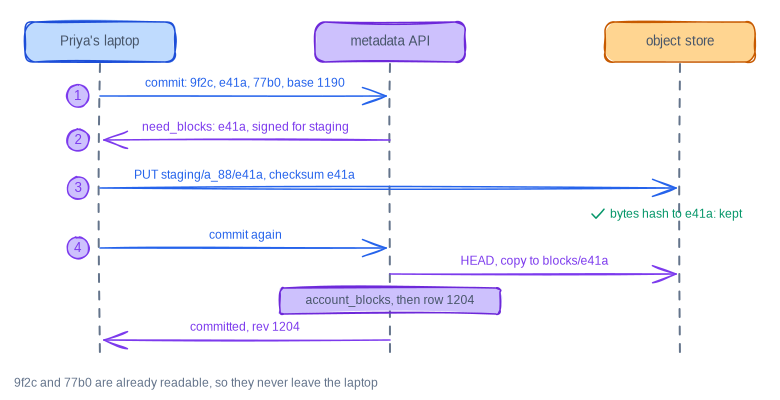
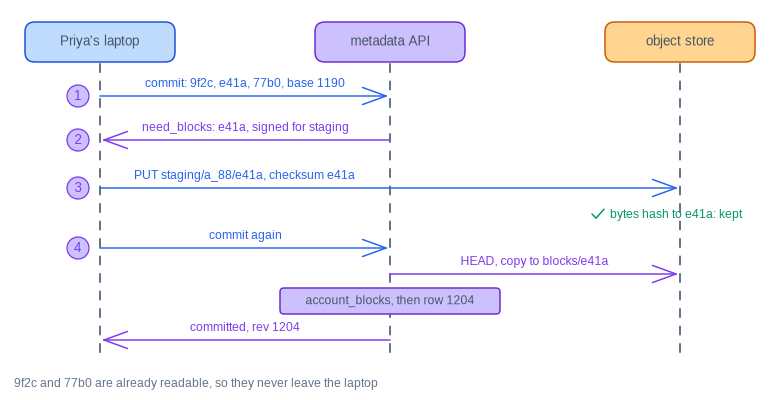
This order is the commit point from object storage, applied to blocks: nothing a user can see ever points at bytes that aren't there. A crash between the upload and the second commit leaves an object under staging/. A lifecycle rule on that prefix, which deletes objects after a set age, removes it, as the object storage page does for raw/.
There's no upload session on the server either. A device that dies halfway through a 10 GB file sends the same commit again when it restarts, and need_blocks lists the blocks still missing. Resuming is the first call, repeated.
A commit that times out is retried with the same commit_id. The commit transaction looks that id up first, under the namespace lock, so a retry of a save that already landed gets its rev back instead of a conflict.
Which store, and what actually forces it
The bytes need no argument. They're large, written once and never queried, which is what an object store is for. The metadata needs one, and the numbers decide it.
The two planes grow at very different rates. Size each
one, then ask which of them decides the database.

Bytes: new unique block data, after deduplication
  commits       a day                                   1B
  new bytes     per commit, assumed                 0.5 MB
  per day       1B x 0.5 MB                 =       500 TB
  per year      500 TB x 365                =       183 PB

Rows: the current tree
  files         assumed, as Dropbox has               300B
                hundreds of billions
  one row       ids, name, rev, size,               ~250 B
                two hashes
  tree          300B x 250 B                =        75 TB

Rows: the journal
  per day       1B rows x 250 B             =       250 GB
  per year      250 GB x 365                =        91 TB

Write rate at peak
  commits       1B / 86,400 x 3             ≈     35,000/s
  rows each     head, node, journal row,    ≈            5
                block references
  row writes    35,000 x 5                  ≈    175,000/s
  ────────────────────────────────────────────────────────
The bytes are about 2,000 times a year of journal, and
they need no database at all. The rows still come to
166 TB in the first year and 175,000 writes a second,
more than one database primary can take.
So the bytes go to an object store and decide nothing else. The rows decide the database, and one question matters most: where does the transaction in step 3 run?
One Postgres for the tree and the journal
This is the right place to start. A commit changes three rows together, the namespace's head, the file's node and a new journal row, and a relational database such as Postgres does that in one transaction.
The worksheet rules it out on size first. 166 TB in the first year is far past what one machine holds comfortably, and it grows by 91 TB every year after that. At 500 MB/s, the rate Object and Blob Storage assumes for a restore, 166 TB takes 92 hours to restore. The write rate fails as well: 175,000 row writes a second at peak, all through one primary.
Shard by namespace, so every commit stays on one shard
Split the rows by ns_id. A namespace's head row, its nodes and its journal all live on the same shard, so a commit is an ordinary local transaction. The compare-and-swap and the order of the journal need nothing from any other machine. MySQL or Postgres both work, and Dropbox's file system metadata runs on sharded MySQL.
This is what most teams run, and it's correct. The worksheet's 166 TB spreads over a few dozen shards.
It costs two things. First, a namespace can never be split across shards, so one that outgrows its shard is stuck there. Dropbox met this limit in Edgestore, its other metadata system, and warned that a shard that outgrew one machine would leave it with "no way to split that shard."
The bigger cost is the journal. It grows by 91 TB a year whether anyone reads it or not, and within two years it's most of what the shards hold.
Give the journal a horizon
The premise to question is that every journal row stays in the hot database forever. Look at who reads a row. A device catching up reads rows from the last few minutes, or from last week if it was switched off. Restore reads old rows, rarely, one file at a time. Nothing else reads the journal.
So keep 30 days of journal on the shards, and move older rows to an archive in object storage that only restore reads.
One file per namespace per month would be millions of tiny objects, the case Object and Blob Storage prices out. So an archiver packs the rows into one file per shard per day, in Parquet, a columnar format, sorted by namespace and rev. A restore reads the file for the day it needs, and fetches only the part that holds its namespace.
A device whose cursor is older than 30 days doesn't get a replay. It gets a snapshot, the current tree, which it compares against its own disk. That's the second of the three answers in WebSockets, SSE and Polling. Dropbox's API does the same: it can answer a cursor with reset, meaning the cursor is no longer valid.
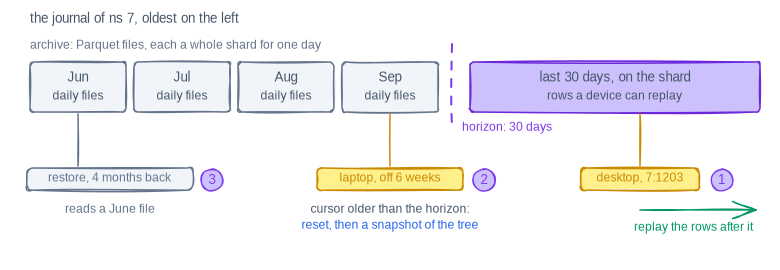
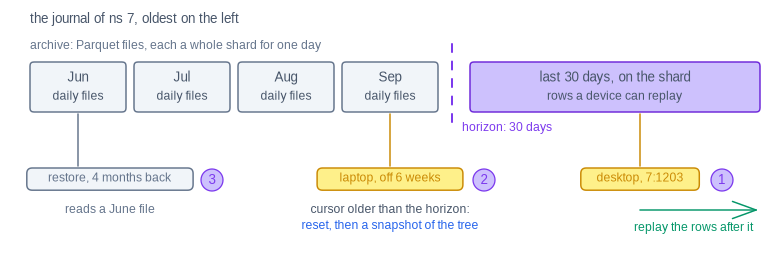
The hot data stops growing with time. It's the tree plus 30 days of journal, 75 + 7.5 = 82.5 TB, and it grows only as the number of files grows. With every row kept hot, the same shards would hold 75 + 3 x 91 = 348 TB after three years.
What you give up: a device that was off for more than 30 days downloads a listing of the whole tree, and section 4 has to make that comparison safe. Restoring a version older than 30 days reads the archive, so it takes seconds instead of milliseconds. And history now lives in two places, so the restore path has to look in both.
| data store | what goes in it | what forces it |
|---|---|---|
| object store, such as S3 | blocks under blocks/, uploads under staging/ | 500 TB a day of bytes that never change and are never queried |
| sharded MySQL or Postgres, by namespace | namespaces, nodes, 30 days of journal | a transaction on every commit, 175,000 row writes a second at peak |
| block index, MySQL or Postgres sharded by hash | each block's state, references and regions | every commit claims its hashes, and deletion needs counts |
account_blocks, sharded by account | the blocks each account has uploaded | deciding which uploads an account may skip |
| Parquet files in object storage | journal rows older than 30 days, packed per shard per day | 91 TB a year, read only by restore |
| Redis | each namespace's newest rev, the hint channels and the tail cache | deep dive 1 sizes it |
The tables
-- One row per namespace. Every commit in the namespace locks it.
namespaces (
  ns_id         bigint primary key,
  owner_account bigint not null,          -- changes when the owner leaves
  head_rev      bigint not null,          -- the newest journal position
  home_region   smallint not null         -- deep dive 6
)

-- The current tree, kept in step with the journal in the same transaction.
nodes (
  ns_id        bigint,
  node_id      bigint,                    -- globally unique, kept through every move
  parent_id    bigint,
  name         text,
  is_dir       boolean,
  rev          bigint,                    -- journal position of its last change
  size         bigint,
  blocklist    bytea,                     -- 32-byte SHA-256 hashes, in order
  deleted      boolean,
  primary key (ns_id, node_id)
)
  unique (ns_id, parent_id, name) where not deleted

-- The journal. Append-only: a row is never updated.
journal (
  ns_id        bigint,
  rev          bigint,
  node_id      bigint,
  op           smallint,                  -- add, edit, move, delete, restore
  parent_id    bigint,
  name         text,
  blocklist    bytea,
  size         bigint,
  commit_id    uuid,                      -- the device's idempotency key
  linked_ns    bigint,                    -- the other half of a move between
  linked_rev   bigint,                    --   namespaces, section 3
  committed_at timestamptz,
  primary key (ns_id, rev)
)
  unique (ns_id, commit_id)

-- Blocks each account has uploaded, written at its second commit.
account_blocks (
  account_id   bigint,
  hash         bytea,
  primary key (account_id, hash)
)

-- The block index. Sharded by hash, on shards of its own.
blocks (
  hash         bytea primary key,
  state        smallint,                  -- stored, deleting
  size         integer,
  refs         bigint,                    -- journal rows that name it
  claimed_at   timestamptz,               -- the last commit that named it
  zero_since   timestamptz,               -- when refs last reached zero
  regions      smallint[]                 -- where its copies are, deep dive 6
)
Four things to note.
The journal's key is (ns_id, rev), and rev comes from head_rev. Every commit locks its namespace's one namespaces row, takes the next number and writes it. That lock is what makes the journal a single order. It's also why a cursor can be one integer per namespace, and why catching up is one range scan.
Files are found by node_id, not by path. Renaming a folder that holds 100,000 files changes one row and writes one journal entry. If files were keyed by path, the same rename would rewrite 100,000 rows, and a device that read half of them would see a half-moved folder. Dropbox's old sync engine had this problem: its files "lacked a stable identifier that would be preserved across moves." Here node_id is unique across all namespaces, so a file keeps it even when it moves into a shared folder.
nodes is a copy of what the journal says. Both change in the same transaction, and you could rebuild nodes by replaying the journal. If the two ever disagree, the journal is right.
Block rows live on other shards. A commit runs on its namespace's shard, and the block index is sharded by hash, so no transaction covers both. Deep dive 4 deals with the reference counts that leaves behind.
The queries that carry the product
-- 1. Commit an edit. One transaction, on the namespace's shard.
BEGIN;
SELECT head_rev FROM namespaces WHERE ns_id = $1 FOR UPDATE;   -- one commit at a time
SELECT rev FROM journal WHERE ns_id = $1 AND commit_id = $7;   -- found: a retry, return it
UPDATE nodes SET rev = $head + 1, blocklist = $2, size = $3
 WHERE ns_id = $1 AND node_id = $4 AND rev = $base_rev;       -- 0 rows: conflict, roll back
INSERT INTO journal (ns_id, rev, node_id, op, parent_id, name, blocklist, size, commit_id, committed_at)
VALUES ($1, $head + 1, $4, 'edit', $5, $6, $2, $3, $7, now());
INSERT INTO block_ref_outbox (ns_id, rev, hash, delta)         -- deep dive 4
SELECT $1, $head + 1, h, 1 FROM unnest($8::bytea[]) AS h;
UPDATE namespaces SET head_rev = $head + 1 WHERE ns_id = $1;
COMMIT;

-- 2. Catch up from a cursor. Runs after every hint and on a slow backstop.
SELECT rev, node_id, op, parent_id, name, blocklist, size, linked_ns, linked_rev
FROM journal
WHERE ns_id = $1 AND rev > $2
ORDER BY rev
LIMIT 2000;

-- 3. Hashes this account may skip: the ones it uploaded. The base version's
--    hashes, which it can already read, are skipped as well.
SELECT hash FROM account_blocks
WHERE account_id = $1 AND hash = ANY($2);

-- 4. Before the row is written, claim every block it names.
UPDATE blocks SET claimed_at = now()
WHERE hash = ANY($1) AND state = 'stored'
RETURNING hash;                              -- a hash not returned goes back as need_blocks
Query 2 runs most often, about 245,000 times a second at peak, as deep dive 1 counts. Each run is a range scan on the primary key, the cheapest read a shard can do.
Query 1 is the one the interviewer will push on, because of the FOR UPDATE. Every commit in a namespace waits for the one before it, including that commit's wait for copies in another region, which deep dive 6 sets up. For one person's folder that's invisible. For a folder 50,000 people write to, it's a ceiling, and deep dive 3 measures it.
2. How does a device learn that something changed?
A device that knows its position can catch up at any moment by calling list. The design question is when it should call, and what tells it to.
Every desktop polls list on a timer
This is the natural first answer, and it has strengths. A poll is stateless, so any server can answer it, and a deploy breaks nothing. The device also catches up after a gap with no extra machinery, because a poll after a day offline is the same request as any other.
Then put numbers on it.
100M desktops are connected at peak. Each follows about
5 namespaces, its root and 4 shared folders, and each
commit is wanted by about 3 other devices. Both are
assumed.

Changes devices actually need, at peak
  commits       1B / 86,400 x 3             ≈     35,000/s
  lists         x 3 devices each            ≈    105,000/s

Poll every 30 s
  requests      100M / 30 s                 ≈       3.3M/s
  shard reads   x 5 namespaces              ≈        17M/s
  useful        105,000 / 3.3M              ≈           3%
  delay         up to 30 s                  →  misses 10 s

Poll every 5 s, to meet the target
  requests      100M / 5 s                  =        20M/s
  shard reads   x 5 namespaces              =       100M/s
  useful        105,000 / 20M               ≈         0.5%
  ────────────────────────────────────────────────────────
Meeting the target by polling costs 100 million shard
reads a second to find 105,000 changes, about 950 reads
for every change.
Polling fails on its latency floor before it fails on volume. A 30 second poll can't meet a 10 second target, however fast the servers are. A 5 second poll meets it, and almost every one of those reads finds that nothing happened.
Hold a socket to every desktop, and push each change down it
Keep a WebSocket open to every connected desktop. After a commit, send the journal row itself to every device that follows the namespace. Delivery takes milliseconds, nothing polls, and the empty answers disappear. WhatsApp delivers messages this way, and most candidates draw it here too.
The cost is that you now have two ways of delivering the same rows. A deploy restarts a server holding 500,000 sockets. Each of those devices reconnects and needs whatever it missed while it was away, and the only complete record of that is the journal, read from its cursor. So list still exists, and the push is a second path beside it. The device has to merge the two: drop a row it got both ways, order a pushed row against a listed one, and notice a gap between them.
The push servers also need to know what each device has received, and every restart throws that state away. None of it helps a phone either, because iOS suspends an app in the background and its socket goes with it.
Push a position, never the change
The premise to question is that the notification delivers the change. The journal already delivers changes, to any device, from any position, after any gap. So the push, which this design calls a hint, only has to tell a device that a namespace moved, and how far: { "ns": 7, "rev": 1204 }. The device compares that with its cursor and calls list.
A hint that carries only a position can be lost, merged or repeated without harm. A device that already has 1204 ignores it. Ten commits in one second can become one hint for the last of them. A lost hint costs at most one timeout, because the device's next waiting request finds the namespace already past its cursor.
A notification server keeps only who is waiting on which namespace and the newest rev of each, and it can read those revs again from Redis. So a deploy loses nothing, and a reconnect is the same request the device always makes.
The transport follows from the payload. The rule in WebSockets, SSE and Polling is to push when updates are rarer than the delay you can accept. At peak, 105,000 wakes a second spread over 100 million desktops is one every 16 minutes or so for each desktop, against a 10 second delay, so push wins.
But only the server sends, and only one small message. A long poll, a request the server holds open until it has something to say, is enough, and so are server-sent events. A WebSocket's two-way framing buys nothing here. Dropbox's 2014 write-up describes idle desktop clients holding a long poll open to a notification server, and its public API answers that long poll with only changes, true or false. Google Drive's push messages have an empty body.
The same move takes phones out of the problem. A phone is a viewer, not a replica. Dropbox's mobile app doesn't store files on the device by default, and files marked for offline use update when the user opens the app's list of offline files. So a phone holds no connection and lists when the app opens.
A background push couldn't keep a phone current anyway. Apple advises sending no more than two or three an hour, as Push Notification Delivery covers, and a busy shared folder changes more often than that. 200 million phones cost nothing while their apps are closed.
What you give up: every hint costs an extra round trip before the device has the row, about 40 ms against a 10 second target. A phone shows the folder as it was when the app last opened. And the notification fleet still holds 100 million waiting requests, which deep dive 1 sizes.
What the hint has to get right
Four rules make a hint that carries only a position safe.
Publish after the commit, and only move the head forward. If the server published before the commit, a device could list before the row existed and go back to waiting. So the metadata server commits first. Then it sets head:7 in Redis to 1204 and publishes the same position on the channel ns:7. The channels are Redis's sharded publish/subscribe (pub/sub) channels, which spread across its shards.
The write to head:7 is max-only: it succeeds only if the new rev is larger. Two commits that finish close together on different API servers can publish out of order, and the max-only write stops the head from moving backwards.
Subscribe first, then compare. A device lists up to 1203 and sends its next long poll. If 1204 commits in the gap between the two, its publish went out before anyone was listening for that device. So the notification server subscribes to ns:7 first, then compares the device's cursor with the head it holds for ns 7.
The server keeps every subscribed namespace's head in memory, updated from the pub/sub messages it already receives. It reads head:7 from Redis only when it first subscribes to that namespace. WebSockets, SSE and Polling uses the same order for replay: subscribe, then catch up.
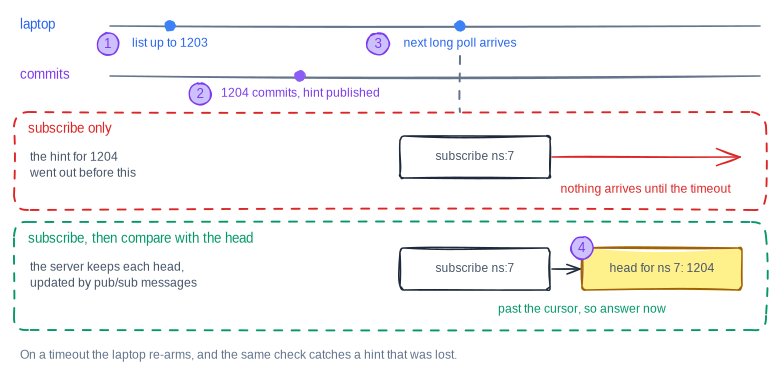
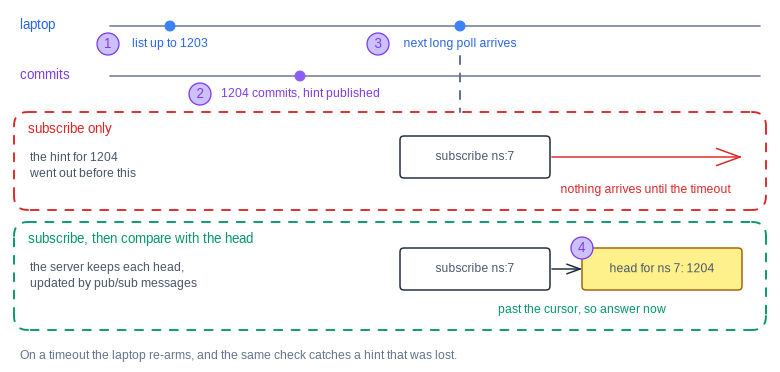
On a timeout, wait again instead of listing. The device re-arms: it sends a new long poll with the same cursor, and rule 2's comparison runs again. That catches a lost hint only if the server's own head is right, so the server has to know when it might have missed one.
Redis delivers pub/sub messages at most once. A message a subscriber misses, for example during a network disconnect, is "forever lost." So a notification server whose Redis connection drops re-reads the heads of every namespace it holds before it answers again. The load balancer sends a device's requests to the same notification server, by a hash of the device id, so its subscriptions are already in place when it re-arms. A list once an hour is the last backstop.
Read from a replica only once it has the hinted rev. The device sends min_rev=7:1204 with its list. A read replica that hasn't applied 1204 yet forwards the request to the leader. Without that rule, a replica that's behind answers with nothing new, the device goes back to waiting, and the change sits unseen until the next commit in that namespace.
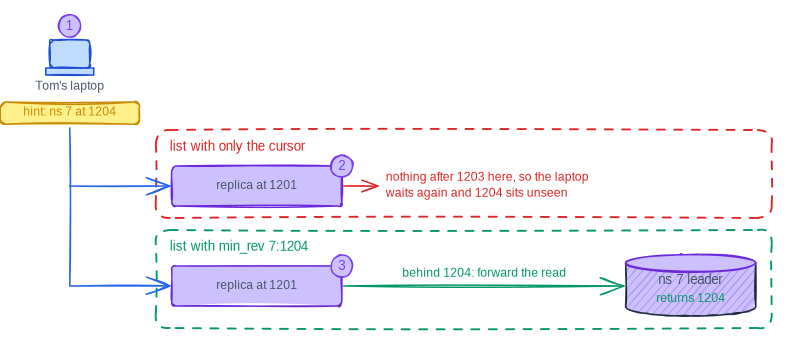
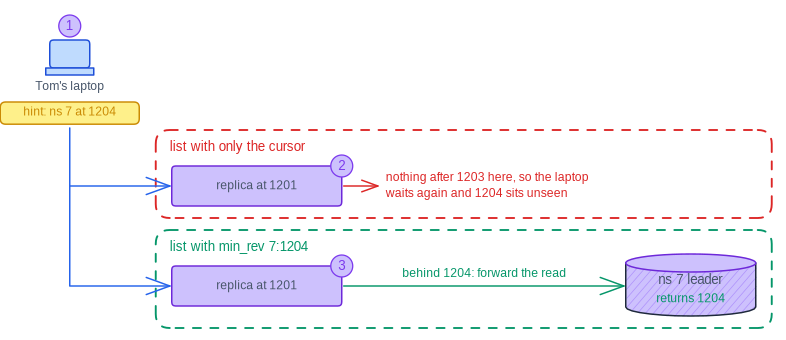
Every waiting request also ends at a random time, so devices that started waiting together don't all come back in the same second. Here each one waits 60 seconds plus up to 60 seconds of random jitter, 90 seconds on average. Dropbox's long poll adds "up to 90 seconds of random jitter" for the same reason: "to avoid the thundering herd problem." Some networks cut idle requests sooner, and a request cut early starts again.
3. How does a folder become shared?
Priya shares her Projects folder with Tom. Tom's laptop has to sync Projects like any other folder, and an edit from either side has to reach the other. The question is whose journal those edits go in.
Copy the folder into each member's namespace
It looks simple. Tom gets his own copy of every row, in his own root namespace, and syncs it like his own files. Nothing about the commit or the cursor changes.
Every commit to Projects now has to be written once per member. With 50 members, one edit becomes 50 journal rows on up to 50 shards, in 50 separate transactions. They don't commit together, so two members can see two edits in different orders.
The conflict check is worse. Each copy has its own rev, so Priya's edit can pass the check against her copy while Tom's passes against his, and both of them "win". Requirement 4 is gone, and the folder's metadata is stored 50 times.
Keep it in the owner's namespace, and give members access
Keep Projects where it is, in Priya's root namespace, and add a row saying Tom may read and write it. Tom's devices follow Priya's namespace as well as his own, and see only the Projects subtree. There's one copy, one order and one conflict check, so requirement 4 holds again.
It costs three things. Tom's list reads Priya's whole journal and filters out everything outside Projects, so her private edits cost him reads. If Priya leaves the company, Projects has to move to someone else's namespace: every row copied to another shard while people keep editing it. And Priya's namespace carries the folder's write load, whoever does the writing.
Make every shared folder a namespace of its own
The premise to question is that each file belongs to an account. Make Projects a namespace of its own, ns 7, with its own head and its own journal. Priya's root namespace and Tom's each get a mount: ns 7 appears in Priya's tree at /Projects and in Tom's at /Shared/Projects.
This is Dropbox's model. In its words, "Each user owns a root namespace," and "every shared folder is a namespace which can be mounted within one or many root namespaces."
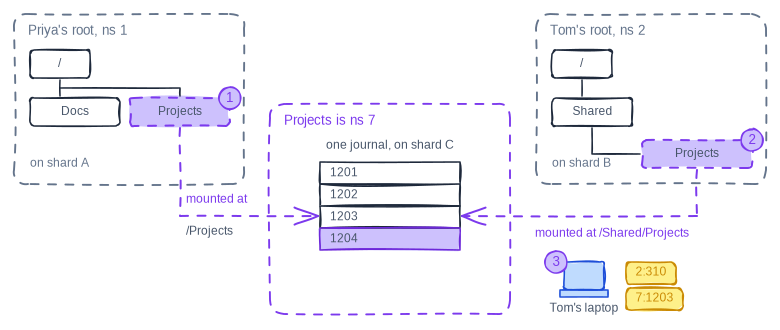
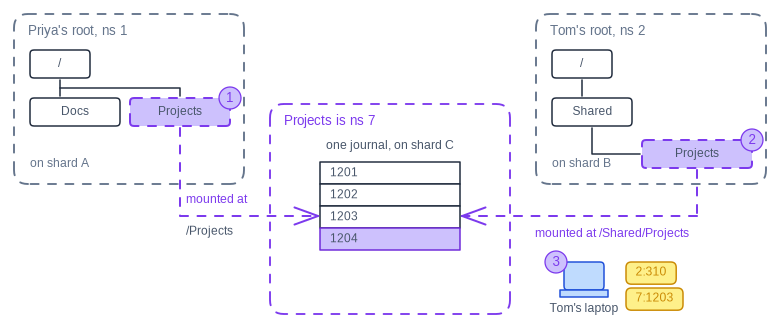
Every problem from the tiers above goes away. A commit to Projects is one row in one journal, in one order everyone sees. The shard key was already ns_id, so nothing moves when Priya leaves; the row's owner_account changes. Unsharing deletes a mount, and the folder stays whole for everyone else. Tom's list reads only ns 7's rows.
What you give up: a device's cursor is now a list of positions, one per namespace it follows, and a list reads several namespaces, possibly on several shards. And a move between namespaces, such as dragging a file from your own folders into Projects, touches two journals that may sit on two shards.
The mount is one more table, on the account's shard:
mounts (
  account_id   bigint,
  ns_id        bigint,                   -- the shared folder's namespace
  root_ns_id   bigint,                   -- the account's own root
  mount_node   bigint,                   -- the folder in the root where it appears
  can_write    boolean,
  primary key (account_id, ns_id)
)
Every list, commit and fetch checks it. A device may read a namespace only if its account has a mount for it, and write only if can_write is set. Removing Tom from Projects deletes his row, his devices' next list for ns 7 is refused, and his client stops syncing it.
A move inside one namespace changes one node and writes one row. A move from Priya's root into Projects is a delete in ns 1 and an add in ns 7. The two have to commit together, or a crash between them leaves the file in neither place. When both namespaces sit on one shard, that's a local transaction. When they don't, it's a two-phase commit (2PC) across the two shards, in which both shards first promise to commit and then both do.
Dropbox's metadata team needed the same thing. The system that shards its MySQL doesn't offer all-or-nothing transactions across shards, so Panda, the layer Dropbox built under Edgestore, adds them with two-phase commit.
2PC costs four things here, and each needs an answer.
- The decision has to outlive the coordinator. A coordinator that dies after both shards vote yes leaves them unable to commit or abort, as Distributed Transactions and Sagas shows. So the coordinator writes its decision to a replicated log before it tells the shards, as Spanner and CockroachDB do, and a replica finishes the commit if the coordinator dies.
- Both namespace locks stay held while the outcome is in doubt. Each shard keeps its
namespacesrow locked from its yes vote until the decision arrives. Every other commit in both namespaces waits behind the move, and if ns 7 is a folder 50,000 people use, all of them wait. - Two home regions make it a cross-region 2PC. The sagas page puts a row locked through cross-region 2PC at about 26 commits a second, and a move between namespaces homed in different regions holds both locks that long.
- Devices read the two halves from two journals. A device that lists ns 7 before ns 1 shows the file twice, and one that lists them the other way round shows it missing. So the file keeps its
node_id, and each row names the other half inlinked_nsandlinked_rev. A device that sees one half lists the other namespace up to the linked rev before it applies either. Dropbox's Nucleus sets the same bar for shared folders and files: "clients never observe them in transiently duplicated or missing states."
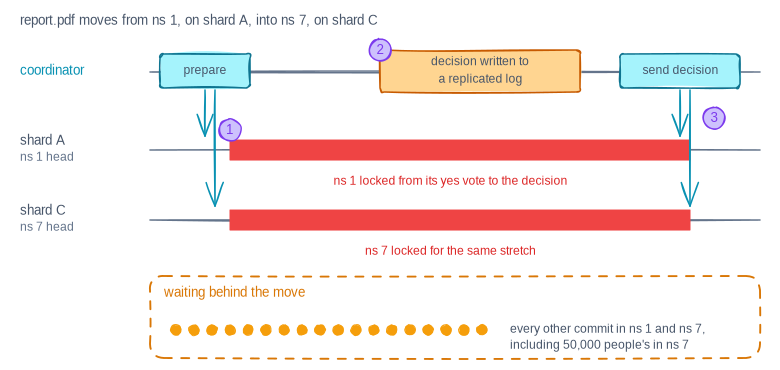
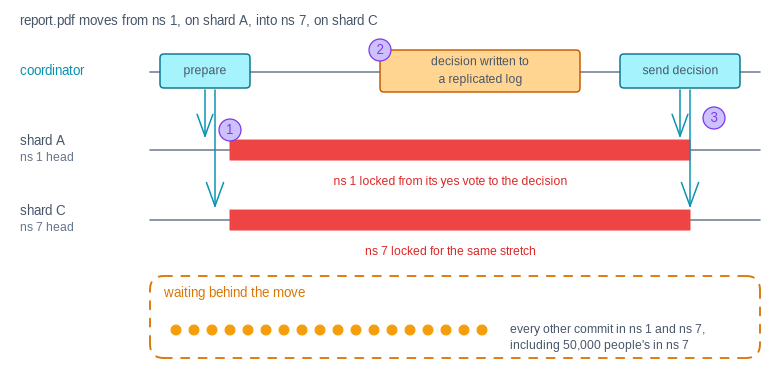
Moves between namespaces are rare next to edits, so only they pay for 2PC. Dropbox's performance guide gives the same advice from outside: it's "more efficient (and reduces contention risk)" to keep a batch "to a singular namespace".
4. What happens when two devices change the same file?
Tom edits budget.xlsx on the plane. Priya edits it at her desk. Both of them started from rev 2187. Priya's desktop commits first, as rev 2203. Then Tom lands, and his laptop commits too.
The last commit wins
The server applies whatever arrives. Tom's commit lands as 2204, and the tree now shows his version. It's simple, and it never shows anyone an error.
Priya's edit is gone from the current tree, and nobody was told. It still exists in the history, but nothing tells her to look there. That's what requirement 4 forbids. CAP and What It Actually Constrains says last write wins "deletes one side's data without telling anyone", and that it's acceptable for a cache, never for anything a person typed.
Commit only on top of the version you started from
The commit already carries base_rev. Query 1 updates the node only WHERE rev = $base_rev, so Tom's commit, based on 2187, finds the node at 2203, changes nothing and rolls back. The server answers conflict.
Tom's laptop then commits his bytes as a new file beside the original, "budget (Tom's conflicted copy 2026-11-01).xlsx", as rev 2204. Both versions survive, both sync to every device, and a person decides what to keep. That's the "keep both and ask" option from the CAP article's list. Two new files created offline with the same name end the same way: the unique index on (ns_id, parent_id, name) refuses the second, and it becomes a conflicted copy.
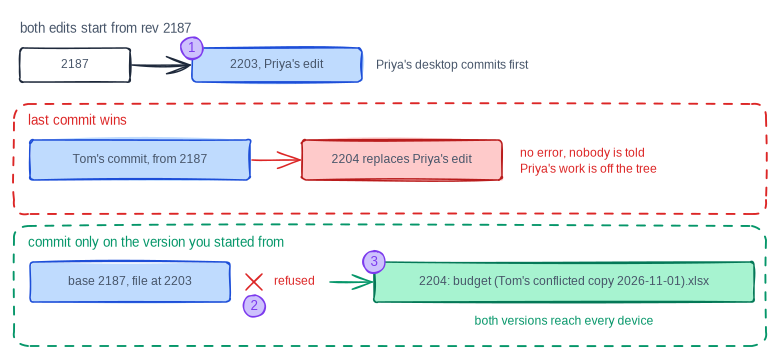
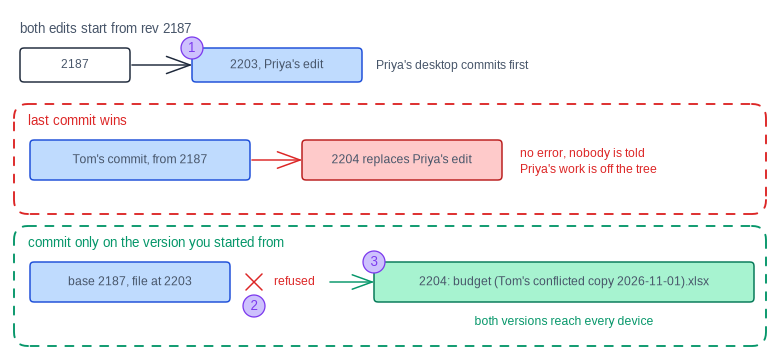
This is what Dropbox does. Its help centre says "The last version saved will always appear as the conflicted copy." Seen from outside, that's the compare-and-swap: the first commit keeps the name, and the second becomes the copy.
The cost lands on users. They get duplicate files to clean up, and apps that save on their own make them often. Dropbox lists a file "left open on another user's computer" among the three usual causes.
Use a merge base to tell who changed what
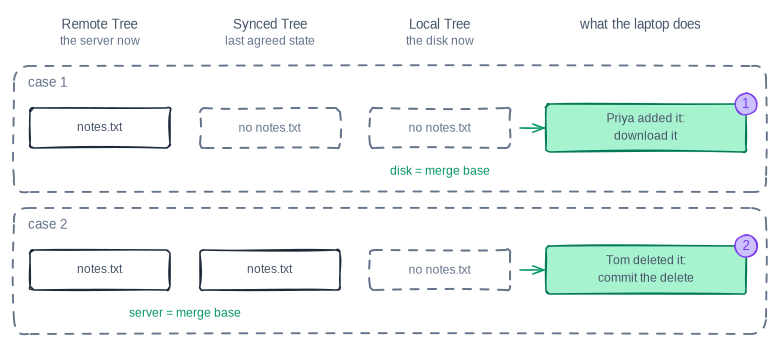
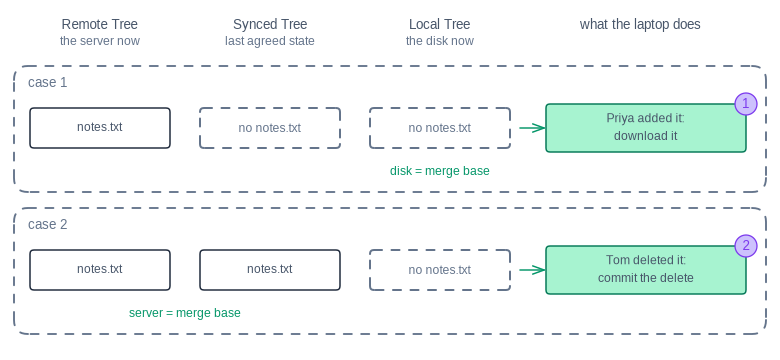
The premise to question is that a conflict is two edits to one file's contents. The harder cases are about direction. Tom's laptop reconnects and finds /Projects/notes.txt on the server but not on its disk. Either Priya added it while he was away, or Tom deleted it on the plane. The journal says what the server did. It can't say what the laptop did while it was offline. And the right action is the opposite in each case: download the file, or delete it on the server.
Dropbox's rewritten sync engine, Nucleus, answers this with three trees on the device. The Remote Tree is the latest state on the server. The Local Tree is the last state seen on disk. The Synced Tree is the last state on which the two agreed, and each node in it acts as a merge base.
If the disk still matches the merge base, the change came from the server, so the laptop downloads it. If the server still matches the merge base, the change came from the laptop, so it uploads. Only when both differ from the merge base is there a conflict, and only then does a conflicted copy get made.
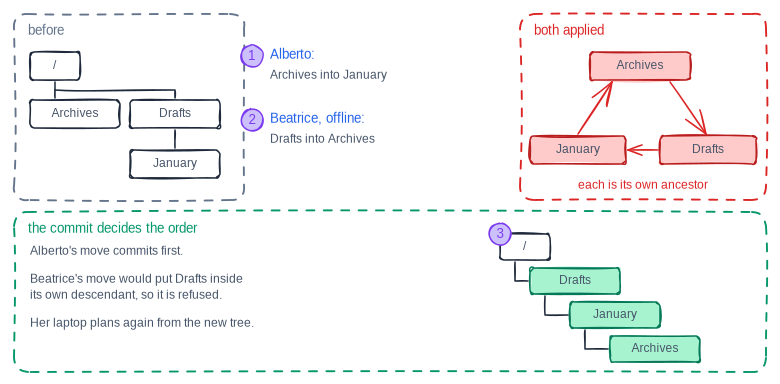
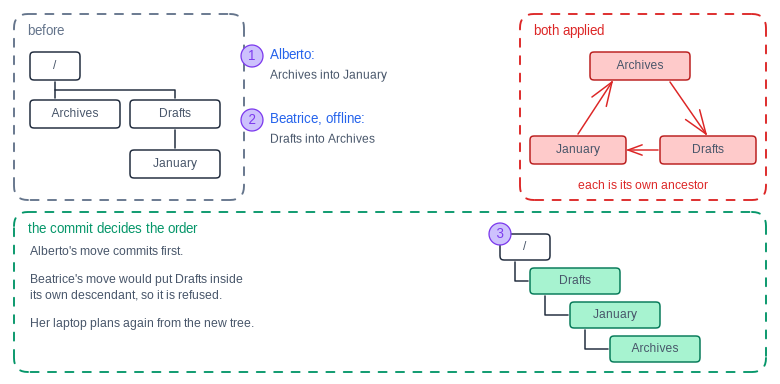
Moves need the same care. In Dropbox's own example, Alberto moves Archives into January while Beatrice, offline, moves Drafts into Archives. Applied together, the two moves would make a folder that contains itself. Dropbox's old engine duplicated the directories and merged the trees. With Nucleus, Dropbox says, "we keep the original directories, and the final order depends on which sync engine uploads their move first."
In this design, the commit decides which move goes first. A move names the moved node's base_rev like an edit does, and the server refuses a move that would put a folder inside itself. The device that loses plans again from the new remote tree.
This is also why node_id never changes, even when a file moves between namespaces. Without it, the merge base sees a delete and an unrelated add, and it can't pair them up.
What you give up: every desktop keeps a third copy of its tree's metadata, and the client becomes the hard part of the system. Dropbox spent four years rewriting its sync engine around this model.
5. How does a restore work?
A restore is a commit. budget.xlsx has journal rows 2187, with blocklist A, and 2203, with blocklist B. Restoring 2187 appends row 2250 with blocklist A and base_rev 2203. No bytes move. Blocklist A's blocks are still stored, because row 2187 still names them, and a restore runs on the server, so it skips the upload check altogether.
Because a restore is an ordinary commit, every device syncs it like any other edit, and the restore can itself be undone. A deleted file comes back the same way, as a commit of its last blocklist with op set to restore.
Dropbox's Rewind lets a user "take a folder, or their entire account, back to a specific point in time" using version history. In this design that's the journal read backwards to the chosen time, then one restore commit for each node that changed since.
Old blocks can move to a cheaper storage class, and age is the main signal. Dropbox reports that "over 40% of all file retrievals" are for data uploaded in the last day, over 70 percent for the last month and over 90 percent for the last year. In 2019 it added a cold tier to Magic Pocket, its own block store.
One exception matters for sync. A block that a current version still names stays warm, however old, because every device that syncs that file reads it. So the job that moves blocks checks their references as well as their age.
Deep dives
The first three come up in nearly every version of this interview.
1. How many servers, and what actually needs scaling?
Size each tier by the thing it holds.
The inputs are the requirements and the earlier
worksheets. Assumed: what one server or one shard holds,
about 3 notification servers per namespace, and about
100 B of Redis memory per subscription.

Notification servers, sized by waiting requests
  desktops      connected at peak                     100M
  per server    waiting requests                   500,000
  servers       100M / 500,000              =          200
  re-arms       100M / 90 s average         ≈       1.1M/s
  per server    from memory, 1.1M / 200     ≈      5,600/s

Redis, sized by deliveries and subscriptions
  publishes     one per commit              ≈     35,000/s
  deliveries    x 3 servers each            ≈    105,000/s
  subscribed    100M x 5, at most                     500M
  memory        500M x 100 B                ≈        50 GB
  shards        50 GB / 8 GB each           ≈     7, use 8

Metadata API, sized by requests
  commits       35,000/s x 2 calls          =     70,000/s
  lists         one per hint                ≈    105,000/s
  backstop      100M / 3,600 s              ≈     28,000/s
  fetches       one per list with blocks    ≈    105,000/s
  servers       308,000 / 5,000 each        ≈           62

Metadata shards, sized by data
  hot data      with the 30-day horizon            82.5 TB
  shards        82.5 TB / 5 TB each         ≈   17, use 32
  range scans   105,000 + 28,000 x 5        =    245,000/s
  per shard     245,000 / 32                ≈      7,700/s

Block index, sized by rows
  new blocks    ~1 per commit, assumed      ≈     1B a day
  one year      365B x ~100 B               ≈      36.5 TB
  claims        35,000 x ~2 hashes          ≈     70,000/s
  counts        one per claim, by relay     ≈     70,000/s
  shards        36.5 TB / 5 TB, with room   ≈           16
  ────────────────────────────────────────────────────────
The bytes, 500 TB a day, pass through none of our
servers. The largest fleet answers re-arms from memory,
and Redis is sized by subscriptions, not by hints.
The notification fleet is the largest, and the cheapest to lose. 200 servers hold 100 million waiting requests, plus the head of each namespace those requests follow, and nothing else. A re-arm is a comparison against heads in memory, so 1.1 million a second touch no database.
A server that restarts drops 500,000 requests. Their devices reconnect to other servers, which subscribe and read those namespaces' heads from Redis once. WebSockets, SSE and Polling puts published figures between 100,000 and 1 million connections a server, and how many devices one restart may disturb decides where in that range to sit.
Redis is sized by subscriptions. 35,000 publishes a second is light work, well under the WhatsApp breakdown's figure of about 100,000 publishes a second for one Redis pub/sub shard. Memory fills with every notification server's subscription to every namespace its devices follow, so the cluster is sized on that, at about 8 shards with replicas.
The metadata API is ordinary. It needs about 62 stateless servers behind a load balancer, scaled on request rate. The shards behind them are harder to change. Adding one means moving whole namespaces onto it while they're live, which Partitioning and Sharding covers.
The block plane costs no servers of ours. Uploads, downloads and the copies from staging/ to blocks/ all happen inside the object store, so the 500 TB a day shows up on the storage bill and nowhere else. The keys are hashes, so they spread evenly across S3's prefixes, and a sudden flood into a new bucket is the one case to watch, as Object and Blob Storage explains.
2. Where do the seconds go?
Take a 1 MB file saved on Priya's laptop, appearing on her desktop in the same region.
Link speeds are assumed: 20 Mbps up and 100 Mbps down
at home, 40 ms round trips to the region and 25 ms to
the nearest other region. The settle wait and the copy
time are assumed too.

  settle        disk event, writes stop           1,000 ms
  hash          cut and hash 1 MB                     5 ms
  commit        need_blocks, 1 round trip            40 ms
  upload        PUT 1 MB at 20 Mbps                 400 ms
  commit        1 round trip                         40 ms
                HEAD and copy the block              50 ms
                quorum, nearest region               25 ms
  hint          publish, answer request              20 ms
  list          from cursor, 1 round trip            40 ms
  fetch         URL, then 1 MB at 100 Mbps      40 + 80 ms
  write         temporary file, rename               10 ms
  ────────────────────────────────────────────────────────
  total                                     ≈       1.75 s

The settle wait and the upload are 80% of it. Round
trips to our servers add 160 ms, and the copy, the
quorum and the hint add 95 ms more.
For a 1 MB file the time goes on the client, not the servers. The settle wait is there because an editor may save in several writes, and a large file being copied in arrives over minutes. If the client uploads either one too early, it commits a half-written file. A shorter wait is the only lever, and it trades speed against half-written uploads.
Bigger files are different. Past a few megabytes the links are the budget, so what can the design do about them? Take a new 500 MB file, saved once, with 20 Mbps up from the laptop and 20 Mbps down to the desktop.
Upload the whole file, then tell the other devices
Upload 500 MB, commit, then let the desktop download 500 MB. At 20 Mbps each way that's 200 seconds up and then 200 seconds down, 400 seconds before the file appears. Every later save uploads the whole 500 MB again, even if one byte changed.
Send only the changed blocks, and compress them
Section 1's blocks already fix the repeat: a later save that changes one block uploads one block. Compressing blocks shrinks what's left, and Dropbox's Broccoli encoder cut upload bandwidth by about 33 percent on average. The catch is that the object store can only check a SHA-256 against the bytes that were hashed, so compressed uploads need block servers of your own to decompress and check them. And none of it helps the first save of a new file, which still uploads every block and then waits for the commit.
Let the other device download before the commit
The premise to question is that a receiver must wait for the commit. It must wait to show the file, because the row is the commit point. It doesn't have to wait to fetch the bytes. Blocks are named by their hash and never change, so a block uploaded a second ago is exactly the block the commit will name.
Dropbox built this and called it Streaming Sync. When an uploader's first commit fails with need-blocks, the server writes that blocklist to memcache, an in-memory cache, rather than a table, because it doesn't need to survive a restart. list returns these pending blocklists beside the committed rows, and the downloading device prefetches their blocks into a cache.
Dropbox reports "an up-to-2x improvement on multi-client sync time", close to 2x for large files when upload and download speeds are equal.
Here the uploads go straight to S3, so the downloader has to learn which blocks have landed. The object store's event for each staging upload reaches a handler that checks the block, copies it to blocks/<hash> and marks it landed in the pending blocklist. The second commit then finds the copy already made. S3 delivers those events at least once, usually within seconds, as Object and Blob Storage notes, so the downloader trails by seconds.
/v1/fetch changes too. It signs a block of a file that isn't committed yet only if a pending blocklist in a namespace the account mounts names it.
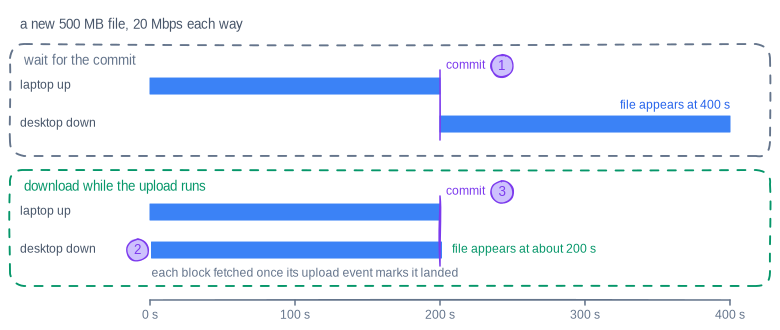
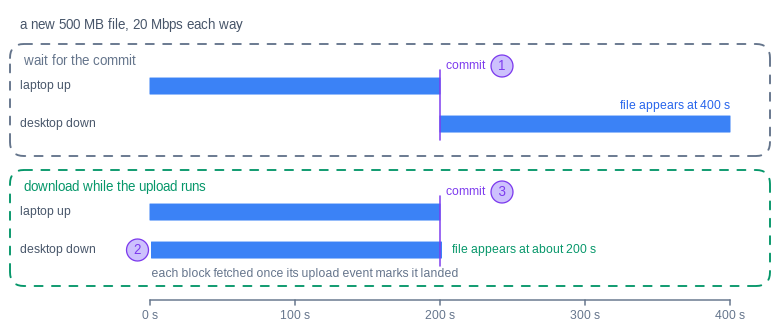
For the 500 MB file, the download runs beside the upload, so the file appears about 200 seconds after the save instead of 400. The slower link caps the gain. With 20 Mbps up and 100 Mbps down, the sequential version takes 200 + 40 = 240 seconds, and streaming saves only the 40.
What you give up: state for files that don't exist yet. Prefetched blocks sit in a client cache that has to be purged, and an upload that never commits wastes the downloads. The memcache entries also need an expiry that doesn't drop uploads still in progress. Dropbox limited it to new files, and only files that take several requests gain from it.
3. Hot namespaces
A company puts its handbook, templates and team files in one folder and shares it with all 50,000 employees. Every desktop mounts it, and during the working day it changes several times a second.
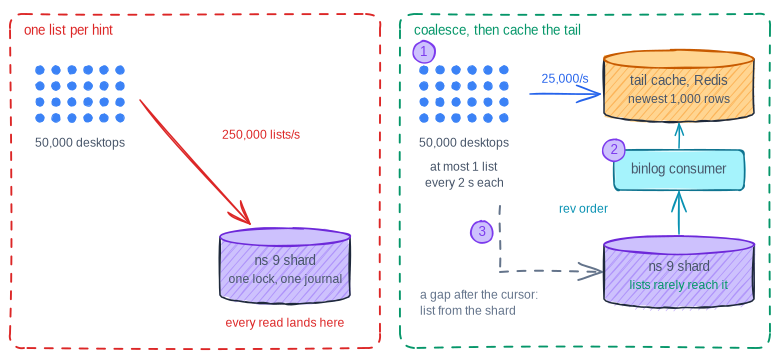
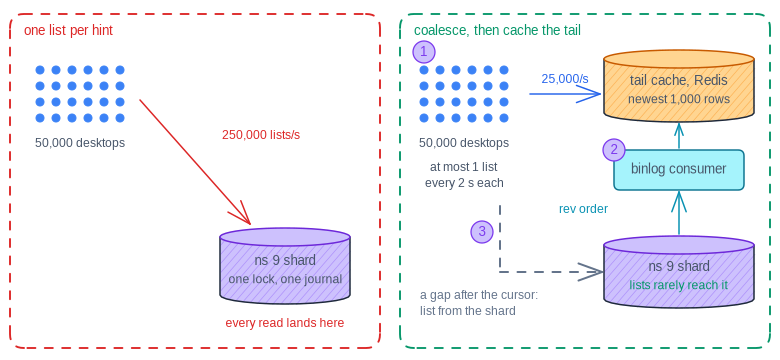
A namespace followed by 50,000 desktops takes 5 commits
a second through the working day, assumed. Count the
reads that land on its one shard.

One list per hint
  hints         50,000 x 5/s                =    250,000/s
  lists         one per hint, one shard     =    250,000/s

Coalesce: a device with a list in flight ignores new
hints, and lists at most once every 2 s
  lists         50,000 / 2 s                =     25,000/s
  rows each     2 s x 5 commits/s           =           10

Serve the newest 1,000 rows from a cache, filled in
rev order from the shard's change stream
  cache reads                               =     25,000/s
  cache writes  one per commit              =          5/s
  shard reads   gaps and old cursors only             rare
  ────────────────────────────────────────────────────────
From 250,000 reads a second on one shard to almost
none. The cache never goes stale, because a journal row
is never updated.
Three fixes, cheapest first.
Coalesce hints. A device that already has a list in flight, or listed in the last 2 seconds, ignores new hints until it's done. It loses nothing, because its next list returns every row after its cursor, however many hints it skipped. Requirement 2 allows 10 seconds, so 2 seconds of batching is affordable.
Serve the tail from a cache. Keep the newest 1,000 rows of each hot namespace in Redis. If the commit path appended each row after its commit, a process that died in between would leave a gap, and devices would skip that rev for good. So a small consumer reads the shard's binlog directly and appends rows to the cache in rev order. Revs within a namespace have no holes, so a gap is still visible.
The cache answers a list only if it holds every rev from the cursor + 1 to its newest, and its newest is at least the hinted rev. Otherwise the list goes to the shard. Journal rows never change once written, so the cache needs no invalidation.
Spread the wake. For a namespace with more than a few thousand followers, the notification servers answer their waiting requests over a few seconds instead of all at once. That adds a couple of seconds for the biggest folders, still inside the 10 second target.
The write side has a limit too, and it's the lock. Every commit holds its namespace's row lock until the commit is durable, and with the quorum from deep dive 6 that includes about 25 ms waiting for the nearest other region. So one namespace takes at most about 1 / 27 ms, or about 40 single-file commits a second. Five a second is well under that, but a script copying 100,000 files into the folder one at a time would take about 40 minutes.
Dropbox's performance guide describes the same lock: write operations "first acquire a lock on that namespace", and enough parallel writers make them wait on each other. Its advice is to batch the files and "only issue one commit at the end, eliminating contention." A batch commit appends many rows in one transaction, so 1,000 files cost one lock hold.
A namespace too big for one journal can also be split into child namespaces mounted inside it, one per department.
4. How does a block get deleted safely?
Blocks are shared. One block can belong to several versions of one file, to copies of the file in other folders, and to other accounts' files, because the block store keeps one copy per hash. A block can go only when nothing names it.
A block becomes deletable in three ways. The last version naming it leaves the history window, the deleted file naming it passes its restore window, or it was copied into blocks/ for a commit that never landed.
Carry the counts out of the commit through an outbox. The count lives in the block index, on shards keyed by hash, and the commit runs on a namespace shard, so the commit can't change the count itself. If it wrote its journal row and then died before a separate call raised the count, the block would look unused and could be deleted under a live file.
So the commit writes one outbox row per block it names, in the same transaction as the journal row, as query 1 shows. A relay reads the outbox and applies each increment to the block index, keyed by (ns_id, rev, hash), so applying one twice changes nothing. When a version leaves the history window, its decrements travel the same way.
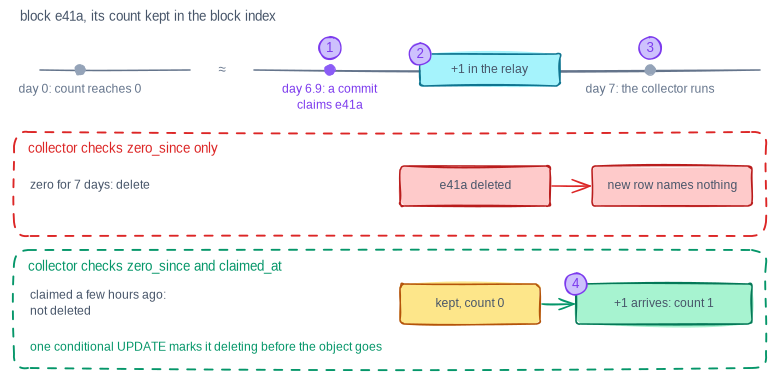
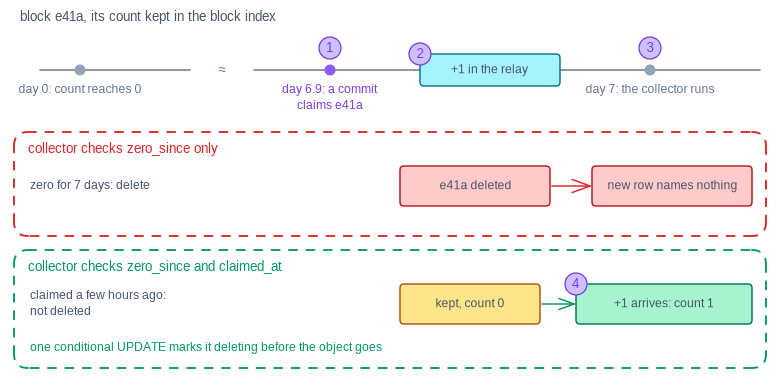
Delete only blocks nobody has named or claimed for 7 days. Object and Blob Storage names the race. A commit checks that a block exists, and before its increment reaches the block index, the last other version naming the block expires and the count drops to zero. Waiting 7 days on zero_since alone isn't enough, because a commit that claims the block on day 6.9 still has its increment in the relay when day 7 arrives. So query 4 sets claimed_at on every block a commit names, and the collector checks both times in one conditional statement:
UPDATE blocks SET state = 'deleting'
WHERE hash = $1 AND state = 'stored' AND refs = 0
  AND zero_since < now() - interval '7 days'
  AND claimed_at < now() - interval '7 days'
RETURNING hash;                 -- only a returned hash has its object deleted
Only after the row says deleting does the collector delete blocks/<hash>, and then the row. A commit's claim matches only stored rows, so a block caught mid-delete counts as missing and goes back as need_blocks. The server copies a fresh upload back only once the row is gone. And every copy into blocks/ writes the index row with no references and both timestamps set to now, so a block whose commit never landed ages out the same way.
Never tell one account what another has stored. An account skips the upload of a block only if it uploaded that block before or can already read it. If it could skip any block the object store holds, anyone could learn whether a file exists in someone else's account, by uploading a copy and watching whether it's sent. Harnik, Pinkas and Shulman-Peleg showed this in 2010, and Dropbox was one of the three services they found doing it.
One fix in their paper, and the one Object and Blob Storage takes, is to deduplicate across accounts only on the server. Here that's the copy into blocks/<hash>, which stores a block once, whoever uploads it. You give up the bandwidth saving between accounts.
5. What happens when a piece fails?
A desktop client holds every change it makes on its own disk, so most failures here cost time, not data. Losing the notification servers only slows sync: devices that can't reach notify list on a timer, every few minutes, until it answers. Two failures need a rule of their own.
One metadata shard loses its majority. Each shard is a group of five voters across three regions, as deep dive 6 sets out. One machine or one whole region can go without losing an acknowledged commit, and a new leader takes over. Only losing three voters stops the shard. Then its namespaces can't commit or list. Edits wait on the devices that made them and retry with the same commit_id, and namespaces on the other 31 shards notice nothing.
The object store is refusing writes. Uploads back off and retry. Commits wait, because the second commit checks every block. Devices that need new blocks keep showing the old version until they can fetch the new one. No one sees a file with pieces missing, because a device writes a new version to a temporary file and renames it into place only when every block has arrived.
6. What changes across regions?
Only the journal has an order. Blocks don't, so the two planes go multi-region in different ways.
Blocks are copied to a second region. A block is written in the region nearest the uploading device and copied to a second region after upload, and the block index's regions column records where its copies are. A block never changes, so a copy can't be stale and two copies can't disagree. Magic Pocket, in 2016, copied "each block to a remote zone within one second of it being uploaded locally." A device that wants a block before the copy arrives reads it from the source region.
Each namespace has one home region, and its commits wait for a quorum. The shard that holds a namespace is a group of five voters: two in the home region, two in a second region and one in a third. That's the placement Replication and Leader Election arrives at. A commit needs three of the five, so it waits for the two at home and the first answer from another region, about 25 ms from the nearest one. Losing any one region loses no acknowledged commit.
One synchronous replica in a single remote region looks simpler, and that page calls it the naive answer, because every commit then waits for that one far copy.
The leader lives in the home region, so a device on another continent also pays its own round trip there. Reads go to a voter in the device's own region, under the min_rev rule from section 2. One leader per namespace means two regions can never accept conflicting commits for it, the option CAP and What It Actually Constrains calls making the conflict impossible.
Where the data lives can be a requirement. Dropbox keeps most of its users' data on its own infrastructure. It also uses Amazon Web Services (AWS) in the United States, Australia, Europe and Japan, which "allows us to localize where content is stored." Setting a team's home region, and keeping its blocks and voters in that geography, is how a European company keeps its files in Europe. Deduplication then stops at the region's edge.
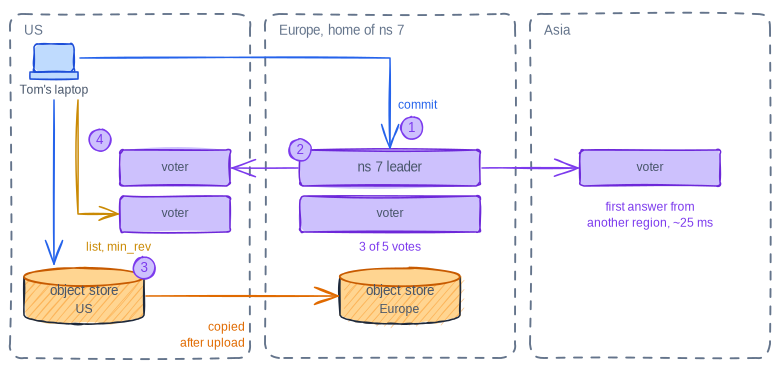
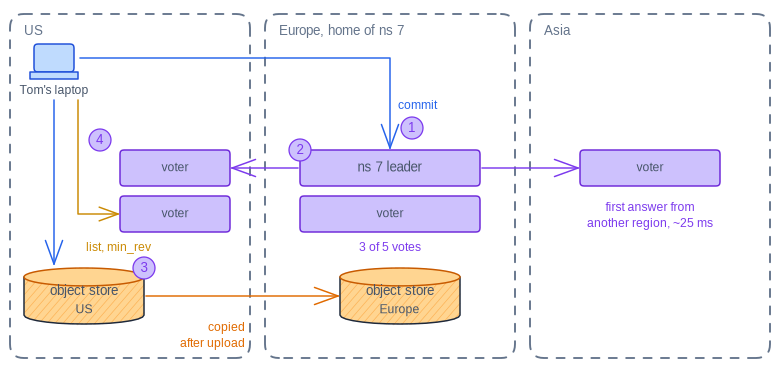
So the metadata is partitioned by home region and replicated to a quorum across three regions, and the blocks are copied to a second region. The cost is a third region to run, a second copy of every block, about 25 ms on every commit, and longer commits for anyone far from their namespace's home. Sync's ten seconds and the device's own disk make that waiting cheap.
7. Should you build your own block store?
At some size the object store's bill becomes one of the largest lines in the company's costs. Then the question changes from how to use it to whether to own it. Dropbox reached that point. Its S-1, the filing it made before going public in 2018, reports the savings under the name Infrastructure Optimization, a program that also closed long-inactive free accounts.
S3 Standard in US East charges $0.023 per GB-month for
the first 50 TB, $0.022 for the next 450 TB and $0.021
above: $23, $22 and $21 per TB. The first 500 TB cost
50 x $23 + 450 x $22 = $11,050 a month at any size.

A month at list price
  1 PB          $11,050 + 500 TB x $21      ≈      $21,550
  183 PB        $11,050 + 182,500 TB x $21  ≈       $3.84M
  500 PB        $11,050 + 499,500 TB x $21  ≈       $10.5M
A year at list price
  1 PB          $21,550 x 12                ≈     $259,000
  500 PB        $10.5M x 12                 ≈        $126M
  183 PB is this design after a year, and 500 PB is
  Dropbox in March 2016.

Dropbox's S-1, under "Infrastructure Optimization"
  2016          third-party provider           down $92.5M
                own equipment and sites          up $53.0M
                net saving                          $39.5M
  2017          further saving                      $35.1M
  ────────────────────────────────────────────────────────
In 2016 Dropbox's own infrastructure cost $53 million
more than the year before, and its provider bill fell
by $92.5 million. At 1 PB, the whole list-price bill
is $259,000 a year.
List prices overstate what a customer that size pays, and the S-1 doesn't give the bill itself. The shape still holds: owning storage is a large fixed cost that pays back only on a very large bill. Even then Dropbox didn't leave entirely. Its 10-K for 2024 says more than 90 percent of users' data sits on its own infrastructure, and AWS holds the rest.
8. How do you know it is working?
During an incident you need four answers. How far behind are devices? Are hints turning into lists? Are conflicted copies rising? Is every shard's journal still moving?
- Sync lag, by region. For each device, the age of the oldest row it hasn't listed yet: now minus that row's
committed_at. Its p99 by region tells you whether requirement 2 is being met. - Lists per hint. Close to one is healthy. Far below one means hints aren't turning into lists. Far above means devices are listing on timers, so the notification servers are down or unreachable.
- Conflicted copies per 1,000 commits. Users produce a steady low rate. A step change right after a client release is a sync bug, not a change in habits.
- Commits per second per shard, and the age of the oldest unapplied outbox row. A stuck relay means counts that lag, and the 7 day wait in deep dive 4 has to stay longer than that lag.
- Don't label metrics by namespace or account. Every distinct label value becomes a separate time series, so hundreds of millions of them take the metrics backend down when you need it most. Trace one account with logs.
One signal covers the whole path. In each region, two test desktops share a folder. One writes a file every minute, and the other reports how long it took to appear. It measures what a user experiences, from one disk to another, which no single server can see.
Final design
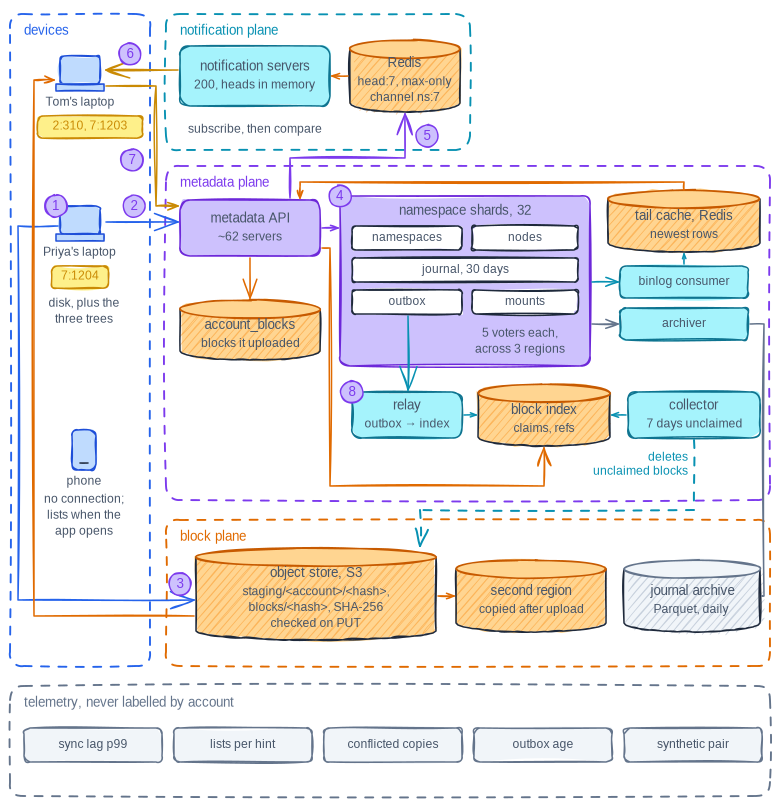
One save, end to end:
- The sync client on Priya's laptop notices a change on disk, waits for the writes to settle, cuts the file into blocks of about 4 MiB on average, and hashes each one with SHA-256.
- It sends
commitwith the blocklist,base_revandcommit_id. The API returnsneed_blocksfor every hash this account neither uploaded nor can already read, each with a URL signed for the account's own staging key. - The laptop uploads each missing block to
staging/<account>/<hash>, and the object store refuses bytes whose SHA-256 doesn't match the name. - The laptop commits again. The API checks each staged block, copies it to
blocks/<hash>, records it inaccount_blocksand claims every hash in the block index. Then one transaction on the namespace's shard locks the head and returns the oldrevif thecommit_idis already there. Otherwise it checksbase_rev, updates the node, and appends the journal row and its outbox rows. The commit waits for three of the shard's five voters. - After the commit, the API moves
head:7forward with a max-only write and publishesns 7 → 1204on sharded pub/sub. A consumer of the shard's change stream appends the row to the tail cache. - Each notification server holding a waiting request from a device that follows ns 7 answers it with the namespace and the
rev. A new or re-armed request is compared with the head the server keeps in memory. - Tom's laptop calls
listfrom its cursor withmin_rev. The tail cache answers if it holds every rev after the cursor, and otherwise a voter that has reached 1204, or the leader. The laptop asks/v1/fetchfor the blocks it lacks, downloads them from the object store, and renames the finished file into place. Phones do none of this until their app opens. - The relay applies the outbox's reference changes to the block index, and an archiver packs rows older than 30 days into Parquet. The collector deletes a block only when nothing has named or claimed it for 7 days. Every stage reports sync lag, lists per hint and conflicted copies, never labelled by account.
Four numbers justify the shape. 500 TB of new blocks a day go to the object store and through none of our servers. The metadata is 82.5 TB of hot rows on 32 shards, and every commit is a local transaction that waits about 25 ms for a quorum. 100 million desktops wait on 200 notification servers for a position, never a change, and re-arm from memory. And a small file appears on another desktop in about 1.75 seconds, most of it spent waiting for the file to finish being written.
What is expected at each level
How interviewers turn what they see into these levels is in How a System Design Interview Is Scored.
Mid-level
Breadth matters more than depth at this level, and it's fine to be led.
Put the bytes in an object store and the file tree in a database, and say why: the bytes are large, never change and are never queried. Split files into blocks named by their hash, so a save uploads only what changed and an interrupted upload resumes. Get the client to learn about changes without polling the database every few seconds.
You're not expected to raise merge bases, journal horizons or the deduplication leak on your own. You are expected to answer sensibly when asked what happens when two people edit the same file offline. Neither edit may vanish, and a conflicted copy is a good answer.
Senior
You drive the structure, and three things should appear without prompting.
An ordered journal, and a cursor per device. Show how a device that was off for a day catches up, and show that it's the same call as any other sync. A design where catching up is a special case usually loses changes in it.
A commit that names the version it started from. Make the commit a compare-and-swap on base_rev, and give the loser a conflicted copy. Last write wins here is disqualifying, because it deletes a person's work without a word.
Sizing that keeps bytes and rows apart. Hundreds of petabytes of blocks go in an object store, and a hundred-odd terabytes of rows in a sharded database. Choose the shard key so that a commit is one local transaction.
When prompted, you should get to shared folders as their own namespaces, hints that carry a position rather than the change, and why phones don't hold connections.
Staff+
Producing a correct design is still the bar. On top of it, a staff answer decides what the server must do and what it can leave to the journal and the device.
State early that sync is a journal, and use it. Storage, notification, sharing, conflicts and history all become questions about rows and positions.
Make the notification carry a position, never the change, and say what that buys: a deploy loses nothing, a lost hint costs one timeout, and a phone needs no connection at all.
Treat the client as part of the design. It holds the merge base that tells a delete from someone else's add, and its disk is where every edit waits through every failure.
Know what makes the bytes easy, and what makes them dangerous. Immutable, hash-named blocks let the server deduplicate, resume and verify without coordination. A hash is not proof of possession, so an account claims only bytes it uploaded or can already read.
Be able to say what you would not build. Server-side merging of file contents. A push path that delivers changes beside the journal. A connection per phone. A journal kept hot forever. Your own block store below a few hundred petabytes.
Sources
The scale figures in the worksheets are this design's own assumptions, stated where they're used. Everything said about how Dropbox, Google Drive, S3 and Redis work comes from the pages below.
- Dropbox, Streaming File Synchronization, Nipunn Koorapati, 2014. The Server File Journal, journal IDs per namespace, root and shared namespaces, the commit and need-blocks protocol, the long poll to a notification server, and Streaming Sync's prefetch with its up-to-2x result.
- Dropbox, Rewriting the heart of our sync engine, Sujay Jayakar, 2020, and Testing sync at Dropbox, Isaac Goldberg, 2020. Stable file identifiers, shared files never seen duplicated or missing, the move that would make a cycle, the four-year rewrite, and the Remote, Local and Synced trees.
- Dropbox, Inside the Magic Pocket, James Cowling, 2016, Scaling to exabytes and beyond, Akhil Gupta, 2016, and How we optimized Magic Pocket for cold storage, Preslav Le, 2019. Blocks keyed by SHA-256 and copied to a second zone within a second, 500 PB in 2016, and retrievals by age with the cold tier they led to.
- Dropbox's S-1 of 2018 and 10-K for 2024. The Infrastructure Optimization savings in 2016 and 2017, the share of data in-house and on AWS, data locations, and Rewind.
- Dropbox, Broccoli: Syncing faster by syncing less, Rishabh Jain and Daniel Reiter Horn, 2020, and Future-proofing our metadata stack with Panda, 2022. Block compression and its savings, and sharded MySQL with its unsplittable shards and cross-shard transactions.
- Dropbox's API specification, content hash page and performance guide, and its help centre on conflicted copies and offline files on mobile. The long poll and its jitter, cursor resets, the namespace lock, batching, 4 MB block hashing, conflicted copy names and phones that store nothing by default.
- Mulazzani and others, Dark Clouds on the Horizon, USENIX Security 2011, and Harnik, Pinkas and Shulman-Peleg, Side channels in cloud services: deduplication in cloud storage, 2010. A server that links a known hash to an account without the bytes, the existence leak in cross-account deduplication, and deduplicating on the server instead.
- Amazon S3's guide to checking object integrity, Redis's pub/sub documentation, and Google Drive's push notifications guide. Uploads rejected when their SHA-256 doesn't match, at-most-once pub/sub with sharded channels, and push messages with an empty body.