Why you are doing this at all
In March 2019, someone outside Capital One sent requests to a web application firewall (WAF) that the bank ran on an Amazon EC2 server. A WAF inspects HTTP requests and blocks the ones that match known attacks. This one was misconfigured. Analyses of the court filings, including a 2021 case study from MIT, describe a server-side request forgery (SSRF). The attacker made the firewall send a request on their behalf, to an address only the server itself could reach.
That address was 169.254.169.254, the instance metadata service (IMDS). Every EC2 server can ask it for facts about itself, including temporary credentials for the server's role in AWS Identity and Access Management (IAM). The firewall fetched its role's credentials and passed them back. With them, the attacker listed more than 700 of the account's S3 buckets and copied data from them. About 100 million people in the US and 6 million in Canada were affected.
The data was encrypted. Capital One's statement said so, and added that "the unauthorized access also enabled the decrypting of data." Some fields, mostly Social Security and account numbers, were tokenised with different keys, and the statement says those "remained protected."
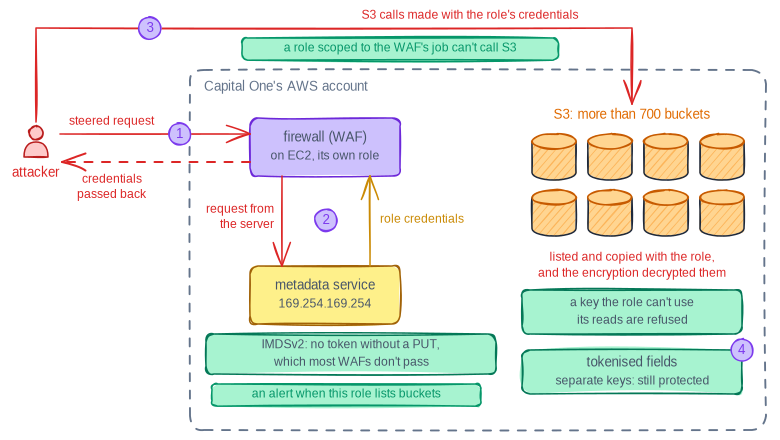
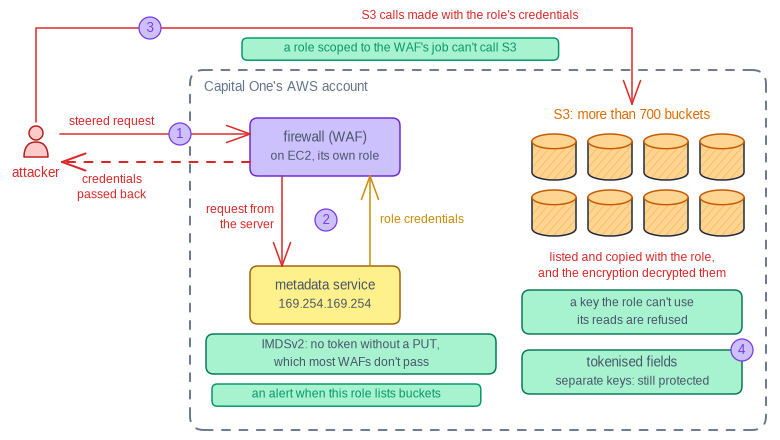
The controls people list first were in place. The credentials were temporary, and the data was encrypted at rest. The problem was reach. Once an attacker steered it, a component whose job was to inspect HTTP requests could read the company's data.
Assume each component in your design will be compromised one day, and ask what it can reach when it is. Most security decisions in a design round either make that reach smaller, or keep a record of its use that the attacker can't erase.
Apply that question to the usual list. TLS (Transport Layer Security), a WAF and "encrypt everything" are each fine, and none of them changes what the firewall could reach. Each of the four green controls in the figure would have broken the chain.
When to say it, and for how long
Most design rounds aren't about security, and ten minutes of it in a news feed design is ten minutes not spent on the feed. "Secure" as a requirement says nothing, as the first five minutes shows.
So raise it at two moments. While you draw the high-level design, mark where trust changes and say in one clause what each crossing checks. Then spend a deep dive on it when the product is shaped by security: payments, business software shared by many companies, file sharing, fetching URLs users supply, or personal data at scale.
Who the caller is and what they may do belong to Auth: sessions, JWT and OAuth. This page covers the rest.
The controls, and what each one limits
A threat model you can draw
OWASP, the Open Worldwide Application Security Project, frames a threat model as four questions from the Threat Modeling Manifesto. What are we working on? What can go wrong? What are we going to do about it? Did we do a good enough job? In a round you have two minutes, so answer the first two by marking three things on your diagram.
- Assets. What an attacker wants: customer documents, personal data, credentials and keys, the power to move money, and your capacity to serve.
- Entry points. Every place input from outside arrives: the public API, uploads, webhooks from partners, URLs your servers fetch, admin and support tools, and the build pipeline.
- Trust boundaries. A line where the level of trust changes, such as between the internet and your edge, or between your services and their data. Anything that crosses one has to be checked.
Draw each boundary as a dashed line. For every arrow that crosses one, name the check beside it: who is authenticated, what is authorized, what is validated, what is rate limited, what is encrypted. An arrow that crosses a line with nothing written beside it is a gap you have found.
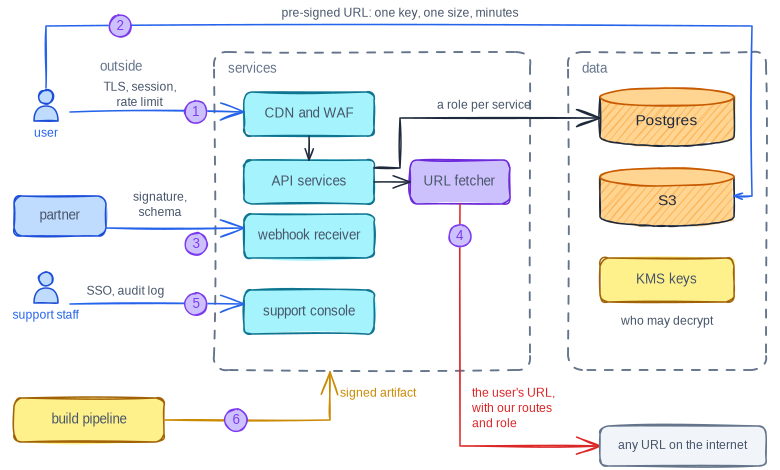
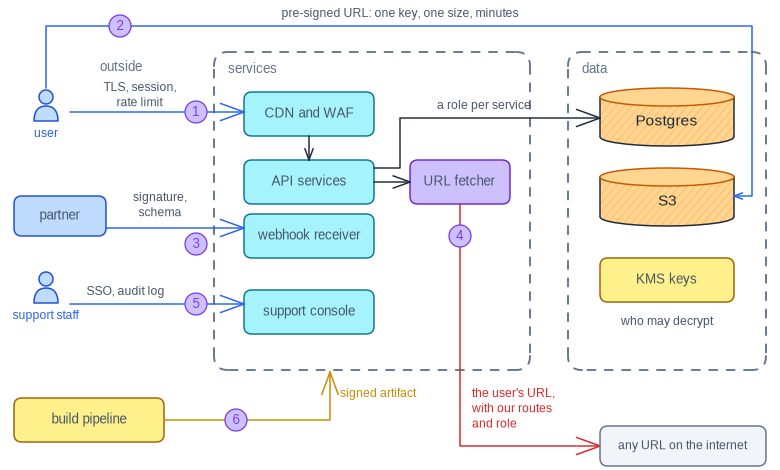
For "what can go wrong", OWASP's guide uses STRIDE, one threat per letter: spoofing, tampering, repudiation, information disclosure, denial of service and elevation of privilege. Each breaks one property, in order: authentication, integrity, accounting, confidentiality, availability and authorization. Run it over one crossing at a time.
Then write down each component's reach: the network routes it has, the credentials it holds and the keys it may use.
Least privilege and defence in depth
Least privilege means each component gets the access its job needs and no more. OWASP's 2025 Top 10 still ranks broken access control first, and says 100 percent of the applications it tested had some form of it. Its first rule for preventing it is "deny by default."
A component's reach is the sum of four kinds of access, so apply the rule to each one.
- Cloud roles. One role per service, naming the resources it uses. A firewall needs no bucket at all.
- Database accounts. Read-only where the job only reads. OWASP's SQL injection guide says never to give application accounts admin rights, and to grant create or delete access "rarely, if ever".
- Network routes. A service can open connections only to what it calls, and the rest is blocked.
- Keys. Who may decrypt with a key is a separate list from who may read the data. The next section depends on it.
Defence in depth means several controls stand between an attacker and an asset, so one failure doesn't expose it. The controls only count as several if they fail separately. A WAF rule and a library check that both inspect the same URL string fail together, because the same input fools both.
Google's BeyondCorp paper removes the trusted internal network, so that access "depends solely on device and user credentials, regardless of a user's network location." Between services, an internal call proves who sent it just as an external one does, which auth builds with mutual TLS.
Depth also covers failure. A control that protects shouldn't let everything through when its dependency fails. The rate limiter falls back to a limit per server when Redis is down, not to no limit. An authorization check that can't reach its data refuses the request.
Encryption in transit and at rest
Encryption stops someone who has the bytes but not the key, so the useful question about each kind is who holds the key.
| encrypted with | stops | doesn't stop |
|---|---|---|
| TLS between the client and your edge | anyone on the network path reading or changing traffic | a compromised client or server |
| TLS between your services, usually mutual | a tap or compromised host inside your network | the services at either end |
| a key the storage provider manages, such as S3's default | a stolen disk, a discarded drive, a copy of raw storage | anyone allowed to read the data |
| a customer-managed key in a key management service (KMS), whose key policy names who may decrypt | a role that may read the data but isn't in the key policy: its reads are refused | a role allowed both |
| application-level encryption or tokenisation, with separate keys | a database dump, a copied backup, a broad cloud role: they get ciphertext | the one service that holds the key |
Capital One's tokenised fields sat in the last row, which is why they stayed protected.
Encryption at rest controls access only where the key's access list is shorter than the data's. In S3, that takes a customer-managed KMS key whose key policy names the few roles allowed to decrypt. The default aws/s3 key doesn't separate the lists, because any principal in the account that may use S3 can decrypt through it. With the right key, a caller needs kms:Decrypt on it as well as read access to the object, and a read without it is refused. KMS logs each use of the key, though with S3 Bucket Keys turned on, the entry names the bucket, not the object.
Envelope encryption and key rotation
A KMS, such as AWS KMS, keeps its root keys inside hardware security modules (HSMs), and you call the service to use them. AWS KMS's Encrypt takes at most 4,096 bytes. An account's encrypt, decrypt and data key calls in one region share a quota, about 10,000 a second by default in most regions.
Envelope encryption works within both limits.
- The application calls
GenerateDataKey. KMS returns a new data key twice: in plaintext, and encrypted under the KMS key. - The application encrypts the record with the plaintext key, using AES-GCM, and stores the encrypted data key beside the ciphertext.
- It throws the plaintext key away.
- To read, it sends the encrypted data key to KMS
Decrypt, gets the plaintext key back, and decrypts the record locally.
The data never travels to KMS, and the key's access list decides who may unwrap a data key, so the encryption now controls who can read the data.
How long a data key lives is the design decision, because reuse saves KMS calls and widens what one leaked key opens.
The question is how long a data key may be reused. A
service writes 20,000 records a second from 100
servers, 200 a second each. AWS KMS allows about
10,000 calls a second per account and region by
default in most regions.

A new data key for every record
  GenerateDataKey calls                         20,000/s
  against a 10,000 quota
                        20,000 / 10,000      =  2x over,
                                                before any reads

One data key per server, reused for 5 minutes
  calls                 100 servers / 300 s  ≈  0.3/s
  one leaked key opens  200/s × 300 s        =  60,000 records

One data key for the whole fleet, for a day
  calls                                      ≈  1 a day
  one leaked key opens  20,000 × 86,400      ≈  1.7B records
  ─────────────────────────────────────────────────────
  Five minutes per server keeps KMS far under its quota,
  and a data key that leaks, in a log line or a crash
  dump, opens only one server's five minutes of writes.
Readers cache unwrapped data keys the same way, so a read calls KMS only the first time a server meets a key. A compromised server is a different case. It holds that cache and a role that can call Decrypt, so the role sets its reach, not the worksheet.
Rotation is a separate question. When you turn on automatic rotation, AWS KMS gives the key new material every 365 days by default. New data keys are wrapped with the new material, and KMS keeps every old version to unwrap what it wrapped before. Nothing is re-encrypted. AWS's documentation says rotation "will not mitigate the effect of a compromised data key."
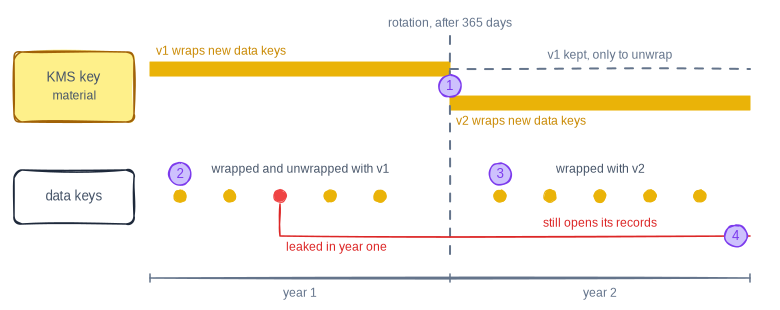
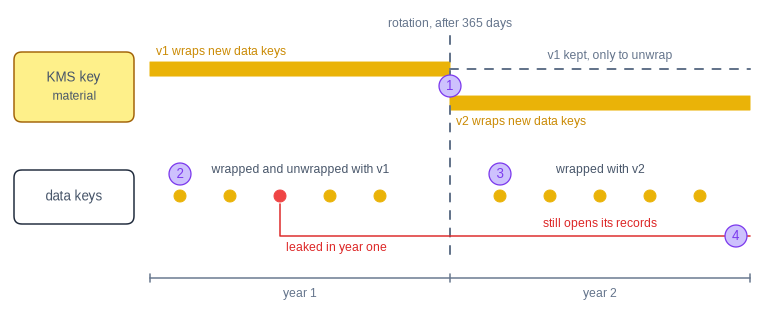
AWS says a KMS key wraps so few data keys that overuse is very unlikely, and that you rotate mostly because rules or contracts require it. Rotation isn't a response to a breach. The response depends on what leaked.
- A plaintext data key leaked. Re-encrypt the records under it with a new data key. The worksheet's lifetime decides how many records that is.
- A role that may call
Decryptwas compromised. Take the role off the key's access list and end its sessions. Rotating would let the same role use the new material. - Ciphertext leaked, and no key did. There is nothing to do. That's the case encryption exists for.
Signing keys rotate differently, because every verifier must have the new public key before the first token signed with it arrives. Auth covers that overlap.
Secrets and short-lived credentials
A secret is anything that grants access by being known: a database password, a third-party API key, a cloud access key, a signing key. GitHub reported more than 39 million secrets leaked across its platform in 2024.
OWASP's secrets management guide warns about three places secrets often end up.
- Source code, where every clone and every fork has a copy.
- A container image, set with
ENVorARGin the Dockerfile, where anyone who can pull the image can read it. - Plain environment variables, which other processes on the host can read and which crash dumps and logs often capture.
The usual answer is a secrets manager, such as AWS Secrets Manager or HashiCorp Vault. Services fetch secrets at startup, and the manager logs who read what.
A credential that is never stored is better still. AWS's Well-Architected guidance asks you to "eliminate reliance on long-term static credentials", and the platform can give each workload short-lived ones instead.
- An EC2 server gets its role's credentials from the metadata service, renewed automatically.
- An
AssumeRolesession from AWS Security Token Service (STS) lasts an hour by default. - A GitHub Actions job trades its OpenID Connect (OIDC) token for cloud credentials "only valid for a single job", so the pipeline stores no cloud secret.
Codecov shows what that changes. From 31 January 2021, someone altered Codecov's Bash Uploader, a script its customers ran in their continuous integration (CI) pipelines. The altered script sent each pipeline's environment variables to an outside server. A customer noticed on 1 April, when the script's checksum didn't match the published one. Codecov told its users to re-roll every credential in those environment variables.
The question is what the clean-up costs once a leak
like Codecov's is found, with stored secrets against
short-lived ones. Counts are assumed, for one company.

Stored secrets
  pipelines                                      40
  secrets in each pipeline's environment          8
  of those, cloud credentials                     7
  secrets to treat as stolen  40 × 8          =  320
  each one works until it is rotated, in every
  place that uses it

Cloud credentials from each job's OIDC token
  cloud secrets stored in CI                      0
  each stolen credential works for at most        1 hour
  secrets left that can't be short-lived, such
  as third-party API keys     40 × 1          =   40
  ─────────────────────────────────────────────────────
  Short-lived credentials cut the clean-up from 320
  rotations to 40. The other 280, 40 × 7, stopped
  working within an hour of the leak being closed.
Short-lived credentials don't stop a leak that is still running, because the attacker takes fresh ones on every run. They remove the hunt for copies afterwards. Observability keeps tokens and card numbers out of log lines too.
Tenant isolation
A multi-tenant system serves many customers, its tenants, from shared infrastructure. AWS's guide to tenant isolation separates two goals that share the name. One is security: no tenant reads or changes another's data. The other is the noisy neighbour: one tenant's load mustn't slow the rest. This section is about the first, which needs a boundary around data. The second needs a cap on resources, such as the per-tenant limits in the rate limiter.
AWS's guide names three ways to isolate.
- Silo. Each tenant gets its own database, or its own cloud account. It isolates the most, and costs the most to run.
- Pool. Tenants share tables, and every row carries a
tenant_id. It's the cheapest, and in AWS's words it "increases the chance for cross-tenant access." - Bridge. Silo for some layers or some tenants, pool for the rest.
Most business software starts pooled, because small tenants can't each justify a database. The second worked example designs a pool where one wrong query can't cross tenants.
Input at the edge: validation, injection and SSRF
Check input where it arrives. OWASP's input validation guide says to "define what the application accepts and reject values outside those rules," on the server, with size limits before parsing. That rejects nonsense early. It doesn't stop injection.
Injection happens when input becomes part of code: a SQL statement, a shell command, a template. The defence is to keep the code fixed and pass input as data. For SQL that means parameterised queries, because "prepared statements treat bound values as data rather than SQL syntax," as OWASP's guide puts it. Least privilege on the database account then limits the damage when a query is wrong anyway.
SSRF turns input into a place your server connects to. It appears wherever a server fetches a URL someone else chose: webhooks, link previews, image import, PDF rendering. The fetch runs from inside your network, with your server's routes and credentials, so it reaches whatever the server reaches. OWASP's 2025 Top 10 lists SSRF under broken access control, which matches the thesis: the problem is what the fetcher can reach.
AWS's second version of the metadata service, IMDSv2, adds three checks, and each one stops a different path.
- A session token. A caller must send a
PUTfor a token before any read, which stops an SSRF that can only sendGET. - No token through a proxy. The service refuses a token request that carries an
X-Forwarded-Forheader. That stops proxies that add the header, and not every proxy does. - A hop limit on the reply. The token's packets expire after a set number of network hops, so a server misconfigured as a router can't pass the token on. The limit is 1 by default, and 2 on instances launched from AMIs marked for IMDSv2 only, so containers on the instance can reach it. At 2, a host acting as a router can pass it one hop.
None of the three stops an SSRF that controls the method and headers, or code running on the server. So require IMDSv2 on every instance, and treat it as one layer: OWASP says it "mitigates some of the instances of SSRF." The first worked example designs the fetcher itself.
Abuse and DDoS
A flood compromises nothing. It uses up what you serve, so the reach that matters is how much of your capacity an outsider can touch. The controls sit in layers, each placed where it can see what it needs to judge.
- The edge absorbs volume. A content delivery network (CDN) or scrubbing service spreads a distributed denial of service (DDoS) flood across hundreds of points of presence (PoPs), as CDNs and edge compute describes. It works only if the origin accepts traffic from the edge alone. Otherwise a flood aimed at the origin's own address goes around it.
- A WAF filters requests that match known attack patterns or bot signals, before they reach your servers.
- The rate limiter counts per caller: API key, user, address and the surrounding address block, as the rate limiter builds it. That page leaves floods to the layer above.
- The application enforces product rules, such as one free trial per card, because only it knows them.
The arithmetic shows why the first layer has to be the edge.
The question is which layer can take a large flood, and
whether a limit per address stops it. The flood is the
one Cloudflare blocked in May 2025. The origin's link
is assumed.

Volume
  attack peak                                 7.3 Tbps
  origin link, assumed                        10 Gbps
  7,300 / 10                               =  730x the link
  spread over 477 Cloudflare data centres,
  if it spread evenly   7,300 / 477        ≈  15 Gbps each

Requests, if the same sources sent HTTP instead
  source addresses                            122,145
  each sending 5 a second, under a per-
  address limit of 10, assumed
  122,145 × 5                              ≈  610,000 requests/s,
                                              all allowed
  ─────────────────────────────────────────────────────
  No origin link takes the flood, and no per-address
  limit sees it. It has to be absorbed at the edge,
  spread across hundreds of sites.
Scaling up isn't a defence either. Autoscaling into a flood buys servers you pay for, while the origin's link fills anyway, so give the fleet a ceiling. Capacity planning and autoscaling covers the scaling side.
Some abuse uses the product as built. A short code on a trusted domain is what a phishing campaign needs. So the URL shortener scans links when they are created and again later, and takes a bad link down at every PoP within about 90 seconds.
Audit logs that can't be altered
An audit log records who did what to which object, when, from where, and with what result. It covers admin actions, permission changes, data exports, key use and support staff opening customer data.
The first rule is that the systems and people it records can't change it, because an attacker with admin rights deletes the evidence first.
- Write it append-only to a separate account, which the recorded systems can write to and never delete from.
- Store it as write-once. S3 Object Lock in compliance mode keeps an object version from being overwritten or deleted "by any user, including the root user", until its retention date.
- Chain it. AWS CloudTrail writes a signed digest every hour that lists the hashes of that hour's log files and carries the previous digest's signature, so a missing or edited file breaks the chain.
The second rule is that someone reads it. The MIT case study notes that Capital One's logs recorded the commands that listed and copied the buckets, and that nothing raised an alert. The bank learned of the breach four months later, from an outside researcher. Alert on actions a component never takes in normal work, such as a firewall's role listing every bucket.
One conflict needs settling in the design. A log nobody can edit also can't forget a person who asks to be forgotten. So record user IDs in audit entries, not names or email addresses. Where personal data must appear, encrypt it under that user's key, as in the third worked example. Deleting the key then makes it unreadable in a log nobody can edit.
Personal data: collect less, keep it for less time
The EU's General Data Protection Regulation (GDPR) puts two rules in Article 5 that are design rules too. Personal data must be "limited to what is necessary", and kept in a form that identifies people "for no longer than is necessary." Data you never collected can't leak, and data you deleted last month isn't in this month's breach.
Three moves apply them, and each already appears in the course.
- Keep it out of systems that don't need it. In the payment system, the processor's own fields take the card number in the browser and return a token, which keeps nearly every service outside PCI DSS, the card industry's security standard.
- Give every copy a retention period. The ad click aggregator keeps IP addresses and user agents for 13 months, and calls that a decision privacy law has to allow.
- Know where it lives. Multi-region and disaster recovery covers data that must stay in one country, including the copies in logs and analytics.
Article 17 gives a person the right to have their data erased "without undue delay." Article 12 gives you one month to tell them what you did about the request, which you can extend by two more. That is a deadline to report the action, not to finish the copies in backups, and the regulation names no method for them. The third worked example deletes every copy.
Supply chain
Your build runs code you didn't write: libraries, their dependencies, build tools, CI scripts and base images. OWASP's 2025 Top 10 lists software supply chain failures third.
Four design rules follow.
- Choose versions on purpose. Pin each dependency, and upgrade "only when there is need", in OWASP's words.
- Keep a software bill of materials (SBOM), a list of every component in every build. Then "do we run this library?" takes minutes on the day a flaw is published.
- Build on a hosted platform that signs provenance, a record of what was built, from which source, by which builder. SLSA, a framework for build integrity, sets levels for how hard that record is to forge.
- Deploy only what checks out. The deploy step verifies the signature and provenance before anything runs, and only the pipeline may deploy to production, not a person. Deployments covers the release that follows.
The pipeline is a component with reach too. With cloud credentials from OIDC, it holds none between jobs.
The method
1. Name the assets and the entry points. What an attacker wants, and every place outside input arrives.
2. Draw the trust boundaries, and name the check on every crossing. An arrow across a dashed line with no check beside it is the first thing to fix.
3. Write each component's reach, then cut it to the job. Roles, database accounts, network routes and keys.
4. Decide who may use each key. Encryption counts as access control only where the key's access list is shorter than the data's.
5. Put a time limit on everything that grants access or holds personal data. Credentials in hours, data keys by the worksheet, a retention period on every copy.
6. Keep a record that the recorded can't erase, and alert on it.
7. Place abuse controls where each layer can see. Volume at the edge, callers at the rate limiter, product rules in the application.
Worked examples, start to finish
Each example breaks a different obvious answer.
A link preview, where checking the URL is the obvious answer
A chat app shows a card when someone pastes a link: the page's title, description and image. A preview service fetches the URL and stores the card. It runs on EC2 beside the other services, with a role that can write cards to S3, and it must accept any public URL.
The fetch runs inside your network and goes wherever the user's URL points. So how do you stop it reaching anything an outsider shouldn't, when you can't list the allowed destinations?
Check the URL against a list of forbidden addresses
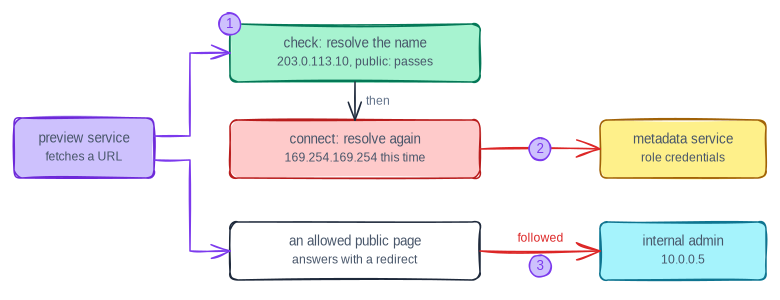
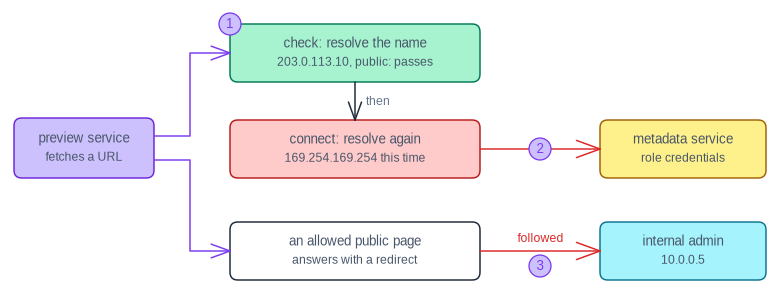
It's tempting because the dangerous addresses are known: 169.254.169.254, localhost, and private ranges such as 10.0.0.0/8.
It breaks because the string isn't the connection. A host name can resolve to a private address. It can resolve to a public address when you check it and a private one when you connect, which is DNS rebinding. An allowed public page can answer with a redirect to an internal one. OWASP's SSRF guide says it plainly: "Deny-lists are bypass-prone."
Check the address you connect to, and harden the metadata service
Resolve the name, check every address it returns against the non-public ranges, and connect to the address you checked, keeping the original name for TLS. Turn off redirects, or repeat the check on every hop. Require IMDSv2, so a plain GET to the metadata service gets nothing. This follows OWASP's SSRF guide, and most teams stop here.
The cost is that the protection lives in code. Every feature that fetches a URL has to use the same client, and a new one built on a plain HTTP library opens the hole again. A bug in the check still runs with the service's role and its routes to every internal host.
Move the fetch outside the trusted network
Question the idea that the fetch has to run where your services run. Send every fetch of a user-supplied URL through one fetcher in its own network segment. It can open connections only to public addresses, never to private ones, and it accepts requests only from the services that fetch user URLs. Its instances have the metadata service turned off, it holds no IAM role, and nothing inside allowlists its outbound address.
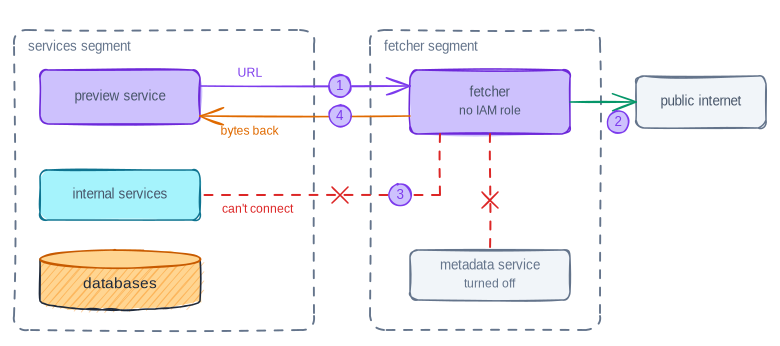
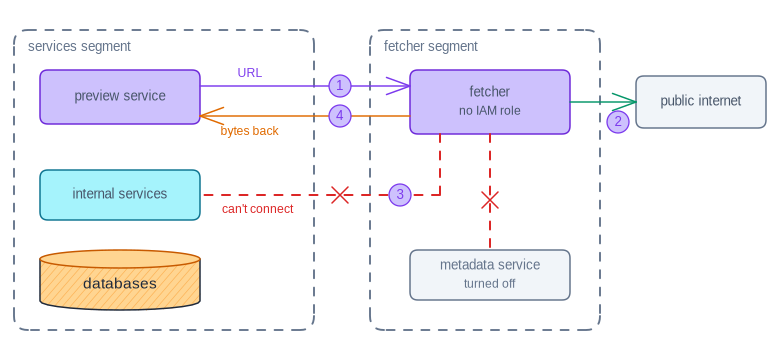
Now a bug in the URL check reaches only what anyone on the internet can already reach. The fix shrinks the reach instead of adding a smarter filter, and the senior checks stay as a second layer.
What you give up: one more service to run, and one extra hop inside the datacentre. That hop is 250 to 500 µs by latency numbers that matter, on a fetch across the internet that takes far longer anyway. And it protects only if nothing goes around it, so make it the sole way out for every service that fetches user URLs.
The decision is the isolated fetcher, with the address checks inside it and IMDSv2 required on every other instance. Outgoing webhooks, which also go to URLs customers chose, use the same fetcher.
A project tool, where a tenant column is the obvious answer
A project tool sells to companies. 5,000 tenants share one Postgres database and one S3 bucket for attachments. Every table has a tenant_id column, and every handler adds WHERE tenant_id = $1. Twenty tenants are large enterprises whose contracts ask for their data to be kept apart.
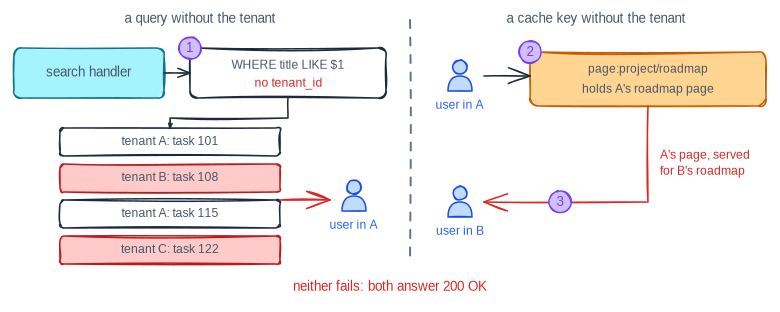
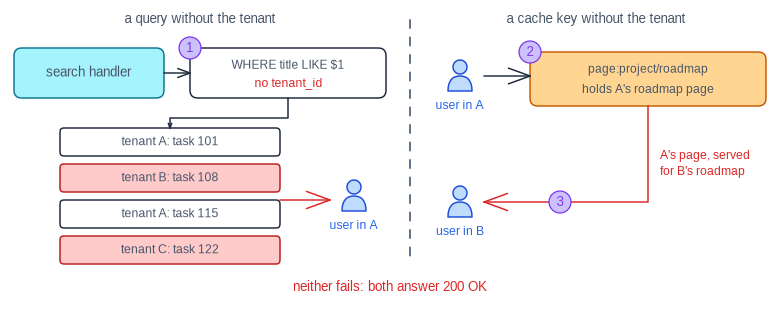
Some query, cache key or report will be wrong one day. So what keeps that one mistake from showing one tenant another tenant's data?
A tenant filter in every query
It's tempting because it's one schema and one database, the cheapest design to run, and it's correct as long as every query is.
It breaks because isolation then depends on every query, report and cache key that every engineer writes. One query that forgets the clause returns every tenant's rows, and nothing errors. A cache key built from the project's name alone serves tenant A's page to tenant B, when B has a project with the same name.
Let the database enforce it with row-level security
Turn on Postgres row-level security (RLS) for every tenant table, with a policy that compares tenant_id to a setting. At the start of each transaction, the application sets it from the tenant in the verified token, passed as a parameter like any other input.
ALTER TABLE projects ENABLE ROW LEVEL SECURITY;
ALTER TABLE projects FORCE ROW LEVEL SECURITY;
CREATE POLICY tenant_rows ON projects
  USING (tenant_id = current_setting('app.tenant_id')::uuid);

-- in each transaction; $1 is the tenant from the verified token
SELECT set_config('app.tenant_id', $1, true);
A query that forgets the clause now returns only the current tenant's rows. Two details from the Postgres documentation decide whether it holds. Superusers and roles with BYPASSRLS skip every policy. The table's owner skips them too, unless the table is set to FORCE ROW LEVEL SECURITY, as it is here.
RLS covers only the database, so put the tenant in every cache key and every object key as well.
The cost is that the application still holds one credential that reaches every tenant, because it sets app.tenant_id itself. RLS catches the forgotten clause. It doesn't limit a compromised application. And the twenty enterprises share hardware and failures with everyone else.
Scope each request's access, and silo only the tenants who need it
Question two ideas: that every tenant needs the same isolation, and that the service's own credential should reach all of them.
First, scope access per request where the platform can enforce it. AWS's isolation guide describes services that ask for credentials scoped to the current tenant. For attachments, each request's STS session gets a policy naming the prefix tenants/{tenant_id}/. A session can do only what both the role and that policy allow, so a bug, or a leaked session, reaches one tenant's files. IAM can't scope Postgres rows, the guide notes, so the rows keep RLS.
Second, silo where the contract pays for it. The twenty enterprises each get their own database, KMS key and deployment of the services, so nothing in the pool holds a credential for them. The other 4,980 stay pooled.
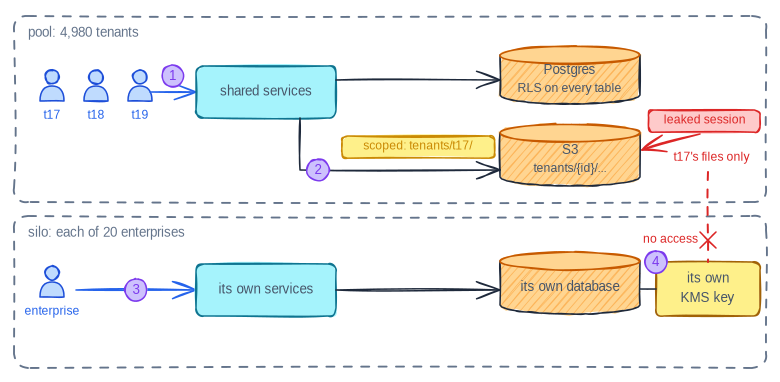
Siloing every tenant would mean 5,000 databases to migrate, back up and watch. Siloing twenty means twenty. Cost as a design constraint covers how to price choices like this one.
What you give up: a token service on the request path, policies that grow with the tenants, and two code paths to test. A fully compromised pooled service can still request any pooled tenant's session, so the scoping limits bugs and leaks, and only the silo limits a compromise.
The decision is RLS on every pooled table, sessions scoped to one tenant's prefix, and silos for the twenty.
A delete-my-account request, where deleting the row is the obvious answer
A consumer app with 100 million users gets a request: delete everything about me. The user's profile and posts live in Postgres. Copies sit in a Redis cache, an Elasticsearch index fed by change events, Kafka topics, application logs, a warehouse for analytics, and nightly database backups.
The question is when the last readable copy of one user's
data disappears after they ask, and what sets that time.
Retention periods are assumed.

Where the data sits, and when it goes
  Postgres rows      deleted by the request    0
  Redis cache        entries expire after      1 hour
  search index       deleted by change events  minutes
  Kafka topics       retention                 7 days
  application logs   retention                30 days
  database backups   retention                35 days
  warehouse          kept for analytics        2 years
  ─────────────────────────────────────────────────────
  last copy gone, deleting the rows only       2 years
  adding a delete job for the warehouse       35 days

Deleting the rows leaves copies for two years. A delete
job in every data store still waits for the backups.
Delete the user's rows
It's tempting because it's one transaction and the user sees "deleted" at once.
It breaks on the worksheet. The warehouse keeps the data for two years, and the backups, logs and Kafka topics keep it for weeks. Nothing touched any of them.
Send the deletion to every data store, and give every copy a retention period
Publish a deletion event. Each data store's owner runs a consumer that deletes the user there and reports back, and a tracker marks the request done when every consumer has. Logs and Kafka expire on their own. Backups can't be edited, so the request completes when the last backup holding the user expires, 35 days later.
The cost is that every new data store must join the workflow, and a missed one is a copy nobody deletes. Restoring a backup also brings deleted users back, so a restore must replay the deletions made since that backup was taken.
Encrypt each user's personal data under their own key, and delete the key
Question the idea that deleting means finding every copy. Give each user a data key, wrapped under a KMS key, and keep it in one key table that only the services handling personal data can read. Encrypt their personal fields with it before they're written anywhere: rows, events, logs, the warehouse. This is crypto-shredding. Deleting the user's key row makes those copies unreadable, backups and Kafka included.
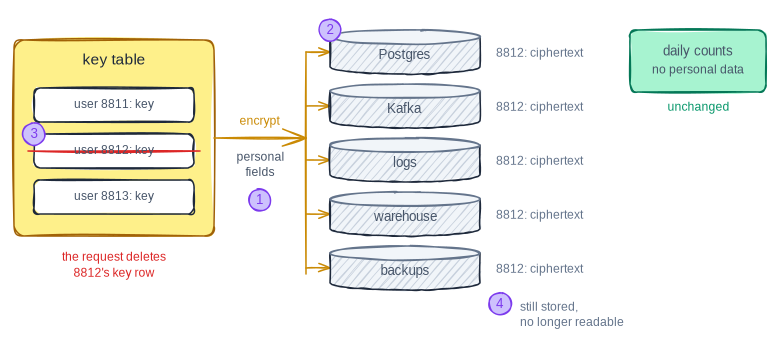
AWS's example of a wrapped 256-bit data key is 167 bytes, so a row with the user ID and row overhead is about 250 bytes, and 100 million rows come to about 25 GB. Keep the key table's backups for 7 days, and every copy under the key is unreadable 7 days after the request, instead of 35.
GDPR names no erasure method, and regulators haven't ruled on whether deleting a key counts as erasure. Treat it as the strongest technical answer, not a settled legal one.
What you give up: every read of personal data needs the user's key, so services cache unwrapped keys, which also keeps KMS calls under the quota, and can read until that cache expires. Keep it to minutes. Search can't index encrypted fields, so the search index keeps its own delete consumer, and analytics uses pseudonymous IDs. Losing the key table loses everyone's personal data, so it needs replicas, and a restore from its backups replays the deletions made since.
The decision is per-user keys for personal fields, a delete consumer for the search index, retention periods on everything else, and audit entries that hold user IDs only.
Where it goes wrong
These are ordered by how often they come up.
1. Security as a list at the end
"We'd add TLS, encryption at rest and a WAF" names three controls and no boundary, and none of them changes what a compromised component reaches. Draw the boundaries on the design, and name the check on each crossing.
2. Encryption at rest offered as access control
Storage encryption decrypts for every reader it trusts. Say which key protects the data, and which few roles may use it.
3. One broad role for a service, or for everything
A role that can list and read every bucket turns any compromise into a full one. Cut each component's roles, routes and keys to its job.
4. Trusting the internal network
Internal admin endpoints, unauthenticated internal services and the metadata service are one bad fetch away from the internet. Check internal calls the way you check external ones.
5. Long-lived secrets in code, images or CI
A stored secret works until every copy is found. Use workload identity and short-lived credentials, and a secrets manager such as Vault for what's left.
6. A rate limiter as the DDoS plan
A per-address limit doesn't see 122,145 addresses each under the limit, and no origin link takes 7.3 Tbps. Floods are absorbed at the edge, and the origin accepts traffic only from it.
7. Deleting the row and calling it erased
Copies in logs, events, the warehouse and backups stay readable. Send the deletion everywhere and expire every copy, or delete the user's key.
8. Spending the round on it
In most designs, security gets one clause per boundary. Go deep only where the product is shaped by security.
If you memorise nothing else
| fact | why it matters |
|---|---|
| Ask of each component: what can it reach when compromised? | the design is good when that answer is small |
| Draw trust boundaries as dashed lines and name the check on each crossing | an unlabelled crossing is a gap |
| Reach is roles, database accounts, network routes and keys together | least privilege applies to all four |
| Defence in depth counts only controls that fail separately | two checks on one URL string are one check |
| Storage encryption stops stolen disks, not trusted readers | S3 encrypts every new object by default, and that limits no reader |
| Encryption controls access only where the key's access list is shorter than the data's | tokenised fields under other keys stayed protected |
| Envelope encryption: data keys used locally, root key kept in KMS | the data never travels to KMS |
| A data key's lifetime sets KMS calls and what one leak opens | 5 minutes per server: 0.3 calls a second, 60,000 records |
| Rotation wraps new keys with new material and re-encrypts nothing | it doesn't fix a leaked data key |
| Short-lived credentials end a leak's damage within their lifetime | STS defaults to 1 hour; CI tokens last one job |
| Pool tenants behind RLS, scope sessions per tenant, silo the few who pay | a forgotten clause returns one tenant's rows |
| SSRF is fixed by what the fetcher can reach, not by a smarter filter | own segment, public addresses only, no metadata, no role |
| Floods go to the edge; callers go to the rate limiter | 7.3 Tbps is 730 times a 10 Gbps link |
| Audit logs live where the logged can't delete them, and someone alerts on them | Capital One's logs held the commands and raised nothing |
| Erasure means every copy, and backups set the deadline | 35 days with delete jobs, 7 with per-user keys |
What is expected at each level
Mid-level
Know what TLS and encryption at rest each protect against. Keep secrets out of code, use parameterised queries, and put a tenant ID on every shared row. Asked "how do you stop one customer seeing another's data?", a good mid-level answer names the tenant column and a filter the database enforces.
You aren't expected to raise threat models, envelope encryption, SSRF or crypto-shredding unprompted, only to follow when the interviewer does.
Senior
Raise security briefly, in the right places. Three things must come up unprompted when the product calls for them.
Trust boundaries on the diagram, with the check named on each crossing. It shows where the deep dive belongs.
Who can use each key and credential. A key whose access list is shorter than the data's, and credentials that expire in hours, not months.
Isolation that doesn't depend on every query being right. RLS or its equivalent, and the tenant in every cache key and object key.
Two things are disqualifying: "encrypted at rest" offered as the answer to a breach question, and a service that fetches user URLs with the same role and routes as everything else.
Staff+
Producing a correct design is still the bar. A staff answer spends protection where the reach is.
Ask what each component reaches when compromised, and cut it to the job: roles, routes and keys.
Move risky work outside the trusted network. A fetcher that can't connect to private addresses and holds no role, instead of a better URL filter.
Buy isolation per tenant. Pool by default, scope each session to its tenant, and silo the few who pay for it.
Make deletion a key operation. Per-user keys make the copies in backups and logs unreadable, and search keeps its own delete.
And say what you would not build. Each of these can cost a team a quarter.
One is your own encryption scheme or key server when a KMS exists. Another is a silo for each of 5,000 small tenants. A third is a growing WAF rule list against SSRF, when removing the fetcher's routes stops it outright.
Another is a KMS call for every record at 20,000 writes a second. Another is encrypting every column, which breaks search for data that was never sensitive. And the last is an audit pipeline whose alerts nobody acts on.
Sources
Every incident detail, product limit and rule above comes from these documents; the worksheets derive the rest.
- Capital One, frequently asked questions on the 2019 incident, filed with the SEC.
- Novaes Neto, Madnick, de Paula and Borges, A Case Study of the Capital One Data Breach, Journal of Information System Security, 2021.
- AWS on the metadata service: IMDSv2, its options, and Colm MacCárthaigh's 2019 post on its design.
- OWASP: the Top 10:2025, and the cheat sheets on SSRF prevention, secrets management, threat modelling, input validation and SQL injection.
- AWS KMS: envelope encryption, key types, Encrypt, GenerateDataKey, request quotas and key rotation. Also S3's SSE-KMS and Bucket Keys pages.
- Short-lived credentials: AWS STS AssumeRole, GitHub's OIDC for Actions and 39 million leaked secrets, and Codecov's security update.
- AWS, SaaS Tenant Isolation Strategies, 2020, and PostgreSQL's row security policies.
- Cloudflare, how it blocked a 7.3 Tbps DDoS attack, 2025.
- AWS on audit logs: S3 Object Lock and CloudTrail log file integrity validation. Also the Well-Architected security pillar.
- Ward and Beyer, BeyondCorp: A New Approach to Enterprise Security, ;login:, 2014, and SLSA's build track.
- GDPR Article 5, Article 12 and Article 17.