Why you are doing this at all
Ask a candidate what their design costs, and most of them price the servers. Take an API that serves 10,000 requests a second on average and 24,000 at its evening peak, from 40 servers sized for that peak. At $0.40 an hour each, the servers cost about $11,800 a month. That's usually the whole answer.
Now price the rest of the same design. It logs every step of every request, about 30 lines of 300 bytes each, like the example service in observability: metrics, logs and traces. The lines go to a log service that charges for each gigabyte it takes in, such as CloudWatch Logs. The services call each other across three availability zones, or zones, which are the separate data centres inside one cloud region. The responses go out to phones. And six engineers build and run it.
The question is which line is the largest. Prices are
AWS list prices in US East, read on 8 November 2026.
A month is 730 hours, or 2.63M seconds.

  requests       10,000/s × 2.63M s            =    26.3B

Servers: 40 × m7i.2xlarge, on demand
                 40 × $0.4032 × 730            ≈  $11,770
Database: Postgres on Amazon RDS, db.r7g.2xlarge,
a primary with a standby in another zone, and 2 read
replicas, 2 TB of disk each
  instances      $1,396 + 2 × $698             ≈   $2,790
  disks          2 TB × $0.23 + 4 TB × $0.115  ≈     $920
Cache: Redis on ElastiCache, 3 × cache.r7g.large,
one per zone, with the keys split across them
                 3 × $0.219 × 730              ≈     $480
Documents: 100 TB in S3 Standard, 50 TB at
$0.023/GB and 50 TB at $0.022/GB               ≈   $2,250
Responses to the internet, 5 KB each (assumed)
                 26.3B × 5 KB = 131 TB at
                 $0.09 to $0.07 per GB         ≈  $10,020
Calls inside the region, 4 per request of 10 KB
each (assumed): the cache, the users service, the
orders service and the database primary. 2 in 3
cross a zone, at $0.02/GB, or $0.01 for the cache,
which bills only your side
  per call       26.3B × 10 KB × 2/3 = 175 TB
                 3 × 175 TB × $0.02
                 + 175 TB × $0.01              ≈  $12,260
Second region: a $698 database replica with 2 TB
of disk, and 1 TB a day copied (assumed)
                 $698 + 2 TB × $0.115
                 + 30.4 TB × $0.02             ≈   $1,540
Sessions in DynamoDB, on demand: an eventually
consistent read per request at $0.0625 per
million, a write per 10 requests at $0.625/M   ≈   $3,290
Logs: 30 lines × 300 B per request (assumed)
  taken in       26.3B × 9 KB = 237 TB
                 × $0.50/GB                    ≈ $118,260
  kept 30 days   233 TB, compressed 5:1 to
                 46.7 TB × $0.03/GB-month      ≈   $1,400
  ─────────────────────────────────────────────────────
  infrastructure                               ≈ $165,000
  servers        $11,770 / $165,000            ≈       7%
  logs           $119,660 / $165,000           ≈      73%

People: 6 engineers at the US median wage for
software developers, $135,980 a year, before
benefits         6 × $11,330                   ≈  $68,000

The logs cost ten times the servers, and about 1.8
times what the team is paid.
People price the servers because the servers are what they drew. The other lines come from choices nobody priced when they were made: 30 log lines per request, four calls that ignore which zone they land in, a 5 KB response.
Every line on a cloud bill is a quantity your design chose, multiplied by a price. Find the line that dominates and change the design until that line falls. Commercial discounts come second.
The order matters because of the sizes involved. A 3-year commitment takes about half off a server's price, which here saves $5,800 a month. Keeping every error line plus the lines of 1 request in 100 takes the log line from $119,660 to about $1,200, as the first worked example shows. The deepest discount AWS offers is 90 percent, on spot, which divides a price by 10 at most. The logging change divides a quantity by about 100.
The shape of a bill
Most bills have the same five kinds of line: compute, storage, data moved, requests to managed services, and people. The one that dominates depends on what the system does, and the course's breakdowns show each kind.
- Media: egress. The photo app in back-of-envelope estimation spends 15 times as much sending images as storing them. YouTube estimates it sends about 675 PB a day.
- Event archives: storage, and how long it's kept. The ad click aggregator keeps a year of raw clicks for about $840 a month, and drops raw impressions after 90 days, because they cost 40 times as much and bill nothing.
- Small objects: requests. The web crawler would pay $50,000 a month to write 10 billion pages as separate S3 objects, five times the $9,730 to store them.
- Chatty services across zones: data between zones, and logs. That's the opening API.
- A young product: people. Six engineers cost $68,000 a month, and a startup's whole cloud bill can be $2,000.
So before pricing anything, say which kind of system this is, and price that line first.
When cost should not change the design
Cost changes the architecture only when a line grows faster than usage or is large next to something the business counts, such as the payroll; worked example 4 shows a bill too small to touch.
What each line costs
These are AWS list prices in US East (N. Virginia), read from AWS's price list on 8 November 2026. They change, other regions differ, and large customers negotiate below them.
Compute: on demand, committed or spot
There are three ways to pay for a server.
On demand. You pay by the second or the hour, with no commitment. Savings Plans. You commit to spending a fixed amount an hour for 1 or 3 years, and get a lower rate on what you run. Spot. You rent spare capacity at a deep discount, and give it back when AWS asks, with two minutes' notice.
| how you pay | m7i.2xlarge (8 vCPU, 32 GiB), per hour | against on demand | per month |
|---|---|---|---|
| on demand | $0.4032 | the base price | $294 |
| Compute Savings Plan, 1 year, nothing upfront | $0.2962 | 27% less | $216 |
| Compute Savings Plan, 3 years, nothing upfront | $0.2045 | 49% less | $149 |
| spot, on 8 November 2026 | $0.1774 | 56% less | $130 |
A Compute Savings Plan applies to any instance family, size or region, and to Fargate and Lambda too, so it still applies after you change instance type. The commitment is dollars an hour, billed whether or not you run anything.
Managed databases have their own version. Database Savings Plans, launched in December 2025, take up to 20 percent off provisioned RDS, Aurora and ElastiCache instances, and up to 35 percent off serverless deployments, for a one-year commitment. They cover only Generation 7 and newer instances, and only Valkey on ElastiCache, so the opening's Redis cache isn't covered. A 3-year all-upfront Reserved Instance still goes deeper: about 47 percent off a db.r7g.2xlarge.
Spot goes up to 90 percent off. AWS's own guidance is that spot suits stateless, fault-tolerant, flexible work, and doesn't suit work that is "inflexible, stateful, fault-intolerant, or tightly coupled between instance nodes." Here is how that sorts the usual tiers.
| tier | on spot? | why |
|---|---|---|
| stateless web and API servers behind a load balancer | yes | two minutes is enough to stop taking requests and finish the ones in flight |
| queue consumers and batch jobs that checkpoint | yes | an interrupted job restarts from its last checkpoint, and the queue keeps the rest |
| builds and test environments | yes | a retry costs minutes |
| databases, Kafka brokers, anything holding the only copy of some state | no | losing the machine starts a rebuild or a failover |
Paying for a fleet with a daily peak
Most fleets follow a daily curve. The opening API is the one capacity planning and autoscaling sizes: 24,000 requests a second at the evening peak, 10,000 on average and 4,000 at night. At 600 requests a second per server, that's 40 servers at the peak, 16.7 on average and a floor of 9, three per zone. That page decides how many servers and how fast to add them. The question here is how to pay for them.
The question is which mix of prices costs least for a
fleet that needs 40 servers at its peak. A server-month
is $294.34 on demand, $149.27 on a 3-year plan and
$129.50 on spot.

  busiest minute          24,000 / 600       = 40 servers
  average over the day    10,000 / 600       ≈ 16.7
  floor, 3 per zone                          =  9

  40 all month, on demand  40 × $294.34       ≈  $11,770
  40 all month, 3-year plan
                           40 × $149.27       ≈   $5,970
  following the curve, on demand
                           16.7 × $294.34     ≈   $4,920
  floor on the plan, the rest on demand
                9 × $149.27 + 7.7 × $294.34   ≈   $3,610
  floor on the plan, the rest on spot
                9 × $149.27 + 7.7 × $129.50   ≈   $2,340
  ─────────────────────────────────────────────────────
  16.7 is what the load needs on average. The night
  needs 6.7 and the floor holds 9, so the last three
  rows run a little low.
  A plan on the peak fleet beats following the curve on
  demand only if the peak is under $294.34 / $149.27 =
  2.0 times the average, or 1.4 times for a 1-year plan.
This curve's peak is 2.4 times its average.Size for the busiest minute and pay on demand
It's tempting because 40 is the fleet the busiest minute needs at 600 requests a second each, and nothing changes during the day. But the fleet does 16.7 servers' worth of work on average and pays for 40, so 58 percent of what you pay for sits idle. That's $11,770 a month.
Putting that fleet on a 3-year plan halves the bill to $5,970, and it still pays for the idle 58 percent. With a peak 2.4 times the average, that costs more than following the curve on demand.
Follow the curve on demand
Autoscaling adds servers as load rises and removes them at night, so the fleet averages about 16.7 and costs about $4,920. This changes the quantity, server-hours, and leaves the price alone. It's how most teams run a web tier.
The cost is the on-demand price on servers that never leave. Nine of them run all day, every day, and on demand is the most expensive way to pay for a server you know you'll need.
Give each layer of the fleet its own price
Question the idea that one fleet has one way of paying. Split it by how long each server lives. The floor of 9 runs all year, so it goes on a 3-year plan. The rest comes and goes every day, so it runs on demand, or on spot if the tier is stateless by the table above. That's $2,340 a month, about a fifth of the naive fleet.
The spot row comes with conditions. AWS doesn't recommend spot for work that can't tolerate periods when the full target capacity isn't available, and for such work it strongly discourages falling back to on demand to cover the gaps. So the daily layer spreads over at least 10 instance types, as AWS advises, and the tier must survive losing part of it at the peak. Otherwise keep the daily layer on demand at $3,610.
What you give up: a plan you outgrow downward, because traffic fell or the service moved, is still billed for its term. Commit to the floor you're sure of, not the floor you have today.
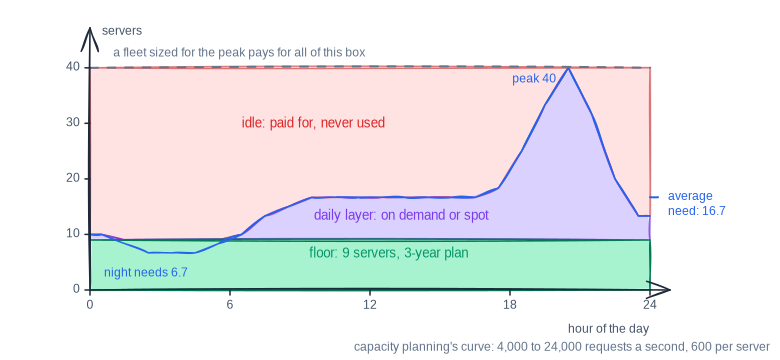
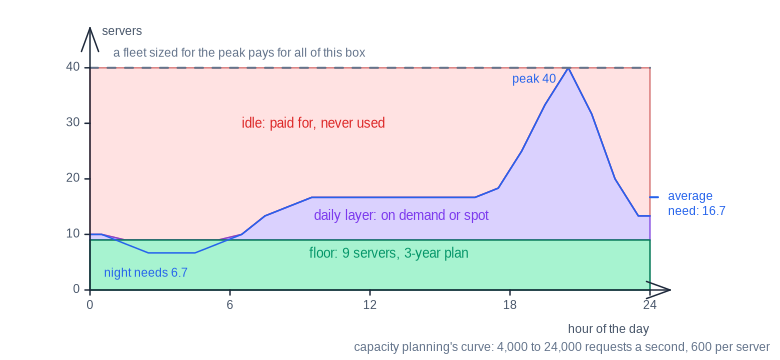
Autoscaling changes how many servers you pay for, and a commitment changes what each one costs. Do the first, then commit to what never leaves. A blue-green deploy's second fleet, described in deployments: blue-green and canary, runs only while you might switch back, so it's short-lived capacity and belongs on demand.
Storage, by where the gigabyte sits
The same gigabyte costs 250 times as much in one place as in another.
| where it sits | per GB a month | to read it back | minimum billed |
|---|---|---|---|
| DynamoDB Standard | $0.25 | $0.125 per million reads, on demand | none |
| RDS Postgres disk (gp3), with a standby | $0.23 | nothing extra | the size you provision |
| EBS gp3 disk, one copy | $0.08 | nothing extra | the size you provision |
| CloudWatch Logs | $0.03 per compressed GB, after $0.50 per GB taken in | $0.005 per GB a query scans | none |
| S3 Standard | $0.023 | $0.0004 per 1,000 GETs | none |
| S3 Standard-IA, for infrequent access | $0.0125 | $0.01 per GB | 30 days, 128 KB |
| S3 Glacier Instant Retrieval | $0.004 | $0.03 per GB | 90 days, 128 KB |
| S3 Glacier Deep Archive | $0.00099 | $0.02 per GB, after hours | 180 days |
The table says three things. A gigabyte in a database costs about 10 times one in S3 Standard, so bulky bytes belong in object storage with a row pointing at them, as object and blob storage argues. A database's disk is also billed on the size you provision, so a 2 TB volume holding 200 GB costs the same as a full one. And within S3, each step down lowers the price of keeping a gigabyte and raises the price of reading it back. So the cheapest class depends on how much you read.
Price one gigabyte for a month, storage plus retrieval, with r the gigabytes read back that month for each gigabyte stored. Standard costs $0.023 whatever r is. Standard-IA costs $0.0125 + $0.01r, which is cheaper than Standard while r is under (0.023 − 0.0125) / 0.01 = 1.05. Glacier Instant Retrieval costs $0.004 + $0.03r, which is cheaper than Standard-IA while r is under (0.0125 − 0.004) / 0.02 = 0.43. AWS describes the classes the same way: Standard-IA for data read about once a month, and Glacier Instant Retrieval for about once a quarter.
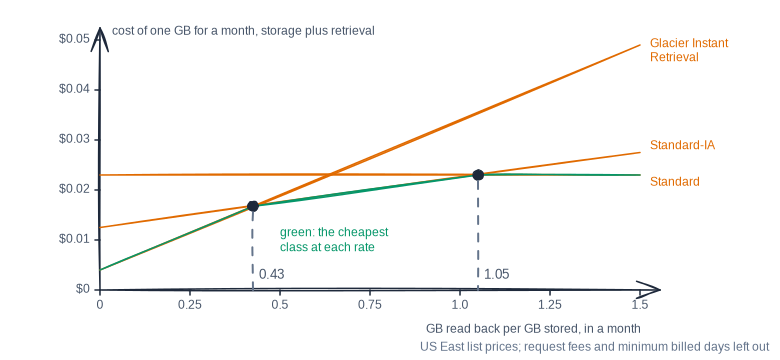
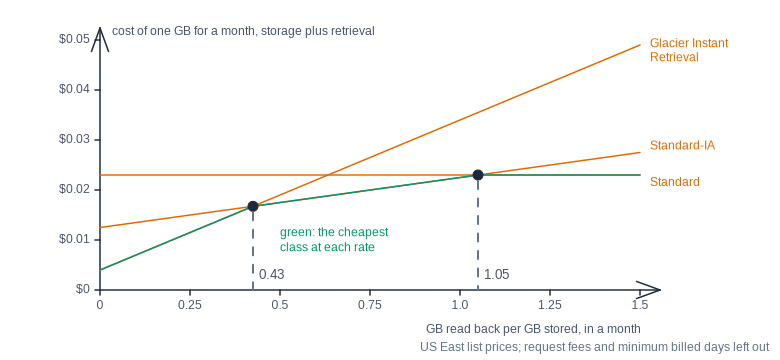
Storage is the one line that grows with time as well as with usage, because nothing leaves unless a rule removes it. So every class decision comes with a second one: how long the data is kept at all.
Moving data
Data costs nothing to bring in, and something to send almost anywhere else.
| from, to | per GB |
|---|---|
| the internet, into AWS | free |
| EC2 or S3, out to the internet | $0.09 for the first 10 TB a month, falling to $0.05 above 150 TB |
| S3, into CloudFront | free |
| CloudFront, out to the internet in the US | $0.085 for the first 10 TB, falling to $0.02 above 5 PB |
| EC2 to EC2 in the same zone, on private addresses | free |
| EC2 to EC2 in another zone | $0.01 out, and $0.01 in |
| US East to most other regions | $0.02, and $0.01 to US East (Ohio) |
| EC2 to S3 or DynamoDB in the same region, directly | free |
| through a NAT gateway | $0.045 to process, plus $0.045 an hour for the gateway |
Egress, data sent out of the cloud to the internet, grows with your audience. Back-of-envelope estimation works out that sending a gigabyte once costs about four months of keeping it in S3.
A content delivery network (CDN) such as CloudFront changes the price of each byte: $0.085 instead of $0.09 at small volume, and $0.02 instead of $0.05 above 5 PB a month. A hit also keeps the byte off your origin. CDNs and edge compute works out the hit rate below which a CDN that pays origin egress on every miss costs more than none. At list prices that break-even is the CDN's rate over the origin's, near 90 percent. With a CDN in the same cloud, such as CloudFront in front of S3 or EC2, the origin fetch is free and any hit rate saves.
The larger lever is usually the quantity: fewer bytes per view. Back-of-envelope estimation shows a 200 KB image instead of a 500 KB one cutting the largest line on the bill by 60 percent. An object store with no egress fee, such as Cloudflare R2, removes the line instead, at the price of a second provider.
Cross-zone traffic doesn't appear on most diagrams, and it does appear on the bill. Spreading servers over three zones is the default protection against losing one, as multi-region and disaster recovery says. But if each caller picks a callee at random, 2 calls in 3 land in another zone. Between instances, or to a database on RDS, each gigabyte that crosses is billed twice: $0.01 as it leaves one zone, and $0.01 as it enters the other. ElastiCache bills only your side, so a crossing to a cache node costs $0.01. An Application Load Balancer's traffic to the servers behind it is free on private addresses. The calls those servers make to each other, to a cache and to a database are not.
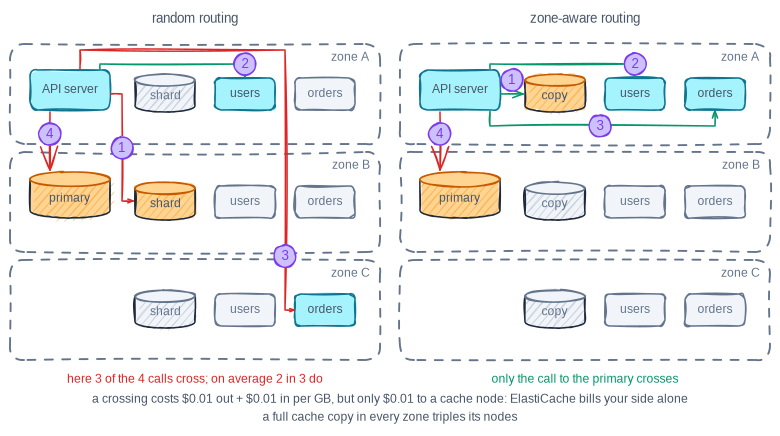
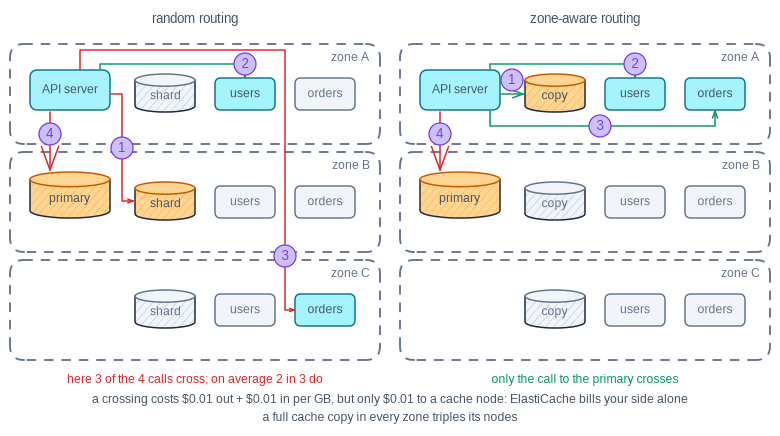
The fix is routing, not fewer zones. Zone-aware routing sends each call to a callee in the caller's own zone when that zone has room. Envoy, an open-source proxy, does this on a best-effort basis and sends the overflow across zones.
A service with copies in every zone gets this for nothing. A cache doesn't, because a sharded cache keeps each key on one node in one zone. Keeping cache reads in the zone needs a full copy in every zone, such as a replica of every shard. That triples the cache's nodes, and a replica can return a value the primary has just changed. For the opening API, that's 6 more cache.r7g.large nodes, about $960 a month. Keeping all three calls in the zone saves about $8,760 of crossings, but only $1,752 of that is the cache call, because ElastiCache bills a crossing once. Kafka has its own version of the fix, for consumers, in worked example 2.
A NAT gateway charges for traffic that would otherwise be free. Servers in a private subnet reach the internet through a NAT gateway, which does network address translation and charges $0.045 for every gigabyte it processes. If the same servers reach S3 by that route, the S3 traffic pays the fee too, although EC2 to S3 in the same region is otherwise free. A job reading 100 TB a month from S3 that way pays 100,000 × $0.045 = $4,500 for the route alone. A gateway endpoint for S3 or DynamoDB is a route-table entry that sends that traffic around the NAT gateway, at no charge.
A second region costs what it keeps running there, which multi-region and disaster recovery prices by tier, plus $0.02 for every gigabyte copied to it.
Paying per request
Some services charge for each request instead of for capacity, so an idle system costs nothing.
- DynamoDB on demand charges $0.625 per million writes of up to 1 KB, and $0.125 per million strongly consistent reads of up to 4 KB, half that for eventually consistent ones.
- DynamoDB provisioned sells a rate instead: $0.00065 an hour for a write unit, one write a second, and $0.00013 an hour for a read unit.
- Lambda charges $0.20 per million requests, plus $0.0000166667 for each GB-second of memory a function holds while it runs. CPU comes with memory: at 1,769 MB, a function gets the equivalent of one vCPU.
- S3 charges $0.005 per 1,000 writes. Object and blob storage shows that below about 200 KB, an object costs more to write than to keep for a month.
A per-request price includes the capacity behind it, at a markup. So it wins when the capacity you'd otherwise buy would sit idle, and the question is how idle.
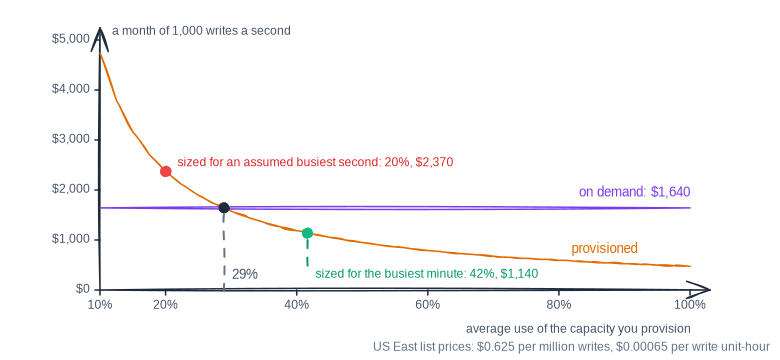
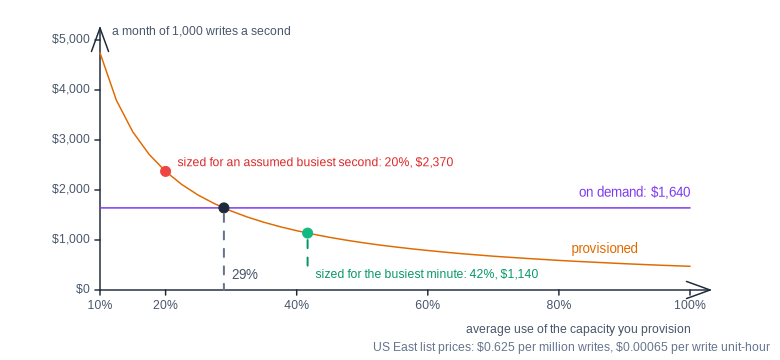
The question is how busy provisioned capacity must be
before it beats paying per request.

DynamoDB writes (reads have the same ratio)
  a write unit for an hour, fully used,
  is 3,600 writes                                 $0.00065
  3,600 writes on demand  3,600 × $0.625/M        $0.00225
  on demand costs 3.46 times as much, so it is
  cheaper below 1 / 3.46 of capacity used    ≈         29%
  before November 2024, at $1.25/M           ≈         14%

The sessions table: 1,000 writes/s on average
  on demand        2.63B × $0.625/M          ≈      $1,640
  provisioned for the busiest minute, 2,400/s,
  42% used         2,400 × $0.00065 × 730    ≈      $1,140
  provisioned for a busiest second of 5,000/s
  (assumed), 20% used
                   5,000 × $0.00065 × 730    ≈      $2,370

Lambda against an m7i.2xlarge
  Lambda, per vCPU-second
                   1.769 GB × $0.0000166667  =  $0.0000295
  server, per vCPU-second
                   $0.4032 / 8 / 3,600       =  $0.0000140
  a request using 50 ms of one vCPU
    Lambda         0.05 × $0.0000295
                   + $0.0000002              ≈     $1.67/M
    server, u busy: 8u / 0.05 s = 160u a second
                   $0.4032 / (160u × 3,600)  ≈ $0.70/M ÷ u
    equal at       u = 0.70 / 1.67           ≈         42%
  behind API Gateway's HTTP API, $1.00/M more
    equal at       u = 0.70 / 2.67           ≈         26%
  ─────────────────────────────────────────────────────
  Paying per request wins when the capacity it replaces
  would average under about 14 to 42 percent busy.
Three things move the crossover. The first is the peak you must absorb. Provisioned capacity has to cover it, so the use that counts is the average divided by what you provision. The sessions table is cheaper provisioned if it only has to cover the busiest minute, and cheaper on demand if it has to cover the busiest second. When AWS halved on-demand prices in November 2024, it said most provisioned tables would then pay less on demand.
DynamoDB softens the peak for provisioned tables in two ways. Burst capacity keeps up to five minutes of unused capacity, so a short spike above the provisioned rate can still succeed, though AWS doesn't promise the burst will be there. And auto scaling moves provisioned capacity with the daily curve, to a target utilisation you set between 20 and 90 percent, though each change takes several minutes.
The second is the front door. The Lambda rows are the function alone. An API that phones call needs an entrance, and API Gateway's HTTP API adds $1.00 per million requests, which moves the crossover to about 26 percent. Its REST API, at $3.50 per million, moves it to about 14.
The third is waiting. Lambda bills for the whole time a request runs, including the time it spends waiting on a database. A server runs other requests while one waits. So for an API that mostly waits, Lambda's real ratio is worse than the CPU ratio above. At low volume, though, the comparison isn't close: a function called 10 times a minute, at the same 50 ms, makes 438,000 requests a month and costs about $0.73.
Managed against self-run, people included
A managed service costs more per hour than the machines under it. Postgres on RDS costs about twice the price of the same EC2 instance. The difference pays for patching, backups, failover and upgrades that somebody would otherwise do, so price that somebody.
The question is how many databases one engineer's time
must cover before running them yourself costs less.

One database with a standby in another zone
  RDS, db.r7g.2xlarge, Multi-AZ
                   $1.913 × 730                ≈ $1,396
  2 × EC2 r7g.2xlarge that you run
                   2 × $0.4284 × 730           ≈   $625
  what RDS adds                                ≈   $771

One engineer's wages, before benefits
                   $135,980 / 12               ≈ $11,330
  ─────────────────────────────────────────────────────
  $11,330 / $771 ≈ 15 databases. If running your own
  takes one engineer's whole time, you break even at
  about 15. If it takes half an engineer, at about 7.
So which should you run?
Run it yourself, because the machines cost half
The instance price is the number on the pricing page, and it's under half of RDS's. Then the team spends its weeks on patches, backup tests and failover drills, and someone carries a pager for the database. Below about 15 databases per engineer, by the worksheet, that time costs more than RDS adds.
Buy the managed service, and price what it adds
Take RDS, Amazon MSK, which is AWS's managed Kafka, or DynamoDB, and spend the time on the product. Choosing a database makes the same call: when two options fit the queries, choose by who will run them. AWS's Well-Architected cost guidance puts it as a principle, to stop spending money on undifferentiated heavy lifting.
A managed service can also be cheaper on the bill itself. MSK doesn't charge for replication between its brokers across zones, and worked example 2 shows that line deciding the comparison.
The cost: the premium grows with the fleet. At hundreds of databases, or a bill in millions, it's larger than the team that could remove it.
Own the large, steady part once the premium outgrows a team
Question the idea that renting is always the default. 37signals spent $3.2 million on cloud in 2022, just under $1 million of it to store 8 PB in S3. For the other $2.3 million, it projected $840,000 a year on its own hardware.
That figure is about $600,000 of servers spread over five years, plus $720,000 a year for the racks it already rented in two data centres. It comes to about $1.5 million a year saved, without changing the size of the operations team.
The projection rests on three things. The post names stable workloads as the condition, so there were few peaks to rent for. The operations team and the racks were already paid for. And the bill was in millions, more than the team that runs the machines costs. Dropbox moved most of its file storage off S3 at a far larger size, and that breakdown prices the move.
What you give up: capacity has to be bought before it's needed, so a surprise peak has nowhere to go. Hardware, the network and the building become your failures, and your team carries them.
The managed premium is paid per database. The people are paid per team. Rent until the first is larger than the second.
Observability's own bill
Logs, metrics and traces each multiply something different, as observability lays out, and the opening worksheet priced the logs.
Metrics are billed by the series. CloudWatch charges $0.30 a month for each of the first 10,000 custom metrics, and $0.10 for each of the next 240,000. It treats each unique combination of dimensions, its word for labels, as a separate metric. A per-customer label on one request counter, for 10,000 customers across 5 routes, makes 50,000 metrics: 10,000 × $0.30 + 40,000 × $0.10 = $7,000 a month for one counter. Time-series storage shows the same multiplication in memory.
Unit cost
A total tells you what a month cost. Divided by something the business counts, such as a request, a user or a gigabyte kept, it tells you whether the design gets cheaper or dearer as it grows. Pick the unit the product is sold or used by: requests for an API, active users for an app, gigabytes for a storage product. The opening API costs $165,000 / 26,280 million requests, about $6.28 per million. The cuts in worked example 1 take it to about $1.16.
State it for two reasons. If every line grew in proportion to traffic, the unit cost would stay put as traffic doubled. So a unit cost that rises means some line is growing faster than usage, and that line is the one to find. And it can be set against what a unit earns. AWS's cost guidance makes this a principle: measure what the workload delivers to the business, and what delivering it costs. Worked example 3 shows a unit cost that rises with nothing but time.
The method
1. List the lines. Write one line for each thing the design multiplies: servers by hours, gigabytes by months in each class, gigabytes by each zone or region boundary they cross, requests by their price, log bytes, and people by months.
2. Price each line in one round. Use list prices, one or two significant figures, with the inputs written beside each line.
3. Find the largest line, and the fastest-growing one. Say both aloud. They're often different lines.
4. Divide by the unit. Work out the cost per million requests, per user a month or per gigabyte kept, and compare it with what the unit earns if you know.
5. Change the design so the largest line falls. Shrink its quantity by sampling, compressing, caching, batching or keeping calls in their zone. Or move it somewhere cheaper, such as a colder storage class or a service that doesn't bill for that line. Then price again, because the largest line moves.
6. Then take the commercial discounts on what's left. Commit to the floor, put interruptible work on spot, and keep on demand for the rest.
7. Stop when the largest line costs less a month than the engineer time it would take to shrink it.
Worked examples, start to finish
Each example breaks a different obvious answer.
The opening API, cut in order
The API from the start of this page costs $165,000 a month. The obvious first move is the one on every cost-saving checklist: put the 40 servers on a 3-year Savings Plan. It saves $5,800 a month, 3.5 percent of the bill. Follow the method instead, largest line first.
The question is what each change saves, taken in the
method's order. Inputs as in the opening worksheet.

  as designed, to the nearest $10              ≈ $164,980

1. Logs: every ERROR line, and every line of 1% of
   requests, chosen by trace ID, about 80 GB a day
   taken in     80 GB × 30.4 × $0.50           ≈   $1,216
   kept 7 days  560 GB, compressed to 112 GB
                × $0.03                        ≈       $3
   saves        $119,660 − $1,219              ≈ $118,440
2. Calls between zones: the cache, users and orders
   calls stay in the caller's zone, and the call to
   the primary still crosses 2 times in 3
                175.2 TB × $0.02               =   $3,504
   a cache copy in every zone, 6 more nodes
                6 × $0.219 × 730               ≈     $959
   saves        $12,264 − $3,504 − $959        =   $7,801
3. Servers: the floor of 9 on a 3-year plan, the
   rest on demand following the curve          ≈   $3,610
   saves        $11,770 − $3,610               ≈   $8,160
  ─────────────────────────────────────────────────────
  after                                        ≈  $30,600
  per million requests   $164,980 / 26,280     ≈    $6.28
                         $30,600 / 26,280      ≈    $1.16

The largest line left is responses to the internet,
$10,020, less than one engineer's monthly wage.
The logging change is the standard tier in observability: keep every error, and choose whole requests by a hash of their trace ID, so the lines you keep describe complete requests. It gives up the lines of 99 in 100 successful requests, and that page names what you can no longer answer.
The decision is the order. The logging change saves 20 times what the commitment alone would have. The commitment still happens, on the 9 servers that never leave instead of on all 40. Step 2's cache copies are the weakest part of it. They cost $959 a month and remove only the cache call's crossings, $1,752, so they save about $790 net, and they bring replica reads that can trail a write. A team that can't accept that lag should skip them: the users and orders calls still save $7,008 with no copies at all. Every line left is under one engineer's monthly wage, so by step 7 the next change competes with product work on equal terms. The next candidate would be the 5 KB response, the largest quantity left, by compressing it or dropping fields the phones don't use.
A Kafka pipeline across three zones, where the bytes cost more than the brokers
A team runs Kafka on EC2 for 100 MB a second of events. Each partition has three copies, one in each zone, so that losing a zone loses nothing. Two consumer groups read everything. The obvious bill is brokers and disks.
The question is which line dominates, and what removes
it. 100 MB/s produced, 3 copies of each partition, one
per zone, 2 consumer groups, 3 days kept.

  produced a month   100 MB/s × 2.63M s   = 262,800 GB

On EC2
  brokers   6 × m7g.2xlarge  6 × $0.3264 × 730   ≈  $1,430
  disks     8.64 TB a day × 3 days × 3 copies
            = 77,760 GB × $0.08                  ≈  $6,220
  zones, per GB produced
    producer to leader, 2 times in 3          0.67 GB
    leader to its 2 followers                 2.00 GB
    2 consumer groups reading the leader,
    2 times in 3 each                         1.33 GB
    total                                     4.00 GB
            262,800 × 4 × $0.02                  ≈ $21,020
  total                                          ≈ $28,670
  zones     $21,020 / $28,670                    ≈    73%

On EC2, consumers reading a replica in their own zone
  zones     262,800 × 2.67 × $0.02               ≈ $14,020
  total                                          ≈ $21,670

On Amazon MSK, consumers reading in their own zone
  brokers   6 × kafka.m7g.2xlarge
            6 × $0.816 × 730                     ≈  $3,570
  storage   77,760 GB × $0.10                    ≈  $7,780
  zones     replication between brokers is free,
            so producers only
            262,800 × 0.67 × $0.02               ≈  $3,500
  total                                          ≈ $14,850
  ─────────────────────────────────────────────────────
MSK's brokers cost 2.5 times as much as EC2's, and its
bill is half the first EC2 bill, because it removes
most of the largest line.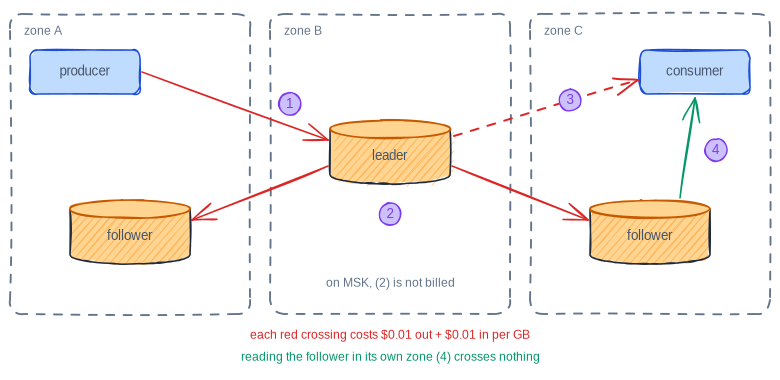
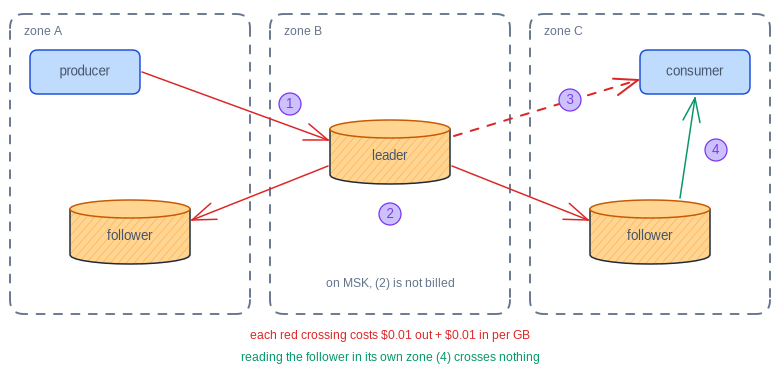
A consumer reads from a partition's leader by default, and the leader is in another zone 2 times in 3. KIP-392, a Kafka improvement proposal the project accepted, lets a consumer that sets its zone in client.rack read from a replica in that zone, once the brokers are configured for it. AWS documents the same setting for MSK. That removes the consumer crossings either way. The replication crossings come with the three-zone layout itself. On EC2 you pay them, and on MSK you don't.
The decision is to have consumers read in their own zone however the cluster runs, and then to take MSK. At this volume, the replication line MSK removes is worth more than the extra it charges per broker, before anyone's time is counted.
A photo backup plan, where cost per user grows with account age
A photo backup service charges $2 a month. Each user uploads about 2 GB of photos a month, 3 MB each, and deletes nothing. Dividing each month's bill by the users looks fine in the first year.
The question is what one user's storage costs in month m
of their account, against the $2 they pay. The plan
price and upload rate are assumed.

All in S3 Standard
  month m        2m GB × $0.023          = $0.046 × m
  month 12                               ≈ $0.55
  month 24                               ≈ $1.10
  storage alone takes the whole $2 at
                 2 / 0.046               ≈ 43 months

The last 3 months in Standard, the rest in Glacier
Instant Retrieval at $0.004
  month m        6 GB × $0.023 + 2(m − 3) GB × $0.004
  month 24                               ≈ $0.31
  month 60                               ≈ $0.59
  reaches $2 at                          ≈ 236 months

Moving one month of photos down
  667 photos × $0.02 per 1,000           ≈ $0.013, once
  saved every month after  2 GB × $0.019 ≈ $0.038
A user who scrolls back through a year of old photos
  24 GB × $0.03                          = $0.72
  ─────────────────────────────────────────────────────
In Standard, an account costs more than it pays after
about 3.5 years. Tiered, after nearly 20.
The average across all users hides this, because new accounts pull it down while old ones climb. The unit that shows it is cost per user by account age.
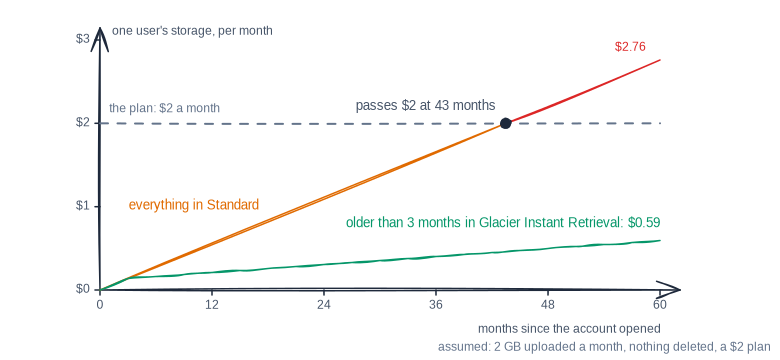
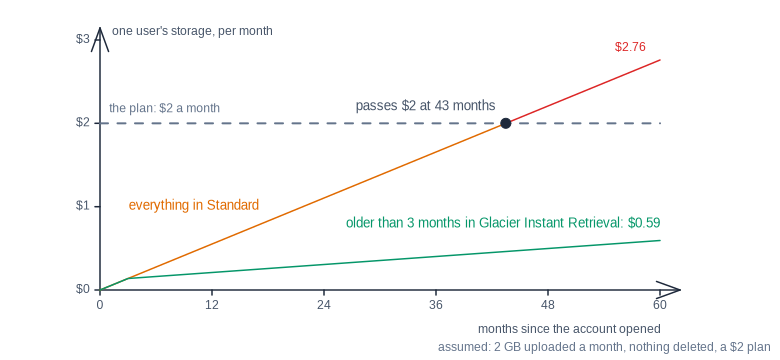
The decision is to move photos older than 90 days to Glacier Instant Retrieval, which still answers a read in milliseconds, and to price the plan against an account in its fifth year, not its first. The 90-day minimum billed duration doesn't matter here, because a backed-up photo is kept for years.
A team of three, where the right answer is to change nothing
A three-person startup spends $2,000 a month on AWS: a managed database, a few servers on demand and an S3 bucket. An engineer proposes running the database on EC2 and moving the servers to spot, for a 30 percent saving.
The question is whether the change pays for the time it
takes. The bill, the saving and the time are assumed.

  the bill                                    $2,000 a month
  30% saved                                     $600 a month
  the work: one engineer-month
                 $135,980 / 12               ≈ $11,330
  paid back after
                 $11,330 / $600              ≈ 19 months
  ─────────────────────────────────────────────────────
That month is a third of the whole team's month, and
the database it moves now needs someone on call.
The decision is no. Keep everything managed and on demand, set a spend alert, and write down what would change the answer: any one line that costs more each month than the engineer time it would take to shrink it. For this team that's about $11,000 a month for a single line, more than five times today's whole bill.
Where it goes wrong
These are ordered by how often they come up. The first two come up most.
1. Pricing the servers and stopping
The servers were 7 percent of the opening API's bill. Price every line the design multiplies: bytes out, bytes between zones, requests, log bytes and people.
2. Leaving out the bytes between zones
Three zones is the right default, and with random routing it sends 2 calls in 3 across a boundary, at up to $0.02 a gigabyte. In the Kafka example that line was 73 percent of the bill. Route calls within the zone, and use a gateway endpoint for S3 and DynamoDB instead of a NAT gateway.
3. Comparing managed and self-run on instance price
RDS costs about twice the EC2 instances under it, and below about 15 databases that difference is less than one engineer. Count the people in the same unit as the machines.
4. Discounting before redesigning
A commitment on the opening API's servers saved 3.5 percent of a bill whose logs were 73 percent of it. Change the design to shrink the largest line first, then commit to what's left.
5. Committing to the peak
A 3-year plan on a fleet sized for its busiest minute costs more than following the curve on demand, whenever the peak is over twice the average. Commit to the floor.
6. Optimising a line smaller than the people it takes
A 30 percent cut of a $2,000 bill takes 19 months to pay back one engineer-month. Leave it, and write down the size at which you would act.
7. A request-priced service with no ceiling
On demand scales with whatever calls it, including a retry loop or an attacker. Cap it where the service allows, such as Lambda's reserved concurrency, and alert on spend.
If you memorise nothing else
| fact | why it matters |
|---|---|
| Every line is a quantity your design chose, times a price | change the design to shrink the largest line first, take discounts second |
| An on-demand m7i.2xlarge is about $0.40 an hour, $294 a month | the unit for pricing a fleet |
| A 1-year Savings Plan is about 27% off, 3 years about 49%, spot about 56% today | a discount divides a price by about 2, a design change can divide a quantity by 100 |
| Commit a peak-sized fleet only if its peak is under twice the average | otherwise follow the curve, and commit the floor |
| Standard-IA beats Standard for data read back less than about once a month, Glacier Instant Retrieval beats Standard-IA below about 0.4 times | pick the class by how much you read |
| Egress is $0.09 per GB, about four months of S3 storage | the line that grows with the audience |
| Cross-zone is $0.01 out plus $0.01 in per GB between instances, and $0.01 to ElastiCache | random routing sends 2 calls in 3 across, and a cache needs a copy per zone to avoid it |
| A NAT gateway charges $0.045 per GB, even on the way to S3 | a gateway endpoint is free |
| DynamoDB on demand beats provisioned below about 29% use | divide the average by what you'd have to provision |
| Lambda costs about twice a server per busy vCPU-second | it wins below about 42% busy alone, 26% behind an HTTP API |
| RDS costs about twice its EC2 instances | one engineer's wages cover the premium on about 15 databases |
| Logs at $0.50 per GB taken in | sample whole requests by trace ID |
| State the cost per unit | a rising unit cost points at the line growing faster than usage |
What is expected at each level
Mid-level
Know that storage, egress, compute and requests are priced differently, and roughly what each costs: S3 at $0.023 per GB a month, egress at $0.09 per GB, and a mid-size server at about $300 a month. When asked, price the design's largest line with its inputs shown.
You aren't expected to raise cross-zone traffic, commitments or unit cost without being asked. A good answer to "what does this cost?" names the dominant line and one way to shrink it.
Senior
You lead the cost discussion when it comes up, and three things should appear without prompting.
The dominant line, with a number. For media it's egress. For chatty services it's often cross-zone traffic or logs. Pricing only the servers misses most of the bill.
A design change before a discount. Sample the logs, tier the storage, keep calls in their zone, shrink the bytes. Then commit to the floor.
Managed against self-run, with the people counted. Say what the managed premium is a month and how many engineers it equals.
Two things are disqualifying: calling a design cheap or expensive with no number, and putting a stateful tier, such as a database or a Kafka broker, on spot.
Staff+
Producing a correct design is still the bar. A staff answer stands out by deciding where cost changes the architecture, and where it doesn't.
State the unit cost and what moves it. Per request or per user, and the line that grows faster than usage.
Price the hidden lines before they reach the bill. Cross-zone calls, NAT gateways, log volume and metric labels.
Split each fleet by how long its servers live. A commitment for the floor, on demand for the daily curve, and spot for the stateless share.
Know when to own. Steady load, a bill in the millions and a team that already runs machines. Otherwise rent.
And say what you would not build. Each of these can cost a team a quarter.
One is a self-run database fleet that saves $771 a month per database, for a team running five databases. Another is a 3-year commitment sized to today's peak. A third is a layer that hides the cloud provider, built in the hope of a better price. Others are a custom autoscaler for a fleet whose floor is most of its load, and a cost dashboard for a $2,000 bill.
Sources
Every price below was read on 8 November 2026, and every worksheet multiplies those prices by the inputs it states.
- AWS pricing pages. EC2 on demand also lists data transfer between zones and regions. The others are Savings Plans, S3, DynamoDB, Lambda, API Gateway, CloudFront, CloudWatch, VPC (virtual private cloud) and NAT gateways, RDS for PostgreSQL, ElastiCache and MSK. The rates come from the AWS Price List API that those pages draw on. CloudWatch's application-log examples assume logs compress 5 to 1 before storage is billed, and ElastiCache's page says it bills only the application's side of a cross-zone transfer.
- AWS, Announcing Database Savings Plans, December 2025, the AWS News Blog post on it, and the Savings Plans FAQ. The one-year term, up to 20 and 35 percent off, Generation 7 and newer instances, Valkey only on ElastiCache, and Reserved Instances for 3-year commitments.
- AWS documentation: Spot best practices, the Spot Instance Advisor, DynamoDB capacity modes, burst capacity and auto scaling, Lambda memory and reserved concurrency, S3 storage classes, S3 gateway endpoints and CloudWatch metrics. The two-minute notice and AWS's warnings about spot, DynamoDB's burst capacity and auto scaling, the vCPU at 1,769 MB, minimum billed sizes and durations, the free route to S3, and dimensions as separate metrics.
- AWS Well-Architected, cost optimization pillar: design principles. Measuring cost against business output, and undifferentiated heavy lifting.
- Mazen Ali and Joseph Idziorek, Amazon DynamoDB lowers pricing for on-demand throughput and global tables, AWS, November 2024. The 50 percent cut, and AWS's view that most provisioned tables would then pay less on demand.
- David Heinemeier Hansson, We stand to save $7m over five years from our cloud exit, 37signals, February 2023. The 2022 bill and its S3 share, the projected costs of owning, stable workloads and the unchanged operations team.
- KIP-392: Allow consumers to fetch from closest replica, Apache Kafka, and Todd McGrath and Austin Groeneveld, Reduce network traffic costs of your Amazon MSK consumers with rack awareness, AWS, 2022. Reading from a replica in the consumer's zone, and free replication between MSK brokers. Envoy's zone aware routing is the same idea for service calls.
- US Bureau of Labor Statistics, Software Developers. The median annual wage of $135,980 in May 2025.
- Cloudflare, R2 pricing. No egress charge.