Why you are doing this at all
On 29 May 2025, Google Cloud released a new feature in Service Control, the binary that checks incoming API requests against policy and quota. It went out region by region. The new code path ran only after a policy change that used the feature, so during the rollout it never ran at all.
On 12 June, a policy change with blank fields that nobody intended was inserted into the Spanner tables that hold Service Control's policies. Quota policy is global, so the change replicated to every region within seconds. Service Control read it in every region, hit a null pointer and crashed, and kept crashing as it restarted. Google's report says the new code had no feature flag, a switch that keeps new code off until someone turns it on. With one, the report says, the problem would have been caught in staging. A red button that turned the new path off had finished rolling out 40 minutes after the incident began, and recovery started, smaller regions first. In us-central1, the restarting tasks overloaded the Spanner table they depend on, and full recovery took up to about 2 hours 40 minutes.
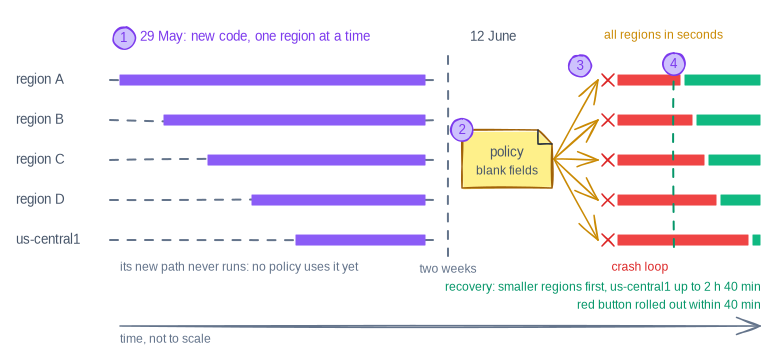
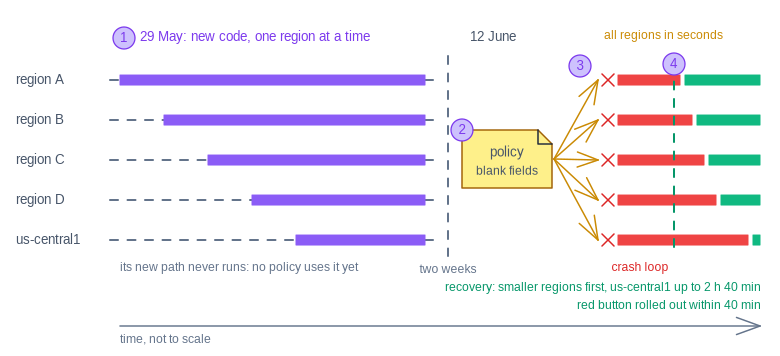
The staged rollout did its job for the code. The failure arrived as data, and the data reached every region at once. Google's Site Reliability Engineering (SRE) book says roughly 70 percent of outages are due to changes in a live system. Its answer is three practices: roll out progressively, find problems quickly, and roll back safely.
Shipping a change safely needs two things. A bad change must reach only a small share of traffic before you know it's bad, and the old version must be able to run on everything the new one wrote. The rollout strategy buys the first. Only the order and format of your data changes buy the second.
When a plain deploy is enough
If the business can take a few minutes of downtime at a quiet hour, stop the old version, run the migration and start the new one. Kubernetes's Recreate strategy works this way: it stops every old pod before it starts a new one. It suits an internal tool or a nightly batch job, and two versions never run at once. Take a backup first, because a migration that runs and turns out wrong is undone from the backup, not by deploying the old code.
If a service gets little traffic, a canary has nothing to measure. At 10 requests an hour, a canary on 5 percent of traffic sees one request every two hours. Deploy everywhere, run synthetic checks against the new version, and keep the rollback ready. Observability covers alerts for services this quiet.
The data half still holds in both cases: the old version has to run on whatever the new one wrote.
Limiting who sees a change
Rolling, blue-green and canary
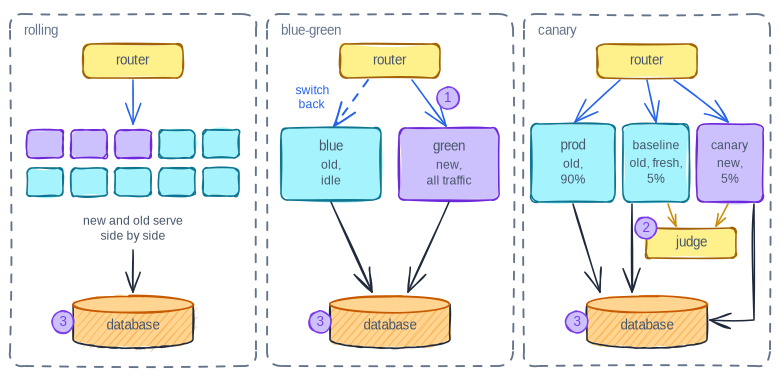
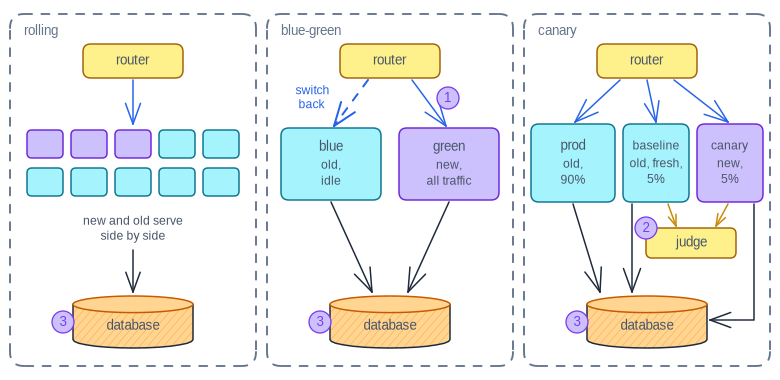
- Rolling. Replace instances a few at a time, until every instance runs the new version.
- Blue-green. Start a full second fleet on the new version, then move all traffic to it.
- Canary. Send a small share of traffic to the new version and compare it with the old one before going further. The SRE workbook defines canarying as a partial and time-limited deploy of a change, and its evaluation.
A rolling deploy is Kubernetes's default, and by default it lets 25 percent of the pods be unavailable and starts up to 25 percent extra. It needs only a batch's worth of spare capacity. Each old instance has to drain its requests and each new one has to warm up, which load balancing covers.
The weakness is that nothing in a rolling deploy compares the new version with the old one. Kubernetes moves on once new pods report ready, so a version that passes its readiness check and fails real requests rolls through the whole fleet. Undoing it is another rolling deploy, though it can run in bigger batches. Amazon describes teams that deploy 5 percent of their boxes at a time and roll back 33 percent at a time.
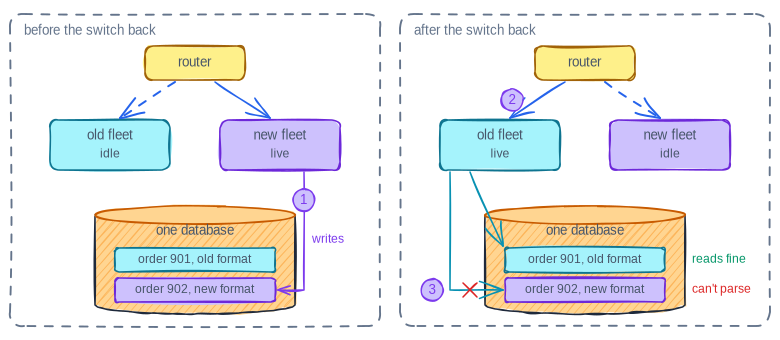
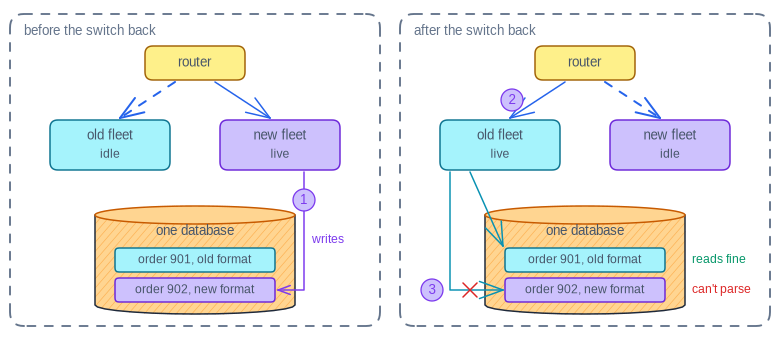
Blue-green, as Martin Fowler describes it, keeps two production environments, and one of them is live. You deploy to the idle one, test it, and switch the router so that all requests go to it. To undo, you switch the router back, which takes seconds while the old fleet is still running. The costs are a second full fleet while both run, and a switch that moves 100 percent of traffic at once, so whatever the tests missed reaches every user. The SRE workbook notes that you can also split traffic between the two environments, which turns blue-green into a canary with a fast undo.
Of the three, only the canary measures the new version on real traffic before most users get it. It costs time, because the comparison needs enough requests to mean anything.
To compare the three, take one bad release and ship it each way.
The question is how many requests a release that fails
every request costs before it's undone. 100 instances,
10,000 requests a second. To compare like with like, the
alarm fires and the rollout stops 5 minutes after bad
code first serves traffic, in all three (assumed).

Rolling, 10 instances every 2 minutes (assumed)
  traffic on the bad code when the alarm fires        30%
  failed before the alarm
    10,000 × (0.1 × 120 + 0.2 × 120 + 0.3 × 60) = 540,000
  undo at the same pace: 3 steps of 2 minutes (assumed)
    10,000 × (0.3 + 0.2 + 0.1) × 120            = 720,000
  total                                           ≈ 1.26M
  extra instances                                      10

Blue-green, every request moved at once
  failed    10,000 × 300 s                         = 3.0M
  undo: one switch back, seconds
  extra instances while both fleets run               100

Canary on 5 instances, beside a 5-instance baseline
  failed    0.05 × 10,000 × 300 s               = 150,000
  undo: take 5 instances out of rotation, seconds
  extra instances                                      10

Share of the budget of a 99.9 percent SLO over a 30-day
month, 25.9M failed requests
  rolling 4.9%      blue-green 12%      canary 0.6%
  ─────────────────────────────────────────────────────
  Blue-green undoes fastest and exposes everyone. A
  rolling deploy's undo is another rolling deploy. Only
  the canary limits the damage before anyone knows.
So pipelines combine them: a canary first, then a weighted shift in stages that keeps the old instances running until the end, so every stage can be undone in seconds. The budget line uses the service level objective (SLO) from observability, which priced a 5 percent canary left running for 40 minutes at 4.6 percent of the month. Cost as a design constraint would price blue-green's second fleet as on-demand compute, paid only while it runs.
Comparing a canary with a baseline
The obvious comparison is the canary's metrics against the same metrics before the deploy. Time breaks it. Traffic, latency and error rates move through the day. The SRE workbook calls time one of the biggest sources of change in observed metrics, and warns that a before-and-after comparison may set a business day against a weekend.
So compare against something running at the same time. The rest of production still differs: its instances have run for days with warm caches, and the canary started a minute ago. Kayenta, a canary analysis tool that Google and Netflix developed together from Netflix's internal system, compares against a baseline instead. The baseline is a fresh deploy of the current version, started with the canary, with the same number of instances and the same kind of traffic, typically three instances each. The only thing left that differs between the two groups is the version.
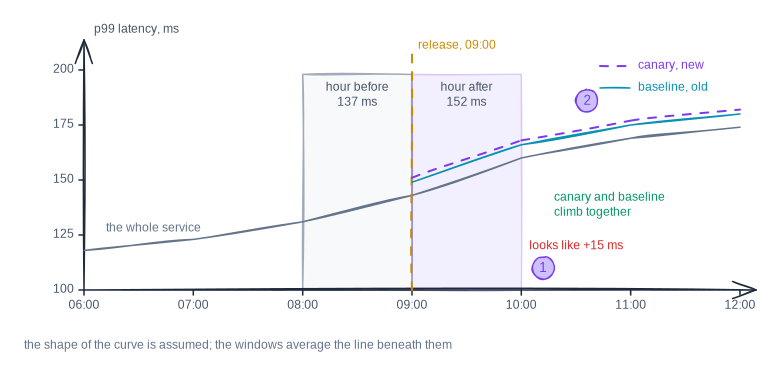
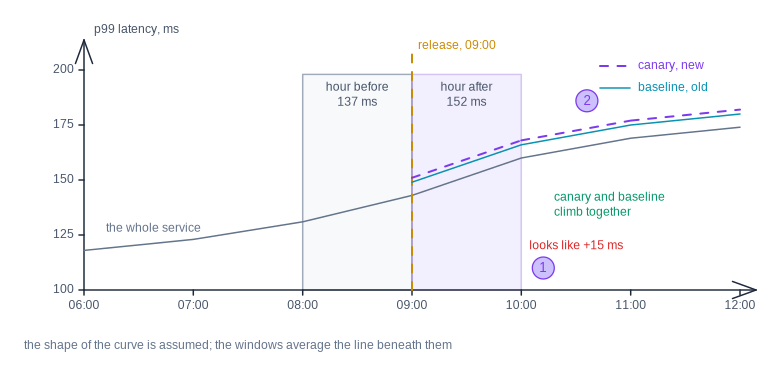
Pick a few metrics. The workbook suggests starting from your service level indicators (SLIs), such as status codes and response latency for a frontend, and keeping the list short, perhaps no more than a dozen. A metric that moves without hurting users, such as total CPU, makes a noisy canary. CPU time per request is better. The workbook also suggests leaving out status codes that users cause, such as 404s.
Kayenta's judge, documented in Spinnaker, compares each metric's canary values with the baseline's. It uses a Mann-Whitney U test, a check of whether two sets of samples come from the same distribution. It marks a metric High or Low only when it is 98 percent confident of a difference. The score is the share of metrics that passed, weighted by group, from 0 to 100. A pass promotes the release, a marginal score can ask a person, and a fail rolls it back.
How long the canary has to run depends on the smallest regression you need to see.
The question is how long a canary needs before a rise in
its error rate stands out from chance. Baseline error
rate 0.1 percent. Canary and baseline each get the same
share of 10,000 requests a second.

A count of random events wobbles by about its square root.
The baseline expects E errors and the canary E × (1 + r),
where r is the rise. A gap of twice the wobble of the two
counts together turns up by chance about 5 times in 100:
  r × E   ≥  2 × √(E × (2 + r))
  E       ≥  4 × (2 + r) / r²

  rise          errors needed           requests each
  2x,   r = 1     4 × 3 / 1      =  12        12,000
  +20%, r = 0.2   4 × 2.2 / 0.04 = 220       220,000
  +10%, r = 0.1   4 × 2.1 / 0.01 = 840       840,000

At 5% of traffic, 500 requests a second each
  2x        12,000 / 500   =     24 s
  +20%     220,000 / 500   =    440 s  ≈  7 min
  +10%     840,000 / 500   =  1,680 s  = 28 min
At 1% of traffic, 100 requests a second each
  2x        12,000 / 100   =    120 s  =  2 min
  +20%     220,000 / 100   =  2,200 s  ≈ 37 min
  +10%     840,000 / 100   =  8,400 s  ≈ 2.3 hours

These are the times at which a regression first has an
even chance of standing out. Catching it 4 times in 5
takes about twice as long.
  ─────────────────────────────────────────────────────
  A small canary finds a broken release in minutes. A 10
  percent rise in errors on 1 percent of traffic needs
  2.3 hours for an even chance of showing, and about 4.7
  to show 4 times in 5.
Spinnaker's suggested starting point is a three-hour canary, judged in three one-hour runs, with at least 50 data points per metric in each run. The worksheet agrees: a 30-minute canary on 1 percent of traffic catches the release that breaks everything, and not much else.
The second trap is the number of metrics.
The question is how often a good release fails its canary
by chance. Say each metric, when its samples are
independent, comes out different up to 2 times in 100 on
a release that changed nothing, as a 98 percent
confidence test allows. Metrics treated as independent.

  metrics   chance that at least one is flagged, at most
     1       1 − 0.98             =   2%
    12       1 − 0.98^12          ≈  22%
    50       1 − 0.98^50          ≈  64%
  ─────────────────────────────────────────────────────
  At a dozen metrics, about one good release in five has
  a metric out of line. So the judge scores the share
  that pass, and only a few metrics can fail it alone.
Spinnaker's tolerance band and effect-size check push the real rate lower, and samples that move together push it higher. An A-A test, a canary with the same version on both sides, measures it, as the Google and Waze canary post recommends. Spinnaker also lets you mark a metric critical, such as the error rate, so that it alone can drop the score to zero.
Zones, regions and bake time
After the canary, the release still goes out in steps. The steps follow failure domains, the parts of a system that fail together, rather than percentages. Amazon's pipelines deploy in waves. The first goes to a region with little traffic and the second to a region with a lot. In Amazon's sample pipeline, later waves go to 3 regions, then up to 12, then all the rest. Inside a region, a wave deploys to one availability zone at a time. A bad release then breaks at most one zone, which a system spread across zones is built to survive, as multi-region and disaster recovery explains.
Between steps, the pipeline waits and keeps watching its alarms. This wait is bake time. Amazon notes that some damage from a deploy isn't readily apparent and builds slowly. A memory leak that takes hours, or a job that runs once an hour, fails only after a short canary has passed. A typical pipeline waits at least an hour after each one-box stage, at least 12 hours after the first regional wave, and 2 to 4 hours after each later wave. With these defaults a change reaches every region in about four or five business days.
Google's SRE book describes the same shape: start in one cluster and expand exponentially, and for sensitive infrastructure, take several days and interleave regions. Amazon's pipelines also skip nights, holidays and weekends, when on-call engineers take longer to respond.
The canary decides whether a release is broken. The waves and bake time limit what a broken release you missed can reach.
Config and data are deploys too
Anything that changes what the fleet does is a deploy: code, config, feature flags, rules, and data that code branches on. Teams stage code and often push the rest everywhere at once, because the rest has to move fast.
Cloudflare's outage on 2 July 2019 shows the cost. Its procedure let web application firewall (WAF) rule changes go global at once, so a new rule could stop an attack quickly, while software went through stages. A new rule went out in simulate mode, where nothing is blocked. It still ran on every request, and a regular expression in it used up the CPU that serves HTTP traffic. Rules reach the whole network in seconds, and Cloudflare was down for 27 minutes. Its fixes include staging rule changes like software, with a global push kept for active attacks.
Google's June 2025 outage has the same shape: staged code, global data. Google's fixes say globally replicated data has to be propagated incrementally, with enough time to validate it and find problems.
So give config and data the same stages as code, and an undo that restores the previous version. The rate limiter does this for its rules, with a shadow mode that logs what a new rule would decide before it decides anything. Shadow mode guards against a wrong decision, not against the rule's cost, as Cloudflare's simulate mode showed. Search autocomplete puts each new build of its suggestion data on canary servers first. When a change must go global fast, make that a separate emergency path that someone chooses on purpose. Who may push a change at all is part of security in system design.
Feature flags: deploy is not release
A deploy puts new code on machines. A release lets users see new behaviour. A feature flag separates the two. The new code ships everywhere with its flag off, so it never runs. Later the flag turns it on for some users, then more. Pete Hodgson's article on Martin Fowler's site calls release flags the most common way to separate release from deploy.
Each instance keeps a copy of the flags in memory, refreshed from a flag service by a push or a short poll, and checks it on every request with no network call. If the flag service is unreachable, the instance keeps the values it last had, as the rate limiter does with its rules. To turn a flag on for 1 percent of users, hash the user ID with the flag's name into 100 buckets and turn on one bucket. Each user then stays in or out on every request, and each flag picks a different 1 percent, so the same users don't get every new feature first.
Turning a flag off takes seconds and needs no deploy. Google's fixes after June 2025 include requiring flags, off by default, for changes to critical binaries.
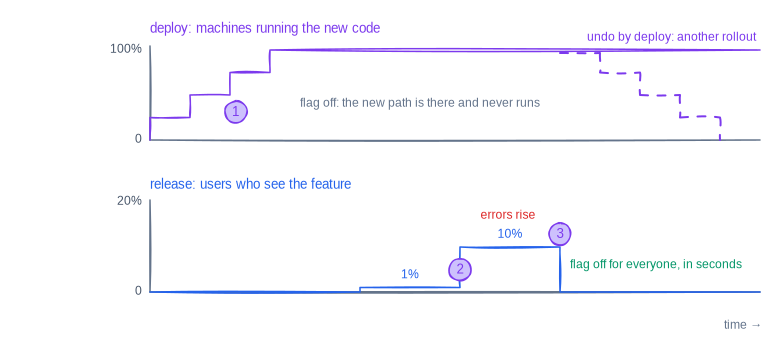
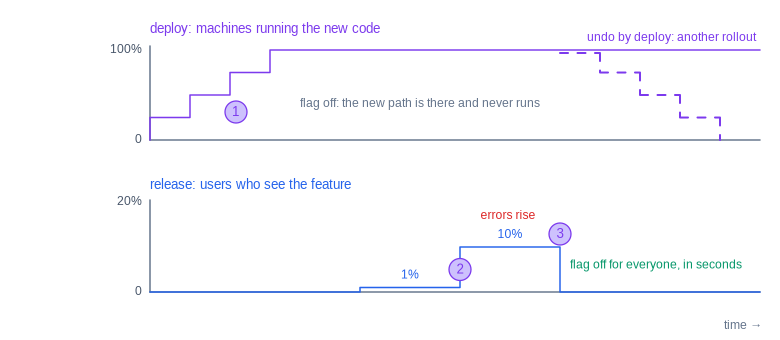
Some flags are meant to stay. Hodgson describes long-lived kill switches that let operators turn off features that aren't essential when the system is under heavy load.
The rest should be temporary. A flag doubles the paths through the code it guards, and each one left in place after its rollout is flag debt. Hodgson treats flags as inventory with a carrying cost, and says a release flag should generally not last much longer than a week or two. Give each one an expiry date, or a time bomb: a test that fails once the flag is past its date. With 20 flags there are 2^20 combinations, about a million, so test only the set you expect in production, the set with every new flag off, and the set with them all on.
Two limits apply to flags. A flag change is a config push, and turned on for everyone at once it reaches every instance in seconds, like Cloudflare's rule, so ramp it by percentage. And a flag doesn't undo data: if the new path wrote rows in a new format while it was on, turning it off leaves them behind.
A canary limits how many machines run the new code. A flag limits how many users see the new behaviour.
Keeping the way back open
What a rollback can't undo
A rollback deploys the previous build again, and the code comes back in full. Three other things don't.
The data the new version wrote. Rows in a new format, cache entries, queue messages and files in object storage all stay. If the old version can't read them, the rollback starts a second incident. Blue-green's quick switch back has the same limit, because both fleets use one database, and Fowler's article separates schema changes from application upgrades for this reason.
What the new version did outside your system. An email sent, a card charged, a message delivered to a partner: no deploy recalls them. Undoing one takes a new action, such as a refund, which distributed transactions and sagas calls a compensation.
Machines that can't take the old version. In July 2024, CrowdStrike reverted a bad content update for its Windows sensor 78 minutes after releasing it. Windows hosts that loaded the bad file in that window crashed, and the revert reached a host only if it stayed up long enough to download the fixed file. CrowdStrike's fixes include a staggered rollout that starts with a canary.
So before shipping anything, ask what a rollback would leave behind. If the answer includes data the old version can't read, split the change, so that each step leaves data both versions can read.
Two versions at once
During a rolling deploy, a canary, or a blue-green switch with requests in flight, two versions run together. Each has to read what the other writes: rows, cache entries, queue messages, and requests between services.
Amazon's article on rollback safety has a small example. A team changes a heartbeat from every 5 seconds to every 10. During the rollout, a server still on the old version hears nothing from an upgraded peer for more than 5 seconds, and drops the connection.
Its fix works for any change of format. Deploy it in two phases.
- Prepare. Teach every reader the new format, while every writer still writes the old one. Nothing changes that anyone can see, and rolling back is safe, because no data in the new format exists yet.
- Activate. Once every server runs the prepare version, switch the writers to the new format. A server that hasn't switched can still read it, because it was prepared.
Amazon checks that every server picked up the prepare version before it activates, because a server that missed it can't read anything written afterwards. A deploy tool that reports success once enough hosts succeed can leave some behind, so check each host's version, not the deploy's status. Rolling back runs in the opposite order: writers first, then readers, and readers only once no data in the new format is left. Amazon usually bakes for a few days between the two phases.
Schema registries name the two directions. In Confluent's terms, a change is backward compatible if readers on the new schema can read data written with the old one. It's forward compatible if readers on the old schema can read data written with the new one. A deploy that may be rolled back needs both, which Confluent calls full compatibility, and only then can producers and consumers upgrade in any order. In practice, add fields as optional with defaults, and never reuse a field's name or number for a new meaning. When old code rewrites a record, it should keep the fields it doesn't recognise. Amazon notes that this can make the two phases unnecessary.
Caches need the same care. If v2 writes an entry in a new shape and v1 reads it, v1 fails on a cache hit. Put the format version in the cache key, so each version reads only its own entries. Then a write has to delete the key under every version still running, or the other version's copy stays stale until its TTL. The old version can't delete a key it has never heard of, so it learns the new key in a prepare deploy, or the deletes come from the database's change stream. The cost is that the new version's keys start cold, so the database takes more reads as the rollout grows.
Schema changes: expand and contract
A schema change is the same problem with a database in the middle. The pattern for it is parallel change, also called expand and contract, which Danilo Sato describes on Martin Fowler's site. Expand the interface to support both the old and the new version, migrate every client to the new one, then contract by removing the old. For a column, that's six steps, five of them deploys:
- Add the new column, nullable, so existing code ignores it.
- Write both columns from the application, still reading the old one. This starts before the backfill, so a row updated after the backfill passes it still gets the new column.
- Backfill the new column for existing rows with a job, then compare the two.
- Read the new column, still writing both.
- Stop writing the old column.
- Drop the old column.
Steps 1 to 4 can be undone all the way back to the original build, because the old column is still written and complete. The original build doesn't write the new column, though, so going forward again after a rollback below step 2 means running steps 2 and 3 again, comparison included. Step 5 narrows the way back. Once writes to the old column stop, a build that reads it finds nothing for new rows, so the oldest safe build becomes the step-4 build. Step 6 can't be undone. Postgres's DROP COLUMN makes the column invisible to SQL at once, so the only way back to its values is a backup. When the table also feeds a change stream, every consumer of that stream is a reader too, and change data capture shows step 4 waiting for every consuming team.
Moving data to a different data store has the same shape, with the whole data store in place of a column.
Stateful services and long-lived connections
A stateless instance can be replaced in seconds. An instance that holds connections or data takes them with it when it stops.
A WebSocket connection has no natural end, so a drain that waits for it never finishes. WebSockets, SSE and polling closes connections on purpose over a window, has clients reconnect with backoff and resume, and gives connections a maximum lifetime so new servers fill up. Deploy that tier one zone at a time, with the headroom capacity planning sizes.
A cache node that restarts empty sends its misses to the database, which distributed cache avoids by keeping items through a restart. A restarting queue consumer triggers a rebalance, and the messages it hadn't acknowledged are processed again by the partition's new owner. Idempotency counts them for a deploy day. A cluster that commits by majority must keep a majority up, so upgrade one member at a time.
The method
1. List what the change touches. Code, config, flags, rules, schema, and every data format it reads or writes. Each one is a deploy.
2. Find what a rollback would leave behind. For each new format, ask whether the old version can read it. Split any change where it can't: prepare then activate for a format, expand and contract for a column.
3. Ship new behaviour dark, behind a flag that is off by default, and release it by percentage of users.
4. Canary against a fresh baseline on a few SLI metrics, with error rates split by code path, long enough to see the regression you care about.
5. Roll out by failure domain, one zone at a time and region by region, with bake time, and automatic rollback on alarms.
6. Drain what holds state. Close connections over a window, keep or move cache contents, and let consumers commit their offsets before they stop.
7. Contract last. Remove the old column, the old format reader and the flag once no running version and no rollback target needs them.
Worked examples, start to finish
Each example breaks a different obvious answer.
A checkout release that breaks one rare path
A checkout service takes 10,000 requests a second, with a background error rate of 0.1 percent. A release changes how gift cards are applied. One request in 20,000 uses a gift card, and the new code fails every one of them. The pipeline runs a 1 percent canary for 30 minutes, judged on the service's error rate and latency.
So how should the pipeline decide that a release is good, when the damage is confined to one path?
Watch the dashboards after the deploy
It needs no tooling, and a release that breaks everything shows up on a dashboard at once.
This one moves the service's error rate from 0.1 percent to 0.105. Nobody sees that on a graph, and comparing with the hour before can't separate it from the time of day.
A canary judged against a fresh baseline
Run the canary beside a baseline of the same size, and let a judge compare error rate and latency. This is the standard answer, and it catches a release that breaks a large share of requests within minutes. It doesn't catch this one.
The question is how long a 1 percent canary takes to
show a path that always fails, when that path is 1 in
20,000 requests. Baseline error rate 0.1 percent.

  canary traffic       10,000 × 1%          =   100/s
  gift-card requests   100 / 20,000         = 0.005/s
                       0.005 × 3,600        =    18 an hour
  canary error rate    0.1% + 0.005%        = 0.105%
  rise r               0.005 / 0.1          =  0.05

Judged on the whole service's error rate
  errors needed        4 × 2.05 / 0.05²     = 3,280
  baseline errors      100/s × 0.1%         =   0.1/s
  even chance          3,280 / 0.1          = 32,800 s ≈ 9 hours
  4 times in 5, about twice that                     ≈ 18 hours

Judged on gift-card requests alone, the baseline fails
almost none of them
  10 requests, all failing (minimum assumed)
    10 / 18 an hour                         ≈ 33 minutes
  ─────────────────────────────────────────────────────
  The service-wide rate needs 9 hours for an even chance.
  The path's own rate needs about half an hour.
The 30-minute canary passes it.
Judge each payment path, not the whole service
Question the idea that a service has one error rate. Split the judge's error rate by payment path: card, gift card and saved wallet. This isn't the request classes the observability page uses for SLOs. Those group requests by what a failure costs the user, and a failed checkout costs the same on any path. The judge's split follows the code a release can break. The baseline's gift-card error rate is near zero. After about 33 minutes the canary has seen 10 gift-card requests, all failed, and the judge fails the release.
The minimum of 10 requests per path is an assumption. Spinnaker's 50 data points per metric are time-series samples in each run, one per interval, not requests, and they let its judge tell small differences from noise. Ten failures in 10 requests, against a baseline near zero, isn't a small difference, and it needs few samples to show.
What you give up. Each path adds metrics, and the false-alarm worksheet shows how quickly those add up, so split only the few paths that carry money or that the release changes. A path too rare to reach its minimum gets synthetic traffic, the kind of continuous test Amazon calls a canary.
The decision is error rates per payment path in the judge, and a canary that runs until every path has its minimum, about 33 minutes here at the assumed 10 requests. Any path too rare to reach that in an hour gets synthetic traffic.
An event format, rolled back in the wrong place
An orders service publishes an OrderPlaced event to a Kafka topic, 2,000 events a second, kept for 7 days. The team moves the event from JSON to Protocol Buffers, and does it in two phases. On Monday, the consumers deploy a version that reads both formats. On Wednesday, the producers deploy a version that writes Protocol Buffers. On Thursday, a bug unrelated to the format turns up in the consumers, and the on-call engineer rolls them back to last week's build.
The obvious answer was the order the team used: readers first, then writers. It's correct going forward. The rollback broke it, because last week's consumer reads only JSON.
The question is what the consumers' rollback costs, and
how long both formats have to stay readable. 2,000 events
a second, 7 days of retention. The producers switched to
Protocol Buffers 24 hours ago.

Consumers rolled back to JSON only
  new events failing until someone notices
    2,000 × 1,800 s, 30 minutes, assumed =   3.6M
  events already stored, which any replay
  or new consumer group reads
    2,000 × 86,400 s                     = 172.8M

Consumers that drop JSON a day after the switch
  JSON events still stored
    2,000 × 86,400 × 6 days              =  1.04B
  ─────────────────────────────────────────────────────
  For at least 7 days after the switch, the topic holds
  both formats, and every consumer has to read both.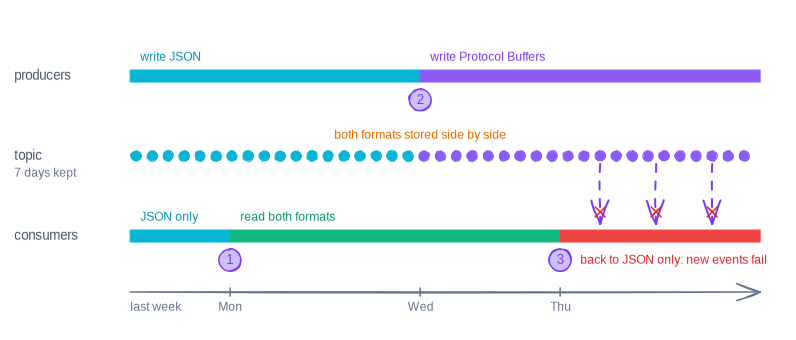
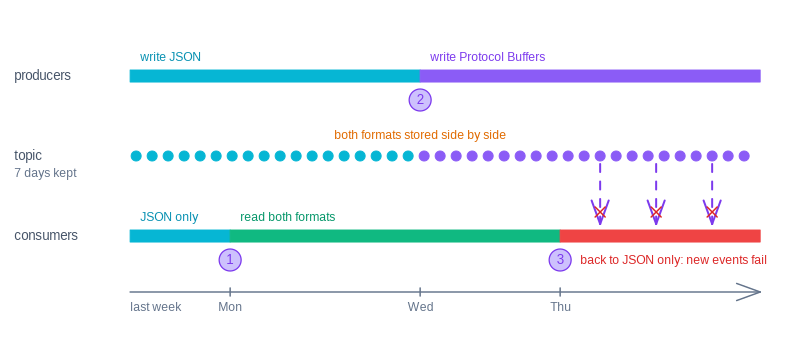
The engineer needed one fact that the list of builds didn't show: the oldest consumer build that can read what's in the topic. For the next 7 days, that's Monday's build. To undo the format change itself, roll back the producers first, and keep the consumers on Monday's build until the last Protocol Buffers event is gone.
Removing JSON support from the consumers is the contract step. It waits until the last JSON event is gone: 7 days after the switch, plus up to the time one log segment covers, because Kafka deletes whole segments. On a compacted topic, the latest event for each key stays forever, so those events have to be rewritten first. Amazon gives the same rule for stored data: support for the old format goes only after every stored object has been rewritten.
The decision is consumers that read both formats, plus the floor. No compatibility setting covers a change of format, because a JSON parser can't read Protocol Buffers at all, so each consumer has to tell the two apart. The new producers put a content-type record header, application/x-protobuf, on every event, and an event with no header is JSON. The consumer picks its parser from that. The topic's retention sets how long each contract step waits, and every rollback of a consumer checks its floor: the oldest build it may roll back to. Here that's Monday's build, the oldest one that can read what's stored.
Changing a column's type on a live table
The orders table has 400M rows, 200 GB with its indexes, and stores total as a floating-point number of dollars, which can't hold most cent amounts exactly. The goal is total_cents, an integer.
The question is how to change what a column means without stopping orders, and without a rollback that serves wrong totals.
The question is what each approach costs on a table of
400M rows, 200 GB with its indexes.

In place, one ALTER COLUMN ... TYPE bigint
  rewrites the table and its indexes, holding a lock
  that blocks every read and write
    200 GB / 100 MB/s, assumed          = 2,000 s ≈ 33 min
  old instances during the deploy read cents as dollars
    a $19.99 order shows as             $1,999.00

Expand and contract
  add total_cents, nullable             metadata only
  backfill  400M / 2,000 rows/s, assumed
                                        = 200,000 s ≈ 2.3 days
  5 deploys: 4 gaps of 5 days, assumed  = 20 days
  the backfill runs in the gap between
  steps 2 and 4                         ≈ 3 weeks in all
  ─────────────────────────────────────────────────────
  In place costs half an hour with no orders and a wrong
  total on every old instance. Expand and contract costs
about three weeks of calendar time and no outage.One migration, shipped with the code
It's tempting because it's one pull request: a migration that converts the column, and the code that reads cents.
It fails in four ways. The rewrite holds a lock that blocks every query on orders for about 33 minutes. During the rolling deploy, every instance still on the old code reads cents as dollars, and nothing returns an error. Those instances also write dollars into the converted column: depending on how the driver sends the value, Postgres either rejects 19.99 or rounds it to 20, and 20 now reads as 20 cents. And a rollback puts the old code back on a column that now holds cents, so every total reads wrong, and the rows already written stay wrong.
Expand and contract, one step per deploy
Run the six steps. Add total_cents as a nullable column, which changes only metadata. Deploy code that computes the value once and writes both columns. Backfill old rows with a throttled job at 2,000 a second, which takes about 2.3 days, and compare the two columns. Round each value to the nearest cent rather than truncating: 19.99 stored as a float, times 100, is 1,998.9999..., and truncating gives 1,998. Deploy code that reads total_cents. Stop writing total, after dropping its NOT NULL constraint if it has one, or every new row is rejected. Drop total last.
This is the standard answer. Its cost is five deploys over about three weeks, and double writes the whole time. Its weak point is how far back a rollback may go: after step 5, a build from before step 4 reads total, which new rows no longer have.
Make the rollback floor a fact the pipeline checks
Question the idea that rollback is always a safe button. Give every build a list of the columns it reads and writes, generated from its queries. The pipeline then holds the rollback floor: the oldest build it lets anyone roll back to.
Three checks follow. A rollback below the floor is refused. Step 5 first raises the floor to the step-4 build, the oldest that doesn't read total, and it runs only when no running build reads total. The drop first raises the floor to the step-5 build, the oldest that doesn't write total, and it runs only when no running build writes it.
The numbers say why. The six steps take about three weeks, and at a deploy each working day, about 15 other releases ship in that time. After step 5, about half of them read a column nobody writes, and without the floor they are still on the list of rollback targets. The check costs one field per build and a few lines in the pipeline.
What you give up. The column lists have to be right, so generate and test them. And some incidents can't roll back at all and have to fix forward through the same stages, or through the emergency path.
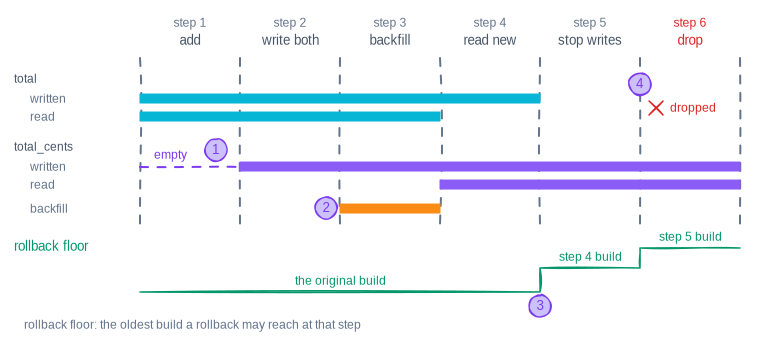
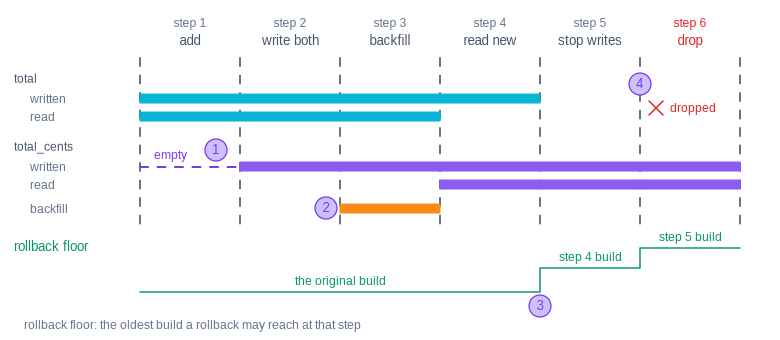
The decision is expand and contract in six steps, with the pipeline holding the rollback floor. The drop runs only after the floor has moved to the step-5 build, so no build a rollback can reach touches total. It also waits for a backup that holds the column.
Where it goes wrong
These are ordered by how often they come up.
1. Calling the rollback instant without checking the data
A switch back or a flag flip takes seconds, but if the new version wrote anything the old one can't read, it starts a second outage.
2. A destructive schema change in the same deploy as its code
A rename, a type change or a drop, shipped with the code that needs it, breaks every old instance during the rollout and every rollback after it. Split it into expand and contract.
3. Judging a canary against the time before it
Compare the canary with a fresh baseline running at the same time, because traffic, latency and errors change through the day.
4. Pushing config, rules or flags everywhere at once
Cloudflare's rule and Google's policy reached every server in seconds while the code they ran had gone out in stages, so give anything that changes behaviour the same stages.
5. A rolling deploy that never stops by itself
Kubernetes moves on when pods report ready, and it only reports a stalled rollout. Without a canary judge or alarms that halt and roll back, a release that fails real requests reaches every instance.
6. Flags nobody removes
Give each release flag an owner and an expiry, and remove it within a week or two of creating it.
If you memorise nothing else
| fact | why it matters |
|---|---|
| About 70 percent of outages come from changes, by Google's count | how you ship is a reliability decision |
| A rollback restores the code, not the data | the old version must read everything the new one wrote |
| Blue-green undoes in seconds and exposes 100 percent | a canary first is what limits the damage |
| A rolling deploy's undo is another rolling deploy | 1.26M failed requests in the worksheet, against 150,000 for a canary |
| Compare a canary with a fresh baseline, not with the hour before | time is one of the biggest sources of change in a metric |
| A 10 percent rise on a 1 percent canary has an even chance of showing after 2.3 hours | a 30-minute canary on 1 percent catches only loud failures |
| 12 metrics at 98 percent confidence flag up to 22 percent of good releases | score the share that pass, and mark only a few critical |
| Judge error rates per code path | a path at 1 in 20,000 hides inside the service's rate for at least 9 hours |
| Roll out one zone at a time, region by region, with bake time | Amazon's defaults reach every region in four or five business days |
| Config, flags, rules and data are deploys | Cloudflare 2019 and Google 2025 were global pushes |
| A flag separates deploy from release | it reverses in seconds, and it doesn't undo data |
| Change formats in two phases: readers, then writers | roll back writers first, readers only once no new-format data is left |
| A rollback-safe schema change is backward and forward compatible | add optional fields, never reuse a name |
| Expand and contract: add, write both, backfill, read new, stop writing, drop | step 5 narrows the way back, and the drop is one-way |
| A queue's retention sets how long both formats stay readable | 7 days of retention means at least 7 days of both |
What is expected at each level
Mid-level
Know rolling, blue-green and canary, and what each costs in spare capacity and in how much traffic a bad release reaches. Know that a canary is compared with the old version, and that a rollback is a deploy of the previous build.
You aren't expected to raise baselines, bake time or rollback floors without being asked. Asked how you'd change a column, a good mid-level answer adds the new one first and drops the old one later, in a separate deploy.
Senior
You lead this part of the discussion, and three things must come up without prompting.
Exposure and undo, in numbers. How much traffic a bad release reaches before the alarm, and how long the undo takes, for the strategy you chose.
How the canary is judged. A fresh baseline, a few SLI metrics, a duration that matches the regression you need to see, and automatic rollback on a fail.
What a rollback leaves behind. Every new format split into phases, and every schema change into expand and contract, so the old version always runs on the data.
Two things are disqualifying: a destructive migration shipped with the code that needs it, and "we'd roll back" as the whole recovery plan.
Staff+
Producing a correct design is still the bar. A staff answer stands out by deciding where the risk of a change lives.
Treat config, flags and data as deploys, with stages, bake time and an emergency path that someone chooses on purpose.
Split the judge's error rates by code path, with a minimum of traffic per path and synthetic traffic for the rare ones.
Make the rollback floor a fact the pipeline checks, so nobody can roll back below the data at 3am.
Keep the kill switch outside the blast radius, the share of the system a failure can reach.
And say what you would not build. Each of these can cost a team a quarter.
One is a full blue-green fleet for a service that a canary and a rolling deploy already protect. Another is a canary judge that fails a release on any one of 50 metrics, which can fail up to two good releases in three. Another is a flag platform with targeting rules before anyone has a process for removing flags. And the last is a rollback tool for schema migrations, when the answer is to make every step before the drop safe to leave in place.
Sources
The incident details, defaults and practices below come from these documents. The worksheets work out the rest from the inputs they state.
- Google Cloud, Service Control incident report, June 2025. The staged rollout, the global policy change, the missing flag, the red button, the recovery and the fixes.
- Google's SRE book, Introduction and Release Engineering, and the SRE workbook, Canarying Releases. The 70 percent figure, staged expansion, the canary definition, metric choice and the before-and-after trap.
- Amazon Builders' Library, Automating safe, hands-off deployments and Ensuring rollback safety during deployments. Waves, the one box, bake times, fast rollbacks, the heartbeat example, and prepare and activate.
- Google Cloud, Introducing Kayenta and Canary analysis: lessons learned from Google and Waze, with Spinnaker's canary judge and best practices. The fresh baseline, the judge and its score, the A-A test and the three-hour start.
- Martin Fowler's site: BlueGreenDeployment, Danilo Sato's ParallelChange and Pete Hodgson's Feature Toggles. Blue-green, expand and contract, release flags, kill switches and flag debt.
- Cloudflare, Details of the Cloudflare outage on July 2, 2019. The global rule push, simulate mode, the 27 minutes and the sign-in problem.
- CrowdStrike, preliminary post incident review and statement on the Windows content update, 2024. The 78-minute window and the hosts the revert couldn't reach.
- Confluent, schema evolution and compatibility; PostgreSQL, ALTER TABLE, explicit locking and lock_timeout; Kubernetes, Deployments; Apache Kafka, topic configuration. Compatibility directions, locks and rewrites, rolling update defaults, and segment deletion and compaction.